下面通过一段 Java 代码示例,展示如何基于 RabbitMQ 搭建一个简单的消息队列系统,并进行消息的收发操作。首先,需要引入 RabbitMQ 的 Java 客户端依赖,在 Maven 项目的pom.xml文件中添加如下依赖:
XML
    <dependency>
      <groupId>com.rabbitmq</groupId>
      <artifactId>amqp-client</artifactId>
      <version>5.17.2-SNAPSHOT</version>
    </dependency>
接下来是生产者代码示例:
java
import com.rabbitmq.client.Channel;
import com.rabbitmq.client.Connection;
import com.rabbitmq.client.ConnectionFactory;

public class Producer {

    private static final String QUEUE_NAME = "simple_queue";

    public static void main(String[] argv) throws Exception {

        // 创建连接工厂
        ConnectionFactory factory = new ConnectionFactory();

        // 设置RabbitMQ服务器地址
        factory.setHost("localhost");

        // 创建连接
        try (Connection connection = factory.newConnection();

            // 创建信道
            Channel channel = connection.createChannel()) {

            // 声明队列
            channel.queueDeclare(QUEUE_NAME, false, false, false, null);

            String message = "Hello, RabbitMQ!";

            // 发送消息到队列
            channel.basicPublish("", QUEUE_NAME, null, message.getBytes("UTF-8"));
            System.out.println(" [x] Sent '" + message + "'");
        }
    }
}
在上述生产者代码中,首先创建了一个ConnectionFactory,并设置了 RabbitMQ 服务器的地址为本地localhost。然后通过ConnectionFactory创建了一个Connection,并在该连接上创建了一个Channel。接着使用channel.queueDeclare方法声明了一个队列,如果队列不存在则会创建。最后使用channel.basicPublish方法将消息发送到指定的队列中,其中""表示使用默认的交换机,QUEUE_NAME是队列名称,null表示使用默认的消息属性,message.getBytes("UTF-8")是要发送的消息内容,将其转换为字节数组。
再看消费者代码示例:
java
import com.rabbitmq.client.*;
import java.io.IOException;

public class Consumer {
    private static final String QUEUE_NAME = "simple_queue";
    public static void main(String[] argv) throws Exception {
        // 创建连接工厂
        ConnectionFactory factory = new ConnectionFactory();

        // 设置RabbitMQ服务器地址
        factory.setHost("localhost");

        // 创建连接
        try (Connection connection = factory.newConnection();
            // 创建信道
            Channel channel = connection.createChannel()) {

            // 声明队列
            channel.queueDeclare(QUEUE_NAME, false, false, false, null);
            System.out.println(" [*] Waiting for messages. To exit press CTRL+C");
            // 创建消费者
            DeliverCallback deliverCallback = (consumerTag, delivery) -> {
                String message = new String(delivery.getBody(), "UTF-8");
                System.out.println(" [x] Received '" + message + "'");
            };

            // 消费消息,设置autoAck为true,表示自动确认消息已被消费
            channel.basicConsume(QUEUE_NAME, true, deliverCallback, consumerTag -> { });
        }
    }
}
在消费者代码中,同样先创建了ConnectionFactory、Connection和Channel,并声明了与生产者相同的队列。然后定义了一个DeliverCallback,用于处理接收到的消息,在回调函数中,将接收到的消息字节数组转换为字符串并打印。最后使用channel.basicConsume方法开始消费消息,其中QUEUE_NAME是队列名称,true表示自动确认消息已被消费,deliverCallback是处理消息的回调函数,consumerTag -> { }是一个空的取消回调函数,当消费者被取消时会调用。通过以上生产者和消费者的代码示例,就完成了一个基于 RabbitMQ 的简单消息队列系统的搭建,并实现了消息的收发功能。
ConnectionFactory
ConnectionFactory 类是 RabbitMQ Java 客户端库中的一个重要组件,它提供了创建与 RabbitMQ 服务器连接的便捷工厂方法。这个类封装了连接配置和参数设置,并允许开发者灵活地调整各种连接属性。
以下是 ConnectionFactory 类主要功能的中文注释说明:
java
/**
 * 便利的工厂类,用于创建到RabbitMQ节点的{@link Connection}连接。
 *
 * 大多数连接和套接字设置都通过这个工厂进行配置。
 * 一些适用于连接的设置也可以在这里配置,
 * 并且会应用到该工厂创建的所有连接上。
 */
public class ConnectionFactory implements Cloneable {

    private static final Logger LOGGER = LoggerFactory.getLogger(ConnectionFactory.class);

    // AMQP协议中无符号短整型的最大值
    private static final int MAX_UNSIGNED_SHORT = 65535;

    /** 默认用户名 */
    public static final String DEFAULT_USER = "guest";
    /** 默认密码 */
    public static final String DEFAULT_PASS = "guest";
    /** 默认虚拟主机 */
    public static final String DEFAULT_VHOST = "/";
    /** 默认最大通道数;
     *  2047是因为服务端限制为2048,减去每个连接用于协商和错误通信的通道0 */
    public static final int    DEFAULT_CHANNEL_MAX = 2047;
    /** 默认最大帧大小;
     *  0表示无限制 */
    public static final int    DEFAULT_FRAME_MAX = 0;
    /** 默认心跳间隔;
     *  60秒 */
    public static final int    DEFAULT_HEARTBEAT = 60;
    /** 默认主机地址 */
    public static final String DEFAULT_HOST = "localhost";
    /** '使用默认端口'的端口号 */
    public static final int    USE_DEFAULT_PORT = -1;
    /** 默认的非SSL端口 */
    public static final int    DEFAULT_AMQP_PORT = AMQP.PROTOCOL.PORT;
    /** 默认的SSL端口 */
    public static final int    DEFAULT_AMQP_OVER_SSL_PORT = 5671;
    /** 默认TCP连接超时时间:60秒 */
    public static final int    DEFAULT_CONNECTION_TIMEOUT = 60000;
    /**
     * 默认AMQP 0-9-1连接握手超时时间。有关TCP(套接字)连接超时,
     * 请参见DEFAULT_CONNECTION_TIMEOUT。
     */
    public static final int    DEFAULT_HANDSHAKE_TIMEOUT = 10000;
    /** 默认关闭超时时间;
     *  0表示无限等待 */
    public static final int    DEFAULT_SHUTDOWN_TIMEOUT = 10000;

    /** 通道中RPC调用的默认持续超时时间:10分钟 */
    public static final int    DEFAULT_CHANNEL_RPC_TIMEOUT = (int) MINUTES.toMillis(10);

    /** 默认网络恢复间隔:5000毫秒 */
    public static final long   DEFAULT_NETWORK_RECOVERY_INTERVAL = 5000;

    /** 工作池入队的默认超时时间:无超时 */
    public static final int    DEFAULT_WORK_POOL_TIMEOUT = -1;

    // 首选TLS协议版本
    private static final String PREFERRED_TLS_PROTOCOL = "TLSv1.2";

    // 备用TLS协议版本
    private static final String FALLBACK_TLS_PROTOCOL = "TLSv1";

    // 连接基本配置
    private String virtualHost                    = DEFAULT_VHOST;  // 虚拟主机
    private String host                           = DEFAULT_HOST;   // 主机地址
    private int port                              = USE_DEFAULT_PORT;  // 端口号
    private int requestedChannelMax               = DEFAULT_CHANNEL_MAX;  // 请求的最大通道数
    private int requestedFrameMax                 = DEFAULT_FRAME_MAX;    // 请求的最大帧大小
    private int requestedHeartbeat                = DEFAULT_HEARTBEAT;    // 请求的心跳间隔
    private int connectionTimeout                 = DEFAULT_CONNECTION_TIMEOUT;  // 连接超时时间
    private int handshakeTimeout                  = DEFAULT_HANDSHAKE_TIMEOUT;   // 握手超时时间
    private int shutdownTimeout                   = DEFAULT_SHUTDOWN_TIMEOUT;    // 关闭超时时间
    private Map<String, Object> _clientProperties = AMQConnection.defaultClientProperties();  // 客户端属性
    private SocketFactory socketFactory           = null;  // 套接字工厂
    private SaslConfig saslConfig                 = DefaultSaslConfig.PLAIN;  // SASL配置

    // 执行器配置
    private ExecutorService sharedExecutor;               // 共享执行器
    private ThreadFactory threadFactory             = Executors.defaultThreadFactory();  // 线程工厂
    // 最小化快速关闭多个连接时使用的线程数,参见rabbitmq/rabbitmq-java-client#86
    private ExecutorService shutdownExecutor;             // 关闭执行器
    private ScheduledExecutorService heartbeatExecutor;   // 心跳执行器
    private SocketConfigurator socketConf           = SocketConfigurators.defaultConfigurator();  // 套接字配置器
    private ExceptionHandler exceptionHandler       = new DefaultExceptionHandler();  // 异常处理器
    private CredentialsProvider credentialsProvider = new DefaultCredentialsProvider(DEFAULT_USER, DEFAULT_PASS);  // 凭据提供者

    // 恢复机制配置
    private boolean automaticRecovery               = true;  // 是否启用自动恢复
    private boolean topologyRecovery                = true;  // 是否启用拓扑恢复
    private ExecutorService topologyRecoveryExecutor;       // 拓扑恢复执行器

    // 使用long类型确保用户可以安全地使用int和long值。
    // 实际上不太可能有人需要使用大于Integer.MAX_VALUE的恢复间隔。
    private long networkRecoveryInterval          = DEFAULT_NETWORK_RECOVERY_INTERVAL;  // 网络恢复间隔
    private RecoveryDelayHandler recoveryDelayHandler;  // 恢复延迟处理器

    private MetricsCollector metricsCollector;  // 指标收集器

    // NIO配置
    private boolean nio = false;  // 是否使用NIO
    private FrameHandlerFactory frameHandlerFactory;  // 帧处理器工厂
    private NioParams nioParams = new NioParams();  // NIO参数

    private SslContextFactory sslContextFactory;  // SSL上下文工厂

    /**
     * RPC调用的持续超时时间。
     * @since 4.1.0
     */
    private int channelRpcTimeout = DEFAULT_CHANNEL_RPC_TIMEOUT;

    /**
     * 通道是否检查RPC调用的响应类型。
     * 默认为false。
     * @since 4.2.0
     */
    private boolean channelShouldCheckRpcResponseType = false;

    /**
     * 当连接在尝试写入套接字时发生IO错误时调用的监听器。
     * 默认监听器会异步触发连接恢复并传播异常。
     * @since 4.5.0
     */
    private ErrorOnWriteListener errorOnWriteListener;

    /**
     * 工作池入队的超时时间(毫秒)。
     * @since 4.5.0
     */
    private int workPoolTimeout = DEFAULT_WORK_POOL_TIMEOUT;

    /**
     * 用于从拓扑恢复中包含/排除实体的过滤器。
     * @since 4.8.0
     */
    private TopologyRecoveryFilter topologyRecoveryFilter;

    /**
     * 触发自动连接恢复的条件。
     * @since 5.4.0
     */
    private Predicate<ShutdownSignalException> connectionRecoveryTriggeringCondition;

    /**
     * 拓扑恢复的重试处理器。
     * 默认不重试。
     * @since 5.4.0
     */
    private RetryHandler topologyRecoveryRetryHandler;

    private RecoveredQueueNameSupplier recoveredQueueNameSupplier;  // 恢复队列名称提供者

    /**
     * 接收传入和传出{@link Command}的通知流量监听器。
     * <p>
     * 对于调试目的很有用。默认为空操作。
     *
     * @since 5.5.0
     */
    private TrafficListener trafficListener = TrafficListener.NO_OP;

    private CredentialsRefreshService credentialsRefreshService;  // 凭据刷新服务

    /**
     * 接收消息体的最大大小(字节)。
     *
     * <p>默认值为67,108,864(64 MiB)。
     */
    private int maxInboundMessageBodySize = 1_048_576 * 64;
创建帧处理器工厂实例
java
    /**
     * 创建帧处理器工厂实例
     *
     * @return 帧处理器工厂实例
     * @throws IOException 当创建过程中发生IO异常时抛出
     */
    protected synchronized FrameHandlerFactory createFrameHandlerFactory() throws IOException {
        // NIO模式下的帧处理器工厂创建逻辑
        if(nio) {
            if(this.frameHandlerFactory == null) {
                // 当NIO执行器和线程工厂都未设置时,使用默认线程工厂
                if(this.nioParams.getNioExecutor() == null && this.nioParams.getThreadFactory() == null) {
                    this.nioParams.setThreadFactory(getThreadFactory());
                }
                this.frameHandlerFactory = new SocketChannelFrameHandlerFactory(
                    connectionTimeout, nioParams, isSSL(), sslContextFactory,
                    this.maxInboundMessageBodySize);
            }
            return this.frameHandlerFactory;
        } else {
            // 非NIO模式下的帧处理器工厂创建逻辑
            return new SocketFrameHandlerFactory(connectionTimeout, socketFactory,
                socketConf, isSSL(), this.shutdownExecutor, sslContextFactory,
                this.maxInboundMessageBodySize);
        }

    }
创建新的代理连接
java
    /**
     * 创建一个新的代理连接,从地址列表中选择第一个可用的地址。
     *
     * 如果启用了<a href="https://www.rabbitmq.com/api-guide.html#recovery">自动连接恢复</a>,
     * 此方法返回的连接将是{@link Recoverable}类型的。未来的重连尝试将从提供的列表中随机选择一个可访问的地址。
     *
     * @param addrs 已知代理地址数组(主机名/端口对),按顺序尝试
     * @return 连接接口
     * @throws IOException 如果遇到问题
     */
    public Connection newConnection(Address[] addrs) throws IOException, TimeoutException {
        return newConnection(this.sharedExecutor, Arrays.asList(addrs), null);
    }

    /**
     * 创建一个新的代理连接,从{@link AddressResolver}提供的列表中选择第一个可用的地址。
     *
     * 如果启用了<a href="https://www.rabbitmq.com/api-guide.html#recovery">自动连接恢复</a>,
     * 此方法返回的连接将是{@link Recoverable}类型的。未来的重连尝试将从{@link AddressResolver}提供的可访问地址中随机选择。
     *
     * @param addressResolver 发现服务,用于列出潜在的连接地址(主机名/端口对)
     * @return 连接接口
     * @throws IOException 如果遇到问题
     * @see <a href="https://www.rabbitmq.com/api-guide.html#recovery">自动恢复</a>
     */
    public Connection newConnection(AddressResolver addressResolver) throws IOException, TimeoutException {
        return newConnection(this.sharedExecutor, addressResolver, null);
    }


    /**
     * 创建一个带有客户端提供名称的新代理连接,从地址列表中选择第一个可用的地址。
     *
     * 如果启用了<a href="https://www.rabbitmq.com/api-guide.html#recovery">自动连接恢复</a>,
     * 此方法返回的连接将是{@link Recoverable}类型的。未来的重连尝试将从提供的列表中随机选择一个可访问的地址。
     *
     * @param addrs 已知代理地址数组(主机名/端口对),按顺序尝试
     * @param clientProvidedName 应用程序特定的连接名称,如果RabbitMQ服务器支持,将在管理UI中显示。
     *                           此值不必唯一,也不能用作HTTP API请求中的连接标识符。
     *                           此值应该是人类可读的。
     * @return 连接接口
     * @throws IOException 如果遇到问题
     */
    public Connection newConnection(Address[] addrs, String clientProvidedName) throws IOException, TimeoutException {
        return newConnection(this.sharedExecutor, Arrays.asList(addrs), clientProvidedName);
    }

    /**
     * 创建一个新的代理连接,从地址列表中选择第一个可用的地址。
     *
     * 如果启用了<a href="https://www.rabbitmq.com/api-guide.html#recovery">自动连接恢复</a>,
     * 此方法返回的连接将是{@link Recoverable}类型的。未来的重连尝试将从提供的列表中随机选择一个可访问的地址。
     *
     * @param addrs 已知代理地址列表(主机名/端口对),按顺序尝试
     * @return 连接接口
     * @throws IOException 如果遇到问题
     */
    public Connection newConnection(List<Address> addrs) throws IOException, TimeoutException {
        return newConnection(this.sharedExecutor, addrs, null);
    }

    /**
     * 创建一个带有客户端提供名称的新代理连接,从地址列表中选择第一个可用的地址。
     *
     * 如果启用了<a href="https://www.rabbitmq.com/api-guide.html#recovery">自动连接恢复</a>,
     * 此方法返回的连接将是{@link Recoverable}类型的。未来的重连尝试将从提供的列表中随机选择一个可访问的地址。
     *
     * @param addrs 已知代理地址列表(主机名/端口对),按顺序尝试
     * @param clientProvidedName 应用程序特定的连接名称,如果RabbitMQ服务器支持,将在管理UI中显示。
     *                           此值不必唯一,也不能用作HTTP API请求中的连接标识符。
     *                           此值应该是人类可读的。
     * @return 连接接口
     * @throws IOException 如果遇到问题
     */
    public Connection newConnection(List<Address> addrs, String clientProvidedName) throws IOException, TimeoutException {
        return newConnection(this.sharedExecutor, addrs, clientProvidedName);
    }

    /**
     * 创建一个新的代理连接,从地址列表中选择第一个可用的地址。
     *
     * 如果启用了<a href="https://www.rabbitmq.com/api-guide.html#recovery">自动连接恢复</a>,
     * 此方法返回的连接将是{@link Recoverable}类型的。未来的重连尝试将从提供的列表中随机选择一个可访问的地址。
     *
     * @param executor 连接上消费者使用的线程执行服务
     * @param addrs 已知代理地址数组(主机名/端口对),按顺序尝试
     * @return 连接接口
     * @throws java.io.IOException 如果遇到问题
     * @see <a href="https://www.rabbitmq.com/api-guide.html#recovery">自动恢复</a>
     */
    public Connection newConnection(ExecutorService executor, Address[] addrs) throws IOException, TimeoutException {
        return newConnection(executor, Arrays.asList(addrs), null);
    }


    /**
     * 创建一个带有客户端提供名称的新代理连接,从地址列表中选择第一个可用的地址。
     *
     * 如果启用了<a href="https://www.rabbitmq.com/api-guide.html#recovery">自动连接恢复</a>,
     * 此方法返回的连接将是{@link Recoverable}类型的。未来的重连尝试将从提供的列表中随机选择一个可访问的地址。
     *
     * @param executor 连接上消费者使用的线程执行服务
     * @param addrs 已知代理地址数组(主机名/端口对),按顺序尝试
     * @param clientProvidedName 应用程序特定的连接名称,如果RabbitMQ服务器支持,将在管理UI中显示。
     *                           此值不必唯一,也不能用作HTTP API请求中的连接标识符。
     *                           此值应该是人类可读的。
     * @return 连接接口
     * @throws java.io.IOException 如果遇到问题
     * @see <a href="https://www.rabbitmq.com/api-guide.html#recovery">自动恢复</a>
     */
    public Connection newConnection(ExecutorService executor, Address[] addrs, String clientProvidedName) throws IOException, TimeoutException {
        return newConnection(executor, Arrays.asList(addrs), clientProvidedName);
    }

    /**
     * 创建一个新的代理连接,从地址列表中选择第一个可用的地址。
     *
     * 如果启用了<a href="https://www.rabbitmq.com/api-guide.html#recovery">自动连接恢复</a>,
     * 此方法返回的连接将是{@link Recoverable}类型的。未来的重连尝试将从提供的列表中随机选择一个可访问的地址。
     *
     * @param executor 连接上消费者使用的线程执行服务
     * @param addrs 已知代理地址列表(主机名/端口对),按顺序尝试
     * @return 连接接口
     * @throws java.io.IOException 如果遇到问题
     * @see <a href="https://www.rabbitmq.com/api-guide.html#recovery">自动恢复</a>
     */
    public Connection newConnection(ExecutorService executor, List<Address> addrs) throws IOException, TimeoutException {
        return newConnection(executor, addrs, null);
    }

    /**
     * 创建一个新的代理连接,从{@link AddressResolver}提供的列表中选择第一个可用的地址。
     *
     * 如果启用了<a href="https://www.rabbitmq.com/api-guide.html#recovery">自动连接恢复</a>,
     * 此方法返回的连接将是{@link Recoverable}类型的。未来的重连尝试将从{@link AddressResolver}提供的可访问地址中随机选择。
     *
     * @param executor 连接上消费者使用的线程执行服务
     * @param addressResolver 发现服务,用于列出潜在的连接地址(主机名/端口对)
     * @return 连接接口
     * @throws java.io.IOException 如果遇到问题
     * @see <a href="https://www.rabbitmq.com/api-guide.html#recovery">自动恢复</a>
     */
    public Connection newConnection(ExecutorService executor, AddressResolver addressResolver) throws IOException, TimeoutException {
        return newConnection(executor, addressResolver, null);
    }

    /**
     * 创建一个带有客户端提供名称的新代理连接,从地址列表中选择第一个可用的地址。
     *
     * 如果启用了<a href="https://www.rabbitmq.com/api-guide.html#recovery">自动连接恢复</a>,
     * 此方法返回的连接将是{@link Recoverable}类型的。未来的重连尝试将从提供的列表中随机选择一个可访问的地址。
     *
     * @param executor 连接上消费者使用的线程执行服务
     * @param addrs 已知代理地址列表(主机名/端口对),按顺序尝试
     * @param clientProvidedName 应用程序特定的连接名称,如果RabbitMQ服务器支持,将在管理UI中显示。
     *                           此值不必唯一,也不能用作HTTP API请求中的连接标识符。
     *                           此值应该是人类可读的。
     * @return 连接接口
     * @throws java.io.IOException 如果遇到问题
     * @see <a href="https://www.rabbitmq.com/api-guide.html#recovery">自动恢复</a>
     */
    public Connection newConnection(ExecutorService executor, List<Address> addrs, String clientProvidedName)
            throws IOException, TimeoutException {
        return newConnection(executor, createAddressResolver(addrs), clientProvidedName);
    }

    /**
     * 创建一个带有客户端提供名称的新代理连接,从{@link AddressResolver}提供的列表中选择第一个可用的地址。
     *
     * 如果启用了<a href="https://www.rabbitmq.com/api-guide.html#recovery">自动连接恢复</a>,
     * 此方法返回的连接将是{@link Recoverable}类型的。未来的重连尝试将从{@link AddressResolver}提供的可访问地址中随机选择。
     *
     * @param executor 连接上消费者使用的线程执行服务
     * @param addressResolver 发现服务,用于列出潜在的连接地址(主机名/端口对)
     * @param clientProvidedName 应用程序特定的连接名称,如果RabbitMQ服务器支持,将在管理UI中显示。
     *                           此值不必唯一,也不能用作HTTP API请求中的连接标识符。
     *                           此值应该是人类可读的。
     * @return 连接接口
     * @throws java.io.IOException 如果遇到问题
     * @see <a href="https://www.rabbitmq.com/api-guide.html#recovery">自动恢复</a>
     */
    public Connection newConnection(ExecutorService executor, AddressResolver addressResolver, String clientProvidedName)
        throws IOException, TimeoutException {
        // 如果指标收集器为空,则创建一个空操作的指标收集器
        if(this.metricsCollector == null) {
            this.metricsCollector = new NoOpMetricsCollector();
        }
        // 确保我们尊重提供的线程工厂
        FrameHandlerFactory fhFactory = createFrameHandlerFactory();
        ConnectionParams params = params(executor);
        // 通过客户端属性设置客户端提供的连接名称
        if (clientProvidedName != null) {
            Map<String, Object> properties = new HashMap<String, Object>(params.getClientProperties());
            properties.put("connection_name", clientProvidedName);
            params.setClientProperties(properties);
        }

        // 如果启用了自动恢复
        if (isAutomaticRecoveryEnabled()) {
            // 查看 com.rabbitmq.client.impl.recovery.RecoveryAwareAMQConnectionFactory#newConnection
            // No Sonar: 不需要关闭此资源,因为我们是创建它的人,并将其交给用户
            AutorecoveringConnection conn = new AutorecoveringConnection(params, fhFactory, addressResolver, metricsCollector); //NOSONAR

            conn.init();
            return conn;
        } else {
            // 获取地址列表
            List<Address> addrs = addressResolver.getAddresses();
            Exception lastException = null;
            // 遍历地址列表,尝试连接
            for (Address addr : addrs) {
                try {
                    FrameHandler handler = fhFactory.create(addr, clientProvidedName);
                    AMQConnection conn = createConnection(params, handler, metricsCollector);
                    conn.start();
                    this.metricsCollector.newConnection(conn);
                    return conn;
                } catch (IOException e) {
                    lastException = e;
                } catch (TimeoutException te) {
                    lastException = te;
                }
            }
            // 如果有异常,则抛出最后的异常
            if (lastException != null) {
                if (lastException instanceof IOException) {
                    throw (IOException) lastException;
                } else if (lastException instanceof TimeoutException) {
                    throw (TimeoutException) lastException;
                }
            }
            throw new IOException("连接失败");
        }
    }

    /**
     * 构建并返回连接参数对象
     *
     * @param consumerWorkServiceExecutor 消费者工作服务执行器,用于处理消费者相关的工作任务
     * @return 配置完成的连接参数对象
     */
    public ConnectionParams params(ExecutorService consumerWorkServiceExecutor) {
        ConnectionParams result = new ConnectionParams();

        // 设置连接所需的各种参数配置
        result.setCredentialsProvider(credentialsProvider);
        result.setConsumerWorkServiceExecutor(consumerWorkServiceExecutor);
        result.setVirtualHost(virtualHost);
        result.setClientProperties(getClientProperties());
        result.setRequestedFrameMax(requestedFrameMax);
        result.setRequestedChannelMax(requestedChannelMax);
        result.setShutdownTimeout(shutdownTimeout);
        result.setSaslConfig(saslConfig);
        result.setNetworkRecoveryInterval(networkRecoveryInterval);
        result.setRecoveryDelayHandler(recoveryDelayHandler);
        result.setTopologyRecovery(topologyRecovery);
        result.setTopologyRecoveryExecutor(topologyRecoveryExecutor);
        result.setExceptionHandler(exceptionHandler);
        result.setThreadFactory(threadFactory);
        result.setHandshakeTimeout(handshakeTimeout);
        result.setRequestedHeartbeat(requestedHeartbeat);
        result.setShutdownExecutor(shutdownExecutor);
        result.setHeartbeatExecutor(heartbeatExecutor);
        result.setChannelRpcTimeout(channelRpcTimeout);
        result.setChannelShouldCheckRpcResponseType(channelShouldCheckRpcResponseType);
        result.setWorkPoolTimeout(workPoolTimeout);
        result.setErrorOnWriteListener(errorOnWriteListener);
        result.setTopologyRecoveryFilter(topologyRecoveryFilter);
        result.setConnectionRecoveryTriggeringCondition(connectionRecoveryTriggeringCondition);
        result.setTopologyRecoveryRetryHandler(topologyRecoveryRetryHandler);
        result.setRecoveredQueueNameSupplier(recoveredQueueNameSupplier);
        result.setTrafficListener(trafficListener);
        result.setCredentialsRefreshService(credentialsRefreshService);
        result.setMaxInboundMessageBodySize(maxInboundMessageBodySize);
        return result;
    }
    /**
     * 创建一个新的AMQConnection实例
     *
     * @param params 连接参数
     * @param frameHandler 帧处理器,用于处理协议帧
     * @param metricsCollector 指标收集器,用于收集连接指标
     * @return 新创建的AMQConnection实例
     */
    protected AMQConnection createConnection(ConnectionParams params, FrameHandler frameHandler, MetricsCollector metricsCollector) {
        return new AMQConnection(params, frameHandler, metricsCollector);
    }

    /**
     * 创建一个新的代理连接。
     *
     * 如果启用了<a href="https://www.rabbitmq.com/api-guide.html#recovery">自动连接恢复</a>,
     * 此方法返回的连接将是{@link Recoverable}类型的。重连尝试将始终使用在{@link ConnectionFactory}上配置的地址。
     *
     * @return 连接接口
     * @throws IOException 如果遇到问题
     * @throws TimeoutException 如果操作超时
     */
    public Connection newConnection() throws IOException, TimeoutException {
        return newConnection(this.sharedExecutor, Collections.singletonList(new Address(getHost(), getPort())));
    }

    /**
     * 创建一个新的代理连接。
     *
     * 如果启用了<a href="https://www.rabbitmq.com/api-guide.html#recovery">自动连接恢复</a>,
     * 此方法返回的连接将是{@link Recoverable}类型的。重连尝试将始终使用在{@link ConnectionFactory}上配置的地址。
     *
     * @param connectionName 客户端提供的连接名称(任意字符串)。如果服务器支持,将在管理UI中显示。
     * @return 连接接口
     * @throws IOException 如果遇到问题
     * @throws TimeoutException 如果操作超时
     */
    public Connection newConnection(String connectionName) throws IOException, TimeoutException {
        return newConnection(this.sharedExecutor, Collections.singletonList(new Address(getHost(), getPort())), connectionName);
    }

    /**
     * 创建一个新的代理连接。
     *
     * 如果启用了<a href="https://www.rabbitmq.com/api-guide.html#recovery">自动连接恢复</a>,
     * 此方法返回的连接将是{@link Recoverable}类型的。重连尝试将始终使用在{@link ConnectionFactory}上配置的地址。
     *
     * @param executor 连接上消费者使用的线程执行服务
     * @return 连接接口
     * @throws IOException 如果遇到问题
     * @throws TimeoutException 如果操作超时
     */
    public Connection newConnection(ExecutorService executor) throws IOException, TimeoutException {
        return newConnection(executor, Collections.singletonList(new Address(getHost(), getPort())));
    }

    /**
     * 创建一个新的代理连接。
     *
     * 如果启用了<a href="https://www.rabbitmq.com/api-guide.html#recovery">自动连接恢复</a>,
     * 此方法返回的连接将是{@link Recoverable}类型的。重连尝试将始终使用在{@link ConnectionFactory}上配置的地址。
     *
     * @param executor 连接上消费者使用的线程执行服务
     * @param connectionName 客户端提供的连接名称(任意字符串)。如果服务器支持,将在管理UI中显示。
     * @return 连接接口
     * @throws IOException 如果遇到问题
     * @throws TimeoutException 如果操作超时
     */
    public Connection newConnection(ExecutorService executor, String connectionName) throws IOException, TimeoutException {
        return newConnection(executor, Collections.singletonList(new Address(getHost(), getPort())), connectionName);
    }
属性文件加载
java
    /**
     * 从属性文件加载设置。
     * 键必须以<code>rabbitmq.</code>为前缀,
     * 使用{@link ConnectionFactory#load(String, String)}指定你自己的前缀。
     * @param propertyFileLocation 要使用的属性文件位置
     * @throws IOException 当读取文件出错时抛出
     * @since 4.4.0
     * @see ConnectionFactoryConfigurator
     */
    public ConnectionFactory load(String propertyFileLocation) throws IOException {
        ConnectionFactoryConfigurator.load(this, propertyFileLocation);
        return this;
    }

    /**
     * 从属性文件加载设置。
     * @param propertyFileLocation 要使用的属性文件位置
     * @param prefix 文件中条目的键前缀
     * @throws IOException 当读取文件出错时抛出
     * @since 4.4.0
     * @see ConnectionFactoryConfigurator
     */
    public ConnectionFactory load(String propertyFileLocation, String prefix) throws IOException {
        ConnectionFactoryConfigurator.load(this, propertyFileLocation, prefix);
        return this;
    }

    /**
     * 从{@link Properties}实例加载设置。
     * 键必须以<code>rabbitmq.</code>为前缀,
     * 使用{@link ConnectionFactory#load(Properties, String)}指定你自己的前缀。
     * @param properties 设置的来源
     * @since 4.4.0
     * @see ConnectionFactoryConfigurator
     */
    public ConnectionFactory load(Properties properties) {
        ConnectionFactoryConfigurator.load(this, properties);
        return this;
    }

    /**
     * 从{@link Properties}实例加载设置。
     * @param properties 设置的来源
     * @param prefix 属性条目的键前缀
     * @since 4.4.0
     * @see ConnectionFactoryConfigurator
     */
    @SuppressWarnings("unchecked")
    public ConnectionFactory load(Properties properties, String prefix) {
        ConnectionFactoryConfigurator.load(this, (Map) properties, prefix);
        return this;
    }

    /**
     * 从{@link Map}实例加载设置。
     * 键必须以<code>rabbitmq.</code>为前缀,
     * 使用{@link ConnectionFactory#load(Map, String)}指定你自己的前缀。
     * @param properties 设置的来源
     * @since 4.4.0
     * @see ConnectionFactoryConfigurator
     */
    public ConnectionFactory load(Map<String, String> properties) {
        ConnectionFactoryConfigurator.load(this, properties);
        return this;
    }

    /**
     * 从{@link Map}实例加载设置。
     * @param properties 设置的来源
     * @param prefix 映射条目的键前缀
     * @since 4.4.0
     * @see ConnectionFactoryConfigurator
     */
    public ConnectionFactory load(Map<String, String> properties, String prefix) {
        ConnectionFactoryConfigurator.load(this, properties, prefix);
        return this;
    }
ConnectionFactoryConfigurator
该类用于从属性文件或Map中加载RabbitMQ连接工厂(ConnectionFactory)的配置。支持前缀、别名、SSL、NIO等配置项,并可处理客户端属性和TLS安全设置。主要功能包括解析配置、设置连接参数及启用SSL/NIO模式。
java
// Copyright (c) 2017-2020 VMware, Inc. or its affiliates.  All rights reserved.
//
// 此软件即RabbitMQ Java客户端库,采用Mozilla Public License 2.0 ("MPL")、GNU通用公共许可证第2版("GPL")和Apache许可证第2版("ASL")三重许可。
// MPL相关信息请查看LICENSE-MPL-RabbitMQ,GPL相关信息请查看LICENSE-GPL2,ASL相关信息请查看LICENSE-APACHE2。
//
// 本软件按"现状"分发,不提供任何形式的担保,无论是明示或暗示。
// 有关本软件权利和限制的详细信息,请参阅LICENSE文件。
//
// 如有任何关于许可的问题,请联系我们:
// info@rabbitmq.com

package com.rabbitmq.client;

import com.rabbitmq.client.impl.AMQConnection;
import com.rabbitmq.client.impl.nio.NioParams;

import javax.net.ssl.*;
import java.io.FileInputStream;
import java.io.FileNotFoundException;
import java.io.IOException;
import java.io.InputStream;
import java.net.URISyntaxException;
import java.security.*;
import java.security.cert.CertificateException;
import java.util.*;
import java.util.concurrent.ConcurrentHashMap;

/**
 * 用于从属性文件加载{@link ConnectionFactory}设置的辅助类。
 * <p>
 * 授权的键为此类中的常量值(例如USERNAME)。
 * 属性文件/属性实例/映射实例的键可以具有前缀,默认为<code>rabbitmq.</code>。
 * <p>
 * 可以从文件系统(默认方式)加载属性文件,
 * 也可以通过在位置中使用<code>classpath:</code>前缀从类路径加载。
 * <p>
 * 可以通过使用<code>client.properties.</code>前缀来设置客户端属性,
 * 例如<code>client.properties.app.name</code>。
 * 默认客户端属性和自定义客户端属性将会合并。
 * 要删除默认客户端属性,请将其键设置为空值。
 *
 * @see ConnectionFactory#load(String, String)
 * @since 5.1.0
 */
public class ConnectionFactoryConfigurator {

    // 默认前缀
    public static final String DEFAULT_PREFIX = "rabbitmq.";

    // 各种配置项的键名定义
    public static final String USERNAME = "username";                          // 用户名
    public static final String PASSWORD = "password"; //NOSONAR               // 密码
    public static final String VIRTUAL_HOST = "virtual.host";                 // 虚拟主机
    public static final String HOST = "host";                                 // 主机地址
    public static final String PORT = "port";                                 // 端口号
    public static final String CONNECTION_CHANNEL_MAX = "connection.channel.max";  // 连接最大通道数
    public static final String CONNECTION_FRAME_MAX = "connection.frame.max";      // 连接最大帧大小
    public static final String CONNECTION_HEARTBEAT = "connection.heartbeat";      // 连接心跳间隔
    public static final String CONNECTION_TIMEOUT = "connection.timeout";          // 连接超时时间
    public static final String HANDSHAKE_TIMEOUT = "handshake.timeout";            // 握手超时时间
    public static final String SHUTDOWN_TIMEOUT = "shutdown.timeout";              // 关闭超时时间
    public static final String CLIENT_PROPERTIES_PREFIX = "client.properties.";    // 客户端属性前缀
    public static final String CONNECTION_RECOVERY_ENABLED = "connection.recovery.enabled";  // 连接恢复启用标志
    public static final String TOPOLOGY_RECOVERY_ENABLED = "topology.recovery.enabled";      // 拓扑恢复启用标志
    public static final String CONNECTION_RECOVERY_INTERVAL = "connection.recovery.interval"; // 连接恢复间隔
    public static final String CHANNEL_RPC_TIMEOUT = "channel.rpc.timeout";                  // 通道RPC超时时间
    public static final String CHANNEL_SHOULD_CHECK_RPC_RESPONSE_TYPE = "channel.should.check.rpc.response.type"; // 通道是否应检查RPC响应类型
    public static final String USE_NIO = "use.nio";                                         // 使用NIO标志
    public static final String NIO_READ_BYTE_BUFFER_SIZE = "nio.read.byte.buffer.size";      // NIO读取字节缓冲区大小
    public static final String NIO_WRITE_BYTE_BUFFER_SIZE = "nio.write.byte.buffer.size";    // NIO写入字节缓冲区大小
    public static final String NIO_NB_IO_THREADS = "nio.nb.io.threads";                     // NIO IO线程数量
    public static final String NIO_WRITE_ENQUEUING_TIMEOUT_IN_MS = "nio.write.enqueuing.timeout.in.ms"; // NIO写入排队超时时间(毫秒)
    public static final String NIO_WRITE_QUEUE_CAPACITY = "nio.write.queue.capacity";        // NIO写入队列容量
    public static final String SSL_ALGORITHM = "ssl.algorithm";                              // SSL算法
    public static final String SSL_ENABLED = "ssl.enabled";                                  // SSL启用标志
    public static final String SSL_KEY_STORE = "ssl.key.store";                             // SSL密钥库
    public static final String SSL_KEY_STORE_PASSWORD = "ssl.key.store.password";            // SSL密钥库密码
    public static final String SSL_KEY_STORE_TYPE = "ssl.key.store.type";                    // SSL密钥库类型
    public static final String SSL_KEY_STORE_ALGORITHM = "ssl.key.store.algorithm";          // SSL密钥库算法
    public static final String SSL_TRUST_STORE = "ssl.trust.store";                          // SSL信任库
    public static final String SSL_TRUST_STORE_PASSWORD = "ssl.trust.store.password";        // SSL信任库密码
    public static final String SSL_TRUST_STORE_TYPE = "ssl.trust.store.type";                // SSL信任库类型
    public static final String SSL_TRUST_STORE_ALGORITHM = "ssl.trust.store.algorithm";      // SSL信任库算法
    public static final String SSL_VALIDATE_SERVER_CERTIFICATE = "ssl.validate.server.certificate"; // SSL验证服务器证书标志
    public static final String SSL_VERIFY_HOSTNAME = "ssl.verify.hostname";                  // SSL验证主机名标志

    // 别名映射,允许与Spring Boot中的键兼容,同时保持初始命名的一致性
    private static final Map<String, List<String>> ALIASES = new ConcurrentHashMap<String, List<String>>() {{
        put(SSL_KEY_STORE, Arrays.asList("ssl.key-store"));
        put(SSL_KEY_STORE_PASSWORD, Arrays.asList("ssl.key-store-password"));
        put(SSL_KEY_STORE_TYPE, Arrays.asList("ssl.key-store-type"));
        put(SSL_KEY_STORE_ALGORITHM, Arrays.asList("ssl.key-store-algorithm"));
        put(SSL_TRUST_STORE, Arrays.asList("ssl.trust-store"));
        put(SSL_TRUST_STORE_PASSWORD, Arrays.asList("ssl.trust-store-password"));
        put(SSL_TRUST_STORE_TYPE, Arrays.asList("ssl.trust-store-type"));
        put(SSL_TRUST_STORE_ALGORITHM, Arrays.asList("ssl.trust-store-algorithm"));
        put(SSL_VALIDATE_SERVER_CERTIFICATE, Arrays.asList("ssl.validate-server-certificate"));
        put(SSL_VERIFY_HOSTNAME, Arrays.asList("ssl.verify-hostname"));
    }};

    /**
     * 从属性文件加载ConnectionFactory配置
     *
     * @param cf ConnectionFactory实例
     * @param propertyFileLocation 属性文件位置
     * @param prefix 键前缀
     * @throws IOException 当读取文件出现问题时抛出
     */
    @SuppressWarnings("unchecked")
    public static void load(ConnectionFactory cf, String propertyFileLocation, String prefix) throws IOException {
        if (propertyFileLocation == null || propertyFileLocation.isEmpty()) {
            throw new IllegalArgumentException("属性文件参数不能为空");
        }
        Properties properties = new Properties();
        try (InputStream in = loadResource(propertyFileLocation)) {
            properties.load(in);
        }
        load(cf, (Map) properties, prefix);
    }

    /**
     * 加载资源文件流
     *
     * @param location 资源位置
     * @return 输入流
     * @throws FileNotFoundException 当文件未找到时抛出
     */
    private static InputStream loadResource(String location) throws FileNotFoundException {
        if (location.startsWith("classpath:")) {
            return ConnectionFactoryConfigurator.class.getResourceAsStream(
                    location.substring("classpath:".length())
            );
        } else {
            return new FileInputStream(location);
        }
    }

    /**
     * 从Map加载ConnectionFactory配置
     *
     * @param cf ConnectionFactory实例
     * @param properties 配置属性映射
     * @param prefix 键前缀
     */
    public static void load(ConnectionFactory cf, Map<String, String> properties, String prefix) {
        prefix = prefix == null ? "" : prefix;
        String uri = properties.get(prefix + "uri");
        if (uri != null) {
            try {
                cf.setUri(uri);
            } catch (URISyntaxException e) {
                throw new IllegalArgumentException("设置AMQP URI时出错: " + uri, e);
            } catch (NoSuchAlgorithmException e) {
                throw new IllegalArgumentException("设置AMQP URI时出错: " + uri, e);
            } catch (KeyManagementException e) {
                throw new IllegalArgumentException("设置AMQP URI时出错: " + uri, e);
            }
        }
        // 加载基本连接配置
        String username = lookUp(USERNAME, properties, prefix);
        if (username != null) {
            cf.setUsername(username);
        }
        String password = lookUp(PASSWORD, properties, prefix);
        if (password != null) {
            cf.setPassword(password);
        }
        String vhost = lookUp(VIRTUAL_HOST, properties, prefix);
        if (vhost != null) {
            cf.setVirtualHost(vhost);
        }
        String host = lookUp(HOST, properties, prefix);
        if (host != null) {
            cf.setHost(host);
        }
        String port = lookUp(PORT, properties, prefix);
        if (port != null) {
            cf.setPort(Integer.valueOf(port));
        }
        String requestedChannelMax = lookUp(CONNECTION_CHANNEL_MAX, properties, prefix);
        if (requestedChannelMax != null) {
            cf.setRequestedChannelMax(Integer.valueOf(requestedChannelMax));
        }
        String requestedFrameMax = lookUp(CONNECTION_FRAME_MAX, properties, prefix);
        if (requestedFrameMax != null) {
            cf.setRequestedFrameMax(Integer.valueOf(requestedFrameMax));
        }
        String requestedHeartbeat = lookUp(CONNECTION_HEARTBEAT, properties, prefix);
        if (requestedHeartbeat != null) {
            cf.setRequestedHeartbeat(Integer.valueOf(requestedHeartbeat));
        }
        String connectionTimeout = lookUp(CONNECTION_TIMEOUT, properties, prefix);
        if (connectionTimeout != null) {
            cf.setConnectionTimeout(Integer.valueOf(connectionTimeout));
        }
        String handshakeTimeout = lookUp(HANDSHAKE_TIMEOUT, properties, prefix);
        if (handshakeTimeout != null) {
            cf.setHandshakeTimeout(Integer.valueOf(handshakeTimeout));
        }
        String shutdownTimeout = lookUp(SHUTDOWN_TIMEOUT, properties, prefix);
        if (shutdownTimeout != null) {
            cf.setShutdownTimeout(Integer.valueOf(shutdownTimeout));
        }

        // 加载客户端属性配置
        Map<String, Object> clientProperties = new HashMap<String, Object>();
        Map<String, Object> defaultClientProperties = AMQConnection.defaultClientProperties();
        clientProperties.putAll(defaultClientProperties);

        for (Map.Entry<String, String> entry : properties.entrySet()) {
            if (entry.getKey().startsWith(prefix + CLIENT_PROPERTIES_PREFIX)) {
                String clientPropertyKey = entry.getKey().substring((prefix + CLIENT_PROPERTIES_PREFIX).length());
                if (defaultClientProperties.containsKey(clientPropertyKey) && (entry.getValue() == null || entry.getValue().trim().isEmpty())) {
                    // 如果是默认属性且值为空,则移除该属性
                    clientProperties.remove(clientPropertyKey);
                } else {
                    clientProperties.put(
                            clientPropertyKey,
                            entry.getValue()
                    );
                }
            }
        }
        cf.setClientProperties(clientProperties);

        // 加载恢复相关配置
        String automaticRecovery = lookUp(CONNECTION_RECOVERY_ENABLED, properties, prefix);
        if (automaticRecovery != null) {
            cf.setAutomaticRecoveryEnabled(Boolean.valueOf(automaticRecovery));
        }
        String topologyRecovery = lookUp(TOPOLOGY_RECOVERY_ENABLED, properties, prefix);
        if (topologyRecovery != null) {
            cf.setTopologyRecoveryEnabled(Boolean.valueOf(topologyRecovery));
        }
        String networkRecoveryInterval = lookUp(CONNECTION_RECOVERY_INTERVAL, properties, prefix);
        if (networkRecoveryInterval != null) {
            cf.setNetworkRecoveryInterval(Long.valueOf(networkRecoveryInterval));
        }
        String channelRpcTimeout = lookUp(CHANNEL_RPC_TIMEOUT, properties, prefix);
        if (channelRpcTimeout != null) {
            cf.setChannelRpcTimeout(Integer.valueOf(channelRpcTimeout));
        }
        String channelShouldCheckRpcResponseType = lookUp(CHANNEL_SHOULD_CHECK_RPC_RESPONSE_TYPE, properties, prefix);
        if (channelShouldCheckRpcResponseType != null) {
            cf.setChannelShouldCheckRpcResponseType(Boolean.valueOf(channelShouldCheckRpcResponseType));
        }

        // 加载NIO配置
        String useNio = lookUp(USE_NIO, properties, prefix);
        if (useNio != null && Boolean.valueOf(useNio)) {
            cf.useNio();

            NioParams nioParams = new NioParams();

            String readByteBufferSize = lookUp(NIO_READ_BYTE_BUFFER_SIZE, properties, prefix);
            if (readByteBufferSize != null) {
                nioParams.setReadByteBufferSize(Integer.valueOf(readByteBufferSize));
            }
            String writeByteBufferSize = lookUp(NIO_WRITE_BYTE_BUFFER_SIZE, properties, prefix);
            if (writeByteBufferSize != null) {
                nioParams.setWriteByteBufferSize(Integer.valueOf(writeByteBufferSize));
            }
            String nbIoThreads = lookUp(NIO_NB_IO_THREADS, properties, prefix);
            if (nbIoThreads != null) {
                nioParams.setNbIoThreads(Integer.valueOf(nbIoThreads));
            }
            String writeEnqueuingTime = lookUp(NIO_WRITE_ENQUEUING_TIMEOUT_IN_MS, properties, prefix);
            if (writeEnqueuingTime != null) {
                nioParams.setWriteEnqueuingTimeoutInMs(Integer.valueOf(writeEnqueuingTime));
            }
            String writeQueueCapacity = lookUp(NIO_WRITE_QUEUE_CAPACITY, properties, prefix);
            if (writeQueueCapacity != null) {
                nioParams.setWriteQueueCapacity(Integer.valueOf(writeQueueCapacity));
            }
            cf.setNioParams(nioParams);
        }

        // 加载SSL配置
        String useSsl = lookUp(SSL_ENABLED, properties, prefix);
        if (useSsl != null && Boolean.valueOf(useSsl)) {
            setUpSsl(cf, properties, prefix);
        }
    }

    /**
     * 设置SSL配置
     *
     * @param cf ConnectionFactory实例
     * @param properties 配置属性映射
     * @param prefix 键前缀
     */
    private static void setUpSsl(ConnectionFactory cf, Map<String, String> properties, String prefix) {
        String algorithm = lookUp(SSL_ALGORITHM, properties, prefix);
        String keyStoreLocation = lookUp(SSL_KEY_STORE, properties, prefix);
        String keyStorePassword = lookUp(SSL_KEY_STORE_PASSWORD, properties, prefix);
        String keyStoreType = lookUp(SSL_KEY_STORE_TYPE, properties, prefix, "PKCS12");
        String keyStoreAlgorithm = lookUp(SSL_KEY_STORE_ALGORITHM, properties, prefix, "SunX509");
        String trustStoreLocation = lookUp(SSL_TRUST_STORE, properties, prefix);
        String trustStorePassword = lookUp(SSL_TRUST_STORE_PASSWORD, properties, prefix);
        String trustStoreType = lookUp(SSL_TRUST_STORE_TYPE, properties, prefix, "JKS");
        String trustStoreAlgorithm = lookUp(SSL_TRUST_STORE_ALGORITHM, properties, prefix, "SunX509");
        String validateServerCertificate = lookUp(SSL_VALIDATE_SERVER_CERTIFICATE, properties, prefix);
        String verifyHostname = lookUp(SSL_VERIFY_HOSTNAME, properties, prefix);

        try {
            algorithm = algorithm == null ?
                    ConnectionFactory.computeDefaultTlsProtocol(SSLContext.getDefault().getSupportedSSLParameters().getProtocols()) : algorithm;
            boolean enableHostnameVerification = verifyHostname == null ? Boolean.FALSE : Boolean.valueOf(verifyHostname);

            if (keyStoreLocation == null && trustStoreLocation == null) {
                setUpBasicSsl(
                        cf,
                        validateServerCertificate == null ? Boolean.FALSE : Boolean.valueOf(validateServerCertificate),
                        enableHostnameVerification,
                        algorithm
                );
            } else {
                KeyManager[] keyManagers = configureKeyManagers(keyStoreLocation, keyStorePassword, keyStoreType, keyStoreAlgorithm);
                TrustManager[] trustManagers = configureTrustManagers(trustStoreLocation, trustStorePassword, trustStoreType, trustStoreAlgorithm);

                // 创建SSL上下文
                SSLContext sslContext = SSLContext.getInstance(algorithm);
                sslContext.init(keyManagers, trustManagers, null);

                cf.useSslProtocol(sslContext);

                if (enableHostnameVerification) {
                    cf.enableHostnameVerification();
                }
            }
        } catch (NoSuchAlgorithmException | IOException | CertificateException |
                UnrecoverableKeyException | KeyStoreException | KeyManagementException e) {
            throw new IllegalStateException("配置TLS时出错", e);
        }
    }

    /**
     * 配置密钥管理器
     *
     * @param keystore 密钥库路径
     * @param keystorePassword 密钥库密码
     * @param keystoreType 密钥库类型
     * @param keystoreAlgorithm 密钥库算法
     * @return 密钥管理器数组
     * @throws KeyStoreException 当密钥库操作出错时抛出
     * @throws IOException 当IO操作出错时抛出
     * @throws NoSuchAlgorithmException 当算法不存在时抛出
     * @throws CertificateException 当证书操作出错时抛出
     * @throws UnrecoverableKeyException 当无法恢复密钥时抛出
     */
    private static KeyManager[] configureKeyManagers(String keystore, String keystorePassword, String keystoreType, String keystoreAlgorithm) throws KeyStoreException, IOException, NoSuchAlgorithmException,
            CertificateException, UnrecoverableKeyException {
        char[] keyPassphrase = null;
        if (keystorePassword != null) {
            keyPassphrase = keystorePassword.toCharArray();
        }
        KeyManager[] keyManagers = null;
        if (keystore != null) {
            KeyStore ks = KeyStore.getInstance(keystoreType);
            try (InputStream in = loadResource(keystore)) {
                ks.load(in, keyPassphrase);
            }
            KeyManagerFactory kmf = KeyManagerFactory.getInstance(keystoreAlgorithm);
            kmf.init(ks, keyPassphrase);
            keyManagers = kmf.getKeyManagers();
        }
        return keyManagers;
    }

    /**
     * 配置信任管理器
     *
     * @param truststore 信任库路径
     * @param truststorePassword 信任库密码
     * @param truststoreType 信任库类型
     * @param truststoreAlgorithm 信任库算法
     * @return 信任管理器数组
     * @throws KeyStoreException 当密钥库操作出错时抛出
     * @throws IOException 当IO操作出错时抛出
     * @throws NoSuchAlgorithmException 当算法不存在时抛出
     * @throws CertificateException 当证书操作出错时抛出
     */
    private static TrustManager[] configureTrustManagers(String truststore, String truststorePassword, String truststoreType, String truststoreAlgorithm)
            throws KeyStoreException, IOException, NoSuchAlgorithmException, CertificateException {
        char[] trustPassphrase = null;
        if (truststorePassword != null) {
            trustPassphrase = truststorePassword.toCharArray();
        }
        TrustManager[] trustManagers = null;
        if (truststore != null) {
            KeyStore tks = KeyStore.getInstance(truststoreType);
            try (InputStream in = loadResource(truststore)) {
                tks.load(in, trustPassphrase);
            }
            TrustManagerFactory tmf = TrustManagerFactory.getInstance(truststoreAlgorithm);
            tmf.init(tks);
            trustManagers = tmf.getTrustManagers();
        }
        return trustManagers;
    }

    /**
     * 设置基础SSL配置
     *
     * @param cf ConnectionFactory实例
     * @param validateServerCertificate 是否验证服务器证书
     * @param verifyHostname 是否验证主机名
     * @param sslAlgorithm SSL算法
     * @throws KeyManagementException 当密钥管理出错时抛出
     * @throws NoSuchAlgorithmException 当算法不存在时抛出
     * @throws KeyStoreException 当密钥库操作出错时抛出
     */
    private static void setUpBasicSsl(ConnectionFactory cf, boolean validateServerCertificate, boolean verifyHostname, String sslAlgorithm) throws KeyManagementException, NoSuchAlgorithmException, KeyStoreException {
        if (validateServerCertificate) {
            useDefaultTrustStore(cf, sslAlgorithm, verifyHostname);
        } else {
            if (sslAlgorithm == null) {
                cf.useSslProtocol();
            } else {
                cf.useSslProtocol(sslAlgorithm);
            }
        }
    }

    /**
     * 使用默认信任库
     *
     * @param cf ConnectionFactory实例
     * @param sslAlgorithm SSL算法
     * @param verifyHostname 是否验证主机名
     * @throws NoSuchAlgorithmException 当算法不存在时抛出
     * @throws KeyStoreException 当密钥库操作出错时抛出
     * @throws KeyManagementException 当密钥管理出错时抛出
     */
    private static void useDefaultTrustStore(ConnectionFactory cf, String sslAlgorithm, boolean verifyHostname) throws NoSuchAlgorithmException, KeyStoreException, KeyManagementException {
        SSLContext sslContext = SSLContext.getInstance(sslAlgorithm);
        TrustManagerFactory trustManagerFactory =
                TrustManagerFactory.getInstance(TrustManagerFactory.getDefaultAlgorithm());
        trustManagerFactory.init((KeyStore) null);
        sslContext.init(null, trustManagerFactory.getTrustManagers(), null);
        cf.useSslProtocol(sslContext);
        if (verifyHostname) {
            cf.enableHostnameVerification();
        }
    }

    /**
     * 从属性文件加载ConnectionFactory配置(使用默认前缀)
     *
     * @param connectionFactory ConnectionFactory实例
     * @param propertyFileLocation 属性文件位置
     * @throws IOException 当读取文件出现问题时抛出
     */
    public static void load(ConnectionFactory connectionFactory, String propertyFileLocation) throws IOException {
        load(connectionFactory, propertyFileLocation, DEFAULT_PREFIX);
    }

    /**
     * 从Properties对象加载ConnectionFactory配置(使用默认前缀)
     *
     * @param connectionFactory ConnectionFactory实例
     * @param properties Properties对象
     */
    @SuppressWarnings("unchecked")
    public static void load(ConnectionFactory connectionFactory, Properties properties) {
        load(connectionFactory, (Map) properties, DEFAULT_PREFIX);
    }

    /**
     * 从Properties对象加载ConnectionFactory配置
     *
     * @param connectionFactory ConnectionFactory实例
     * @param properties Properties对象
     * @param prefix 键前缀
     */
    @SuppressWarnings("unchecked")
    public static void load(ConnectionFactory connectionFactory, Properties properties, String prefix) {
        load(connectionFactory, (Map) properties, prefix);
    }

    /**
     * 从Map加载ConnectionFactory配置(使用默认前缀)
     *
     * @param connectionFactory ConnectionFactory实例
     * @param properties 配置属性映射
     */
    public static void load(ConnectionFactory connectionFactory, Map<String, String> properties) {
        load(connectionFactory, properties, DEFAULT_PREFIX);
    }

    /**
     * 查找配置项的值
     *
     * @param key 配置项键名
     * @param properties 配置属性映射
     * @param prefix 键前缀
     * @return 配置项的值
     */
    public static String lookUp(String key, Map<String, String> properties, String prefix) {
        return lookUp(key, properties, prefix, null);
    }

    /**
     * 查找配置项的值(带默认值)
     *
     * @param key 配置项键名
     * @param properties 配置属性映射
     * @param prefix 键前缀
     * @param defaultValue 默认值
     * @return 配置项的值
     */
    public static String lookUp(String key, Map<String, String> properties, String prefix, String defaultValue) {
        String value = properties.get(prefix + key);
        if (value == null) {
            value = ALIASES.getOrDefault(key, Collections.emptyList()).stream()
                    .map(alias -> properties.get(prefix + alias))
                    .filter(v -> v != null)
                    .findFirst().orElse(defaultValue);
        }
        return value;
    }
}
Connection
java
/**
 * 公共API:AMQ连接接口。详情请参见<a href="https://www.amqp.org/">规范</a>。
 * <p>
 * 要连接到代理服务器,请填写{@link ConnectionFactory}并使用{@link ConnectionFactory},如下所示:
 *
 * <pre>
 * ConnectionFactory factory = new ConnectionFactory();
 * factory.setHost(hostName);
 * factory.setPort(portNumber);
 * factory.setVirtualHost(virtualHost);
 * factory.setUsername(username);
 * factory.setPassword(password);
 * Connection conn = factory.newConnection();
 *
 * // 然后打开一个通道:
 *
 * Channel channel = conn.createChannel();
 * </pre>
 * 或者,更简洁的方式:
 *
 * <pre>
 * ConnectionFactory factory = new ConnectionFactory();
 * factory.setUri("amqp://username:password@hostName:portNumber/virtualHost");
 * Connection conn = factory.newConnection();
 * Channel channel = conn.createChannel()
 * </pre>
 *
 * 当前实现在线程安全方面,对于客户端API级别的代码是线程安全的,
 * 实际上内部也是线程安全的,除了RPC调用内的代码。
 */
public interface Connection extends ShutdownNotifier, Closeable { // 稍后重命名为AMQPConnection,这是临时名称
    /**
     * 获取主机地址。
     * @return 我们连接的对端的主机名。
     */
    InetAddress getAddress();

    /**
     * 获取端口号。
     * @return 我们连接的对端的端口号。
     */
    int getPort();

    /**
     * 获取协商的最大通道数。可用的通道编号范围从1到此数字(包含)。
     *
     * @return 此连接允许的最大通道数。
     */
    int getChannelMax();

    /**
     * 获取协商的最大帧大小。
     *
     * @return 最大帧大小,以八位字节为单位;零表示无限制
     */
    int getFrameMax();

    /**
     * 获取协商的心跳间隔。
     *
     * @return 心跳间隔,以秒为单位;零表示无心跳
     */
    int getHeartbeat();

    /**
     * 获取发送到服务器的客户端属性副本
     *
     * @return 客户端属性映射的副本
     */
    Map<String, Object> getClientProperties();

    /**
     * 返回客户端提供的连接名称(如果有)。请注意,返回的值不能唯一标识连接,
     * 不能在HTTP API请求中用作连接标识符。
     *
     * @return 客户端提供的连接名称(如果有)
     * @see ConnectionFactory#newConnection(Address[], String)
     * @see ConnectionFactory#newConnection(ExecutorService, Address[], String)
     */
    String getClientProvidedName();

    /**
     * 获取服务器属性。
     * @return 服务器属性映射。通常包括服务器的产品名称和版本。
     */
    Map<String, Object> getServerProperties();

    /**
     * 使用内部分配的通道号创建新通道。
     * 如果启用了<a href="https://www.rabbitmq.com/api-guide.html#recovery">自动连接恢复</a>,
     * 此方法返回的通道将是{@link Recoverable}类型的。
     * <p>
     * 如果想使用{@link Optional}来处理{@null}值,请使用{@link #openChannel()}。
     *
     * @return 新的通道描述符,如果没有可用通道则返回null
     * @throws IOException 如果遇到I/O问题
     */
    Channel createChannel() throws IOException;

    /**
     * 创建新通道,尽可能使用指定的通道号。
     * <p>
     * 如果想使用{@link Optional}来处理{@null}值,请使用{@link #openChannel(int)}。
     *
     * @param channelNumber 要分配的通道号
     * @return 新的通道描述符,如果此通道号已在使用中则返回null
     * @throws IOException 如果遇到I/O问题
     */
    Channel createChannel(int channelNumber) throws IOException;

    /**
     * 创建包装在{@link Optional}中的新通道。
     * 通道号由内部自动分配。
     * <p>
     * 如果启用了<a href="https://www.rabbitmq.com/api-guide.html#recovery">自动连接恢复</a>,
     * 此方法返回的通道将是{@link Recoverable}类型的。
     * <p>
     * 使用{@link #createChannel()}可以直接返回{@link Channel}或{@code null}。
     *
     * @return 包含通道的{@link Optional};
     * 永远不会是{@code null},但如果无可用通道可能是空的
     * @throws IOException 如果遇到I/O问题
     * @see #createChannel()
     * @since 5.6.0
     */
    default Optional<Channel> openChannel() throws IOException {
        return Optional.ofNullable(createChannel());
    }

    /**
     * 创建新通道,尽可能使用指定的通道号。
     * <p>
     * 使用{@link #createChannel(int)}可以直接返回{@link Channel}或{@code null}。
     *
     * @param channelNumber 要分配的通道号
     * @return 包含通道的{@link Optional},
     * 永远不会是{@code null},但如果此通道号已在使用中可能是空的
     * @throws IOException 如果遇到I/O问题
     * @see #createChannel(int)
     * @since 5.6.0
     */
    default Optional<Channel> openChannel(int channelNumber) throws IOException {
        return Optional.ofNullable(createChannel(channelNumber));
    }

    /**
     * 使用{@link com.rabbitmq.client.AMQP#REPLY_SUCCESS}关闭代码和消息'OK'
     * 关闭此连接及其所有通道。
     *
     * 等待所有关闭操作完成。
     *
     * @throws IOException 如果遇到I/O问题
     */
    @Override
    void close() throws IOException;

    /**
     * 关闭此连接及其所有通道。
     *
     * 等待所有关闭操作完成。
     *
     * @param closeCode 关闭代码(请参见AMQP规范中的"Reply Codes"部分)
     * @param closeMessage 指示关闭连接原因的消息
     * @throws IOException 如果遇到I/O问题
     */
    void close(int closeCode, String closeMessage) throws IOException;

    /**
     * 使用{@link com.rabbitmq.client.AMQP#REPLY_SUCCESS}关闭代码和消息'OK'
     * 关闭此连接及其所有通道。
     *
     * 此方法的行为与{@link #close()}类似,唯一的区别是它会等待给定的超时时间
     * 来完成所有关闭操作。当超时到达时,套接字会被强制关闭。
     *
     * @param timeout 完成所有关闭相关操作的超时时间(以毫秒为单位),使用-1表示无限
     * @throws IOException 如果遇到I/O问题
     */
    void close(int timeout) throws IOException;

    /**
     * 关闭此连接及其所有通道。
     *
     * 使用给定的超时时间等待所有关闭操作完成。
     * 当超时到达时,套接字会被强制关闭。
     *
     * @param closeCode 关闭代码(请参见AMQP规范中的"Reply Codes"部分)
     * @param closeMessage 指示关闭连接原因的消息
     * @param timeout 完成所有关闭相关操作的超时时间(以毫秒为单位),使用-1表示无限
     * @throws IOException 如果遇到I/O问题
     */
    void close(int closeCode, String closeMessage, int timeout) throws IOException;

    /**
     * 使用{@link com.rabbitmq.client.AMQP#REPLY_SUCCESS}关闭代码和消息'OK'
     * 中止此连接及其所有通道。
     *
     * 强制关闭连接。
     * 关闭操作中遇到的任何异常都会被静默丢弃。
     */
    void abort();

    /**
     * 中止此连接及其所有通道。
     *
     * 强制关闭连接并等待所有关闭操作完成。
     * 关闭操作中遇到的任何异常都会被静默丢弃。
     *
     * @param closeCode 关闭代码(请参见AMQP规范中的"Reply Codes"部分)
     * @param closeMessage 指示关闭连接原因的消息
     */
    void abort(int closeCode, String closeMessage);

    /**
     * 使用{@link com.rabbitmq.client.AMQP#REPLY_SUCCESS}关闭代码和消息'OK'
     * 中止此连接及其所有通道。
     *
     * 此方法的行为与{@link #abort()}类似,唯一的区别是它会等待给定的超时时间
     * 来完成所有关闭操作。当超时到达时,套接字会被强制关闭。
     *
     * @param timeout 完成所有关闭相关操作的超时时间(以毫秒为单位),使用-1表示无限
     */
    void abort(int timeout);

    /**
     * 中止此连接及其所有通道。
     *
     * 强制关闭连接并使用给定的超时时间等待所有关闭操作完成。
     * 当超时到达时,套接字会被强制关闭。
     * 关闭操作中遇到的任何异常都会被静默丢弃。
     *
     * @param closeCode 关闭代码(请参见AMQP规范中的"Reply Codes"部分)
     * @param closeMessage 指示关闭连接原因的消息
     * @param timeout 完成所有关闭相关操作的超时时间(以毫秒为单位),使用-1表示无限
     */
    void abort(int closeCode, String closeMessage, int timeout);

    /**
     * 添加一个{@link BlockedListener}。
     * @param listener 要添加的监听器
     */
    void addBlockedListener(BlockedListener listener);

    /**
     * 添加基于lambda的{@link BlockedListener}。
     * @see BlockedListener
     * @see BlockedCallback
     * @see UnblockedCallback
     * @param blockedCallback 连接被阻塞时的回调
     * @param unblockedCallback 连接解除阻塞时的回调
     * @return 包装回调的监听器
     */
    BlockedListener addBlockedListener(BlockedCallback blockedCallback, UnblockedCallback unblockedCallback);

    /**
     * 移除一个{@link BlockedListener}。
     * @param listener 要移除的监听器
     * @return <code><b>true</b></code>如果找到并移除了监听器,
     * <code><b>false</b></code>否则
     */
    boolean removeBlockedListener(BlockedListener listener);

    /**
     * 移除所有{@link BlockedListener}。
     */
    void clearBlockedListeners();

    /**
     * 获取异常处理器。
     *
     * @see com.rabbitmq.client.ExceptionHandler
     */
    ExceptionHandler getExceptionHandler();

    /**
     * 返回此连接的唯一ID。
     *
     * 此ID必须是唯一的,否则某些服务(如指标收集器)将无法正常工作。
     * 此ID不需要由客户端提供,
     * 需要它的服务如果未设置将自动分配。
     *
     * @return 此连接的唯一ID。
     */
    String getId();

    /**
     * 为此连接设置唯一ID。
     *
     * 此ID必须是唯一的,否则某些服务(如指标收集器)将无法正常工作。
     * 此ID不需要由客户端提供,
     * 需要它的服务如果未设置将自动分配。
     */
    void setId(String id);
}
AMQConnection
java
/**
 * 具体的类,用于表示和管理到代理服务器的AMQP连接。
 * <p>
 * 要创建代理服务器连接,请使用{@link ConnectionFactory}。有关示例,请参见{@link Connection}。
 */
public class AMQConnection extends ShutdownNotifierComponent implements Connection, NetworkConnection {

    // AMQP协议中无符号短整型的最大值
    private static final int MAX_UNSIGNED_SHORT = 65535;

    // 日志记录器
    private static final Logger LOGGER = LoggerFactory.getLogger(AMQConnection.class);
    // 我们希望套接字写入和通道关闭超时在心跳超时之后触发,
    // 因此我们使用有效心跳超时的105%
    public static final double CHANNEL_SHUTDOWN_TIMEOUT_MULTIPLIER = 1.05;

    // 消费者工作服务执行器
    private final ExecutorService consumerWorkServiceExecutor;
    // 心跳执行器
    private final ScheduledExecutorService heartbeatExecutor;
    // 关闭执行器
    private final ExecutorService shutdownExecutor;
    // 主循环线程
    private Thread mainLoopThread;
    // 线程工厂
    private ThreadFactory threadFactory = Executors.defaultThreadFactory();
    // 连接ID
    private String id;

    // 恢复可以开始监听器列表
    private final List<RecoveryCanBeginListener> recoveryCanBeginListeners =
            Collections.synchronizedList(new ArrayList<RecoveryCanBeginListener>());

    // 写入错误监听器
    private final ErrorOnWriteListener errorOnWriteListener;

    // 工作池超时时间
    private final int workPoolTimeout;

    // 最终关闭是否已开始的原子布尔值
    private final AtomicBoolean finalShutdownStarted = new AtomicBoolean(false);

    /**
     * 获取在连接启动期间将发送到服务器的客户端属性默认表的副本。
     * 每当构建新的ConnectionFactory实例时都会调用此方法。
     * @return 客户端属性映射
     * @see Connection#getClientProperties
     */
    public static Map<String, Object> defaultClientProperties() {
        Map<String,Object> props = new HashMap<String, Object>();
        props.put("product", LongStringHelper.asLongString("RabbitMQ"));
        props.put("version", LongStringHelper.asLongString(ClientVersion.VERSION));
        props.put("platform", LongStringHelper.asLongString("Java"));
        props.put("copyright", LongStringHelper.asLongString(Copyright.COPYRIGHT));
        props.put("information", LongStringHelper.asLongString(Copyright.LICENSE));

        Map<String, Object> capabilities = new HashMap<String, Object>();
        capabilities.put("publisher_confirms", true);
        capabilities.put("exchange_exchange_bindings", true);
        capabilities.put("basic.nack", true);
        capabilities.put("consumer_cancel_notify", true);
        capabilities.put("connection.blocked", true);
        capabilities.put("authentication_failure_close", true);

        props.put("capabilities", capabilities);

        return props;
    }

    // 客户端版本
    private static final Version clientVersion =
        new Version(AMQP.PROTOCOL.MAJOR, AMQP.PROTOCOL.MINOR);

    /** 特殊的通道0(<i>不</i>由<code><b>_channelManager</b></code>管理) */
    private final AMQChannel _channel0;

    // 消费者工作服务
    protected ConsumerWorkService _workService = null;

    /** 帧源/接收器 */
    private final FrameHandler _frameHandler;

    /** 控制主驱动循环终止的标志 */
    private volatile boolean _running = false;

    /** 处理在{@link MainLoop}中出现的(未捕获的)异常的处理器 */
    private final ExceptionHandler _exceptionHandler;

    /** 在执行所有必要的连接关闭操作时用于阻塞主线程的对象 */
    private final BlockingCell<Object> _appContinuation = new BlockingCell<Object>();

    /** 指示客户端是否从代理服务器收到Connection.Close消息的标志 */
    private volatile boolean _brokerInitiatedShutdown;

    /** 指示我们仍在启动时协商连接的标志 */
    private volatile boolean _inConnectionNegotiation;

    /** 管理此连接的心跳发送 */
    private HeartbeatSender _heartbeatSender;

    // 虚拟主机
    private final String _virtualHost;
    // 客户端属性
    private final Map<String, Object> _clientProperties;
    // SASL配置
    private final SaslConfig saslConfig;
    // 请求的心跳间隔
    private final int requestedHeartbeat;
    // 请求的最大通道数
    private final int requestedChannelMax;
    // 请求的最大帧大小
    private final int requestedFrameMax;
    // 握手超时时间
    private final int handshakeTimeout;
    // 关闭超时时间
    private final int shutdownTimeout;
    // 凭据提供者
    private final CredentialsProvider credentialsProvider;
    // 阻塞监听器集合
    private final Collection<BlockedListener> blockedListeners = new CopyOnWriteArrayList<BlockedListener>();
    // 指标收集器
    protected final MetricsCollector metricsCollector;
    // 通道RPC超时时间
    private final int channelRpcTimeout;
    // 通道是否应检查RPC响应类型
    private final boolean channelShouldCheckRpcResponseType;
    // 流量监听器
    private final TrafficListener trafficListener;
    // 凭据刷新服务
    private final CredentialsRefreshService credentialsRefreshService;

    /* 启动后修改的状态 - 全部为volatile */

    /** 最大帧长度,如果未设置限制则为零 */
    private volatile int _frameMax = 0;
    /** 在没有任何传入帧的情况下发生的套接字超时计数 */
    private volatile int _missedHeartbeats = 0;
    /** 当前配置的心跳间隔,以秒为单位。0表示无心跳。 */
    private volatile int _heartbeat = 0;
    /** 管理一组通道的对象 */
    private volatile ChannelManager _channelManager;
    /** 从connection.start保存的服务器属性字段 */
    private volatile Map<String, Object> _serverProperties;
    // 最大入站消息体大小
    private final int maxInboundMessageBodySize;

    public AMQConnection(ConnectionParams params, FrameHandler frameHandler) {
        this(params, frameHandler, new NoOpMetricsCollector());
    }

    /** Construct a new connection
     * @param params parameters for it
     */
    public AMQConnection(ConnectionParams params, FrameHandler frameHandler, MetricsCollector metricsCollector)
    {
        checkPreconditions();
        this.credentialsProvider = params.getCredentialsProvider();
        this._frameHandler = frameHandler;
        this._virtualHost = params.getVirtualHost();
        this._exceptionHandler = params.getExceptionHandler();

        this._clientProperties = new HashMap<>(params.getClientProperties());
        this.requestedFrameMax = params.getRequestedFrameMax();
        this.requestedChannelMax = params.getRequestedChannelMax();
        this.requestedHeartbeat = params.getRequestedHeartbeat();
        this.handshakeTimeout = params.getHandshakeTimeout();
        this.shutdownTimeout = params.getShutdownTimeout();
        this.saslConfig = params.getSaslConfig();
        this.consumerWorkServiceExecutor = params.getConsumerWorkServiceExecutor();
        this.heartbeatExecutor = params.getHeartbeatExecutor();
        this.shutdownExecutor = params.getShutdownExecutor();
        this.threadFactory = params.getThreadFactory();
        if(params.getChannelRpcTimeout() < 0) {
            throw new IllegalArgumentException("Continuation timeout on RPC calls cannot be less than 0");
        }
        this.channelRpcTimeout = params.getChannelRpcTimeout();
        this.channelShouldCheckRpcResponseType = params.channelShouldCheckRpcResponseType();

        this.trafficListener = params.getTrafficListener() == null ? TrafficListener.NO_OP : params.getTrafficListener();

        this.credentialsRefreshService = params.getCredentialsRefreshService();


        this._channel0 = createChannel0();

        this._channelManager = null;

        this._brokerInitiatedShutdown = false;

        this._inConnectionNegotiation = true; // we start out waiting for the first protocol response

        this.metricsCollector = metricsCollector;

        this.errorOnWriteListener = params.getErrorOnWriteListener() != null ? params.getErrorOnWriteListener() :
            (connection, exception) -> { throw exception; }; // we just propagate the exception for non-recoverable connections
        this.workPoolTimeout = params.getWorkPoolTimeout();
        this.maxInboundMessageBodySize = params.getMaxInboundMessageBodySize();
    }

    AMQChannel createChannel0() {
        return new AMQChannel(this, 0) {
            @Override public boolean processAsync(Command c) throws IOException {
                return getConnection().processControlCommand(c);
            }
        };
    }
首先来看看start()方法的源码,这个方法有点长,这里拆开来一一分析,首先是注释:
java
/**
     * 启动连接,包括启动MainLoop线程。
     * 发送协议版本协商头,然后执行Connection.Start/.StartOk、Connection.Tune/.TuneOk流程,
     * 接着调用Connection.Open并等待OpenOk响应。在调优完成后设置心跳和最大帧值。
     * @throws IOException 如果在协议协商之前或期间遇到错误;
     * 在相应情况下会抛出子类{@link ProtocolVersionMismatchException}和
     * {@link PossibleAuthenticationFailureException}。
     * 如果代理以ACCESS_REFUSED关闭连接,则会抛出{@link AuthenticationFailureException}。
     * 如果抛出异常,则当不再引用连接对象时,分配的连接资源都可以被垃圾回收。
     */
首先来看看方法上的注释说了什么:
- 方法的作用是启动连接(start up the connection), 包括启动MainLoop线程,这个MainLoop线程主要是和broker进行通信交互处理通信帧(Frame)的一个线程(非常的重要!!!)。
- 这个方法会在建立连接的初始化阶段(negotiation)会进行Connection.Start/.StartOk, Connection.Tune/.TuneOk, 调用Connection.Open之后再等待Conenction.OpenOk(这里的都是指AMQP协议层面的),这个可以参考本文中第一张使用wireshark抓包的网络截图,一一对应的关系。
- 通过broker回复的Connection.Tune帧(帧中包含Channel-Max, Frame-Max, Heartbeat三个参数)设置channelMax, frameMax以及Heartbeat的参数值。
- 一些异常情况。
java
    public void start() throws IOException, TimeoutException {
        // 初始化消费者工作服务
        initializeConsumerWorkService();
        // 初始化心跳发送器
        initializeHeartbeatSender();
        // 设置运行标志为true
        this._running = true;
        // 确保我们做的第一件事是发送头部,
        // 这应该会使任何套接字错误暴露给我们,
        // 而不是让它们在MainLoop中出现
        AMQChannel.SimpleBlockingRpcContinuation connStartBlocker =
            new AMQChannel.SimpleBlockingRpcContinuation();
        // 我们在这里加入一个RPC延续而无需发送RPC请求,
        // 因为协议规定在发送版本协商头后,
        // 客户端(连接发起方)需要等待connection.start方法到来。
        _channel0.enqueueRpc(connStartBlocker);
首先是初始化工作线程池(initializeConsumerWorkService)和初始化心跳线程(initializeHeartbeatSender)并设置运行状态为true(this._isrunning=true,这个值会在MainLoop线程中有用,控制MainLoop线程是否继续运行)。
"AMQChannel.SimpleBlockingRpcContinuation connStartBlocker = new AMQChannel.SimpleBlockingRpcContinuation();"这句代码,从命名上来说像是rpc, 其实这么理解也没错。RabbitMQ-Client这个版本(3.5.3)的客户端与broker端的通信是采用java原生socket.当然后面也改成了NIO,这个自然是后话。RabbitMQ-Client程序中会对各种帧进行处理,处理的方式也不是单一化的,这里举Connection.Start这个类型的报文做分析。当broker发送Connection.Start至client端,client收到之后进行处理(MainLoop线程中),然后将此报文存入SimpleBlockingRpcContinuation中,照着SimpleBlockingRpcContinuation深究下去,其就是一个容量为1的BlockingQueue,也就是当MainLoop主导的线程将收到的Connection.Start存入其中,然后AMQConnction类的start()线程在等待(start()方法下面的代码):
java
connStart = (AMQP.Connection.Start) connStartBlocker.getReply(handshakeTimeout/2).getMethod();然后继续处理。这看上去也算是个rpc,等待别的线程(这个线程同样在等待broker的返回)处理完毕。
AMQCommand(这个之后会讲到), 下面的"_channel0.enqueueRpc(connStartBlocker)"将这个rpc任务放入Channel中,如果深入代码看的话,channel中当前至多只能enqueue一个rpc,如果当前的rpc没有处理完再enqueue的话会被阻塞(wait())直到处理完当前的rpc才能enqueue下一个rpc
java
        try {
            // 下面两行类似于AMQChannel的transmit()方法用于这个伪RPC。
            _frameHandler.setTimeout(handshakeTimeout);
            _frameHandler.sendHeader();
        } catch (IOException ioe) {
            _frameHandler.close();
            throw ioe;
        }
接下来"_frameHandler.sendHeader()"主要是发送Protocol-Header 0-9-1帧(可参考下图),这个客户端与broker建立连接的AMQP协议的第一帧,帧中的内容包括AMQP的版本号。这里发_frameHandler就是前面Connection提到的SocketFrameHandler对象,我们来看看sendHeader()做了什么:
java
   /**
     * 向底层套接字写入0-9-1风格的连接头,
     * 包含指定的版本信息,启动AMQP协议版本协商过程。
     *
     * @param major 主协议版本号
     * @param minor 次协议版本号
     * @param revision 协议修订号
     * @throws IOException 如果访问连接时出现问题
     * @see #sendHeader()
     */
  public void sendHeader(int major, int minor, int revision) throws IOException {
        // 同步输出流以确保线程安全
        synchronized (_outputStream) {
            // 写入AMQP协议标识符
            _outputStream.write("AMQP".getBytes("US-ASCII"));
            // 写入协议版本格式标识符(0表示0-9-1风格)
            _outputStream.write(0);
            // 写入主版本号
            _outputStream.write(major);
            // 写入次版本号
            _outputStream.write(minor);
            // 写入修订号
            _outputStream.write(revision);
            try {
                // 刷新输出流,确保数据发送
                _outputStream.flush();
            } catch (SSLHandshakeException e) {
                // 记录TLS连接失败的错误信息
                LOGGER.error("TLS连接失败: {}", e.getMessage());
                // 重新抛出异常
                throw e;
            }
        }
    }
    @Override
    public void sendHeader() throws IOException {
        sendHeader(AMQP.PROTOCOL.MAJOR, AMQP.PROTOCOL.MINOR, AMQP.PROTOCOL.REVISION);
        if (this._socket instanceof SSLSocket) {
            TlsUtils.logPeerCertificateInfo(((SSLSocket) this._socket).getSession());
        }
    }
上面这段对照着下图一目了然:
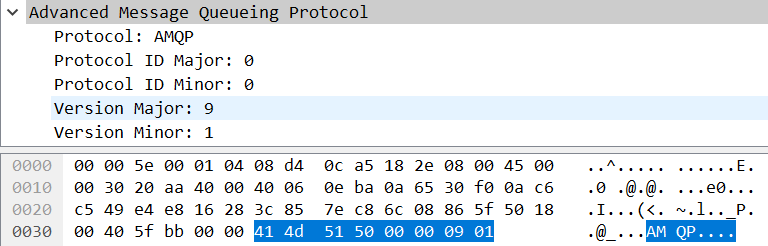
java
        // 初始化帧处理器
        this._frameHandler.initialize(this);
其中com.rabbitmq.client.impl.SocketFrameHandler#initialize方法会调用com.rabbitmq.client.impl.AMQConnection#startMainLoop()方法,该方法定义如下:
java
    /**
     * Package private API, allows for easier testing.
     */
    public void startMainLoop() {
        MainLoop loop = new MainLoop();
        final String name = "AMQP Connection " + getHostAddress() + ":" + getPort();
        mainLoopThread = Environment.newThread(threadFactory, loop, name);
        mainLoopThread.start();
    }
下面就是最重要的MainLoop线程了。这里先跳过,接下去看看start()方法,之后就是Connection.Start/.StartOk, Connection.Tune/.TuneOk, Connection.Open/.OpenOk的来回negotiation,以及设置channelMax, frameMax和heartbeat的参数值。当然在设置frameMax之前还初始化了ChannelManager,至于ChannelManager可以简单的理解为管理Channel的一个类:
java
        AMQP.Connection.Start connStart;
        AMQP.Connection.Tune connTune = null;
        try {
            // 获取连接开始响应
            connStart =
                    (AMQP.Connection.Start) connStartBlocker.getReply(handshakeTimeout/2).getMethod();

            // 保存服务器属性
            _serverProperties = Collections.unmodifiableMap(connStart.getServerProperties());

            // 检查版本兼容性
            Version serverVersion =
                    new Version(connStart.getVersionMajor(),
                                       connStart.getVersionMinor());

            if (!Version.checkVersion(clientVersion, serverVersion)) {
                throw new ProtocolVersionMismatchException(clientVersion,
                                                                  serverVersion);
            }

            // 协商认证机制
            String[] mechanisms = connStart.getMechanisms().toString().split(" ");
            SaslMechanism sm = this.saslConfig.getSaslMechanism(mechanisms);
            if (sm == null) {
                throw new IOException("找不到兼容的认证机制 - " +
                                              "服务器提供了 [" + connStart.getMechanisms() + "]");
            }

            // 获取用户名和密码
            String username = credentialsProvider.getUsername();
            String password = credentialsProvider.getPassword();

            // 检查凭据是否即将过期,如果需要则刷新
            if (credentialsProvider.getTimeBeforeExpiration() != null) {
                if (this.credentialsRefreshService == null) {
                    throw new IllegalStateException("凭据可能过期,应设置凭据刷新服务");
                }
                if (this.credentialsRefreshService.isApproachingExpiration(credentialsProvider.getTimeBeforeExpiration())) {
                    credentialsProvider.refresh();
                    username = credentialsProvider.getUsername();
                    password = credentialsProvider.getPassword();
                }
            }

            // 处理挑战-响应认证
            LongString challenge = null;
            LongString response = sm.handleChallenge(null, username, password);

            do {
                Method method = (challenge == null)
                                        ? new AMQP.Connection.StartOk.Builder()
                                                  .clientProperties(_clientProperties)
                                                  .mechanism(sm.getName())
                                                  .response(response)
                                                  .build()
                                        : new AMQP.Connection.SecureOk.Builder().response(response).build();

                try {
                    Method serverResponse = _channel0.rpc(method, handshakeTimeout/2).getMethod();
                    if (serverResponse instanceof AMQP.Connection.Tune) {
                        connTune = (AMQP.Connection.Tune) serverResponse;
                    } else {
                        challenge = ((AMQP.Connection.Secure) serverResponse).getChallenge();
                        response = sm.handleChallenge(challenge, username, password);
                    }
                } catch (ShutdownSignalException e) {
                    Method shutdownMethod = e.getReason();
                    if (shutdownMethod instanceof AMQP.Connection.Close) {
                        AMQP.Connection.Close shutdownClose = (AMQP.Connection.Close) shutdownMethod;
                        if (shutdownClose.getReplyCode() == AMQP.ACCESS_REFUSED) {
                            throw new AuthenticationFailureException(shutdownClose.getReplyText());
                        }
                    }
                    throw new PossibleAuthenticationFailureException(e);
                }
            } while (connTune == null);
        } catch (TimeoutException te) {
            _frameHandler.close();
            throw te;
        } catch (ShutdownSignalException sse) {
            _frameHandler.close();
            throw AMQChannel.wrap(sse);
        } catch(IOException ioe) {
            _frameHandler.close();
            throw ioe;
        }

        try {
            // 协商通道最大值
            int negotiatedChannelMax =
                negotiateChannelMax(this.requestedChannelMax,
                                    connTune.getChannelMax());

            int channelMax = ConnectionFactory.ensureUnsignedShort(negotiatedChannelMax);

            if (channelMax != negotiatedChannelMax) {
                LOGGER.warn("通道最大值必须在0到{}之间,值已被设置为{}而不是{}",
                        MAX_UNSIGNED_SHORT, channelMax, negotiatedChannelMax);
            }

            // 实例化通道管理器
            _channelManager = instantiateChannelManager(channelMax, threadFactory);

            // 协商帧最大值
            int frameMax =
                negotiatedMaxValue(this.requestedFrameMax,
                                   connTune.getFrameMax());
            this._frameMax = frameMax;

            // 协商心跳值
            int negotiatedHeartbeat =
                negotiatedMaxValue(this.requestedHeartbeat,
                                   connTune.getHeartbeat());

            int heartbeat = ConnectionFactory.ensureUnsignedShort(negotiatedHeartbeat);

            if (heartbeat != negotiatedHeartbeat) {
                LOGGER.warn("心跳必须在0到{}之间,值已被设置为{}而不是{}",
                        MAX_UNSIGNED_SHORT, heartbeat, negotiatedHeartbeat);
            }

            // 设置心跳
            setHeartbeat(heartbeat);

            // 发送调优确认和打开连接
            _channel0.transmit(new AMQP.Connection.TuneOk.Builder()
                                .channelMax(channelMax)
                                .frameMax(frameMax)
                                .heartbeat(heartbeat)
                              .build());
            _channel0.exnWrappingRpc(new AMQP.Connection.Open.Builder()
                                      .virtualHost(_virtualHost)
                                    .build());
        } catch (IOException ioe) {
            _heartbeatSender.shutdown();
            _frameHandler.close();
            throw ioe;
        } catch (ShutdownSignalException sse) {
            _heartbeatSender.shutdown();
            _frameHandler.close();
            throw AMQChannel.wrap(sse);
        }

        // 注册凭据刷新服务
        if (this.credentialsProvider.getTimeBeforeExpiration() != null) {
            String registrationId = this.credentialsRefreshService.register(credentialsProvider, () -> {
                // 如果连接已关闭,返回false,以便刷新服务可以移除此注册
                if (!isOpen()) {
                    return false;
                }
                if (this._inConnectionNegotiation) {
                    // 这不应该发生
                    return true;
                }
                String refreshedPassword = credentialsProvider.getPassword();

                UpdateSecretExtension.UpdateSecret updateSecret = new UpdateSecretExtension.UpdateSecret(
                        LongStringHelper.asLongString(refreshedPassword), "客户端计划的刷新"
                );
                try {
                    _channel0.rpc(updateSecret);
                } catch (ShutdownSignalException e) {
                    LOGGER.warn("尝试更新密钥时出错: {}。连接已关闭。", e.getMessage());
                    return false;
                }
                return true;
            });

            // 添加关闭监听器以取消注册
            addShutdownListener(sse -> this.credentialsRefreshService.unregister(this.credentialsProvider, registrationId));
        }

        // 连接协商完成,现在可以响应错误了
        this._inConnectionNegotiation = false;
MainLoop类
MainLoop类是AMQConnection类的私有内部类:
java
    private class MainLoop implements Runnable {

        /**
         * 通道读取线程的主循环。读取一个帧,如果不是心跳帧,
         * 则将其分派给相应的通道处理。
         * 持续运行直到shutdown()将"running"标志设为false。
         */
        @Override
        public void run() {
            // 标记是否需要执行最终关闭操作
            boolean shouldDoFinalShutdown = true;
            try {
                // 当_running标志为true时持续循环读取帧
                while (_running) {
                    // 从帧处理器读取帧
                    Frame frame = _frameHandler.readFrame();
                    // 处理读取到的帧
                    readFrame(frame);
                }
            } catch (Throwable ex) {
                // 捕获所有异常和错误
                if (ex instanceof InterruptedException) {
                    // 循环在关闭过程中被中断,
                    // 无需再次执行关闭操作
                    shouldDoFinalShutdown = false;
                } else {
                    // 处理其他类型的故障
                    handleFailure(ex);
                }
            } finally {
                // 确保在必要时执行最终关闭操作
                if (shouldDoFinalShutdown) {
                    doFinalShutdown();
                }
            }
        }
    }

    private void readFrame(Frame frame) throws IOException {
        if (frame != null) {
            // 重置丢失的心跳计数器
            _missedHeartbeats = 0;
            // 检查是否为心跳帧
            if (frame.type == AMQP.FRAME_HEARTBEAT) {
                // 忽略心跳帧:我们刚刚已经重置了心跳计数器
            } else {
                // 检查是否为通道0(特殊通道)
                if (frame.channel == 0) {
                    // 将帧交给通道0处理
                    _channel0.handleFrame(frame);
                } else {
                    // 检查连接是否仍处于开放状态
                    if (isOpen()) {
                        // 如果我们仍在运行但连接已关闭,说明正在进入静默状态,
                        // 此时必须丢弃非零通道的入站帧(以及通道0上不是Connection.CloseOk的入站命令)
                        ChannelManager cm = _channelManager;
                        if (cm != null) {
                            ChannelN channel;
                            try {
                                // 获取对应通道
                                channel = cm.getChannel(frame.channel);
                            } catch(UnknownChannelException e) {
                                // 当通道已关闭但仍有传输中的消息时可能发生这种情况
                                // 忽略该帧以避免关闭整个连接
                                LOGGER.info("Received a frame on an unknown channel, ignoring it");
                                return;
                            }
                            // 让对应通道处理帧
                            channel.handleFrame(frame);
                        }
                    }
                }
            }
        } else {
            // 套接字超时等待帧
            // 可能错过了心跳
            handleSocketTimeout();
        }
    }
MainLoop线程主要用来处理通信帧(Frame)的,可以看到当AMQConnection调用start()方法后,_isrunning就设置为true,那么线程一直在运行(while(true))。
MainLoop线程当读取到通信帧之后,判断是否是心跳帧,如果是则忽略继续监听。如果是其他帧,则判断其frame.channel值是否为0,frame.channel值为0代表的是特殊帧,这些特殊帧是和Connection有关的,而不是和Channel有关的(上面代码里的frame.channel就是Channel里的channel number, 一般Connection类型的帧的channel number为0,而其余Channel类别帧的channel number大于0。)
这里就分channel_number=0和channel_number !=0分别进行处理。
当channel_number=0即frame.channel=0则直接调用_channel0的handleFrame方法。
这个_channel0是在AMQConnection类中创建的私有变量:
java
    AMQChannel createChannel0() {
        // 创建通道0,这是一个特殊的通道,不被_channelManager管理
        return new AMQChannel(this, 0) {
            // 重写processAsync方法,用于处理异步命令
            @Override public boolean processAsync(Command c) throws IOException {
                // 将控制命令交由连接对象处理
                return getConnection().processControlCommand(c);
            }
        };
    }
调用AMQChannel的handleFrame方法
java
    /**
     * Private API - 当连接接收到该通道的帧时,会将帧传递给此方法处理。
     * @param frame 接收到的帧
     * @throws IOException 如果遇到错误
     */
    public void handleFrame(Frame frame) throws IOException {
        // 获取当前正在组装的命令
        AMQCommand command = _command;
        // 让命令处理帧,如果返回true表示已组装完成一个完整命令
        if (command.handleFrame(frame)) {
            // 创建新的AMQCommand实例用于处理下一个命令
            _command = new AMQCommand(this.maxInboundMessageBodySize);
            // 处理已完成的入站命令
            handleCompleteInboundCommand(command);
        }
    }
对于channel number为0的帧,AMQCommand的handleFrame方法都是返回true.(有关AMQCommand的实现细节可以参考:(六RabbitMQ-客户端源码之AMQCommand))
进而调用AMQChannel的handleCompleteInboundCommand(command)方法:
java
    /**
     * Private API - 处理已组装完成的命令
     * @throws IOException 如果出现任何问题
     *
     * @param command 接收到的命令
     * @throws IOException
     */
    public void handleCompleteInboundCommand(AMQCommand command) throws IOException {
        // 首先,将命令提供给异步命令处理机制,
        // 该机制可以作为传入命令流的过滤器。
        // 如果processAsync()返回true,说明命令已经被过滤器处理,
        // 不应进一步处理。对于异步命令(投递/退回/其他事件)返回true,
        // 对于应传递给等待的RPC延续的命令返回false。
        this._trafficListener.read(command);
        if (!processAsync(command)) {
            // 过滤器决定不处理/消费该命令,
            // 所以它必须是对先前RPC的响应。

            if (_checkRpcResponseType) {
                synchronized (_channelMutex) {
                    // 在调用nextOutstandingRpc()之前检查此回复命令是否适用于当前等待的请求
                    if (_activeRpc != null && !_activeRpc.canHandleReply(command)) {
                        // 此回复命令不适用于当前等待的请求
                        // 很可能是之前的请求超时了,而此命令是针对那个请求的回复。
                        // 丢弃此回复命令,以免阻止当前请求等待其回复
                        return;
                    }
                }
            }
            // 获取下一个待处理的RPC
            final RpcWrapper nextOutstandingRpc = nextOutstandingRpc();
            // 当调用Channel#asyncRpc时,待处理的RPC可能为null
            if(nextOutstandingRpc != null) {
                // 完成RPC处理
                nextOutstandingRpc.complete(command);
                // 标记RPC完成
                markRpcFinished();
            }
        }
    }
进而调用AMQChannel的processAsync方法。这个方法在AMQChannel类中是一个抽象方法,而观察AMQConnection中AMQChannel的_channel0私有变量其正好实现了这个方法:
java
    this._channel0 = createChannel0();

    AMQChannel createChannel0() {
        return new AMQChannel(this, 0) {
            @Override public boolean processAsync(Command c) throws IOException {
                return getConnection().processControlCommand(c);
            }
        };
    }