从0到1搭建测试环境,避开常见坑
一、为什么需要单元测试?
单元测试就像软件开发的"安全带",能帮你:
- ✅ 快速发现问题(代码修改后立刻知道哪里出错)
- ✅ 提高代码质量(强制思考边界条件)
- ✅ 加快开发速度(测试失败时不会慌乱)
- ✅ 文档化功能(测试代码本身就是真实用法示例)
二、你需要准备什么工具?
| 工具 | 作用 | 为什么需要 |
|---|---|---|
| JUnit 5 | 测试框架 | Java官方推荐,支持最新特性 |
| Mockito | 模拟对象 | 替代数据库/网络调用,快速测试 |
| JaCoCo | 覆盖率报告 | 查看代码被测试了多少 |
| Spring Boot Test | 集成测试 | 提供便捷的测试工具 |
三、环境搭建步骤
1. 创建Spring Boot项目
使用 Spring Initializr 选择以下依赖:
- Spring Web
- Spring Data JPA
- Lombok
- Spring Boot DevTools
2. 添加测试依赖(pom.xml)
主要测试依赖如下:
XML
<!-- 核心测试包(包含JUnit5+Mockito) -->
<dependency>
    <groupId>org.springframework.boot</groupId>
    <artifactId>spring-boot-starter-test</artifactId>
    <scope>test</scope>
    <!-- 重要!排除旧版JUnit4(提升测试速度) -->
    <exclusions>
        <exclusion>
            <groupId>org.junit.vintage</groupId>
            <artifactId>junit-vintage-engine</artifactId>
        </exclusion>
    </exclusions>
</dependency>

<!-- 可选:如果需要模拟final类/静态方法才添加 -->
<dependency>
    <groupId>org.mockito</groupId>
    <artifactId>mockito-inline</artifactId>
    <version>5.12.0</version>
    <scope>test</scope>
</dependency>

<!-- JaCoCo 覆盖率插件 -->
<plugin>
	<groupId>org.jacoco</groupId>
	<artifactId>jacoco-maven-plugin</artifactId>
	<version>0.8.13</version>
	<executions>
		<!-- 准备JaCoCo运行时代理 -->
		<execution>
			<id>prepare-agent</id>
			<goals>
				<goal>prepare-agent</goal>
			</goals>
		</execution>
		<!-- 生成覆盖率报告 -->
		<execution>
			<id>report</id>
			<phase>test</phase>
			<goals>
				<goal>report</goal>
			</goals>
			<configuration>
				<outputDirectory>${project.build.directory}/site/jacoco</outputDirectory>
				 <includes>
					 <!--只包含xx目录下的bean,改成你自己的-->
					 <include>com/chinaunicom/medical/ihm/supply/server/service/*.class</include>
					 <include>com/chinaunicom/medical/ihm/supply/server/controller/*.class</include>
				 </includes>
			</configuration>
		</execution>
		<!-- 创建聚合报告 -->
		<execution>
			<id>report-aggregate</id>
			<phase>test</phase> <!-- 在test阶段执行 -->
			<goals>
				<goal>report-aggregate</goal>
			</goals>
			<configuration>
				<outputDirectory>${project.build.directory}/site/jacoco-aggregate</outputDirectory>
			</configuration>
		</execution>
	</executions>
</plugin>
在真实场景中,xml配置文件如下:
XML
<?xml version="1.0" encoding="UTF-8"?>
<project xmlns="http://maven.apache.org/POM/4.0.0" xmlns:xsi="http://www.w3.org/2001/XMLSchema-instance"
         xsi:schemaLocation="http://maven.apache.org/POM/4.0.0 https://maven.apache.org/xsd/maven-4.0.0.xsd">
    <modelVersion>4.0.0</modelVersion>
    <parent>
        <groupId>org.springframework.boot</groupId>
        <artifactId>spring-boot-starter-parent</artifactId>
        <version>3.0.2</version>
        <!-- lookup parent from repository -->
    </parent>
    <groupId>com.chinaunicom.medical</groupId>
    <artifactId>chinaunicom-medical-ihm-middle-platform</artifactId>
    <version>${revision}</version>
    <name>chinaunicom-medical-ihm-middile-platform</name>
    <description>互联网医院</description>
    <packaging>pom</packaging>
    <modules>
        <module>applications/chinaunicom-medical-ihm-supply-server</module>
    </modules>
    <properties>
        <!-- 当前项目的版本 用了flatten 仅修改这一个地方即可-->
        <revision>2.1.0</revision>
        <java.version>17</java.version>
        <project.build.outputTimestamp>2023-01-01T00:00:00Z</project.build.outputTimestamp>
        <!-- 暂时保持不变的 3.20.0-->
        <redisson-spring-boot-starter.version>3.20.0</redisson-spring-boot-starter.version>

        <transmittable-thread-local.version>2.12.1</transmittable-thread-local.version>
        <hutool-all.version>5.8.20</hutool-all.version>
        <guava.version>31.1-jre</guava.version>
        <jxls.version>3.0.0</jxls.version>
        <lombok.version>1.18.22</lombok.version>
        <okhttp3.version>4.10.0</okhttp3.version>
        <!-- mybatis相关 3.5.3.1-->
        <baomidou.mybatis-plus.version>3.5.3.1</baomidou.mybatis-plus.version>
        <mybatis.version>3.5.10</mybatis.version>

        <!-- spring-boot,spring-cloud,spring-cloud-alibaba依赖版本 -->
        <spring.boot.version>3.0.2</spring.boot.version>
        <springframework.cloud.version>2022.0.0</springframework.cloud.version>
        <!--参考nacos官方的版本关系 https://github.com/alibaba/spring-cloud-alibaba/wiki/%E7%89%88%E6%9C%AC%E8%AF%B4%E6%98%8E-->
        <alibaba.cloud.version>2022.0.0.0-RC2</alibaba.cloud.version>

        <jasypt.spring.boot.starte.version>3.0.5</jasypt.spring.boot.starte.version>

        <spring-cloud-starter-sleuth.version>3.1.1</spring-cloud-starter-sleuth.version>
        <!-- alibaba -->
        <!--        <nacos-client.version>2.2.3</nacos-client.version>-->

        <!-- feign -->
        <feign-form.version>3.8.0</feign-form.version>

        <!-- swagger -->
        <springdoc-openapi.version>2.0.2</springdoc-openapi.version>
        <knife4j-springdoc-ui.version>3.0.3</knife4j-springdoc-ui.version>
        <knife4j-openapi3-jakarta.version>4.3.0</knife4j-openapi3-jakarta.version>
        <jakarta.annotation-api.version>2.1.1</jakarta.annotation-api.version>
        <jakarta.validation.version>3.0.2</jakarta.validation.version>
        <jakarta.servlet-api.version>5.0.0</jakarta.servlet-api.version>
        <commons-io.version>2.16.1</commons-io.version>
        <!--单元测试-->
        <mockito-inline.version>5.2.0</mockito-inline.version>

    </properties>


    <dependencyManagement>
        <dependencies>
            <!--    spring     -->
            <dependency>
                <groupId>org.springframework.boot</groupId>
                <artifactId>spring-boot-dependencies</artifactId>
                <version>${spring.boot.version}</version>
                <type>pom</type>
                <scope>import</scope>
            </dependency>
            <dependency>
                <groupId>org.springframework.cloud</groupId>
                <artifactId>spring-cloud-dependencies</artifactId>
                <version>${springframework.cloud.version}</version>
                <type>pom</type>
                <scope>import</scope>
            </dependency>

            <!--    alibaba     -->
            <dependency>
                <groupId>com.alibaba.cloud</groupId>
                <artifactId>spring-cloud-alibaba-dependencies</artifactId>
                <version>${alibaba.cloud.version}</version>
                <type>pom</type>
                <scope>import</scope>
            </dependency>


            <!--    tools     -->
            <dependency>
                <groupId>cn.hutool</groupId>
                <artifactId>hutool-all</artifactId>
                <version>${hutool-all.version}</version>
            </dependency>


            <dependency>
                <groupId>org.projectlombok</groupId>
                <artifactId>lombok</artifactId>
                <version>${lombok.version}</version>
            </dependency>
            <!--    mybatis     -->
            <dependency>
                <groupId>org.mybatis</groupId>
                <artifactId>mybatis</artifactId>
                <version>${mybatis.version}</version>
            </dependency>
            <dependency>
                <groupId>com.baomidou</groupId>
                <artifactId>mybatis-plus-boot-starter</artifactId>
                <version>${baomidou.mybatis-plus.version}</version>
            </dependency>
            <dependency>
                <groupId>com.baomidou</groupId>
                <artifactId>mybatis-plus-extension</artifactId>
                <version>${baomidou.mybatis-plus.version}</version>
                <scope>compile</scope>
            </dependency>
            <dependency>
                <groupId>com.baomidou</groupId>
                <artifactId>mybatis-plus-generator</artifactId>
                <version>${baomidou.mybatis-plus.version}</version>
            </dependency>
            <dependency>
                <groupId>com.baomidou</groupId>
                <artifactId>mybatis-plus-annotation</artifactId>
                <version>${baomidou.mybatis-plus.version}</version>
            </dependency>
            <!-- redisson -->
            <dependency>
                <groupId>org.redisson</groupId>
                <artifactId>redisson-spring-boot-starter</artifactId>
                <version>${redisson-spring-boot-starter.version}</version>
            </dependency>
            <dependency>
                <groupId>org.apache.logging.log4j</groupId>
                <artifactId>log4j-to-slf4j</artifactId>
                <version>2.19.0</version>
            </dependency>

            <!--doc -->
            <dependency>
                <groupId>org.springdoc</groupId>
                <artifactId>springdoc-openapi-starter-webmvc-ui</artifactId>
                <version>${springdoc-openapi.version}</version>
            </dependency>
            <dependency>
                <groupId>com.squareup.okhttp3</groupId>
                <artifactId>okhttp</artifactId>
                <version>${okhttp3.version}</version>
            </dependency>


            <!-- https://mvnrepository.com/artifact/commons-io/commons-io -->
            <dependency>
                <groupId>commons-io</groupId>
                <artifactId>commons-io</artifactId>
                <version>${commons-io.version}</version>
            </dependency>

            <dependency>
                <groupId>com.github.xiaoymin</groupId>
                <artifactId>knife4j-openapi3-jakarta-spring-boot-starter</artifactId>
                <version>${knife4j-openapi3-jakarta.version}</version>
            </dependency>

            <!-- 核心测试包(包含JUnit5+Mockito) -->
			<dependency>
				<groupId>org.springframework.boot</groupId>
				<artifactId>spring-boot-starter-test</artifactId>
				<scope>test</scope>
				<!-- 重要!排除旧版JUnit4(提升测试速度) -->
				<exclusions>
					<exclusion>
						<groupId>org.junit.vintage</groupId>
						<artifactId>junit-vintage-engine</artifactId>
					</exclusion>
				</exclusions>
			</dependency>
            <!-- 仅当需要 mock final 类/静态方法时添加 -->
            <dependency>
                <groupId>org.mockito</groupId>
                <artifactId>mockito-inline</artifactId>
                <version>${mockito-inline.version}</version> <!-- 或更高 -->
                <scope>test</scope>
            </dependency>
        </dependencies>
        <!--ihm-->
    </dependencyManagement>


    <build>
        <plugins>
            <plugin>
                <groupId>org.apache.maven.plugins</groupId>
                <artifactId>maven-compiler-plugin</artifactId>
                <version>3.8.1</version>
                <configuration>
                    <source>17</source>
                    <target>17</target>
                    <encoding>UTF-8</encoding>
                    <useIncrementalCompilation>true</useIncrementalCompilation>

                </configuration>
            </plugin>
            <plugin>
                <groupId>org.apache.maven.plugins</groupId>
                <artifactId>maven-source-plugin</artifactId>
                <executions>
                    <execution>
                        <id>attach-sources</id>
                        <goals>
                            <goal>jar</goal> <!-- 生成源码包 -->
                        </goals>
                    </execution>
                </executions>
            </plugin>
			<!-- JaCoCo 覆盖率插件 -->
			<plugin>
				<groupId>org.jacoco</groupId>
				<artifactId>jacoco-maven-plugin</artifactId>
				<version>0.8.13</version>
				<executions>
					<!-- 准备JaCoCo运行时代理 -->
					<execution>
						<id>prepare-agent</id>
						<goals>
							<goal>prepare-agent</goal>
						</goals>
					</execution>
					<!-- 生成覆盖率报告 -->
					<execution>
						<id>report</id>
						<phase>test</phase>
						<goals>
							<goal>report</goal>
						</goals>
						<configuration>
							<outputDirectory>${project.build.directory}/site/jacoco</outputDirectory>
							 <includes>
								 <!--只包含xx目录下的bean,改成你自己的-->
								 <include>com/chinaunicom/medical/ihm/supply/server/service/*.class</include>
								 <include>com/chinaunicom/medical/ihm/supply/server/controller/*.class</include>
							 </includes>
						</configuration>
					</execution>
					<!-- 创建聚合报告 -->
					<execution>
						<id>report-aggregate</id>
						<phase>test</phase> <!-- 在test阶段执行 -->
						<goals>
							<goal>report-aggregate</goal>
						</goals>
						<configuration>
							<outputDirectory>${project.build.directory}/site/jacoco-aggregate</outputDirectory>
						</configuration>
					</execution>
				</executions>
			</plugin>
        </plugins>

    </build>

</project>
四、核心测试写法(分场景)
✅ 场景1:纯单元测试(不启动Spring)
java
@ExtendWith(MockitoExtension.class) // Mockito扩展
class UserServiceTest {

    @Mock
    private UserRepository userRepository; // 模拟数据库操作

    @InjectMocks
    private UserService userService; // 被测对象

    @Test
    void 应该返回用户信息() {
        // 1. 设置模拟数据
        User mockUser = new User(1L, "张三");
        when(userRepository.findById(1L)).thenReturn(Optional.of(mockUser));

        // 2. 执行被测方法
        User result = userService.getUserById(1L);

        // 3. 验证结果
        assertEquals("张三", result.getName());
    }
}
✅ 场景2:Controller层测试(轻量级)
java
@WebMvcTest(UserController.class) // 仅测试Controller层
class UserControllerTest {

    @Autowired
    private MockMvc mockMvc; // 模拟HTTP请求

    @MockBean
    private UserService userService; // 模拟服务层

    @Test
    void 应该返回用户信息() throws Exception {
        // 1. 设置模拟数据
        when(userService.getUserById(1L)).thenReturn(new User(1L, "李四"));

        // 2. 发起模拟请求
        mockMvc.perform(get("/user/1"))
               .andExpect(status().isOk())
               .andExpect(jsonPath("$.name").value("李四"));
    }
}
项目真实测试代码举例
java
@Slf4j
@ExtendWith(MockitoExtension.class)
@DisplayName("StepInstExtController 单元测试")
class StepInstExtControllerTest {

    @Mock
    private StepInstExtService stepInstExtService;

    @InjectMocks
    private StepInstExtController stepInstExtController;

    @Mock
    private LambdaQueryChainWrapper<StepInstExt> lambdaQueryChainWrapper;

    @BeforeEach
    void setUp() {
        // 设置 lambdaQuery() 返回 mock 的链式调用对象
        when(stepInstExtService.lambdaQuery()).thenReturn(lambdaQueryChainWrapper);
        // 设置 eq() 方法返回自身,支持链式调用,使用 lenient 避免不必要的模拟异常
        lenient().when(lambdaQueryChainWrapper.eq(any(), any())).thenReturn(lambdaQueryChainWrapper);
    }

    @Test
    @DisplayName("正常场景:分页查询有数据")
    void testPage_Success_WithData() {
        // 准备测试数据
        Long workflowInstId = 1001L;
        Integer current = 1;
        Integer size = 10;

        StepInstExtPageDto param = new StepInstExtPageDto();
        param.setWorkflowInstId(workflowInstId);
        param.setCurrent(current);
        param.setSize(size);

        // 准备返回的分页数据
        Page<StepInstExt> pageResult = new Page<>(current, size);
        List<StepInstExt> records = new ArrayList<>();
        StepInstExt stepInstExt1 = new StepInstExt();
        stepInstExt1.setId(1L);
        stepInstExt1.setWorkflowInstId(workflowInstId);
        stepInstExt1.setState("pending");
        records.add(stepInstExt1);

        StepInstExt stepInstExt2 = new StepInstExt();
        stepInstExt2.setId(2L);
        stepInstExt2.setWorkflowInstId(workflowInstId);
        stepInstExt2.setState("approved");
        records.add(stepInstExt2);

        pageResult.setRecords(records);
        pageResult.setTotal(2L);

        // Mock page() 方法返回结果
        when(lambdaQueryChainWrapper.page(any(Page.class))).thenReturn(pageResult);

        // 打印输入参数
        log.info("========== 测试:正常场景 - 分页查询有数据 ==========");
        log.info("输入参数 - workflowInstId: {}, current: {}, size: {}",
                param.getWorkflowInstId(), param.getCurrent(), param.getSize());

        // 执行测试
        Result<Page<StepInstExt>> result = stepInstExtController.page(param);

        // 打印输出结果
        log.info("输出结果 - success: {}, data: {}", result.isSucc(), result.getData());
        if (result.getData() != null) {
            log.info("输出结果 - total: {}, records size: {}",
                    result.getData().getTotal(), result.getData().getRecords().size());
            result.getData().getRecords().forEach(record ->
                log.info("输出结果 - record: id={}, workflowInstId={}, state={}",
                        record.getId(), record.getWorkflowInstId(), record.getState())
            );
        }
        log.info("================================================");

        // 验证结果
        assertNotNull(result, "返回结果不应为空");
        assertTrue(result.isSucc(), "应该返回成功结果");
        assertNotNull(result.getData(), "分页数据不应为空");
        assertEquals(2L, result.getData().getTotal(), "总记录数应为2");
        assertEquals(2, result.getData().getRecords().size(), "记录数应为2");
        assertEquals(workflowInstId, result.getData().getRecords().get(0).getWorkflowInstId(),
                "第一条记录的workflowInstId应匹配");

        // 验证方法调用
        verify(stepInstExtService, times(1)).lambdaQuery();
        verify(lambdaQueryChainWrapper, times(1)).eq(any(), eq(workflowInstId));
        verify(lambdaQueryChainWrapper, times(1)).page(any(Page.class));
    }

    @Test
    @DisplayName("空结果场景:查询结果为空")
    void testPage_Success_EmptyResult() {
        // 准备测试数据
        Long workflowInstId = 2001L;
        Integer current = 1;
        Integer size = 10;

        StepInstExtPageDto param = new StepInstExtPageDto();
        param.setWorkflowInstId(workflowInstId);
        param.setCurrent(current);
        param.setSize(size);

        // 准备返回的空分页数据
        Page<StepInstExt> pageResult = new Page<>(current, size);
        pageResult.setRecords(new ArrayList<>());
        pageResult.setTotal(0L);

        // Mock page() 方法返回空结果
        when(lambdaQueryChainWrapper.page(any(Page.class))).thenReturn(pageResult);

        // 打印输入参数
        log.info("========== 测试:空结果场景 ==========");
        log.info("输入参数 - workflowInstId: {}, current: {}, size: {}",
                param.getWorkflowInstId(), param.getCurrent(), param.getSize());

        // 执行测试
        Result<Page<StepInstExt>> result = stepInstExtController.page(param);

        // 打印输出结果
        log.info("输出结果 - success: {}, data: {}", result.isSucc(), result.getData());
        if (result.getData() != null) {
            log.info("输出结果 - total: {}, records size: {}",
                    result.getData().getTotal(), result.getData().getRecords().size());
        }
        log.info("====================================");

        // 验证结果
        assertNotNull(result, "返回结果不应为空");
        assertTrue(result.isSucc(), "应该返回成功结果");
        assertNotNull(result.getData(), "分页数据不应为空");
        assertEquals(0L, result.getData().getTotal(), "总记录数应为0");
        assertEquals(0, result.getData().getRecords().size(), "记录数应为0");

        // 验证方法调用
        verify(stepInstExtService, times(1)).lambdaQuery();
        verify(lambdaQueryChainWrapper, times(1)).eq(any(), eq(workflowInstId));
        verify(lambdaQueryChainWrapper, times(1)).page(any(Page.class));
    }

    @Test
    @DisplayName("边界值场景:第一页查询")
    void testPage_Boundary_FirstPage() {
        // 准备测试数据 - 第一页
        Long workflowInstId = 3001L;
        Integer current = 1;
        Integer size = 5;

        StepInstExtPageDto param = new StepInstExtPageDto();
        param.setWorkflowInstId(workflowInstId);
        param.setCurrent(current);
        param.setSize(size);

        // 准备返回的分页数据
        Page<StepInstExt> pageResult = new Page<>(current, size);
        List<StepInstExt> records = new ArrayList<>();
        for (int i = 1; i <= 5; i++) {
            StepInstExt stepInstExt = new StepInstExt();
            stepInstExt.setId((long) i);
            stepInstExt.setWorkflowInstId(workflowInstId);
            stepInstExt.setState("state" + i);
            records.add(stepInstExt);
        }
        pageResult.setRecords(records);
        pageResult.setTotal(20L); // 总共20条数据

        // Mock page() 方法返回结果
        when(lambdaQueryChainWrapper.page(any(Page.class))).thenReturn(pageResult);

        // 打印输入参数
        log.info("========== 测试:边界值场景 - 第一页 ==========");
        log.info("输入参数 - workflowInstId: {}, current: {}, size: {}",
                param.getWorkflowInstId(), param.getCurrent(), param.getSize());

        // 执行测试
        Result<Page<StepInstExt>> result = stepInstExtController.page(param);

        // 打印输出结果
        log.info("输出结果 - success: {}, total: {}, current page size: {}",
                result.isSucc(), result.getData().getTotal(), result.getData().getRecords().size());
        log.info("==============================================");

        // 验证结果
        assertNotNull(result, "返回结果不应为空");
        assertTrue(result.isSucc(), "应该返回成功结果");
        assertEquals(20L, result.getData().getTotal(), "总记录数应为20");
        assertEquals(5, result.getData().getRecords().size(), "当前页记录数应为5");
        assertEquals(1, result.getData().getCurrent(), "当前页码应为1");
        assertEquals(5, result.getData().getSize(), "每页大小应为5");
    }

    @Test
    @DisplayName("边界值场景:最后一页查询")
    void testPage_Boundary_LastPage() {
        // 准备测试数据 - 最后一页(假设总共20条,每页10条,最后一页是第2页,只有3条数据)
        Long workflowInstId = 4001L;
        Integer current = 2;
        Integer size = 10;

        StepInstExtPageDto param = new StepInstExtPageDto();
        param.setWorkflowInstId(workflowInstId);
        param.setCurrent(current);
        param.setSize(size);

        // 准备返回的分页数据 - 最后一页只有3条
        Page<StepInstExt> pageResult = new Page<>(current, size);
        List<StepInstExt> records = new ArrayList<>();
        for (int i = 1; i <= 3; i++) {
            StepInstExt stepInstExt = new StepInstExt();
            stepInstExt.setId((long) (10 + i));
            stepInstExt.setWorkflowInstId(workflowInstId);
            stepInstExt.setState("state" + (10 + i));
            records.add(stepInstExt);
        }
        pageResult.setRecords(records);
        pageResult.setTotal(13L); // 总共13条数据

        // Mock page() 方法返回结果
        when(lambdaQueryChainWrapper.page(any(Page.class))).thenReturn(pageResult);

        // 打印输入参数
        log.info("========== 测试:边界值场景 - 最后一页 ==========");
        log.info("输入参数 - workflowInstId: {}, current: {}, size: {}",
                param.getWorkflowInstId(), param.getCurrent(), param.getSize());

        // 执行测试
        Result<Page<StepInstExt>> result = stepInstExtController.page(param);

        // 打印输出结果
        log.info("输出结果 - success: {}, total: {}, current page size: {}, current page: {}",
                result.isSucc(), result.getData().getTotal(),
                result.getData().getRecords().size(), result.getData().getCurrent());
        log.info("================================================");

        // 验证结果
        assertNotNull(result, "返回结果不应为空");
        assertTrue(result.isSucc(), "应该返回成功结果");
        assertEquals(13L, result.getData().getTotal(), "总记录数应为13");
        assertEquals(3, result.getData().getRecords().size(), "当前页记录数应为3");
        assertEquals(2, result.getData().getCurrent(), "当前页码应为2");
    }

    @Test
    @DisplayName("边界值场景:单条数据查询")
    void testPage_Boundary_SingleRecord() {
        // 准备测试数据 - 只有一条数据
        Long workflowInstId = 5001L;
        Integer current = 1;
        Integer size = 10;

        StepInstExtPageDto param = new StepInstExtPageDto();
        param.setWorkflowInstId(workflowInstId);
        param.setCurrent(current);
        param.setSize(size);

        // 准备返回的分页数据 - 只有一条
        Page<StepInstExt> pageResult = new Page<>(current, size);
        List<StepInstExt> records = new ArrayList<>();
        StepInstExt stepInstExt = new StepInstExt();
        stepInstExt.setId(1L);
        stepInstExt.setWorkflowInstId(workflowInstId);
        stepInstExt.setState("single");
        records.add(stepInstExt);
        pageResult.setRecords(records);
        pageResult.setTotal(1L);

        // Mock page() 方法返回结果
        when(lambdaQueryChainWrapper.page(any(Page.class))).thenReturn(pageResult);

        // 打印输入参数
        log.info("========== 测试:边界值场景 - 单条数据 ==========");
        log.info("输入参数 - workflowInstId: {}, current: {}, size: {}",
                param.getWorkflowInstId(), param.getCurrent(), param.getSize());

        // 执行测试
        Result<Page<StepInstExt>> result = stepInstExtController.page(param);

        // 打印输出结果
        log.info("输出结果 - success: {}, total: {}, records: {}",
                result.isSucc(), result.getData().getTotal(), result.getData().getRecords());
        log.info("==============================================");

        // 验证结果
        assertNotNull(result, "返回结果不应为空");
        assertTrue(result.isSucc(), "应该返回成功结果");
        assertEquals(1L, result.getData().getTotal(), "总记录数应为1");
        assertEquals(1, result.getData().getRecords().size(), "记录数应为1");
        assertEquals(workflowInstId, result.getData().getRecords().get(0).getWorkflowInstId(),
                "workflowInstId应匹配");
    }

    @Test
    @DisplayName("边界值场景:大分页大小")
    void testPage_Boundary_LargePageSize() {
        // 准备测试数据 - 大分页大小
        Long workflowInstId = 6001L;
        Integer current = 1;
        Integer size = 100;

        StepInstExtPageDto param = new StepInstExtPageDto();
        param.setWorkflowInstId(workflowInstId);
        param.setCurrent(current);
        param.setSize(size);

        // 准备返回的分页数据
        Page<StepInstExt> pageResult = new Page<>(current, size);
        List<StepInstExt> records = new ArrayList<>();
        for (int i = 1; i <= 50; i++) {
            StepInstExt stepInstExt = new StepInstExt();
            stepInstExt.setId((long) i);
            stepInstExt.setWorkflowInstId(workflowInstId);
            stepInstExt.setState("state" + i);
            records.add(stepInstExt);
        }
        pageResult.setRecords(records);
        pageResult.setTotal(50L);

        // Mock page() 方法返回结果
        when(lambdaQueryChainWrapper.page(any(Page.class))).thenReturn(pageResult);

        // 打印输入参数
        log.info("========== 测试:边界值场景 - 大分页大小 ==========");
        log.info("输入参数 - workflowInstId: {}, current: {}, size: {}",
                param.getWorkflowInstId(), param.getCurrent(), param.getSize());

        // 执行测试
        Result<Page<StepInstExt>> result = stepInstExtController.page(param);

        // 打印输出结果
        log.info("输出结果 - success: {}, total: {}, current page size: {}",
                result.isSucc(), result.getData().getTotal(), result.getData().getRecords().size());
        log.info("================================================");

        // 验证结果
        assertNotNull(result, "返回结果不应为空");
        assertTrue(result.isSucc(), "应该返回成功结果");
        assertEquals(50L, result.getData().getTotal(), "总记录数应为50");
        assertEquals(50, result.getData().getRecords().size(), "当前页记录数应为50");
        assertEquals(100, result.getData().getSize(), "每页大小应为100");
    }

    @Test
    @DisplayName("异常场景:Service抛出异常")
    void testPage_Exception_ServiceThrowsException() {
        // 准备测试数据
        Long workflowInstId = 7001L;
        Integer current = 1;
        Integer size = 10;

        StepInstExtPageDto param = new StepInstExtPageDto();
        param.setWorkflowInstId(workflowInstId);
        param.setCurrent(current);
        param.setSize(size);

        // Mock service 抛出异常
        when(stepInstExtService.lambdaQuery()).thenThrow(new RuntimeException("数据库连接异常"));

        // 打印输入参数
        log.info("========== 测试:异常场景 - Service抛出异常 ==========");
        log.info("输入参数 - workflowInstId: {}, current: {}, size: {}",
                param.getWorkflowInstId(), param.getCurrent(), param.getSize());

        // 执行测试并验证异常
        assertThrows(RuntimeException.class, () -> {
            stepInstExtController.page(param);
        }, "应该抛出RuntimeException");

        log.info("输出结果 - 异常已抛出:RuntimeException");
        log.info("==================================================");

        // 验证方法调用
        verify(stepInstExtService, times(1)).lambdaQuery();
    }

    @Test
    @DisplayName("参数验证:不同分页参数组合")
    void testPage_ParameterValidation_DifferentPageParams() {
        // 测试多组不同的分页参数
        Integer[][] testCases = {
            {1, 5},   // 第1页,每页5条
            {2, 10},  // 第2页,每页10条
            {3, 20},  // 第3页,每页20条
            {1, 1}    // 第1页,每页1条
        };

        for (Integer[] testCase : testCases) {
            Integer current = testCase[0];
            Integer size = testCase[1];
            Long workflowInstId = 8001L;

            StepInstExtPageDto param = new StepInstExtPageDto();
            param.setWorkflowInstId(workflowInstId);
            param.setCurrent(current);
            param.setSize(size);

            // 准备返回的分页数据
            Page<StepInstExt> pageResult = new Page<>(current, size);
            pageResult.setRecords(new ArrayList<>());
            pageResult.setTotal(0L);

            // Mock page() 方法返回结果
            when(lambdaQueryChainWrapper.page(any(Page.class))).thenReturn(pageResult);

            // 打印输入参数
            log.info("========== 测试:参数验证 - current={}, size={} ==========", current, size);
            log.info("输入参数 - workflowInstId: {}, current: {}, size: {}",
                    param.getWorkflowInstId(), param.getCurrent(), param.getSize());

            // 执行测试
            Result<Page<StepInstExt>> result = stepInstExtController.page(param);

            // 打印输出结果
            log.info("输出结果 - success: {}, current: {}, size: {}",
                    result.isSucc(), result.getData().getCurrent(), result.getData().getSize());
            log.info("========================================================");

            // 验证结果
            assertNotNull(result, "返回结果不应为空");
            assertTrue(result.isSucc(), "应该返回成功结果");
            assertEquals(current.longValue(), result.getData().getCurrent(), "当前页码应匹配");
            assertEquals(size.longValue(), result.getData().getSize(), "每页大小应匹配");
        }
    }
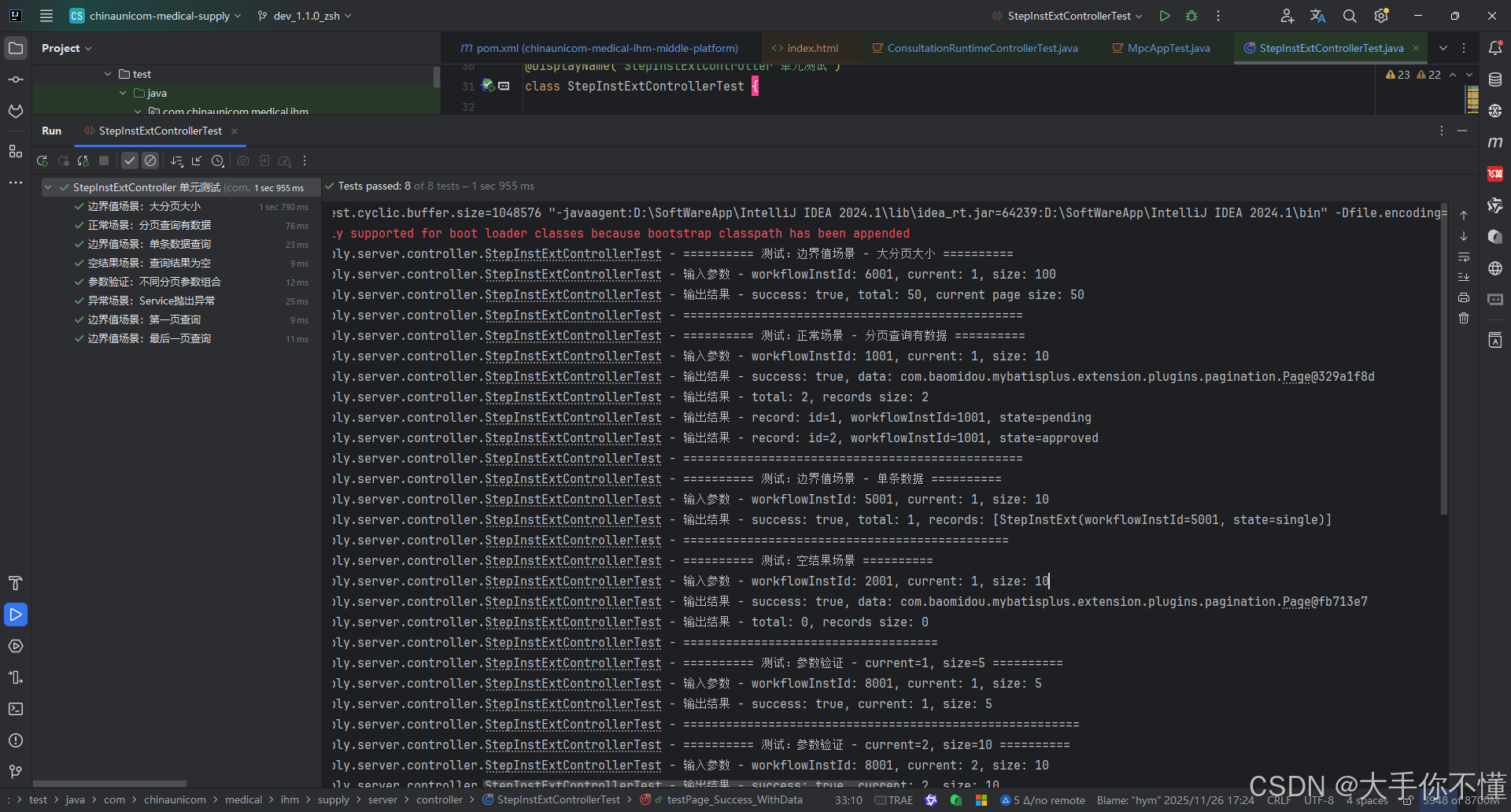
}
五、常见问题解答
1. 为什么排除junit-vintage-engine?
- 旧版兼容模块:允许运行JUnit4测试(老式测试写法)
- 排除后的好处 :
- 测试速度提升10-20%
- 减少依赖体积
- 避免混淆(只保留最新版)
- 什么时候不要排除 ?
如果你还在用JUnit4写测试(不推荐)
2. 为什么不要启动Spring上下文?
- 启动Spring容器需要:5-15秒(很慢!)
- 单元测试应该:在毫秒级完成
- 解决方案 :用
@ExtendWith(MockitoExtension.class)代替
3. Mockito和SpringBootTest怎么选?
| 使用场景 | 推荐方式 |
|---|---|
| 测试业务逻辑(Service层) | Mockito单元测试 |
| 测试接口(Controller层) | @WebMvcTest |
| 需要完整Spring环境 | @SpringBootTest(慎用) |
六、测试覆盖率报告(JaCoCo)
(1)生成报告命令:
mvn clean test(2)查看报告路径:
target/site/jacoco/index.html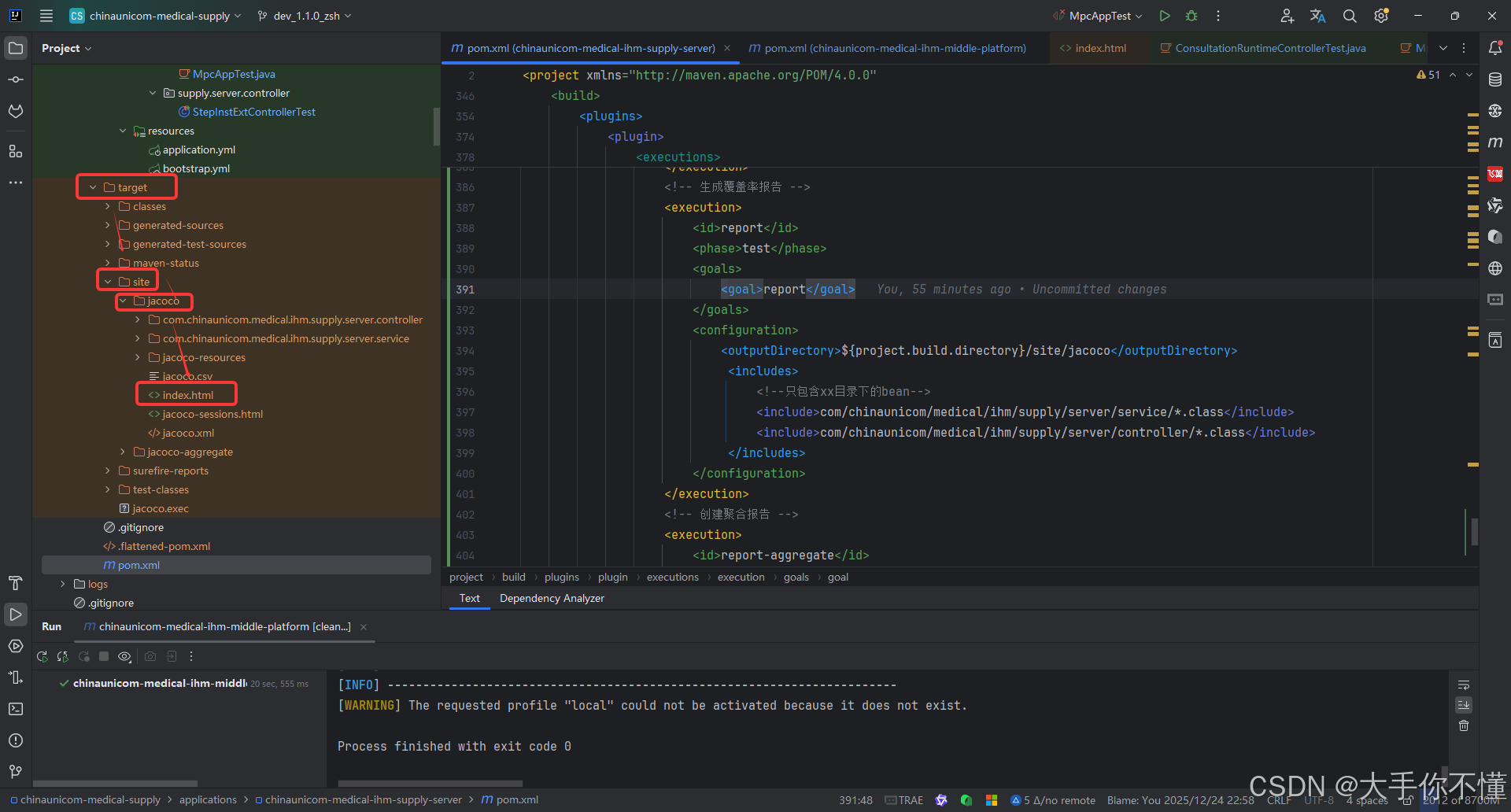
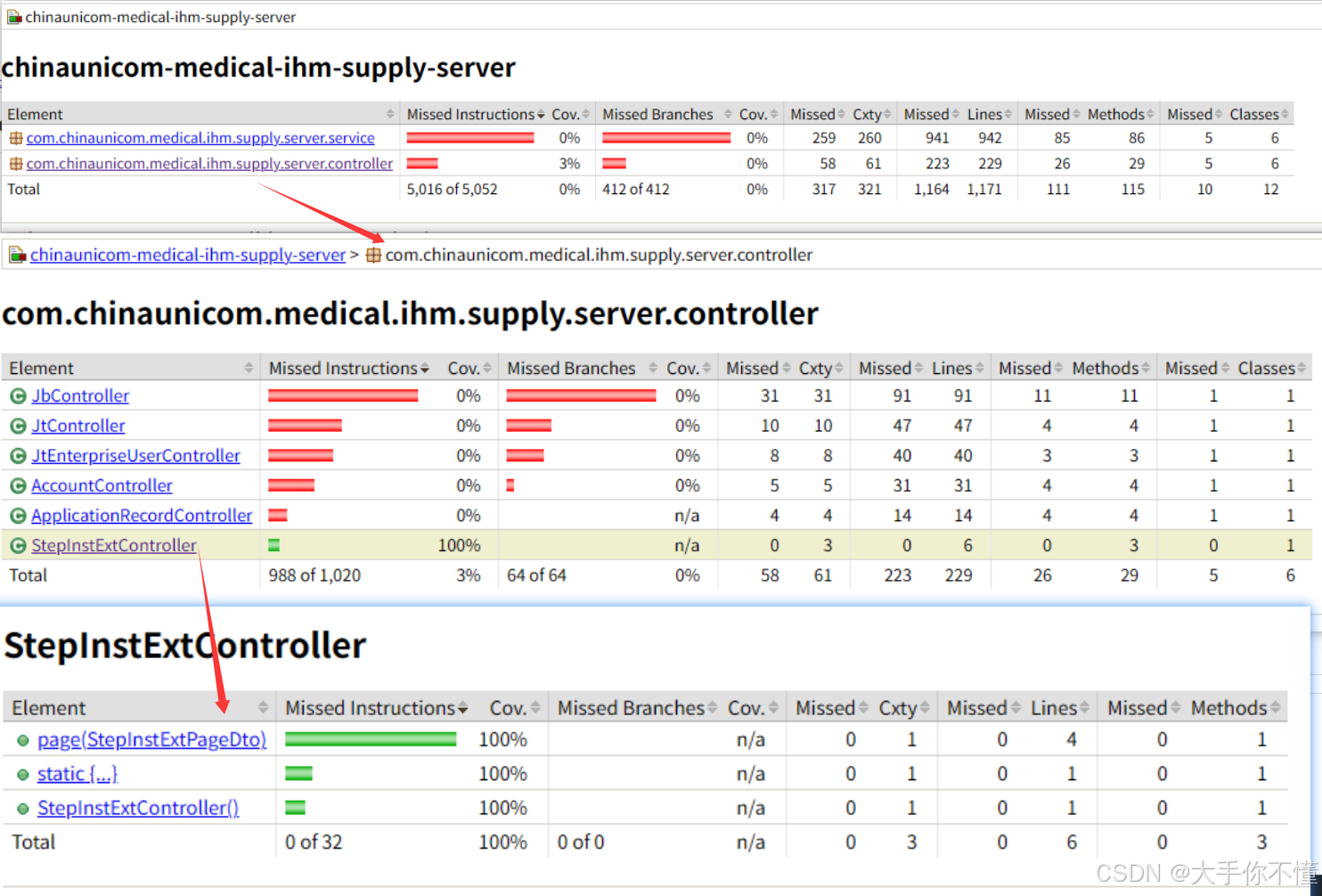
(3)目标覆盖率建议:
- 关键业务逻辑:100%覆盖
- 日志/工具类:可接受低覆盖率
七、新手避坑指南
❌ 常见错误
- 滥用@SpringBootTest
→ 会导致测试变慢(建议90%用Mockito) - 测试私有方法
→ 通过公共方法间接测试(私有方法属于实现细节) - 忽略异常场景
→ 要测试空值、非法参数、异常抛出
✅ 正确姿势
-
测试命名规范 :
java// 好命名 void shouldReturn400WhenEmailIsNull() // 差命名 void test1() -
遵循AAA模式 :
java// Arrange(准备) when(mockService.find()).thenReturn("mock"); // Act(执行) String result = service.process(); // Assert(断言) assertEquals("expected", result);
八、总结
| 步骤 | 做法 | 目标 |
|---|---|---|
| 1. 依赖配置 | 使用spring-boot-starter-test + 排除JUnit4 |
简化依赖 |
| 2. 单元测试 | 用Mockito模拟依赖 | 快速验证逻辑 |
| 3. 集成测试 | 用@WebMvcTest或@DataJpaTest | 验证组件协作 |
| 4. 覆盖率 | 用JaCoCo生成报告 | 查看测试完整性 |
九、扩展建议
-
测试金字塔 (推荐比例):
javascript单元测试(70%)→ 集成测试(20%)→ 端到端测试(10%) -
测试速度优化 :
- 本地运行测试:100ms/用例
- CI/CD运行测试:1-2秒/用例