通过Swiper实现京东m站功能入口效果

效果预览:
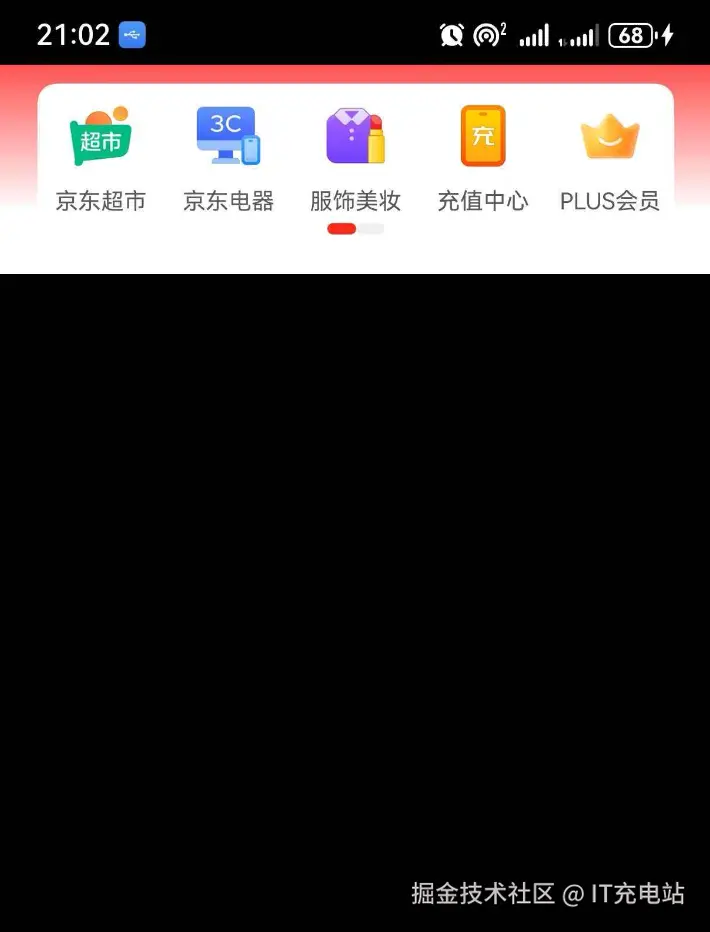
实现思路:
- 通过线性布局Row的linearGradient属性实现渐变背景
less
Row() {
  // 更多代码
}.width('100%').justifyContent(FlexAlign.Center).linearGradient({
  direction: GradientDirection.Bottom, // 渐变方向
  repeating: true, // 渐变颜色是否重复
  colors: [['#ff5454', 0.0], ['#fffff', 0.3], ['#fff', 0.7], ['#fff', 1.0]] // 数组末尾元素占比小于1时满足重复着色效果
}).padding(10)- 在线性布局里面,给Swiper组件的indicator属性自定义导航点的位置和样式。
scss
Swiper() {
  Row() {
  }

  Row() {
  }
}
.width('94%')
.borderRadius(10)
.backgroundColor(Color.White)
.padding({ top: 10 })
.indicator(
  Indicator.dot()
    .top(50)
    .space(LengthMetrics.vp(0))
    .itemWidth(15)
    .selectedItemWidth(15)
    .selectedColor('#fa2c19')
    .color('#f0f0f0')
)
indicator属性手册 developer.huawei.com/consumer/cn...
3.配置网络权限module.json5(因为图片用的互联网地址)
json
{
  "module": {
    // ...
    "requestPermissions": [
      {"name":  "ohos.permission.INTERNET"}
    ],
    // ...
  }
}
完整代码
scss
@Entry
@Component
struct Index {
  build() {
    Row() {
      Swiper() {
        Row() {
          Column() {
            Image('https://img12.360buyimg.com/babel/jfs/t20270715/38278/23/22574/7960/6694edb4F07db03e3/d663cd498321eadc.png')
              .width(35)
            Text('京东超市').fontSize(12).margin({ top: 10 }).fontColor('#595959')
          }.layoutWeight(1).height(80).backgroundColor(Color.White)

          Column() {
            Image('https://m.360buyimg.com/babel/jfs/t20270715/237082/37/21845/7616/6694edddFc764124a/38d00b686257b0f4.png')
              .width(35)
            Text('京东电器').fontSize(12).margin({ top: 10 }).fontColor('#595959')
          }.layoutWeight(1).height(80).backgroundColor(Color.White)

          Column() {
            Image('https://img20.360buyimg.com/babel/jfs/t20270715/36751/25/21385/7651/6694ee02F878cddef/13ce837dd39ad1ad.png')
              .width(35)
            Text('服饰美妆').fontSize(12).margin({ top: 10 }).fontColor('#595959')
          }.layoutWeight(1).height(80).backgroundColor(Color.White)

          Column() {
            Image('https://img20.360buyimg.com/babel/jfs/t20270715/44839/8/24550/7935/6694ee27F8775a577/b63c6a2fa0327964.png')
              .width(35)
            Text('充值中心').fontSize(12).margin({ top: 10 }).fontColor('#595959')
          }.layoutWeight(1).height(80).backgroundColor(Color.White)

          Column() {
            Image('https://img14.360buyimg.com/babel/jfs/t20270715/243181/3/13649/9018/6694ee5fF6aa391d4/1b020aa3f9cf89a0.png')
              .width(35)
            Text('PLUS会员').fontSize(12).margin({ top: 10 }).fontColor('#595959')
          }.layoutWeight(1).height(80).backgroundColor(Color.White)
        }

        Row() {
          Column() {
            Image('https://m.360buyimg.com/babel/jfs/t20270715/22456/27/20943/10381/6694ee81F684396bb/0ba51f592d28dfdd.png')
              .width(35)
            Text('京东生鲜').fontSize(12).margin({ top: 10 }).fontColor('#595959')
          }.layoutWeight(1).height(80).backgroundColor(Color.White)

          Column() {
            Image('https://img11.360buyimg.com/babel/jfs/t20270715/29760/28/21267/11992/6694eea3F0fe3dca2/d5672661722bfc42.png')
              .width(35)
            Text('京东国际').fontSize(12).margin({ top: 10 }).fontColor('#595959')
          }.layoutWeight(1).height(80).backgroundColor(Color.White)

          Column() {
            Image('https://img10.360buyimg.com/babel/jfs/t20270715/233990/3/23983/8102/6694eec4F2aad82cf/2144631769da49b9.png')
              .width(35)
            Text('京东拍卖').fontSize(12).margin({ top: 10 }).fontColor('#595959')
          }.layoutWeight(1).height(80).backgroundColor(Color.White)

          Column() {
            Image('https://img20.360buyimg.com/babel/jfs/t20270926/241563/14/18702/9401/66f4bc8aFc8e6d309/ed7c86f700aba111.png')
              .width(35)
            Text('红包惊喜').fontSize(12).margin({ top: 10 }).fontColor('#595959')
          }.layoutWeight(1).height(80).backgroundColor(Color.White)

          Column() {
            Image('https://img14.360buyimg.com/babel/jfs/t20270715/42046/6/20985/8690/6694ef01Ff3769032/bfa11aada78ce515.png')
              .width(35)
            Text('全部').fontSize(12).margin({ top: 10 }).fontColor('#595959')
          }.layoutWeight(1).height(80).backgroundColor(Color.White)
        }
      }
      .width('94%')
      .borderRadius(10)
      .backgroundColor(Color.White)
      .padding({ top: 10 })
      .indicator(
        Indicator.dot()
          .top(50)
          .itemWidth(15)
          .selectedItemWidth(15)
          .selectedColor('#fa2c19')
      )
    }.width('100%').justifyContent(FlexAlign.Center).linearGradient({
      direction: GradientDirection.Bottom, // 渐变方向
      repeating: true, // 渐变颜色是否重复
      colors: [['#ff5454', 0.0], ['#fffff', 0.3], ['#fff', 0.7], ['#fff', 1.0]] // 数组末尾元素占比小于1时满足重复着色效果
    }).padding(10)
  }
}