<!DOCTYPE html>
<html lang="zh-CN">
<head>
  <meta charset="UTF-8" />
  <meta name="viewport" content="width=device-width, initial-scale=1.0" />
  <title>响应式栅格布局(纯CSS + JS)</title>
  <style>
    body {
      font-family: -apple-system, BlinkMacSystemFont, 'Segoe UI', Roboto, sans-serif;
      background: #f5f7fa;
      min-height: 100vh;
      margin: 0;
      padding: 20px 0;
    }

    h1 {
      text-align: center;
      margin-bottom: 30px;
      color: #2d3748;
    }

    .container {
      margin: 0 20px;
      padding: 20px 0;
    }

    .info {
      background: white;
      padding: 20px;
      border-radius: 8px;
      margin-bottom: 20px;
      box-shadow: 0 2px 4px rgba(0,0,0,0.1);
    }

    .info.details {
      margin-top: 30px;
    }

    .info h3 {
      color: #2d3748;
      margin-bottom: 10px;
    }

    .info ul {
      padding-left: 20px;
      margin: 10px 0;
    }

    .info li {
      margin: 5px 0;
      color: #4a5568;
    }

    .screen-info {
      display: flex;
      flex-wrap: wrap;
      gap: 10px;
      margin-top: 15px;
      padding-top: 15px;
      border-top: 1px solid #e2e8f0;
    }

    .screen-info span {
      background: #edf2f7;
      padding: 6px 12px;
      border-radius: 6px;
      font-size: 14px;
      color: #4a5568;
    }

    /* 栅格布局系统 */
    .grid-wrapper {
      display: grid;
      width: 100%;
      min-height: 200px;
      gap: 10px;
      grid-template-columns: repeat(4, 1fr);
    }

    .div1, .div2 {
      min-height: 150px;
      padding: 20px;
      border-radius: 8px;
      display: flex;
      align-items: center;
      justify-content: center;
      color: white;
      font-size: 18px;
      font-weight: bold;
      transition: all 0.3s ease;
    }

    .div1:hover, .div2:hover {
      transform: translateY(-2px);
      box-shadow: 0 8px 16px rgba(0,0,0,0.2);
    }

    .div1 {
      background: linear-gradient(135deg, #667eea 0%, #764ba2 100%);
    }

    .div2 {
      background: linear-gradient(135deg, #f093fb 0%, #f5576c 100%);
    }

    /* 小屏幕(默认已设置)*/
    .div1 { grid-column: span 1; }
    .div2 { grid-column: span 3; }

    /* 中屏幕 */
    @media (min-width: 768px) and (max-width: 1023px) {
      .grid-wrapper {
        gap: 15px;
        grid-template-columns: repeat(8, 1fr);
      }
      .div1 { grid-column: span 1; }
      .div2 { grid-column: span 7; }
    }

    /* 大屏幕 */
    @media (min-width: 1024px) {
      .grid-wrapper {
        gap: 20px;
        grid-template-columns: repeat(12, 1fr);
      }
      .div1 { grid-column: span 1; }
      .div2 { grid-column: span 11; }
      .div1, .div2 {
        min-height: 180px;
        font-size: 20px;
      }
    }

    /* 额外的小屏幕优化 */
    @media (max-width: 480px) {
      .div1, .div2 {
        min-height: 120px;
        padding: 15px;
        font-size: 16px;
      }
      .screen-info {
        flex-direction: column;
      }
    }
  </style>
</head>
<body>
  <div class="pure-css-grid">
    <h1>响应式栅格布局(纯CSS + JS)</h1>

    <div class="container">
      <div class="info">
        <p>此组件完全使用CSS实现响应式布局</p>

        <div class="screen-info">
          <span>当前模式:<span id="mode">-</span></span>
          <span>栅格间距:<span id="gap">-</span></span>
          <span>栅格列数:<span id="cols">-</span></span>
        </div>
      </div>

      <div class="grid-wrapper">
        <div class="div1">左侧内容</div>
        <div class="div2">右侧内容</div>
      </div>

      <div class="info details">
        <h3>配置详情:</h3>
        <ul>
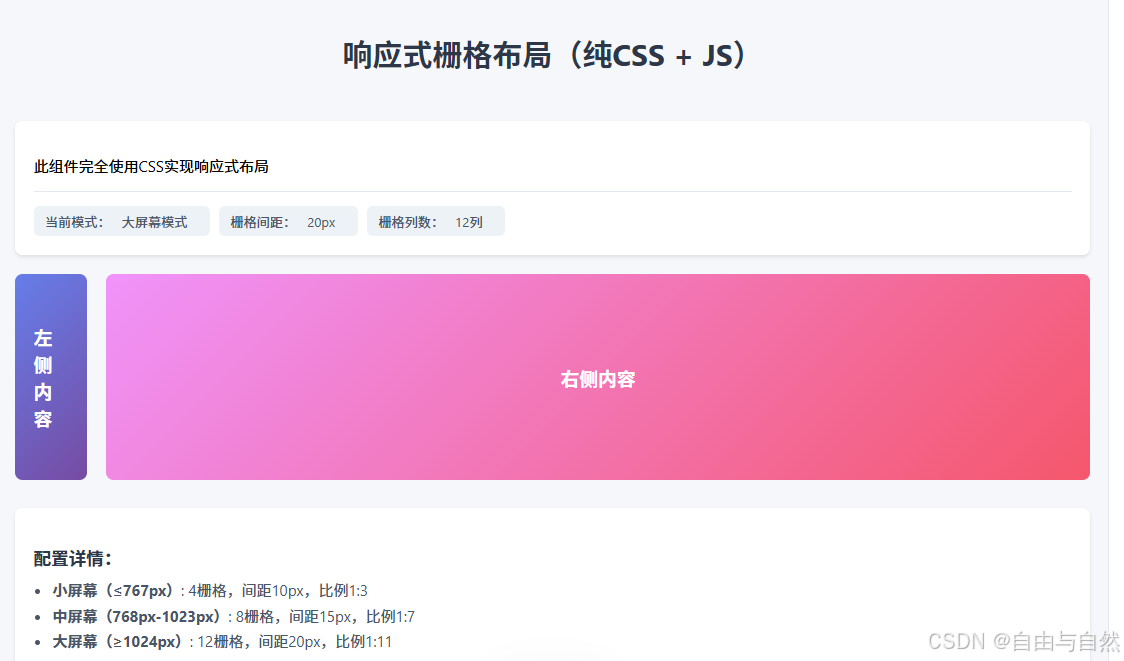
          <li><strong>小屏幕(≤767px)</strong>: 4栅格,间距10px,比例1:3</li>
          <li><strong>中屏幕(768px-1023px)</strong>: 8栅格,间距15px,比例1:7</li>
          <li><strong>大屏幕(≥1024px)</strong>: 12栅格,间距20px,比例1:11</li>
        </ul>
      </div>
    </div>
  </div>

  <script>
    const modeEl = document.getElementById('mode');
    const gapEl = document.getElementById('gap');
    const colsEl = document.getElementById('cols');

    function updateInfo() {
      const width = window.innerWidth;

      let mode, gap, cols;

      if (width < 768) {
        mode = '小屏幕模式';
        gap = '10px';
        cols = '4列';
      } else if (width >= 768 && width < 1024) {
        mode = '中屏幕模式';
        gap = '15px';
        cols = '8列';
      } else {
        mode = '大屏幕模式';
        gap = '20px';
        cols = '12列';
      }

      modeEl.textContent = mode;
      gapEl.textContent = gap;
      colsEl.textContent = cols;
    }

    // 初始化
    updateInfo();
    window.addEventListener('resize', updateInfo);
  </script>
</body>
</html>