轻量级数学符号点击复制工具HTML版
有些数学符号输入可能有一点麻烦。
常见的方案有:
在 Word 中可以使用Alt + =进入公式模式;
Windows 自带快捷键 (Win + . )按下Win键 +.(句点键),会弹出一个表情和符号面板。点击上方的"Ω"图标,里面包含了大量的数学、几何、希腊字母等符号。
这些可能不能完全满足你自己需要。你还可以自己制作了一个网页程序工具,这个工具包含了常用的数学符号分类,点击任意符号即可一键复制到剪贴板,还会有复制成功的提示,完全满足你简化数学符号输入的需求。
点击任意数学符号,即可自动复制到剪贴板,直接粘贴到需要的地方(Word、PPT、公式编辑器、网页等)。这个工具是纯前端网页,无需安装、无需部署,本地即可运行,使用零门槛------点击符号一键复制。
运行效果:
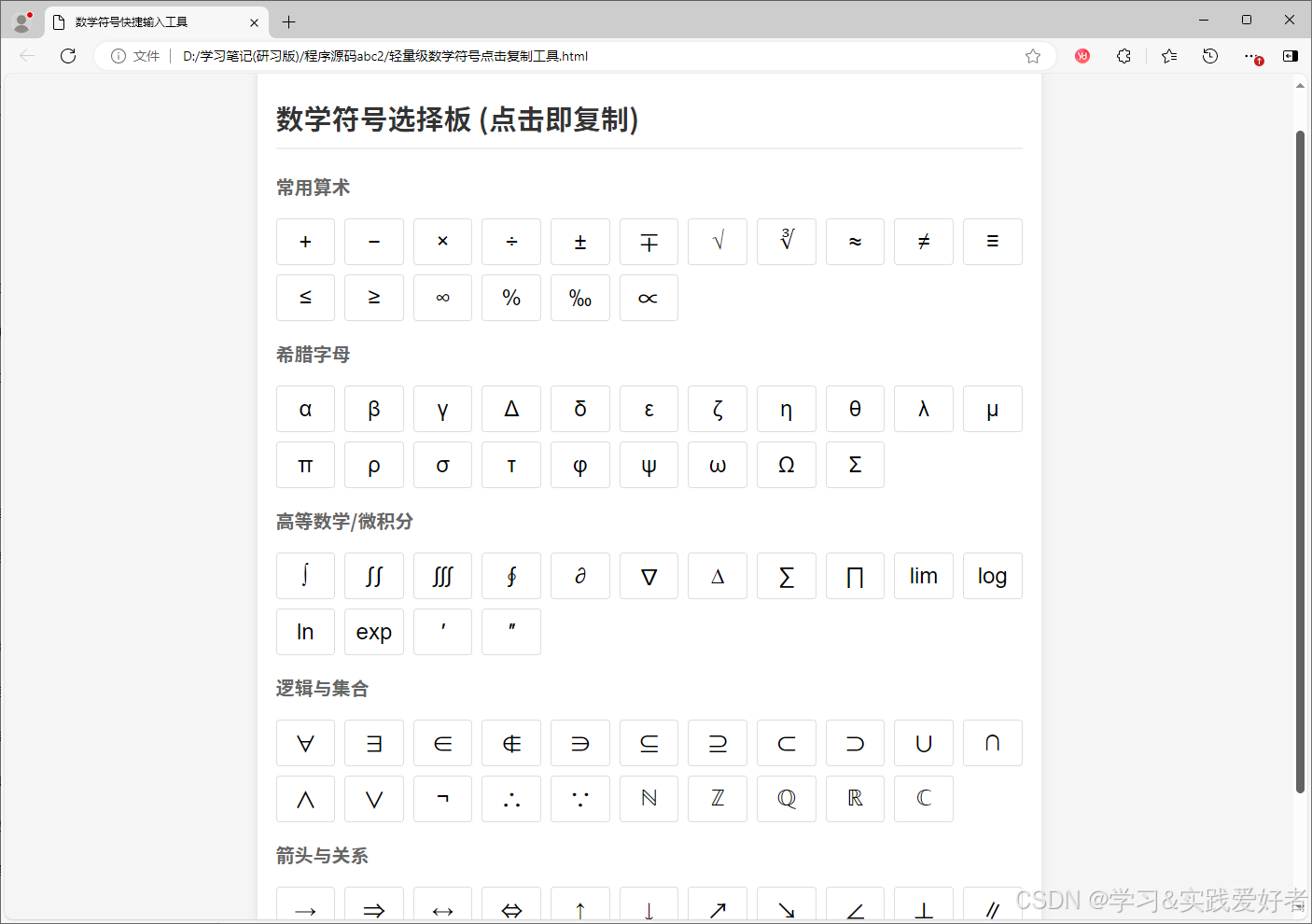
你可以将以下代码保存为.html文件(例如数学符号工具.html),然后用浏览器打开即可使用。
源码如下:
html
<!DOCTYPE html>
<html lang="zh-CN">
<head>
    <meta charset="UTF-8">
    <meta name="viewport" content="width=device-width, initial-scale=1.0">
    <title>数学符号快捷输入工具</title>
    <style>
        body { font-family: -apple-system, sans-serif; padding: 20px; background: #f5f5f5; }
        .container { max-width: 800px; margin: 0 auto; background: white; padding: 20px; border-radius: 8px; box-shadow: 0 2px 10px rgba(0,0,0,0.1); }
        h2 { border-bottom: 2px solid #eee; padding-bottom: 10px; color: #333; }
        h3 { font-size: 1rem; color: #666; margin-top: 20px; }
        .symbol-grid { display: grid; grid-template-columns: repeat(auto-fill, minmax(60px, 1fr)); gap: 10px; margin-bottom: 20px; }
        .symbol-btn {
            height: 50px; border: 1px solid #ddd; background: #fff; border-radius: 4px;
            font-size: 1.2rem; cursor: pointer; transition: all 0.2s;
            display: flex; align-items: center; justify-content: center;
        }
        .symbol-btn:hover { background: #e3f2fd; border-color: #2196f3; transform: translateY(-2px); }
        .symbol-btn:active { background: #bbdefb; }
        #toast {
            position: fixed; bottom: 20px; left: 50%; transform: translateX(-50%);
            background: #323232; color: white; padding: 10px 20px; border-radius: 20px;
            display: none; z-index: 1000;
        }
    </style>
</head>
<body>

<div class="container">
    <h2>数学符号选择板 (点击即复制)</h2>

    <h3>常用算术</h3>
    <div class="symbol-grid" id="arithmetic"></div>

    <h3>希腊字母</h3>
    <div class="symbol-grid" id="greek"></div>

    <h3>高等数学/微积分</h3>
    <div class="symbol-grid" id="advanced"></div>

    <h3>逻辑与集合</h3>
    <div class="symbol-grid" id="logic"></div>

    <h3>箭头与关系</h3>
    <div class="symbol-grid" id="arrows"></div>
</div>

<div id="toast">已复制到剪贴板</div>

<script>
    const symbolData = {
        arithmetic: ['+', '−', '×', '÷', '±', '∓', '√', '∛', '≈', '≠', '≡', '≤', '≥', '∞', '%', '‰','∝'],
        greek: ['α', 'β', 'γ', 'Δ', 'δ', 'ε', 'ζ', 'η', 'θ', 'λ', 'μ', 'π', 'ρ', 'σ', 'τ', 'φ', 'ψ', 'ω', 'Ω', 'Σ'],
        advanced: ['∫', '∬', '∭', '∮', '∂', '∇', '∆', '∑', '∏', 'lim', 'log', 'ln', 'exp', '′', '″'],
        logic: ['∀', '∃', '∈', '∉', '∋', '⊆', '⊇', '⊂', '⊃', '∪', '∩', '∧', '∨', '¬', '∴', '∵', 'ℕ', 'ℤ', 'ℚ', 'ℝ', 'ℂ'],
        arrows: ['→', '⇒', '↔', '⇔', '↑', '↓', '↗', '↘', '∠', '⊥', '∥', '△', '▱', '▭', '⊙']
    };

    function init() {
        for (let category in symbolData) {
            const container = document.getElementById(category);
            symbolData[category].forEach(sym => {
                const btn = document.createElement('button');
                btn.className = 'symbol-btn';
                btn.innerText = sym;
                btn.onclick = () => copySymbol(sym);
                container.appendChild(btn);
            });
        }
    }

    function copySymbol(sym) {
        navigator.clipboard.writeText(sym).then(() => {
            const toast = document.getElementById('toast');
            toast.innerText = `已复制: ${sym}`;
            toast.style.display = 'block';
            setTimeout(() => { toast.style.display = 'none'; }, 1500);
        });
    }

    init();
</script>
</body>
</html>