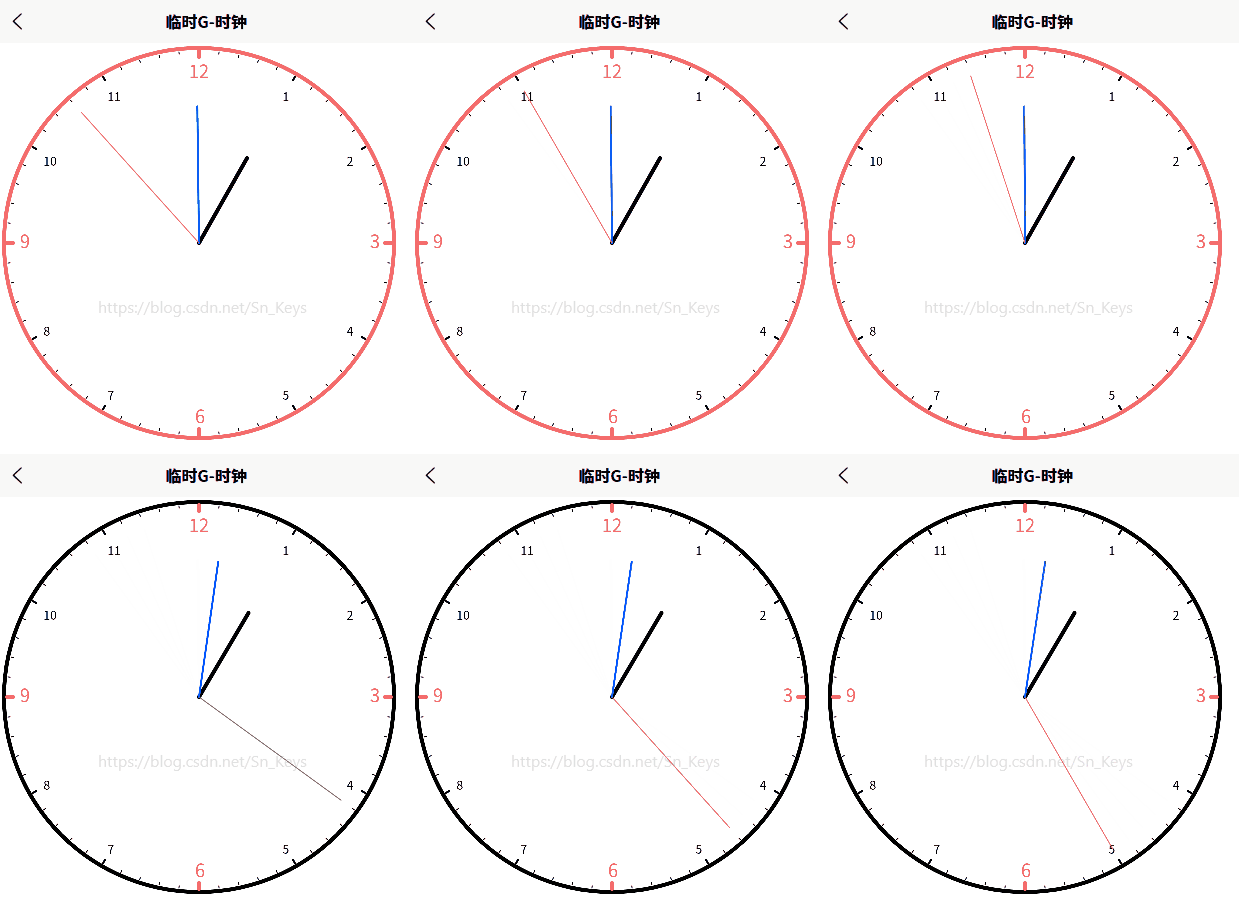
一个基于uni-app的时钟组件,通过canvas绘制模拟时钟。
主要功能包括:
- 绘制时钟外框和刻度;
- 实现时针、分针、秒针的动态效果;
- 支持自定义时钟样式参数(颜色、宽度等)。
技术要点:
使用canvas API绘制图形,通过定时器实现指针动画,支持响应式设计。组件包含完整的配置选项,可灵活调整时钟外观,适用于移动端和小程序开发场景。
javascript
<template>
<view class="container">
<canvas canvas-id="clockCanvas"></canvas>
</view>
</template>
<script>
export default {
data() {
return {
timer: null, // 时钟计时器对象
clockLineWidth: 4, // 时钟外框线条宽度
clockLineColor: "#F56C6C", // 时钟外框线条颜色
hourHandLineWidth: 4, // 时针线条宽度
hourHandLineColor: "#000000", // 时针线条颜色
minuteHandLineWidth: 2, // 分针线条宽度
minuteHandLineColor: "#0055ff", // 分针线条颜色
secondHandLineWidth: 1, // 秒针线条宽度
secondHandLineColor: "#F56C6C", // 秒针线条颜色
scale1LineWidth: 1, // 刻度盘1线条宽度(即每1分钟刻度点)
scale1LineHeigt: 1, // 刻度盘1线条高度(即每1分钟刻度点)
scale1LineColor: "#000000", // 刻度盘1线条颜色(即每1分钟刻度点)
scale2LineWidth: 2, // 刻度盘2线条宽度(即每1小时刻度点)
scale2LineHeigt: 3, // 刻度盘2线条高度(即每1小时刻度点)
scale2LineColor: "#000000", // 刻度盘2线条颜色(即每1小时刻度点)
keyScaleLineWidth: 4, // 关键刻度盘线条宽度(即每3小时刻度点)
keyScaleLineHeigt: 5, // 关键刻度盘线条高度(即每3小时刻度点)
keyScaleLineColor: "#F56C6C", // 关键刻度盘线条颜色(即每3小时刻度点)
numberFontSize: 12, // 数字字号大小(即每1小时刻度点)
numberFontWeight: "400", // 数字字体风格(即每1小时刻度点)
numberFontColor: "#000000", // 数字字体颜色(即每1小时刻度点)
keyNumberFontSize: 18, // 关键数字字号大小(即每3小时刻度点)
keyNumberFontWeight: "700", // 关键数字字体风格(即每3小时刻度点)
keyNumberFontColor: "#F56C6C", // 关键数字字体颜色(即每3小时刻度点)
}
},
onReady() {
this.drawClock();
this.startClock();
},
onUnload() {
this.stopClock();
},
methods: {
/**
* @description 绘制时钟
* <p>
* <ul>常规时钟指针长度比例(https://easylearn.baidu.com/edu-page/tiangong/questiondetail?id=1827121957304548740):
* <li>时针:表盘半径的70%</li>
* <li>分针:表盘半径的85%</li>
* <li>秒针:表盘半径的90%,且通常不超出表盘边缘。</li>
* </ul>
* @param {Number} hours 小时
* @param {Number} minutes 分钟
* @param {Number} seconds 秒
* @param {Number} offsetX 圆心X轴偏移量(单位:px。默认:40)
* @param {Number} offsetY 圆心Y轴偏移量(单位:px。默认:40)
* @param {Number} cycleR 圆半径(单位:px。默认:35)
*/
drawClock(hours, minutes, seconds, offsetX, offsetY, cycleR) {
// 创建时钟画布
const ctx = uni.createCanvasContext('clockCanvas', this);
// 启用抗锯齿(注:微信小程序中没有 setImageSmoothingEnabled 方法,但可以使用 ctx.scale(1, 1) 来模拟平滑效果 https://www.cnblogs.com/jiangxiaobo/p/5989752.html)
// ctx.scale(window.devicePixelRatio, window.devicePixelRatio); // 设置缩放比例(可选)
ctx.mozImageSmoothingEnabled = true;
ctx.webkitImageSmoothingEnabled = true;
ctx.msImageSmoothingEnabled = true;
ctx.imageSmoothingEnabled = true;
// 绘制时钟外框
ctx.setStrokeStyle(this.clockLineColor);
ctx.setLineJoin('round'); // 设置线条连接处为圆角
ctx.setLineCap('round'); // 设置线条端点为圆
ctx.beginPath();
ctx.setLineWidth(this.clockLineWidth); // 设置线条宽度
ctx.arc(offsetX, offsetY, cycleR, 0, 2 * Math.PI);
ctx.stroke();
// 绘制时钟刻度
for (let i = 0; i < 60; i++) {
ctx.save();
ctx.translate(offsetX, offsetY);
ctx.rotate((i * 6 * Math.PI) / 180);
ctx.beginPath();
if ([0, 15, 30, 45].includes(i)) {
// 每3小时刻度点:12、3、6、9
ctx.setStrokeStyle(this.keyScaleLineColor); // 设置画笔颜色
ctx.setLineWidth(this.keyScaleLineWidth);
ctx.moveTo(0, -(cycleR - this.clockLineWidth - this.keyScaleLineHeigt));
} else if ([5, 10, 20, 25, 35, 40, 50, 55].includes(i)) {
// 每1小时刻度点:1、2、4、5、7、8、10、11
ctx.setStrokeStyle(this.scale2LineColor);
ctx.setLineWidth(this.scale2LineWidth);
ctx.moveTo(0, -(cycleR - this.clockLineWidth - this.scale2LineHeigt));
} else {
// 每1分钟刻度点
ctx.setStrokeStyle(this.scale1LineColor);
ctx.setLineWidth(this.scale1LineWidth);
ctx.moveTo(0, -(cycleR - this.clockLineWidth - this.scale1LineHeigt));
}
ctx.lineTo(0, -(cycleR - this.clockLineWidth + 1));
ctx.stroke();
ctx.restore();
}
// 绘制时钟刻度和数字
for (let i = 1; i <= 12; i++) {
const angle = (i * 30 * Math.PI) / 180;
const x = offsetX + (cycleR - 20) * Math.sin(angle);
const y = offsetY - (cycleR - 20) * Math.cos(angle);
if ([3, 6, 9, 12].includes(i)) {
ctx.setFontSize(this.keyNumberFontSize); // 设置字体大小(单位:px)
ctx.setFillStyle(this.keyNumberFontColor); // 设置文本颜色
ctx.fontWeight = "bold"; // 设置字体粗体(即 bold 或 700)
} else {
ctx.setFontSize(this.numberFontSize); // 设置字体大小(单位:px)
ctx.setFillStyle(this.numberFontColor);
ctx.fontWeight = "normal";
}
const xTemp = x - (i != 12 ? 4 : 10);
const yTemp = y + ([1, 2, 10, 11, 12].includes(i) ? 10 : 5);
ctx.fillText(i, xTemp, yTemp);
}
// 绘制时针
ctx.save();
ctx.translate(offsetX, offsetY);
ctx.rotate(((hours % 12) * 30 + (minutes / 60) * 30) * (Math.PI / 180));
ctx.setStrokeStyle(this.hourHandLineColor);
ctx.beginPath();
ctx.setLineWidth(this.hourHandLineWidth);
ctx.moveTo(0, 0);
ctx.lineTo(0, -(cycleR * 0.5)); // 时针长度为表盘半径的60%~70%
ctx.stroke();
ctx.restore();
// 绘制分针
ctx.save();
ctx.translate(offsetX, offsetY);
ctx.rotate((minutes * 6 + (seconds / 60) * 6) * (Math.PI / 180));
ctx.setStrokeStyle(this.minuteHandLineColor);
ctx.beginPath();
ctx.setLineWidth(this.minuteHandLineWidth);
ctx.moveTo(0, 0);
ctx.lineTo(0, -(cycleR * 0.7)); // 分针长度为表盘半径的80%~90%
ctx.stroke();
ctx.restore();
// 绘制秒针
ctx.save();
ctx.translate(offsetX, offsetY);
ctx.rotate(seconds * 6 * (Math.PI / 180));
ctx.setStrokeStyle(this.secondHandLineColor);
ctx.beginPath();
ctx.setLineWidth(this.secondHandLineWidth);
ctx.moveTo(0, 0);
ctx.lineTo(0, -(cycleR * 0.9)); // 秒针长度为表盘半径的90%
ctx.stroke();
ctx.restore();
// 绘制画布
ctx.draw();
},
/** @description 开始计时 */
startClock() {
// 每秒更新一次钟表
this.timer = setInterval(() => {
// 获取当前时间
const now = new Date();
const hours = now.getHours();
const minutes = now.getMinutes();
const seconds = now.getSeconds();
// 绘制时钟
this.drawClock(hours, minutes, seconds, 200, 200, 195);
}, 1000);
},
/** @description 停止计时 */
stopClock() {
clearInterval(this.timer);
}
}
}
</script>
<style lang="scss">
// 页面容器
.container {
display: flex;
justify-content: flex-start;
align-items: center;
}
// 时钟画布
canvas {
width: 400px !important;
height: 400px !important;
display: flex;
justify-content: center;
align-items: center;
}
</style>