📌 概述
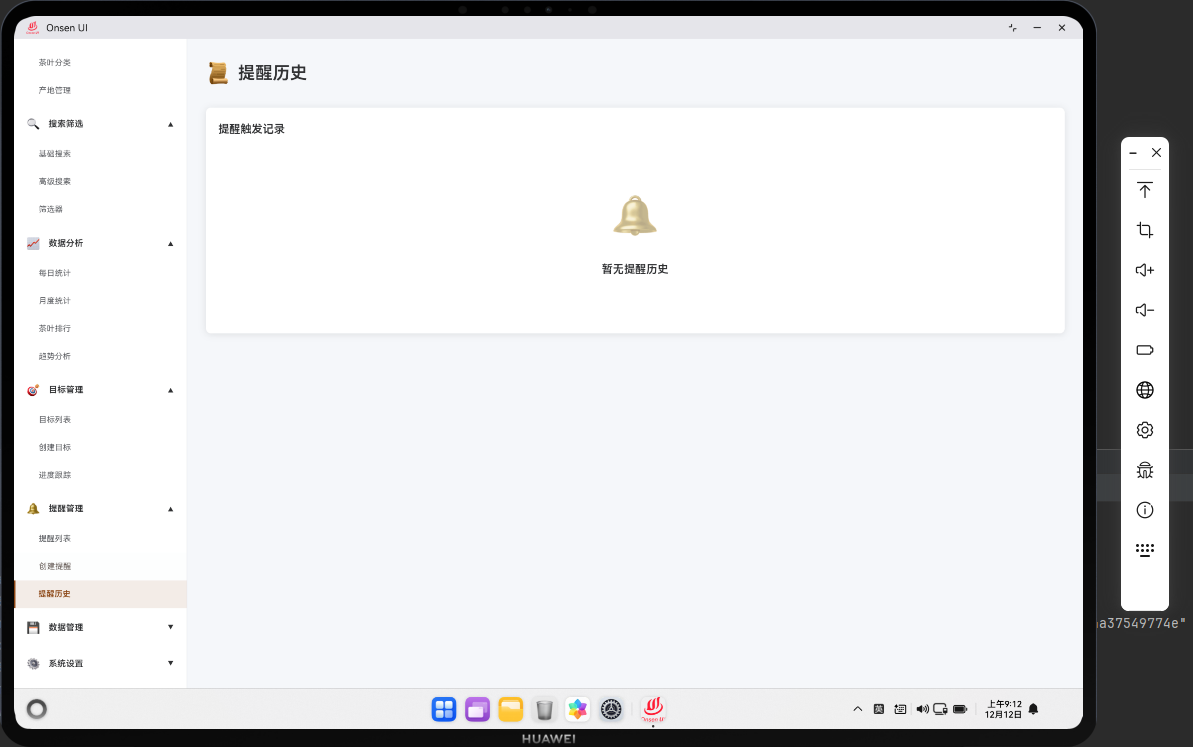
提醒历史模块展示了所有已触发的提醒记录。该模块集成了 Cordova 框架与 OpenHarmony 原生能力,提供了完整的提醒历史管理功能。用户可以查看提醒的触发时间、是否已读等信息。模块支持提醒历史的搜索和导出。
🔗 完整流程
第一步:提醒历史数据加载
当用户进入提醒历史页面时,应用会从数据库中加载所有已触发的提醒记录。应用会按时间倒序显示,最新的提醒显示在最前面。
第二步:历史记录展示
数据加载完成后,应用会将提醒历史显示为列表形式。每条记录显示提醒名称、触发时间和状态。用户可以标记提醒为已读或删除记录。
第三步:历史数据管理
用户可以清空所有历史记录或按时间范围删除记录。应用支持导出提醒历史为文件。
🔧 Web 代码实现
HTML 提醒历史页面
html
<div id="reminder-history-page" class="page">
    <div class="page-header">
        <h1>提醒历史</h1>
        <button class="btn btn-danger" onclick="clearHistory()">清空历史</button>
    </div>

    <div class="history-toolbar">
        <input type="text" id="history-search" class="search-box" placeholder="搜索提醒...">
        <button class="btn btn-primary" onclick="exportHistory()">导出</button>
    </div>

    <div id="history-list" class="history-list">
        <!-- 历史记录动态生成 -->
    </div>
</div>
提醒历史页面包含搜索、导出和清空功能。
提醒历史逻辑
javascript
async function renderReminderHistory() {
    try {
        const history = await db.getReminderHistory();
        const listContainer = document.getElementById('history-list');
        listContainer.innerHTML = '';

        if (history.length === 0) {
            listContainer.innerHTML = '<div class="no-data"><p>暂无历史记录</p></div>';
            return;
        }

        history.forEach(record => {
            const recordEl = createHistoryElement(record);
            listContainer.appendChild(recordEl);
        });

        // 绑定搜索事件
        document.getElementById('history-search').addEventListener('input', function(e) {
            const keyword = e.target.value.toLowerCase();
            const filtered = history.filter(r =>
                r.name.toLowerCase().includes(keyword)
            );
            renderHistoryItems(filtered);
        });

    } catch (error) {
        console.error('Failed to render history:', error);
        showToast('加载历史失败', 'error');
    }
}

function createHistoryElement(record) {
    const div = document.createElement('div');
    div.className = 'history-item';
    div.dataset.recordId = record.id;

    const triggerTime = new Date(record.triggeredAt).toLocaleString('zh-CN');
    const readStatus = record.read ? '已读' : '未读';
    const readClass = record.read ? 'read' : 'unread';

    div.innerHTML = `
        <div class="history-info">
            <div class="history-name">${record.name}</div>
            <div class="history-time">${triggerTime}</div>
            <div class="history-status ${readClass}">${readStatus}</div>
        </div>
        <div class="history-actions">
            <button class="btn-icon" onclick="markAsRead(${record.id})" title="标记已读">✓</button>
            <button class="btn-icon" onclick="deleteHistoryRecord(${record.id})" title="删除">🗑️</button>
        </div>
    `;

    return div;
}

function renderHistoryItems(records) {
    const listContainer = document.getElementById('history-list');
    listContainer.innerHTML = '';

    if (records.length === 0) {
        listContainer.innerHTML = '<div class="no-data"><p>暂无记录</p></div>';
        return;
    }

    records.forEach(record => {
        const recordEl = createHistoryElement(record);
        listContainer.appendChild(recordEl);
    });
}

async function markAsRead(recordId) {
    try {
        await db.updateHistoryRecord(recordId, { read: true });
        showToast('已标记为已读', 'success');
        renderReminderHistory();
    } catch (error) {
        console.error('Failed to mark as read:', error);
        showToast('操作失败', 'error');
    }
}

async function deleteHistoryRecord(recordId) {
    try {
        await db.deleteHistoryRecord(recordId);
        showToast('记录已删除', 'success');
        renderReminderHistory();
    } catch (error) {
        console.error('Failed to delete record:', error);
        showToast('删除失败', 'error');
    }
}

async function clearHistory() {
    if (!confirm('确定要清空所有历史记录吗?')) {
        return;
    }

    try {
        await db.clearReminderHistory();
        showToast('历史已清空', 'success');
        renderReminderHistory();
    } catch (error) {
        console.error('Failed to clear history:', error);
        showToast('清空失败', 'error');
    }
}

async function exportHistory() {
    try {
        const history = await db.getReminderHistory();
        const csvData = convertToCSV(history);

        if (window.cordova) {
            cordova.exec(
                function() { showToast('导出成功', 'success'); },
                function(err) { showToast('导出失败', 'error'); },
                'FileManager',
                'exportData',
                [{ data: csvData, filename: 'reminder_history.csv' }]
            );
        }
    } catch (error) {
        console.error('Failed to export history:', error);
        showToast('导出失败', 'error');
    }
}

function convertToCSV(records) {
    let csv = '提醒名称,触发时间,状态\n';
    records.forEach(record => {
        const time = new Date(record.triggeredAt).toLocaleString('zh-CN');
        const status = record.read ? '已读' : '未读';
        csv += `${record.name},${time},${status}\n`;
    });
    return csv;
}这段代码实现了提醒历史功能。renderReminderHistory() 加载并渲染历史记录。markAsRead() 标记记录为已读。deleteHistoryRecord() 删除单条记录。clearHistory() 清空所有历史。exportHistory() 导出历史为文件。
🔌 OpenHarmony 原生代码
历史数据导出
typescript
// entry/src/main/ets/plugins/HistoryExporter.ets
import { fileIo } from '@kit.FileIOKit';
import { paths } from '@kit.CoreFileKit';

export class HistoryExporter {
    static exportToCSV(data: string, filename: string): Promise<string> {
        return new Promise((resolve, reject) => {
            try {
                const filePath = paths.tempDir + '/' + filename;
                const fd = fileIo.openSync(filePath, 0o100 | 0o001, 0o666);
                fileIo.writeSync(fd, data);
                fileIo.closeSync(fd);

                hilog.info(0xFF00, 'HistoryExporter', `File exported to: ${filePath}`);
                resolve(filePath);
            } catch (error) {
                hilog.error(0xFF00, 'HistoryExporter', `Failed to export: ${error}`);
                reject(error);
            }
        });
    }
}这个类处理历史数据导出。exportToCSV() 将数据导出为 CSV 文件。
📝 总结
提醒历史模块展示了如何在 Cordova 框架中实现历史记录管理功能。通过 Web 层的历史展示和交互,结合原生层的文件导出,为用户提供了完整的提醒历史管理体验。
欢迎加入开源鸿蒙跨平台社区:https://openharmonycrossplatform.csdn.net