概述
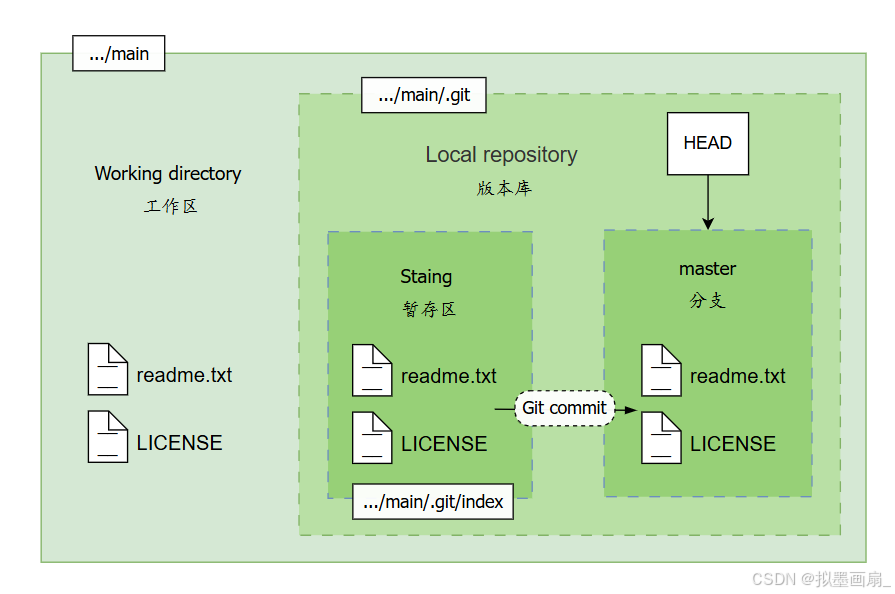
Git仓库可以分为工作区 、版本库 、暂存区三大部分,其功能和位置如下:
| 名称 | 目录 | 说明 |
|---|---|---|
| 工作区 | .../main |
直接编辑文件的可见目录(即本地计算机上的项目目录,但不包括 .git 目录),用户在这里进行文件的创建、修改和删除操作 |
| 暂存区 | .../main/.git/index |
临时存储 git add (添加操作)后的变更 可以多次将文件添加到暂存区,直到准备好提交所有更改 |
| 版本库 | .../main/.git |
永久存储 git commit (提交操作)后的内容 包含项目的所有提交的版本历史记录。 |
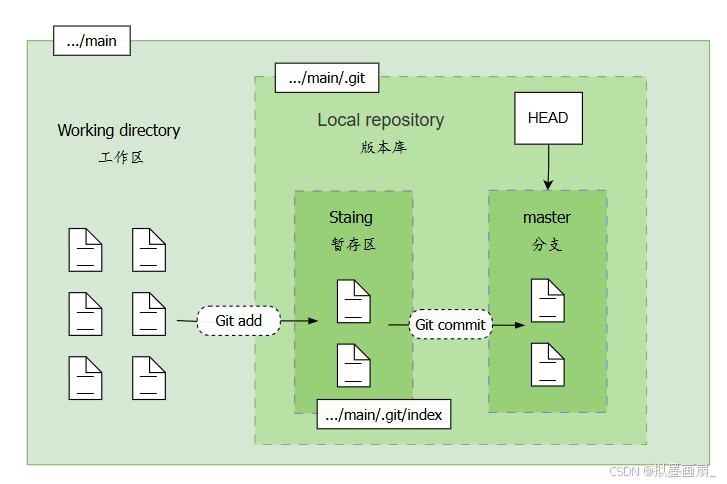
git add添加更改时 ------ 实际上把 对文件的修改记录 添加到 暂存区git commit提交更改时 ------ 实际上是把 暂存区的所有内容 提交到 当前分支
"把需要提交的文件修改首先放到暂存区,最后一次性把暂存区的所有修改内容提交到当前分支"
指令介绍
添加文件 git add
-
语法
shgit add [-options] <文件或目录路径>参数 options说明 -A或--all或.添加所有改动(包括新增、修改、删除的文件) -u或--update仅添加已跟踪文件的修改(不包含新增文件) -p或--patch交互式选择部分修改,可逐块确认是否暂存 -f或--force强制添加被 .gitignore忽略的文件-i或--interactive进入交互模式,手动选择操作 -
示例
-
一次添加单个文件:
shgit add readme.txt -
一次添加多个文件
shgit add file1.txt file2.txt -
一次添加所有改动
shgit add -A git add . -
仅添加已跟踪文件的修改(不包含新增文件)
shgit add -u -
交互式选择部分修改进行添加
sh$ git add -p diff --git a/readme.txt b/readme.txt index 1234567..89abcde 100644 --- a/readme.txt +++ b/readme.txt @@ -1 +1,2 @@ Git is a version control system. +Git is free software. Stage this hunk [y,n,q,a,d,s,e,?]? y操作选项:
选项 含义 选项 含义 y暂存当前块 q退出 n不暂存 ?查看帮助
-
提交文件 git commit
-
语法
shgit commit [-options] "commitMsg"参数 options说明 -m "commitMsg"直接附加提交信息(必须填写) -a或--all跳过 git add,自动提交所有已跟踪文件的修改(不包含新增文件)--amend修改最近一次提交(可更改提交信息或追加文件) -v或--verbose提交时显示详细的 Diff变更信息--no-verify绕过 Git Hooks(如pre-commit检查) -
示例
-
基本提交
sh$ git add file.txt # 暂存修改 $ git commit -m "fix Bug" # 提交并附加信息 [main 1a2b3c4] fix Bug 1 file changed, 2 insertions(+), 1 deletion(-) -
跳过
git add,直接提交已跟踪文件的修改sh$ git commit -am "docs: update README"适用场景 :仅提交已跟踪文件的修改,等同于
git add -u + git commit -m -
修改最近一次提交
shgit add forgotten_file.txt # 添加漏掉的文件 git commit --amend -m "new commit msg" # 替换上次提交
-
查询状态 git status
-
语法
shgit status [<-options>]参数 options说明 --long详细格式(默认) -s或--short简洁格式 -b或--branch显示分支信息(包含本地/远程分支关联状态) --show-stash同时显示 stash中的变更记录-- <pathspec>显示指定路径下的状态 -
示例
sh$ git status On branch main # 在分支 main 上 Your branch is up to date with 'origin/main'. # 已暂存的更改(待提交commit) Changes to be committed: (use "git restore --staged <file>..." to unstage) modified: README.md # 已修改+未暂存的更改(待添加add) Changes not staged for commit: (use "git add <file>..." to update what will be committed) (use "git restore <file>..." to discard changes in working directory) modified: index.html # 新文件,尚未被 Git 跟踪(待添加add) Untracked files: (use "git add <file>..." to include in what will be committed) new-file.txt-
Changes not staged for commit------ 已修改但未暂存的更改 -
Changes to be committed------ 已暂存的更改(在索引中) -
Untracked files------ 新文件,尚未被Git跟踪
-
添加文件到暂存区
相关指令
-
git add------ 工作区文件添加到暂存区 -
git status------ 查看当前状态
实操
-
编写文件 ------ 在创建好的
Git项目下,编写一个readme.txt文件,内容如下:txtHello word! -
添加文件 ------ 输入命令
git add添加文件,没有输出任何内容即代表提交成功sh$ git add readme.txt -
查看状态 ------ 输入命令
git status查看当前仓库状态sh$ git status On branch master # 尚无任何提交记录 No commits yet # readme.txt 被添加 Changes to be committed: (use "git rm --cached <file>..." to unstage) new file: readme.txt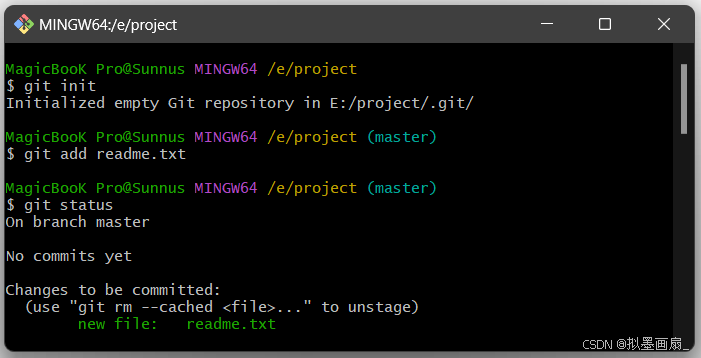
-
修改文件 ------ 修改
readme.txt,新增LICENSE.txt文件,通过git status查看状态sh$ git status On branch master # 在分支 master 上 No commits yet # 尚无提交记录 # readme.txt 被添加 Changes to be committed: (use "git rm --cached <file>..." to unstage) new file: readme.txt # readme.txt 被修改 Changes not staged for commit: (use "git add <file>..." to update what will be committed) (use "git restore <file>..." to discard changes in working directory) modified: readme.txt # LICENSE.txt 未被添加 Untracked files: (use "git add <file>..." to include in what will be committed) LICENSE.txt -
添加更改 ------ 通过命令
git add一次添加两个文件,通过git status查看状态sh$ git add readme.txt LICENSE.txtsh$ git status On branch master # 在分支 master 上 No commits yet # 尚无提交记录 # readme.txt的修改 和 LICENSE.txt的创建 均被添加到暂存区 Changes to be committed: (use "git rm --cached <file>..." to unstage) new file: LICENSE.txt new file: readme.txt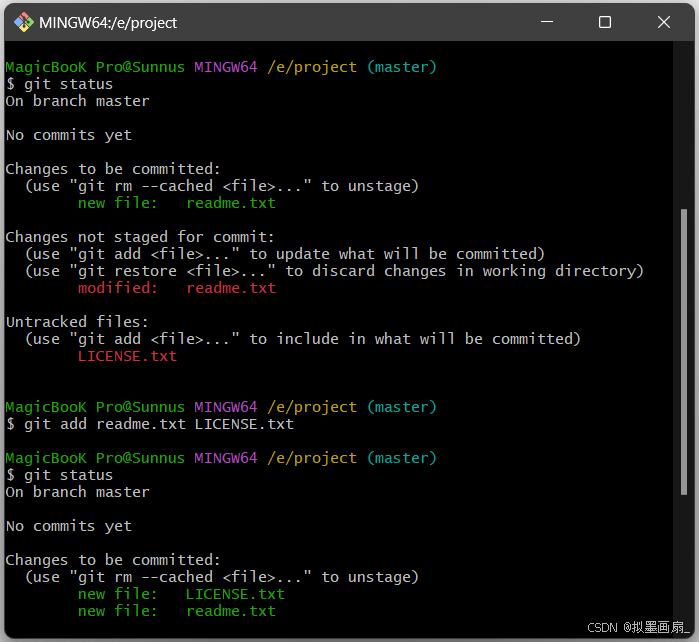
-
仓库状态 ------ 当前仓库状态如下,通过
git add操作已成功把两个文件内容添加到暂存区,等待提交到分支上

提交文件到分支上
相关指令
git commit------ 把暂存区文件提交到本地仓库的分支上
实操
-
提交更改 ------ 通过命令
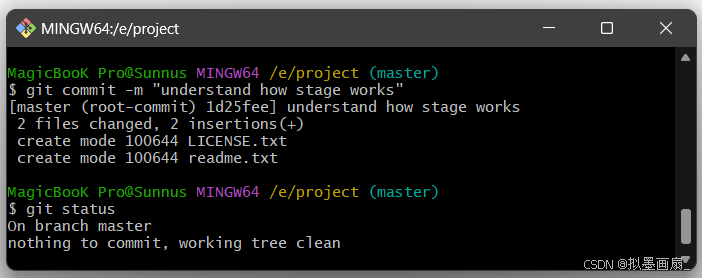
git commit提交更改,通过git status查看状态sh$ git commit -m "understand how stage works" [master (root-commit) 1d25fee] understand how stage works 2 files changed, 2 insertions(+) create mode 100644 LICENSE.txt create mode 100644 readme.txtsh$ git status On branch master nothing to commit, working tree clean # 提交后,工作区变为"干净"的可以看到,文件已经被提交成功,同时仓库的工作区变得"干净",即没有尚未提交的内容
-
仓库状态 ------ 当前仓库状态如下,通过
git commit操作已成功把两个文件内容提交到当前的主分支master上