用 Spring Boot 3.x + dynamic-datasource + Druid 的时候,最让人抓狂的就是:
- 监控页面一访问就 "No static resource druid." 😱
- 控制台死活不打印 SQL,只有出错才冒泡 🤬
- 配置改了半天,还是不生效...
经过无数次重启、翻源码、看 Issue,我终于整出一套超级稳定的方案!监控页面美美哒,多数据源切换顺滑,控制台 SQL 日志带参数打印(正常+出错都行)。
来来来,直接上干货~轻松复制粘贴,就能跑起来!
先加依赖,别多加!
XML
xml
<dependencies>
    <!-- 多数据源神器 -->
    <dependency>
        <groupId>com.baomidou</groupId>
	    <artifactId>dynamic-datasource-spring-boot3-starter</artifactId> <!-- 多数据源 -->
        <version>4.3.1</version>  <!-- 最新版最香 -->
    </dependency>

    <!-- Druid 的 Spring Boot 3 专用 starter -->
    <dependency>
        <groupId>com.alibaba</groupId>
		<artifactId>druid-spring-boot-3-starter</artifactId>
        <version>1.2.27</version>
        <exclusions>
            <exclusion>
                <artifactId>druid</artifactId>
                <groupId>com.alibaba</groupId>
            </exclusion>
        </exclusions>
    </dependency>

    <!-- 强制核心 druid 为 1.2.27 -->
    <dependency>
        <groupId>com.alibaba</groupId>
        <artifactId>druid</artifactId>
        <version>1.2.27</version>
    </dependency>
</dependencies>
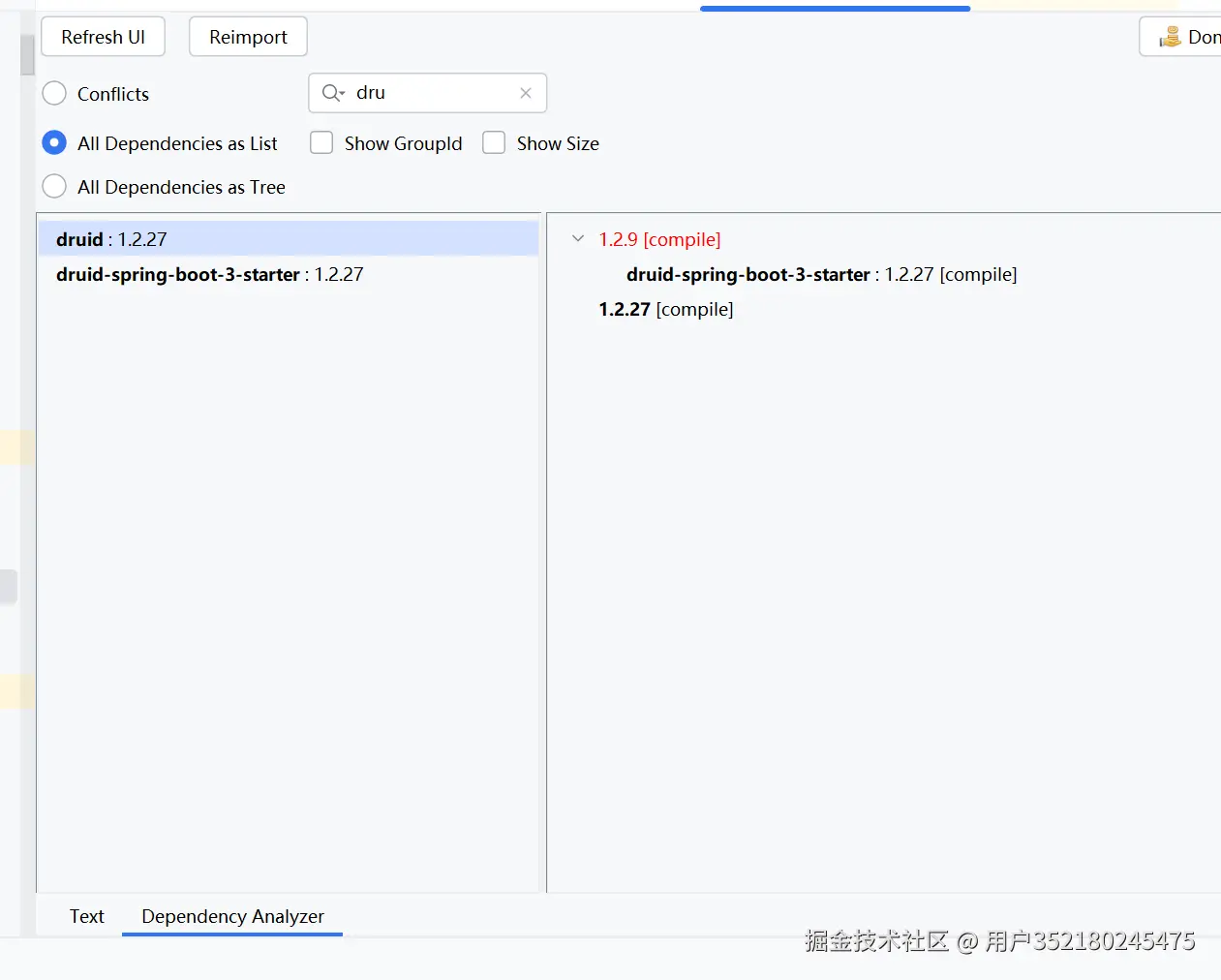
一般只加这一个 Druid starter 就够啦!但是使用的是最新的1.2.27的包,druid-spring-boot-3-starter依赖的是1.2.9,所以需要强制添加核心,是否依赖正确的包,可以通过maven help来排查冲突:
排除原生自动配置(超级重要!不然各种冲突)
在 application.yml 里加:
YAML
yaml
spring:
  autoconfigure:
    exclude:
      - com.alibaba.druid.spring.boot.autoconfigure.DruidDataSourceAutoConfigure
或者直接在启动类上怼注解:
Java
python
@SpringBootApplication(exclude = com.alibaba.druid.spring.boot.autoconfigure.DruidDataSourceAutoConfigure.class)yml 配置(连接池 + Filter)
YAML
yaml
spring:
  datasource:
    dynamic:
      primary: master
      druid:
        initial-size: 5
        min-idle: 10
        max-active: 20
        max-wait: 60000
        # 其他连接池参数随便调~

        filters: stat,wall,slf4j  # stat 监控,wall 防注入,slf4j 打印日志

        filter:
          slf4j:
            enabled: true
            statement-executable-sql-log-enable: true   # 带参数美化 SQL
            statement-log-enabled: false                # 关掉原始 ? 日志,别重复
            result-set-log-enabled: false

      datasource:
        master:
          url: jdbc:mysql://localhost:3306/db1?xxx
          username: root
          password: root
          driver-class-name: com.mysql.cj.jdbc.Driver
        slave:
          # 同上...
手动注册监控页面(最稳!自动配置容易翻车)
1.2.27并没有默认开始监控页面,需要我们自己配置,新建一个配置类 DruidMonitorConfig.java:
Java
java
import com.alibaba.druid.support.jakarta.StatViewServlet;
import com.alibaba.druid.support.jakarta.WebStatFilter;
import org.springframework.boot.web.servlet.FilterRegistrationBean;
import org.springframework.boot.web.servlet.ServletRegistrationBean;
import org.springframework.context.annotation.Bean;
import org.springframework.context.annotation.Configuration;
import org.springframework.web.servlet.config.annotation.ResourceHandlerRegistry;
import org.springframework.web.servlet.config.annotation.WebMvcConfigurer;

import java.util.HashMap;

@Configuration
public class DruidMonitorConfig {

    @Bean
    public ServletRegistrationBean<StatViewServlet> statViewServlet() {
        ServletRegistrationBean<StatViewServlet> bean = new ServletRegistrationBean<>();
        bean.setServlet(new StatViewServlet());
        bean.addUrlMappings("/druid/*");

        var params = new HashMap<String, String>();
        params.put("loginUsername", "admin");
        params.put("loginPassword", "123456");
        params.put("allow", "");
        params.put("resetEnable", "false");
        bean.setInitParameters(params);
        return bean;
    }

    @Bean
    public FilterRegistrationBean<WebStatFilter> webStatFilter() {
        FilterRegistrationBean<WebStatFilter> bean = new FilterRegistrationBean<>();
        bean.setFilter(new WebStatFilter());
        bean.addUrlPatterns("/*");

        var params = new HashMap<String, String>();
        params.put("exclusions", "*.js,*.gif,*.jpg,*.png,*.css,*.ico,/druid/*");
        bean.setInitParameters(params);
        return bean;
    }

    // 静态资源,别忘了!
    @Bean
    public WebMvcConfigurer druidResources() {
        return new WebMvcConfigurer() {
            @Override
            public void addResourceHandlers(ResourceHandlerRegistry registry) {
                registry.addResourceHandler("/druid/**")
                        .addResourceLocations("classpath:/support/http/resources/");
            }
        };
    }
}其中资源的路径跟很多网站与ai说的都不一样,正确的是:/support/http/resources/
logback 让日志蹦出来
XML,重要也简单,网上很多配置都出错,这是通过调试源码找到的配置。甚至很多ai也都给出错误的配置:
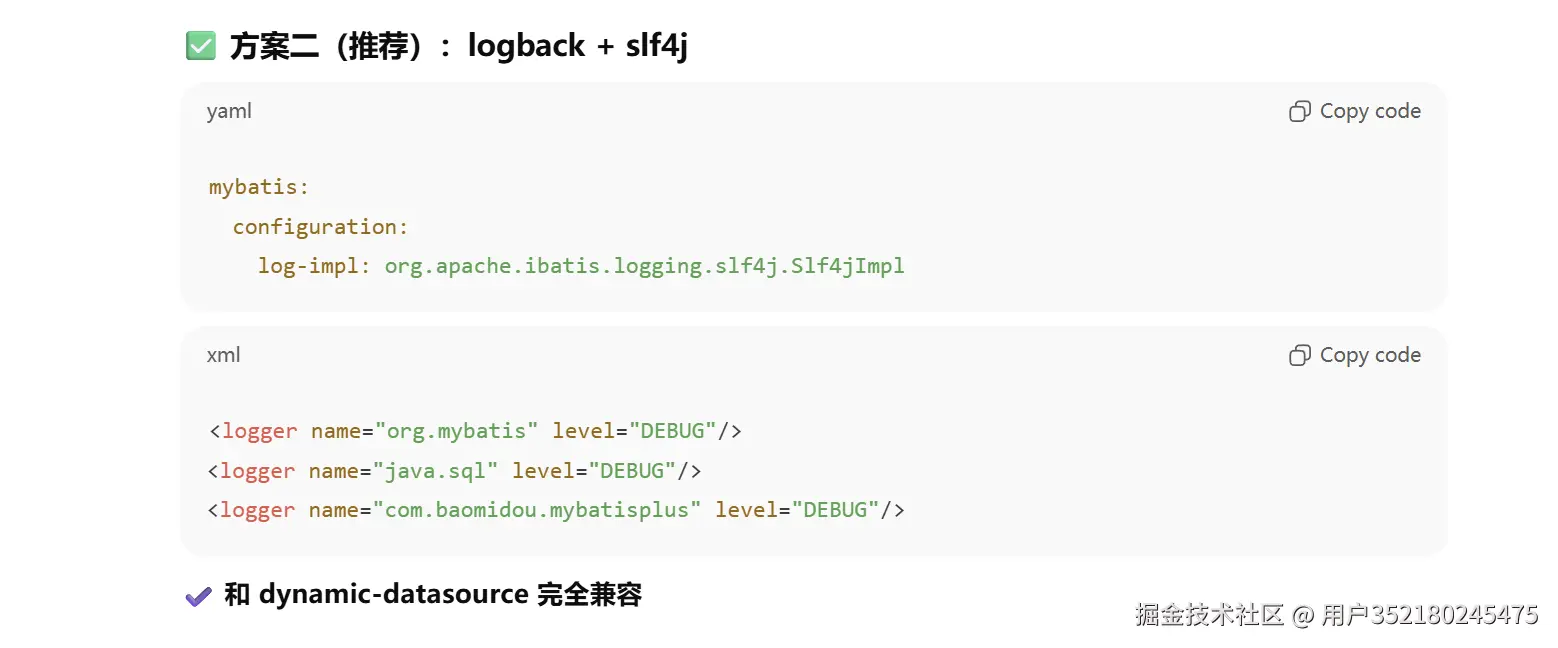
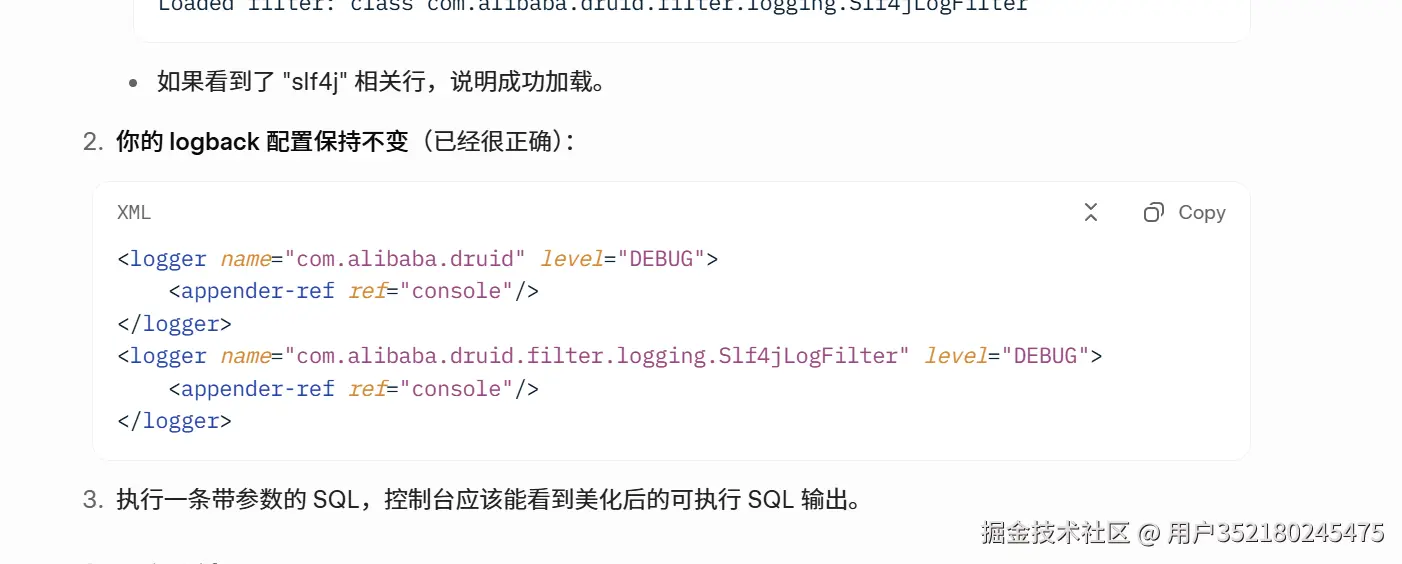
正确的打开方式如下:
ini
<logger name="druid.sql.Statement" level="DEBUG"/>效果图(文字版哈哈)
控制台正常 SQL:
text
sql
DEBUG com.alibaba.druid.filter.logging.Slf4jLogFilter - executable sql:
select * from user where id = ? and age > ?
==> Parameters: 1(Long), 18(Integer)
==> Total: 3
出错 SQL 也会强制打印~
监控页面:访问 /druid/,admin/123456 登录,就能看到 master/slave 切换、SQL 统计、慢查询,爽!

SQL统计

注意:这个版本的重置功能失效!