🎬 个人主页 :Vect个人主页
🎬 GitHub :Vect的代码仓库
🔥 个人专栏 : 《数据结构与算法》《C++学习之旅》《Linux》
⛺️Per aspera ad astra.
文章目录
- [1. 进程创建](#1. 进程创建)
- [2. 进程终止](#2. 进程终止)
- 3.进程等待
- [4. 进程程序替换](#4. 进程程序替换)
1. 进程创建
fork函数
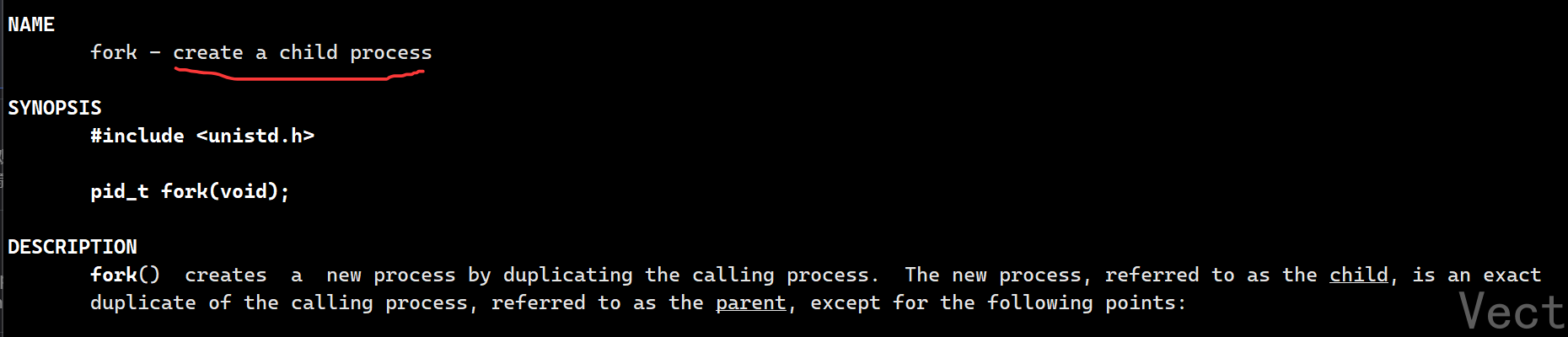

根据文档描述:
fork函数的作用是创建一个子进程
返回值:
- >0 把子进程的pid返回给父进程
- ==0 说明创建的是子进程
- -1 说明进程创建失败
进程调用fork,当控制转移到内核中fork代码后,内核做:
- 分配新的内存块和内核数据结构给子进程
- 将父进程部分数据内容拷贝给子进程
- 添加子进程到系统进程列表中
for返回,调度器开始调度
看如下代码:
cpp
#include <stdio.h>
#include <sys/types.h>
#include <unistd.h>

int main(){
  printf("before: pid: %d\n",getpid());

  pid_t id = fork();
  if(id < 0){
    perror("fork");
    return 1;
  }else if(id == 0){
    printf("after: child, pid:%d, return val: %d\n",getpid(),id);
  }else{
    printf("after: fatehr, pid:%d, return val: %d\n",getpid(),id);
  }

  return 0;
}
输出结果:
bash
[vect@VM-0-11-centos process_control]$ make
gcc -o show_fork show_fork.c
[vect@VM-0-11-centos process_control]$ ./show_fork
before: pid: 9928
after: fatehr, pid:9928, return val: 9929
after: child, pid:9929, return val: 0在frok之前,父进程执行打印,此时没有创建子进程
在fork之后,父子进程分别执行各自的打印操作
也就是说,fork之前父进程独立执行,fork之后父子进程执行流分别执行

为什么子进程返回0,父进程返回子进程的pid?
一个父进程可以有多个子进程,而一个子进程只能有一个父进程。对于父进程,子进程需要被标记,父进程可以根据子进程的pid返回值更好的管理子进程;而对于子进程来说,父进程无需被标记
为什么fork有两个返回值?
并不是
fork返回两次,而是fork调用一次会创建一个子进程,父子进程会从fork返回处继续执行,各自拿到一个返回值
写时拷贝
fork创建子进程时,内核不会立刻复制父进程的物理内存,而是做两件事:
- 共享物理内存: 父子进程共享同一块物理内存空间(包括代码和数据)
- 标记页表项为 "只读":将父子进程页表中指向该共享物理内存的页表项权限均设置为 "只读";同时保证父子进程的虚拟地址通过各自的页表项,映射到同一块物理内存页
当父进程或子进程试图修改这块内存 时,内核触发缺页异常 , 进行缺页中断,随即开始检测,判定有进程要发生写时拷贝------为要修改的的内存创建独立的物理内存副本,然后让修改方指向这个新副本,另一方仍指向原内存
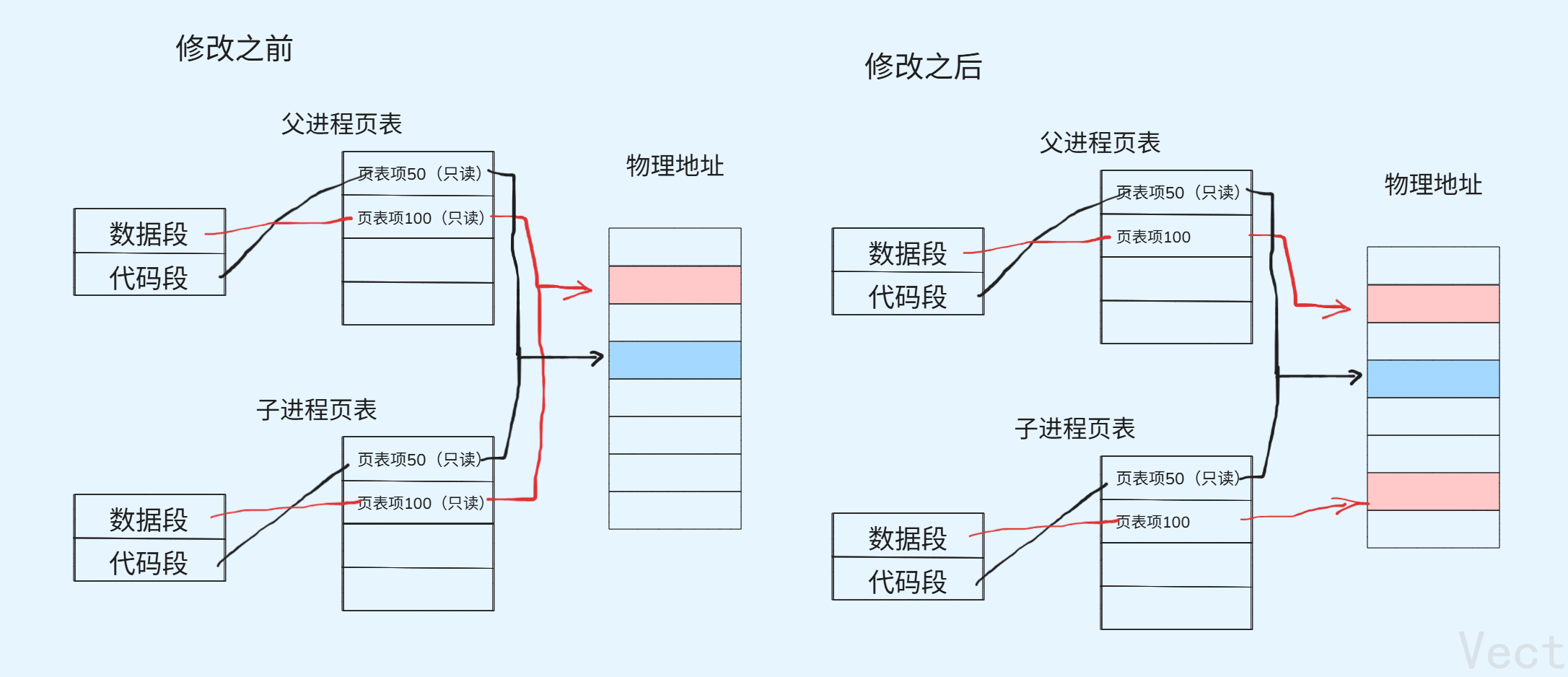
详细过程如下:
fork调用,创建子进程
- 父进程调用
fork,内核创建子进程的PCB,复制父进程的页表- 内核将父子进程页表项的代码和数据标记为"只读"
- 父子进程的页表映射到同一块物理内存
- 返回两个进程的返回值,此时父子进程完全共享内存
无修改操作->持续共享内存
- 若父子进程都只读取内存,永远不触发写实拷贝
有操作修改->触发写时拷贝
当父子进程试图写入某块内存时:
- CPU触发缺页异常
- 内核捕获异常,检查是写时拷贝导致的异常
- 内核为被修改的这个内存分配新的物理内存
- 内核将原内存的内容拷贝到新的内存
- 修改触发写操作的页表项,指向新的物理内存
- 取消新内存的只读标记,原内存保持只读
- 异常处理结束,CPU重新执行写操作,此时写入新副本
fork的用法
- 一个父进程希望复制自己,使父子进程执行不同的代码段
- 一个进程要执行一个不同的程序
fork失败的原因
- 系统进程太多
- 实际用的进程数超过了限制
2. 进程终止
进程终止的本质是释放内核数据结构和对应代码与数据
有三个场景:
- 代码运行完毕,结果正确->返回0
- 代码运行完毕,结果错误->返回非0
- 代码异常终止->本质是OS用信号提前终止了进程
进程退出方法
正常终止的进程可以通过
echo $?查看最近一次进程的退出码
bash./look_exit hh [vect@VM-0-11-centos process_control]$ echo $? 0 [vect@VM-0-11-centos process_control]$ lsls -bash: lsls: command not found [vect@VM-0-11-centos process_control]$ echo $? 127
- 从
main函数返回- 调用
exit_exit异常退出:
ctrl+c,信号终止
退出码
退出码可以告诉我们最后一次执行的进程的状态。在命令结束后,可以根据退出码知道进程以什么方式终止
Linux Shell中的退出码有
bash
0:Success
1:Operation not permitted
2:No such file or directory
3:No such process
4:Interrupted system call
5:Input/output error
6:No such device or address
7:Argument list too long
8:Exec format error
9:Bad file descriptor
10:No child processes
11:Resource temporarily unavailable
12:Cannot allocate memory
13:Permission denied
14:Bad address
15:Block device required
16:Device or resource busy
17:File exists
18:Invalid cross-device link
19:No such device
20:Not a directory
21:Is a directory
22:Invalid argument
23:Too many open files in system
24:Too many open files
25:Inappropriate ioctl for device
26:Text file busy
27:File too large
28:No space left on device
29:Illegal seek
30:Read-only file system
31:Too many links
32:Broken pipe
33:Numerical argument out of domain
34:Numerical result out of range
35:Resource deadlock avoided
36:File name too long
37:No locks available
38:Function not implemented
39:Directory not empty
40:Too many levels of symbolic links
41:Unknown error 41
42:No message of desired type
43:Identifier removed
44:Channel number out of range
45:Level 2 not synchronized
46:Level 3 halted
47:Level 3 reset
48:Link number out of range
49:Protocol driver not attached
50:No CSI structure available
51:Level 2 halted
52:Invalid exchange
53:Invalid request descriptor
54:Exchange full
55:No anode
56:Invalid request code
57:Invalid slot
58:Unknown error 58
59:Bad font file format
60:Device not a stream
61:No data available
62:Timer expired
63:Out of streams resources
64:Machine is not on the network
65:Package not installed
66:Object is remote
67:Link has been severed
68:Advertise error
69:Srmount error
70:Communication error on send
71:Protocol error
72:Multihop attempted
73:RFS specific error
74:Bad message
75:Value too large for defined data type
76:Name not unique on network
77:File descriptor in bad state
78:Remote address changed
79:Can not access a needed shared library
80:Accessing a corrupted shared library
81:.lib section in a.out corrupted
82:Attempting to link in too many shared libraries
83:Cannot exec a shared library directly
84:Invalid or incomplete multibyte or wide character
85:Interrupted system call should be restarted
86:Streams pipe error
87:Too many users
88:Socket operation on non-socket
89:Destination address required
90:Message too long
91:Protocol wrong type for socket
92:Protocol not available
93:Protocol not supported
94:Socket type not supported
95:Operation not supported
96:Protocol family not supported
97:Address family not supported by protocol
98:Address already in use
99:Cannot assign requested address
100:Network is down
101:Network is unreachable
102:Network dropped connection on reset
103:Software caused connection abort
104:Connection reset by peer
105:No buffer space available
106:Transport endpoint is already connected
107:Transport endpoint is not connected
108:Cannot send after transport endpoint shutdown
109:Too many references: cannot splice
110:Connection timed out
111:Connection refused
112:Host is down
113:No route to host
114:Operation already in progress
115:Operation now in progress
116:Stale file handle
117:Structure needs cleaning
118:Not a XENIX named type file
119:No XENIX semaphores available
120:Is a named type file
121:Remote I/O error
122:Disk quota exceeded
123:No medium found
124:Wrong medium type
125:Operation canceled
126:Required key not available
127:Key has expired
128:Key has been revoked
129:Key was rejected by service
130:Owner died
131:State not recoverable
132:Operation not possible due to RF-kill
133:Memory page has hardware error
我们用这段代码可以获得:
cpp
#include <stdio.h>
#include <stdlib.h>
#include <errno.h>
#include <string.h>
int main(){
  for(int i = 0; i < 200; i++){
    printf("%d:%s\n",i,strerror(i));
  }
  return 0;
}
进程正常退出
main函数的return
在main函数中使用return退出进程是我们最常用的方法,但是这里需要注意:
普通函数的return只代表这个函数结束,并不代表整个进程结束
_exit函数和exit函数
_exit 和exit可以在代码的任何地方退出
我们先来看区别:

分析之前我们需要搞清楚标准IO缓冲区
缓冲区的本质: 标准IO库为了减少系统调用(写道中断/文件是昂贵的内核操作),在用户语言层面开辟的一块内存区域,暂时存放输出数据,满足条件时才把数据刷到内核(最终输出到终端/文件)
分析:
exit是标准C库函数 ->用户语言层面,_exit是系通调用 ->内核层面,二者核心差异是是否执行用户语言层面的清理操作,尤其是缓冲区刷新
很显然,exit会刷新完缓冲区再退出,而_exit直接退出
所以,我们现在所说的缓冲区是用户语言级别的!!!不在OS内部!!!
所以,对于用户级别的exit是封装了内核级别的_exit

3.进程等待
进程等待的必要性
- 子进程退出,变成僵尸态,等待父进程处理,若不进行处理,可能会造成内存泄漏
- 进程一旦变成僵尸态,
kill -9也无能为力,谁也没办法杀死一个已经死去的进程 - 父进程拍给子进程的任务的完成情况,需要反馈
而父进程通过进程等待的方式,回收子进程资源,获取子进程退出信息
获取子进程的status
子进程的status就是退出码,仅仅从终止后,向父进程返回的一个整数值,它的作用是:
- 子进程是正常退出 or异常终止
- 正常退出,结果是否正确,异常终止,终止原因是什么
Linux下status的二进制结构
status是一个16位的整数,位段划分如下图:
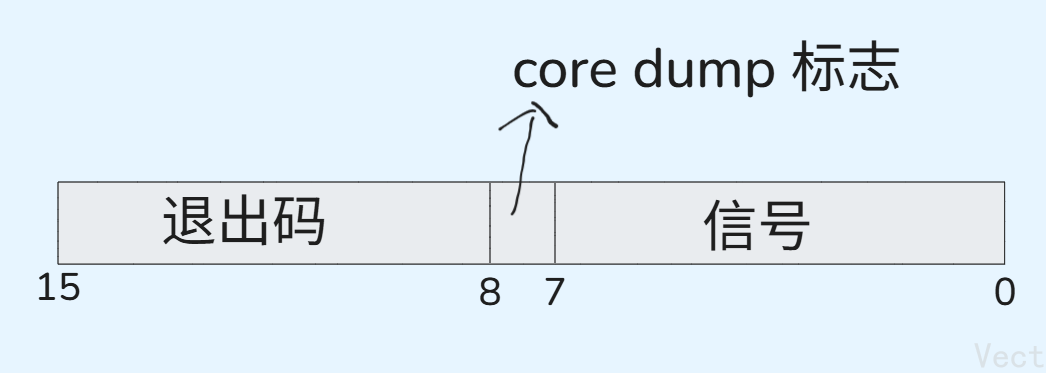
- 正常退出:高8位有效,低8位为0
- 信号终止:低8位有效,高8位无效
我们可以通过位运算的方式得到退出码:
exit_code = (status >> 8) & 0xff;退出码在高8存储,且退出码的范围是0,255,需要将这8位数右移到低8位,然后只保留低8位,则按位与0xff->
1111 1111
exit_signal = status & 0x7f;信号存在低7位,保留低7位即可,按位与0x7f->
111 1111对此,系统提供了两个宏来获取退出码和退出信号:
cpp#define WIFEXITED(status) (((status) & 0x7F) == 0) #define WEXITSTATUS(status) (((status) >> 8) & 0xFF)
需要注意的是:一个进程非正常退出,说明是被信号终止,那么该进程的退出码就没有意义了
进程等待方法
wait
cpp
#include <sys/types.h>
#include <sys/wait.h>

pid_t wait(int* status);
作用:
等待任意子进程
返回值:
成功返回:被等待进程的pid 失败返回:-1
参数:
输出型参数,获取子进程退出状态,不关心可以设成
NULL
cpp
#include <stdio.h>
#include <stdlib.h>
#include <unistd.h>
#include <sys/wait.h>
#include <sys/types.h>

int main(){
  pid_t id = fork();
  if(id == 0){
    // 子进程
    int count = 6;
    while(count--){
      printf("I am child, pid: %d, ppid: %d\n",getpid(),getppid());
      sleep(1);
    }
    exit(0);
  }

  // 父进程
  int status = 0;
  // pid_t wait(int* status);
  pid_t ret = wait(&status);  // 等待子进程 获取子进程返回码
  if(ret > 0){
    // 等待成功
    printf("successful wait\n");
    if(WIFEXITED(status)){ // 判断是否正常退出
      printf("exit code: %d\n",WEXITSTATUS(status));  // 提取退出码
    }
  }
  sleep(3);

  return 0;
}
输出结果:
bash
[vect@VM-0-11-centos process_control]$ gcc -o wait wait.c
[vect@VM-0-11-centos process_control]$ ./wait
I am child, pid: 4197, ppid: 4196
I am child, pid: 4197, ppid: 4196
I am child, pid: 4197, ppid: 4196
I am child, pid: 4197, ppid: 4196
I am child, pid: 4197, ppid: 4196
I am child, pid: 4197, ppid: 4196
successful wait
exit code: 0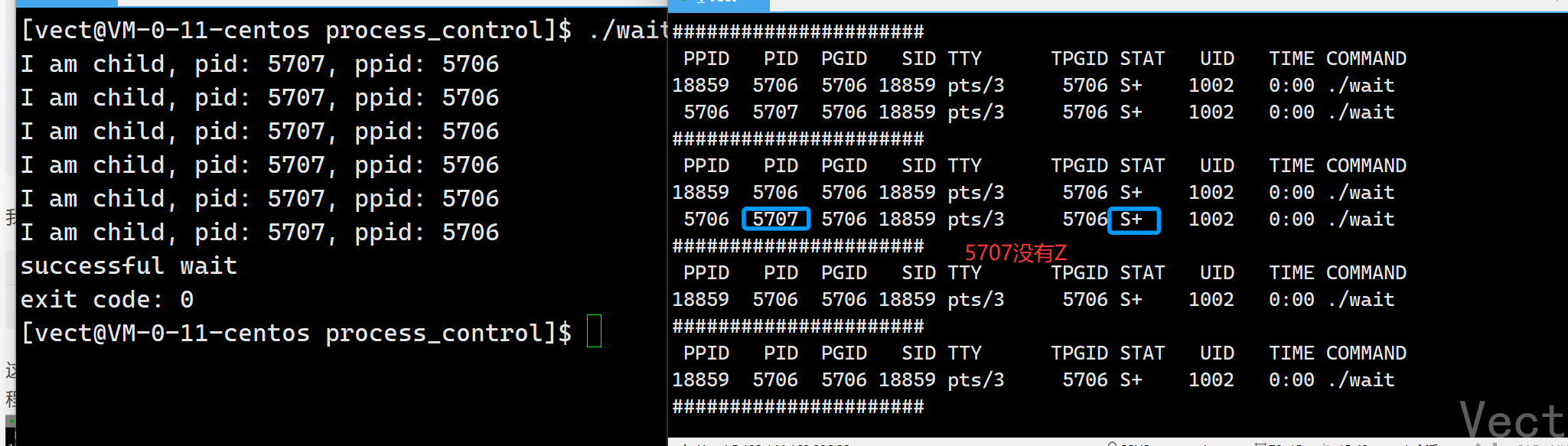
waitpid
cpp
pid_t waitpid(pid_t pid, int* status, int options)作用:
等待指定子进程或任意子进程
返回值:
- 正常返回时返回子进程pid
- 若设置了选项
WNOHANG,而调用中waitpid中发现没有已经退出的子进程可以收集,返回0- 调用出错,返回-1,这时
errno会被设置成相应的值指示错误参数:
PID:
pid=-1,等待任意一个子进程,与wait等效pid>0,等待这个pid的子进程status:
输出型参数,获取子进程退出状态,不关心可以设成
NULLoptions:
当设置成
WNOHANG时,若等待的子进程没有结束,直接返回0,不等待;若正常结束,返回该子进程的pid
例如,创建子进程后,父进程可以一直等待子进程,waitpid的第三个参数设置为0,指导子进程退出后读取子进程的退出信息
cpp
#include <stdio.h>
#include <sys/types.h>
#include <unistd.h>
#include <sys/wait.h>
#include <stdlib.h>

int main(){
  pid_t id = fork();
  if(id == 0){
    // 子进程
    int count = 10;
    while(count--){
      printf("I am child, pid:%d, ppid:%d\n",getpid(),getppid());
      sleep(1);
    }
    exit(0);
  }

  // 父进程
  int status = 0;
  pid_t ret = waitpid(id, &status, 0);
  if(ret >= 0){ // 等待成功
    printf("wait successfully\n");
    if(WIFEXITED(status)){    // 正常返回
      printf("exit code: %d\n",WEXITSTATUS(status));
    }else{  // 异常返回 被信号杀死
      printf("killed by signal, %d\n",status & 0x7F);
    }
  }
  sleep(3);

  return 0;

}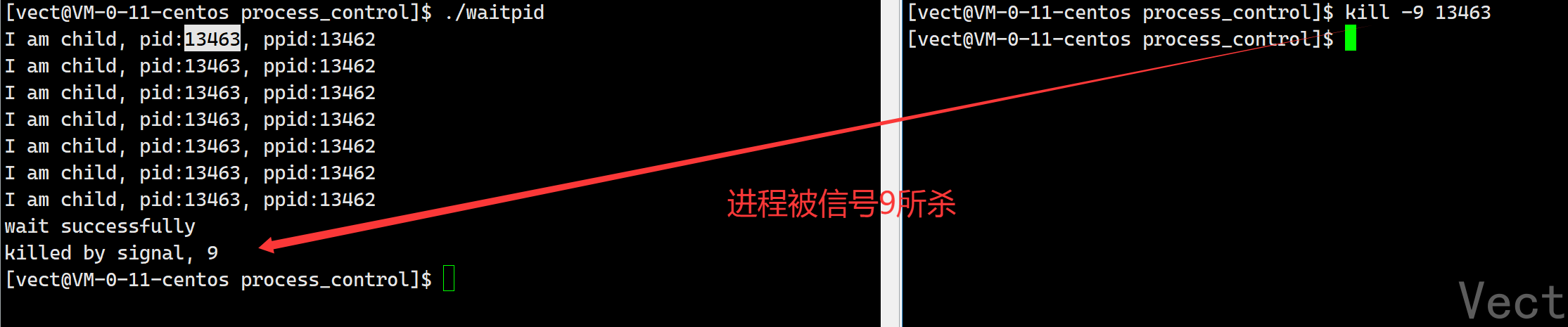
进程被杀信号杀死,也可以成功等待子进程
注意:被信号杀死的进程,其退出码没有意义
阻塞等待与非阻塞等待
阻塞等待方式
当子进程未退出时,父进程一直在等待子进程,等待期间,父进程不能做任何事情,这种等待方式称为阻塞等待
cpp
#include <stdio.h>
#include <sys/types.h>
#include <sys/wait.h>
#include <unistd.h>
#include <stdlib.h>

int main(){
  pid_t pid = fork();
  if(pid < 0){
    printf("fork err");
    exit(1);
  }
  else if(pid == 0){  // 子进程
    printf("I am child, pid: %d\n",getpid());
    sleep(5);
    exit(257);
  }else{
    int status = 0;
    pid_t ret = waitpid(-1,&status,0);  // 阻塞等待,等待5s
    printf("waiting...\n");
    if(WIFEXITED(status) && ret == pid){
      printf("wait child 5s successfully, child return code: %d\n",WEXITSTATUS(status));
    }else{
      printf("wait child failed\n");
      exit(1);
    }
  }
  return 1;
}
输出结果:
bash
[vect@VM-0-11-centos process_control]$ gcc -o block_wait block_wait.c
[vect@VM-0-11-centos process_control]$ ./block_wait
I am child, pid: 17498
waiting...
wait child 5s successfully, child return code: 1
非阻塞等待的轮询检测方式
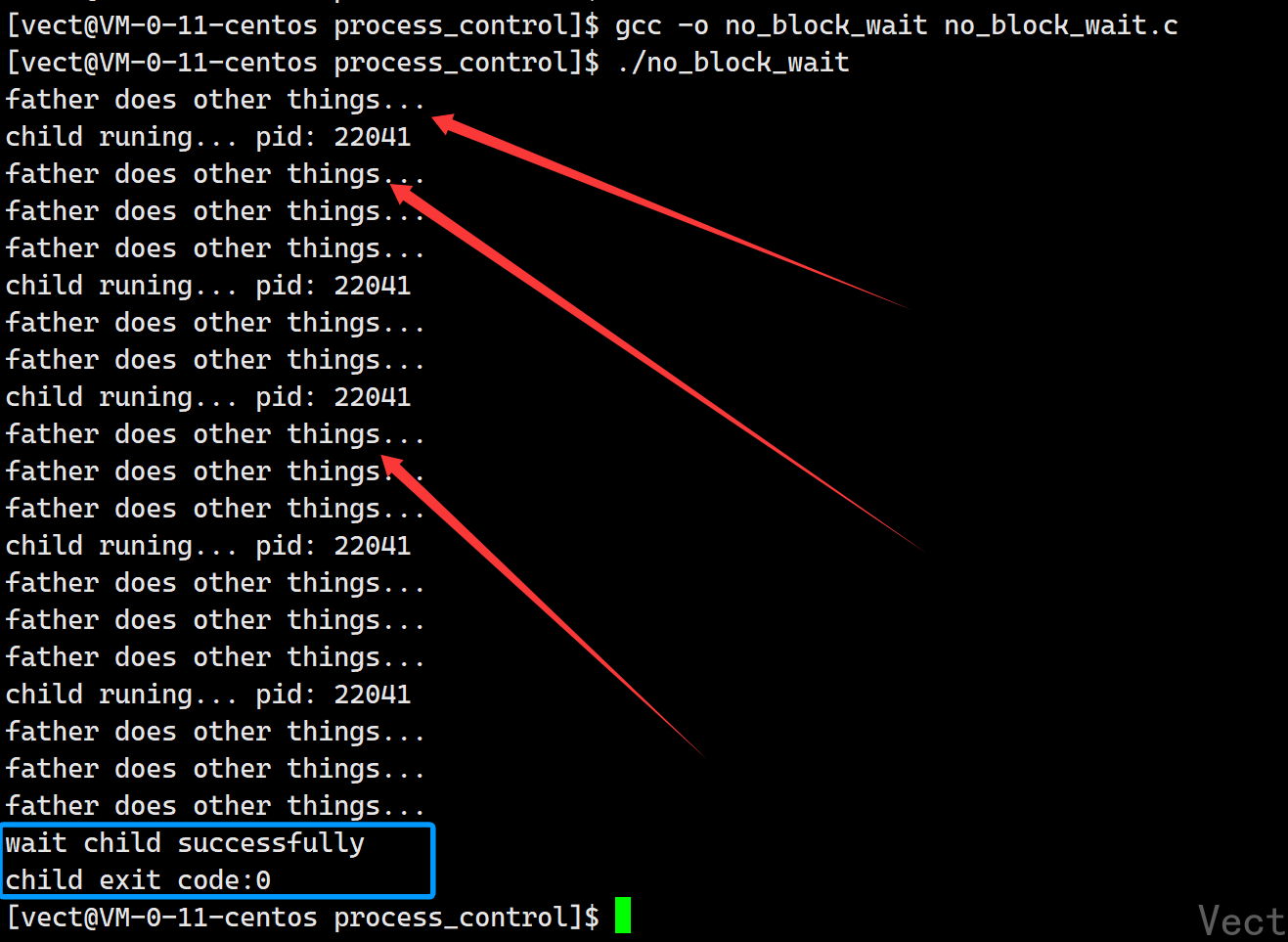
而实际上,我们完全没有必要让父进程干等着,父进程可以在等待子进程的同时做其他事情------非阻塞等待
向
waitpid的第三个参数传WNOGANG,若等待的子进程没有结束,那么waitpid函数直接返回0,不等待;若子进程正常结束,返回该子进程的pid
cpp
#include <stdio.h>
#include <sys/types.h>
#include <sys/wait.h>
#include <unistd.h>
#include <stdlib.h>

int main(){
  pid_t id = fork();
  if(id < 0){
    perror("fork err\n");
    exit(1);
  }else if(id == 0){  // child
    int count = 5;
    while(count--){
      printf("child runing... pid: %d\n",getpid());
      sleep(3);
    }
    exit(0);
  }else{  // father
    while(1){
      int status = 0;
      pid_t ret = waitpid(id,&status,WNOHANG);
      if(ret > 0){
        printf("wait child successfully\n");
        printf("child exit code:%d\n",WEXITSTATUS(status));
        break;
      }else if(ret == 0){
        printf("father does other things...\n");
        sleep(1);
      }else{
        printf("wait err...\n");
        break;
      }
    }

  }

  return 0;
}
父进程每隔一段时间查看子进程是否退出;若为退出,父进程忙自己的事情,每隔一段时间来查看一次,直到子进程退出读取其退出信息
4. 进程程序替换
替换原理
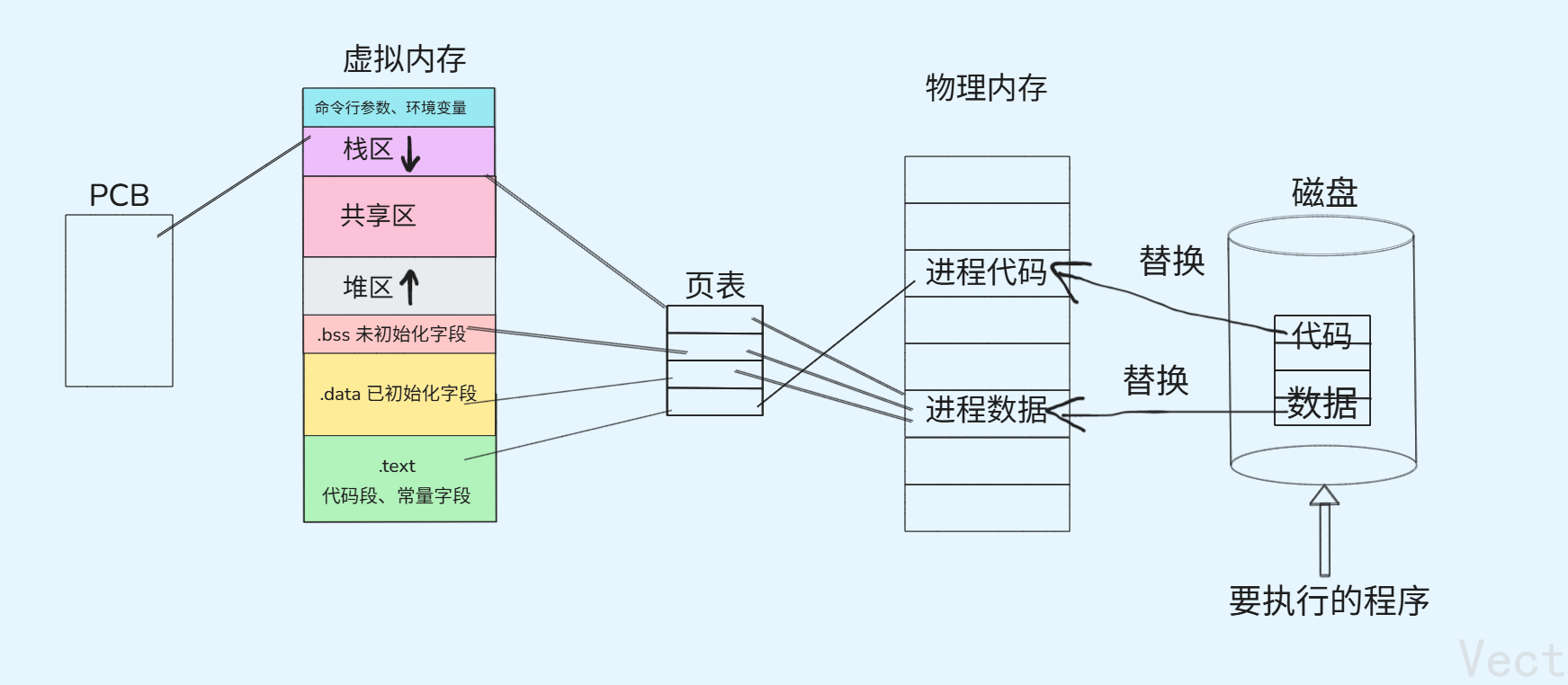
用fork创建子进程后,子进程执行的是和父进程相同的程序(可能执行不同的代码分支),想要让子进程执行另一个程序,需要调用函数完成->exex系列函数
当进程调用exec系列函数时,该进程的空间、代码和数据完全被新程序替换,并从新程序的启动历程开始执行
当进程替换时,有没有创建新的进程?
进程程序替换之后,该进程对应的PCB、进程地址空间及页表等都没有发生改变,仅仅改变进程在物理内存中的代码和数据,所以没有创建新的进程,并且进程程序替换前后该进程的pid没有改变
bashls block_wait.c Makefile other show_fork.c exec.c myexec other.c wait.c exit.c no_block_wait.c print_exit_code.c waitpid.c [vect@VM-0-11-centos process_control]$ make gcc -o myexec exec.c [vect@VM-0-11-centos process_control]$ ./myexec 我是 exec, pid: 22591 我是other, pid: 22591[vect@VM-0-11-centos process_control]$pid相同,所以没有创建新的进程
子进程进行程序替换后,会影响父进程的代码和数据吗?
不会,子进程刚被创建,和父进程共享代码和数据,但当子进程进程程序替换时,就意味着子进程需要对其数据和代码进行写入操作,这时候发生写时拷贝,此后父子进程代码和数据分离
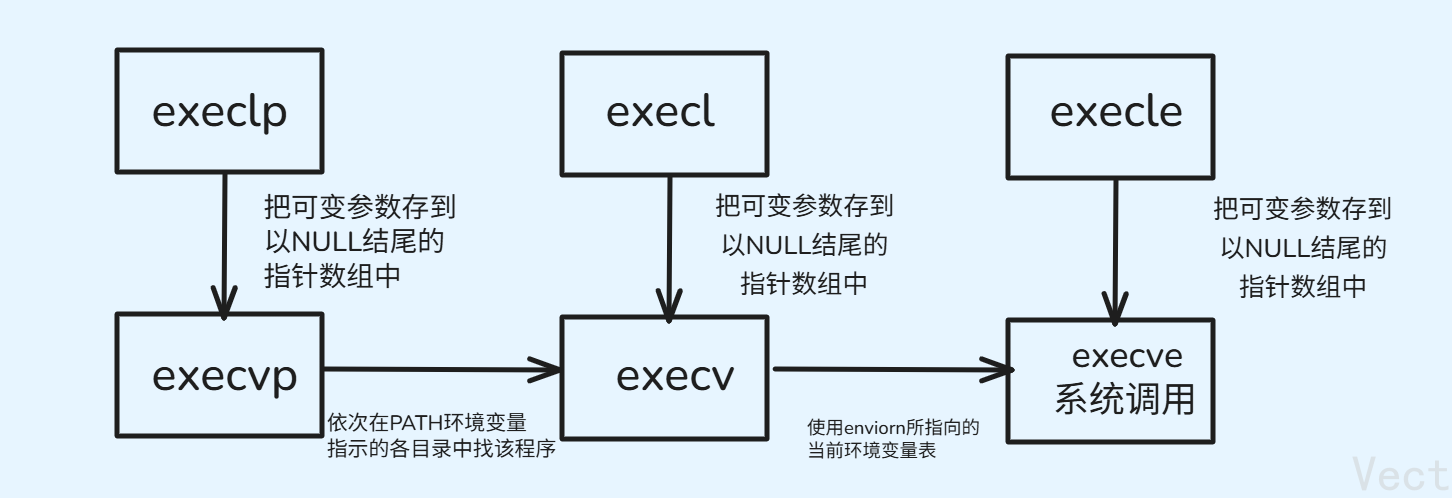
替换函数
有六种以exec 开头的函数,统称为exec函数:
cpp
#include <unistd.h>

extern char **environ;

int execl(const char *path, const char *arg, ...);
int execlp(const char *file, const char *arg, ...);
int execle(const char *path, const char *arg,
           ..., char * const envp[]);
int execv(const char *path, char *const argv[]);
int execvp(const char *file, char *const argv[]);
int execvpe(const char *file, char *const argv[],
            char *const envp[]);
函数解释
- 调用成功,不用返回
- 调用出错,返回-1
所以,
exec只要返回了,就是调用失败
怎么理解这些函数
l(list):参数采用列表v(vector):参数用数组p(path):有p则自动搜索环境变量PATH,不用带详细路径e(env):表示自己维护环境变量
函数使用
cpp
execl("/bin/ls","ls","-al","--color",NULL);第一个参数path是带路径的指令,想执行谁,第二个参数是可变参数列表,想要怎么执行
cpp
char* argv[] = {"ls","-l",NULL};
execv("/bin/ls",argv);第一个参数path是带路径的指令,想执行谁,第二个参数是char*的数组,想要怎么执行
这个和命令行参数的第二个参数一样的形式,都是一张表
cpp
execlp("ls","ls","--color",NULL); 第一个参数是不带路径的命令,想执行谁,第二个参数是可变参数列表,想要怎么执行。这里同时出现两个参数ls,表示的语义不一样,参数位置也不一样
cpp
char* argv[] = {"ls","-l",NULL};
execvp("ls",argv);
这里不做解释了
cpp
char* argv[] = {"ls","-l",NULL};
execvpe("ls",argv,NULL);第一个参数是不带路径的命令,想执行谁,第二个参数是char*的数组,想要怎么执行,第三个参数是新的环境变量
对于环境变量:
- 不传参:会默认继承父进程的环境变量表
- 手动传参:会用全新的环境变量
- 单纯新增环境变量:使用
putenv函数,谁调用了putenv,就把putenv里的环境变量导入到调用者的环境变量表
一般来说,我们不需要手动传环境变量,系统默认的就够了,可以得到一个结论:程序替换是不影响命令行参数和环境变量的
cpp
int execve(const char *path, char *const argv[], char *const envp[]);第一个参数是要执行程序的路径,想执行谁,第二个参数是一个char*数组,想要怎么执行,第三个参数是新的环境变量
事实上,只有execve是真正的系统调用,其他五个函数都是调用execve封装的函数。所以execve在man手册的第2节,而其它五个函数在man手册的第3节