Zephyr 4.3 看门狗 (WDT) 调试笔记
项目 : Renesas FPB-RA6E2 Watchdog Test
平台 : Zephyr RTOS v4.3.0
硬件 : Renesas FPB-RA6E2 (ARM Cortex-M33)
日期: 2025-12-26
1. 遇到的问题与解决方案汇总
在开发基于 Zephyr 4.3 的瑞萨 RA 系列看门狗程序时,遇到了编译链接、驱动配置和硬件限制三个层面的问题。
问题 A: 链接错误 undefined reference to '__device_dts_ord_83'
- 现象: 编译时报错,提示 GPIO 或 WDT 相关的设备节点未定义。
- 原因 : Zephyr 的 Kconfig 配置未启用对应的底层硬件驱动。在 Zephyr 中,仅在设备树 (DTS) 中设置
status = "okay"是不够的,必须在prj.conf中开启对应的子系统和特定厂商驱动。 - 解决 :
- 在
prj.conf中显式添加CONFIG_WDT_RENESAS_RA=y。 - 注意 : 修改 Kconfig 后,必须执行
west build -p always清理缓存,否则旧的配置残留会导致错误持续存在。
- 在
问题 B: 运行时错误 -134 (ENOTSUP)
-
现象 : 调用
wdt_setup(wdt, WDT_OPT_PAUSE_IN_SLEEP)时返回错误代码-134。 -
原因: Renesas RA 系列的 WDT 驱动不支持通过软件 API 动态配置"睡眠模式下暂停计数"。该行为通常由硬件 Option Bytes (OFS0) 决定。
-
解决 : 将选项参数改为
0。c// wdt_setup(wdt, WDT_OPT_PAUSE_IN_SLEEP); // 错误 wdt_setup(wdt, 0); // 正确
问题 C: 喂狗阶段系统意外复位 (Premature Reset)
- 现象: 设置超时时间为 5000ms,且每 1000ms 喂狗一次,但程序打印几次 "Feeding" 后立即复位。
- 原因 : 硬件物理限制 。
- RA 系列 WDT 通常使用 PCLKB 时钟。在标准配置下,硬件计数器能支持的最大超时时间约为 2.6秒。
- 代码请求 5000ms 超出了硬件极限,导致驱动配置异常或回退到极短的默认超时时间。
- 此时
k_msleep(1000)的延时超过了实际生效的超时时间,导致复位。
- 解决 :
- 将
window.max设置在安全范围内(如 2000ms)。 - 缩短喂狗间隔(如 300ms),留出充足余量。
- 将
2. 最终验证通过的配置
2.1 配置文件 (prj.conf)
这是最精简且正确的配置:
ini
# --- 核心子系统 ---
CONFIG_GPIO=y
CONFIG_WATCHDOG=y
CONFIG_SERIAL=y

# --- 控制台打印 ---
CONFIG_CONSOLE=y
CONFIG_UART_CONSOLE=y

# --- 硬件驱动 ---
# 必须显式启用瑞萨 RA 系列看门狗驱动
CONFIG_WDT_RENESAS_RA=y
# GPIO 驱动通常会自动启用,只要 CONFIG_GPIO=y 且 DTS 节点存在
2.2 核心代码逻辑 (main.c)
c
/*
 * Copyright (c) 2024-2025 Renesas Electronics Corporation
 * SPDX-License-Identifier: Apache-2.0
 */

#include <zephyr/kernel.h>
#include <zephyr/device.h>
#include <zephyr/drivers/watchdog.h>
#include <zephyr/drivers/gpio.h>
#include <zephyr/sys/printk.h>
#include <zephyr/version.h>

#define WDT_NODE DT_ALIAS(watchdog0)
#define LED0_NODE DT_ALIAS(led0)

static const struct gpio_dt_spec led = GPIO_DT_SPEC_GET(LED0_NODE, gpios);

int main(void)
{
	int err;
	int wdt_channel_id;
	const struct device *const wdt = DEVICE_DT_GET(WDT_NODE);

	printk("\n\n*** Watchdog Test on FPB-RA6E2 (Fixed) ***\n");
	printk("Zephyr Version: %s\n", KERNEL_VERSION_STRING);

	if (!device_is_ready(wdt)) {
		printk("Error: Watchdog device not ready\n");
		return 0;
	}

	if (!gpio_is_ready_dt(&led)) {
		printk("Error: GPIO device not ready\n");
		return 0;
	}
	gpio_pin_configure_dt(&led, GPIO_OUTPUT_ACTIVE);

	/*
	 * 关键修改 1: 设置超时时间为 2000ms (2秒)。
	 * 原因: RA 系列硬件最大超时通常只有 ~2.6秒 (取决于 PCLKB)。
	 * 请求 5000ms 会导致配置异常或回退到极短时间。
	 */
	struct wdt_timeout_cfg wdt_config = {
		.window.min = 0U,
		.window.max = 2000U,
		.callback = NULL,
		.flags = WDT_FLAG_RESET_SOC,
	};

	wdt_channel_id = wdt_install_timeout(wdt, &wdt_config);
	if (wdt_channel_id < 0) {
		printk("Watchdog install failed: %d\n", wdt_channel_id);
		return 0;
	}

	/*
	 * 关键修改 2: 选项传 0。
	 * 避免使用不支持的 WDT_OPT_PAUSE_IN_SLEEP。
	 */
	err = wdt_setup(wdt, 0);
	if (err < 0) {
		printk("Watchdog setup failed: %d\n", err);
		return 0;
	}

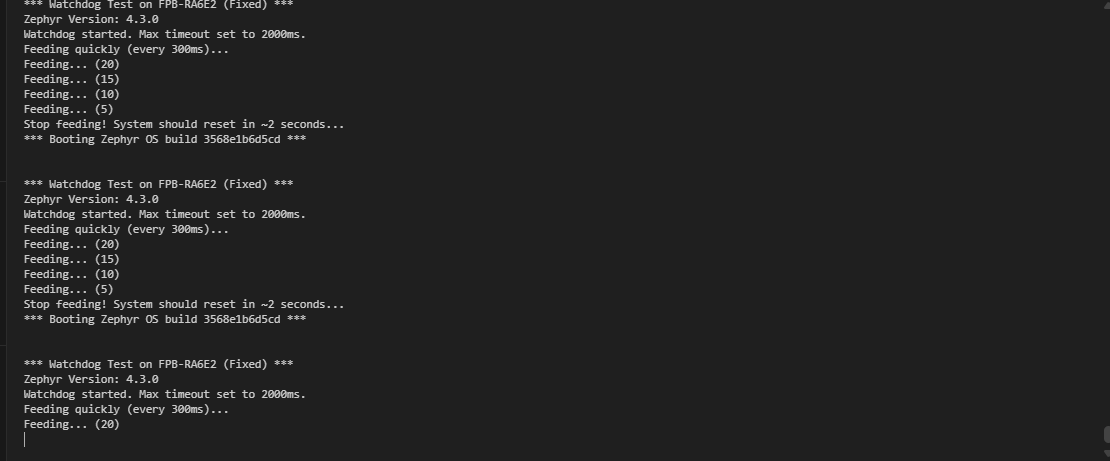
	printk("Watchdog started. Max timeout set to 2000ms.\n");
	printk("Feeding quickly (every 300ms)...\n");

	/*
	 * 关键修改 3: 缩短喂狗间隔到 300ms。
	 * 确保在任何硬件档位(0.6s / 1.3s / 2.6s)下都能存活。
	 */
	for (int i = 20; i > 0; i--) {
		wdt_feed(wdt, wdt_channel_id);
		gpio_pin_toggle_dt(&led);

		/* 打印少量信息以免串口阻塞影响喂狗 */
		if (i % 5 == 0) {
			printk("Feeding... (%d)\n", i);
		}

		k_msleep(300);
	}

	printk("Stop feeding! System should reset in ~2 seconds...\n");

	/* 停止喂狗,等待复位 */
	while (1) {
		k_msleep(100);
	}

	return 0;
}
3. 经验总结
- 清理构建缓存至关重要 : 当遇到莫名其妙的
undefined reference或 Kconfig 警告时,第一时间执行west build -p always。 - 不要盲目信任软件参数 : 即使 API 允许你传入
5000ms,也要查阅芯片数据手册(Hardware Manual),确认 WDT 的时钟源(PCLKB/LOCO)和分频系数决定的物理最大超时时间。 - 驱动符号命名 : Zephyr 版本迭代快,驱动的 Kconfig 符号(如
CONFIG_GPIO_RAvsCONFIG_GPIO_RENESAS_RA_IOPORT)可能会变。最好依赖 Zephyr 的自动推导(status="okay"),或者去查看具体的驱动源码Kconfig文件确认正确的符号。
4. 测试图片