欢迎大家加入开源鸿蒙跨平台开发者社区,一起共建开源鸿蒙跨平台生态。
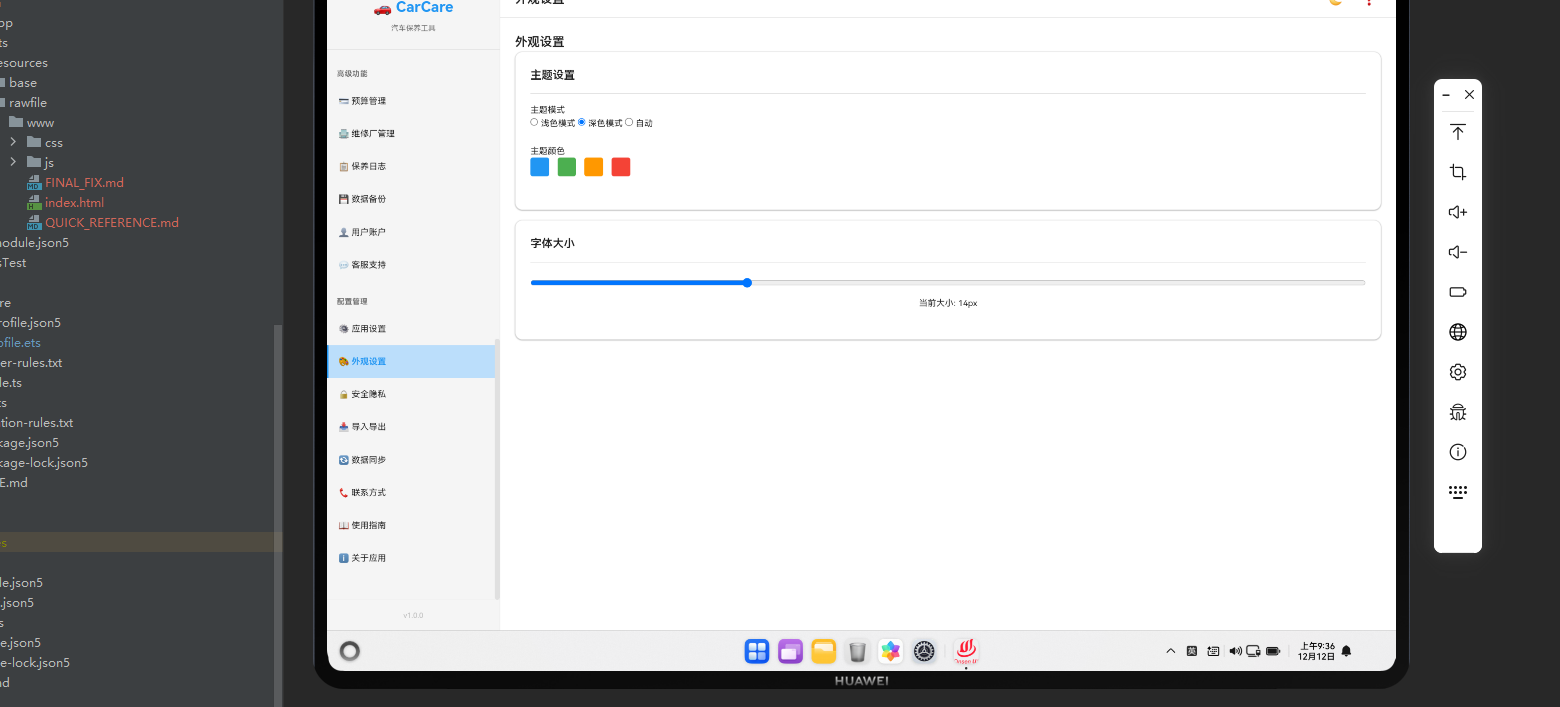
概述
外观主题设置功能允许用户自定义应用的视觉风格。本文将详细讲解如何在Cordova&OpenHarmony框架中实现主题系统。
主题数据结构
主题包含颜色和样式配置。
javascript
const theme = {
    name: 'light',
    colors: {
        primary: '#007AFF',
        secondary: '#5AC8FA',
        background: '#FFFFFF',
        text: '#000000',
        border: '#E0E0E0'
    },
    fonts: {
        primary: 'Arial',
        size: 16
    }
};
这个数据结构定义了主题的基本属性。colors包含各种颜色配置,fonts包含字体配置。
主题列表展示
外观设置页面需要展示可用的主题。
javascript
async renderAppearance() {
    const themes = [
        { name: 'light', label: '浅色主题' },
        { name: 'dark', label: '深色主题' },
        { name: 'blue', label: '蓝色主题' },
        { name: 'green', label: '绿色主题' }
    ];

    const currentTheme = localStorage.getItem('currentTheme') || 'light';

    return `
        <div class="appearance-container">
            <div class="page-header"><h2 class="page-title">外观设置</h2></div>
            <div class="card">
                <div class="card-header"><h3 class="card-title">主题选择</h3></div>
                <div class="card-body">
                    <div class="theme-grid">
                        \${themes.map(theme => \`
                            <div class="theme-item \${currentTheme === theme.name ? 'active' : ''}" onclick="app.switchTheme('\${theme.name}')">
                                <div class="theme-preview"></div>
                                <p>\${theme.label}</p>
                            </div>
                        \`).join('')}
                    </div>
                </div>
            </div>
        </div>
    `;
}
这段代码展示了如何展示主题选择。用户可以选择不同的主题。
切换主题
用户可以切换应用主题。
javascript
async switchTheme(themeName) {
    const themes = {
        light: {
            primary: '#007AFF',
            secondary: '#5AC8FA',
            background: '#FFFFFF',
            text: '#000000',
            border: '#E0E0E0'
        },
        dark: {
            primary: '#0A84FF',
            secondary: '#5AC8FA',
            background: '#1C1C1E',
            text: '#FFFFFF',
            border: '#424245'
        },
        blue: {
            primary: '#0066CC',
            secondary: '#0099FF',
            background: '#F0F4FF',
            text: '#003366',
            border: '#CCDDFF'
        },
        green: {
            primary: '#00AA00',
            secondary: '#00DD00',
            background: '#F0FFF0',
            text: '#003300',
            border: '#CCFFCC'
        }
    };

    const theme = themes[themeName];

    // 应用主题颜色
    document.documentElement.style.setProperty('--primary-color', theme.primary);
    document.documentElement.style.setProperty('--secondary-color', theme.secondary);
    document.documentElement.style.setProperty('--background-color', theme.background);
    document.documentElement.style.setProperty('--text-color', theme.text);
    document.documentElement.style.setProperty('--border-color', theme.border);

    // 保存主题选择
    localStorage.setItem('currentTheme', themeName);

    this.renderPage('appearance');
}
这段代码展示了如何切换主题。我们使用CSS变量来动态应用主题颜色。
自定义主题
用户可以创建自定义主题。
javascript
async createCustomTheme(themeName, colors) {
    const customTheme = {
        name: themeName,
        colors: colors,
        isCustom: true
    };

    const customThemes = JSON.parse(localStorage.getItem('customThemes') || '[]');
    customThemes.push(customTheme);
    localStorage.setItem('customThemes', JSON.stringify(customThemes));

    alert('自定义主题已创建');
}
这段代码展示了如何创建自定义主题。用户可以定义自己的颜色方案。
主题预览
系统可以提供主题预览功能。
javascript
async previewTheme(themeName) {
    const themes = await this.getAvailableThemes();
    const theme = themes.find(t => t.name === themeName);

    if (theme) {
        // 临时应用主题
        document.documentElement.style.setProperty('--primary-color', theme.colors.primary);
        document.documentElement.style.setProperty('--secondary-color', theme.colors.secondary);
        document.documentElement.style.setProperty('--background-color', theme.colors.background);
        document.documentElement.style.setProperty('--text-color', theme.colors.text);
        document.documentElement.style.setProperty('--border-color', theme.colors.border);
    }
}
这段代码展示了如何预览主题。用户可以在应用主题前预览效果。
主题导出导入
用户可以导出导入主题。
javascript
async exportTheme(themeName) {
    const customThemes = JSON.parse(localStorage.getItem('customThemes') || '[]');
    const theme = customThemes.find(t => t.name === themeName);

    if (theme) {
        const blob = new Blob([JSON.stringify(theme, null, 2)], { type: 'application/json' });
        const url = URL.createObjectURL(blob);
        const link = document.createElement('a');
        link.href = url;
        link.download = \`theme_\${themeName}.json\`;
        link.click();
    }
}

async importTheme(file) {
    const reader = new FileReader();
    reader.onload = (e) => {
        try {
            const theme = JSON.parse(e.target.result);
            const customThemes = JSON.parse(localStorage.getItem('customThemes') || '[]');
            customThemes.push(theme);
            localStorage.setItem('customThemes', JSON.stringify(customThemes));
            alert('主题已导入');
        } catch (error) {
            alert('导入失败:文件格式错误');
        }
    };
    reader.readAsText(file);
}
这段代码展示了如何导出导入主题。用户可以分享和使用他人的主题。
OpenHarmony中的主题设置
在OpenHarmony系统中,主题设置需要通过Cordova插件与原生系统进行交互。
typescript
export function pageHideEvent() {
  let result: ArkTsAttribute = {content:"pendingPause", result:[]};
  cordova.onArkTsResult(JSON.stringify(result), "CoreHarmony", "");
}
这段ArkTS代码展示了如何在OpenHarmony系统中处理应用的隐藏事件。
总结
外观主题设置系统是Cordova&OpenHarmony应用的重要功能。通过灵活的主题系统,用户可以根据自己的喜好自定义应用的视觉风格。