文章目录
- [一. 官方文档学习](#一. 官方文档学习)
-
- [1. 环境搭建](#1. 环境搭建)
- [2. 函数式组件和class组件](#2. 函数式组件和class组件)
- [3. React 基础](#3. React 基础)
-
- [3.1 JSX语法定义一个组件](#3.1 JSX语法定义一个组件)
- [3.2 Props 属性](#3.2 Props 属性)
- [3.3 State 状态](#3.3 State 状态)
- [4. 处理文本输入](#4. 处理文本输入)
记录RN的入坑记录,零散笔记
一. 官方文档学习
1. 环境搭建
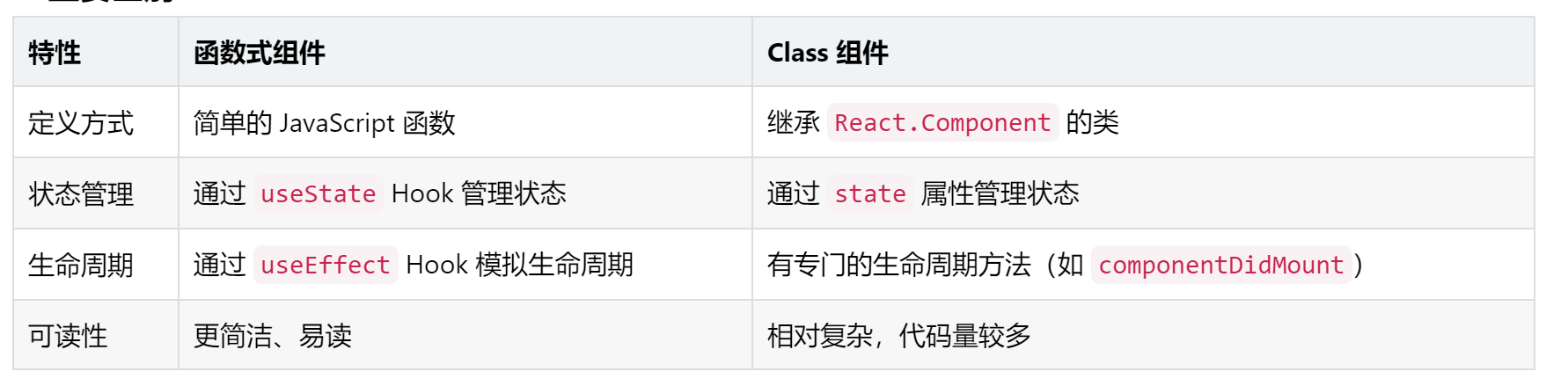
2. 函数式组件和class组件
函数式组件和 Class 组件是 React 中定义组件的两种主要方式,它们在语法、功能和使用场景上有一些区别。
- 函数式组件(Functional Component)
函数式组件是一个简单的 JavaScript 函数,接收一个 props 对象作为参数,并返回一个 React 元素。它是定义组件的最简单方式。
xml
function Welcome(props) {
  return <h1>Hello, {props.name}</h1>;
}- Class 组件(Class Component)
Class 组件是通过继承 React.Component 类来定义的,它需要实现 render() 方法来返回 React 元素。
xml
class Welcome extends React.Component {
  render() {
    return <h1>Hello, {this.props.name}</h1>;
  }
}
3. React 基础
3.1 JSX语法定义一个组件
javascript
import React from 'react';
import { Text } from 'react-native';

const Cat = () => {
  return (
    <Text>Hello, I am your cat!</Text>
  );
}

export default Cat;
在别处通过来任意引用这个组件了
3.2 Props 属性
javascript
import React from 'react';
import { Text, View } from 'react-native';

const Cat = (props) => {
  return (
    <View>
      <Text>Hello, I am {props.name}!</Text>
    </View>
  );
}

const Cafe = () => {
  return (
    <View>
      <Cat name="Maru" />
      <Cat name="Jellylorum" />
      <Cat name="Spot" />
    </View>
  );
}

export default Cafe;
3.3 State 状态
如果把 props 理解为定制组件渲染的参数, 那么state就像是组件的私人数据记录。状态用于记录那些随时间或者用户交互而变化的数据。状态使组件拥有了记忆!
javascript
import React, { useState } from "react";
import { Button, Text, View } from "react-native";

const Cat = (props) => {
  const [isHungry, setIsHungry] = useState(true);

  return (
    <View>
      <Text>
        I am {props.name}, and I am {isHungry ? "hungry" : "full"}!
      </Text>
      <Button
        onPress={() => {
          setIsHungry(false);
        }}
        disabled={!isHungry}
        title={isHungry ? "Pour me some milk, please!" : "Thank you!"}
      />
    </View>
  );
}

const Cafe = () => {
  return (
    <>
      <Cat name="Munkustrap" />
      <Cat name="Spot" />
    </>
  );
}

export default Cafe;