协程的使用
python
import asyncio
import aiohttp
import aiofiles
import os
import pymysql
from pymysql.err import OperationalError, ProgrammingError
from bs4 import BeautifulSoup
from bs4.element import Tag

# ===================== 配置项 =====================
headers = {
    "Referer": "http://www.netbian.com/",
    "Cookie": "JZgpfecookieclassrecord=,8,",
    "User-Agent": "Mozilla/5.0 (Windows NT 10.0; Win64; x64) AppleWebKit/537.36 (KHTML, like Gecko) Chrome/143.0.0.0 Safari/537.36"
}

# 数据库配置(修改为你的信息)
DB_CONFIG = {
    'host': '10.0.0.168',
    'port': 3307,
    'user': 'root',
    'password': 'root',  # 替换为实际密码
    'database': 'db_img',
    'charset': 'utf8mb4',
    'autocommit': True,
    'cursorclass': pymysql.cursors.DictCursor  # 新增:确保游标编码
}


# ===================== 数据库操作函数 =====================
def init_db():
    """初始化数据库:确保db_img存在 + tb_img表存在"""
    conn = None
    try:
        # 先连接MySQL服务器(不指定数据库)
        conn = pymysql.connect(
            host=DB_CONFIG['host'],
            port=DB_CONFIG['port'],
            user=DB_CONFIG['user'],
            password=DB_CONFIG['password'],
            charset=DB_CONFIG['charset'],  # 关键:连接时指定utf8mb4
            autocommit=True
        )
        cursor = conn.cursor()

        # 先设置全局字符集(确保服务器级编码正确)
        cursor.execute("SET NAMES utf8mb4;")
        cursor.execute("SET CHARACTER SET utf8mb4;")

        # 创建db_img数据库(明确指定字符集)
        create_db_sql = """
        CREATE DATABASE IF NOT EXISTS db_img
        DEFAULT CHARACTER SET utf8mb4
        DEFAULT COLLATE utf8mb4_unicode_ci;  # 修改:使用unicode_ci排序规则
        """
        cursor.execute(create_db_sql)
        print("✅ 数据库db_img创建/验证成功")

        # 使用数据库
        cursor.execute("USE db_img;")

        # 创建tb_img表(优化字符集配置)
        create_table_sql = """
        CREATE TABLE IF NOT EXISTS tb_img (
            id INT AUTO_INCREMENT PRIMARY KEY COMMENT '自增主键',
            src VARCHAR(500) NOT NULL UNIQUE COMMENT '图片高清链接(唯一)',
            title VARCHAR(200) NOT NULL COMMENT '图片标题(支持中文)'
        ) ENGINE=InnoDB
          DEFAULT CHARACTER SET utf8mb4
          DEFAULT COLLATE utf8mb4_unicode_ci
          COMMENT='存储图片链接和中文标题的表';
        """
        cursor.execute(create_table_sql)
        print("✅ 数据表tb_img创建/验证成功")

    except OperationalError as e:
        print(f"❌ 数据库连接失败:{e}")
        raise SystemExit(1)
    except ProgrammingError as e:
        print(f"❌ 数据表创建失败:{e}")
        raise SystemExit(1)
    finally:
        if conn:
            conn.close()


async def save_to_db(src, title):
    """异步入库"""
    if not src or not title:
        return

    # 关键:确保标题是utf8编码的字符串(处理爬取的中文)
    try:
        # 强制转换为utf8字符串(解决编码乱码)
        if isinstance(title, bytes):
            title = title.decode('utf8')
        # 清理特殊字符
        title = title.strip()
    except Exception as e:
        print(f"❌ 标题编码转换失败:{e}")
        return

    try:
        loop = asyncio.get_event_loop()
        await loop.run_in_executor(None, _sync_save, src, title)
    except Exception as e:
        print(f"❌ 入库失败 {title}:{e}")


def _sync_save(src, title):
    """同步入库"""
    conn = None
    cursor = None
    try:
        # 关键:使用完整的DB_CONFIG(包含charset)
        conn = pymysql.connect(**DB_CONFIG)
        cursor = conn.cursor()

        # 每次插入前确保会话编码正确
        cursor.execute("SET NAMES utf8mb4;")

        insert_sql = """
        REPLACE INTO tb_img (src, title)
        VALUES (%s, %s);
        """
        # 关键:使用参数化查询(避免手动编码)
        cursor.execute(insert_sql, (src, title))
        # print(f"✅ 入库成功:{title}")
    except pymysql.IntegrityError:
        print(f"⚠️ 图片链接已存在,跳过入库:{src}")
    except Exception as e:
        print(f"❌ 同步入库失败 {title}:{e}")
    finally:
        if cursor:
            cursor.close()
        if conn:
            conn.close()


# ===================== 爬虫逻辑 =====================
async def get_index_url(url, semaphore, session):
    """获取分类页详情链接"""
    hrefs = []
    try:
        async with semaphore:
            async with session.get(url=url, headers=headers, timeout=10) as r:
                if r.status != 200:
                    print(f"❌ 分类页请求失败 {url},状态码:{r.status}")
                    return hrefs

                # 关键:明确指定编码为gbk(彼岸桌面是gbk编码)
                html_content = await r.read()
                soup = BeautifulSoup(html_content.decode('gbk', errors='ignore'), 'html.parser')

                a_list = soup.find('div', class_='list')
                if a_list:
                    a_tags = a_list.find_all('a')
                    if a_tags:
                        for a in a_tags:
                            if not isinstance(a, Tag):
                                continue
                            href = a.get('href', '')
                            if 'https' in href or not href:
                                continue
                            href = 'http://www.netbian.com' + href
                            hrefs.append(href)
        print(f"✅ 分类页 {url} 提取到 {len(hrefs)} 个详情页链接")
    except Exception as e:
        print(f"❌ 解析分类页失败 {url}:{e}")
    return hrefs


async def get_hd_url(page, semaphore, session):
    """提取高清链接+入库"""
    try:
        async with semaphore:
            async with session.get(url=page, headers=headers, timeout=10) as r:
                if r.status != 200:
                    print(f"❌ 详情页请求失败 {page},状态码:{r.status}")
                    return None, None

                # 关键:正确处理gbk编码的响应
                html_content = await r.read()
                soup = BeautifulSoup(html_content.decode('gbk', errors='ignore'), 'html.parser')

                link = soup.find('div', class_="pic")
                if link:
                    link = link.find('img')
                if link:
                    src = link.get('src', '').strip()
                    title = link.get('title', '').strip()

                    # 关键:清理标题中的特殊字符和编码问题
                    safe_title = title.replace('/', '_').replace('\\', '_').replace(':', '_').replace('*', '_').replace(
                        '?', '_').replace('"', '_').replace('<', '_').replace('>', '_').replace('|', '_')

                    # 确保标题是utf8编码
                    safe_title = safe_title.encode('utf8').decode('utf8')

                    await save_to_db(src, safe_title)
                    return src, safe_title
        return None, None
    except Exception as e:
        print(f"❌ 解析详情页失败 {page}:{e}")
        return None, None


async def download_imgs(src, title, semaphore, session):
    """下载图片"""
    if not src or not title:
        return
    os.makedirs('./img', exist_ok=True)
    save_path = f'./img/{title}.png'

    if os.path.exists(save_path):
        print(f"⚠️ 图片已存在,跳过下载:{title}")
        return

    try:
        async with semaphore:
            async with session.get(url=src, headers=headers, timeout=15) as r:
                if r.status != 200:
                    print(f"❌ 图片请求失败 {src},状态码:{r.status}")
                    return
                async with aiofiles.open(save_path, 'wb') as f:
                    await f.write(await r.content.read())
        print(f'✅ 已完成下载:{title}')
    except Exception as e:
        print(f"❌ 下载失败 {title}:{e}")


# ===================== 主函数 =====================
async def main():
    # 1. 初始化数据库
    init_db()
    # 2. 创建信号量
    semaphore = asyncio.Semaphore(5)  # 为异步程序设置一个并发数限制,最多允许 5 个异步任务同时执行,用来控制并发量、避免资源耗尽
    # 3. 复用ClientSession
    async with aiohttp.ClientSession() as session:
        # ========== 第一步:获取所有详情页链接 ==========
        task_urls = []
        for i in range(1, 10): # 这里就爬取9页数据
            if i == 1:
                index_url = 'http://www.netbian.com/huahui/'
            else:
                index_url = f'http://www.netbian.com/huahui/index_{i}.htm'
            task = asyncio.create_task(get_index_url(index_url, semaphore, session))
            task_urls.append(task)

        # 等待所有分类页任务完成
        done, pending = await asyncio.wait(task_urls)

        # ========== 第二步:获取高清链接+入库 ==========
        task_pages = []
        for t in done:
            pages = t.result()
            for page in pages:
                task = asyncio.create_task(get_hd_url(page, semaphore, session))
                task_pages.append(task)

        # 等待所有详情页任务完成
        done, pending = await asyncio.wait(task_pages)

        # ========== 第三步:下载图片 ==========
        task_imgs = []
        for t in done:
            result = t.result()
            if result and len(result) == 2:
                src, title = result
                if src and title:
                    task = asyncio.create_task(download_imgs(src, title, semaphore, session))
                    task_imgs.append(task)

        # 等待所有下载任务完成
        if task_imgs:
            await asyncio.wait(task_imgs)

    print("\n🎉 所有任务执行完成!数据已存入db_img.tb_img表")


if __name__ == '__main__':
    # Windows系统兼容
    if os.name == 'nt':
        asyncio.set_event_loop_policy(asyncio.WindowsSelectorEventLoopPolicy())
    # 运行主函数
    try:
        asyncio.run(main())
    except KeyboardInterrupt:
        print("\n⚠️ 程序被用户中断")
    except Exception as e:
        print(f"\n❌ 程序运行出错:{e}")
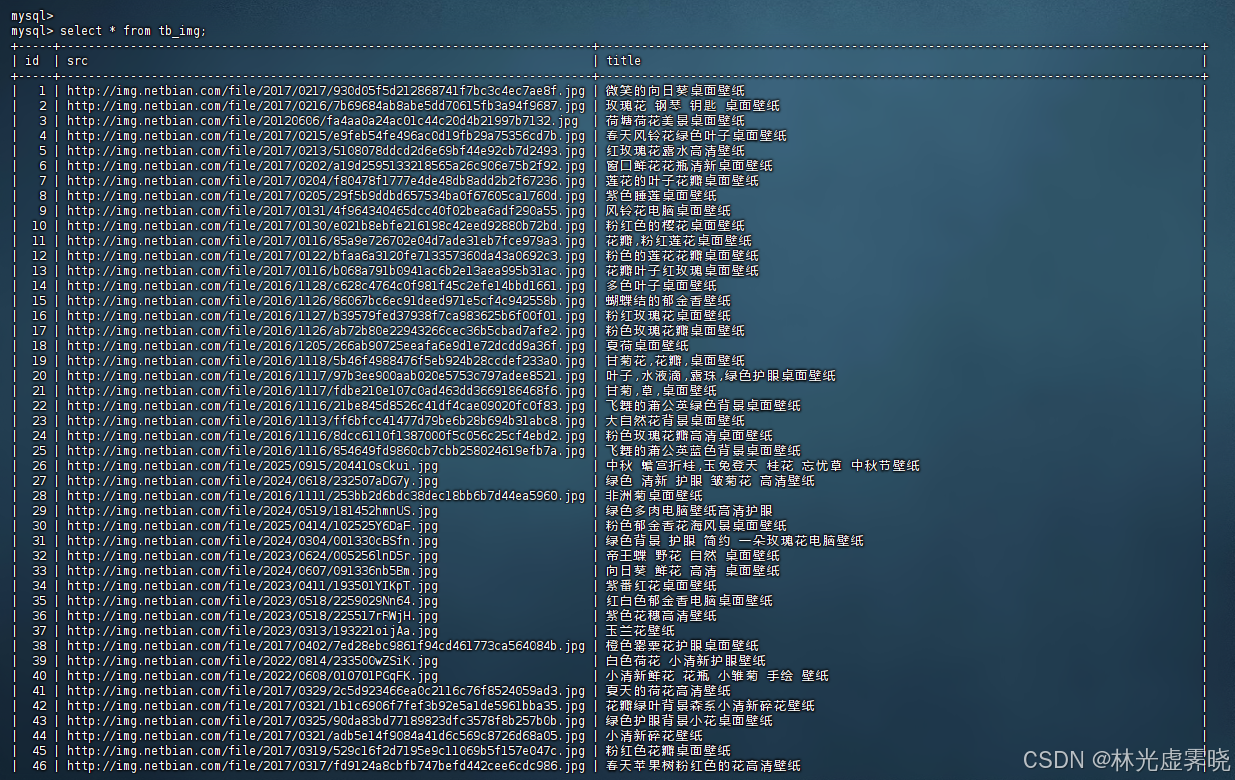
爬取结果展示: