思路
""""Python
1 获取图片页渲染后代码
2 提取一个章节图片链接
3 下载并保存图片
4 循环翻页下载
"""
1 函数版
python
import os.path
import time
import requests
from selenium import webdriver
from selenium.webdriver.chrome.service import Service
from selenium.webdriver.chrome.options import Options
from selenium.webdriver.common.by import By
from selenium.webdriver.common.action_chains import ActionChains

# 配置Chrome驱动路径

service = Service(executable_path=r'D:\data\pyCharm\python311/chromedriver.exe')  # 你的浏览器要匹配你本地的浏览器,否则会报错

# Chrome选项配置
opt = Options()
opt.add_argument('--disable-blink-features=AutomationControlled')

# ========== 核心:新版无头模式配置(关键!) ==========
# 替代旧的 opt.headless = True,适配Chrome 112
opt.add_argument('--headless=new')  # 不打开浏览器下载

# 核心:解绑浏览器进程,避免被 Python 回收
opt.add_experimental_option("detach", True)


def download_img(url, path):
    # 初始化浏览器
    browser = webdriver.Chrome(service=service, options=opt)
    browser.maximize_window()
    browser.get(url)

    time.sleep(0.3)
    filename = browser.find_element(By.XPATH, '//*[@id="comicTitle"]/span[@class="title-comicHeading"]').text

    pic_list = browser.find_elements(By.XPATH, '//*[@id="comicContain"]/li/img')
    for num, pic in enumerate(pic_list):
        time.sleep(0.3)
        ActionChains(browser).scroll_to_element(pic).perform()
        link = pic.get_attribute('src')
        pic_content = requests.get(link).content
        if not os.path.exists(f'{path}/{filename}'):
            os.makedirs(f'{path}/{filename}')
        with open(f'img/{filename}/{num}.jpg', 'wb') as f:
            f.write(pic_content)
            print(f'已下载....{filename}.....第{num}张....')

    next_page = browser.find_element(By.XPATH, '//*[@id="mainControlNext"]').get_attribute('href')

    browser.close()
    return next_page


if __name__ == '__main__':
    path = f'E:/spider_code/videos/img'
    url = 'https://ac.qq.com/ComicView/index/id/651757/cid/808'
    while url:
        url = download_img(url=url, path=path)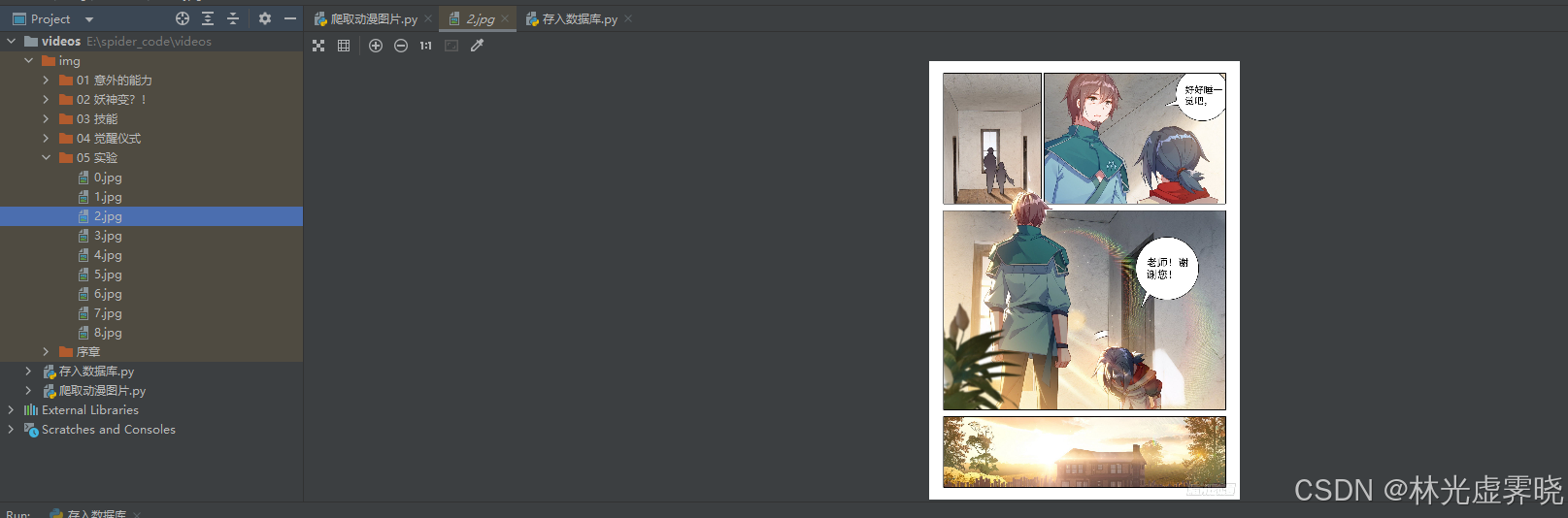
2 面向对象,存入本地
python
import os
import time
import requests
from typing import Optional
from selenium import webdriver
from selenium.webdriver.chrome.service import Service
from selenium.webdriver.chrome.options import Options
from selenium.webdriver.common.by import By
from selenium.webdriver.common.action_chains import ActionChains
from selenium.common.exceptions import NoSuchElementException, WebDriverException


class ComicDownloader:
    """漫画下载器(Windows本地保存版)"""

    def __init__(self, chrome_driver_path: str, save_base_path: str):
        """
        初始化漫画下载器
        :param chrome_driver_path: Chrome驱动路径(Windows路径)
        :param save_base_path: 图片保存的基础路径
        """
        # 配置参数
        self.chrome_driver_path = chrome_driver_path
        self.save_base_path = self._normalize_path(save_base_path)  # 标准化Windows路径
        self.browser: Optional[webdriver.Chrome] = None

        # 初始化Chrome配置
        self.chrome_options = self._init_chrome_options()
        self.chrome_service = Service(executable_path=self.chrome_driver_path)

    def _normalize_path(self, path: str) -> str:
        """标准化Windows路径(处理斜杠、绝对路径等)"""
        # 转换为绝对路径,统一斜杠为Windows格式
        return os.path.abspath(path).replace('/', '\\')

    def _init_chrome_options(self) -> Options:
        """初始化Chrome浏览器配置"""
        opt = Options()
        # 禁用自动化检测
        opt.add_argument('--disable-blink-features=AutomationControlled')
        # 新版无头模式(适配Chrome 112+)
        opt.add_argument('--headless=new')
        # 解绑浏览器进程,避免被Python回收
        opt.add_experimental_option("detach", True)
        # 最大化窗口(无头模式下也生效)
        opt.add_argument('--start-maximized')
        # 忽略证书错误
        opt.add_argument('--ignore-certificate-errors')
        return opt

    def _clean_filename(self, filename: str) -> str:
        """清理文件名中的非法字符(Windows兼容)"""
        if not filename:
            return "未知标题"

        # Windows非法字符替换
        illegal_chars = ['\\', '/', ':', '*', '?', '"', '<', '>', '|']
        for char in illegal_chars:
            filename = filename.replace(char, '_')
        # 截断过长文件名(避免路径超限)
        return filename[:100]

    def download_page(self, url: str) -> Optional[str]:
        """
        下载单页漫画到本地
        :param url: 漫画页面URL
        :return: 下一页URL | None
        """
        self.browser = None
        try:
            # 初始化浏览器
            self.browser = webdriver.Chrome(service=self.chrome_service, options=self.chrome_options)
            self.browser.maximize_window()
            self.browser.get(url)
            time.sleep(0.5)  # 延长等待,确保页面加载完成

            # 获取并清理漫画标题
            try:
                title_elem = self.browser.find_element(By.XPATH, '//*[@id="comicTitle"]/span[@class="title-comicHeading"]')
                comic_title = self._clean_filename(title_elem.text)
            except NoSuchElementException:
                print("⚠️ 未找到漫画标题,使用默认标题")
                comic_title = f"未知标题_{int(time.time())}"

            # 创建保存目录
            save_dir = os.path.join(self.save_base_path, comic_title)
            if not os.path.exists(save_dir):
                os.makedirs(save_dir)
                print(f"📁 创建保存目录: {save_dir}")

            # 获取图片列表并下载
            try:
                pic_list = self.browser.find_elements(By.XPATH, '//*[@id="comicContain"]/li/img')
                if not pic_list:
                    print("⚠️ 当前页面未找到图片")
                    raise NoSuchElementException("图片列表为空")

                for num, pic in enumerate(pic_list):
                    time.sleep(0.3)
                    # 滚动到图片位置确保加载
                    ActionChains(self.browser).scroll_to_element(pic).perform()

                    # 获取图片URL
                    pic_url = pic.get_attribute('src')
                    if not pic_url:
                        print(f"⚠️ 第{num}张图片URL为空,跳过")
                        continue

                    # 下载图片
                    try:
                        response = requests.get(
                            pic_url,
                            timeout=10,
                            headers={
                                'User-Agent': 'Mozilla/5.0 (Windows NT 10.0; Win64; x64) AppleWebKit/537.36 (KHTML, like Gecko) Chrome/120.0.0.0 Safari/537.36'
                            }
                        )
                        response.raise_for_status()  # 抛出HTTP错误
                        pic_content = response.content
                    except requests.RequestException as e:
                        print(f"⚠️ 第{num}张图片下载失败: {e}")
                        continue

                    # 保存图片到本地
                    pic_path = os.path.join(save_dir, f"{num}.jpg")
                    with open(pic_path, 'wb') as f:
                        f.write(pic_content)
                    print(f"✅ 已下载 -> {comic_title} 第{num}张 | 保存路径: {pic_path}")

            except NoSuchElementException:
                print("⚠️ 未找到图片列表元素")
                raise

            # 获取下一页URL
            try:
                next_page_elem = self.browser.find_element(By.XPATH, '//*[@id="mainControlNext"]')
                next_page = next_page_elem.get_attribute('href')
                # 检查下一页URL有效性
                if not next_page or next_page == url:
                    next_page = None
            except NoSuchElementException:
                print("⚠️ 未找到下一页按钮,下载结束")
                next_page = None

            return next_page

        except WebDriverException as e:
            print(f"❌ 浏览器操作失败: {e}")
            return None
        except Exception as e:
            print(f"❌ 下载页面失败: {e}")
            return None
        finally:
            if self.browser:
                try:
                    self.browser.quit()  # 彻底关闭浏览器
                except:
                    pass
                self.browser = None

    def start_download(self, start_url: str, delay: int = 1, max_pages: int = 0) -> None:
        """
        启动批量下载
        :param start_url: 起始URL
        :param delay: 页面间下载延迟(秒)
        :param max_pages: 最大下载页数(0表示无限制)
        """
        current_url = start_url
        page_count = 0

        print(f"🚀 开始下载漫画,起始URL: {start_url}")
        print(f"💾 保存基础路径: {self.save_base_path}")

        while current_url:
            # 检查最大页数限制
            if max_pages > 0 and page_count >= max_pages:
                print(f"✅ 达到最大下载页数({max_pages}),停止下载")
                break

            page_count += 1
            print(f"\n📄 正在下载第 {page_count} 页: {current_url}")

            current_url = self.download_page(current_url)

            # 添加延迟避免请求过快
            if current_url and delay > 0:
                time.sleep(delay)

        print(f"\n🏁 下载完成!共下载 {page_count} 页")

    def __del__(self):
        """析构函数:确保浏览器关闭"""
        if self.browser:
            try:
                self.browser.quit()
            except:
                pass


# ===================== 主程序入口(Windows) =====================
if __name__ == '__main__':
    # 配置参数
    CHROME_DRIVER_PATH = r'D:\data\pyCharm\python311/chromedriver.exe'  # Chrome驱动路径
    SAVE_BASE_PATH = r'E:\spider_code\videos\img'  # 图片保存基础路径
    START_URL = 'https://ac.qq.com/ComicView/index/id/651757/cid/808'  # 起始URL

    # 创建下载器实例
    comic_downloader = ComicDownloader(
        chrome_driver_path=CHROME_DRIVER_PATH,
        save_base_path=SAVE_BASE_PATH
    )

    # 启动下载(页面间延迟1秒,最大下载10页,可根据需要调整)
    comic_downloader.start_download(
        start_url=START_URL,
        delay=1,
        max_pages=10  # 0表示无限制下载
    )
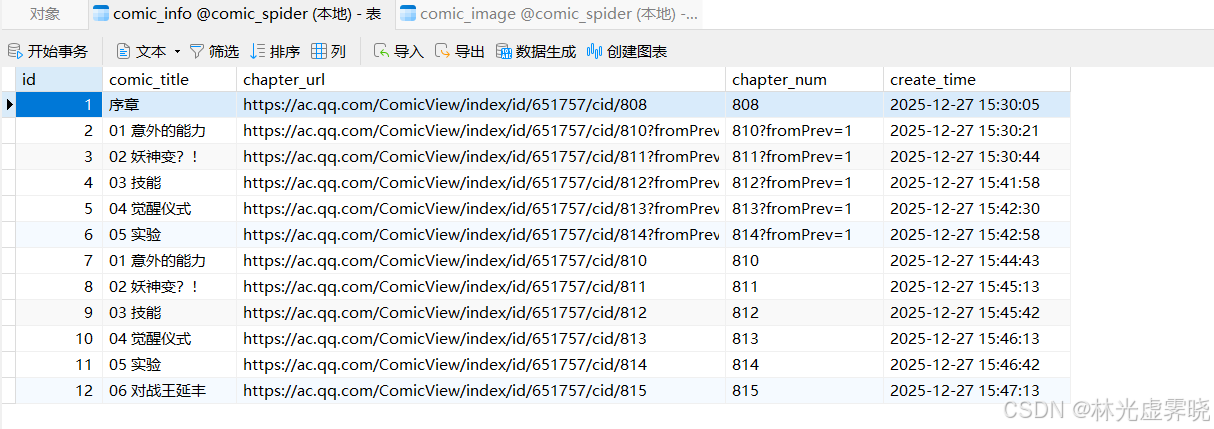
3 面向对象封装,存入数据库
python
import os.path
import time
import requests
import pymysql
from datetime import datetime
from selenium import webdriver
from selenium.webdriver.chrome.service import Service
from selenium.webdriver.chrome.options import Options
from selenium.webdriver.common.by import By
from selenium.webdriver.common.action_chains import ActionChains
class ComicDownloader:
"""漫画下载器类 - 封装所有下载和数据库操作"""
def __init__(self, chrome_driver_path, save_base_path, mysql_config):
"""
初始化下载器
:param chrome_driver_path: Chrome驱动路径
:param save_base_path: 图片保存基础路径
:param mysql_config: MySQL配置字典
"""
# 基础配置
self.chrome_driver_path = chrome_driver_path
self.save_base_path = save_base_path
self.mysql_config = mysql_config
# 初始化Chrome配置
self.driver = None
self.chrome_options = self._init_chrome_options()
# 初始化数据库(强制校验表结构)
self._init_database()
self._check_tables_exists() # 新增:检查表是否存在
def _filter_invalid_chars(self, text):
"""新增:过滤Windows路径中的非法字符"""
if not text:
return ""
# Windows路径非法字符:\/:*?"<>|
invalid_chars = r'\/:*?"<>|'
for char in invalid_chars:
text = text.replace(char, '_')
# 去除首尾空格和多余下划线
text = text.strip().strip('_')
# 限制长度避免路径过长
return text[:100]
def _init_chrome_options(self):
"""初始化Chrome浏览器选项(私有方法)"""
opt = Options()
opt.add_argument('--disable-blink-features=AutomationControlled')
opt.add_argument('--headless=new') # 无头模式
opt.add_experimental_option("detach", True)
opt.add_argument('--no-sandbox')
opt.add_argument('--disable-dev-shm-usage')
# 添加User-Agent防反爬
opt.add_argument(
'user-agent=Mozilla/5.0 (Windows NT 10.0; Win64; x64) AppleWebKit/537.36 (KHTML, like Gecko) Chrome/120.0.0.0 Safari/537.36'
)
return opt
def _init_database(self):
"""初始化数据库和表(私有方法)"""
conn = None
cursor = None
try:
# 连接MySQL(先不指定数据库)
conn = pymysql.connect(
host=self.mysql_config['host'],
port=self.mysql_config['port'],
user=self.mysql_config['user'],
password=self.mysql_config['password'],
charset=self.mysql_config['charset']
)
cursor = conn.cursor()
# 创建数据库(如果不存在)
cursor.execute(f"CREATE DATABASE IF NOT EXISTS {self.mysql_config['database']}")
conn.select_db(self.mysql_config['database'])
# 创建漫画章节表(强制指定字符集,避免编码问题)
comic_table_sql = """
CREATE TABLE IF NOT EXISTS comic_info (
id INT AUTO_INCREMENT PRIMARY KEY COMMENT '主键ID',
comic_title VARCHAR(255) NOT NULL COMMENT '漫画标题',
chapter_url VARCHAR(512) NOT NULL COMMENT '章节URL',
chapter_num VARCHAR(50) COMMENT '章节编号',
create_time DATETIME DEFAULT CURRENT_TIMESTAMP COMMENT '创建时间',
UNIQUE KEY uk_title_url (comic_title, chapter_url) COMMENT '唯一索引:标题+URL'
) ENGINE=InnoDB DEFAULT CHARSET=utf8mb4 COMMENT='漫画章节信息表';
"""
cursor.execute(comic_table_sql)
# 创建图片信息表(修复外键关联,兼容低版本MySQL)
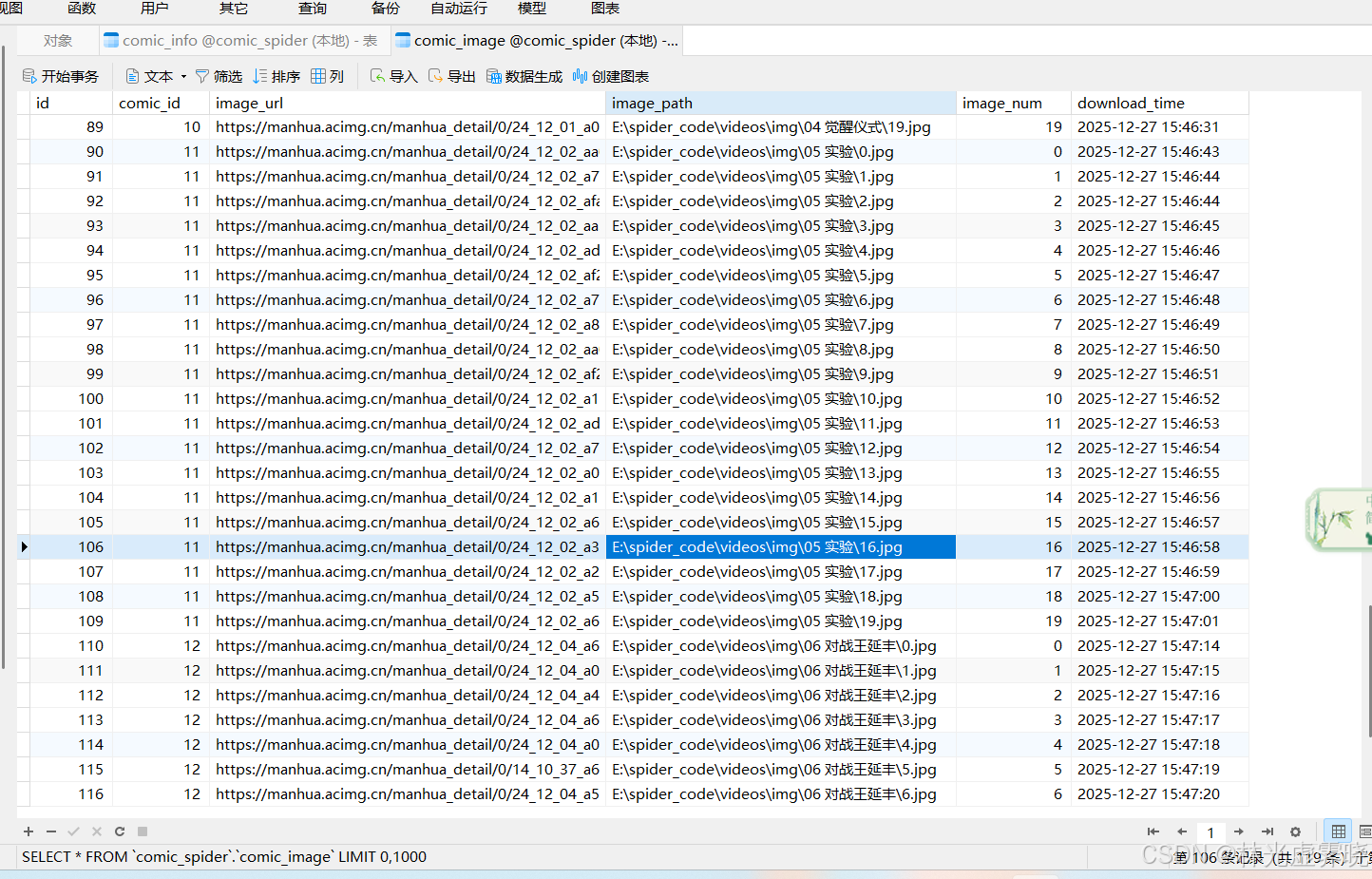
image_table_sql = """
CREATE TABLE IF NOT EXISTS comic_image (
id INT AUTO_INCREMENT PRIMARY KEY COMMENT '主键ID',
comic_id INT NOT NULL COMMENT '关联comic_info的ID',
image_url VARCHAR(512) NOT NULL COMMENT '图片URL',
image_path VARCHAR(512) NOT NULL COMMENT '本地保存路径',
image_num INT NOT NULL COMMENT '图片序号',
download_time DATETIME DEFAULT CURRENT_TIMESTAMP COMMENT '下载时间',
INDEX idx_comic_id (comic_id),
CONSTRAINT fk_comic_image FOREIGN KEY (comic_id) REFERENCES comic_info(id) ON DELETE CASCADE,
UNIQUE KEY uk_comic_image (comic_id, image_num) COMMENT '唯一索引:漫画ID+图片序号'
) ENGINE=InnoDB DEFAULT CHARSET=utf8mb4 COMMENT='漫画图片信息表';
"""
cursor.execute(image_table_sql)
conn.commit()
print("✅ 数据库初始化成功!")
except Exception as e:
if conn:
conn.rollback()
print(f"❌ 数据库初始化失败:{e}")
finally:
if cursor:
cursor.close()
if conn:
conn.close()
def _check_tables_exists(self):
"""新增:校验核心表是否存在,不存在则终止程序"""
conn = self._get_db_connection()
if not conn:
raise Exception("数据库连接失败,无法检查表结构")
cursor = None
try:
cursor = conn.cursor()
# 检查comic_info表
cursor.execute("SHOW TABLES LIKE 'comic_info'")
if not cursor.fetchone():
raise Exception("comic_info表不存在!")
# 检查comic_image表
cursor.execute("SHOW TABLES LIKE 'comic_image'")
if not cursor.fetchone():
raise Exception("comic_image表不存在!")
print("✅ 核心数据表校验通过!")
except Exception as e:
print(f"❌ 表结构校验失败:{e}")
raise # 终止程序,避免后续写入失败
finally:
if cursor:
cursor.close()
conn.close()
def _get_db_connection(self):
"""获取数据库连接(私有方法)"""
try:
conn = pymysql.connect(**self.mysql_config)
return conn
except Exception as e:
print(f"❌ 数据库连接失败:{e}")
return None
def insert_comic_chapter(self, title, url, chapter_num):
"""
插入漫画章节信息
:param title: 漫画标题
:param url: 章节URL
:param chapter_num: 章节编号
:return: 章节ID / None
"""
# 过滤标题中的非法字符(数据库存储原始标题,仅文件系统过滤)
conn = self._get_db_connection()
if not conn:
return None
cursor = None
try:
cursor = conn.cursor()
# 检查是否已存在
cursor.execute("SELECT id FROM comic_info WHERE comic_title=%s AND chapter_url=%s", (title, url))
result = cursor.fetchone()
if result:
chapter_id = result[0]
print(f"ℹ️ 漫画章节已存在【ID:{chapter_id}】:{title} - {chapter_num}")
else:
# 插入新章节
cursor.execute(
"INSERT INTO comic_info (comic_title, chapter_url, chapter_num) VALUES (%s, %s, %s)",
(title, url, chapter_num)
)
conn.commit()
chapter_id = cursor.lastrowid
print(f"✅ 新增漫画章节【ID:{chapter_id}】:{title} - {chapter_num}")
return chapter_id
except Exception as e:
conn.rollback()
print(f"❌ 插入章节失败:{e}")
return None
finally:
if cursor:
cursor.close()
conn.close()
def insert_comic_image(self, chapter_id, img_url, img_path, img_num):
"""
插入漫画图片信息(增强容错)
:param chapter_id: 章节ID
:param img_url: 图片URL
:param img_path: 本地路径
:param img_num: 图片序号
"""
conn = self._get_db_connection()
if not conn:
return
cursor = None
try:
cursor = conn.cursor()
# 检查是否已存在
cursor.execute("SELECT id FROM comic_image WHERE comic_id=%s AND image_num=%s", (chapter_id, img_num))
exist_record = cursor.fetchone()
if exist_record:
print(f"ℹ️ 图片已存在【章节ID:{chapter_id} 序号:{img_num}】:{img_path}")
return
# 插入新图片(强制使用utf8mb4编码)
insert_sql = """
INSERT INTO comic_image (comic_id, image_url, image_path, image_num)
VALUES (%s, %s, %s, %s)
"""
cursor.execute(insert_sql, (chapter_id, img_url, img_path, img_num))
conn.commit()
img_id = cursor.lastrowid
print(f"✅ 新增图片记录【ID:{img_id}】:章节{chapter_id} - 第{img_num}张")
except Exception as e:
conn.rollback()
print(f"❌ 插入图片失败【章节ID:{chapter_id} 序号:{img_num}】:{e}")
finally:
if cursor:
cursor.close()
conn.close()
def _init_browser(self):
"""初始化浏览器(私有方法)"""
try:
service = Service(executable_path=self.chrome_driver_path)
self.driver = webdriver.Chrome(service=service, options=self.chrome_options)
self.driver.maximize_window()
return True
except Exception as e:
print(f"❌ 浏览器初始化失败:{e}")
return False
def download_chapter(self, chapter_url):
"""
下载单个章节的漫画(优化图片-章节关联,修复路径问题)
:param chapter_url: 章节URL
:return: 下一章URL / None
"""
# 初始化浏览器
if not self._init_browser():
return None
next_url = None
try:
# 访问章节页面
self.driver.get(chapter_url)
time.sleep(1.0) # 延长等待时间,确保页面完全加载
# 获取漫画标题(增强定位容错)
try:
title_elem = self.driver.find_element(By.XPATH,
'//*[@id="comicTitle"]/span[@class="title-comicHeading"]')
comic_title_original = title_elem.text.strip()
if not comic_title_original:
comic_title_original = f"未知标题_{int(time.time())}"
print(f"⚠️ 未获取到漫画标题,自动生成:{comic_title_original}")
except:
comic_title_original = f"未知标题_{int(time.time())}"
print(f"⚠️ 标题元素定位失败,自动生成:{comic_title_original}")
# 过滤标题非法字符(用于文件路径)
comic_title_for_path = self._filter_invalid_chars(comic_title_original)
# 确保标题不为空
if not comic_title_for_path:
comic_title_for_path = f"未知标题_{int(time.time())}"
# 提取章节编号并过滤非法字符
chapter_num_original = chapter_url.split('/cid/')[
-1] if 'cid/' in chapter_url else f"未知章节_{int(time.time())}"
# 只保留章节编号中的数字部分(核心修复)
chapter_num_clean = ''.join([c for c in chapter_num_original if c.isdigit()])
if not chapter_num_clean:
chapter_num_clean = f"未知章节_{int(time.time())}"
# 过滤非法字符
chapter_num_for_db = self._filter_invalid_chars(chapter_num_original)
# 插入章节信息到数据库(使用原始标题,保证数据准确性)
chapter_id = self.insert_comic_chapter(comic_title_original, chapter_url, chapter_num_for_db)
if not chapter_id:
print(f"❌ 章节ID获取失败,跳过当前章节:{chapter_url}")
return None
# 创建保存目录(兼容Windows路径,使用过滤后的标题)
save_dir = os.path.join(self.save_base_path, comic_title_for_path)
# 标准化Windows路径
save_dir = os.path.normpath(save_dir)
if not os.path.exists(save_dir):
os.makedirs(save_dir, exist_ok=True)
print(f"✅ 创建章节目录:{save_dir}")
# 获取图片列表(增强定位容错)
try:
pic_list = self.driver.find_elements(By.XPATH, '//*[@id="comicContain"]/li/img')
if not pic_list:
pic_list = self.driver.find_elements(By.TAG_NAME, 'img') # 降级获取所有图片
# 过滤掉非漫画图片(比如logo、广告)
pic_list = [p for p in pic_list if
'comic' in p.get_attribute('src', '') or 'ac.qq.com' in p.get_attribute('src', '')]
print(f"⚠️ 未找到指定图片列表,降级获取到 {len(pic_list)} 张图片")
except:
pic_list = []
print(f"❌ 图片列表定位失败:{comic_title_original} - {chapter_num_clean}")
# 下载每张图片(确保图片下载成功后再写库)
total_img = len(pic_list)
print(f"📥 开始下载【章节ID:{chapter_id}】的 {total_img} 张图片...")
for img_num, pic in enumerate(pic_list):
try:
# 滚动到图片位置
ActionChains(self.driver).scroll_to_element(pic).perform()
time.sleep(0.5) # 延长等待,确保图片URL加载
# 获取图片URL(多属性尝试)
img_url = pic.get_attribute('src') or pic.get_attribute('data-src') or pic.get_attribute('original')
if not img_url or not img_url.startswith('http'):
print(f"❌ 无效图片URL【章节ID:{chapter_id} 序号:{img_num}】:跳过")
continue
# 下载图片(添加重试机制)
retry_times = 3
response = None
while retry_times > 0:
try:
headers = {
'Referer': chapter_url, # 增加Referer防反爬
'User-Agent': 'Mozilla/5.0 (Windows NT 10.0; Win64; x64) AppleWebKit/537.36 (KHTML, like Gecko) Chrome/120.0.0.0 Safari/537.36'
}
response = requests.get(img_url, headers=headers, timeout=15)
response.raise_for_status()
break
except Exception as retry_e:
retry_times -= 1
time.sleep(1)
print(f"⚠️ 图片下载重试 {3 - retry_times}/3:{img_url} 错误:{str(retry_e)[:50]}")
if not response or response.status_code != 200:
print(f"❌ 图片下载失败【章节ID:{chapter_id} 序号:{img_num}】:{img_url}")
continue
# 保存图片(使用干净的章节编号,避免非法字符)
img_filename = f"{img_num}.jpg" # 简化文件名,只保留序号
img_path = os.path.join(save_dir, img_filename)
# 标准化路径
img_path = os.path.normpath(img_path)
with open(img_path, 'wb') as f:
f.write(response.content)
# 图片下载成功后,再插入数据库
self.insert_comic_image(chapter_id, img_url, img_path, img_num)
print(f"✅ 已下载【章节ID:{chapter_id}】:第{img_num + 1}/{total_img}张 | 保存路径:{img_path}")
except Exception as e:
print(f"❌ 处理第{img_num}张图片失败:{str(e)[:100]}")
continue
# 获取下一章URL
try:
next_elem = self.driver.find_element(By.XPATH, '//*[@id="mainControlNext"]')
next_url = next_elem.get_attribute('href')
# 清理下一章URL中的多余参数
if next_url and '?' in next_url:
next_url = next_url.split('?')[0]
if next_url == chapter_url: # 避免循环
next_url = None
except:
next_url = None
print(f"ℹ️ 【章节ID:{chapter_id}】已无下一章")
return next_url
except Exception as e:
print(f"❌ 章节下载失败:{str(e)[:100]}")
return None
finally:
if self.driver:
self.driver.quit() # 关闭浏览器
print("🔌 浏览器已关闭")
def batch_download(self, start_url, interval=2):
"""
批量下载漫画(自动翻页)
:param start_url: 起始章节URL
:param interval: 章节间下载间隔(秒)
"""
# 清理起始URL参数
if '?' in start_url:
start_url = start_url.split('?')[0]
current_url = start_url
chapter_count = 0
# 防止无限循环,设置最大章节数限制
max_chapters = 100
while current_url and chapter_count < max_chapters:
chapter_count += 1
print(f"\n========== 开始下载第 {chapter_count} 章:{current_url} ==========")
current_url = self.download_chapter(current_url)
# 清理下一章URL参数
if current_url and '?' in current_url:
current_url = current_url.split('?')[0]
if current_url:
print(f"⏳ 等待 {interval} 秒后下载下一章...")
time.sleep(interval) # 延长间隔,避免反爬
else:
break
if chapter_count >= max_chapters:
print(f"\n⚠️ 已达到最大下载章节数({max_chapters}章),停止下载")
else:
print(f"\n========== 批量下载完成!共处理 {chapter_count} 个章节 ==========")
def __del__(self):
"""析构函数 - 确保浏览器和数据库连接关闭"""
if self.driver:
self.driver.quit()
print("ℹ️ 漫画下载器已释放资源")
# ===================== 主程序入口 =====================
if __name__ == '__main__':
# 配置参数
CHROME_DRIVER_PATH = r'D:\data\pyCharm\python311\chromedriver.exe' # 修正路径分隔符
SAVE_BASE_PATH = r'E:\spider_code\videos\img' # 修正路径分隔符
MYSQL_CONFIG = {
'host': '127.0.0.1',
'port': 3306,
'user': 'root',
'password': 'root',
'database': 'comic_spider',
'charset': 'utf8mb4'
}
# 异常捕获,确保程序优雅退出
try:
# 创建下载器实例
downloader = ComicDownloader(
chrome_driver_path=CHROME_DRIVER_PATH,
save_base_path=SAVE_BASE_PATH,
mysql_config=MYSQL_CONFIG
)
# 开始批量下载
start_url = 'https://ac.qq.com/ComicView/index/id/651757/cid/808'
downloader.batch_download(start_url=start_url, interval=2)
except Exception as e:
print(f"\n❌ 程序执行失败:{str(e)[:200]}")爬取结果: