
Java中止线程的三种方式
文章目录
-
停止一个线程通常意味着在线程处理任务完成之前停到正在做的操作,也就是放弃当前的操作;
-
在Java中有以下3中方式可以中止正在运行的线程;
-
使用退出标志,使线程正常退出,也就是当run()方法完成后线程终止;
-
使用stop()方法强行终止线程,但是不推荐使用这个方法,该方法已被弃用;
-
使用interrupt方法中断线程。
1.使用标志位中止线程(推荐)
- 在run()方法执行完毕后,该线程就中止了;
- 但是在某些特殊情况下,run()方法会被一只执行;
- 比如在服务端程序中可能会使用while(true){...}这样的循环结构来不断的接收来自客户端的请求;
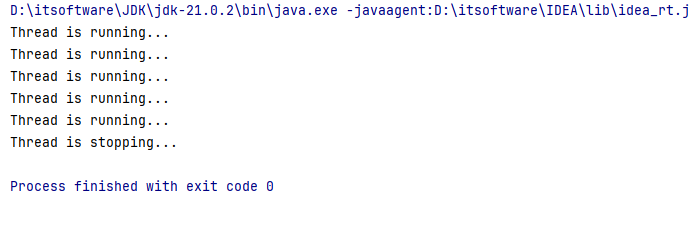
- 此时就可以用修改标志位的方式来结束run()方法。
java
public class ExitFlagTests {
    // volatile修饰符用来保证其它线程读取的总是该变量的最新的值
    private volatile boolean exitFlag = false; // 退出标志

    public void run() {
        while (!exitFlag) {
            // 执行线程的任务
            System.out.println("Thread is running...");
            try {
                Thread.sleep(1000); // 模拟一些工作
            } catch (InterruptedException e) {
                // 处理中断(如果需要)
                Thread.currentThread().interrupt(); // 重新设置中断状态
            }
        }
        System.out.println("Thread is stopping...");
    }

    public void stop() {
        exitFlag = true; // 设置退出标志为true
    }

    public static void main(String[] args) throws InterruptedException {
        ExitFlagTests exit = new ExitFlagTests();
        Thread thread = new Thread(exit::run);
        thread.start();

        // 让线程运行一段时间
        Thread.sleep(5000);

        // 请求线程停止
        exit.stop();
    }
}
2.使用stop()中止线程(不推荐)
- Thread.stop()方法可以强行中止线程的执行;
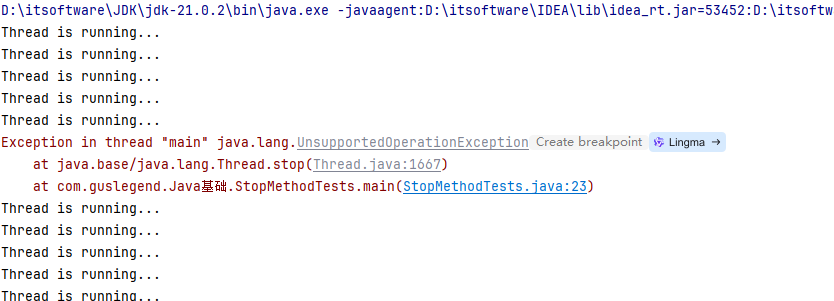
- 然而,这种方法是不安全的,因为它不能保证线程资源的正确释放和清理;
- 这可能导致数据不一致和资源泄漏等问题,因此被官方弃用。
java
public class StopMethodTests extends Thread {
    public void run() {
        while (true) {
            System.out.println("Thread is running...");
            try {
                Thread.sleep(1000);
            } catch (InterruptedException e) {
                Thread.currentThread().interrupt();
            }
        }
    }

    public static void main(String[] args) throws InterruptedException {
        StopMethodTests thread = new StopMethodTests();
        thread.start();

        // 让线程运行一段时间
        Thread.sleep(5000);

        // 强行中止线程(不推荐)
        thread.stop();
    }
}
为什么启用stop:
- 调用stop()方法会立刻停止run()方法中剩余的全部工作,包括在catch或finally语句中的,并抛出ThreadDeath异常(通常情况下次异常不需要显示的捕获);
- 因此可能会导致一些清理性的工作的得不到完成,如文件,数据库等的关闭;
- 调用stop()方法会立即释放该线程所持有的所有的锁,导致数据得不到同步,出现数据不一致的问题。
3.使用interrupt()中断线程
- 我们现在知道了stop()方法停止线程是非常不安全的方式,那么我们应该使用什么方法来停止线程呢?
- 使用interrupt()方法来中断线程;
- 调用interrupt()方法仅仅是在当前线程中打一个停止标记,并不是真的停止线程;
- 也就是线程中断并不会立即中止线程,而是通知目标线程,有人希望你终止;
- 目标线程收到通知后会如何处理,由目标线程决定;
- 如果一个线程不能被interrupt,那么stop方法也不会起作用。
java
public class InterruptTests extends Thread{
    public static void main(String[] args) {
        try {
            InterruptTests t = new InterruptTests();
            // 启动线程
            t.start();

            Thread.sleep(200);

            // 中断线程 t
            t.interrupt();
        } catch (InterruptedException e) {
            e.printStackTrace();
        }
    }

    @Override
    public void run() {
        super.run();
        // 循环打印 i 的值,从 0 到 200000
        for(int i = 0; i <= 200000; i++) {
            System.out.println("i=" + i);
        }
    }
}
通过运行以上代码,我们会发现interrupt方法并没有停止线程t中的处理逻辑,也就是说t线程被设置中断状态,但这个中断不会起作用,那么如何停止线程呢?
java
public boolean Thread.isInterrupted() //判断是否被中断
public static boolean Thread.interrupted() //判断是否被中断,并清除当前中断状态-
这两个方法使得当前线程能够感知到是否被中断了(通过检查标志位)。
-
所以如果希望线程 t 在中断后停止,就必须先判断是否被中断,并为它增加相应的中断处理代码:
java
@Override
public void run() {
    super.run();
    for(int i = 0; i <= 200000; i++) {
        //判断是否被中断
        if(Thread.currentThread().isInterrupted()){
            //处理中断逻辑
            break;
        }
        System.out.println("i=" + i);
    }
}-
在上面这段代码中,我们增加了 Thread.isInterrupted() 来判断当前线程是否被中断了,如果是,则退出 for 循环,结束线程。
-
这种方式看起来与之前介绍的"使用标志位中止线程"非常类似,但是在遇到 sleep() 或者 wait() 这样的操作,我们只能通过中断来处理了。
java
public static native void sleep(long millis) throws InterruptedException- Thread.sleep() 方法会抛出一个 InterruptedException 异常,当线程被 sleep() 休眠时,如果被中断,这会就抛出这个异常。
!NOTE
(注意:Thread.sleep() 方法由于中断而抛出的异常,是会清除中断标记的。)