欢迎大家加入开源鸿蒙跨平台开发者社区,一起共建开源鸿蒙跨平台生态。
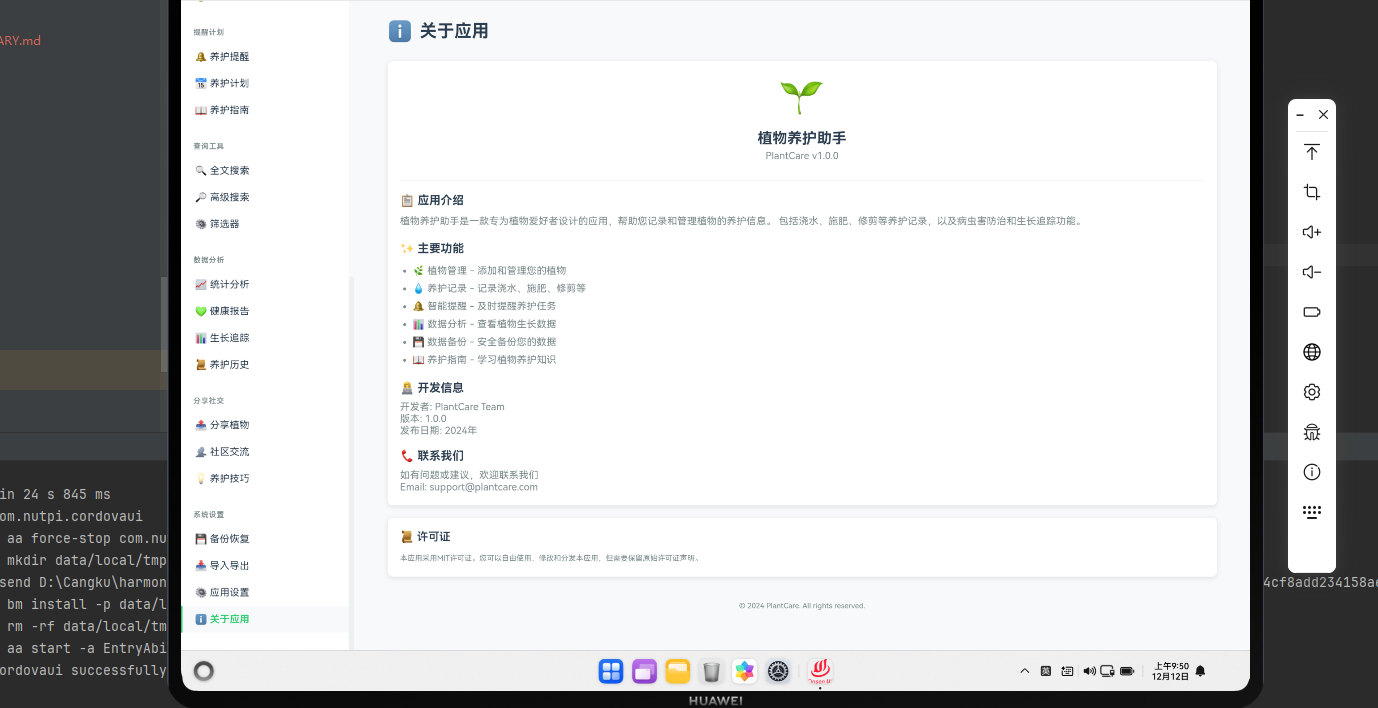
关于应用系统概述
关于应用页面为用户提供了应用的基本信息、版本号、许可证和联系方式。在Cordova框架与OpenHarmony系统的结合下,我们需要实现一个完整的关于应用系统,包括应用信息展示、更新检查和反馈功能。
应用信息数据模型
javascript
class AppInfo {
    constructor() {
        this.name = '植物养护助手';
        this.version = '1.0.0';
        this.buildNumber = '001';
        this.releaseDate = '2024-01-01';
        this.developer = '植物养护团队';
        this.website = 'https://example.com';
        this.email = 'support@example.com';
        this.description = '一个功能完整的植物养护管理应用';
        this.features = [
            '植物信息管理',
            '养护记录追踪',
            '智能提醒系统',
            '社区交流平台',
            '数据备份恢复'
        ];
        this.permissions = [
            '相机',
            '文件存储',
            '位置信息',
            '通知权限'
        ];
        this.changelog = [
            { version: '1.0.0', date: '2024-01-01', changes: ['初始版本发布'] }
        ];
    }
}

class AppInfoManager {
    constructor() {
        this.appInfo = new AppInfo();
    }

    getAppInfo() {
        return this.appInfo;
    }

    checkForUpdates() {
        // 检查是否有新版本
        return new Promise((resolve, reject) => {
            cordova.exec(
                function(result) {
                    resolve(result);
                },
                function(error) {
                    reject(error);
                },
                "UpdatePlugin",
                "checkForUpdates",
                []
            );
        });
    }
}
这个应用信息数据模型定义了AppInfo和AppInfoManager类。
与OpenHarmony的集成
javascript
function getDeviceInfo() {
    cordova.exec(
        function(result) {
            console.log("设备信息:", result);
            displayDeviceInfo(result);
        },
        function(error) {
            console.error("获取设备信息失败:", error);
        },
        "DevicePlugin",
        "getDeviceInfo",
        []
    );
}

function checkForUpdates() {
    cordova.exec(
        function(result) {
            console.log("更新检查完成");
            if (result.hasUpdate) {
                showUpdateDialog(result);
            } else {
                showToast('已是最新版本');
            }
        },
        function(error) {
            console.error("检查更新失败:", error);
        },
        "UpdatePlugin",
        "checkForUpdates",
        []
    );
}

function downloadUpdate(updateUrl) {
    cordova.exec(
        function(result) {
            console.log("更新已下载");
            showToast('更新已下载,请重启应用');
        },
        function(error) {
            console.error("下载失败:", error);
        },
        "UpdatePlugin",
        "downloadUpdate",
        [updateUrl]
    );
}
这段代码展示了如何与OpenHarmony的系统服务集成。
关于应用页面
javascript
function renderAboutPage() {
    const appInfo = appInfoManager.getAppInfo();

    const container = document.getElementById('page-container');
    container.innerHTML = `
        <div class="about-page">
            <div class="app-header">
                <div class="app-icon">🌱</div>
                <h1>${appInfo.name}</h1>
                <p class="app-version">版本 ${appInfo.version}</p>
            </div>
        </div>
    `;

    // 应用描述
    const descriptionSection = document.createElement('div');
    descriptionSection.className = 'about-section';
    descriptionSection.innerHTML = `
        <h3>关于应用</h3>
        <p>${appInfo.description}</p>
    `;
    container.appendChild(descriptionSection);

    // 主要功能
    const featuresSection = document.createElement('div');
    featuresSection.className = 'about-section';
    featuresSection.innerHTML = '<h3>主要功能</h3>';

    const featuresList = document.createElement('ul');
    appInfo.features.forEach(feature => {
        const li = document.createElement('li');
        li.textContent = feature;
        featuresList.appendChild(li);
    });
    featuresSection.appendChild(featuresList);
    container.appendChild(featuresSection);

    // 应用信息
    const infoSection = document.createElement('div');
    infoSection.className = 'about-section';
    infoSection.innerHTML = `
        <h3>应用信息</h3>
        <p>开发者: ${appInfo.developer}</p>
        <p>构建号: ${appInfo.buildNumber}</p>
        <p>发布日期: ${appInfo.releaseDate}</p>
        <p>网站: <a href="${appInfo.website}" target="_blank">${appInfo.website}</a></p>
        <p>邮箱: <a href="mailto:${appInfo.email}">${appInfo.email}</a></p>
    `;
    container.appendChild(infoSection);

    // 权限信息
    const permissionsSection = document.createElement('div');
    permissionsSection.className = 'about-section';
    permissionsSection.innerHTML = '<h3>应用权限</h3>';

    const permissionsList = document.createElement('ul');
    appInfo.permissions.forEach(permission => {
        const li = document.createElement('li');
        li.textContent = permission;
        permissionsList.appendChild(li);
    });
    permissionsSection.appendChild(permissionsList);
    container.appendChild(permissionsSection);

    // 操作按钮
    const actionsSection = document.createElement('div');
    actionsSection.className = 'about-section actions';
    actionsSection.innerHTML = `
        <button onclick="checkForUpdates()">🔄 检查更新</button>
        <button onclick="showFeedbackDialog()">📧 意见反馈</button>
        <button onclick="showLicenseDialog()">📜 许可证</button>
    `;
    container.appendChild(actionsSection);
}
这个函数创建关于应用页面。
更新对话框
javascript
function showUpdateDialog(updateInfo) {
    const dialog = document.createElement('div');
    dialog.className = 'modal-dialog';
    dialog.innerHTML = `
        <div class="modal-content">
            <h3>发现新版本</h3>
            <p>新版本: ${updateInfo.version}</p>
            <p>更新内容:</p>
            <ul>
                ${updateInfo.changes.map(change => `<li>${change}</li>`).join('')}
            </ul>
            <div class="form-actions">
                <button onclick="downloadUpdate('${updateInfo.downloadUrl}')">立即更新</button>
                <button onclick="closeDialog()">稍后更新</button>
            </div>
        </div>
    `;

    document.getElementById('modal-container').appendChild(dialog);
}
这个函数创建更新对话框。
意见反馈
javascript
function showFeedbackDialog() {
    const dialog = document.createElement('div');
    dialog.className = 'modal-dialog';
    dialog.innerHTML = `
        <div class="modal-content">
            <h3>意见反馈</h3>
            <form id="feedback-form">
                <div class="form-group">
                    <label>反馈类型</label>
                    <select id="feedback-type" required>
                        <option value="">请选择</option>
                        <option value="bug">问题报告</option>
                        <option value="feature">功能建议</option>
                        <option value="improvement">改进建议</option>
                        <option value="other">其他</option>
                    </select>
                </div>
                <div class="form-group">
                    <label>反馈内容</label>
                    <textarea id="feedback-content" required></textarea>
                </div>
                <div class="form-group">
                    <label>联系方式 (可选)</label>
                    <input type="email" id="feedback-email" placeholder="your@email.com">
                </div>
                <div class="form-actions">
                    <button type="submit">提交反馈</button>
                    <button type="button" onclick="closeDialog()">取消</button>
                </div>
            </form>
        </div>
    `;

    document.getElementById('modal-container').appendChild(dialog);

    document.getElementById('feedback-form').addEventListener('submit', function(e) {
        e.preventDefault();

        const feedbackData = {
            type: document.getElementById('feedback-type').value,
            content: document.getElementById('feedback-content').value,
            email: document.getElementById('feedback-email').value,
            appVersion: appInfoManager.appInfo.version,
            timestamp: new Date().toISOString()
        };

        cordova.exec(
            function(result) {
                console.log("反馈已提交");
                showToast('感谢您的反馈!');
                closeDialog();
            },
            function(error) {
                console.error("提交失败:", error);
            },
            "FeedbackPlugin",
            "submitFeedback",
            [feedbackData]
        );
    });
}
这段代码实现了意见反馈功能。
许可证信息
javascript
function showLicenseDialog() {
    const dialog = document.createElement('div');
    dialog.className = 'modal-dialog';
    dialog.innerHTML = `
        <div class="modal-content">
            <h3>许可证</h3>
            <div class="license-content">
                <p>本应用采用 MIT 许可证</p>
                <p>© 2024 植物养护团队</p>
                <p>
                    本软件按"原样"提供,不提供任何明示或暗示的保证。
                    在任何情况下,作者或版权持有人都不对任何索赔、损害或其他责任负责。
                </p>
            </div>
            <div class="form-actions">
                <button onclick="closeDialog()">关闭</button>
            </div>
        </div>
    `;

    document.getElementById('modal-container').appendChild(dialog);
}
这段代码显示许可证信息。
总结
关于应用系统为用户提供了应用的基本信息和支持功能。通过与OpenHarmony系统的集成,我们可以创建一个完整的关于应用页面,包括版本信息、更新检查和用户反馈功能。这30篇文章涵盖了植物养护应用的所有主要功能模块,从基础的植物管理到高级的数据分析和社区交流,为开发者提供了完整的参考和指导。
欢迎加入开源鸿蒙跨平台社区:https://openharmonycrossplatform.csdn.net