基本概念
-
作用 ------ 通过简短的别名替代复杂的 Git 命令,提高效率
-
配置级别
- 命令加
--global/ 修改~/.gitconfig文件 ------ 对 当前用户的所有仓库 生效 - 命令不加
--global/ 修改.git/config文件 ------ 对 当前仓库 生效
- 命令加
命令行配置别名
-
用
st表示status,查看Git仓库状态shell$ git config --global alias.st status $ git st -
用
ci表示commit,提交代码shell$ git config --global alias.ci commit $ git ci -m "bala bala bala..." -
用
unstage表示reset HEAD,撤销暂存区的修改shell$ git config --global alias.unstage 'reset HEAD' $ git unstage test.py -
用
last表示log -1,显示最后一次提交信息shell$ git config --global alias.last 'log -1' $ git last commit adca45d317e6d8a4b23f9811c3d7b7f0f180bfe2 Merge: bd6ae48 291bea8 Author: Michael Liao <askxuefeng@gmail.com> Date: Thu Aug 22 22:49:22 2013 +0800 merge & fix hello.py -
用
lg表示log --color --graph ...,自定义的彩色日志格式shell$ git config --global alias.lg "log --color --graph --pretty=format:'%Cred%h%Creset -%C(yellow)%d%Creset %s %Cgreen(%cr) %C(bold blue)<%an>%Creset' --abbrev-commit" $ git lg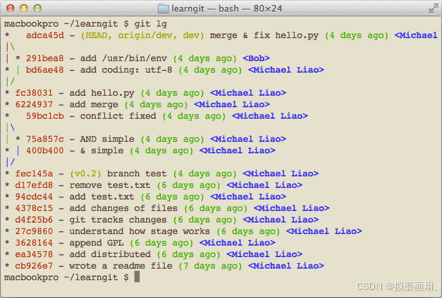
文件配置别名
-
配置当前仓库 ------ 修改项目根目录
.git/config文件ini$ cat .git/config [core] repositoryformatversion = 0 filemode = true bare = false logallrefupdates = true ignorecase = true precomposeunicode = true [remote "origin"] url = git@github.com:michaelliao/learngit.git fetch = +refs/heads/*:refs/remotes/origin/* [branch "master"] remote = origin merge = refs/heads/master [alias] last = log -1 -
配置当前用户的所有仓库 ------ 修改用户主目录
.gitconfig文件ini$ cat .gitconfig [alias] co = checkout ci = commit br = branch st = status [user] name = Your Name email = your@email.com