前言
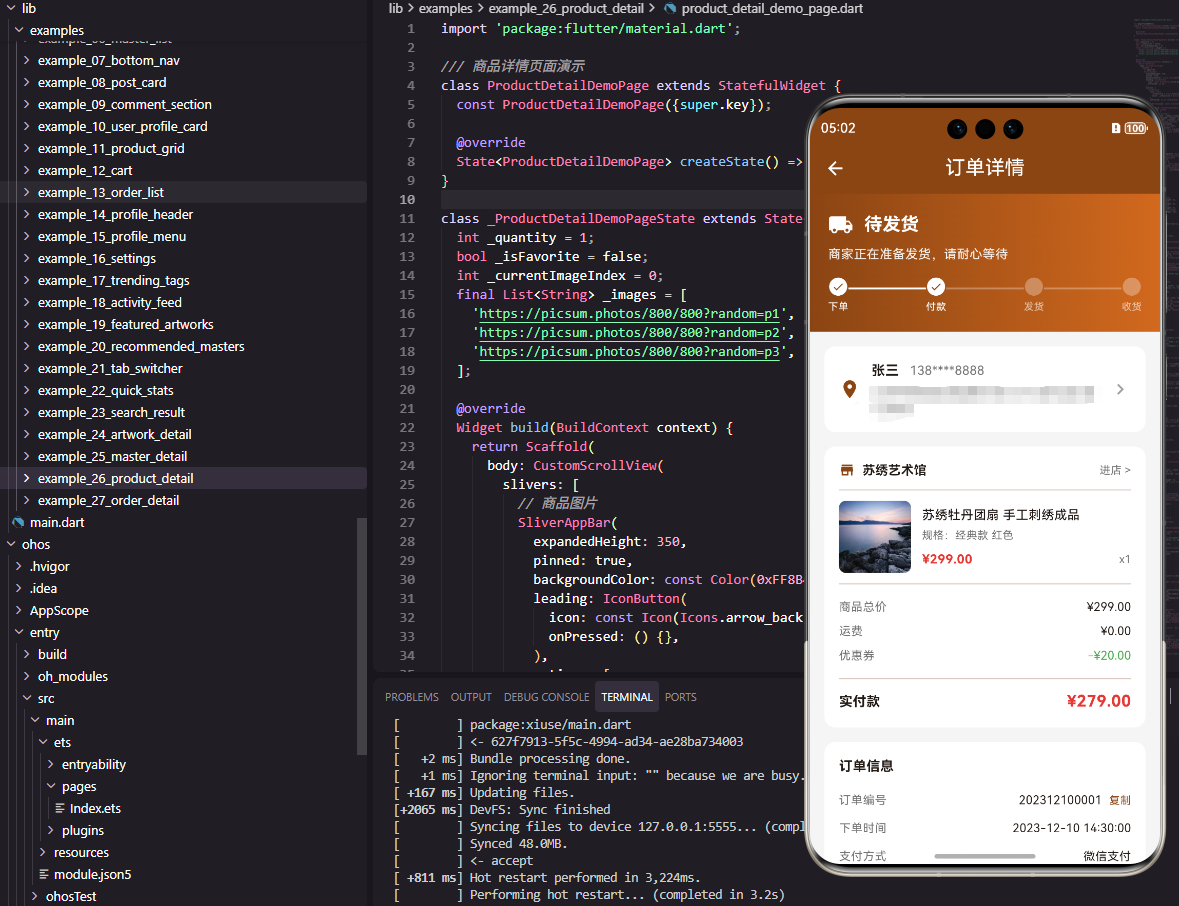
订单详情页面是电商应用中用户查看订单完整信息的重要页面。它需要展示订单状态、商品信息、收货地址、支付信息、物流跟踪等内容。本文将详细介绍如何在Flutter和OpenHarmony平台上实现一个功能完善的订单详情页面。
订单详情页面的设计需要清晰展示订单的各项信息,并根据订单状态提供相应的操作入口。
Flutter订单详情页面实现
页面结构设计
订单详情页面展示订单的完整信息。
dart
class OrderDetailPage extends StatelessWidget {
  final String orderId;

  const OrderDetailPage({super.key, required this.orderId});

  @override
  Widget build(BuildContext context) {
    return Scaffold(
      appBar: AppBar(
        title: const Text('订单详情', style: TextStyle(color: Colors.white)),
        backgroundColor: const Color(0xFF8B4513),
        leading: IconButton(
          icon: const Icon(Icons.arrow_back, color: Colors.white),
          onPressed: () => Navigator.pop(context),
        ),
      ),
orderId通过构造函数传入,用于从后端获取订单详情。
订单状态区域
展示订单当前状态和状态说明。
dart
      body: SingleChildScrollView(
        child: Column(
          children: [
            Container(
              width: double.infinity,
              padding: const EdgeInsets.all(20),
              decoration: const BoxDecoration(
                gradient: LinearGradient(
                  colors: [Color(0xFF8B4513), Color(0xFFD2691E)],
                ),
              ),
              child: Column(
                crossAxisAlignment: CrossAxisAlignment.start,
                children: [
                  Row(
                    children: [
                      const Icon(Icons.local_shipping, color: Colors.white, size: 28),
                      const SizedBox(width: 12),
                      const Text('待发货', style: TextStyle(fontSize: 20, fontWeight: FontWeight.bold, color: Colors.white)),
                    ],
                  ),
                  const SizedBox(height: 8),
                  Text('商家正在准备发货,请耐心等待', style: TextStyle(fontSize: 14, color: Colors.white.withOpacity(0.9))),
                ],
              ),
            ),
渐变背景突出订单状态。图标和文字清晰展示当前状态。
收货地址信息
展示收货人和地址信息。
dart
            Container(
              margin: const EdgeInsets.all(16),
              padding: const EdgeInsets.all(16),
              decoration: BoxDecoration(
                color: Colors.white,
                borderRadius: BorderRadius.circular(12),
                boxShadow: [BoxShadow(color: Colors.black.withOpacity(0.05), blurRadius: 5)],
              ),
              child: Row(
                children: [
                  const Icon(Icons.location_on, color: Color(0xFF8B4513)),
                  const SizedBox(width: 12),
                  Expanded(
                    child: Column(
                      crossAxisAlignment: CrossAxisAlignment.start,
                      children: [
                        Row(
                          children: [
                            const Text('张三', style: TextStyle(fontSize: 14, fontWeight: FontWeight.bold)),
                            const SizedBox(width: 12),
                            Text('138****8888', style: TextStyle(fontSize: 14, color: Colors.grey[600])),
                          ],
                        ),
                        const SizedBox(height: 4),
                        Text('北京市朝阳区xxx街道xxx小区xxx号楼xxx室', style: TextStyle(fontSize: 13, color: Colors.grey[700])),
                      ],
                    ),
                  ),
                ],
              ),
            ),
地址卡片包含收货人、电话和详细地址。
商品信息区域
展示订单中的商品列表。
dart
            Container(
              margin: const EdgeInsets.symmetric(horizontal: 16),
              padding: const EdgeInsets.all(16),
              decoration: BoxDecoration(
                color: Colors.white,
                borderRadius: BorderRadius.circular(12),
                boxShadow: [BoxShadow(color: Colors.black.withOpacity(0.05), blurRadius: 5)],
              ),
              child: Column(
                children: [
                  Row(
                    children: [
                      Container(
                        width: 80,
                        height: 80,
                        decoration: BoxDecoration(color: Colors.grey[200], borderRadius: BorderRadius.circular(8)),
                        child: const Icon(Icons.shopping_bag, color: Colors.grey),
                      ),
                      const SizedBox(width: 12),
                      Expanded(
                        child: Column(
                          crossAxisAlignment: CrossAxisAlignment.start,
                          children: [
                            const Text('苏绣牡丹团扇', style: TextStyle(fontSize: 14, fontWeight: FontWeight.w500)),
                            const SizedBox(height: 4),
                            Text('规格:经典款', style: TextStyle(fontSize: 12, color: Colors.grey[600])),
                            const SizedBox(height: 8),
                            Row(
                              mainAxisAlignment: MainAxisAlignment.spaceBetween,
                              children: [
                                const Text('¥299', style: TextStyle(fontSize: 14, fontWeight: FontWeight.bold, color: Color(0xFFE53935))),
                                Text('x1', style: TextStyle(fontSize: 12, color: Colors.grey[600])),
                              ],
                            ),
                          ],
                        ),
                      ),
                    ],
                  ),
                  const Divider(height: 24),
                  Row(
                    mainAxisAlignment: MainAxisAlignment.spaceBetween,
                    children: [
                      Text('商品总价', style: TextStyle(fontSize: 13, color: Colors.grey[600])),
                      const Text('¥299.00', style: TextStyle(fontSize: 13)),
                    ],
                  ),
                  const SizedBox(height: 8),
                  Row(
                    mainAxisAlignment: MainAxisAlignment.spaceBetween,
                    children: [
                      Text('运费', style: TextStyle(fontSize: 13, color: Colors.grey[600])),
                      const Text('¥0.00', style: TextStyle(fontSize: 13)),
                    ],
                  ),
                  const Divider(height: 24),
                  Row(
                    mainAxisAlignment: MainAxisAlignment.spaceBetween,
                    children: [
                      const Text('实付款', style: TextStyle(fontSize: 14, fontWeight: FontWeight.bold)),
                      const Text('¥299.00', style: TextStyle(fontSize: 16, fontWeight: FontWeight.bold, color: Color(0xFFE53935))),
                    ],
                  ),
                ],
              ),
            ),
商品信息包含图片、名称、规格、价格和数量。价格明细清晰展示各项费用。
订单信息区域
展示订单号、下单时间等信息。
dart
            Container(
              margin: const EdgeInsets.all(16),
              padding: const EdgeInsets.all(16),
              decoration: BoxDecoration(
                color: Colors.white,
                borderRadius: BorderRadius.circular(12),
                boxShadow: [BoxShadow(color: Colors.black.withOpacity(0.05), blurRadius: 5)],
              ),
              child: Column(
                children: [
                  _buildInfoRow('订单编号', orderId),
                  _buildInfoRow('下单时间', '2023-12-10 14:30:00'),
                  _buildInfoRow('支付方式', '微信支付'),
                  _buildInfoRow('支付时间', '2023-12-10 14:31:25'),
                ],
              ),
            ),
          ],
        ),
      ),
    );
  }

  Widget _buildInfoRow(String label, String value) {
    return Padding(
      padding: const EdgeInsets.symmetric(vertical: 6),
      child: Row(
        mainAxisAlignment: MainAxisAlignment.spaceBetween,
        children: [
          Text(label, style: TextStyle(fontSize: 13, color: Colors.grey[600])),
          Text(value, style: const TextStyle(fontSize: 13)),
        ],
      ),
    );
  }
}
订单信息以键值对形式展示。_buildInfoRow方法抽取重复代码。
OpenHarmony鸿蒙实现
页面定义
鸿蒙平台使用路由参数接收订单ID。
typescript
@Entry
@Component
struct OrderDetailPage {
  @State orderId: string = ''

  aboutToAppear() {
    const params = router.getParams() as Record<string, string>
    this.orderId = params?.orderId || '202312001'
  }
页面布局实现
使用Scroll构建可滚动页面。
typescript
  build() {
    Column() {
      Row() {
        Image($r('app.media.back'))
          .width(24)
          .height(24)
          .fillColor(Color.White)
          .onClick(() => router.back())
        Text('订单详情')
          .fontSize(18)
          .fontColor(Color.White)
          .layoutWeight(1)
          .textAlign(TextAlign.Center)
        Blank().width(24)
      }
      .width('100%')
      .height(56)
      .padding({ left: 16, right: 16 })
      .backgroundColor('#8B4513')

      Scroll() {
        Column() {
          Column() {
            Row() {
              Image($r('app.media.shipping'))
                .width(28)
                .height(28)
                .fillColor(Color.White)
              Text('待发货')
                .fontSize(20)
                .fontWeight(FontWeight.Bold)
                .fontColor(Color.White)
                .margin({ left: 12 })
            }
            Text('商家正在准备发货,请耐心等待')
              .fontSize(14)
              .fontColor('#FFFFFFE6')
              .margin({ top: 8 })
          }
          .width('100%')
          .padding(20)
          .alignItems(HorizontalAlign.Start)
          .linearGradient({
            direction: GradientDirection.Right,
            colors: [['#8B4513', 0], ['#D2691E', 1]]
          })

          // 收货地址
          Row() {
            Image($r('app.media.location'))
              .width(20)
              .height(20)
              .fillColor('#8B4513')
            Column() {
              Row() {
                Text('张三')
                  .fontSize(14)
                  .fontWeight(FontWeight.Bold)
                Text('138****8888')
                  .fontSize(14)
                  .fontColor('#666666')
                  .margin({ left: 12 })
              }
              Text('北京市朝阳区xxx街道xxx小区xxx号楼xxx室')
                .fontSize(13)
                .fontColor('#666666')
                .margin({ top: 4 })
            }
            .layoutWeight(1)
            .alignItems(HorizontalAlign.Start)
            .margin({ left: 12 })
          }
          .width('90%')
          .padding(16)
          .backgroundColor(Color.White)
          .borderRadius(12)
          .margin({ top: 16 })

          // 商品信息
          Column() {
            Row() {
              Stack() {
                Image($r('app.media.product'))
                  .width(80)
                  .height(80)
                  .borderRadius(8)
              }
              .width(80)
              .height(80)
              .backgroundColor('#F0F0F0')
              .borderRadius(8)

              Column() {
                Text('苏绣牡丹团扇')
                  .fontSize(14)
                  .fontWeight(FontWeight.Medium)
                Text('规格:经典款')
                  .fontSize(12)
                  .fontColor('#666666')
                  .margin({ top: 4 })
                Row() {
                  Text('¥299')
                    .fontSize(14)
                    .fontWeight(FontWeight.Bold)
                    .fontColor('#E53935')
                  Blank()
                  Text('x1')
                    .fontSize(12)
                    .fontColor('#666666')
                }
                .width('100%')
                .margin({ top: 8 })
              }
              .layoutWeight(1)
              .alignItems(HorizontalAlign.Start)
              .margin({ left: 12 })
            }
            .width('100%')

            Divider().color('#EEEEEE').margin({ top: 16, bottom: 16 })

            this.InfoRow('商品总价', '¥299.00')
            this.InfoRow('运费', '¥0.00')

            Divider().color('#EEEEEE').margin({ top: 12, bottom: 12 })

            Row() {
              Text('实付款')
                .fontSize(14)
                .fontWeight(FontWeight.Bold)
              Blank()
              Text('¥299.00')
                .fontSize(16)
                .fontWeight(FontWeight.Bold)
                .fontColor('#E53935')
            }
            .width('100%')
          }
          .width('90%')
          .padding(16)
          .backgroundColor(Color.White)
          .borderRadius(12)
          .margin({ top: 12 })

          // 订单信息
          Column() {
            this.InfoRow('订单编号', this.orderId)
            this.InfoRow('下单时间', '2023-12-10 14:30:00')
            this.InfoRow('支付方式', '微信支付')
            this.InfoRow('支付时间', '2023-12-10 14:31:25')
          }
          .width('90%')
          .padding(16)
          .backgroundColor(Color.White)
          .borderRadius(12)
          .margin({ top: 12, bottom: 16 })
        }
      }
      .layoutWeight(1)
    }
    .width('100%')
    .height('100%')
    .backgroundColor('#F5F5F5')
  }

  @Builder InfoRow(label: string, value: string) {
    Row() {
      Text(label)
        .fontSize(13)
        .fontColor('#666666')
      Blank()
      Text(value)
        .fontSize(13)
        .fontColor('#333333')
    }
    .width('100%')
    .padding({ top: 6, bottom: 6 })
  }
}
@Builder定义可复用的信息行构建函数。页面使用灰色背景区分不同信息区块。
总结
本文介绍了Flutter和OpenHarmony平台上订单详情页面的实现方法。订单详情页面是用户了解订单信息的重要页面,其设计需要清晰展示各项信息并提供相应的操作入口。欢迎加入开源鸿蒙跨平台社区:https://openharmonycrossplatform.csdn.net