本系列介绍增强现代智能体系统可靠性的设计模式,以直观方式逐一介绍每个概念,拆解其目的,然后实现简单可行的版本,演示其如何融入现实世界的智能体系统。本系列一共 14 篇文章,这是第 1 篇。原文:Building the 14 Key Pillars of Agentic AI
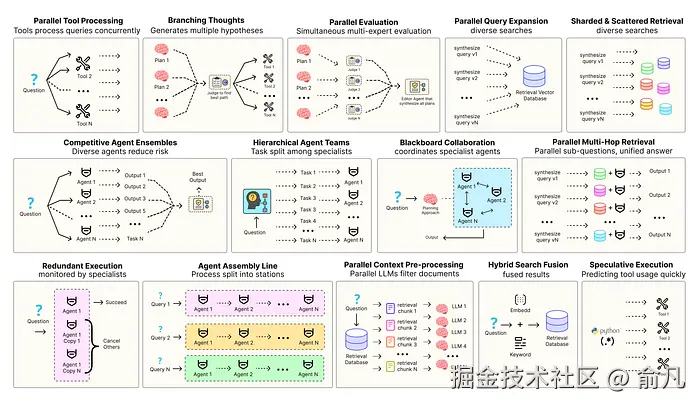
优化智能体解决方案需要软件工程确保组件协调、并行运行并与系统高效交互。例如预测执行,会尝试处理可预测查询以降低时延 ,或者进行冗余执行,即对同一智能体重复执行多次以防单点故障。其他增强现代智能体系统可靠性的模式包括:
- 并行工具:智能体同时执行独立 API 调用以隐藏 I/O 时延。
- 层级智能体:管理者将任务拆分为由执行智能体处理的小步骤。
- 竞争性智能体组合:多个智能体提出答案,系统选出最佳。
- 冗余执行:即两个或多个智能体解决同一任务以检测错误并提高可靠性。
- 并行检索和混合检索:多种检索策略协同运行以提升上下文质量。
- 多跳检索:智能体通过迭代检索步骤收集更深入、更相关的信息。
还有很多其他模式。
本系列将实现最常用智能体模式背后的基础概念,以直观方式逐一介绍每个概念,拆解其目的,然后实现简单可行的版本,演示其如何融入现实世界的智能体系统。
所有理论和代码都在 GitHub 仓库里:🤖 Agentic Parallelism: A Practical Guide 🚀
代码库组织如下:
erlang
agentic-parallelism/
    ├── 01_parallel_tool_use.ipynb
    ├── 02_parallel_hypothesis.ipynb
    ...
    ├── 06_competitive_agent_ensembles.ipynb
    ├── 07_agent_assembly_line.ipynb
    ├── 08_decentralized_blackboard.ipynb
    ...
    ├── 13_parallel_context_preprocessing.ipynb
    └── 14_parallel_multi_hop_retrieval.ipynb
并行工具隐藏 I/O 时延
智能体系统中最主要且最常见的瓶颈(许多开发者已经知道,但我认为对初学者来说很重要)不是 LLM 思考时间,而是 I/O 时延......即等待网络、数据库和外部 API 响应的时间。
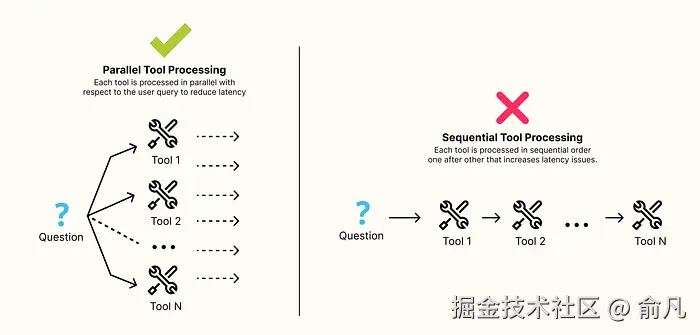
当代理需要从多个来源收集信息时,例如查询股价和搜索最新新闻,天真、顺序的方法会依次执行调用,效率低下。如果都是独立调用,没有理由不同时执行。
我们现在构建一个智能体系统,学习该模式在哪种情况下以及如何使用最有效。该系统会接收用户查询,识别需要调用两个不同的实时 API,并并行执行。
首先需要创造一些真实的工具,利用 yfinance 库获取实时股票价格数据。
python
from langchain_core.tools import tool
import yfinance as yf

@tool
def get_stock_price(symbol: str) -> float:
    """Get the current stock price for a given stock symbol using Yahoo Finance."""
    # 添加一条 print 语句,以清楚指示何时执行此工具
    print(f"--- [Tool Call] Executing get_stock_price for symbol: {symbol} ---")

    # 实例化 yfinance Ticker 对象
    ticker = yf.Ticker(symbol)

    # 获取股票信息,用 'regularMarketPrice' 增强可靠性,并带有回退
    price = ticker.info.get('regularMarketPrice', ticker.info.get('currentPrice'))

    # 处理股票代码无效或数据不可用的情况
    if price is None:
        return f"Could not find price for symbol {symbol}"
    return price
LangChain 的 @tool 将标准 Python 函数装饰为工具提供给代理,从而获取给定股票代码的市价。
快速测试一下,确保正确连接到了实时 API。
python
get_stock_price.invoke({"symbol": "NVDA"})

#### 输出 ####
--- [Tool Call] Executing get_stock_price for symbol: NVDA ---
121.79 ...
可以看到输出确认工具连接正确,可以访问外部 yfinance API。如果失败,就需要检查网络连接或 yfinance 安装情况。
接下来将创建第二个用于获取最新公司新闻的工具,使用针对基于 LLM 的代理优化的 Tavily 搜索 API。
python
from langchain_community.tools.tavily_search import TavilySearchResults

# 首先,初始化基本 Tavily 搜索工具
# 'max_results=5' 将限制搜索前 5 个最相关文章
tavily_search = TavilySearchResults(max_results=5)
@tool
def get_recent_company_news(company_name: str) -> list:
    """Get recent news articles and summaries for a given company name using the Tavily search engine."""
    # 添加 print 语句,以便清楚记录工具的执行情况
    print(f"--- [Tool Call] Executing get_recent_company_news for: {company_name} ---")

    # 为搜索引擎构造更具体的查询
    query = f"latest news about {company_name}"

    # 调用底层 Tavily 工具
    return tavily_search.invoke(query)
这里把基础工具 TavilySearchResults 封装在自定义 @tool 函数里,目的是获取用户查询的最新新闻。
测试一下这个工具......
python
get_recent_company_news.invoke({"company_name": "NVIDIA"})

#### 输出 ####
--- [Tool Call] Executing get_recent_company_news for: NVIDIA ---
[{'url': 'https://www.reuters.com/technology/nvidia-briefly-surpasses-microsoft-most-valuable-company-2024-06-18/', 'content': 'Nvidia briefly overtakes Microsoft as most valuable company...'}, ...]
输出是一份近期新闻列表,证实第二个工具也正常工作,我们的代理现在具备两种不同的真实世界数据收集能力。
为了正确衡量效率提升,需要整理工作流,更新图状态,加入用于记录性能指标的字段。
python
from typing import TypedDict, Annotated, List
from langchain_core.messages import BaseMessage
import operator

class AgentState(TypedDict):
    # 'messages' 将保存对话历史
    messages: Annotated[List[BaseMessage], operator.add]
    # 'performance_log' 将累积详细说明每个步骤执行时间的字符串
    # 'operator.add' 归约函数告诉 LangGraph 追加列表而非替换
    performance_log: Annotated[List[str], operator.add]
AgentState 是智能体运行的黑匣子录音机 ,通过添加带有 Annotated operator.add 归约函数的 performance_log 字段创建持久化日志,图中的每个节点都会更新该日志,为我们提供分析总执行时间和各阶段耗时所需的原始数据。
现在创建第一个仪表化节点,调用 LLM 的代理大脑。
python
import time

def call_model(state: AgentState):
    """The agent node: calls the LLM, measures its own execution time, and logs the result to the state."""
    print("--- AGENT: Invoking LLM --- ")
    start_time = time.time()

    # 从状态中获取当前消息历史
    messages = state['messages']

    # 调用工具感知 LLM,LLM 将决定是否可以直接回答或需要调用工具
    response = llm_with_tools.invoke(messages)

    end_time = time.time()
    execution_time = end_time - start_time

    # 用性能数据创建日志条目
    log_entry = f"[AGENT] LLM call took {execution_time:.2f} seconds."
    print(log_entry)

    # 返回 LLM 响应和要添加到状态的新日志条目
    return {
        "messages": [response],
        "performance_log": [log_entry]
    }
call_model 函数是我们第一个仪表化图节点,用带 time.time() 的 llm_with_tools.invoke() 封装调用,精确测量 LLM 的思考时间,并将测量数据格式化为人类可读的字符串,作为状态更新的一部分返回。
接下来创建用于执行工具的仪表化节点。
python
from langchain_core.messages import ToolMessage
from langgraph.prebuilt import ToolExecutor

# ToolExecutor 是一个 LangGraph 工具,可以获取一组工具列表并执行
tool_executor = ToolExecutor(tools)
def call_tool(state: AgentState):
    """The tool node: executes the tool calls planned by the LLM, measures performance, and logs the results."""
    print("--- TOOLS: Executing tool calls --- ")
    start_time = time.time()

    # 来自代理的最后一条消息将包含工具调用
    last_message = state['messages'][-1]
    tool_invocations = last_message.tool_calls

    # ToolExecutor 可以批量执行工具调用,对于同步工具,底层仍然是顺序的,
    # 但这是一种管理执行的干净方式
    responses = tool_executor.batch(tool_invocations)

    end_time = time.time()
    execution_time = end_time - start_time

    # 为工具执行阶段创建日志条目
    log_entry = f"[TOOLS] Executed {len(tool_invocations)} tools in {execution_time:.2f} seconds."
    print(log_entry)

    # 将工具响应格式化为 ToolMessages,这是 LangGraph 期望的标准格式
    tool_messages = [
        ToolMessage(content=str(response), tool_call_id=call['id'])
        for call, response in zip(tool_invocations, responses)
    ]

    # 返回工具消息和性能日志
    return {
        "messages": tool_messages,
        "performance_log": [log_entry]
    }
类似于 call_model 节点,将核心逻辑 tool_executor.batch(tool_invocations) 封装在计时仪表中,通过记录执行 batch 的总时间,可以稍后和模拟顺序执行比较,以量化并行的好处。
定义好仪表节点后,可以将它们接线成 StateGraph。
python
from langgraph.graph import END, StateGraph

# 此函数作为条件边,根据代理的最后一条消息路由工作流
def should_continue(state: AgentState) -> str:
    last_message = state['messages'][-1]
    # 如果最后一条消息包含工具调用,路由到 'tools' 节点
    if last_message.tool_calls:
        return "tools"
    # 否则,智能体已经完成推理,结束执行图
    return END

# 定义图工作流
workflow = StateGraph(AgentState)

# 添加仪表节点
workflow.add_node("agent", call_model)
workflow.add_node("tools", call_tool)

# 入口点是 'agent' 节点
workflow.set_entry_point("agent")

# 为路由添加条件边
workflow.add_conditional_edges("agent", should_continue, {"tools": "tools", END: END})

# 添加从工具回到代理的边
workflow.add_edge("tools", "agent")

# 编译成可执行应用程序
app = workflow.compile()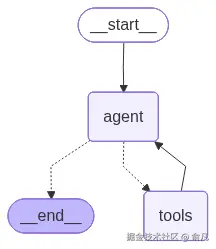
我们定义了一个简单的循环:
agent思考should_continue边检查是否需要行动,如果需要,tools节点会行动,然后流返回agent节点处理其动作的结果。compile()方法将该抽象定义转化为具体、可执行的对象。
接下来给代理一个查询,要求它同时使用两个工具并进行流式执行,并在每一步检查状态。
python
from langchain_core.messages import HumanMessage
import json

# 图的初始输入,包括用户查询
inputs = {
    "messages": [HumanMessage(content="What is the current stock price of NVIDIA (NVDA) and what is the latest news about the company?")],
    "performance_log": []
}
step_counter = 1
final_state = None

# 用 .Stream() 使用 stream_mode='values' 获取每个节点运行后的完整状态字典
for output in app.stream(inputs, stream_mode="values"):

    # 输出字典的键是刚刚运行的节点名称
    node_name = list(output.keys())[0]
    print(f"\n{'*' * 100}")
    print(f"**Step {step_counter}: {node_name.capitalize()} Node Execution**")
    print(f"{'*' * 100}")

    # 打印状态,以便详细检查
    state_for_printing = output[node_name].copy()
    if 'messages' in state_for_printing:
        # 将消息对象转换为更可读的字符串表示形式
        state_for_pr...tty_repr() for msg in state_for_printing['messages']]
    print("\nCurrent State:")
    print(json.dumps(state_for_printing, indent=4))

    # 为每一步添加分析
    print(f"\n{'-' * 100}")
    print("State Analysis:")

    if node_name == "agent":
        # 检查代理响应是否包含工具调用
        if "tool_calls" in state_for_printing['messages'][-1]:
            print("The agent has processed the input. The LLM correctly planned parallel tool calls. The execution time of the LLM call has been logged.")
        else:
            print("The agent has received the tool results and synthesized them into a coherent, final answer. The performance log now contains the full history.")
    elif node_name == "tools":
        print("The tool executor received the tool calls and executed them. The results are now in the state as ToolMessages. The performance log is accumulating.")
    print(f"{'-' * 100}")
    step_counter += 1
    final_state = output[node_name]
执行查询,看看并行模拟是如何工作的......
python
#### 输出 ####
****************************************************************************************************
**Step 1: Agent Node Execution**
****************************************************************************************************
--- AGENT: Invoking LLM ---
[AGENT] LLM call took 4.12 seconds.

Current State:
{
    "messages": [
        "HumanMessage(content='What is the current stock price of NVIDIA (NVDA) and what is the latest news about the company?')",
        "AIMessage(content='', tool_calls=[{'name': 'get_stock_price', 'args': {'symbol': 'NVDA'}, 'id': '...'}, {'name': 'get_recent_company_news', 'args': {'company_name': 'NVIDIA'}, 'id': '...'}])"
    ],
    "performance_log": [ "[AGENT] LLM call took 4.12 seconds." ]
}
----------------------------------------------------------------------------------------------------
State Analysis:
The agent has processed the input. The LLM correctly planned parallel tool calls. The execution time of the LLM call has be...------------------------------

****************************************************************************************************
**Step 2: Tools Node Execution**
****************************************************************************************************
--- TOOLS: Executing tool calls ---
--- [Tool Call] Executing get_stock_price for symbol: NVDA ---
--- [Tool Call] Executing get_recent_company_news for: NVIDIA ---
[TOOLS] Executed 2 tools in 2.31 seconds.
Current State:
{
    "messages": [ ... ],
    "performance_log": [ "[AGENT] LLM call took 4.12 seconds.", "[TOOLS] Executed 2 tools in 2.31 seconds." ]
}
----------------------------------------------------------------------------------------------------
State Analysis:
The tool executor received the tool calls and executed them. The results are now in the state as ToolMessages. The performance log is accumulating.
----------------------------------------------------------------------------------------------------
...
流输出提供了代理周期的逐步视图。
- 步骤 1(代理) :在
agent节点初始运行中,通过AIMessage可以看到 Llama 3 模型正确识别需要调用两个独立工具,get_stock_price和get_recent_company_news,并且在一次回合内完成了规划,从而实现了并行优化计划。 - 步骤 2(工具) :
tools节点接收两条计划调用,日志显示两条[Tool Call]打印语句,确认被ToolExecutor同时执行。性能日志条目[TOOLS] Executed 2 tools in 2.31 seconds是关键数据。 - 步骤 3(代理) :最后一步,代理收到
ToolMessage结果并综合生成最终答案。
现在进行最终定量证明,分析完整性能日志,计算节省的时间。
python
print("Run Log:")
total_time = 0
tool_time = 0
for log in final_state['performance_log']:
    print(f" - {log}")
    # 从日志字符串中提取时间值
    time_val = float(log.split(' ')[-2])
    total_time += time_val
    if "[TOOLS]" in log:
        tool_time = time_val
print("\n" + "-"*60 + "\n")
print(f"Total Execution Time: {total_time:.2f} seconds\n")
print("Analysis:")
可以看到并行处理解决了时延问题......
python
#### 输出 ####
============================================================
               FINAL PERFORMANCE REPORT
============================================================
Run Log:
 - [AGENT] LLM call took 4.12 seconds.
 - [TOOLS] Executed 2 tools in 2.31 seconds.
 - [AGENT] LLM call took 5.23 seconds.
------------------------------------------------------------

Total Execution Time: 11.66 seconds
工具执行总时间为 2.31s,假设每个网络调用耗时约 1.5s,顺序执行需时约 3.0s(1.5s + 1.5s)。
并发执行节省了约 0.7s,增益看起来很小,但在一个有 5-10 个独立工具调用、每次需要 2-3s 的复杂系统中,差别会更大。顺序过程需 10-30s,而并行过程仍只需 2-3s,这就是可用系统和不可用系统的区别。
Hi,我是俞凡,一名兼具技术深度与管理视野的技术管理者。曾就职于 Motorola,现任职于 Mavenir,多年带领技术团队,聚焦后端架构与云原生,持续关注 AI 等前沿方向,也关注人的成长,笃信持续学习的力量。在这里,我会分享技术实践与思考。欢迎关注公众号「DeepNoMind」,星标不迷路。也欢迎访问独立站 www.DeepNoMind.com,一起交流成长。