前言
运动挑战是激励用户突破自我、保持运动热情的有效方式。通过设定有时限的挑战目标,用户可以在竞争和自我超越中获得成就感。本文将详细介绍如何在Flutter与OpenHarmony平台上实现运动挑战组件,包括挑战创建、进度追踪、排行榜、奖励机制等功能模块的完整实现方案。
Flutter挑战数据模型
dart
class Challenge {
  final String id;
  final String name;
  final String description;
  final ChallengeType type;
  final double targetValue;
  final double currentValue;
  final DateTime startDate;
  final DateTime endDate;
  final String? imageUrl;
  final int participantCount;
  final bool isJoined;

  Challenge({
    required this.id,
    required this.name,
    required this.description,
    required this.type,
    required this.targetValue,
    this.currentValue = 0,
    required this.startDate,
    required this.endDate,
    this.imageUrl,
    this.participantCount = 0,
    this.isJoined = false,
  });

  double get progress => (currentValue / targetValue * 100).clamp(0, 100);
  bool get isCompleted => currentValue >= targetValue;
  bool get isActive => DateTime.now().isAfter(startDate) && DateTime.now().isBefore(endDate);
  int get daysRemaining => endDate.difference(DateTime.now()).inDays;

  String get targetText {
    switch (type) {
      case ChallengeType.distance: return '${targetValue.toInt()} 公里';
      case ChallengeType.duration: return '${targetValue.toInt()} 分钟';
      case ChallengeType.workouts: return '${targetValue.toInt()} 次';
      case ChallengeType.steps: return '${targetValue.toInt()} 步';
      case ChallengeType.calories: return '${targetValue.toInt()} 千卡';
    }
  }
}

enum ChallengeType { distance, duration, workouts, steps, calories }
挑战数据模型定义了挑战的完整结构。支持距离、时长、次数、步数和卡路里五种挑战类型。progress计算完成百分比,isActive判断挑战是否在进行中,daysRemaining计算剩余天数。participantCount记录参与人数,增加社交竞争感。targetText根据类型返回格式化的目标文字。这种模型支持多样化的挑战形式。
OpenHarmony挑战服务
typescript
import http from '@ohos.net.http';

class ChallengeService {
  async getActiveChallenges(): Promise<Array<object>> {
    let httpRequest = http.createHttp();

    try {
      let response = await httpRequest.request(
        'https://api.fitness.com/challenges/active',
        { method: http.RequestMethod.GET }
      );

      if (response.responseCode === 200) {
        let result = JSON.parse(response.result as string);
        return result['challenges'] || [];
      }
      return [];
    } finally {
      httpRequest.destroy();
    }
  }

  async joinChallenge(challengeId: string, userId: string): Promise<boolean> {
    let httpRequest = http.createHttp();

    try {
      let response = await httpRequest.request(
        'https://api.fitness.com/challenges/join',
        {
          method: http.RequestMethod.POST,
          header: { 'Content-Type': 'application/json' },
          extraData: JSON.stringify({ challengeId: challengeId, userId: userId }),
        }
      );
      return response.responseCode === 200;
    } finally {
      httpRequest.destroy();
    }
  }

  async updateProgress(challengeId: string, userId: string, value: number): Promise<void> {
    let httpRequest = http.createHttp();

    try {
      await httpRequest.request(
        'https://api.fitness.com/challenges/progress',
        {
          method: http.RequestMethod.POST,
          header: { 'Content-Type': 'application/json' },
          extraData: JSON.stringify({ challengeId: challengeId, userId: userId, value: value }),
        }
      );
    } finally {
      httpRequest.destroy();
    }
  }
}
挑战服务与服务器交互管理挑战数据。getActiveChallenges获取当前进行中的挑战列表,joinChallenge让用户加入挑战,updateProgress在运动结束后更新挑战进度。这种服务设计支持社交化的挑战功能,用户可以参与官方挑战或好友发起的挑战。
Flutter挑战卡片组件
dart
class ChallengeCard extends StatelessWidget {
  final Challenge challenge;
  final VoidCallback onTap;
  final VoidCallback? onJoin;

  const ChallengeCard({Key? key, required this.challenge, required this.onTap, this.onJoin}) : super(key: key);

  @override
  Widget build(BuildContext context) {
    return Card(
      margin: EdgeInsets.symmetric(horizontal: 16, vertical: 8),
      clipBehavior: Clip.antiAlias,
      child: InkWell(
        onTap: onTap,
        child: Column(
          crossAxisAlignment: CrossAxisAlignment.start,
          children: [
            if (challenge.imageUrl != null)
              Image.network(challenge.imageUrl!, height: 120, width: double.infinity, fit: BoxFit.cover),
            Padding(
              padding: EdgeInsets.all(16),
              child: Column(
                crossAxisAlignment: CrossAxisAlignment.start,
                children: [
                  Row(
                    mainAxisAlignment: MainAxisAlignment.spaceBetween,
                    children: [
                      Expanded(child: Text(challenge.name, style: TextStyle(fontSize: 18, fontWeight: FontWeight.bold))),
                      Container(
                        padding: EdgeInsets.symmetric(horizontal: 8, vertical: 4),
                        decoration: BoxDecoration(
                          color: challenge.isActive ? Colors.green : Colors.grey,
                          borderRadius: BorderRadius.circular(12),
                        ),
                        child: Text(challenge.isActive ? '进行中' : '已结束', style: TextStyle(color: Colors.white, fontSize: 12)),
                      ),
                    ],
                  ),
                  SizedBox(height: 8),
                  Text(challenge.description, style: TextStyle(color: Colors.grey), maxLines: 2),
                  SizedBox(height: 12),
                  Row(
                    children: [
                      Icon(Icons.flag, size: 16, color: Colors.grey),
                      SizedBox(width: 4),
                      Text('目标: ${challenge.targetText}'),
                      Spacer(),
                      Icon(Icons.people, size: 16, color: Colors.grey),
                      SizedBox(width: 4),
                      Text('${challenge.participantCount}人参与'),
                    ],
                  ),
                  if (challenge.isJoined) ...[
                    SizedBox(height: 12),
                    LinearProgressIndicator(value: challenge.progress / 100),
                    SizedBox(height: 4),
                    Text('进度: ${challenge.progress.toStringAsFixed(0)}%  剩余${challenge.daysRemaining}天'),
                  ] else if (challenge.isActive && onJoin != null) ...[
                    SizedBox(height: 12),
                    SizedBox(
                      width: double.infinity,
                      child: ElevatedButton(onPressed: onJoin, child: Text('加入挑战')),
                    ),
                  ],
                ],
              ),
            ),
          ],
        ),
      ),
    );
  }
}
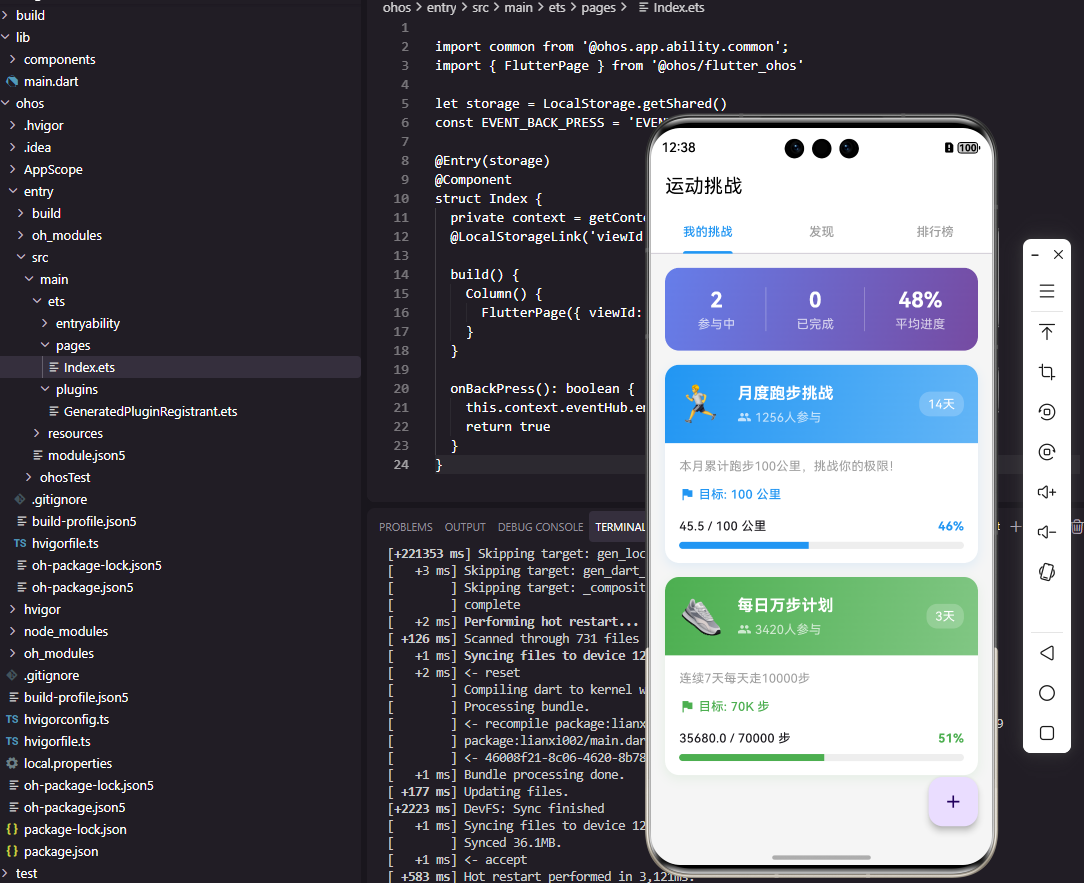
挑战卡片组件展示挑战的详细信息。顶部显示挑战封面图,下方显示名称、状态标签、描述、目标和参与人数。已加入的挑战显示进度条和剩余天数,未加入的显示加入按钮。状态标签使用绿色表示进行中,灰色表示已结束。这种卡片设计信息丰富,引导用户参与挑战。
Flutter挑战排行榜
dart
class ChallengeLeaderboard extends StatelessWidget {
  final List<LeaderboardEntry> entries;
  final String currentUserId;

  const ChallengeLeaderboard({Key? key, required this.entries, required this.currentUserId}) : super(key: key);

  @override
  Widget build(BuildContext context) {
    return ListView.builder(
      shrinkWrap: true,
      physics: NeverScrollableScrollPhysics(),
      itemCount: entries.length,
      itemBuilder: (context, index) {
        var entry = entries[index];
        bool isCurrentUser = entry.userId == currentUserId;

        return Container(
          margin: EdgeInsets.symmetric(horizontal: 16, vertical: 4),
          padding: EdgeInsets.all(12),
          decoration: BoxDecoration(
            color: isCurrentUser ? Colors.blue.withOpacity(0.1) : Colors.white,
            borderRadius: BorderRadius.circular(12),
            border: isCurrentUser ? Border.all(color: Colors.blue, width: 2) : null,
          ),
          child: Row(
            children: [
              Container(
                width: 32,
                height: 32,
                decoration: BoxDecoration(
                  color: _getRankColor(index + 1),
                  shape: BoxShape.circle,
                ),
                child: Center(child: Text('${index + 1}', style: TextStyle(color: Colors.white, fontWeight: FontWeight.bold))),
              ),
              SizedBox(width: 12),
              CircleAvatar(child: Text(entry.userName[0])),
              SizedBox(width: 12),
              Expanded(child: Text(entry.userName, style: TextStyle(fontWeight: isCurrentUser ? FontWeight.bold : FontWeight.normal))),
              Text('${entry.value.toStringAsFixed(1)}', style: TextStyle(fontSize: 18, fontWeight: FontWeight.bold)),
            ],
          ),
        );
      },
    );
  }

  Color _getRankColor(int rank) {
    if (rank == 1) return Colors.amber;
    if (rank == 2) return Colors.grey;
    if (rank == 3) return Colors.brown;
    return Colors.blue;
  }
}

class LeaderboardEntry {
  final String userId;
  final String userName;
  final double value;

  LeaderboardEntry({required this.userId, required this.userName, required this.value});
}
挑战排行榜展示参与者的排名情况。前三名使用金银铜颜色的徽章,当前用户使用蓝色边框高亮。显示排名、头像、用户名和完成数值。排行榜增加了挑战的竞争性,激励用户努力提升排名。这种社交化的竞争机制能够显著提升用户的参与度。
OpenHarmony挑战通知服务
typescript
import notificationManager from '@ohos.notificationManager';

class ChallengeNotificationService {
  async notifyProgress(challengeName: string, progress: number): Promise<void> {
    if (progress >= 50 && progress < 51) {
      await this.sendNotification('挑战进度', `「${challengeName}」已完成50%,继续加油!`);
    } else if (progress >= 100) {
      await this.sendNotification('🎉 挑战完成', `恭喜完成「${challengeName}」挑战!`);
    }
  }

  async notifyDeadline(challengeName: string, daysRemaining: number): Promise<void> {
    if (daysRemaining <= 3 && daysRemaining > 0) {
      await this.sendNotification('挑战即将结束', `「${challengeName}」还剩${daysRemaining}天,抓紧时间!`);
    }
  }

  private async sendNotification(title: string, content: string): Promise<void> {
    let notificationRequest: notificationManager.NotificationRequest = {
      id: Date.now(),
      content: {
        notificationContentType: notificationManager.ContentType.NOTIFICATION_CONTENT_BASIC_TEXT,
        normal: { title: title, text: content }
      }
    };
    await notificationManager.publish(notificationRequest);
  }
}
挑战通知服务在关键节点发送提醒。进度达到50%时鼓励用户继续,完成时发送庆祝通知。临近截止日期时提醒用户抓紧时间。这种通知机制帮助用户保持对挑战的关注,提高完成率。
Flutter创建挑战表单
dart
class CreateChallengeForm extends StatefulWidget {
  final Function(Challenge) onCreate;

  const CreateChallengeForm({Key? key, required this.onCreate}) : super(key: key);

  @override
  State<CreateChallengeForm> createState() => _CreateChallengeFormState();
}

class _CreateChallengeFormState extends State<CreateChallengeForm> {
  final _nameController = TextEditingController();
  ChallengeType _type = ChallengeType.distance;
  double _targetValue = 50;
  int _durationDays = 7;

  @override
  Widget build(BuildContext context) {
    return ListView(
      padding: EdgeInsets.all(16),
      children: [
        TextField(
          controller: _nameController,
          decoration: InputDecoration(labelText: '挑战名称', border: OutlineInputBorder()),
        ),
        SizedBox(height: 16),
        Text('挑战类型', style: TextStyle(fontWeight: FontWeight.bold)),
        Wrap(
          spacing: 8,
          children: ChallengeType.values.map((type) => ChoiceChip(
            label: Text(_getTypeName(type)),
            selected: _type == type,
            onSelected: (_) => setState(() => _type = type),
          )).toList(),
        ),
        SizedBox(height: 16),
        Text('目标: ${_targetValue.toInt()} ${_getTypeUnit(_type)}'),
        Slider(value: _targetValue, min: 10, max: 500, onChanged: (v) => setState(() => _targetValue = v)),
        SizedBox(height: 16),
        Text('持续时间: $_durationDays 天'),
        Slider(value: _durationDays.toDouble(), min: 1, max: 30, divisions: 29, onChanged: (v) => setState(() => _durationDays = v.toInt())),
        SizedBox(height: 24),
        ElevatedButton(onPressed: _createChallenge, child: Text('创建挑战')),
      ],
    );
  }

  String _getTypeName(ChallengeType type) {
    switch (type) {
      case ChallengeType.distance: return '距离';
      case ChallengeType.duration: return '时长';
      case ChallengeType.workouts: return '次数';
      case ChallengeType.steps: return '步数';
      case ChallengeType.calories: return '卡路里';
    }
  }

  String _getTypeUnit(ChallengeType type) {
    switch (type) {
      case ChallengeType.distance: return '公里';
      case ChallengeType.duration: return '分钟';
      case ChallengeType.workouts: return '次';
      case ChallengeType.steps: return '步';
      case ChallengeType.calories: return '千卡';
    }
  }

  void _createChallenge() {
    // 创建挑战
  }
}
创建挑战表单让用户自定义挑战。输入挑战名称,选择类型,设置目标值和持续天数。这种表单支持用户创建个人挑战或邀请好友参与的社交挑战,增加了应用的互动性和趣味性。
总结
本文全面介绍了Flutter与OpenHarmony平台上运动挑战组件的实现方案。从挑战模型到服务接口,从卡片展示到排行榜,从通知提醒到创建表单,涵盖了挑战功能的各个方面。通过有时限的目标和社交竞争,我们可以有效激励用户保持运动热情,提升应用的用户粘性。欢迎加入开源鸿蒙跨平台社区:https://openharmonycrossplatform.csdn.net