前言
运动模式选择是运动应用的入口功能,用户在开始运动前需要选择合适的运动类型。不同的运动模式对应不同的数据采集策略和界面展示方式。本文将详细介绍如何在Flutter与OpenHarmony平台上实现专业的运动模式选择组件,包括模式展示、快速启动、自定义模式、最近使用等功能模块的完整实现方案。
运动模式选择的设计需要考虑用户的使用习惯和效率。常用的运动模式应该更容易访问,不常用的模式也要能够找到。我们需要提供清晰的分类和直观的视觉设计,让用户能够快速选择并开始运动。
Flutter运动模式模型
dart
class SportMode {
final String id;
final String name;
final String icon;
final String category;
final bool trackGPS;
final bool trackHeartRate;
final List<String> metrics;
final Color themeColor;
const SportMode({
required this.id,
required this.name,
required this.icon,
required this.category,
this.trackGPS = true,
this.trackHeartRate = true,
required this.metrics,
required this.themeColor,
});
static const List<SportMode> allModes = [
SportMode(id: 'running', name: '户外跑步', icon: '🏃', category: '跑步', metrics: ['距离', '配速', '心率'], themeColor: Colors.orange),
SportMode(id: 'treadmill', name: '跑步机', icon: '🏃♂️', category: '跑步', trackGPS: false, metrics: ['时长', '心率', '卡路里'], themeColor: Colors.orange),
SportMode(id: 'cycling', name: '户外骑行', icon: '🚴', category: '骑行', metrics: ['距离', '速度', '心率'], themeColor: Colors.green),
SportMode(id: 'swimming', name: '游泳', icon: '🏊', category: '游泳', trackGPS: false, metrics: ['时长', '划水次数', '卡路里'], themeColor: Colors.blue),
SportMode(id: 'walking', name: '健走', icon: '🚶', category: '步行', metrics: ['步数', '距离', '卡路里'], themeColor: Colors.teal),
SportMode(id: 'strength', name: '力量训练', icon: '🏋️', category: '健身', trackGPS: false, metrics: ['组数', '时长', '卡路里'], themeColor: Colors.purple),
SportMode(id: 'yoga', name: '瑜伽', icon: '🧘', category: '健身', trackGPS: false, trackHeartRate: false, metrics: ['时长', '卡路里'], themeColor: Colors.pink),
SportMode(id: 'hiit', name: 'HIIT', icon: '⚡', category: '健身', trackGPS: false, metrics: ['时长', '心率', '卡路里'], themeColor: Colors.red),
];
}运动模式模型定义了每种运动的特性和配置。除了基本的名称和图标外,还包含分类、是否需要GPS、是否需要心率监测、显示的指标列表和主题颜色。trackGPS和trackHeartRate标志决定了运动过程中需要启用哪些传感器,室内运动通常不需要GPS。metrics列表定义了该运动模式下显示的核心数据指标。themeColor为每种运动设置专属颜色,用于界面主题。allModes静态列表预定义了常见的运动模式。
OpenHarmony运动模式存储
typescript
import dataPreferences from '@ohos.data.preferences';

class SportModeStorage {
  private preferences: dataPreferences.Preferences | null = null;

  async initialize(context: Context): Promise<void> {
    this.preferences = await dataPreferences.getPreferences(context, 'sport_modes');
  }

  async saveRecentMode(modeId: string): Promise<void> {
    if (!this.preferences) return;

    let recentJson = await this.preferences.get('recent_modes', '[]') as string;
    let recent: Array<string> = JSON.parse(recentJson);

    recent = recent.filter(id => id !== modeId);
    recent.unshift(modeId);
    recent = recent.slice(0, 5);

    await this.preferences.put('recent_modes', JSON.stringify(recent));
    await this.preferences.flush();
  }

  async getRecentModes(): Promise<Array<string>> {
    if (!this.preferences) return [];
    let recentJson = await this.preferences.get('recent_modes', '[]') as string;
    return JSON.parse(recentJson);
  }

  async saveFavoriteMode(modeId: string): Promise<void> {
    if (!this.preferences) return;

    let favJson = await this.preferences.get('favorite_modes', '[]') as string;
    let favorites: Array<string> = JSON.parse(favJson);

    if (!favorites.includes(modeId)) {
      favorites.push(modeId);
      await this.preferences.put('favorite_modes', JSON.stringify(favorites));
      await this.preferences.flush();
    }
  }

  async getFavoriteModes(): Promise<Array<string>> {
    if (!this.preferences) return [];
    let favJson = await this.preferences.get('favorite_modes', '[]') as string;
    return JSON.parse(favJson);
  }
}
运动模式存储服务管理用户的模式使用记录。saveRecentMode方法记录最近使用的运动模式,将新模式添加到列表开头,移除重复项,保留最近5个。getRecentModes方法获取最近使用的模式列表,用于快速访问。saveFavoriteMode和getFavoriteModes方法管理用户收藏的运动模式。这种存储设计让应用能够学习用户的使用习惯,提供个性化的模式推荐。
Flutter运动模式网格
dart
class SportModeGrid extends StatelessWidget {
  final List<SportMode> modes;
  final Function(SportMode) onModeSelected;

  const SportModeGrid({
    Key? key,
    required this.modes,
    required this.onModeSelected,
  }) : super(key: key);

  @override
  Widget build(BuildContext context) {
    return GridView.builder(
      shrinkWrap: true,
      physics: NeverScrollableScrollPhysics(),
      gridDelegate: SliverGridDelegateWithFixedCrossAxisCount(
        crossAxisCount: 4,
        childAspectRatio: 0.85,
        crossAxisSpacing: 12,
        mainAxisSpacing: 12,
      ),
      itemCount: modes.length,
      itemBuilder: (context, index) {
        var mode = modes[index];
        return GestureDetector(
          onTap: () => onModeSelected(mode),
          child: Column(
            mainAxisAlignment: MainAxisAlignment.center,
            children: [
              Container(
                width: 56,
                height: 56,
                decoration: BoxDecoration(
                  color: mode.themeColor.withOpacity(0.1),
                  borderRadius: BorderRadius.circular(16),
                ),
                child: Center(
                  child: Text(mode.icon, style: TextStyle(fontSize: 28)),
                ),
              ),
              SizedBox(height: 8),
              Text(
                mode.name,
                style: TextStyle(fontSize: 12),
                textAlign: TextAlign.center,
                maxLines: 1,
                overflow: TextOverflow.ellipsis,
              ),
            ],
          ),
        );
      },
    );
  }
}
运动模式网格以图标网格形式展示所有运动模式。每行显示4个模式,每个模式包含图标和名称。图标使用圆角容器包裹,背景色使用模式主题色的浅色版本,视觉上既统一又有区分。点击触发onModeSelected回调,传递选中的模式对象。这种网格布局紧凑高效,用户可以快速浏览所有可用的运动模式。shrinkWrap使网格适应内容高度,便于嵌入到其他布局中。
Flutter快速启动组件
dart
class QuickStartSection extends StatelessWidget {
  final List<SportMode> recentModes;
  final Function(SportMode) onModeSelected;

  const QuickStartSection({
    Key? key,
    required this.recentModes,
    required this.onModeSelected,
  }) : super(key: key);

  @override
  Widget build(BuildContext context) {
    if (recentModes.isEmpty) return SizedBox.shrink();

    return Column(
      crossAxisAlignment: CrossAxisAlignment.start,
      children: [
        Padding(
          padding: EdgeInsets.symmetric(horizontal: 16, vertical: 8),
          child: Text('快速开始', style: TextStyle(fontSize: 16, fontWeight: FontWeight.bold)),
        ),
        SizedBox(
          height: 100,
          child: ListView.builder(
            scrollDirection: Axis.horizontal,
            padding: EdgeInsets.symmetric(horizontal: 16),
            itemCount: recentModes.length,
            itemBuilder: (context, index) {
              var mode = recentModes[index];
              return GestureDetector(
                onTap: () => onModeSelected(mode),
                child: Container(
                  width: 80,
                  margin: EdgeInsets.only(right: 12),
                  decoration: BoxDecoration(
                    gradient: LinearGradient(
                      colors: [mode.themeColor, mode.themeColor.withOpacity(0.7)],
                      begin: Alignment.topLeft,
                      end: Alignment.bottomRight,
                    ),
                    borderRadius: BorderRadius.circular(16),
                  ),
                  child: Column(
                    mainAxisAlignment: MainAxisAlignment.center,
                    children: [
                      Text(mode.icon, style: TextStyle(fontSize: 32)),
                      SizedBox(height: 4),
                      Text(mode.name, style: TextStyle(color: Colors.white, fontSize: 11), maxLines: 1),
                    ],
                  ),
                ),
              );
            },
          ),
        ),
      ],
    );
  }
}
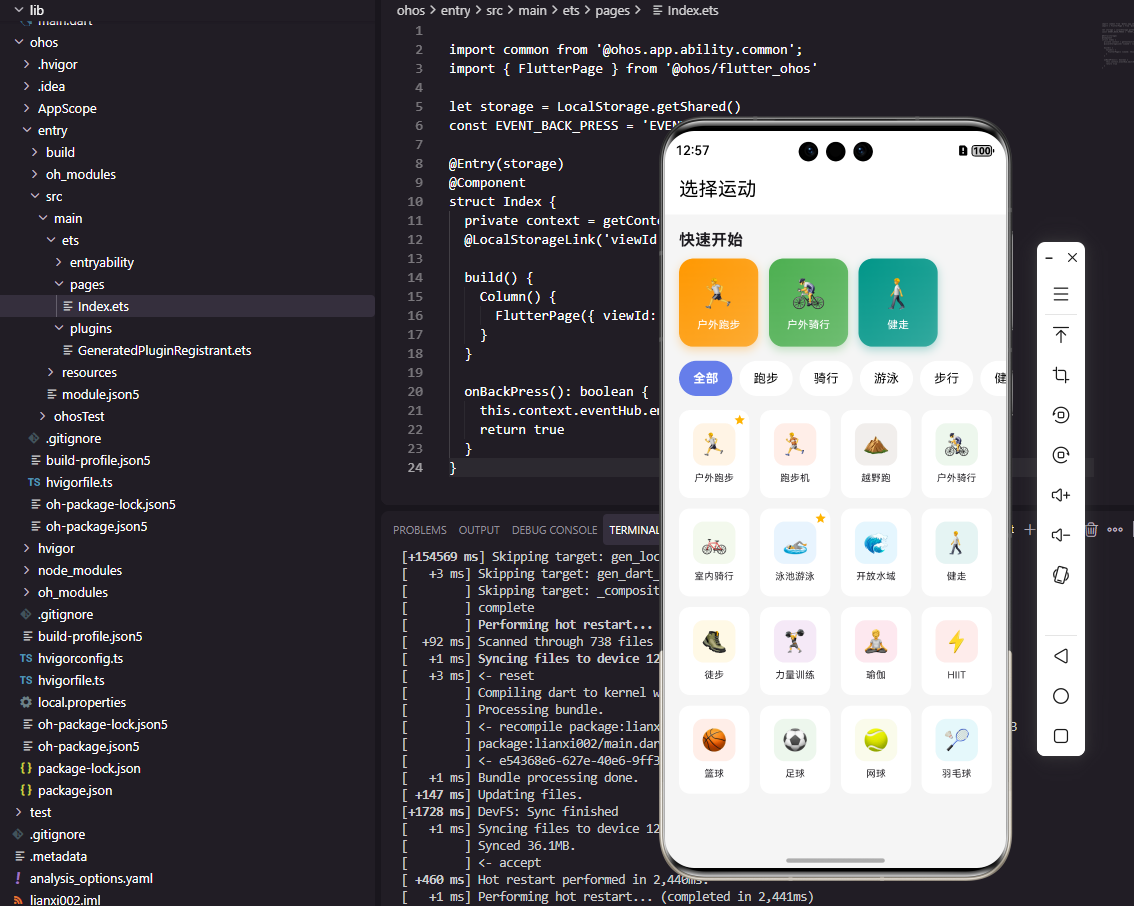
快速启动组件展示用户最近使用的运动模式,提供一键开始的便捷入口。横向滚动列表节省垂直空间,每个模式卡片使用渐变背景突出显示。这种设计让用户无需在众多模式中寻找,直接点击最近使用的模式即可开始运动。如果没有最近使用记录,组件返回空占位,不占用界面空间。快速启动功能显著提升了用户的操作效率,特别是对于有固定运动习惯的用户。
Flutter分类标签组件
dart
class CategoryTabs extends StatelessWidget {
  final List<String> categories;
  final String selectedCategory;
  final Function(String) onCategorySelected;

  const CategoryTabs({
    Key? key,
    required this.categories,
    required this.selectedCategory,
    required this.onCategorySelected,
  }) : super(key: key);

  @override
  Widget build(BuildContext context) {
    return Container(
      height: 40,
      child: ListView.builder(
        scrollDirection: Axis.horizontal,
        padding: EdgeInsets.symmetric(horizontal: 16),
        itemCount: categories.length,
        itemBuilder: (context, index) {
          var category = categories[index];
          bool isSelected = category == selectedCategory;

          return GestureDetector(
            onTap: () => onCategorySelected(category),
            child: Container(
              margin: EdgeInsets.only(right: 8),
              padding: EdgeInsets.symmetric(horizontal: 16),
              decoration: BoxDecoration(
                color: isSelected ? Colors.blue : Colors.grey[200],
                borderRadius: BorderRadius.circular(20),
              ),
              child: Center(
                child: Text(
                  category,
                  style: TextStyle(
                    color: isSelected ? Colors.white : Colors.black,
                    fontWeight: isSelected ? FontWeight.bold : FontWeight.normal,
                  ),
                ),
              ),
            ),
          );
        },
      ),
    );
  }
}
分类标签组件让用户按运动类别筛选模式。标签使用胶囊形状设计,选中状态通过背景色和文字颜色区分。横向滚动支持更多分类而不占用过多垂直空间。点击标签触发筛选,下方的模式网格只显示该分类的运动模式。这种分类筛选功能在运动模式较多时特别有用,帮助用户快速定位目标模式。分类包括跑步、骑行、游泳、健身等常见运动类别。
OpenHarmony运动模式配置
typescript
class SportModeConfigService {
  getModeConfig(modeId: string): object {
    let configs: Record<string, object> = {
      'running': {
        gpsInterval: 1,
        heartRateInterval: 5,
        autoPause: true,
        autoPauseSpeed: 1.0,
        voiceAnnounceInterval: 60,
      },
      'cycling': {
        gpsInterval: 1,
        heartRateInterval: 5,
        autoPause: true,
        autoPauseSpeed: 3.0,
        voiceAnnounceInterval: 120,
      },
      'swimming': {
        gpsInterval: 0,
        heartRateInterval: 10,
        autoPause: false,
        poolLength: 25,
      },
      'strength': {
        gpsInterval: 0,
        heartRateInterval: 5,
        restTimer: 60,
        autoCountSets: true,
      },
    };

    return configs[modeId] || {
      gpsInterval: 1,
      heartRateInterval: 5,
      autoPause: false,
    };
  }

  async saveCustomConfig(modeId: string, config: object): Promise<void> {
    // 保存用户自定义配置
  }
}
运动模式配置服务为每种运动模式提供专属的配置参数。跑步模式配置GPS采样间隔、自动暂停速度阈值、语音播报间隔等。骑行模式的自动暂停速度阈值更高,因为骑行速度通常比跑步快。游泳模式不需要GPS,但需要配置泳池长度。力量训练模式配置休息计时器和自动计数功能。这种差异化配置确保每种运动模式都能提供最佳的数据采集和用户体验。
Flutter模式详情弹窗
dart
class ModeDetailSheet extends StatelessWidget {
  final SportMode mode;
  final VoidCallback onStart;

  const ModeDetailSheet({
    Key? key,
    required this.mode,
    required this.onStart,
  }) : super(key: key);

  @override
  Widget build(BuildContext context) {
    return Container(
      padding: EdgeInsets.all(24),
      decoration: BoxDecoration(
        color: Colors.white,
        borderRadius: BorderRadius.vertical(top: Radius.circular(24)),
      ),
      child: Column(
        mainAxisSize: MainAxisSize.min,
        children: [
          Container(
            width: 80,
            height: 80,
            decoration: BoxDecoration(
              color: mode.themeColor.withOpacity(0.1),
              borderRadius: BorderRadius.circular(20),
            ),
            child: Center(child: Text(mode.icon, style: TextStyle(fontSize: 48))),
          ),
          SizedBox(height: 16),
          Text(mode.name, style: TextStyle(fontSize: 24, fontWeight: FontWeight.bold)),
          SizedBox(height: 8),
          Text(mode.category, style: TextStyle(color: Colors.grey)),
          SizedBox(height: 24),
          Row(
            mainAxisAlignment: MainAxisAlignment.center,
            children: [
              if (mode.trackGPS) _buildFeatureChip(Icons.location_on, 'GPS'),
              if (mode.trackHeartRate) _buildFeatureChip(Icons.favorite, '心率'),
            ],
          ),
          SizedBox(height: 16),
          Text('记录指标', style: TextStyle(fontWeight: FontWeight.bold)),
          SizedBox(height: 8),
          Wrap(
            spacing: 8,
            children: mode.metrics.map((m) => Chip(label: Text(m))).toList(),
          ),
          SizedBox(height: 24),
          SizedBox(
            width: double.infinity,
            height: 56,
            child: ElevatedButton(
              onPressed: onStart,
              style: ElevatedButton.styleFrom(
                backgroundColor: mode.themeColor,
                shape: RoundedRectangleBorder(borderRadius: BorderRadius.circular(16)),
              ),
              child: Text('开始运动', style: TextStyle(fontSize: 18, color: Colors.white)),
            ),
          ),
        ],
      ),
    );
  }

  Widget _buildFeatureChip(IconData icon, String label) {
    return Container(
      margin: EdgeInsets.symmetric(horizontal: 4),
      padding: EdgeInsets.symmetric(horizontal: 12, vertical: 6),
      decoration: BoxDecoration(
        color: Colors.grey[200],
        borderRadius: BorderRadius.circular(16),
      ),
      child: Row(
        mainAxisSize: MainAxisSize.min,
        children: [
          Icon(icon, size: 16),
          SizedBox(width: 4),
          Text(label, style: TextStyle(fontSize: 12)),
        ],
      ),
    );
  }
}
模式详情弹窗在用户选择运动模式后显示,展示该模式的详细信息并提供开始按钮。弹窗顶部显示大图标和模式名称,中间显示该模式启用的功能(GPS、心率)和记录的指标,底部是醒目的开始按钮。开始按钮使用模式的主题色,视觉上与模式关联。这种确认步骤让用户在开始运动前了解该模式的特性,避免选错模式。弹窗使用圆角设计,从底部滑出,符合移动端的交互习惯。
Flutter运动模式选择页面
dart
class SportModeSelectionPage extends StatefulWidget {
  const SportModeSelectionPage({Key? key}) : super(key: key);

  @override
  State<SportModeSelectionPage> createState() => _SportModeSelectionPageState();
}

class _SportModeSelectionPageState extends State<SportModeSelectionPage> {
  String _selectedCategory = '全部';
  List<SportMode> _recentModes = [];

  List<String> get _categories => ['全部', ...SportMode.allModes.map((m) => m.category).toSet()];

  List<SportMode> get _filteredModes {
    if (_selectedCategory == '全部') return SportMode.allModes;
    return SportMode.allModes.where((m) => m.category == _selectedCategory).toList();
  }

  @override
  Widget build(BuildContext context) {
    return Scaffold(
      appBar: AppBar(title: Text('选择运动')),
      body: SingleChildScrollView(
        child: Column(
          crossAxisAlignment: CrossAxisAlignment.start,
          children: [
            QuickStartSection(recentModes: _recentModes, onModeSelected: _onModeSelected),
            SizedBox(height: 16),
            CategoryTabs(
              categories: _categories,
              selectedCategory: _selectedCategory,
              onCategorySelected: (c) => setState(() => _selectedCategory = c),
            ),
            SizedBox(height: 16),
            Padding(
              padding: EdgeInsets.symmetric(horizontal: 16),
              child: SportModeGrid(modes: _filteredModes, onModeSelected: _onModeSelected),
            ),
          ],
        ),
      ),
    );
  }

  void _onModeSelected(SportMode mode) {
    showModalBottomSheet(
      context: context,
      isScrollControlled: true,
      backgroundColor: Colors.transparent,
      builder: (context) => ModeDetailSheet(
        mode: mode,
        onStart: () {
          Navigator.pop(context);
          // 开始运动
        },
      ),
    );
  }
}
运动模式选择页面整合了所有模式选择相关的组件。页面顶部是快速启动区域,显示最近使用的模式。中间是分类标签,支持按类别筛选。下方是模式网格,显示筛选后的运动模式。点击任意模式弹出详情弹窗,确认后开始运动。这种页面结构层次清晰,既支持快速访问常用模式,又支持浏览发现新模式。SingleChildScrollView确保内容超出屏幕时可以滚动。
总结
本文全面介绍了Flutter与OpenHarmony平台上运动模式选择组件的实现方案。从模式数据模型到存储服务,从网格展示到快速启动,从分类筛选到详情确认,涵盖了模式选择功能的各个方面。通过合理的界面设计和交互流程,我们可以帮助用户快速选择合适的运动模式,顺畅地开始运动,提升整体的使用体验。
欢迎加入开源鸿蒙跨平台社区:https://openharmonycrossplatform.csdn.net