一、项目背景与核心目标
1.1 全网 OSPF p2p 部署,实现路由互通;
1.2 本部核心部署 DHCP+VRRP+MSTP,分部核心部署 DHCP,分部主干配置链路聚合;
1.3 业务连通性:
本部 / 分部非财务 PC 互访;
分部 / 本部 PC 访问 web 服务器;
1.4 安全控制:仅运维组(vlan254)可 SSH 访问指定管理网段。
二、实验拓扑
2.1 拓扑图
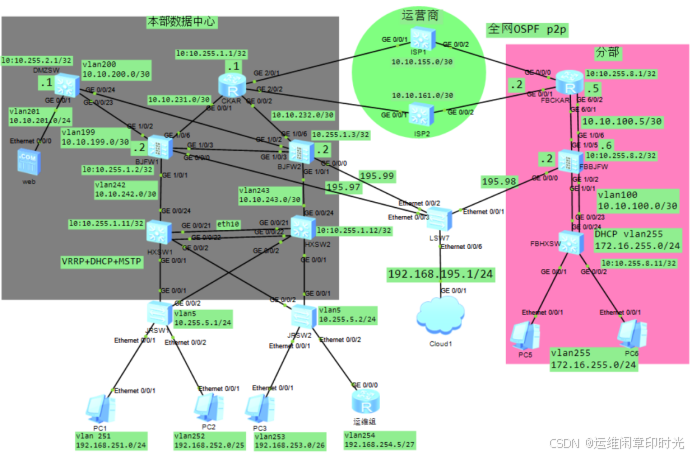
2.2 网络中各设备的IP地址规划及接口描述如下:
设备名称 接口 IP地址 VLAN ID 备注
**本部**
CKAR	GE2/0/1	10.10.155.1/30	------	连接运营商ISP1的接口
	GE2/0/2	10.10.161.1/30	------	连接运营商ISP2的接口
	GE0/0/1	100.10.231.1/30	------	连接边界防火墙1的接口
	GE0/0/2	100.10.232.1/30	------	连接边界防火墙2的接口
	LoopBack0	10.255.1.1/32	------	管理口
BJFW01	G0/0/0	192.168.195.97/24	------	管理口
	G1/0/1	10.10.243.2/30	------	连接核心交换机1的接口
	G1/0/3	10.10.199.2/30	------	连接DMZSW的接口
	G1/0/6	10.10.231.2/30	 	连接出口路由器的接口
	LoopBack0	10.255.1.2/32	------	环回口(实际管理IP)
BJFW02	G0/0/0	192.168.255.99/24	------	管理口
	G1/0/1	10.10.242.2/30	------	连接核心交换机2的接口
	G1/0/3	10.10.200.2/30	------	连接DMZSW的接口
	G1/0/6	10.10.232.2/30	 	连接出口路由器的接口
	LoopBack0	10.255.1.3/32	------	环回口(实际管理IP)
HXSW01	GE0/0/1	------	5 251to254	连接JRSW1的接口
	GE0/0/2	------	5 251to254	连接JRSW2的接口
	GE0/0/24	------	5 251to254	边界防火墙1的接口
	Vlanif231	10.10.231.1/30	231	边界防火墙1的接口
	Vlanif5	10.255.5.253/24	5	接入交换机的管理IP
	Vlanif251	192.168.251.253/24	251	销售部,实际网关192.168.251.254
	Vlanif252	192.168.252.125/25	252	综合部,实际网关192.168.252.126
	Vlanif253	192.168.253.60/26	253	研发部,实际网关192.168.253.62
	Vlanif254	192.168.254.29/27	254	科技部,实际网关192.168.254.30
	LoopBack0   	10.255.1.11/32	------	管理IP
HXSW02	GE0/0/1	------	5 251to254	连接JRSW2的接口
	GE0/0/2	------	5 251to254	连接JRSW1的接口
	GE0/0/24	------	232	边界防火墙2的接口
	Vlanif231	10.10.232.1/30	232	边界防火墙2的接口
	Vlanif5	10.255.5.252/24	5	接入交换机的管理IP
	Vlanif251	192.168.251.252/24	251	销售部,实际网关192.168.251.254
	Vlanif252	192.168.252.124/25	252	综合部,实际网关192.168.252.126
	Vlanif253	192.168.253.59/26	253	严发部,实际网关192.168.253.62
	Vlanif254	192.168.254.28/27	254	科技部,实际网关192.168.254.30
	LoopBack0   	10.255.1.12/32	------	管理IP
DMZSW	GE0/0/1	------	201	连接web服务器_IP
	GE0/0/23	------	199	连接边界防火墙1的接口
	GE0/0/24	------	200	连接边界防火墙2的接口
	Vlanif201	10.10.201.254/24	201	DMZ区服务器IP
	Vlanif199	10.10.199.1/30	199	链接防火墙IP
	Vlanif200	10.10.200.1/30	200	链接防火墙IP
	LoopBack0   	10.255.5.1/32	------	管理IP
JRSW1	GE0/0/1	------	5 251to254	连接HXSW1的接口
	GE0/0/2	------	5 251to254	连接HXSW2的接口
	Vlanif5	10.255.5.1/24	5	管理口
JRSW2	GE0/0/1	------	5 251to254	连接HXSW2的接口
	GE0/0/2	------	5 251to254	连接HXSW1的接口
	Vlanif5	10.255.5.2/24	5	管理口
**分公司**
FXAR	G0/0/0	10.10.155.2/30	------	连接运营商ISP1的接口
	G0/0/1	10.10.161.2/30	------	连接运营商ISP2的接口
	G0/0/2	10.10.100.5/30	------	连接边界防火墙接口
	LoopBack0 	10.255.8.1/32	------	管理口
BJFW	G0/0/0	192.168.255.98/24	------	管理口
	G1/0/1	10.10.100.2/30	------	连接核心交换机的接口
	G1/0/6	10.10.100.6/30	 	连接出口路由器的接口
	LoopBack0	10.255.8.2/32	------	环回口
HXSW	GE0/0/24	------	100	连接防火墙的接口
	Vlanif100	10.10.100.1/30	100	 连接防火墙的接口IP
	Vlanif255	172.16.255.254/24	255	分部内网PC终端IP
	LoopBack0   	10.255.8.11/32	------	管理口
二、实验需求
1、设备中 DHCP 服务的配置与验证方法,实现客户机自动获取 IP 地址等网络参数;
2、配置 VRRP(虚拟路由冗余协议),实现网关的冗余备份,提高网络可靠性;
3、配置 MSTP(多生成树协议),解决局域网中的二层环路问题,同时实现不同 VLAN 数据的负载分担;
4、完成 OSPF(开放式最短路径优先)协议的配置与调试,实现不同网段之间的动态路由可达;
5、为网络中的每台设备配置管理 IP,并通过 ACL(访问控制列表)精确控制仅允许指定管理 IP 对设备进行管理操作,增强网络设备的安全性;
6、华为防火墙负载均衡功能的配置,实现流量在多条链路或服务器之间的合理分配,提升网络服务质量与吞吐量。三、实验配置
3.1 配置本部出口路由器
#
 sysname CKAR
#配置接口
interface LoopBack0
 ip address 10.255.1.1 32
 quit
#
interface GigabitEthernet0/0/1
 description to BJFW1_G1/0/6
 ip address 10.10.231.1 30
 quit
#
interface GigabitEthernet0/0/2
 description to BJFW2_G1/0/6
 ip address 10.10.232.1 30
 quit
#
interface GigabitEthernet2/0/1
 description to ISP1
 ip address 10.10.155.1 30
 quit
#
interface GigabitEthernet2/0/2
 description to ISP2
 ip address 10.10.161.1 30
 quit
#配置ospf
ospf 1 router-id 10.255.1.1
 area 0.0.0.0
  network 10.255.1.1 0.0.0.0
  network 10.10.155.1 0.0.0.0
  network 10.10.161.1 0.0.0.0
  network 10.10.231.1 0.0.0.0
  network 10.10.232.1 0.0.0.0
quit
#
interface GigabitEthernet0/0/1
 ospf network-type p2p
#
interface GigabitEthernet0/0/2
 ospf network-type p2p
#
interface GigabitEthernet2/0/1
 ospf network-type p2p
#
interface GigabitEthernet2/0/2
 ospf network-type p2p
#配置ssh
user-interface vty 0 4
 authentication-mode aaa
 user privilege level 15
 protocol inbound all
#
aaa
 local-user huawei password cipher Huawei@123
 local-user huawei privilege level 15
 local-user huawei service-type telnet ssh
#
3.2 配置本部HXSW1、HXSW2
# HXSW1
sysname HXSW1
#配置vlan、接口
undo info-center enable
#
vlan batch 5 242 to 243 251 to 254
#
interface Vlanif5
 ip address 10.255.5.253 24
 quit
#
interface Vlanif243
 ip address 10.10.243.1 30
 quit
#
interface Vlanif251
 ip address 192.168.251.253 24
 quit
#
interface Vlanif252
 ip address 192.168.252.125 25
quit
#
interface Vlanif253
  ip address 192.168.253.61 26
 quit
#
interface Vlanif254
  ip address 192.168.254.29 27
 quit
#链路聚合
interface Eth-Trunk10
 description to HSXW2_eth10
 port link-type trunk
 undo port trunk allow-pass vlan 1
 port trunk allow-pass vlan 5 251 to 254
 trunkport GigabitEthernet 0/0/21 to 0/0/22
 quit
配置接口
interface GigabitEthernet0/0/1
 description to JRSW1_GE0/0/1
 port link-type trunk
 undo port trunk allow-pass vlan 1
 port trunk allow-pass vlan 5 251 to 254
#
interface GigabitEthernet0/0/2
 description to JRSW2_GE0/0/2
 port link-type trunk
 undo port trunk allow-pass vlan 1
 port trunk allow-pass vlan 5 251 to 254
#
interface GigabitEthernet0/0/24
 description to BJFW1_G1/0/1
 port link-type access
 port default vlan 243
#
interface LoopBack0
 ip address 10.255.1.11 32
#配置mstp
stp enable
stp mode mstp
#
stp region-configuration
 region-name huawei
 instance 1 vlan 251 to 252 5
 instance 2 vlan 253 to 254
 active region-configuration
#
stp instance 1 root primary
stp instance 2 root secondary
#配置DHCP
#
dhcp enable
#
ip pool vlan251
 gateway-list 192.168.251.254
 network 192.168.251.0 mask 255.255.255.0
 excluded-ip-address 192.168.251.240 192.168.251.253
 lease day 3 hour 12 minute 0
 dns-list 223.5.5.5 223.6.6.6
#
ip pool vlan252
 gateway-list 192.168.252.126
 network 192.168.252.0 mask 255.255.255.128
 excluded-ip-address 192.168.252.120 192.168.252.123
 lease day 3 hour 12 minute 0
 dns-list 223.5.5.5 223.6.6.6
#
ip pool vlan253
 gateway-list 192.168.253.62
 network 192.168.253.0 mask 255.255.255.192
 excluded-ip-address 192.168.253.56 192.168.253.58
 lease day 3 hour 12 minute 0
 dns-list 223.5.5.5 223.6.6.6
#
interface Vlanif251
  dhcp select global
#
interface Vlanif252
 dhcp select global
#
interface Vlanif253
 dhcp select global
#配置VRRP
interface Vlanif5
 ip address 10.255.5.253 24
 vrrp vrid 5 virtual-ip 10.255.5.254
 #
interface Vlanif251
 ip address 192.168.251.253 24
 vrrp vrid 251 virtual-ip 192.168.251.254
 vrrp vrid 251 priority 110
 vrrp vrid 251 track interface G0/0/24 reduced 30
#
interface Vlanif252
 ip address 192.168.252.125 255.255.255.128
 vrrp vrid 252 virtual-ip 192.168.252.126
 vrrp vrid 252 priority 110
 vrrp vrid 252 track interface G0/0/24 reduced 30
#
interface Vlanif253
 ip address 192.168.253.61 255.255.255.192
 vrrp vrid 253 virtual-ip 192.168.253.62
#
interface Vlanif254
 ip address 192.168.254.29 255.255.255.224
 vrrp vrid 254 virtual-ip 192.168.254.30
#配置路由策略,ospf路由重发布
acl number 2001
 rule 5 permit source 192.168.251.0 0.0.0.255
 rule 10 permit source 192.168.252.0 0.0.0.127
 rule 15 permit source 192.168.253.0 0.0.0.61
 rule 20 permit source 192.168.254.0 0.0.0.31
#
route-policy aa permit node 10
 if-match acl 2001
#
ospf 1 router-id 10.255.1.11
 import-route direct route-policy aa
 area 0.0.0.0
  network 10.255.1.11 0.0.0.0
  network 10.10.243.1 0.0.0.0
  network 10.10.99.253 0.0.0.0
#
interface Vlanif243
  ospf network-type p2p
  quit
#配置ssh(同上)
# HXSW2
sysname HXSW2
#配置vlan、接口
undo info-center enable
#
vlan batch 5 242 251 to 254
#
interface Vlanif5
 ip address 10.255.5.252 24
 quit
#
interface Vlanif242
 ip address 10.10.242.1 30
 quit
#
interface Vlanif251
 ip address 192.168.251.252 24
 quit
#
interface Vlanif252
 ip address 192.168.252.124 25
quit
#
interface Vlanif253
 ip address 192.168.253.60 26
 quit
#
interface Vlanif254
 ip address 192.168.254.28 27
 quit
#链路聚合
interface Eth-Trunk10
 description to HSXW1_eth10
 port link-type trunk
 undo port trunk allow-pass vlan 1
 port trunk allow-pass vlan 5 251 to 254
 trunkport GigabitEthernet 0/0/21 to 0/0/22
 quit
#
interface GigabitEthernet0/0/1
 description to JRSW1_GE0/0/1
 port link-type trunk
 undo port trunk allow-pass vlan 1
 port trunk allow-pass vlan 5 251 to 254
#
interface GigabitEthernet0/0/2
 description to JRSW1_GE0/0/2
 port link-type trunk
 undo port trunk allow-pass vlan 1
 port trunk allow-pass vlan 5 251 to 254
#
interface GigabitEthernet0/0/24
 description to BJFW2_G1/0/1
 port link-type access
 port default vlan 242
#
interface LoopBack0
 ip address 10.255.1.12 32
#配置mstp
stp enable
stp mode mstp
#
stp region-configuration
 region-name huawei
 instance 1 vlan 5 251 to 252
 instance 2 vlan 253 to 254
 active region-configuration
#
stp instance 1 root secondary
stp instance 2 root primary
#配置DHCP
#
dhcp enable
#
ip pool vlan251
 gateway-list 192.168.251.254
 network 192.168.251.0 mask 255.255.255.0
 excluded-ip-address 192.168.251.230 192.168.251.253
 lease day 3 hour 12 minute 0
 dns-list 223.5.5.5 223.6.6.6
#
ip pool vlan252
 gateway-list 192.168.252.126
 network 192.168.252.0 mask 255.255.255.128
 excluded-ip-address 192.168.252.120 192.168.252.123
 lease day 3 hour 12 minute 0
 dns-list 223.5.5.5 223.6.6.6.6
#
ip pool vlan253
 gateway-list 192.168.253.62
 network 192.168.253.0 mask 255.255.255.192
 excluded-ip-address 192.168.253.56 192.168.253.58
 lease day 3 hour 12 minute 0
 dns-list 223.5.5.5 223.6.6.6
#
interface Vlanif251
  dhcp select global
#
interface Vlanif252
 dhcp select global
#
interface Vlanif253
 dhcp select global
#配置VRRP
interface Vlanif5
 ip address 10.255.5.252 24
 vrrp vrid 5 virtual-ip 10.255.5.254
 vrrp vrid 5 priority 110
#
interface Vlanif251
 ip address 192.168.251.252 255.255.255.0
 vrrp vrid 251 virtual-ip 192.168.251.254
#
interface Vlanif252
 ip address 192.168.252.124 255.255.255.128
 vrrp vrid 252 virtual-ip 192.168.252.126
#
interface Vlanif253
 ip address 192.168.253.60 255.255.255.192
 vrrp vrid 253 virtual-ip 192.168.253.62
vrrp vrid 253 track interface G0/0/24 reduced 30
#
interface Vlanif254
 ip address 192.168.254.28 255.255.255.224
 vrrp vrid 254 virtual-ip 192.168.254.30
vrrp vrid 254 track interface G0/0/24 reduced 30
#配置路由策略,ospf路由重发布
acl number 2001
 rule 5 permit source 192.168.251.0 0.0.0.255
 rule 10 permit source 192.168.252.0 0.0.0.127
 rule 15 permit source 192.168.253.0 0.0.0.61
 rule 20 permit source 192.168.254.0 0.0.0.31
#
route-policy aa permit node 10
 if-match acl 2001
#
ospf 1 router-id 10.255.1.12
 import-route direct route-policy aa
 area 0.0.0.0
  network 10.255.1.12 0.0.0.0
  network 10.10.243.1 0.0.0.0
  network 10.10.99.252 0.0.0.0
#
interface Vlanif242
  ospf network-type p2p
  quit
#配置ssh(同上)
3.3 配置本部DMZSW
#
sysname DMZSW
#
undo info-center enable
#
vlan batch 199 to 201
#
interface Vlanif199
 ip address 10.10.199.1 255.255.255.252
 ospf network-type p2p
#
interface Vlanif200
 ip address 10.10.200.1 255.255.255.252
 ospf network-type p2p
#
interface Vlanif201
 ip address 10.10.201.254 255.255.255.0
#
interface GigabitEthernet0/0/1
 description to WEB_IP
 port link-type access
 port default vlan 201
#
interface GigabitEthernet0/0/23
 description to BJFW1_G1/0/2
 port link-type access
 port default vlan 199
#
interface GigabitEthernet0/0/24
 description to BJFW2_G1/0/2
 port link-type access
 port default vlan 200
#
interface LoopBack0
 ip address 10.255.2.1 32
#
ospf 1 router-id 10.255.2.1
  area 0.0.0.0
  network 10.255.2.1 0.0.0.0
  network 10.10.199.1 0.0.0.0
  network 10.10.200.1 0.0.0.0
#
3.4 配置本部JRSW1/JRSW2
#
sysname JRSW1
#
undo info-center enable
#
vlan batch 5 251 to 254
#
dhcp enable
#
dhcp snooping enable
#
stp region-configuration
 region-name huawei
 instance 1 vlan 5 251 to 252
 instance 2 vlan 253 to 254
 active region-configuration
#
interface Vlanif5
 ip address 10.255.5.1 24
#
interface Ethernet0/0/1
 description to PC1_IP
 dhcp snooping enable
 port link-type access
 port default vlan 251
#
interface Ethernet0/0/2
 description to PC2_IP
dhcp snooping enable
 port link-type access
 port default vlan 252
#
interface GigabitEthernet0/0/1
 description to HXSW1_GE0/0/1
 port link-type trunk
 undo port trunk allow-pass vlan 1
 port trunk allow-pass vlan 5 251 to 254
 dhcp snooping trusted
#
interface GigabitEthernet0/0/2
 description to HXSW2_GE0/0/2
 port link-type trunk
 undo port trunk allow-pass vlan 1
 port trunk allow-pass vlan 5 251 to 254
 dhcp snooping trusted
#
ip route-static 0.0.0.0 0.0.0.0 10.255.5.254
#
3.4 分单位出口路由器
#
 sysname FBCKAR
#
interface GigabitEthernet0/0/0
 description to ISP1
 ip address 10.10.155.2 30
 ospf network-type p2p
#
interface GigabitEthernet0/0/1
 description to ISP2
 ip address 10.10.161.2 30
 ospf network-type p2p
#
interface GigabitEthernet0/0/2
 description to BJFW_G1/0/1
 ip address 10.10.100.5 30
 ospf network-type p2p
#
interface LoopBack0
 ip address 10.255.8.1 32
#
ospf 1 router-id 10.255.8.1
 area 0.0.0.0
  network 10.255.8.1 0.0.0.0
  network 10.10.100.5 0.0.0.0
  network 10.10.155.2 0.0.0.0
  network 10.10.161.2 0.0.0.0
#
3.4 分单位核心交换机
#
sysname FBHXSW
#
undo info-center enable
#
vlan batch  100 255
#
dhcp enable
#
dhcp snooping enable
#
vlan 100
 description to BJFW_JKvlan
vlan 255
 description to DHCP_IPvlan
#
ip pool vlan255
 gateway-list 172.16.255.254
 network 172.16.255.0 mask 255.255.255.0
 excluded-ip-address 172.16.255.230 172.16.255.253
 lease day 2 hour 12 minute 0
 dns-list 223.5.5.5 223.6.6.6
#
interface Vlanif100
 ip address 10.10.100.1 255.255.255.252
 ospf network-type p2p
#
interface Vlanif255
 ip address 172.16.255.254 255.255.255.0
 dhcp select global
#
interface GigabitEthernet0/0/1
 dhcp snooping enable
 port link-type access
 port default vlan 255
#
interface GigabitEthernet0/0/2
 dhcp snooping enable
 port link-type access
 port default vlan 255
#
interface GigabitEthernet0/0/24
 description to BJFWGE1/0/1
 port link-type access
 port default vlan 100
#
interface LoopBack0
 ip address 10.255.8.11 32
#
stelnet server enable
#
ospf 1 router-id 10.255.8.11
 area 0.0.0.0
  network 10.255.8.11 0.0.0.0
  network 10.10.100.1 0.0.0.0
  network 10.10.61.1 0.0.0.0
#
3.5 边界防火墙(详细配置看ensp项目实验)
分单位:边界防火墙
#
sysname BJFW
#
interface GigabitEthernet0/0/0
 description to MGMT
 undo shutdown
 ip binding vpn-instance default
 ip address 192.168.255.98 24
 alias GE0/METH
 service-manage all permit
 quit
#web登陆:https://192.168.255.98:8443
通过网盘分享的文件:双出口路由20251226.7z 防火墙账号密码:admin/Huawei@123
链接: https://pan.baidu.com/s/1K3IlNGRUiQOo-IIvMaD7pQ?pwd=ye7a 提取码: ye7a