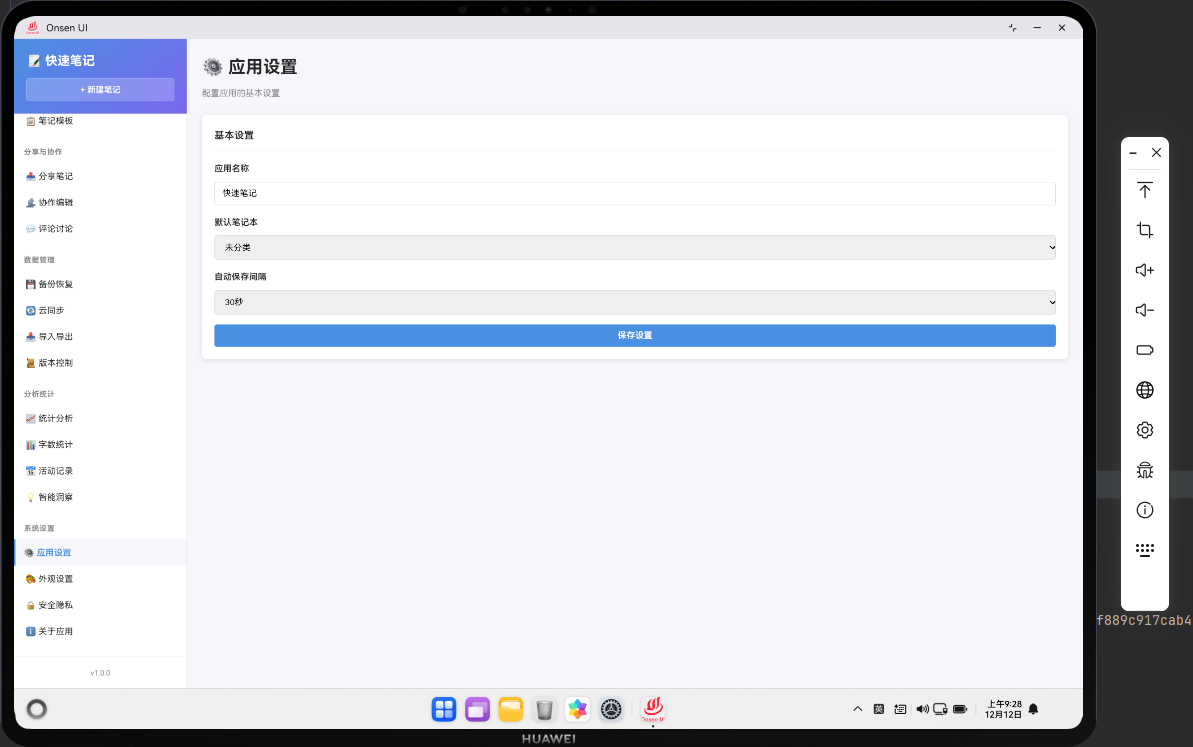
📌 模块概述
应用设置功能允许用户配置应用的基本设置,比如语言、主题、字体大小等。用户的设置会被保存,下次打开应用时会应用这些设置。
🔗 完整流程
第一步:加载设置
启动应用时加载用户的设置。
第二步:修改设置
用户可以修改各种设置选项。
第三步:保存设置
设置被保存到数据库。
🔧 Web代码实现
javascript
async renderSettings() {
  const settings = await noteDB.getSettings();

  return `
    <div class="page active">
      <div class="page-header">
        <h1 class="page-title">⚙️ 应用设置</h1>
      </div>
      <div class="settings-form">
        <div class="form-group">
          <label>语言</label>
          <select id="language" class="form-control" value="${settings.language || 'zh'}">
            <option value="zh">中文</option>
            <option value="en">English</option>
          </select>
        </div>
        <div class="form-group">
          <label>主题</label>
          <select id="theme" class="form-control" value="${settings.theme || 'light'}">
            <option value="light">浅色</option>
            <option value="dark">深色</option>
          </select>
        </div>
        <div class="form-group">
          <label>字体大小</label>
          <input type="range" id="font-size" min="12" max="20" value="${settings.fontSize || 14}">
        </div>
        <button class="btn btn-primary" onclick="app.saveSettings()">保存设置</button>
      </div>
    </div>
  `;
}

// 保存设置
async saveSettings() {
  try {
    const settings = {
      language: document.getElementById('language').value,
      theme: document.getElementById('theme').value,
      fontSize: document.getElementById('font-size').value
    };

    await noteDB.updateSettings(settings);
    Utils.showToast('设置已保存', 'success');
  } catch (error) {
    console.error('保存设置失败:', error);
    Utils.showToast('操作失败,请重试', 'error');
  }
}
🔌 OpenHarmony 原生代码
typescript
// SettingsPlugin.ets - 设置插件
import { webview } from '@kit.ArkWeb';
import { common } from '@kit.AbilityKit';
import { fileIo } from '@kit.CoreFileKit';

@NativeComponent
export class SettingsPlugin {
  private context: common.UIAbilityContext;

  constructor(context: common.UIAbilityContext) {
    this.context = context;
  }

  // 初始化插件
  public init(webviewController: webview.WebviewController): void {
    webviewController.registerJavaScriptProxy(
      new SettingsJSProxy(this),
      'settingsPlugin',
      ['getSettings', 'updateSettings']
    );
  }

  // 获取设置
  public getSettings(): Promise<any> {
    return new Promise((resolve) => {
      try {
        const settingsPath = this.context.cacheDir + '/settings.json';
        const content = fileIo.readTextSync(settingsPath);
        const settings = JSON.parse(content);
        resolve(settings);
      } catch (error) {
        console.error('Failed to get settings:', error);
        resolve({ language: 'zh', theme: 'light', fontSize: 14 });
      }
    });
  }

  // 更新设置
  public updateSettings(settings: any): Promise<boolean> {
    return new Promise((resolve) => {
      try {
        const settingsPath = this.context.cacheDir + '/settings.json';
        fileIo.writeTextSync(settingsPath, JSON.stringify(settings, null, 2));
        resolve(true);
      } catch (error) {
        console.error('Failed to update settings:', error);
        resolve(false);
      }
    });
  }
}

// SettingsJSProxy.ets - JavaScript代理类
class SettingsJSProxy {
  private plugin: SettingsPlugin;

  constructor(plugin: SettingsPlugin) {
    this.plugin = plugin;
  }

  getSettings(): void {
    this.plugin.getSettings().then(settings => {
      console.log('Settings loaded:', settings);
    });
  }

  updateSettings(settings: any): void {
    this.plugin.updateSettings(settings).then(success => {
      console.log('Settings updated:', success);
    });
  }
}
📝 总结
应用设置功能展示了如何在Cordova与OpenHarmony混合开发中实现用户偏好设置。
欢迎加入开源鸿蒙跨平台社区:https://openharmonycrossplatform.csdn.net