自走棋
我们学习C#这么多天了,是不是该做一个小项目给自己展示一下学习成果,那就来做一个自走棋的游戏吧
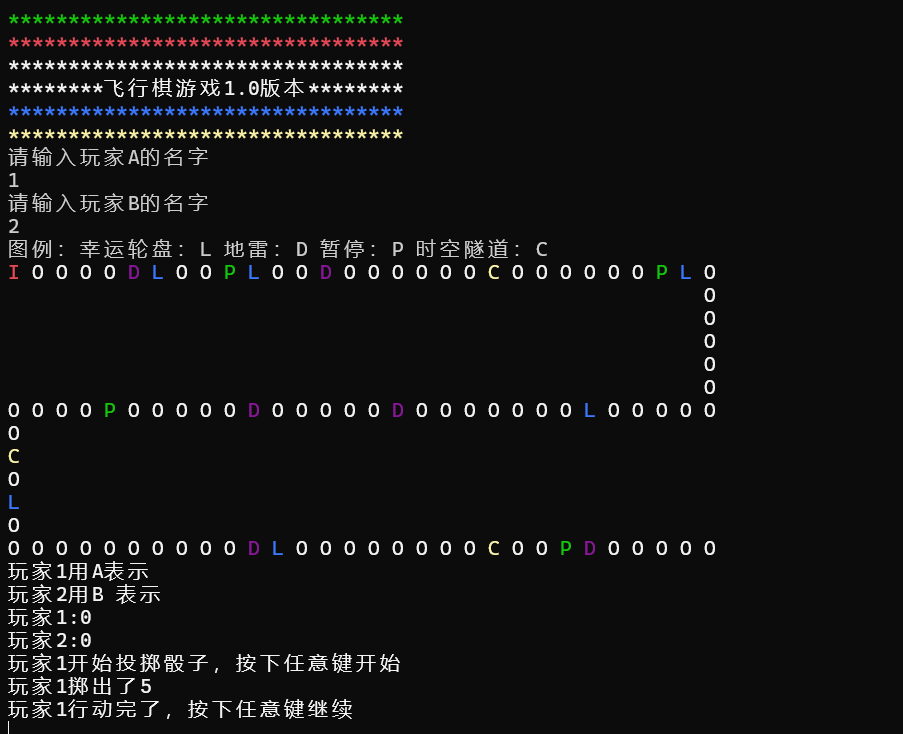
游戏头
我们先做游戏头的代码,做一个方法在main函数里面去调用
cs
static void InitGameShow()
{
    ConsoleColor orginal=ConsoleColor.ForegroundColor;
    Console.ForegroundColor=ConsoleColor.Green;
    Console.WriteLine("*****************************");
    Console.ForegroundColor=Console.Color.Red;
    Console.WriteLine("*****************************");
    Console.ForegroundColor=Console.Color.Red;
    Console.WriteLine("*********飞行棋游戏1.0版本***********");
    Console.ForegroundColor=Console.Color.Blue;
    Console.WriteLine("*****************************");
    Console.ForegroundColor=Console.Color.Yellow;
    Console.WriteLine("*****************************");
    Console.ForegroundColor=original;
}
定义玩家
接着我们定义玩家,用一个长度为2的数组来表示,索引值为0表示玩家1,索引值为2表示玩家2
cs
public static string []Name=new string[2];//存储玩家姓名的字符串数组
static void InitPlay()
{
    Console.WriteLine("请输入玩家A的名字");
    Name[0]=Console.ReadLine();//把玩家添加到数组里面
    while(Name[0]=="")
    {
    Console.WriteLine("输入玩家名字不能为口,请重新输入");
    Name[0]=Console.ReadLine();
    }
    Console.WriteLine("请输入玩家B的名字");
    Name[1]=Console.ReadLine();
    while(Name[1]==""||Name[0]==Name[1])//如果为空 或者玩家A和玩家B的名字一样
    {
    if(Name[1]=="")
    {
    Console.WriteLine("输入玩家名字不能为空,请重新输入");
    Name[1]=Console.ReadLine();
    }
    else
    {
    Console.WriteLine("不能重名,请重新输入");
    Name[1]=Console.ReadLine();
    }
}
画图
我们用数组的方式去画图,如int100,表示有100个格子,而我们没有去定义数组里面的元素,所以说里面的每个元素都为0,数组的默认值为0,事件格子我们可以用1,2,3,4去表示
cs
public static int[]Maps=new int[100];//100个格子默认值[0,0,0,0,0...]

//初始化地图

static void InitMap()
{
    //地图格子100格
    //幸运格子位置的数组
    int[]luck=new int[] {6,10,28,40,68,81};//第几个格子就是幸运格
    for(int i=0;i<luck.Length;i++)
    {
    Maps[luck[i]=1;//[0,0,0,0,0,1,0]
    }
    int[] landMine = { 5, 13, 48,54, 80, 94 };//地雷
    for (int i = 0; i < landMine.Length; i++)
    {
     Maps[landMine[i]] = 2;//地雷对应的类型为2
    }
    int[] pause = { 9, 27, 60, 93 };//暂停
    for (int i = 0; i < pause.Length; i++)
    {
    Maps[pause[i]] = 3;//暂停对应的类型是3
    }
    int[] timeTunnel = { 20,66, 90 };//时空跳跃
    for (int i = 0; i < timeTunnel.Length; i++)
    {
    Maps[timeTunnel[i]] = 4;//时空跳跃对应类型是4
    }
}
玩家位置
用一个数组来存储玩家的位置,然后在地图上进行表示
cs
public static int[] PlayPos = new int[2];//存储玩家位置,第一个元素存储玩家A的位置,如PlayPos[0]=90,代表玩家A走到90格
static string DrawGezi(int i)//DrawGezi(30)绘制第30格位置的图形
{
    string s="";
    //确定A和B是不是在同一位置
    if(PlayPos[0]==playPos[1]&&PlayPos[1]==i)//在同一位置 PlayPos[1]==i 确定玩家在地图上
    {
    Console.ForegroundColor=ConsoleColor.Red;
    s="I ";
    }
    else if(PlayPos[0]==i)//如果玩家在地图上,显示A
    {
    Console.ForegroundColor = ConsoleColor.Red;
    s = "A";
    }
    else if(PlayPos[1]==i)//如果玩家B在地图上,显示B
    {
     Console.ForegroundColor = ConsoleColor.Red;
     s = "B";
    }else//其余格子
    {
    //开始绘制道具和地图格子
    //根据map数组里面的元素绘制不同事件
    //Map[30]的值是0,1,2,3,4哪一个
    switch(Maps[i])
        {
    case 0:
        Console.ForegroundColor = ConsoleColor.White;
        s = "O ";
        break;
    case 1:
        Console.ForegroundColor = ConsoleColor.Blue ;
        s = "L ";//幸运
        break;
    case 2:
        Console.ForegroundColor = ConsoleColor.DarkMagenta;
        s = "D ";//地雷
        break;
    case 3:
        Console.ForegroundColor = ConsoleColor.Green ;
        s = "P ";//暂停
        break;
    case 4:
        Console.ForegroundColor = ConsoleColor.Yellow;
        s = "C ";//传送
        break;
    default:
        break;
        }
    }
return s;
}
绘制地图
cs
static void DrawMap()
{
    Console.WriteLine("图例:幸运轮盘:L 地雷:D 暂停:P 时空隧道:C ");
    //第一行绘制30个格子
    for(int i=0;i<30;i++)
    {
    //30个正常图像,还可以能有道具
    //Map[i]=Maps[0]
    Console.Write(DrawGezi(i));
    }
    Console.WriteLine("");

    //第二次绘制
    for(int i=30;i<35;i++)//外层循环创建几行正方形,5行
    {
    for(int j=0;j<29;j++)//一行前29个全是空格
    {
    Console.Write("  ");
    }
    Console.WriteLine(DrawGezi(i));//第30个绘制对应图像
    }

    //第三次绘制(倒着绘制)
    for(int i=64;i>=35;i--)
    {
    Console.Write(DrawGezi(i));
    }
    Console.WriteLine("");

    //第四次绘制
    for(int i=65;i<70;i++)
    {
     Console.WriteLine(DrawGezi(i));
    }

    //第五次绘制
    for (int i = 70; i < 100; i++)
    {
    Console.Write(DrawGezi(i));
    }
    Console.WriteLine("");
游戏内容
该区域写掷骰子踩到事件格子的情况
cs
static void PlayerShow()
{
    Console.WriteLine($"玩家{Name[0]}用A表示");
    Console.WriteLine($"玩家{Name[1]}用B 表示");
}
static void PlayGame(int num)
{
    Random random=new Random();
    int n1=random.Next(1,7);//骰子
    //提示玩家开始投骰子
    Console.WriteLine($"玩家{Name[num]}开始掷骰子,按下任意键开始");
    Console.ReadLine(true);//按下任意键
    //显示玩家点数
    Console.WriteLine($"玩家{Name[num]}掷出了{n1}");
    PlayPos[num] += n1;
    //行动
    Console.WriteLine($"玩家{Name[num]}行动完了,按下任意键继续");
    Console.ReadKey(true);//按下任意键

    //判断踩到的道具,根据Maps数组里面的元素是0,1,2,3,4来进行判断
    int pos =PlayPos[num]>=99?99:PlayPos[num]//取出当前玩家位置
    switch(Maps[pos])
    {
    case 0:
        Console.WriteLine($"玩家{Name[num]}无事发生,请按下任意键继续");
        Console.ReadKey(true);//按下任意键
        break;
    case 1://幸运
        Console.WriteLine($"玩家{Name[num]}踩到了狗屎运喵,请选择以下选项:\n1,交换位置,2,对手后退4格");
        string s = Console.ReadLine();
        while (true)//玩家在输入字符不符合一直输入
        {
            if( s == "1")//交换位置
            {
                //PlayPos[num]当前玩家  playpos[1-num]另外玩家
                int temp = PlayPos[num];
                PlayPos[num] = PlayPos[1 - num];
                PlayPos[1 - num] = temp;
                Console.WriteLine("交换成功咯咯咯,按下任意键继续游戏");
                Console.ReadKey(true);
                break ;
            }
            else if( s == "2")
            {
                PlayPos[1 - num] -= 4;
                Console.WriteLine("对方后退咯,加油,按下任意键继续游戏");
                Console.ReadKey(true);
                break;
            }
            else
            {
                Console.WriteLine("输入的指令不对,请重新输入");
                s = Console.ReadLine();
            }
        }
        break;
    case 2://地雷
        Console.WriteLine($"玩家{Name[num]}踩到地雷了,砰~,后退3格,请按下任意键继续");
        //玩家位置减3
        PlayPos[num] -=3;//当前玩家 另外一个玩家playpos[1-num]
        Console.ReadKey(true);//按下任意键
        break;
    case 3://暂停
        Console.WriteLine($"玩家{Name[num]}看到了美杜莎的眼睛,石化一回合,请按下任意键继续");
        Console.ReadKey(true);//按下任意键
        isPause[num]=true;//修改指定玩家的状态
        break;
    case 4://传送
        Console.WriteLine($"玩家{Name[num]}踩到了一个神奇的格子,前进了4格,请按下任意键继续");
        PlayPos[num] += 4;
        Console.ReadKey(true);//按下任意键
        break;
    default:
        break;
        }
     if (PlayPos[0] < 0)
     {
         PlayPos[0] = 0;
     }
     if (PlayPos[0] > 99)
     {
         PlayPos[0] = 99;
     }

     if (PlayPos[1] < 0)
     {
         PlayPos[1] = 0;
     }
     if (PlayPos[1] > 99)
     {
         PlayPos[1] = 99;
     }

     //清空控制台
     //Console.Clear();
     //玩家走完之后,需要重新绘制地图
     InitGameShow();//游戏头
     PlayerShow();
     DrawMap();
}
调方法
cs
public static bool[]isPause=new bool[2];//bool数组,元素1 玩家1的状态,元素2玩家2的状态,默认值为[false,false]

static void Main(string[] args)
 {
     //1显示游戏头
     InitGameShow();
     //2初始化玩家姓名
     InitPlayer();
     //3初始化格子地图种类
     InitMap();
     //4初始化绘制地图
     DrawMap();
     //5展示玩家
     PlayerShow();
     //6开始游戏
     //玩家1和玩家2都没有到终点的时候  开始玩:PlayPos[0]玩家1的位置;PlayPos[1]玩家2的位置
    while(PlayPos[0]<=99&&PlayPos[1]<99)
    {
    //显示玩家位置
    Console.WriteLine($"玩家1:{PlayPos[0]}");
    Console.WriteLine($"玩家2:{PlayPos[1]}");
    //玩家通过isPause数组进行状态判断,根据bool值判断是否可以玩,
    //对玩家1进行判断
    if(isPause[0]==false)
    {
    PlayGame(0);
    }
    else//isPause[0]==true(踩到暂停键)
    {
    isPause[0] = false;//走到else 证明isPause[1]=true ,还必须把状态在修改成false状态让if条件成立
    }
    //对玩家1是否到达终点判断
    if (PlayPos[0]==99)
    {
        Console.WriteLine($"玩家{Name[0]}战胜了{Name[1]}");
        break;
    }
    //对玩家2的判断
    if (isPause[1] == false)
    {
        PlayGame(1);//可以玩,调用玩游戏的方法
    }
    else//isPause[1]==true(踩到暂停键
    {
        isPause[1] = false;//走到else 证明isPause[1]=true ,还必须把状态在修改成false状态让if条件成立
    }
    if (PlayPos[1] == 99)
    {
        Console.WriteLine($"玩家{Name[1]}战胜了{Name[0]}");
    }
    }
}