手把手封装Iframe父子单向双向通讯功能
导言
最近在研究多系统 集成到一个主系统 中,也就是所谓"微前端",在研究了用微前端框架 micro-app 和qiankun来搭建测试项目,发现似乎有一点麻烦。
因为我的项目不需要复杂的路由跳转,只有简单的数据通讯,似乎用Iframe更加符合我当前的业务场景。
业务场景分析
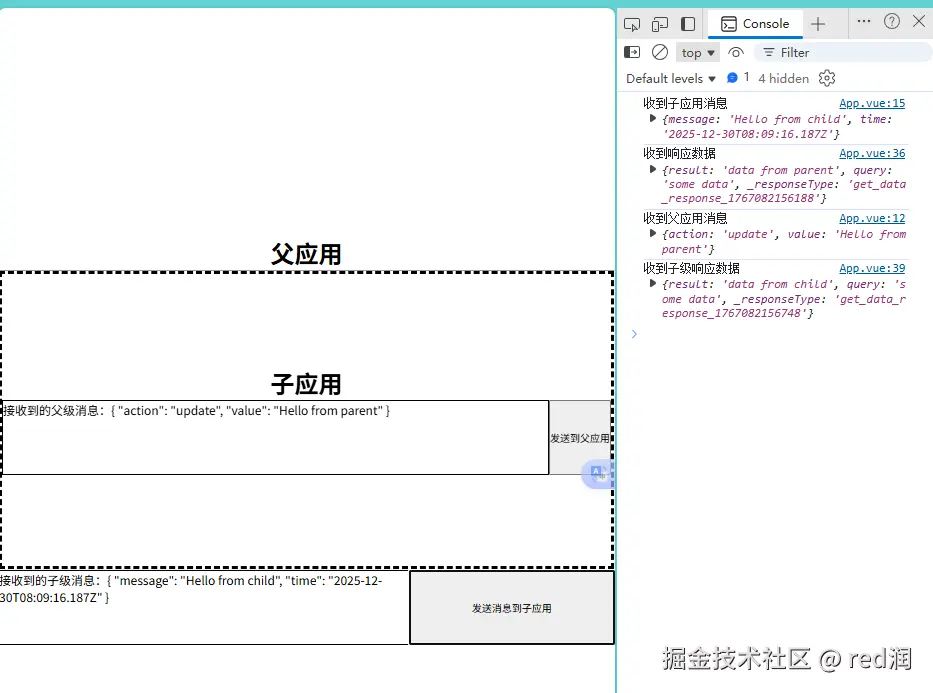
如上图,我将业务场景使用最小demo展示出来
我们使用vue3+hook封装工具函数
目前实现的功能
我需要父子页面能够单向 和双向的互相通讯
下面是实现的代码片段功能
单向数据传输
-
父级向子级主动发送数据,子级接收父级发来的数据。
php// 父级向子级主动发送数据 send('parent_message', { action: 'update', value: 'Hello from parent' });ini// 子级接收父级发来的数据 on('parent_message', data => { parentData.value = data; console.log('收到父应用消息', data); }); // 收到父应用消息 {action: 'update', value: 'Hello from parent'} -
子级向父级主送发送数据,父级接收子级发来的数据。
php// 子级向父级主送发送数据 send('child_message', { message: 'Hello from child', time: new Date().toISOString() });ini// 父级接收子级发来的数据。 on('child_message', data => { receivedData.value = data; console.log('收到子应用消息', data); }); // 收到子应用消息 {message: 'Hello from child', time: '2025-12-30T08:23:38.850Z'}
双向数据传输
-
父级向子级发起数据获取请求并等待,子级收到请求并响应
javascript// 父级向子级发起数据获取请求并等待 try { const response = await sendWithResponse('get_data', { query: 'some data'// 发给子级的数据 }); console.log('收到子级响应数据', response); } catch (error) { console.error('请求失败', error); } // 收到子级响应数据 {result: 'data from child', query: 'some data', _responseType: 'get_data_response_1767082999194'}kotlin// 子级收到请求并响应 handleRequest('get_data', async data => { // 处理数据 return { result: 'data from child', ...data }; }); -
子级向父级发起数据获取请求并等待,父级收到请求并响应
javascript// 子级向父级发起数据获取请求并等待 try { const response = await sendWithResponse('get_data', { query: 'some data' }); console.log('收到响应数据', response); } catch (error) { console.error('请求失败', error); } 收到响应数据 {result: 'data from parent', query: 'some data', _responseType: 'get_data_response_1767083018851'}kotlin// 父级收到请求并响应 handleRequest('get_data', async data => { // 处理数据 return { result: 'data from parent', ...data }; });
Iframe通讯原理解析
判断是否在iframe嵌套中
这是最简单且常用的方法。
javascript
// window.self 表示当前窗口对象,而 window.top 表示最顶层窗口对象。
// 如果两者不相等,则说明当前页面被嵌套在 iframe 中。
if (window.self !== window.top) {
console.log("当前页面被嵌套在 iframe 中");
} else {
console.log("当前页面未被嵌套");
}
核心发送消息逻辑
常使用postMessage来进行消息发送
ini
otherWindow.postMessage(message, targetOrigin, [transfer]);-
otherWindow
- 其他窗口的一个引用,比如 iframe 的 contentWindow 属性。
-
message
- 将要发送到其他 window 的数据。可以是字符串或者对象类型。
-
targetOrigin
- 通过窗口的 origin 属性来指定哪些窗口能接收到消息事件,其值可以是字符串"*"(表示无限制)或者一个 URI。
-
transfer(一般不传)
- 是一串和 message 同时传递的
Transferable对象。这些对象的所有权将被转移给消息的接收方,而发送一方将不再保有所有权。
- 是一串和 message 同时传递的
核心接收消息逻辑
父子元素通过 监听 message事件来获取接收到的数据。我们将根据这个函数来封装自己的工具函数
javascript
window.addEventListener('message', e => {
    // 通过origin对消息进行过滤,避免遭到XSS攻击
    if (e.origin === 'http://xxxx.com') {
        // 判断来源是否和要通讯的地址来源一致
        console.log(e.data)  // 子页面发送的消息, hello, parent!
    }
}, false);
项目搭建
bash
src/
├── utils/
│   ├── iframe-comm.js        # 父应用通信类
│   └── iframe-comm-child.js  # 子应用通信类
├── composables/
│   └── useIframeComm.js      # Vue3 组合式函数
├── App.vue                   # 父应用主组件
└── main.js使用vite 创建两个vue3项目
lua
pnpm create vite项目名分别是Parent 和Child ,分别代表父级应用和子级应用,除了App.vue不一样其他代码都是相同的
源码分析
核心逻辑分析
我们首先实现两个工具函数,iframe-comm.js 和iframe-comm-child.js,分别作为父级和子级的工具函数,他们的逻辑大致一样,核心逻辑是:
constructor
- 初始化配置信息,包括连接目标地址,是父级还是子级,事件对象处理合集等
initMessageListener
- 初始化message事件消息监听
connect
- 传入iframe元素,为全局对象设置iframe
send
- 通过postMessage发送消息
on
- 监听消息,通过new Map(事件类别,事件回调),可以实现对多个不同事件监听多个回调函数,后续监听顺序触发回调函数,获取接收到的消息。
off
- 取消监听消息
sendWithResponse
- 发送消息并等待响应,发生消息之前,设置一个回调函数,当消息发送成功后,回调函数会被触发,触发后回调函数清楚。
handleRequest
- 配合sendWithResponse使用,主要监听sendWithResponse事件类别所发来的数据,处理完成并返回结果数据,返回的结果会触发sendWithResponse中设置的回调函数
destroy
- 销毁实例
然后是hook函数useIframeComm.js,这个函数主要是封装了上面两个工具方法,方便vue3项目集成使用
如果是react框架可以自行封装hook函数,原生JS项目的话,可以直接使用上面的工具函数
然后就是App.vue的实现了,可以直接参照源码
src/utils工具函数
-
iframe-comm-child.js 供子级使用的工具函数
kotlin// iframe-comm-child.js class IframeCommChild { constructor(options = {}) { this.parentOrigin = options.parentOrigin || window.location.origin; this.handlers = new Map(); this.isParent = false; // 初始化消息监听 this.initMessageListener(); } /** * 向父应用发送消息 * @param {string} type - 消息类型 * @param {any} data - 消息数据 */ send(type, data) { const message = { type, data, source: 'child', timestamp: Date.now() }; try { window.parent.postMessage(message, this.parentOrigin); return true; } catch (error) { console.error('发送消息到父应用失败:', error); return false; } } /** * 监听消息 * @param {string} type - 消息类型 * @param {Function} handler - 处理函数 */ on(type, handler) { if (!this.handlers.has(type)) { this.handlers.set(type, []); } this.handlers.get(type).push(handler); } /** * 取消监听消息 * @param {string} type - 消息类型 * @param {Function} handler - 处理函数 */ off(type, handler) { if (!this.handlers.has(type)) return; if (handler) { const handlers = this.handlers.get(type); const index = handlers.indexOf(handler); if (index > -1) { handlers.splice(index, 1); } } else { this.handlers.delete(type); } } /** * 自动响应请求 * @param {string} requestType - 请求类型 * @param {Function} handler - 处理函数,返回响应数据 */ handleRequest(requestType, handler) { this.on(requestType, async (data, event) => { const responseType = data?._responseType; if (responseType) { try { const responseData = await handler(data, event); this.send(responseType, { success: true, data: responseData }); } catch (error) { this.send(responseType, { success: false, error: error.message }); } } }); } /** * 发送消息并等待响应 * @param {string} type - 消息类型 * @param {any} data - 消息数据 * @param {number} timeout - 超时时间(毫秒) * @returns {Promise} */ sendWithResponse(type, data, timeout = 5000) { return new Promise((resolve, reject) => { const responseType = `${type}_response_${Date.now()}`; let timeoutId; const responseHandler = (response) => { clearTimeout(timeoutId); this.off(responseType, responseHandler); resolve(response.data); }; this.on(responseType, responseHandler); // 发送请求 const success = this.send(type, { ...data, _responseType: responseType }); if (!success) { this.off(responseType, responseHandler); reject(new Error('发送消息失败')); return; } // 设置超时 timeoutId = setTimeout(() => { this.off(responseType, responseHandler); reject(new Error('等待响应超时')); }, timeout); }); } /** * 初始化消息监听器 */ initMessageListener() { window.addEventListener('message', (event) => { // 安全检查 if (this.parentOrigin !== '*' && event.origin !== this.parentOrigin) { return; } const { type, data, source } = event.data; // 只处理来自父应用的消息 if (source !== 'parent') return; if (this.handlers.has(type)) { this.handlers.get(type).forEach(handler => { try { handler(data, event); } catch (error) { console.error(`处理消息 ${type} 时出错:`, error); } }); } }); } /** * 销毁实例 */ destroy() { window.removeEventListener('message', this.messageHandler); this.handlers.clear(); } } export default IframeCommChild; -
iframe-comm.js 供父级使用的工具函数
kotlin// iframe-comm.js class IframeComm { constructor(options = {}) { this.origin = options.origin || '*'; this.targetOrigin = options.targetOrigin || window.location.origin; this.handlers = new Map(); this.iframe = null; this.isParent = true; // 初始化消息监听 this.initMessageListener(); } /** * 连接到指定iframe * @param {HTMLIFrameElement|string} iframe - iframe元素或选择器 */ connect(iframe) { if (typeof iframe === 'string') { this.iframe = document.querySelector(iframe); } else { this.iframe = iframe; } if (!this.iframe || !this.iframe.contentWindow) { console.error('无效的iframe元素'); return; } this.isParent = true; return this; } /** * 向子应用发送消息 * @param {string} type - 消息类型 * @param {any} data - 消息数据 * @param {string} targetOrigin - 目标origin */ send(type, data, targetOrigin = this.targetOrigin) { if (!this.iframe?.contentWindow) { console.error('未连接到iframe或iframe未加载完成'); return false; } const message = { type, data, source: 'parent', timestamp: Date.now() }; try { this.iframe.contentWindow.postMessage(message, targetOrigin); return true; } catch (error) { console.error('发送消息失败:', error); return false; } } /** * 监听消息 * @param {string} type - 消息类型 * @param {Function} handler - 处理函数 */ on(type, handler) { if (!this.handlers.has(type)) { this.handlers.set(type, []); } this.handlers.get(type).push(handler); } /** * 取消监听消息 * @param {string} type - 消息类型 * @param {Function} handler - 处理函数 */ off(type, handler) { if (!this.handlers.has(type)) return; if (handler) { const handlers = this.handlers.get(type); const index = handlers.indexOf(handler); if (index > -1) { handlers.splice(index, 1); } } else { this.handlers.delete(type); } } /** * 发送消息并等待响应 * @param {string} type - 消息类型 * @param {any} data - 消息数据 * @param {number} timeout - 超时时间(毫秒) * @returns {Promise} */ sendWithResponse(type, data, timeout = 5000) { return new Promise((resolve, reject) => { const responseType = `${type}_response_${Date.now()}`; let timeoutId; const responseHandler = (response) => { clearTimeout(timeoutId); this.off(responseType, responseHandler); resolve(response.data); }; this.on(responseType, responseHandler); // 发送请求 const success = this.send(type, { ...data, _responseType: responseType }); if (!success) { this.off(responseType, responseHandler); reject(new Error('发送消息失败')); return; } // 设置超时 timeoutId = setTimeout(() => { this.off(responseType, responseHandler); reject(new Error('等待响应超时')); }, timeout); }); } /** * 初始化消息监听器 */ initMessageListener() { window.addEventListener('message', (event) => { // 安全检查 if (this.targetOrigin !== '*' && event.origin !== this.targetOrigin) { return; } const { type, data, source } = event.data; // 只处理来自子应用的消息 if (source !== 'child') return; if (this.handlers.has(type)) { this.handlers.get(type).forEach(handler => { try { handler(data, event); } catch (error) { console.error(`处理消息 ${type} 时出错:`, error); } }); } }); } /** * 销毁实例 */ destroy() { window.removeEventListener('message', this.messageHandler); this.handlers.clear(); this.iframe = null; } } export default IframeComm;
src/composables 钩子函数
-
这里面是核心hook函数
-
useIframeComm.js
ini// useIframeComm.js import { ref, onUnmounted } from 'vue'; import IframeComm from '../utils/iframe-comm.js'; import IframeCommChild from '../utils/iframe-comm-child.js'; /** * Vue3组合式函数 - 父应用 */ export function useIframeComm(options = {}) { const comm = ref(null); const isConnected = ref(false); const lastMessage = ref(null); const connect = (iframe) => { if (comm.value) { comm.value.destroy(); } comm.value = new IframeComm(options); comm.value.connect(iframe); isConnected.value = true; // 监听所有消息 comm.value.on('*', (data, event) => { lastMessage.value = { data, timestamp: Date.now() }; }); }; const send = (type, data) => { if (!comm.value) { console.error('未连接到iframe'); return false; } return comm.value.send(type, data); }; const on = (type, handler) => { if (comm.value) { comm.value.on(type, handler); } }; const off = (type, handler) => { if (comm.value) { comm.value.off(type, handler); } }; const sendWithResponse = async (type, data, timeout) => { try { if (!comm.value) { throw new Error('未连接到iframe'); } return await comm.value.sendWithResponse(type, data, timeout); } catch (error) { console.error(error); } }; const handleRequest = (requestType, handler) => { if (comm.value) { comm.value.handleRequest(requestType, handler); } }; onUnmounted(() => { if (comm.value) { comm.value.destroy(); } }); return { comm, isConnected, lastMessage, connect, send, on, off, sendWithResponse, handleRequest }; } /** * Vue3组合式函数 - 子应用 */ export function useIframeCommChild(options = {}) { const comm = ref(null); const isReady = ref(false); const lastMessage = ref(null); const init = () => { if (comm.value) { comm.value.destroy(); } comm.value = new IframeCommChild(options); isReady.value = true; // 监听所有消息 comm.value.on('*', (data, event) => { lastMessage.value = { data, timestamp: Date.now() }; }); }; const send = (type, data) => { if (!comm.value) { console.error('子应用通信未初始化'); return false; } return comm.value.send(type, data); }; const on = (type, handler) => { if (comm.value) { comm.value.on(type, handler); } }; const off = (type, handler) => { if (comm.value) { comm.value.off(type, handler); } }; const sendWithResponse = async (type, data, timeout) => { try { if (!comm.value) { throw new Error('子应用通信未初始化'); } return await comm.value.sendWithResponse(type, data, timeout); } catch (error) { console.error(error); } }; const handleRequest = (requestType, handler) => { if (comm.value) { comm.value.handleRequest(requestType, handler); } }; onUnmounted(() => { if (comm.value) { comm.value.destroy(); } }); return { comm, isReady, lastMessage, init, send, on, off, sendWithResponse, handleRequest }; }
src/App.vue 主代码
-
这是父级的App.vue
-
父级的端口是5173,所以他要连接到5174
xml<script setup> import { ref, onMounted } from 'vue'; import { useIframeComm } from './composables/useIframeComm'; const iframeRef = ref(null); const receivedData = ref(null); // 初始化通讯 const { connect, send, on, sendWithResponse, handleRequest, lastMessage } = useIframeComm({ targetOrigin: 'http://localhost:5174' }); const onIframeLoad = () => { connect(iframeRef.value); // 监听子应用 on('child_message', data => { receivedData.value = data; console.log('收到子应用消息', data); }); on('child_response', data => { console.log('收到子应用响应', data); }); // 处理请求并自自动响应 handleRequest('get_data', async data => { // 处理数据 return { result: 'data from parent', ...data }; }); }; const sendMessage = async () => { send('parent_message', { action: 'update', value: 'Hello from parent' }); // 发送并等待响应 try { const response = await sendWithResponse('get_data', { query: 'some data' }); console.log('收到子级响应数据', response); } catch (error) { console.error('请求失败', error); } }; </script> <template> <div class="parent"> <h1>父应用</h1> <iframe ref="iframeRef" src="http://localhost:5174" @load="onIframeLoad"></iframe> <div style="display: flex; flex-direction: row"> <div style="flex: 2; border: 1px solid black; height: 100px">接收到的子级消息:{{ receivedData }}</div> <button style="flex: 1" @click="sendMessage">发送消息到子应用</button> </div> </div> </template> <style scoped> .parent { width: 100%; height: 100%; background-color: white; display: flex; flex-direction: column; justify-content: center; iframe { height: 400px; } h1 { text-align: center; } } </style> -
-
这是子级的App.vue
-
子级的端口是5174,所以他要连接到5173
xml<script setup> import { onMounted, ref } from 'vue'; import { useIframeCommChild } from './composables/useIframeComm'; const parentData = ref(null); const { init, send, on, handleRequest, sendWithResponse } = useIframeCommChild({ parentOrigin: 'http://localhost:5173' }); onMounted(() => { init(); on('parent_message', data => { parentData.value = data; console.log('收到父应用消息', data); }); // 处理请求并自自动响应 handleRequest('get_data', async data => { // 处理数据 return { result: 'data from child', ...data }; }); }); // 发送消息到父级 const sendToParent = async () => { send('child_message', { message: 'Hello from child', time: new Date().toISOString() }); // // 发送响应信息 // send('child_response', { status: 'success' }); // 发送并等待响应 try { const response = await sendWithResponse('get_data', { query: 'some data' }); console.log('收到响应数据', response); } catch (error) { console.error('请求失败', error); } }; </script> <template> <div class="child"> <h1>子应用</h1> <div style="display: flex; flex-direction: row"> <div style="flex: 2; border: 1px solid black; height: 100px">接收到的父级消息:{{ parentData }}</div> <button @click="sendToParent">发送到父应用</button> </div> <div></div> </div> </template> <style scoped> .child { width: 100%; height: 100%; border: 5px dashed black; display: flex; flex-direction: column; justify-content: center; h1 { text-align: center; } } </style> -
结尾
这个封装方案提供了一个完整、可靠的 Iframe 通信解决方案,适用于各种微前端集成场景。