文章目录
- 一、封装的目的
- 二、封装实现(重点)
- 三、搭建框架
- 四、案例(重点)
-
- [4.1 设置私有方法](#4.1 设置私有方法)
- [4.2 实现类方法](#4.2 实现类方法)
-
- [4.2.1 查询一条记录](#4.2.1 查询一条记录)
- [4.2.2 增删改数据](#4.2.2 增删改数据)
- [4.3 完整代码实现](#4.3 完整代码实现)
- 五、小结
一、封装的目的
- 将 数据库常用的操作,封装成类中的方法。 将来在使用时,只需提供 要执行的SQL语句,给这个方法,即可执行。
- 使用者,不需要关心:建立连接、创建游标、关闭游标、关闭连接
二、封装实现(重点)
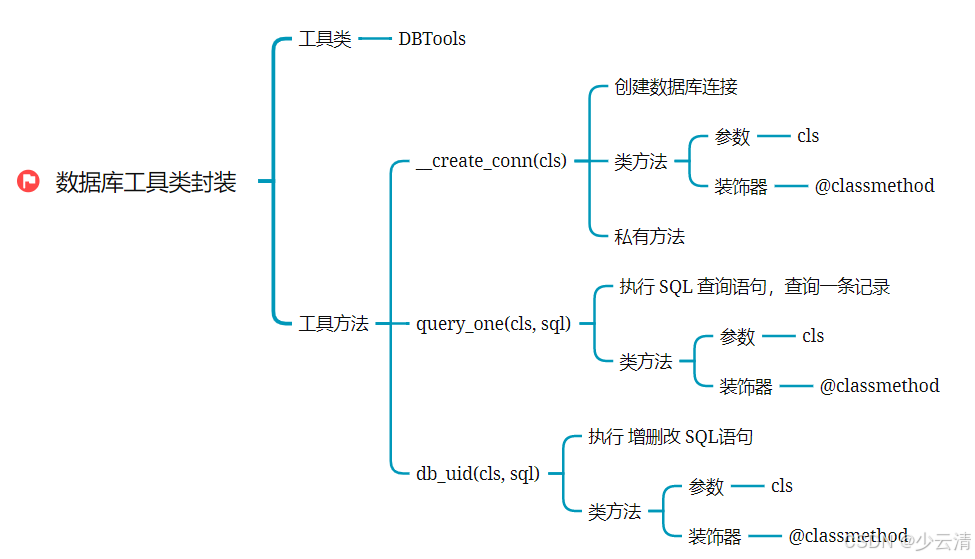
类方法,可以用类名直接调用,添加装饰器。
python
类方法:create_conn()     // 获取数据库连接

类方法:close_conn()      // 关闭数据库连接

类方法:query_one(sql)    // 查询一条数据

类方法:db_uid(sql)       // 执行数据库增删改

要求:定义一个DBTools工具类,对外提供以上方法
三、搭建框架
python
# 定义 数据库工具类
class DBTools(object):

    # 创建连接
    def create_conn(self):
        pass

    # 查一条记录
    def query_one(self, sql):
        pass
        # 创建连接
        # 创建游标
        # 关闭游标
        # 关闭连接

    # 增删改记录
    def db_uid(self, sql):
        pass
        # 创建连接
        # 创建游标
        # 关闭游标
        # 关闭连接
四、案例(重点)
| id | title | pub_date | read | comment | is_delete |
|---|---|---|---|---|---|
| 1 | 射雕英雄传 | 1960-05-01 | 12 | 34 | 0 |
| 2 | 天龙八部 | 1966-07-24 | 37 | 40 | 0 |
| 3 | 笑傲江湖 | 1995-12-24 | 23 | 80 | 0 |
4.1 设置私有方法
让创建连接方法 create_conn( ) 对用户不可见(对用户没用),但是又不影响后面查询和修改方法使用。
--->设置私有方法 __create_conn( )
python
# 定义 数据库工具类
class DBTools(object):
    # 创建连接 - 类方法。可以直接使用类名调用!
    @classmethod
    def __create_conn(cls):
        conn = pymysql.connect(host="172.16.28.4", port=3306, user="root", password="root",
                               database="books", charset="utf8")
        # 不能遗漏(创建连接之后,要返回结果)
        return conn
4.2 实现类方法
4.2.1 查询一条记录
python
import pymysql

# 定义 数据库工具类
class DBTools(object):
    # 创建连接 - 类方法。可以直接使用类名调用!
    @classmethod
    def __create_conn(cls):
        conn = pymysql.connect(host="172.16.28.4", port=3306, user="root", password="root",
                               database="books", charset="utf8")
        # 不能遗漏(创建连接之后,要返回结果)
        return conn

# 查一条记录 - 封装为类方法,方便调用
    @classmethod
    def query_one(cls, sql):
        my_conn = None
        my_cursor = None
        res = None
        try:
            # 创建连接。借助类名,调用 类方法 create_conn。
            my_conn = DBTools.__create_conn()   # 接收 return conn返回的结果,给my_conn

            # 创建游标
            my_cursor = my_conn.cursor()
            # 执行 sql 语句,做查询
            my_cursor.execute(sql)
            # 提取一条记录
            res = my_cursor.fetchone()
        except Exception as err:
            print("执行查询SQL失败:", str(err))
        finally:
            # 关闭游标
            my_cursor.close()
            # 关闭连接
            my_conn.close()
            # 返回查询结果
            return res


if __name__ == '__main__':
	result = DBTools.query_one("select * from t_book;")
    print("查询语句的结果:", result)
4.2.2 增删改数据
python
import pymysql

# 定义 数据库工具类
class DBTools(object):
    # 创建连接 - 类方法。可以直接使用类名调用!
    @classmethod
    def __create_conn(cls):
        conn = pymysql.connect(host="172.16.28.4", port=3306, user="root", password="root",
                               database="books", charset="utf8")
        # 不能遗漏
        return conn

# 增删改记录
    @classmethod
    def db_uid(cls, sql):
        my_conn = None
        my_cursor = None
        try:
            # 创建连接.
            my_conn = DBTools.__create_conn()
            # 创建游标
            my_cursor = my_conn.cursor()
            # 执行 增删改 语句
            my_cursor.execute(sql)
            print("Affected rows:", my_conn.affected_rows())
            # 提交事务
            my_conn.commit()
        except Exception as err:
            print("执行 增删改 SQL 失败:", str(err))
            # 回滚事务
            my_conn.rollback()
        finally:
            # 关闭游标
            my_cursor.close()
            # 关闭连接
            my_conn.close()

if __name__ == '__main__':
    DBTools.db_uid("update t_book set `read` = 100 where id = 3;")
4.3 完整代码实现
文件:py08_db_tools.py
python
import pymysql

# 定义 数据库工具类
class DBTools(object):
    # 创建连接 - 类方法。可以直接使用类名调用!
    @classmethod
    def __create_conn(cls):
        conn = pymysql.connect(host="172.16.28.4", port=3306, user="root", password="root",
                               database="books", charset="utf8")
        # 不能遗漏
        return conn

    # 查一条记录 - 封装为类方法,方便调用
    @classmethod
    def query_one(cls, sql):
        my_conn = None
        my_cursor = None
        res = None
        try:
            # 创建连接, 借助类名,调用 类方法 create_conn
            my_conn = DBTools.__create_conn()
            # 创建游标
            my_cursor = my_conn.cursor()
            # 执行 sql 语句,做查询
            my_cursor.execute(sql)
            # 提取一条记录
            res = my_cursor.fetchone()
        except Exception as err:
            print("执行查询SQL失败:", str(err))
        finally:
            # 关闭游标
            my_cursor.close()
            # 关闭连接
            my_conn.close()
            # 返回查询结果
            return res

    # 增删改记录
    @classmethod
    def db_uid(cls, sql):
        my_conn = None
        my_cursor = None
        try:
            # 创建连接
            my_conn = DBTools.__create_conn()
            # 创建游标
            my_cursor = my_conn.cursor()
            # 执行 增删改 语句
            my_cursor.execute(sql)
            print("Affected rows:", my_conn.affected_rows())
            # 提交事务
            my_conn.commit()
        except Exception as err:
            print("执行 增删改 SQL 失败:", str(err))
            # 回滚事务
            my_conn.rollback()
        finally:
            # 关闭游标
            my_cursor.close()
            # 关闭连接
            my_conn.close()

if __name__ == '__main__':
    result = DBTools.query_one("select * from t_hero;")
    print("查询语句的结果:", result)

    DBTools.db_uid("update t_book set `read` = 100 where id = 3;")
五、小结