原实时识别录音内容文档:
https://blog.csdn.net/qq_70172010/article/details/156392609?spm=1001.2014.3001.5501
生成的内容生成纪要发送到飞书机器人
获取飞书群聊机器人链接:
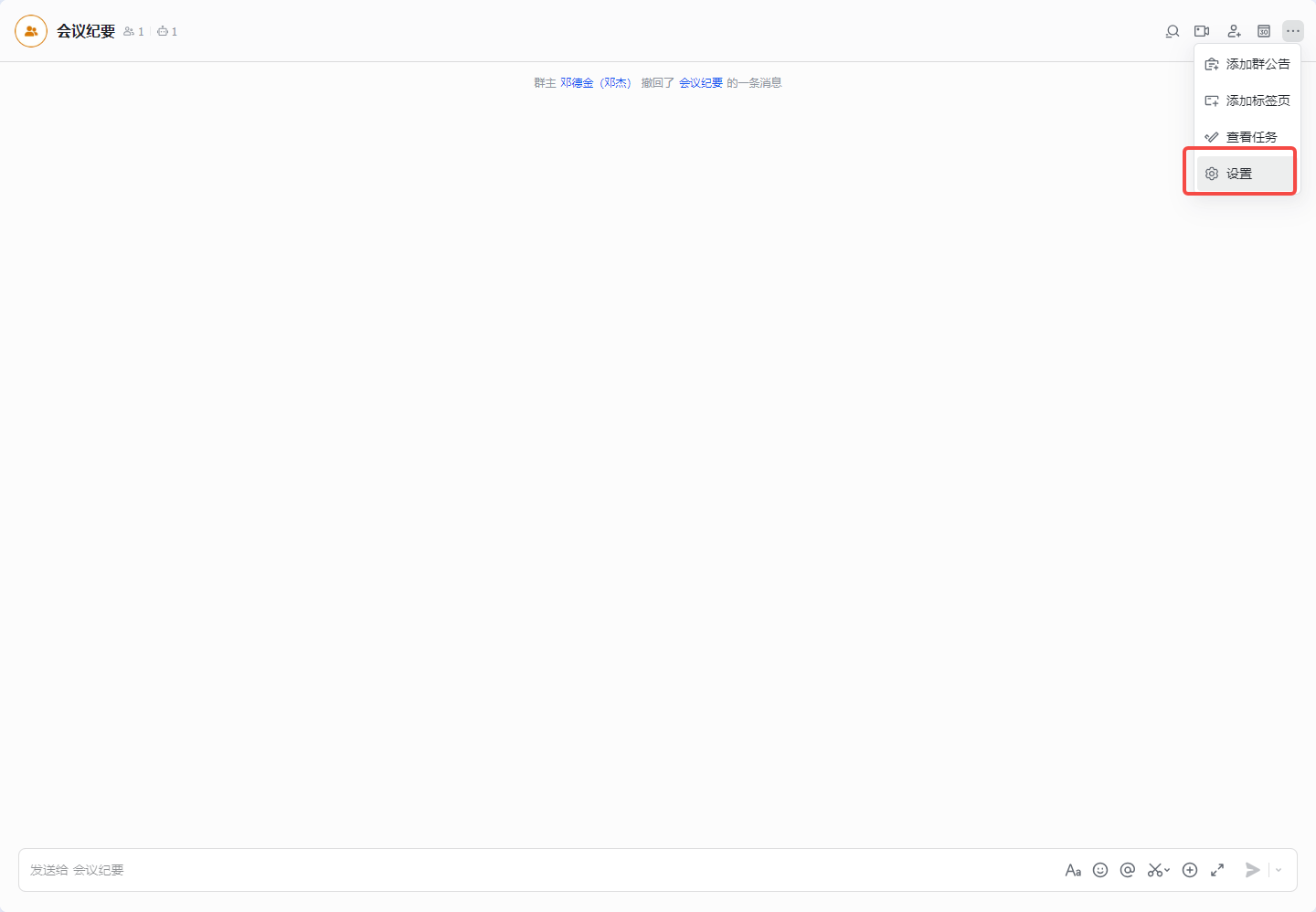
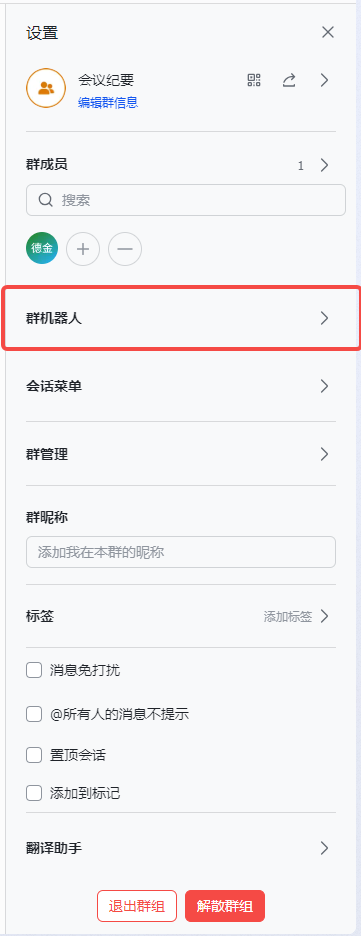
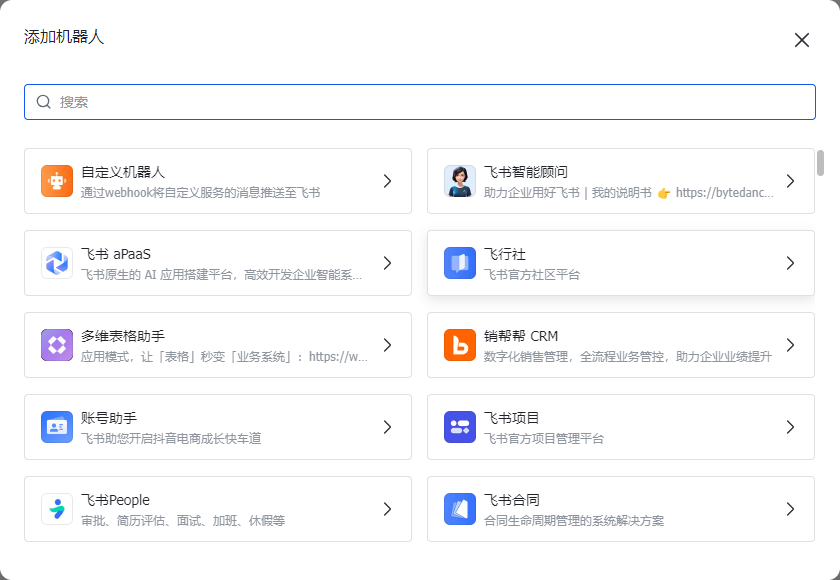
添加自定义机器人
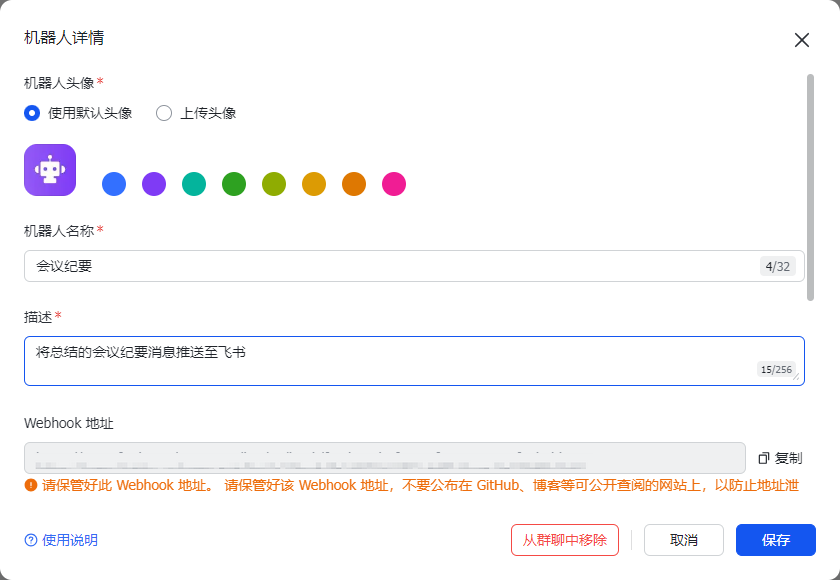
复制WebHook地址到代码中配置
实现效果:
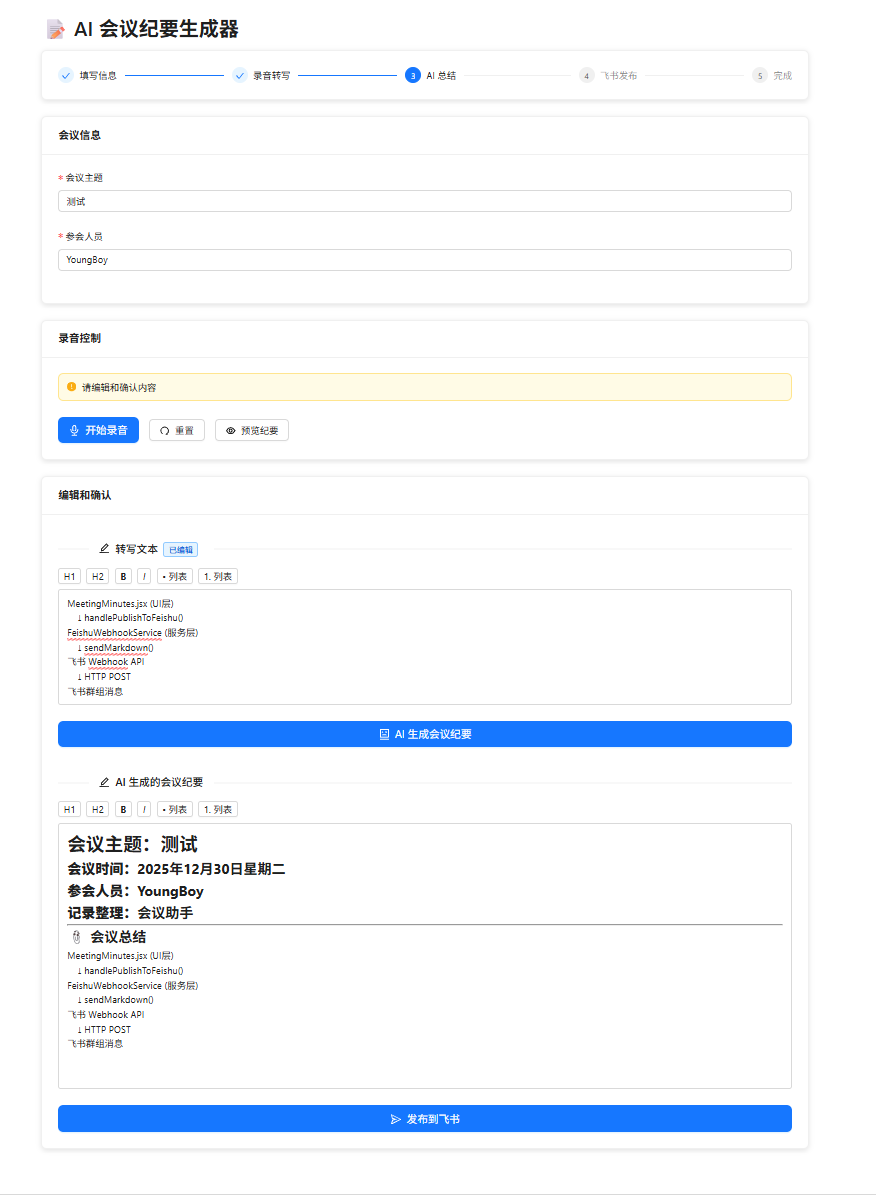
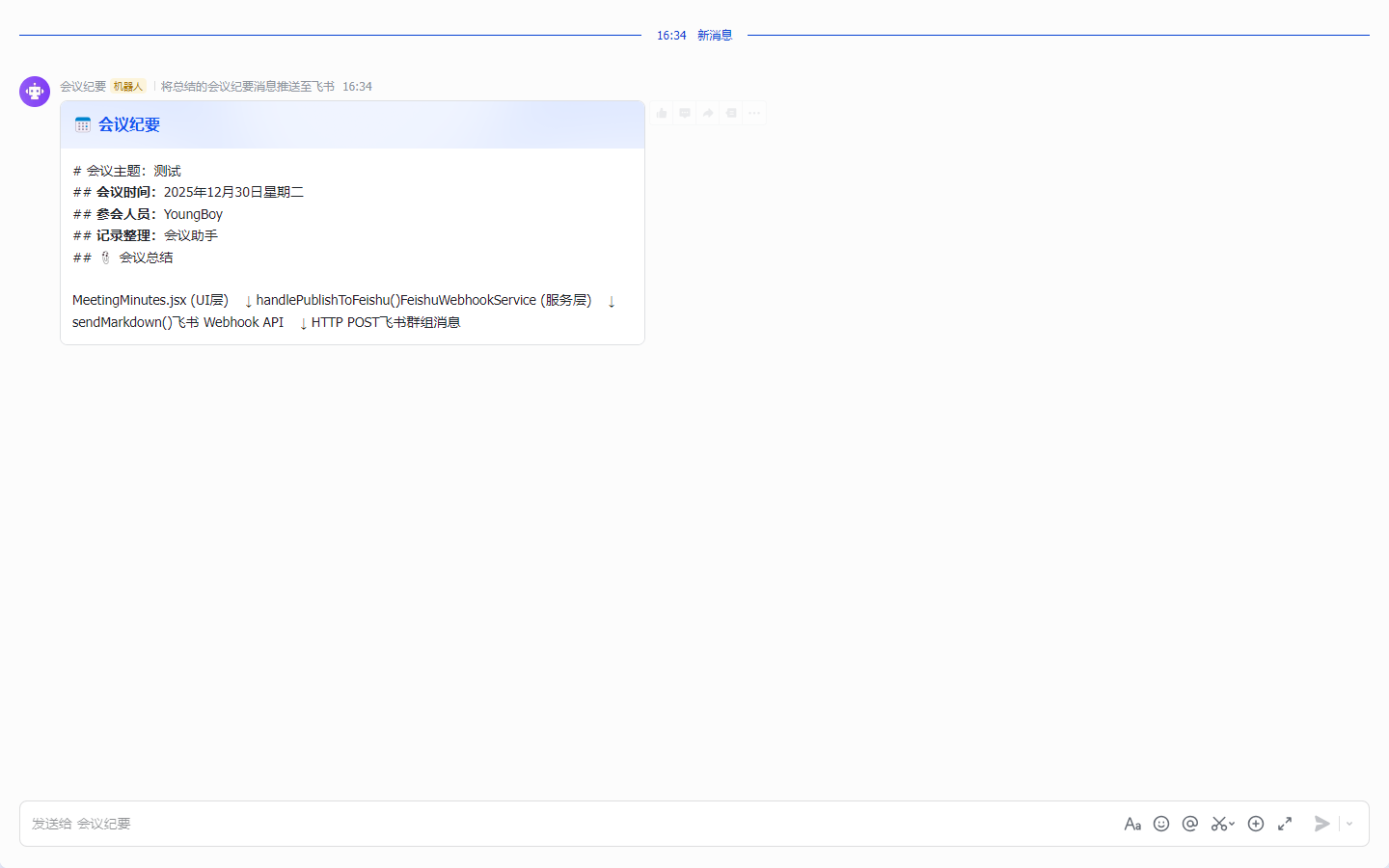
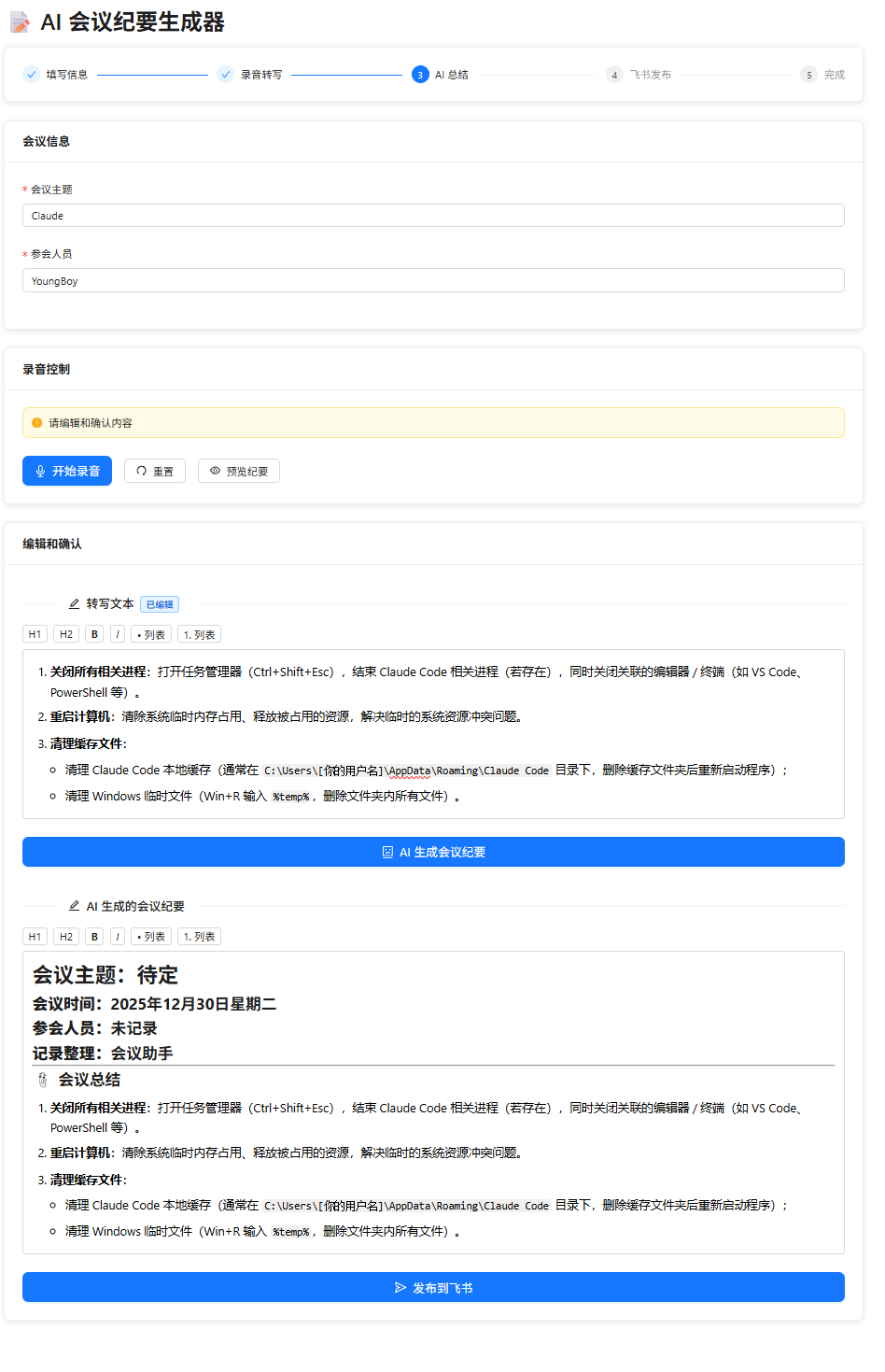
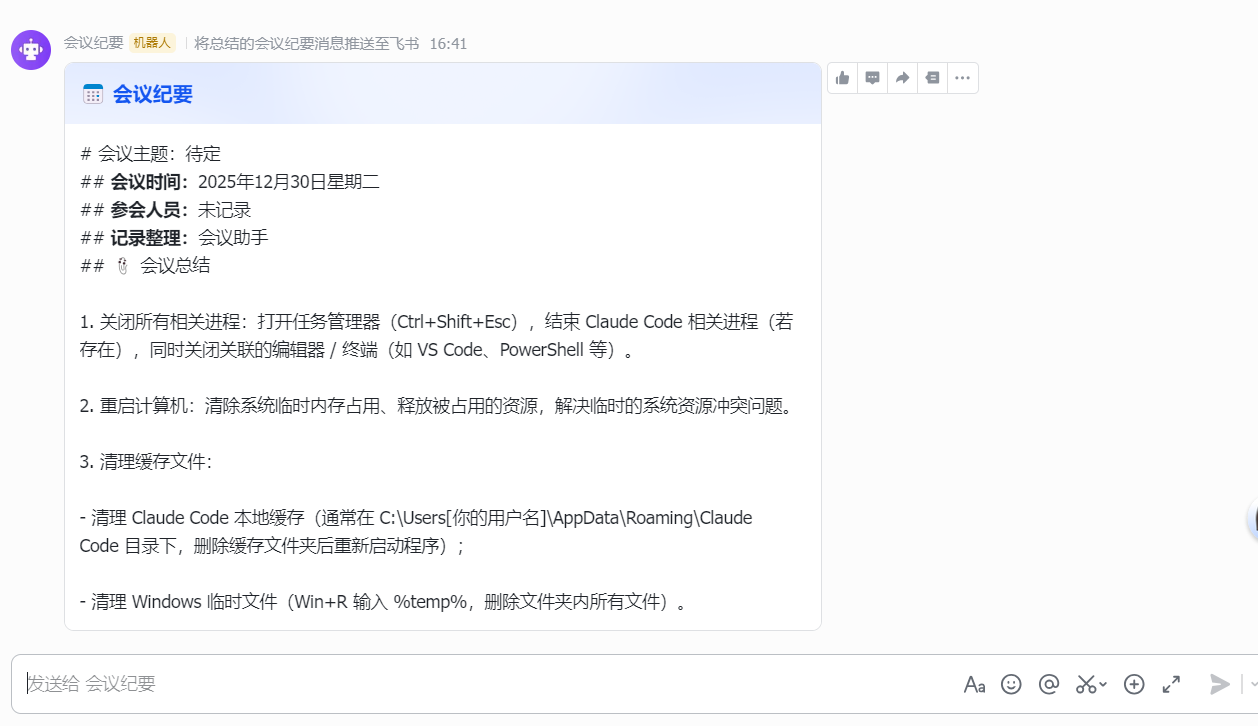
📋 整体架构
MeetingMinutes.jsx (UI层)
    ↓ handlePublishToFeishu()
FeishuWebhookService (服务层)
    ↓ sendMarkdown()
飞书 Webhook API
    ↓ HTTP POST
飞书群组消息
1️⃣ UI 层触发
数据验证
const summaryToPublish = editedSummary || summaryResult;

if (!summaryToPublish || summaryToPublish.trim().length === 0) {
    message.warning('请先生成会议纪要');
    return;
}
状态管理
useMeetingStore.getState().startPublishing(); // 更新为 publishing 状态创建服务实例
const feishuService = new FeishuWebhookService(CONFIG.feishu.webhookUrl);格式转换
const markdown = htmlToFeishuMarkdown(summaryToPublish);- 将 HTML 富文本转换为飞书 Markdown 格式
- 转换规则:htmlToFeishuMarkdown 函数
发送请求
await feishuService.sendMarkdown(markdown);服务层实现
服务初始化
constructor(webhookUrl) {
    this.webhookUrl = webhookUrl;
}
URL 验证
if (!this.webhookUrl ||
    this.webhookUrl === 'your_webhook_url_here' ||
    this.webhookUrl.trim().length === 0 ||
    !this.webhookUrl.startsWith('https://open.feishu.cn')) {
    throw new Error('请先配置飞书 Webhook URL');
}
验证条件:
- URL 不能为空
- 不能是占位符
your_webhook_url_here - 必须以
https://open.feishu.cn开头
HTTP 请求构建
请求格式:
POST {webhookUrl}
Content-Type: application/json

{
    "msg_type": "interactive",
    "card": {
        "header": {
            "title": {
                "tag": "plain_text",
                "content": "📅 会议纪要",
                "zh_cn": "📅 会议纪要"
            },
            "template": "blue"  // 蓝色卡片主题
        },
        "elements": [
            {
                "tag": "div",
                "text": {
                    "tag": "lark_md",  // 飞书 Markdown 格式
                    "content": "{markdown内容}"
                }
            }
        ]
    }
}
关键参数说明:
msg_type: "interactive"- 交互式卡片消息card.header.template: "blue"- 卡片颜色主题text.tag: "lark_md"- 飞书支持的 Markdown 语法
响应处理
HTTP 状态码检查:
if (!response.ok) {
    throw new Error(`HTTP 错误: ${response.status} ${response.statusText}`);
}
飞书 API 错误码检查:
const result = await response.json();

if (result.code !== 0) {
    throw new Error(`飞书 API 错误: ${result.msg}`);
}

return {
    success: true,
    data: result.data
};
UI 层结果处理
成功场景
useMeetingStore.getState().setPublishResult({ success: true });
message.success('已发布到飞书!');
setPreviewVisible(false);
失败场景 + 降级方案
Modal.confirm({
    title: '发布失败',
    content: '是否复制会议纪要内容,手动发送到飞书?',
    onOk: () => {
        const markdown = htmlToFeishuMarkdown(summaryToPublish);
        navigator.clipboard.writeText(markdown);
        message.success('已复制到剪贴板');
    }
});
服务层的其他能力
纯文本消息
async sendText(text) {
    // 用于降级方案或简单文本推送
    body: JSON.stringify({
        msg_type: 'text',
        content: { text: text }
    })
}
富文本消息
async sendPost(content) {
    // 支持更复杂的富文本结构
    body: JSON.stringify({
        msg_type: 'post',
        content: {
            post: {
                zh_cn: {
                    title: '📅 会议纪要',
                    content: content
                }
            }
        }
    })
}
连接测试
async testConnection() {
    try {
        await this.sendText('✅ 飞书机器人连接测试成功!');
        return true;
    } catch (error) {
        console.error('Webhook 连接测试失败:', error);
        return false;
    }
}
完整流程图
┌─────────────────────────────────────────────────────────────┐
│  用户点击"发布到飞书"按钮 (MeetingMinutes.jsx)                │
└─────────────────────────────────────────────────────────────┘
                            ↓
┌─────────────────────────────────────────────────────────────┐
│  验证会议纪要内容不为空                                       │
│  const summaryToPublish = editedSummary || summaryResult    │
└─────────────────────────────────────────────────────────────┘
                            ↓
┌─────────────────────────────────────────────────────────────┐
│  更新状态为 publishing                                       │
│  useMeetingStore.getState().startPublishing()               │
└─────────────────────────────────────────────────────────────┘
                            ↓
┌─────────────────────────────────────────────────────────────┐
│  创建 FeishuWebhookService 实例                              │
│  const feishuService = new FeishuWebhookService(webhookUrl) │
└─────────────────────────────────────────────────────────────┘
                            ↓
┌─────────────────────────────────────────────────────────────┐
│  HTML → 飞书 Markdown 格式转换                               │
│  const markdown = htmlToFeishuMarkdown(summaryToPublish)    │
└─────────────────────────────────────────────────────────────┘
                            ↓
┌─────────────────────────────────────────────────────────────┐
│  FeishuWebhookService.sendMarkdown() (feishuWebhook.js)     │
└─────────────────────────────────────────────────────────────┘
                            ↓
┌─────────────────────────────────────────────────────────────┐
│  Webhook URL 验证                                           │
│  - 检查 URL 不为空                                           │
│  - 必须以 https://open.feishu.cn 开头                        │
└─────────────────────────────────────────────────────────────┘
                            ↓
┌─────────────────────────────────────────────────────────────┐
│  构建 HTTP POST 请求                                         │
│  {                                                          │
│    msg_type: "interactive",                                 │
│    card: {                                                  │
│      header: { title: "📅 会议纪要", template: "blue" },    │
│      elements: [{ text: { tag: "lark_md", content } }]      │
│    }                                                         │
│  }                                                           │
└─────────────────────────────────────────────────────────────┘
                            ↓
┌─────────────────────────────────────────────────────────────┐
│  发送请求到飞书服务器                                        │
│  POST https://open.feishu.cn/open-apis/bot/v2/hook/...      │
└─────────────────────────────────────────────────────────────┘
                            ↓
                    ┌──────┴──────┐
                    ↓             ↓
              ┌─────────┐   ┌──────────┐
              │  成功   │   │  失败    │
              └─────────┘   └──────────┘
                    ↓             ↓
        ┌───────────────┐  ┌─────────────────────┐
        │ 显示成功提示  │  │ 错误处理 + 降级方案  │
        │ 关闭预览弹窗  │  │ 复制内容到剪贴板     │
        └───────────────┘  └─────────────────────┘
关键技术点总结
| 技术点 | 实现位置 | 说明 |
|---|---|---|
| 消息格式 | feishuWebhook.js | 使用 interactive 卡片消息 + lark_md Markdown |
| URL 验证 | feishuWebhook.js | 多重验证确保 URL 合法性 |
| 错误处理 | 双层 | HTTP 状态码 + 飞书 API 错误码 |
| 降级方案 | MeetingMinutes.jsx | 剪贴板复制手动发送 |
| 格式转换 | MeetingMinutes.jsx | HTML → 飞书 Markdown |
| 状态管理 | Zustand Store | publishing → completed |
飞书 API 参考
- 官方文档 :https://open.feishu.cn/document/ukTMukTMukTM/ucTM5YjL3ETO24yTNkTN
- Webhook URL 格式 :
https://open.feishu.cn/open-apis/bot/v2/hook/{webhook_id} - 支持的消息类型 :
text- 纯文本post- 富文本interactive- 交互式卡片(当前使用)card- 卡片消息
MeetingMinutes.jsx
import React, { useState, useRef, useEffect } from 'react';
import {
Button, Card, Input, Form, Space, Steps, Progress,
Typography, Alert, Divider, Modal, message, Spin, Tag
} from 'antd';
import {
AudioOutlined, StopOutlined, LoadingOutlined, CheckCircleOutlined,
SendOutlined, RedoOutlined, EyeOutlined, EditOutlined, RobotOutlined
} from '@ant-design/icons';
import { useMeetingStore } from '../../store/meetingStore';
import { AudioRecorder } from '../../utils/audioRecorder';
import AliyunASR from '../../services/aliyunASR';
import { AISummaryService } from '../../services/aiSummary';
import { FeishuWebhookService } from '../../services/feishuWebhook';
import styles from './MeetingMinutes.module.scss';
const { Step } = Steps;
const { Title, Text, Paragraph } = Typography;
// 环境变量配置
const CONFIG = {
// 阿里云配置
aliyun: {
appKey: process.env.REACT_APP_ALIYUN_APP_KEY || '',
apiBaseUrl: process.env.REACT_APP_API_BASE_URL || 'http://localhost:3001'
},
// 飞书 Webhook
feishu: {
webhookUrl: process.env.REACT_APP_FEISHU_WEBHOOK_URL || 'https://open.feishu.cn/open-apis/bot/v2/hook/{webhook_id}'
}
};
const MeetingMinutes = () => {
// Zustand store
const {
isRecording,
recordingTime,
transcriptText,
fullTranscript,
summaryResult,
currentStep,
meetingInfo,
editedTranscript,
editedSummary,
error,
updateMeetingInfo,
updateEditedTranscript,
updateEditedSummary,
reset,
setError
} = useMeetingStore();
// 本地状态
const [form] = Form.useForm();
const [recorder, setRecorder] = useState(null);
const [asrService, setAsrService] = useState(null);
const [timerInterval, setTimerInterval] = useState(null);
const [previewVisible, setPreviewVisible] = useState(false);
const [isGenerating, setIsGenerating] = useState(false);
const recordingStartTime = useRef(null);
const transcriptEditorRef = useRef(null);
const summaryEditorRef = useRef(null);
const lastTranscriptContent = useRef(null);
const lastSummaryContent = useRef(null);
const isTranscriptComposing = useRef(false);
const isSummaryComposing = useRef(false);
// 将 HTML 转换为飞书 Markdown 格式
const htmlToFeishuMarkdown = (html) => {
if (!html) return '';
// 创建临时 DOM 元素来解析 HTML
const tempDiv = document.createElement('div');
tempDiv.innerHTML = html;
// 处理各种标签
const processNode = (node) => {
if (node.nodeType === Node.TEXT_NODE) {
return node.textContent;
}
if (node.nodeType !== Node.ELEMENT_NODE) {
return '';
}
const tagName = node.tagName.toLowerCase();
// 根据标签添加格式(飞书 Markdown 语法)
switch (tagName) {
case 'h1':
return `# ${processChildren(node)}\n`;
case 'h2':
return `## ${processChildren(node)}\n`;
case 'h3':
return `### ${processChildren(node)}\n`;
case 'strong':
case 'b':
return `**${processChildren(node)}**`;
case 'em':
case 'i':
return `*${processChildren(node)}*`;
case 'p':
return processChildren(node) + '\n\n';
case 'br':
return '\n';
case 'hr':
return '---\n\n';
case 'ul':
return '\n\n' + processList(node, 'ul') + '\n\n';
case 'ol':
return '\n\n' + processList(node, 'ol') + '\n\n';
case 'li':
return processChildren(node).trim();
case 'div':
case 'span':
case 'font':
return processChildren(node);
default:
return processChildren(node);
}
};
// 处理子节点
const processChildren = (node) => {
let result = '';
for (const child of node.childNodes) {
result += processNode(child);
}
return result;
};
// 处理列表
const processList = (node, listType) => {
let result = '';
let index = 1;
for (const child of node.childNodes) {
if (child.nodeType === Node.ELEMENT_NODE && child.tagName === 'LI') {
const liContent = processChildren(child).trim();
if (listType === 'ol') {
// 有序列表使用数字编号
result += `${index}. ${liContent}\n\n`;
index++;
} else {
// 无序列表使用 -
result += `- ${liContent}\n\n`;
}
} else if (child.nodeType === Node.ELEMENT_NODE && (child.tagName === 'UL' || child.tagName === 'OL')) {
// 嵌套列表
result += processList(child, child.tagName.toLowerCase());
}
}
return result;
};
const text = processNode(tempDiv);
// 清理多余的空行
return text.replace(/\n{3,}/g, '\n\n').trim();
};
// 更新转写编辑器内容(仅在外部变化时)
useEffect(() => {
const editor = transcriptEditorRef.current;
if (editor && editedTranscript !== lastTranscriptContent.current) {
// 保存当前焦点状态
const isFocused = document.activeElement === editor;
editor.innerHTML = editedTranscript;
lastTranscriptContent.current = editedTranscript;
// 如果之前有焦点,恢复光标到末尾
if (isFocused && editor.childNodes.length > 0) {
try {
const selection = window.getSelection();
const newRange = document.createRange();
newRange.selectNodeContents(editor);
newRange.collapse(false);
selection.removeAllRanges();
selection.addRange(newRange);
} catch (err) {
console.warn('光标恢复失败:', err);
}
}
}
}, [editedTranscript]);
// 更新总结编辑器内容(仅在外部变化时)
useEffect(() => {
const editor = summaryEditorRef.current;
if (editor && editedSummary !== lastSummaryContent.current) {
// 保存当前光标位置
const selection = window.getSelection();
const isFocused = document.activeElement === editor;
editor.innerHTML = editedSummary;
lastSummaryContent.current = editedSummary;
// 如果之前有焦点,恢复光标到末尾
if (isFocused && editor.childNodes.length > 0) {
try {
const newRange = document.createRange();
newRange.selectNodeContents(editor);
newRange.collapse(false);
selection.removeAllRanges();
selection.addRange(newRange);
} catch (err) {
console.warn('光标恢复失败:', err);
}
}
}
}, [editedSummary]);
// 初始化录音器
useEffect(() => {
const initRecorder = async () => {
try {
// 如果页面刷新后发现处于录音状态,重置为 idle
if (isRecording) {
console.warn('检测到异常的录音状态,正在重置...');
reset();
}
const audioRecorder = new AudioRecorder();
await audioRecorder.init();
setRecorder(audioRecorder);
} catch (error) {
console.error('录音器初始化失败:', error);
message.error('麦克风初始化失败: ' + error.message);
}
};
initRecorder();
return () => {
if (recorder) {
recorder.dispose();
}
if (timerInterval) {
clearInterval(timerInterval);
}
};
}, []);
// 格式化录音时间
const formatTime = (seconds) => {
const mins = Math.floor(seconds / 60);
const secs = seconds % 60;
return `${mins.toString().padStart(2, '0')}:${secs.toString().padStart(2, '0')}`;
};
// 开始录音
const handleStartRecording = async () => {
try {
// 验证表单
const values = await form.validateFields();
updateMeetingInfo(values);
// 初始化阿里云 ASR
let asr = null;
try {
asr = new AliyunASR(CONFIG.aliyun);
await asr.connect();
// 设置识别结果回调
asr.onResult = (data) => {
useMeetingStore.getState().updateTranscript(data.text, {
isFinal: data.isFinal,
replace: false
});
};
asr.onError = (error) => {
console.error('语音识别错误:', error);
setError(error.message);
message.warning('语音识别出现问题: ' + error.message);
};
// 启动识别
await asr.start();
setAsrService(asr);
message.success('✅ 阿里云语音识别已启动,请开始说话');
} catch (error) {
console.error('阿里云 ASR 连接失败:', error);
message.error('语音识别服务连接失败: ' + error.message);
return;
}
// 开始录音 - 直接使用局部变量 asr(避免闭包问题)
recorder.start((audioChunk) => {
// 实时发送音频数据到阿里云
if (asr && asr.isConnected) {
asr.sendAudio(audioChunk);
}
});
// 更新状态
useMeetingStore.getState().startRecording();
recordingStartTime.current = Date.now();
// 启动计时器
const interval = setInterval(() => {
const elapsed = Math.floor((Date.now() - recordingStartTime.current) / 1000);
useMeetingStore.getState().updateRecordingTime(elapsed);
}, 1000);
setTimerInterval(interval);
} catch (error) {
console.error('启动录音失败:', error);
message.error('启动录音失败: ' + error.message);
}
};
// 停止录音并自动处理
const handleStopRecording = async () => {
try {
// 停止阿里云 ASR(先停止,等待最后的转写结果)
if (asrService) {
await asrService.stop();
// 等待 1 秒,确保最后的转写结果被处理
await new Promise(resolve => setTimeout(resolve, 1000));
setAsrService(null);
}
// 停止录音
await recorder.stop();
clearInterval(timerInterval);
// 获取当前的完整转写文本
const currentFullTranscript = useMeetingStore.getState().fullTranscript;
const currentTranscriptText = useMeetingStore.getState().transcriptText;
// 合并转写文本
const finalTranscript = currentFullTranscript + currentTranscriptText;
// 更新状态:直接进入编辑模式
useMeetingStore.getState().stopRecording();
// 清空实时转写文本(避免干扰)
useMeetingStore.setState({
transcriptText: '',
fullTranscript: finalTranscript
});
// 自动进入编辑模式,使用转写文本初始化编辑区
updateEditedTranscript(finalTranscript);
message.success('✅ 录音结束,转写完成');
} catch (error) {
console.error('停止录音失败:', error);
message.error('停止录音失败: ' + error.message);
}
};
// 生成 AI 总结
const handleGenerateSummary = async () => {
const transcriptToUse = editedTranscript || fullTranscript;
if (!transcriptToUse || transcriptToUse.trim().length === 0) {
message.warning('请先输入或录音转写文本');
return;
}
// 直接从表单中获取最新的会议信息
const formValues = form.getFieldsValue();
const currentMeetingInfo = {
topic: formValues.topic || meetingInfo.topic || '待定',
attendees: formValues.attendees || meetingInfo.attendees || '未记录',
date: new Date().toISOString()
};
setIsGenerating(true);
useMeetingStore.getState().startSummarizing();
try {
const aiService = new AISummaryService();
const summary = await aiService.generateSummary(
transcriptToUse,
currentMeetingInfo,
({ content, progress }) => {
useMeetingStore.getState().updateSummaryProgress(progress);
useMeetingStore.getState().setSummaryResult(content);
}
);
updateEditedSummary(summary);
message.success('AI 总结完成!');
} catch (error) {
console.error('AI 总结失败:', error);
message.error('AI 总结失败: ' + error.message);
setError(error.message);
} finally {
setIsGenerating(false);
}
};
// 发布到飞书
const handlePublishToFeishu = async () => {
const summaryToPublish = editedSummary || summaryResult;
if (!summaryToPublish || summaryToPublish.trim().length === 0) {
message.warning('请先生成会议纪要');
return;
}
useMeetingStore.getState().startPublishing();
try {
const feishuService = new FeishuWebhookService(CONFIG.feishu.webhookUrl);
// 将 HTML 转换为飞书 Markdown 格式
const markdown = htmlToFeishuMarkdown(summaryToPublish);
// 使用 Markdown 格式发送
await feishuService.sendMarkdown(markdown);
useMeetingStore.getState().setPublishResult({ success: true });
message.success('已发布到飞书!');
setPreviewVisible(false);
} catch (error) {
console.error('发布失败:', error);
message.error('发布失败: ' + error.message);
setError(error.message);
// 提供降级方案
Modal.confirm({
title: '发布失败',
content: '是否复制会议纪要内容,手动发送到飞书?',
onOk: () => {
const markdown = htmlToFeishuMarkdown(summaryToPublish);
navigator.clipboard.writeText(markdown);
message.success('已复制到剪贴板');
}
});
}
};
// 重置
const handleReset = () => {
if (timerInterval) {
clearInterval(timerInterval);
}
reset();
form.resetFields();
message.info('已重置');
};
// 预览会议纪要
const handlePreview = () => {
setPreviewVisible(true);
};
// 当前步骤
const getCurrentStep = () => {
const stepMap = {
idle: 0,
recording: 1,
transcribing: 1,
summarizing: 2,
editing: 2,
publishing: 3,
completed: 4
};
return stepMap[currentStep] || 0;
};
return (
<div className={styles.container}>
<Title level={2}>📝 AI 会议纪要生成器</Title>
{/* 进度步骤 */}
<Card className={styles.stepsCard}>
<Steps current={getCurrentStep()} size="small">
<Step title="填写信息" />
<Step title="录音转写" />
<Step title="AI 总结" />
<Step title="飞书发布" />
<Step title="完成" />
</Steps>
</Card>
{/* 表单区域 */}
<Card title="会议信息" className={styles.formCard}>
<Form form={form} layout="vertical">
<Form.Item
label="会议主题"
name="topic"
rules={[{ required: true, message: '请输入会议主题' }]}
>
<Input placeholder="例如:产品需求评审会" />
</Form.Item>
<Form.Item
label="参会人员"
name="attendees"
rules={[{ required: true, message: '请输入参会人员' }]}
>
<Input placeholder="例如:张三、李四、王五" />
</Form.Item>
</Form>
</Card>
{/* 录音控制区域 */}
<Card title="录音控制" className={styles.recordingCard}>
<Space direction="vertical" size="large" style={{ width: '100%' }}>
{/* 状态显示 */}
{currentStep !== 'idle' && (
<Alert
message={
<Space>
{currentStep === 'recording' && <LoadingOutlined />}
{currentStep === 'completed' && <CheckCircleOutlined />}
{currentStep === 'summarizing' && <RobotOutlined />}
<span>{useMeetingStore.getState().getStepText()}</span>
</Space>
}
description={currentStep === 'recording' && `录音时长: ${formatTime(recordingTime)}`}
type={
currentStep === 'completed' ? 'success' :
currentStep === 'recording' ? 'info' : 'warning'
}
showIcon
/>
)}
{/* 录音按钮 */}
<Space size="middle">
{!isRecording ? (
<Button
type="primary"
size="large"
icon={<AudioOutlined />}
onClick={handleStartRecording}
disabled={currentStep === 'recording' || currentStep === 'summarizing'}
>
开始录音
</Button>
) : (
<Button
danger
size="large"
icon={<StopOutlined />}
onClick={handleStopRecording}
>
停止录音
</Button>
)}
<Button
icon={<RedoOutlined />}
onClick={handleReset}
disabled={currentStep === 'recording'}
>
重置
</Button>
{summaryResult && (
<Button
type="default"
icon={<EyeOutlined />}
onClick={handlePreview}
>
预览纪要
</Button>
)}
</Space>
{/* 实时转写显示 */}
{(transcriptText || fullTranscript) && isRecording && (
<div>
<Divider orientation="left">
🎤 实时转写
{transcriptText && <Tag color="processing">识别中...</Tag>}
</Divider>
<div className={styles.transcriptBox}>
<Paragraph>
{fullTranscript && <span style={{ color: '#1890ff' }}>{fullTranscript}</span>}
{transcriptText && <span style={{ color: '#52c41a' }}>{transcriptText}</span>}
</Paragraph>
</div>
</div>
)}
</Space>
</Card>
{/* 编辑区域 */}
{(currentStep === 'editing' || currentStep === 'completed' || currentStep === 'idle') && (
<Card title="编辑和确认" className={styles.editCard}>
<Space direction="vertical" size="large" style={{ width: '100%' }}>
{/* 转写文本编辑 */}
<div>
<Divider orientation="left">
<Space>
<EditOutlined />
转写文本
{editedTranscript && <Tag color="blue">已编辑</Tag>}
</Space>
</Divider>
{/* 富文本工具栏 */}
<Space style={{ marginBottom: 8 }}>
<Button size="small" onMouseDown={(e) => { e.preventDefault(); document.execCommand('formatBlock', false, 'h1'); }}>H1</Button>
<Button size="small" onMouseDown={(e) => { e.preventDefault(); document.execCommand('formatBlock', false, 'h2'); }}>H2</Button>
<Button size="small" onMouseDown={(e) => { e.preventDefault(); document.execCommand('bold'); }}><strong>B</strong></Button>
<Button size="small" onMouseDown={(e) => { e.preventDefault(); document.execCommand('italic'); }}><em>I</em></Button>
<Button size="small" onMouseDown={(e) => { e.preventDefault(); document.execCommand('insertUnorderedList'); }}>• 列表</Button>
<Button size="small" onMouseDown={(e) => { e.preventDefault(); document.execCommand('insertOrderedList'); }}>1. 列表</Button>
</Space>
<div
ref={transcriptEditorRef}
className={styles.richTextEditor}
contentEditable
suppressContentEditableWarning
onCompositionStart={() => {
isTranscriptComposing.current = true;
}}
onCompositionEnd={(e) => {
isTranscriptComposing.current = false;
// 输入法完成后立即更新
updateEditedTranscript(e.target.innerHTML);
}}
onInput={(e) => {
// 只在非输入法状态下更新
if (!isTranscriptComposing.current) {
updateEditedTranscript(e.target.innerHTML);
}
}}
onBlur={(e) => updateEditedTranscript(e.target.innerHTML)}
style={{
minHeight: '150px',
border: '1px solid #d9d9d9',
borderRadius: '4px',
padding: '8px 12px',
overflow: 'auto'
}}
/>
</div>
{/* 生成总结按钮 */}
<Button
type="primary"
size="large"
icon={<RobotOutlined />}
onClick={handleGenerateSummary}
loading={isGenerating}
disabled={!editedTranscript}
block
>
AI 生成会议纪要
</Button>
{/* AI 总结编辑 */}
{summaryResult && (
<div>
<Divider orientation="left">
<Space>
<EditOutlined />
AI 生成的会议纪要
{editedSummary !== summaryResult && <Tag color="blue">已编辑</Tag>}
</Space>
</Divider>
{/* 富文本工具栏 */}
<Space style={{ marginBottom: 8 }}>
<Button size="small" onMouseDown={(e) => { e.preventDefault(); document.execCommand('formatBlock', false, 'h1'); }}>H1</Button>
<Button size="small" onMouseDown={(e) => { e.preventDefault(); document.execCommand('formatBlock', false, 'h2'); }}>H2</Button>
<Button size="small" onMouseDown={(e) => { e.preventDefault(); document.execCommand('bold'); }}><strong>B</strong></Button>
<Button size="small" onMouseDown={(e) => { e.preventDefault(); document.execCommand('italic'); }}><em>I</em></Button>
<Button size="small" onMouseDown={(e) => { e.preventDefault(); document.execCommand('insertUnorderedList'); }}>• 列表</Button>
<Button size="small" onMouseDown={(e) => { e.preventDefault(); document.execCommand('insertOrderedList'); }}>1. 列表</Button>
</Space>
<div
ref={summaryEditorRef}
contentEditable
suppressContentEditableWarning
onCompositionStart={() => {
isSummaryComposing.current = true;
}}
onCompositionEnd={(e) => {
isSummaryComposing.current = false;
// 输入法完成后立即更新
updateEditedSummary(e.target.innerHTML);
}}
onInput={(e) => {
// 只在非输入法状态下更新
if (!isSummaryComposing.current) {
updateEditedSummary(e.target.innerHTML);
}
}}
onBlur={(e) => updateEditedSummary(e.target.innerHTML)}
style={{
minHeight: '400px',
border: '1px solid #d9d9d9',
borderRadius: '4px',
padding: '8px 12px',
overflow: 'auto'
}}
/>
</div>
)}
{/* 发布按钮 */}
{editedSummary && (
<Button
type="primary"
size="large"
icon={<SendOutlined />}
onClick={handlePublishToFeishu}
loading={currentStep === 'publishing'}
block
>
发布到飞书
</Button>
)}
</Space>
</Card>
)}
{/* 错误提示 */}
{error && (
<Alert
message="发生错误"
description={error}
type="error"
closable
onClose={() => setError(null)}
className={styles.errorAlert}
/>
)}
{/* 预览弹窗 */}
<Modal
title="会议纪要预览"
open={previewVisible}
onCancel={() => setPreviewVisible(false)}
width={800}
footer={[
<Button key="close" onClick={() => setPreviewVisible(false)}>
关闭
</Button>,
<Button
key="copy"
onClick={() => {
const markdown = htmlToFeishuMarkdown(editedSummary || summaryResult);
navigator.clipboard.writeText(markdown);
message.success('已复制到剪贴板');
}}
>
复制内容
</Button>,
<Button
key="publish"
type="primary"
icon={<SendOutlined />}
onClick={handlePublishToFeishu}
loading={currentStep === 'publishing'}
>
发布到飞书
</Button>
]}
>
<div className={styles.previewContent}>
<div
dangerouslySetInnerHTML={{ __html: editedSummary || summaryResult }}
style={{
lineHeight: '1.6',
fontSize: '14px'
}}
/>
</div>
</Modal>
</div>
);
};
export default MeetingMinutes;feishuWebhook.js
/**
 * 飞书机器人 Webhook 服务
 * 文档: https://open.feishu.cn/document/ukTMukTMukTM/ucTM5YjL3ETO24yTNkTN
 */
export class FeishuWebhookService {
    constructor(webhookUrl) {
        this.webhookUrl = webhookUrl;
    }

    /**
     * 发送 Markdown 格式消息
     * @param {string} markdown - Markdown 内容
     * @returns {Promise<Object>} 发送结果
     */
    async sendMarkdown(markdown) {
        console.log('飞书 Webhook URL:', this.webhookUrl);
        console.log('Webhook URL 类型:', typeof this.webhookUrl);
        console.log('Webhook URL 长度:', this.webhookUrl?.length);

        if (!this.webhookUrl ||
            this.webhookUrl === 'your_webhook_url_here' ||
            this.webhookUrl.trim().length === 0 ||
            !this.webhookUrl.startsWith('https://open.feishu.cn')) {
            throw new Error('请先配置飞书 Webhook URL');
        }

        try {
            const response = await fetch(this.webhookUrl, {
                method: 'POST',
                headers: {
                    'Content-Type': 'application/json'
                },
                body: JSON.stringify({
                    msg_type: 'interactive',
                    card: {
                        header: {
                            title: {
                                tag: 'plain_text',
                                content: '📅 会议纪要',
                                zh_cn: '📅 会议纪要'
                            },
                            template: 'blue'
                        },
                        elements: [
                            {
                                tag: 'div',
                                text: {
                                    tag: 'lark_md',
                                    content: markdown
                                }
                            }
                        ]
                    }
                })
            });

            if (!response.ok) {
                throw new Error(`HTTP 错误: ${response.status} ${response.statusText}`);
            }

            const result = await response.json();

            if (result.code !== 0) {
                throw new Error(`飞书 API 错误: ${result.msg}`);
            }

            return {
                success: true,
                data: result.data
            };

        } catch (error) {
            console.error('发送飞书消息失败:', error);
            throw error;
        }
    }

    /**
     * 发送纯文本消息(备用方案)
     * @param {string} text - 文本内容
     * @returns {Promise<Object>} 发送结果
     */
    async sendText(text) {
        if (!this.webhookUrl ||
            this.webhookUrl === 'your_webhook_url_here' ||
            this.webhookUrl.trim().length === 0 ||
            !this.webhookUrl.startsWith('https://open.feishu.cn')) {
            throw new Error('请先配置飞书 Webhook URL');
        }

        try {
            const response = await fetch(this.webhookUrl, {
                method: 'POST',
                headers: {
                    'Content-Type': 'application/json'
                },
                body: JSON.stringify({
                    msg_type: 'text',
                    content: {
                        text: text
                    }
                })
            });

            const result = await response.json();

            if (result.code !== 0) {
                throw new Error(`飞书 API 错误: ${result.msg}`);
            }

            return {
                success: true,
                data: result.data
            };

        } catch (error) {
            console.error('发送飞书文本消息失败:', error);
            throw error;
        }
    }

    /**
     * 发送富文本消息(支持更复杂的格式)
     * @param {Object} content - 富文本内容
     * @returns {Promise<Object>} 发送结果
     */
    async sendPost(content) {
        if (!this.webhookUrl ||
            this.webhookUrl === 'your_webhook_url_here' ||
            this.webhookUrl.trim().length === 0 ||
            !this.webhookUrl.startsWith('https://open.feishu.cn')) {
            throw new Error('请先配置飞书 Webhook URL');
        }

        try {
            const response = await fetch(this.webhookUrl, {
                method: 'POST',
                headers: {
                    'Content-Type': 'application/json'
                },
                body: JSON.stringify({
                    msg_type: 'post',
                    content: {
                        post: {
                            zh_cn: {
                                title: '📅 会议纪要',
                                content: content
                            }
                        }
                    }
                })
            });

            const result = await response.json();

            if (result.code !== 0) {
                throw new Error(`飞书 API 错误: ${result.msg}`);
            }

            return {
                success: true,
                data: result.data
            };

        } catch (error) {
            console.error('发送飞书富文本消息失败:', error);
            throw error;
        }
    }

    /**
     * 测试 Webhook 连接
     * @returns {Promise<boolean>} 是否连接成功
     */
    async testConnection() {
        try {
            await this.sendText('✅ 飞书机器人连接测试成功!');
            return true;
        } catch (error) {
            console.error('Webhook 连接测试失败:', error);
            return false;
        }
    }
}
注意⚠:流程和代码仅供参考!!!
我觉着后续可以迭代的完整功能可以是:
录音 > 实时ASR识别 > 识别内容AI处理总结 > 可直接发送或者编辑后发送 > 将内容直接创建成飞书文档 > 自动发送给指定的飞书成员