使用KEYS 查找所有的key 模糊查询key前缀
Go
func (c Client) Keys(pattern string) *StringSliceCmd

keys, _ := client.Keys(search).Result()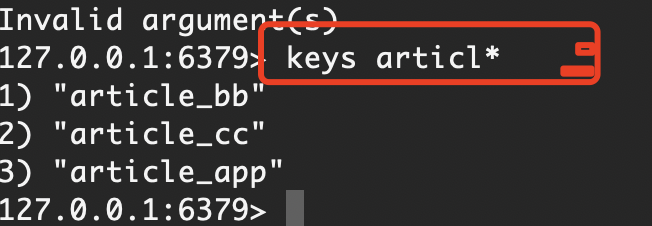
获取所有的KEYS ,可以使用 keys ,scan
//上下文对象
var ctx = context.Background()
// 使用Scan方法遍历所有键
iter := client.Scan(ctx, 0, "*", 0).Iterator()
for iter.Next(ctx) {
key := iter.Val()
fmt.Println(key)
}
SCAN cursor [MATCH pattern] [COUNT count]

cursor:游标的位置。第一次调用 SCAN 时,应该设置为 0。
MATCH pattern:可选参数,用于指定要匹配的键的模式。
COUNT count:可选参数,指定在每次迭代中返回的键的最大数量。


1. 基本的 SCAN 命令
bash
Copy Code
SCAN 0
这将返回所有键,但通常不推荐这样做,因为可能会返回大量数据。

2. 使用 MATCH 过滤键
假设我们只想获取所有以 user: 开头的键:

bash
Copy Code
SCAN 0 MATCH "user:*"
3. 使用 COUNT 控制返回的键的数量
为了减少单次调用的数据量,可以限制返回的键的数量:

bash
Copy Code
SCAN 0 MATCH "user:*" COUNT 10


python 实例:

import redis

r = redis.Redis()
cursor = '0'
pattern = 'user:*'
count = 10

while True:
    cursor, keys = r.scan(cursor=cursor, match=pattern, count=count)
    for key in keys:
        print(key)
    if cursor == '0':
        break


对于需要原子性操作的场景(例如,确保在短时间内不会丢失任何键),可以考虑使用 SSCAN, HSCAN, 或 ZSCAN 命令,这些是专门为集合、哈希表和有序集合设计的迭代器。但基本原理与 SCAN 相同。
redis.call('DECRBY') 举出实例
https://www.jb51.net/database/340685ucb.htm
https://www.cnblogs.com/ycfenxi/p/19216134
https://www.cnblogs.com/JerryQTQcjl/p/13359695.html
Go
redis.call('DECRBY', key, decrement) 是 Redis Lua 脚本中的一个命令,用于将存储在 key 中的数字值减少指定的 decrement 量。如果 key 不存在,则会先将其设置为 0,然后执行减法操作。

实例说明
1. 基本用法
lua
编辑
redis.call('SET', 'counter', 100)  -- 设置初始值为 100
local result = redis.call('DECRBY', 'counter', 30)  -- 减少 30
-- 此时 'counter' 的值变为 70,result = 70
2. 负数增量(相当于增加)
lua
编辑
redis.call('SET', 'score', 50)  -- 设置初始值为 50
local result = redis.call('DECRBY', 'score', -10)  -- 减少 -10(相当于增加 10)
-- 此时 'score' 的值变为 60,result = 60
3. 键不存在时的默认行为
lua
编辑
local result = redis.call('DECRBY', 'new_counter', 20)  -- 'new_counter' 不存在
-- Redis 会先将 'new_counter' 设置为 0,然后减去 20
-- 最终 'new_counter' 的值为 -20,result = -20
4. 在购物车库存管理中的应用
lua
编辑
-- 假设库存键为 'product:1:inventory',当前库存为 100
redis.call('SET', 'product:1:inventory', 100)

-- 用户购买 30 件商品,减少库存
local new_stock = redis.call('DECRBY', 'product:1:inventory', 30)
-- 此时库存变为 70,new_stock = 70
5. 与 INCRBY 的对比
lua
编辑
redis.call('SET', 'balance', 1000)

-- 使用 DECRBY 减少余额(如扣款)
local new_balance1 = redis.call('DECRBY', 'balance', 100)  -- 扣除 100
-- balance 变为 900

-- 使用 INCRBY 增加余额(如充值)
local new_balance2 = redis.call('INCRBY', 'balance', 50)  -- 增加 50
-- balance 变为 950
注意事项
DECRBY 只能用于存储数字值的键,如果键存储的是非数字值,会返回错误
减量值可以是负数,此时效果等同于 INCRBY(增加)
如果键不存在,Redis 会先将其设置为 0,然后执行减法操作
这个命令在 Redis Lua 脚本中常用于实现原子性的计数器操作、库存管理、积分系统等场景。
以下是修正后的 Redis Lua 脚本:
Go
-- KEYS[1] = cartKey (e.g., "user:123:cart")
-- KEYS[2] = inventoryKey (e.g., "product:1:inventory")
-- ARGV[1] = operation ("add" or "subtract")
-- ARGV[2] = quantity (string number, e.g., "2")
-- ARGV[3] = productId (e.g., "product:1")

local cartKey = KEYS[1]
local inventoryKey = KEYS[2]
local operation = ARGV[1]
local quantity = tonumber(ARGV[2])
local productId = ARGV[3]

-- 获取当前购物车中的数量,若不存在则为 0
local currentQuantity = tonumber(redis.call('HGET', cartKey, productId)) or 0

-- 获取库存
local stock = tonumber(redis.call('GET', inventoryKey))
if not stock then
    stock = 0
end

if operation == 'add' then
    if currentQuantity + quantity > stock then
        return 0  -- 库存不足
    end
    redis.call('HINCRBY', cartKey, productId, quantity)
    redis.call('DECRBY', inventoryKey, quantity)
elseif operation == 'subtract' then
    if currentQuantity < quantity then
        return 0  -- 购物车数量不足
    end
    redis.call('HINCRBY', cartKey, productId, -quantity)
    redis.call('INCRBY', inventoryKey, quantity)  -- 归还库存!
else
    return -1  -- 无效操作
end

return 1
调用方式
Go
script = """...上面的 Lua 脚本..."""
redis.eval(script, 2, 'user:123:cart', 'product:1:inventory', 'add', '2', 'product:1')


local sha = redis.call('SCRIPT', 'LOAD', shoppingCartOperation)
redis.call('EVALSHA', sha, 2, cartKey, inventoryKey, operation, quantity, productId)- 定义一个本地函数,接收四个参数:
cartKey:用户购物车的哈希键(如'user:123:cart')inventoryKey:商品库存的字符串键(如'product:1:inventory')operation:操作类型('add'或'subtract')quantity:操作数量
Go
-- 修正后的 Redis Lua 脚本
-- KEYS[1]: 购物车哈希键 (如 "user:123:cart")
-- KEYS[2]: 库存字符串键 (如 "product:1:inventory")
-- ARGV[1]: 操作类型 ("add" 或 "subtract")
-- ARGV[2]: 操作数量 (如 "2")
-- ARGV[3]: 商品ID (如 "product:1")

local cartKey = KEYS[1]
local inventoryKey = KEYS[2]
local operation = ARGV[1]
local quantity = tonumber(ARGV[2])
local productId = ARGV[3]

-- 获取当前购物车中商品的数量,如果不存在则为0
local currentQuantity = tonumber(redis.call('HGET', cartKey, productId)) or 0

-- 获取当前库存
local stock = tonumber(redis.call('GET', inventoryKey)) or 0

if operation == 'add' then
    -- 添加商品时检查库存是否足够
    if currentQuantity + quantity > stock then
        return {error = "库存不足", code = 0}
    end
    -- 增加购物车数量
    redis.call('HINCRBY', cartKey, productId, quantity)
    -- 减少库存
    redis.call('DECRBY', inventoryKey, quantity)
elseif operation == 'subtract' then
    -- 减少商品时检查购物车数量是否足够
    if currentQuantity < quantity then
        return {error = "购物车数量不足", code = 0}
    end
    -- 减少购物车数量
    redis.call('HINCRBY', cartKey, productId, -quantity)
    -- 增加库存(归还商品)
    redis.call('INCRBY', inventoryKey, quantity)
else
    return {error = "无效操作", code = -1}
end

return {success = true, code = 1, message = "操作成功"}