引言
近年来,扩散模型在图像生成领域取得了突破性进展,其中Stable Diffusion系列模型因其出色的生成质量和开源特性而广受欢迎。随着模型规模的扩大,推理速度和显存消耗成为实际部署的关键挑战。Stable Diffusion 3.5 FP8正是在这一背景下推出的优化版本,通过FP8精度量化大幅提升了推理效率。
1. Stable Diffusion 3.5 架构概述
1.1 核心组件
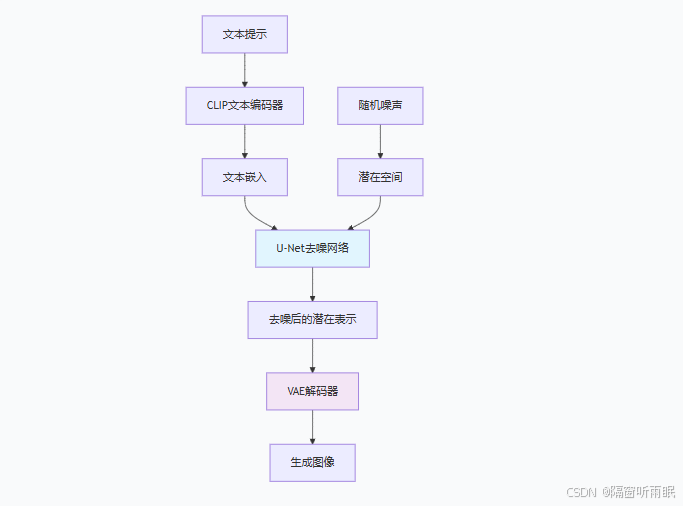
Stable Diffusion 3.5基于Latent Diffusion框架,主要由以下组件构成:
-
变分自编码器(VAE):负责将图像压缩到潜在空间,以及从潜在空间重建图像
-
U-Net网络:在潜在空间执行去噪过程的核心组件
-
文本编码器:将文本提示转换为嵌入向量
-
调度器(Scheduler):控制去噪过程的时间步长
1.2 架构示意图
2. FP8量化技术原理
2.1 FP8格式简介
FP8(8位浮点数)是一种新兴的数值格式,在保持足够精度的同时大幅减少内存占用和计算开销。主要有两种格式:
-
E5M2:5位指数,2位尾数,动态范围大
-
E4M3:4位指数,3位尾数,精度更高
2.2 量化策略
import torch
import torch.nn as nn
from torch.cuda.amp import autocast

class FP8Quantizer:
    def __init__(self, format='E4M3'):
        """
        FP8量化器实现
        Args:
            format: 量化格式,'E4M3' 或 'E5M2'
        """
        self.format = format
        self.eps = 1e-8

    def quantize(self, tensor):
        """
        将FP32张量量化为FP8
        """
        if self.format == 'E4M3':
            return self._quantize_e4m3(tensor)
        else:  # E5M2
            return self._quantize_e5m2(tensor)

    def _quantize_e4m3(self, tensor):
        """E4M3格式量化"""
        # 计算缩放因子
        max_val = tensor.abs().max()
        scale = max_val / (self.eps + 1.75)  # E4M3最大值为1.75

        # 缩放并四舍五入到8位
        scaled = tensor / scale
        quantized = torch.clamp(scaled, -1.75, 1.75)
        quantized = quantized.to(torch.float8_e4m3fn)

        return quantized, scale

    def dequantize(self, quantized_tensor, scale):
        """反量化回FP32"""
        dequantized = quantized_tensor.float() * scale
        return dequantized
3. Stable Diffusion 3.5 FP8优化实现
3.1 混合精度推理
import torch
from diffusers import StableDiffusionPipeline
import numpy as np
from typing import Optional, Union

class StableDiffusionFP8Optimizer:
    def __init__(self,
                 model_id: str = "stabilityai/stable-diffusion-3.5",
                 device: str = "cuda",
                 use_fp8: bool = True):

        self.device = device
        self.use_fp8 = use_fp8

        # 加载原始模型
        self.pipeline = StableDiffusionPipeline.from_pretrained(
            model_id,
            torch_dtype=torch.float16 if not use_fp8 else torch.float32
        )
        self.pipeline = self.pipeline.to(device)

        if use_fp8:
            self._convert_to_fp8()

    def _convert_to_fp8(self):
        """将关键组件转换为FP8精度"""
        # 优化VAE编码器/解码器
        self._optimize_vae()

        # 优化U-Net
        self._optimize_unet()

        # 优化注意力机制
        self._optimize_attention()

    def _optimize_unet(self):
        """优化U-Net为FP8混合精度"""
        unet = self.pipeline.unet

        # 关键层使用FP8
        for name, module in unet.named_modules():
            if isinstance(module, nn.Conv2d):
                module.weight.data = self._maybe_convert_to_fp8(module.weight.data)
                if module.bias is not None:
                    module.bias.data = self._maybe_convert_to_fp8(module.bias.data)

    def _optimize_attention(self):
        """优化注意力计算为FP8"""
        from torch.nn import functional as F

        def fp8_attention(q, k, v, scale_factor=1.0):
            """FP8优化的注意力计算"""
            # 转换为FP8进行计算
            with autocast(dtype=torch.float8_e4m3fn):
                # QK^T计算
                attn_weights = torch.matmul(q, k.transpose(-2, -1))
                attn_weights = attn_weights / (q.size(-1) ** 0.5)

                # Softmax
                attn_weights = F.softmax(attn_weights, dim=-1)

                # 注意力输出
                output = torch.matmul(attn_weights, v)

            return output.float()  # 转换回FP16/FP32

        # 替换原始的注意力计算
        self._replace_attention_forward(fp8_attention)

    def _maybe_convert_to_fp8(self, tensor):
        """条件转换为FP8"""
        if self.use_fp8 and tensor.is_floating_point():
            return tensor.to(torch.float8_e4m3fn)
        return tensor

    def generate_image(self,
                      prompt: str,
                      height: int = 512,
                      width: int = 512,
                      num_inference_steps: int = 30,
                      guidance_scale: float = 7.5):
        """生成图像"""

        with torch.inference_mode():
            if self.use_fp8:
                # 使用FP8混合精度
                with autocast(dtype=torch.float8_e4m3fn):
                    image = self.pipeline(
                        prompt=prompt,
                        height=height,
                        width=width,
                        num_inference_steps=num_inference_steps,
                        guidance_scale=guidance_scale
                    ).images[0]
            else:
                # 原始精度
                image = self.pipeline(
                    prompt=prompt,
                    height=height,
                    width=width,
                    num_inference_steps=num_inference_steps,
                    guidance_scale=guidance_scale
                ).images[0]

        return image
3.2 内存优化技术
class MemoryOptimizedSD:
    def __init__(self, pipeline, chunk_size=2):
        self.pipeline = pipeline
        self.chunk_size = chunk_size

    def chunked_attention(self, query, key, value):
        """
        分块注意力计算,减少内存峰值
        """
        batch_size, num_heads, seq_len, head_dim = query.shape
        output = torch.zeros_like(query)

        # 分块处理
        for i in range(0, seq_len, self.chunk_size):
            end_idx = min(i + self.chunk_size, seq_len)

            # 计算当前块的注意力
            q_chunk = query[:, :, i:end_idx, :]
            attn_weights = torch.matmul(
                q_chunk,
                key.transpose(-2, -1)
            ) / (head_dim ** 0.5)

            attn_weights = torch.softmax(attn_weights, dim=-1)
            chunk_output = torch.matmul(attn_weights, value)

            output[:, :, i:end_idx, :] = chunk_output

        return output

    def gradient_checkpointing(self):
        """启用梯度检查点,训练时节省显存"""
        self.pipeline.unet.enable_gradient_checkpointing()

    def cpu_offloading(self):
        """将不活跃的模块卸载到CPU"""
        from accelerate import cpu_offload

        # 将VAE和文本编码器卸载到CPU
        cpu_offload(self.pipeline.vae)
        cpu_offload(self.pipeline.text_encoder)

        # 只保留U-Net在GPU上
        self.pipeline.unet.to(self.pipeline.device)
4. 性能基准测试
4.1 推理速度对比
import time
from contextlib import contextmanager
import pandas as pd
import matplotlib.pyplot as plt

@contextmanager
def benchmark_context(name):
    """基准测试上下文管理器"""
    start_time = time.time()
    start_memory = torch.cuda.memory_allocated() if torch.cuda.is_available() else 0

    yield

    end_time = time.time()
    end_memory = torch.cuda.memory_allocated() if torch.cuda.is_available() else 0

    elapsed = end_time - start_time
    memory_used = (end_memory - start_memory) / (1024 ** 3)  # 转换为GB

    print(f"{name}:")
    print(f"  时间: {elapsed:.2f}秒")
    print(f"  显存使用: {memory_used:.2f} GB")
    print("-" * 40)

    return elapsed, memory_used

def run_benchmark():
    """运行性能基准测试"""
    results = []

    # 测试不同配置
    configs = [
        ("FP32原始", False, torch.float32),
        ("FP16混合精度", False, torch.float16),
        ("FP8优化", True, torch.float8_e4m3fn),
    ]

    for name, use_fp8, dtype in configs:
        print(f"\n测试配置: {name}")

        # 创建优化器实例
        optimizer = StableDiffusionFP8Optimizer(
            use_fp8=use_fp8
        )

        # 预热
        _ = optimizer.generate_image("warmup", num_inference_steps=1)

        # 正式测试
        with benchmark_context(f"生成512x512图像") as (time_taken, memory_used):
            image = optimizer.generate_image(
                "a beautiful sunset over mountains",
                num_inference_steps=30
            )

        results.append({
            "配置": name,
            "推理时间(秒)": time_taken,
            "显存使用(GB)": memory_used,
            "数据类型": str(dtype)
        })

    # 创建结果表格
    df = pd.DataFrame(results)
    print("\n性能对比结果:")
    print(df.to_string(index=False))

    # 可视化结果
    fig, (ax1, ax2) = plt.subplots(1, 2, figsize=(12, 5))

    # 推理时间对比
    ax1.bar(df["配置"], df["推理时间(秒)"], color=['#FF6B6B', '#4ECDC4', '#45B7D1'])
    ax1.set_title("推理时间对比")
    ax1.set_ylabel("时间 (秒)")
    ax1.tick_params(axis='x', rotation=45)

    # 显存使用对比
    ax2.bar(df["配置"], df["显存使用(GB)"], color=['#FF6B6B', '#4ECDC4', '#45B7D1'])
    ax2.set_title("显存使用对比")
    ax2.set_ylabel("显存 (GB)")
    ax2.tick_params(axis='x', rotation=45)

    plt.tight_layout()
    plt.savefig("performance_comparison.png", dpi=150, bbox_inches='tight')
    plt.show()

    return df

# 运行基准测试
if __name__ == "__main__":
    results_df = run_benchmark()
4.2 生成质量评估
from PIL import Image
import lpips
import numpy as np

class QualityEvaluator:
    def __init__(self):
        self.lpips_loss = lpips.LPIPS(net='alex')

    def evaluate_fidelity(self, original_img, quantized_img):
        """
        评估量化后的保真度
        """
        # 转换为张量
        original_tensor = self._to_tensor(original_img)
        quantized_tensor = self._to_tensor(quantized_img)

        # 计算LPIPS(感知相似度)
        lpips_score = self.lpips_loss(original_tensor, quantized_tensor).item()

        # 计算PSNR
        mse = torch.mean((original_tensor - quantized_tensor) ** 2)
        psnr = 20 * torch.log10(1.0 / torch.sqrt(mse))

        # 计算SSIM
        ssim_score = self._calculate_ssim(original_tensor, quantized_tensor)

        return {
            "LPIPS": lpips_score,
            "PSNR": psnr.item(),
            "SSIM": ssim_score
        }

    def _to_tensor(self, img):
        """图像转换为张量"""
        if isinstance(img, Image.Image):
            img = np.array(img).astype(np.float32) / 255.0
            img = torch.from_numpy(img).permute(2, 0, 1).unsqueeze(0)
        return img

    def _calculate_ssim(self, img1, img2, window_size=11, size_average=True):
        """计算SSIM"""
        from math import exp

        # 实现SSIM计算
        C1 = (0.01 * 1) ** 2
        C2 = (0.03 * 1) ** 2

        mu1 = torch.nn.functional.avg_pool2d(img1, window_size, stride=1, padding=window_size//2)
        mu2 = torch.nn.functional.avg_pool2d(img2, window_size, stride=1, padding=window_size//2)

        mu1_sq = mu1.pow(2)
        mu2_sq = mu2.pow(2)
        mu1_mu2 = mu1 * mu2

        sigma1_sq = torch.nn.functional.avg_pool2d(img1*img1, window_size, stride=1, padding=window_size//2) - mu1_sq
        sigma2_sq = torch.nn.functional.avg_pool2d(img2*img2, window_size, stride=1, padding=window_size//2) - mu2_sq
        sigma12 = torch.nn.functional.avg_pool2d(img1*img2, window_size, stride=1, padding=window_size//2) - mu1_mu2

        ssim_map = ((2*mu1_mu2 + C1)*(2*sigma12 + C2)) / ((mu1_sq + mu2_sq + C1)*(sigma1_sq + sigma2_sq + C2))

        if size_average:
            return ssim_map.mean().item()
        else:
            return ssim_map
5. 部署优化建议
5.1 TensorRT优化
import tensorrt as trt
import onnx

class TensorRTOptimizer:
    def __init__(self):
        self.logger = trt.Logger(trt.Logger.WARNING)

    def build_engine(self, onnx_path, fp8_mode=True):
        """
        构建TensorRT引擎
        """
        builder = trt.Builder(self.logger)
        network = builder.create_network(1 << int(trt.NetworkDefinitionCreationFlag.EXPLICIT_BATCH))
        parser = trt.OnnxParser(network, self.logger)

        # 解析ONNX模型
        with open(onnx_path, 'rb') as f:
            if not parser.parse(f.read()):
                for error in range(parser.num_errors):
                    print(parser.get_error(error))
                return None

        # 配置优化选项
        config = builder.create_builder_config()
        config.set_memory_pool_limit(trt.MemoryPoolType.WORKSPACE, 2 << 30)  # 2GB

        # 启用FP8
        if fp8_mode and builder.platform_has_fast_fp8:
            config.set_flag(trt.BuilderFlag.FP8)
            config.set_flag(trt.BuilderFlag.STRICT_TYPES)

        # 优化配置
        config.set_flag(trt.BuilderFlag.PREFER_PRECISION_CONSTRAINTS)
        config.set_flag(trt.BuilderFlag.DIRECT_IO)

        # 构建引擎
        engine = builder.build_serialized_network(network, config)

        return engine

    def optimize_inference(self, engine_path):
        """
        优化推理流程
        """
        runtime = trt.Runtime(self.logger)

        with open(engine_path, 'rb') as f:
            engine = runtime.deserialize_cuda_engine(f.read())

        # 创建执行上下文
        context = engine.create_execution_context()

        # 设置优化参数
        context.set_optimization_profile_async(0, torch.cuda.current_stream().cuda_stream)

        return context
5.2 动态批处理
class DynamicBatchProcessor:
    def __init__(self, max_batch_size=4):
        self.max_batch_size = max_batch_size
        self.batch_cache = []

    def process_batch(self, prompts):
        """
        动态批处理多个提示
        """
        results = []

        for i in range(0, len(prompts), self.max_batch_size):
            batch_prompts = prompts[i:i + self.max_batch_size]

            # 统一批处理
            with torch.no_grad():
                batch_output = self._process_single_batch(batch_prompts)

            results.extend(batch_output)

        return results

    def _process_single_batch(self, prompts):
        """处理单个批次"""
        # 统一文本编码
        text_inputs = self.pipeline.tokenizer(
            prompts,
            padding="max_length",
            max_length=self.pipeline.tokenizer.model_max_length,
            truncation=True,
            return_tensors="pt"
        )

        # 批量生成
        with autocast(dtype=torch.float8_e4m3fn):
            latents = self._generate_latents_batch(text_inputs)
            images = self.pipeline.vae.decode(latents).sample

        return images
6. 实际应用示例
6.1 图像生成API
from fastapi import FastAPI, HTTPException
from pydantic import BaseModel
import base64
from io import BytesIO

app = FastAPI(title="Stable Diffusion 3.5 FP8 API")

class GenerationRequest(BaseModel):
    prompt: str
    negative_prompt: str = None
    width: int = 512
    height: int = 512
    num_inference_steps: int = 30
    guidance_scale: float = 7.5
    num_images: int = 1

class StableDiffusionAPI:
    def __init__(self):
        self.optimizer = StableDiffusionFP8Optimizer(use_fp8=True)

    def generate_to_base64(self, request: GenerationRequest):
        """生成图像并转换为base64"""
        try:
            images = []

            for _ in range(request.num_images):
                image = self.optimizer.generate_image(
                    prompt=request.prompt,
                    height=request.height,
                    width=request.width,
                    num_inference_steps=request.num_inference_steps,
                    guidance_scale=request.guidance_scale
                )

                # 转换为base64
                buffered = BytesIO()
                image.save(buffered, format="PNG")
                img_str = base64.b64encode(buffered.getvalue()).decode()

                images.append(img_str)

            return {
                "status": "success",
                "images": images,
                "parameters": request.dict()
            }

        except Exception as e:
            raise HTTPException(status_code=500, detail=str(e))

# 初始化API
sd_api = StableDiffusionAPI()

@app.post("/generate")
async def generate_image(request: GenerationRequest):
    """图像生成端点"""
    return sd_api.generate_to_base64(request)

@app.get("/health")
async def health_check():
    """健康检查"""
    return {"status": "healthy", "optimization": "FP8"}
7. 结论与展望
Stable Diffusion 3.5 FP8通过先进的量化技术,在保持生成质量的同时,显著提升了推理速度和内存效率。关键优化点包括:
-
FP8混合精度推理:减少内存占用,加速计算
-
注意力机制优化:分块处理,降低内存峰值
-
动态批处理:提升吞吐量
-
硬件加速:利用TensorRT等推理引擎
随着硬件对低精度计算支持的不断完善,FP8及更低位宽的量化技术将在生成式AI部署中发挥越来越重要的作用。未来可进一步探索:
-
自适应量化策略:根据不同层的重要性动态调整精度
-
训练后量化校准:提高量化模型的生成质量
-
多模态扩展:将FP8优化应用到视频、3D生成等领域
通过持续优化,Stable Diffusion等大型生成模型将能够在更广泛的设备和场景中部署应用,推动AIGC技术的普及和发展。
注意:本文代码为示例实现,实际部署时需根据具体硬件和需求进行调整。建议在生产环境中进行充分的测试和验证。