文章目录
Kvaser使用Python收发报文示例
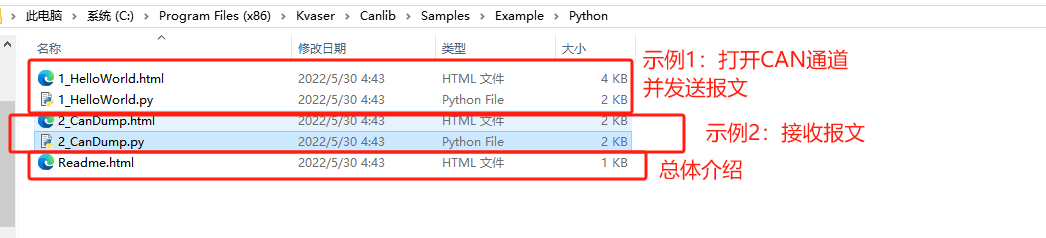
一、Kvaser给出的官方示例路径
C:\Program Files (x86)\Kvaser\Canlib\Samples\Example\Python
二、文件解读

HelloWorld.html
html
Part 1: Hello World!
This first example demonstrates how to open a channel and send a message to it.

Step 1: Preliminaries
To run this program, you must have a recent version of Python 2.7 (that includes the package installer pip) installed on your computer. You also need to install the Python canlib module (e.g. using pip install canlib-x.y.z.zip. The Python canlib zip archive can be found in Samples\Python including a README.html. The program will try to open Canlib channel 0 and write a message to it, so make sure that the channel is available for opening and connected to something or change the channel number in the source code to something more suitable.

Step 2: Initializing Canlib and setting up a channel
Before making any calls to Canlib, we must initialize the library. With the wrapper, this is done by creating a canlib object. This will initiate the library as well as set up prototypes for the various Canlib functions.

Next, we use the openChannel to return a canChannel object. The parameters we pass are the channel number (0) and the canOPEN_ACCEPT_VIRTUAL flag, which means that channel 0 can be on a virtual device.

Once we have successfully opened a channel, we need to set its bitrate. We do this using the setBusParams method of the channel, which takes the desired bitrate (an enumerable) as parameters. The underlying method has more parameters, but they are set to 0 by default and not important in this example.

Next, take the channel on bus using the busOn method. This needs to be done before we can send a message.

Step 3: Send a message
Now we declare the variables needed to send our message: an identifier, a data array which is the message body and the optional flags. The identifier is an integer of up to 11 bits (29 bits if we use the extended ID flag) and the data array can contain up to eight bytes. These fields are passed to the writeWait method, along with a timeout value of 50 ms. This method will try to write the message to the channel and block until either the message is transmitted or the timeout value reached. In many cases, it is unneccesary to wait for the message to be transmitted (in which case we can just call write, without a timeout value), but in this case we want to close the bus after transmitting. Attempting to close a channel while a message is being transmitted might cause problems, which is why need to wait a bit.

The underlying functions canWait and canWriteWait actually takes an additional parameter: the length of the array. In this case, the wrapper calculates it for us but it is good to know what the function looks like for situations where you can't use the wrapper.

Step 4: Go off bus and close the channel
Once we are done using the channel, we go off bus and close it using the busOff and closeChannel methods, respectively.

Exercises
Use some other program (such as Kvaser CanKing) to listen for messages on a channel connected to the one used in the program. Make sure to use the same bitrate.
Change the message identifier to something large, like 10000. What happens on the receiving side? Then, change the flags parameter to canlib.canMSG_EXT. What happens now?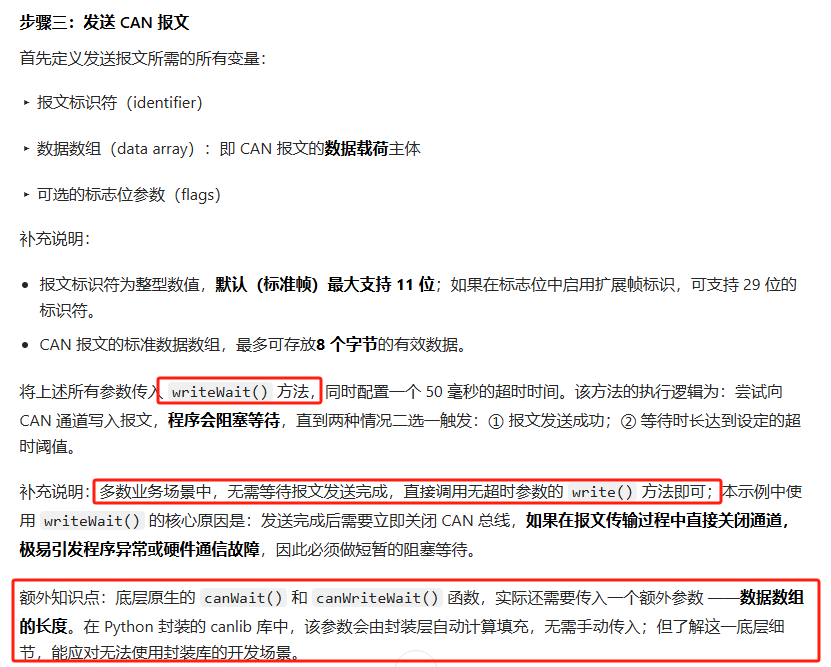
HelloWorld.py
python
This software is furnished as Redistributable under the Kvaser Software Licence
https://www.kvaser.com/canlib-webhelp/page_license_and_copyright.html
import sys
from canlib import canlib, Frame
channel_number = 0
Specific CANlib channel number may be specified as first argument
if len(sys.argv) == 2:
 channel_number = int(sys.argv[1])
print("Opening channel %d" % (channel_number))
Use ChannelData to get some information about the selected channel
chd = canlib.ChannelData(channel_number)
print("%d. %s (%s / %s) " % (channel_number,
 chd.channel_name,
 chd.card_upc_no,
 chd.card_serial_no))
If the channel have a custom name, print it
if chd.custom_name != '':
 print("Customized Channel Name: %s " % (chd.custom_name))
Open CAN channel, virtual channels are considered ok to use
ch = canlib.openChannel(channel_number, canlib.canOPEN_ACCEPT_VIRTUAL)
print("Setting bitrate to 250 kb/s")
ch.setBusParams(canlib.canBITRATE_250K)
print("Going on bus")
ch.busOn()
print("Sending a message")
frame = Frame(id_=123,
 data=[1, 2, 3, 4, 5, 6, 7, 8],
 dlc=8,
 flags=0)
ch.write(frame)
print("Going off bus")
ch.busOff()
print("Closing channel")
ch.close()
CanDump.html
html
Part 2: Receiving messages
In the previous part, we demonstrated how to construct a program which sends a message on a CAN channel. In this part, we will show how to read messages from a channel.

Step 1: Setup
Like in the previous example, we need to initialize the library, open a channel and go on bus. This is done in the exact same way as in the previous example.

Step 2: Waiting for messages
In the dumpMessageLoop method, we create a loop which runs as long as there are no errors in reading the messages. The way it works is that we first call read with a timeout value of 50 ms. This method will block for until either a message is received or until the timeout is reached. If the timeout is reached, it will throw a canNoMsg exception. Calling read without a timeout is equivalent to using a timeout of 0.
If no exception is thrown, the dumpMessage method is called. Here, we first check if the message's error flag is set, in which case we print an error message. If not, we just print the message.

Step 3: Exiting the program
The last thing we do in the loop is to print any possible exceptions except for canNoMsg since this would imply that an error in reading the messages has occurred.
When we're done reading messages, we go off bus and close the channel, as always.

Exercises
Use some other program (such as HelloWorld.py from the Hello world example) to send a message.
CanDump.py
python
# This software is furnished as Redistributable under the Kvaser Software Licence
# https://www.kvaser.com/canlib-webhelp/page_license_and_copyright.html

import sys

from canlib import canlib


def print_frame(frame):
    """Prints a message to screen"""
    if (frame.flags & canlib.canMSG_ERROR_FRAME != 0):
        print("***ERROR FRAME RECEIVED***")
    else:
        print("{id:0>8b}  {dlc}  {data}  {timestamp}".format(
            id=frame.id,
            dlc=frame.dlc,
            data=' '.join('%02x' % i for i in frame.data),
            timestamp=frame.timestamp
        ))


if __name__ == '__main__':
    # Initialization
    channel_number = 0

    # Specific CANlib channel number may be specified as first argument
    if len(sys.argv) == 2:
        channel_number = int(sys.argv[1])

    print("Opening channel %d" % (channel_number))
    # Open CAN channel, virtual channels are considered ok to use
    ch = canlib.openChannel(channel_number, canlib.canOPEN_ACCEPT_VIRTUAL)

    print("Setting bitrate to 250 kb/s")
    ch.setBusParams(canlib.canBITRATE_250K)
    ch.busOn()

    # Start listening for messages
    finished = False
    print("   ID    DLC DATA                     Timestamp")
    while not finished:
        try:
            frame = ch.read(timeout=50)
            print_frame(frame)
        except(canlib.canNoMsg) as ex:
            None
        except (canlib.canError) as ex:
            print(ex)
            finished = True

    # Channel teardown
    ch.busOff()
    ch.close()