文章目录
SQLite02-安装
1、安装
(1)下载文件
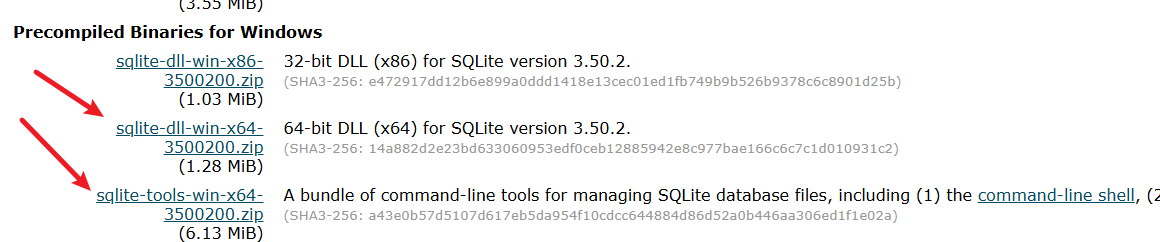
- 百度网盘地址: https://pan.baidu.com/s/1L0v5Du1CUqysj_6M2KbAcA?pwd=8888
- 下载以下两个压缩包(根据系统位数选择 32位(x86) 或 64位(x64)):
sqlite-dll-win-x64-xxxxxxx.zip(核心库文件)sqlite-tools-win-x64-xxxxxxx.zip(命令行工具)
(2)解压与合并
- 创建文件夹 D:\DEV\SQLite
- 将两个压缩包中的以下文件解压至此文件夹:
sqlite3.defsqlite3.dllsqlite3.exe
(3)配置环境变量
- 右键「此电脑」→ 属性 → 高级系统设置 → 环境变量
- 在「系统变量」中找到
Path→ 点击 编辑 → 新建 - 添加路径:
D:\DEV\SQLite→ 点击确定保存
(4)验证安装
- 打开命令提示符(Win+R 输入
cmd) - 输入命令,若显示版本号即安装成功
bash
sqlite3 --version2、常用点命令
(1)概述
- 点命令:(以
.开头,区别于SQL语句),适用于日常数据库管理与调试。 - 完整命令参考官网说明:https://www.sqlite.org/cli.html
(2)进入点命令
- 打开命令提示符(Win+R 输入
cmd),输入命令 sqlite3,进入命令行
bash
C:\Users\Administrator>sqlite3
SQLite version 3.50.2 2025-06-28 14:00:48
Enter ".help" for usage hints.
Connected to a transient in-memory database.
Use ".open FILENAME" to reopen on a persistent database.
sqlite>
(3)数据库与文件操作
.open [文件名]:打开或创建数据库文件(若文件不存在则新建)
bash
.open test.db      # 打开磁盘文件
.open :memory:     # 使用内存数据库(临时存储)
.backup [备份文件名]:备份当前数据库到文件
bash
.backup backup.db # 备份到backup.db.restore [备份文件名]:从备份文件恢复数据库
bash
.restore backup.db # 恢复数据(4)表结构查询
.tables [PATTERN]:列出所有表(支持通配符匹配)
bash
.tables           # 显示所有表
.tables user%     # 列出以"user"开头的表
.schema [表名]:查看表的创建语句(不含表名则显示所有)
bash
.schema users # 查看users表结构 .indexes [表名]:显示表的索引信息
bash
.indexes orders # 查看orders表的索引(5)数据导出与导入
.dump [表名]:导出数据库或单表为SQL脚本
bash
.dump             # 导出整个数据库
.dump products    # 仅导出products表
.output [文件名]:将后续命令结果重定向到文件
bash
.output data.sql  # 导出结果写入data.sql
.output stdout    # 恢复终端输出
.read [SQL文件]:执行外部SQL脚本
bash
.read init.sql # 运行init.sql中的命令 (6)显示格式控制
.mode [格式]:设置查询结果输出格式(支持csv,html,column等)
bash
.mode column     # 表格列模式(自动对齐)
.mode csv        # CSV格式(便于Excel处理)
.headers on/off:显示/隐藏列名标题(默认off)
bash
.headers on # 启用列名显示.width [数值1] [数值2] ...:设置列宽(需配合.mode column)
bash
.width 10 20 # 设置前两列宽度为10/20字符(7)系统与调试
.timer on/off:启用/禁用SQL执行时间统计(性能调试)
bash
.timer on # 显示查询耗时.shell [系统命令]: 执行操作系统命令(Windows/Linux通用)
bash
.shell ls -l     # Linux列出文件
.shell dir       # Windows列出目录
.stats on/off:开启/关闭内存使用统计
(8)帮助与退出
.help:查看所有点命令说明.exit或.quit:退出SQLite命令行
bash
sqlite> .help
.archive ...             Manage SQL archives
.auth ON|OFF             Show authorizer callbacks
.backup ?DB? FILE        Backup DB (default "main") to FILE
.bail on|off             Stop after hitting an error.  Default OFF
.cd DIRECTORY            Change the working directory to DIRECTORY
.changes on|off          Show number of rows changed by SQL
.check GLOB              Fail if output since .testcase does not match
.clone NEWDB             Clone data into NEWDB from the existing database
.connection [close] [#]  Open or close an auxiliary database connection
.crlf ?on|off?           Whether or not to use \r\n line endings
.databases               List names and files of attached databases
.dbconfig ?op? ?val?     List or change sqlite3_db_config() options
.dbinfo ?DB?             Show status information about the database
.dbtotxt                 Hex dump of the database file
.dump ?OBJECTS?          Render database content as SQL
.echo on|off             Turn command echo on or off
.eqp on|off|full|...     Enable or disable automatic EXPLAIN QUERY PLAN
.excel                   Display the output of next command in spreadsheet
.exit ?CODE?             Exit this program with return-code CODE
.expert                  EXPERIMENTAL. Suggest indexes for queries
.explain ?on|off|auto?   Change the EXPLAIN formatting mode.  Default: auto
.filectrl CMD ...        Run various sqlite3_file_control() operations
.fullschema ?--indent?   Show schema and the content of sqlite_stat tables
.headers on|off          Turn display of headers on or off
.help ?-all? ?PATTERN?   Show help text for PATTERN
.import FILE TABLE       Import data from FILE into TABLE
.indexes ?TABLE?         Show names of indexes
.intck ?STEPS_PER_UNLOCK?  Run an incremental integrity check on the db
.limit ?LIMIT? ?VAL?     Display or change the value of an SQLITE_LIMIT
.lint OPTIONS            Report potential schema issues.
.load FILE ?ENTRY?       Load an extension library
.log FILE|on|off         Turn logging on or off.  FILE can be stderr/stdout
.mode ?MODE? ?OPTIONS?   Set output mode
.nonce STRING            Suspend safe mode for one command if nonce matches
.nullvalue STRING        Use STRING in place of NULL values
.once ?OPTIONS? ?FILE?   Output for the next SQL command only to FILE
.open ?OPTIONS? ?FILE?   Close existing database and reopen FILE
.output ?FILE?           Send output to FILE or stdout if FILE is omitted
.parameter CMD ...       Manage SQL parameter bindings
.print STRING...         Print literal STRING
.progress N              Invoke progress handler after every N opcodes
.prompt MAIN CONTINUE    Replace the standard prompts
.quit                    Stop interpreting input stream, exit if primary.
.read FILE               Read input from FILE or command output
.recover                 Recover as much data as possible from corrupt db.
.restore ?DB? FILE       Restore content of DB (default "main") from FILE
.save ?OPTIONS? FILE     Write database to FILE (an alias for .backup ...)
.scanstats on|off|est    Turn sqlite3_stmt_scanstatus() metrics on or off
.schema ?PATTERN?        Show the CREATE statements matching PATTERN
.separator COL ?ROW?     Change the column and row separators
.session ?NAME? CMD ...  Create or control sessions
.sha3sum ...             Compute a SHA3 hash of database content
.shell CMD ARGS...       Run CMD ARGS... in a system shell
.show                    Show the current values for various settings
.stats ?ARG?             Show stats or turn stats on or off
.system CMD ARGS...      Run CMD ARGS... in a system shell
.tables ?TABLE?          List names of tables matching LIKE pattern TABLE
.timeout MS              Try opening locked tables for MS milliseconds
.timer on|off            Turn SQL timer on or off
.trace ?OPTIONS?         Output each SQL statement as it is run
.version                 Show source, library and compiler versions
.vfsinfo ?AUX?           Information about the top-level VFS
.vfslist                 List all available VFSes
.vfsname ?AUX?           Print the name of the VFS stack
.width NUM1 NUM2 ...     Set minimum column widths for columnar output
.www                     Display output of the next command in web browser
(9)完整操作示例
bash
sqlite3 test.db        # 进入数据库
.tables                # 查看所有表
.schema users          # 检查users表结构
.mode column           # 设置表格输出
.headers on            # 显示列名
SELECT * FROM users;   # 查询数据
.output users.csv      # 导出到CSV
SELECT * FROM users;
.quit                  # 退出
3、图形化管理工具
(1)核心工具对比
| 工具名称 | 许可证 | 核心功能亮点 | 适用场景 | 缺陷 |
|---|---|---|---|---|
| 1. SQLiteStudio | 开源免费 | - 完整SQL编辑(语法高亮/自动补全) - 可视化表设计+外键管理 - 支持插件扩展 | 开发者深度开发、复杂数据库维护 | 界面较朴素 |
| 2. DBBrowser (SQLiteBrowser) | 开源免费 | - 极简操作界面 - 数据导入导出(CSV/JSON) - 一键生成SQL图表 | 快速查看/编辑中小型数据库 | 高级功能(如调试)较弱 |
| 3. Navicat Premium | 商业付费 | - 多数据库支持(MySQL/SQLite等) - 数据同步与备份 - 团队协作功能 | 企业级多数据库管理、团队协作 | 价格较高(约$199起) |
| 4. DBeaver | 开源免费 | - 通用型数据库工具(支持20+引擎) - ER图表建模 - 任务调度脚本 | 需同时管理多种数据库的开发场景 | 内存占用略高 |
| 5. SQLiteSpy | 免费 | - 极速启动(<5MB) - 实时SQL执行反馈 - 二进制数据编辑器 | 快速调试、嵌入式设备数据检查 | 仅支持Windows |
(2)关键维度对比
- 功能深度
- 高级开发:SQLiteStudio > Navicat > DBeaver(支持存储过程调试)
- 数据迁移:Navicat 提供跨库同步,DBBrowser 仅基础导入导出
- 可视化能力:DBeaver 的ER图表 > SQLiteSpy 的紧凑数据视图
- 易用性
- 新手友好:DBBrowser 界面最简洁,无学习门槛
- 效率工具:SQLiteSpy 启动秒开,适合高频次快速操作
- 扩展性
- 插件生态:SQLiteStudio 支持Python脚本扩展,Navicat 提供云服务对接
(3)按场景推荐
- 轻量级个人使用 → DBBrowser(免安装+基础功能全)
- 跨平台开发 → SQLiteStudio(Win/macOS/Linux全支持)
- 企业多数据库管理 → Navicat 或 DBeaver(兼容性强)
- Windows环境快速调试 → SQLiteSpy(极致轻量)
4、Navicat17安装及配置
(1)介绍
- Navicat 是一套功能全面的数据库管理工具,通过直观的图形用户界面,可对 MySQL、Redis、PostgreSQL、MongoDB、MariaDB、SQL Server、Oracle、Snowflake 和 SQLite 等多种数据库进行管理,有助于简化数据库操作并提升效率,超五成的《财富》世界 500 强企业每天都会使用它。
(2)下载安装
- 官网地址:http://www.navicat.com.cn/
- 官网下载地址:http://www.navicat.com.cn/download/navicat-premium
- 百度网盘科学安装地址:https://pan.baidu.com/s/1yBe_m6HXN5W0h2zZaxo6Zw?pwd=8888
(3)配置连接
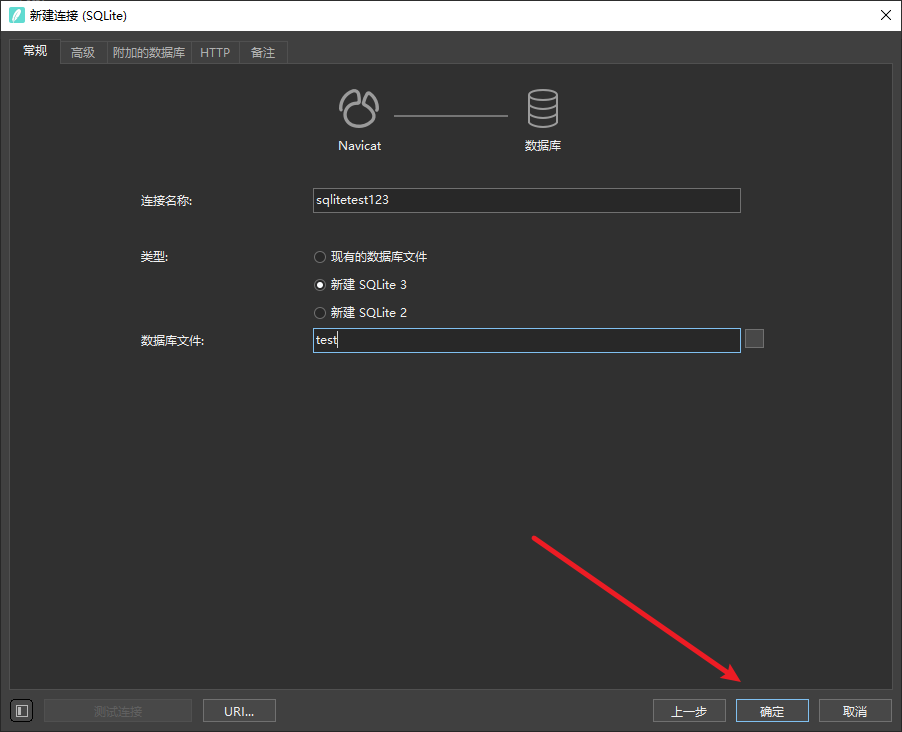
- 连接->SQLite
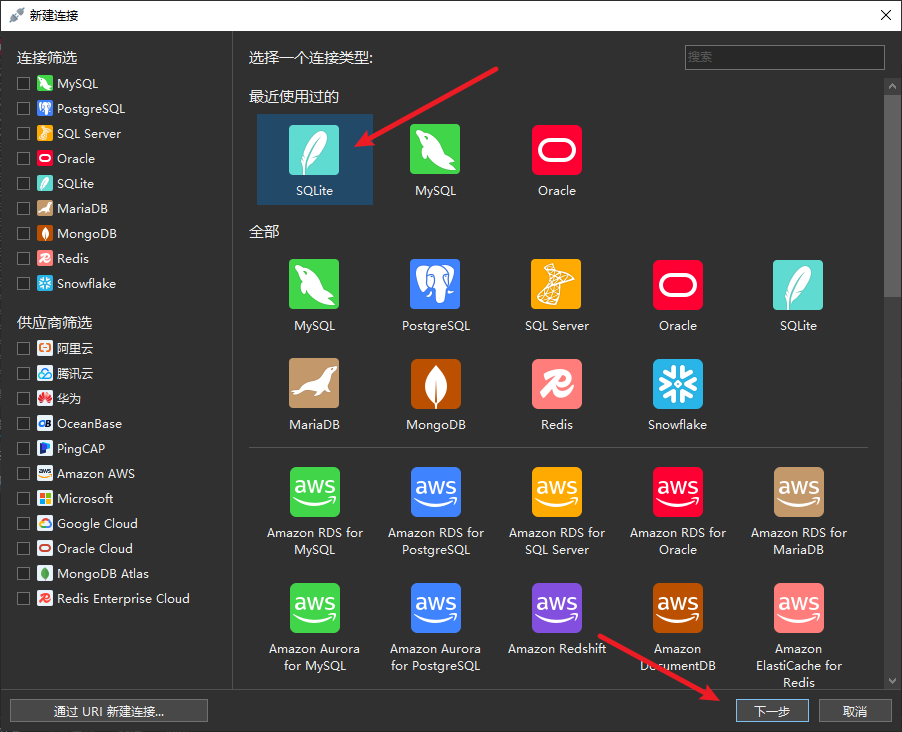
- 可以选择已有的数据库文件,也可以新建新的文件