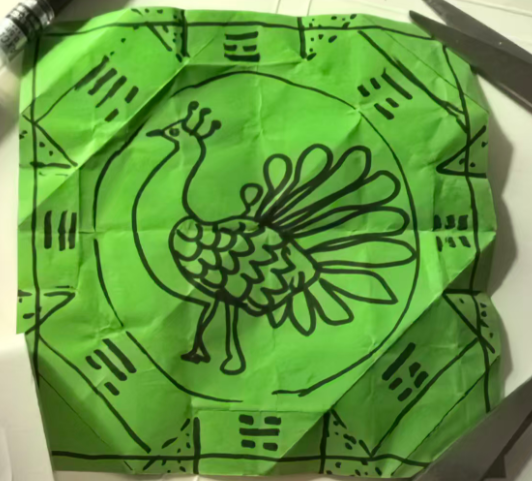
背景需求:
去年中2班做了圆镜和方形,幼儿裁剪和绘画图案。
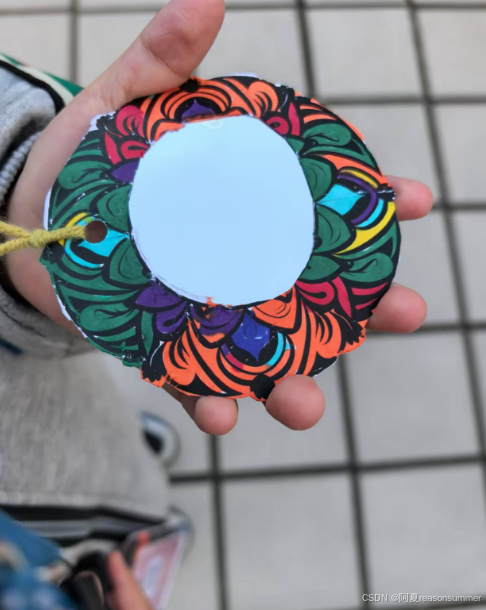
【教学类-70-03】20241121中2班幼儿制作"圆镜和方镜"(适配5CM圆镜)通义万相花边图案 https://mp.csdn.net/mp_blog/creation/editor/143951841
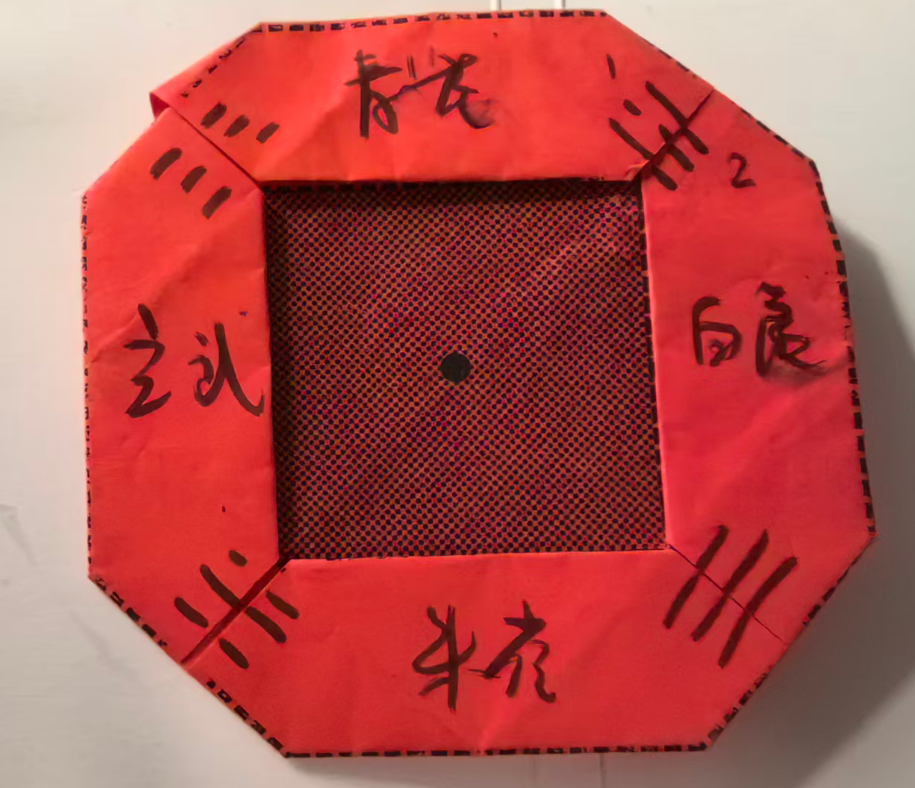
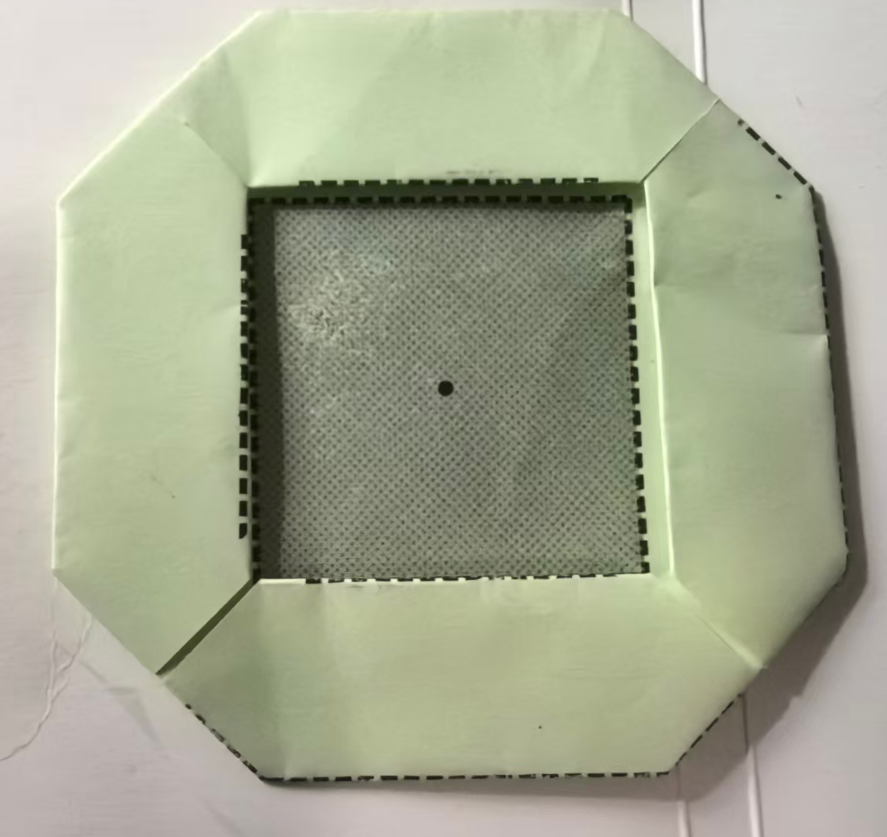
但是今年我们是小2班,幼儿不适合集体用剪刀,所以我想用手工纸15CM,做一个八边形的镜子。
一、图纸设计
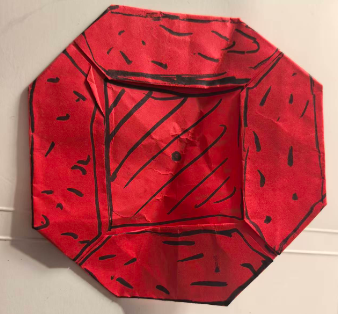
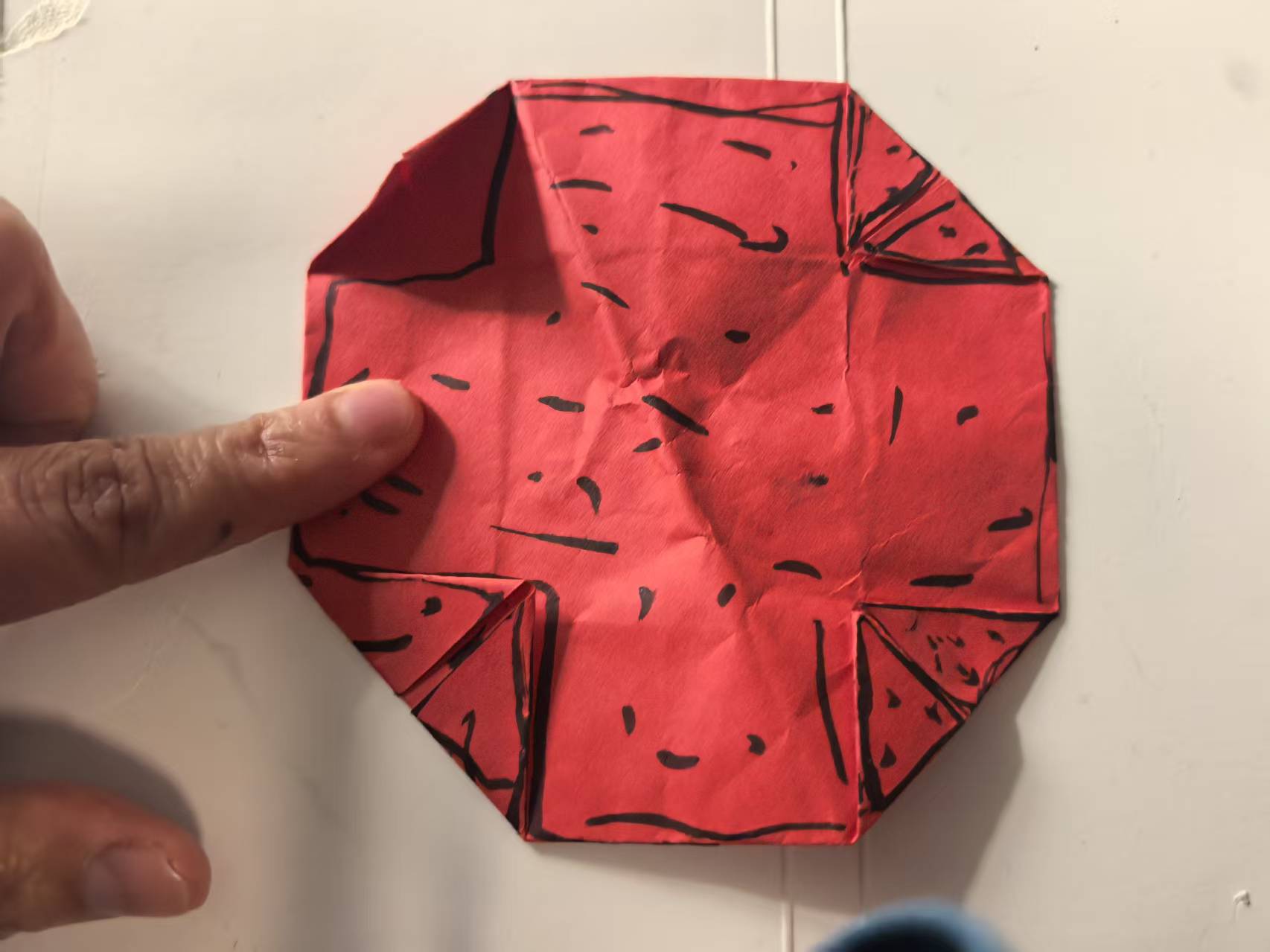
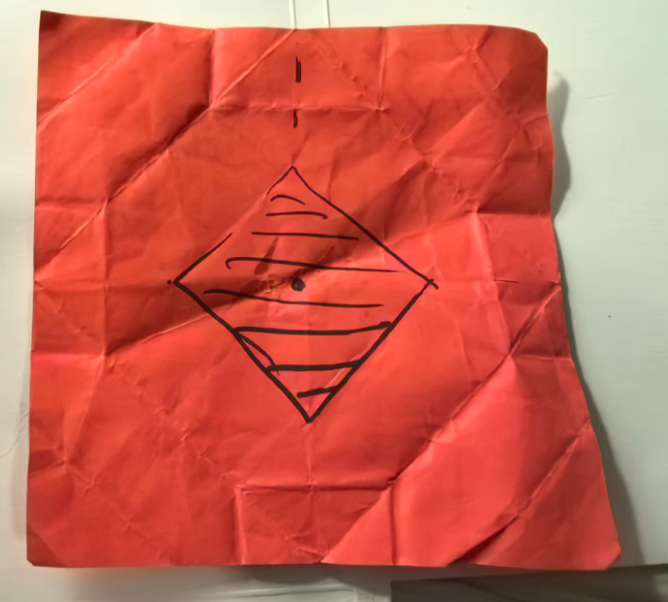
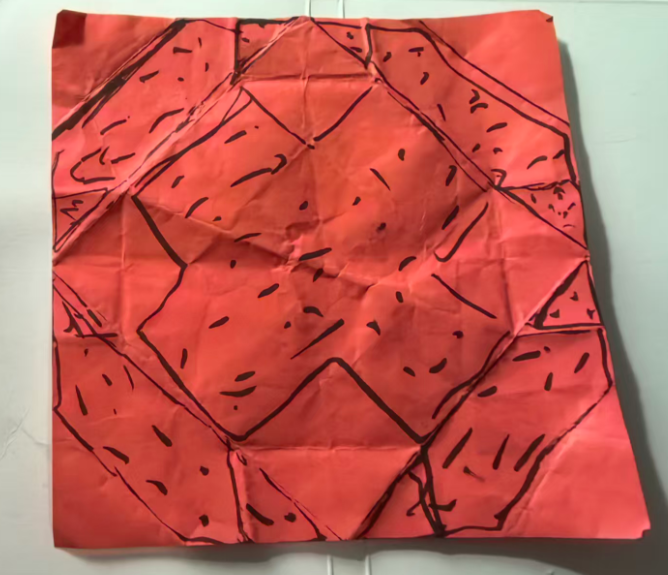
代码过程
第1稿图纸
'''
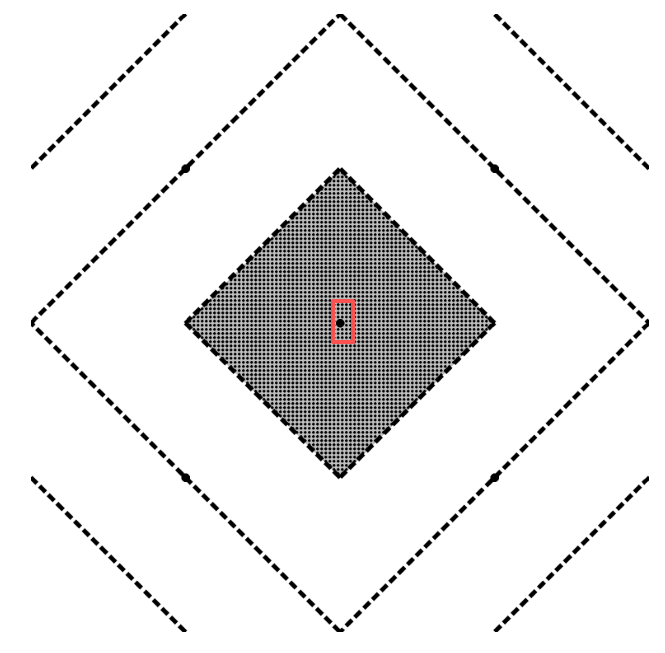
折纸镜子(相框样式)正面1.0
Deepseek,豆包,阿夏
20251220
'''

from PIL import Image, ImageDraw

# 创建白色背景图片
image_size = 1500
image = Image.new('RGB', (image_size, image_size), 'white')
draw = ImageDraw.Draw(image)

# 定义菱形的四个顶点(都在四边中点)
points = [
    (image_size // 2, 0),        # 上中点
    (image_size, image_size // 2), # 右中点
    (image_size // 2, image_size),  # 下中点
    (0, image_size // 2)         # 左中点
]

line_width = 10
dash_pattern = [20, 10]  # [实线长度, 间隔长度]
gray_color = (192, 192, 192)  # 灰色

# 绘制菱形的四条虚线边
def draw_dashed_polygon(draw, points, width, pattern):
    """绘制虚线多边形"""
    # 将点列表闭合(添加第一个点到末尾)
    closed_points = points + [points[0]]

    for i in range(len(points)):
        start = closed_points[i]
        end = closed_points[i+1]

        # 计算线段长度
        dx = end[0] - start[0]
        dy = end[1] - start[1]
        length = ((dx**2 + dy**2) ** 0.5)

        if length == 0:
            continue

        # 单位向量
        ux = dx / length
        uy = dy / length

        # 虚线模式:实线 + 间隔
        dash_on, dash_off = pattern
        dash_length = dash_on + dash_off

        # 绘制虚线
        current = 0
        while current < length:
            # 实线段起点
            dash_start_x = start[0] + ux * current
            dash_start_y = start[1] + uy * current

            # 实线段终点
            dash_end = min(current + dash_on, length)
            dash_end_x = start[0] + ux * dash_end
            dash_end_y = start[1] + uy * dash_end

            # 绘制实线段
            draw.line([(dash_start_x, dash_start_y),
                      (dash_end_x, dash_end_y)],
                     fill='black', width=width)

            current += dash_length

# 1. 首先绘制原始菱形
draw_dashed_polygon(draw, points, line_width, dash_pattern)

# 2. 计算四条新连接线的端点
# 顶部边线左1/4点:从左上角(0,0)到右上角(image_size,0)的1/4处
top_left_quarter = (image_size * 1 // 4, 0)

# 左侧边线顶1/4点:从左上角(0,0)到左下角(0,image_size)的1/4处
left_top_quarter = (0, image_size * 1 // 4)

# 顶部边线右1/4点:从左上角(0,0)到右上角(image_size,0)的3/4处
top_right_quarter = (image_size * 3 // 4, 0)

# 右侧边线顶1/4点:从右上角(image_size,0)到右下角(image_size,image_size)的1/4处
right_top_quarter = (image_size, image_size * 1 // 4)

# 右侧边线底1/4点:从右上角(image_size,0)到右下角(image_size,image_size)的3/4处
right_bottom_quarter = (image_size, image_size * 3 // 4)

# 底部边线右1/4点:从左下角(0,image_size)到右下角(image_size,image_size)的3/4处
bottom_right_quarter = (image_size * 3 // 4, image_size)

# 底部边线左1/4点:从左下角(0,image_size)到右下角(image_size,image_size)的1/4处
bottom_left_quarter = (image_size * 1 // 4, image_size)

# 左侧边线底1/4点:从左上角(0,0)到左下角(0,image_size)的3/4处
left_bottom_quarter = (0, image_size * 3 // 4)

# 3. 绘制四条新的连接线
new_lines = [
    # 顶部边线左1/4点与左侧边线顶1/4点连接
    (top_left_quarter, left_top_quarter),

    # 顶部边线右1/4点与右侧边线顶1/4点连接
    (top_right_quarter, right_top_quarter),

    # 右侧边线底1/4点与底部边线右1/4点连接
    (right_bottom_quarter, bottom_right_quarter),

    # 底部边线左1/4点与左侧边线底1/4点连接
    (bottom_left_quarter, left_bottom_quarter),
]

# 绘制新的连接线
def draw_dashed_line(draw, start, end, width, pattern):
    """绘制虚线线段"""
    # 计算线段长度
    dx = end[0] - start[0]
    dy = end[1] - start[1]
    length = ((dx**2 + dy**2) ** 0.5)

    if length == 0:
        return

    # 单位向量
    ux = dx / length
    uy = dy / length

    # 虚线模式:实线 + 间隔
    dash_on, dash_off = pattern
    dash_length = dash_on + dash_off

    # 绘制虚线
    current = 0
    while current < length:
        # 实线段起点
        dash_start_x = start[0] + ux * current
        dash_start_y = start[1] + uy * current

        # 实线段终点
        dash_end = min(current + dash_on, length)
        dash_end_x = start[0] + ux * dash_end
        dash_end_y = start[1] + uy * dash_end

        # 绘制实线段
        draw.line([(dash_start_x, dash_start_y),
                  (dash_end_x, dash_end_y)],
                 fill='black', width=width)

        current += dash_length

# 绘制四条新的连接线
for start, end in new_lines:
    draw_dashed_line(draw, start, end, line_width, dash_pattern)

# 5. 在中间位置画一个小菱形
# 计算小菱形的尺寸:顶点距离顶部大约是1/4的边长的宽度
# 假设小菱形与大菱形相似,且顶点到中心点的距离是大菱形的1/4

# 计算大菱形的中心点(图片中心)
center_x = image_size // 2
center_y = image_size // 2

# 大菱形的顶点到中心的垂直距离(上顶点到中心的距离)
large_vertical_distance = image_size // 2

# 小菱形的顶点到中心的垂直距离:1/4边长宽度
small_vertical_distance = image_size // 4  # 1500/4 = 375

# 小菱形的顶点到中心的水平距离(保持菱形形状)
small_horizontal_distance = small_vertical_distance

# 计算小菱形的四个顶点
small_diamond_points = [
    (center_x, center_y - small_vertical_distance),        # 上顶点
    (center_x + small_horizontal_distance, center_y),      # 右顶点
    (center_x, center_y + small_vertical_distance),        # 下顶点
    (center_x - small_horizontal_distance, center_y)       # 左顶点
]

# 先填充小菱形为灰色
draw.polygon(small_diamond_points, fill=gray_color, outline=None)

# 绘制小菱形边框(同样使用虚线)
draw_dashed_polygon(draw, small_diamond_points, line_width, dash_pattern)

# 6. 在小菱形内部绘制点点点(黑色圆点)
# 设置点点的参数
dot_radius = 3  # 点点的半径
dot_spacing = 10  # 点与点之间的间距

# 计算小菱形的边界
small_diamond_left = center_x - small_horizontal_distance
small_diamond_right = center_x + small_horizontal_distance
small_diamond_top = center_y - small_vertical_distance
small_diamond_bottom = center_y + small_vertical_distance

# 创建判断点是否在菱形内的函数
def is_point_in_diamond(x, y, center_x, center_y, h_dist, v_dist):
    """判断点(x,y)是否在菱形内"""
    # 菱形的数学方程:|x - center_x|/h_dist + |y - center_y|/v_dist <= 1
    return (abs(x - center_x) / h_dist + abs(y - center_y) / v_dist) <= 1

# 在菱形内均匀绘制点点
for x in range(int(small_diamond_left), int(small_diamond_right), dot_spacing):
    for y in range(int(small_diamond_top), int(small_diamond_bottom), dot_spacing):
        # 检查点是否在菱形内
        if is_point_in_diamond(x, y, center_x, center_y, small_horizontal_distance, small_vertical_distance):
            # 计算圆点的边界框
            dot_left = x - dot_radius
            dot_top = y - dot_radius
            dot_right = x + dot_radius
            dot_bottom = y + dot_radius

            # 绘制黑色圆点
            draw.ellipse([dot_left, dot_top, dot_right, dot_bottom], fill='black', outline=None)

# 7. 在画布中心位置画一个20磅的黑色圆点(在点点的上面)
center_dot_radius = 10  # 中心圆点的半径
# 计算圆点的边界框
left = center_x - center_dot_radius
top = center_y - center_dot_radius
right = center_x + center_dot_radius
bottom = center_y + center_dot_radius

# 绘制黑色实心圆点(在最上层)
draw.ellipse([left, top, right, bottom], fill='black', outline=None)

print(f"中心圆点信息:")
print(f"  中心坐标: ({center_x}, {center_y})")
print(f"  圆点直径: {center_dot_radius * 2}像素")

print(f"\n小菱形信息:")
print(f"  中心点: ({center_x}, {center_y})")
print(f"  填充颜色: RGB{gray_color}")
print(f"  顶点到中心垂直距离: {small_vertical_distance}像素")
print(f"  顶点到中心水平距离: {small_horizontal_distance}像素")
print(f"  点点参数: 半径{dot_radius}像素, 间距{dot_spacing}像素")
print(f"  上顶点坐标: {small_diamond_points[0]}")
print(f"  右顶点坐标: {small_diamond_points[1]}")
print(f"  下顶点坐标: {small_diamond_points[2]}")
print(f"  左顶点坐标: {small_diamond_points[3]}")

# 保存图片
output_path = r'C:\Users\jg2yXRZ\OneDrive\桌面\20251215 手工纸镜子\正面1.0.png'
image.save(output_path)

print(f"\n已创建图片: {output_path}")
print(f"图片尺寸: {image_size} x {image_size}")
print(f"菱形线宽: {line_width}像素")
print(f"中心圆点直径: {center_dot_radius * 2}像素")
print(f"虚线模式: 实线{dash_pattern[0]}像素 + 间隔{dash_pattern[1]}像素")
print(f"小菱形点点: 半径{dot_radius}像素, 间距{dot_spacing}像素")

# 显示图片
image.show()
正面1.0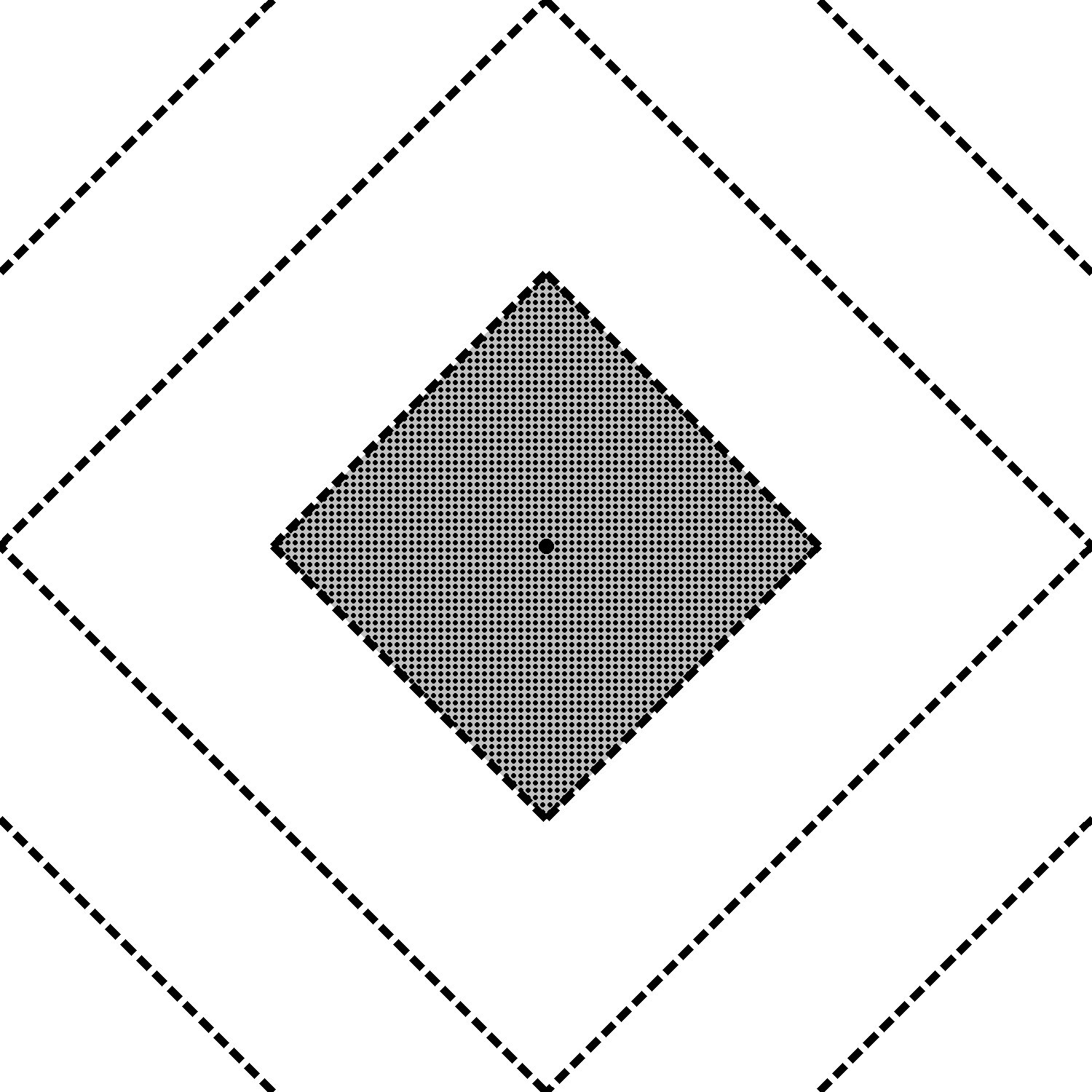
问题:大菱形每条边需要一个中间的点,便于纸张四个角对位折小小三角形。
'''
折纸镜子(相框样式)反面1.0
Deepseek,豆包,阿夏
20251220
'''
from PIL import Image, ImageDraw
import math

# ===================== 基础配置(颜色变量仅定义一次) =====================
image_size = 1500  # 画布尺寸
line_width = 10    # 线宽
dash_pattern = [20, 10]  # 虚线样式:[实线长度, 间隔长度]
main_line_color = (0, 0, 0)  # 灰色(RGB)
small_diamond_color = 'white'      # 小菱形边框颜色(白色)
output_path = r'C:\Users\jg2yXRZ\OneDrive\桌面\20251215 手工纸镜子\反面1.0.png'

# ===================== 创建画布 =====================
image = Image.new('RGB', (image_size, image_size), 'white')
draw = ImageDraw.Draw(image)

# 大菱形顶点(四边中点)
big_diamond_points = [
    (image_size // 2, 0),        # 上中点
    (image_size, image_size // 2), # 右中点
    (image_size // 2, image_size),  # 下中点
    (0, image_size // 2)         # 左中点
]

# ===================== 工具函数 =====================
def draw_dashed_polygon(draw, points, width, pattern, color):
    """绘制虚线多边形(闭合)"""
    closed_points = points + [points[0]]
    for i in range(len(points)):
        start = closed_points[i]
        end = closed_points[i+1]
        dx = end[0] - start[0]
        dy = end[1] - start[1]
        length = math.hypot(dx, dy)
        if length == 0:
            continue
        ux = dx / length
        uy = dy / length
        dash_on, dash_off = pattern
        dash_length = dash_on + dash_off
        current = 0
        while current < length:
            dash_start = (start[0] + ux * current, start[1] + uy * current)
            dash_end = min(current + dash_on, length)
            dash_end_pos = (start[0] + ux * dash_end, start[1] + uy * dash_end)
            draw.line([dash_start, dash_end_pos], fill=color, width=width)
            current += dash_length

def draw_dashed_line(draw, start, end, width, pattern, color):
    """绘制任意角度虚线(必须传color参数)"""
    dx = end[0] - start[0]
    dy = end[1] - start[1]
    length = math.hypot(dx, dy)
    if length == 0:
        return
    ux = dx / length
    uy = dy / length
    dash_on, dash_off = pattern
    dash_length = dash_on + dash_off
    current = 0
    while current < length:
        dash_start = (start[0] + ux * current, start[1] + uy * current)
        dash_end = min(current + dash_on, length)
        dash_end_pos = (start[0] + ux * dash_end, start[1] + uy * dash_end)
        draw.line([dash_start, dash_end_pos], fill=color, width=width)
        current += dash_length

def find_line_diamond_intersection(line_start, line_end, diamond_points):
    """求线段与菱形的交点(返回最近的有效交点)"""
    x1, y1 = line_start
    x2, y2 = line_end
    diamond_edges = [
        (diamond_points[0], diamond_points[1]),
        (diamond_points[1], diamond_points[2]),
        (diamond_points[2], diamond_points[3]),
        (diamond_points[3], diamond_points[0]),
    ]
    intersections = []
    for edge_start, edge_end in diamond_edges:
        x3, y3 = edge_start
        x4, y4 = edge_end
        denom = (y4 - y3) * (x2 - x1) - (x4 - x3) * (y2 - y1)
        if denom == 0:
            continue
        ua = ((x4 - x3) * (y1 - y3) - (y4 - y3) * (x1 - x3)) / denom
        ub = ((x2 - x1) * (y1 - y3) - (y2 - y1) * (x1 - x3)) / denom
        if 0 <= ua <= 1 and 0 <= ub <= 1:
            x = x1 + ua * (x2 - x1)
            y = y1 + ua * (y2 - y1)
            intersections.append((x, y))
    if intersections:
        distances = [math.hypot(ix - x1, iy - y1) for ix, iy in intersections]
        return intersections[distances.index(min(distances))]
    return None

def line_intersection(line1, line2):
    """求两条线段的交点(无交点返回None)"""
    x1, y1 = line1[0]
    x2, y2 = line1[1]
    x3, y3 = line2[0]
    x4, y4 = line2[1]
    denom = (y4 - y3) * (x2 - x1) - (x4 - x3) * (y2 - y1)
    if denom == 0:
        return None
    ua = ((x4 - x3) * (y1 - y3) - (y4 - y3) * (x1 - x3)) / denom
    ub = ((x2 - x1) * (y1 - y3) - (y2 - y1) * (x1 - x3)) / denom
    if 0 <= ua <= 1 and 0 <= ub <= 1:
        x = x1 + ua * (x2 - x1)
        y = y1 + ua * (y2 - y1)
        return (x, y)
    return None

# ===================== 绘制大菱形(RGB灰色) =====================
draw_dashed_polygon(draw, big_diamond_points, line_width, dash_pattern, main_line_color)

# ===================== 绘制1/4点连接线(RGB灰色) =====================
# 计算1/4点坐标
top_left_quarter = (image_size * 1 // 4, 0)
left_top_quarter = (0, image_size * 1 // 4)
top_right_quarter = (image_size * 3 // 4, 0)
right_top_quarter = (image_size, image_size * 1 // 4)
right_bottom_quarter = (image_size, image_size * 3 // 4)
bottom_right_quarter = (image_size * 3 // 4, image_size)
bottom_left_quarter = (image_size * 1 // 4, image_size)
left_bottom_quarter = (0, image_size * 3 // 4)

# 定义1/4点连接线
quarter_lines = [
    (top_left_quarter, left_top_quarter),
    (top_right_quarter, right_top_quarter),
    (right_bottom_quarter, bottom_right_quarter),
    (bottom_left_quarter, left_bottom_quarter),
]

# 绘制1/4点连接线(RGB灰色)
for start, end in quarter_lines:
    draw_dashed_line(draw, start, end, line_width, dash_pattern, main_line_color)

# ===================== 绘制3/8点延伸线(RGB灰色) =====================
# 计算3/8点坐标
top_left_3_8 = (image_size * 3 // 8, 0)
top_right_3_8 = (image_size * 5 // 8, 0)
right_top_3_8 = (image_size, image_size * 3 // 8)
right_bottom_3_8 = (image_size, image_size * 5 // 8)
bottom_right_3_8 = (image_size * 5 // 8, image_size)
bottom_left_3_8 = (image_size * 3 // 8, image_size)
left_bottom_3_8 = (0, image_size * 5 // 8)
left_top_3_8 = (0, image_size * 3 // 8)

# 绘制8条3/8点延伸线(RGB灰色)
draw_dashed_line(
    draw, top_left_3_8,
    find_line_diamond_intersection(top_left_3_8, (top_left_3_8[0], image_size), big_diamond_points),
    line_width, dash_pattern, main_line_color
)
draw_dashed_line(
    draw, top_right_3_8,
    find_line_diamond_intersection(top_right_3_8, (top_right_3_8[0], image_size), big_diamond_points),
    line_width, dash_pattern, main_line_color
)
draw_dashed_line(
    draw, right_top_3_8,
    find_line_diamond_intersection(right_top_3_8, (0, right_top_3_8[1]), big_diamond_points),
    line_width, dash_pattern, main_line_color
)
draw_dashed_line(
    draw, right_bottom_3_8,
    find_line_diamond_intersection(right_bottom_3_8, (0, right_bottom_3_8[1]), big_diamond_points),
    line_width, dash_pattern, main_line_color
)
draw_dashed_line(
    draw, bottom_right_3_8,
    find_line_diamond_intersection(bottom_right_3_8, (bottom_right_3_8[0], 0), big_diamond_points),
    line_width, dash_pattern, main_line_color
)
draw_dashed_line(
    draw, bottom_left_3_8,
    find_line_diamond_intersection(bottom_left_3_8, (bottom_left_3_8[0], 0), big_diamond_points),
    line_width, dash_pattern, main_line_color
)
draw_dashed_line(
    draw, left_bottom_3_8,
    find_line_diamond_intersection(left_bottom_3_8, (image_size, left_bottom_3_8[1]), big_diamond_points),
    line_width, dash_pattern, main_line_color
)
draw_dashed_line(
    draw, left_top_3_8,
    find_line_diamond_intersection(left_top_3_8, (image_size, left_top_3_8[1]), big_diamond_points),
    line_width, dash_pattern, main_line_color
)

# ===================== 绘制小菱形(白色) + 延长线(RGB灰色) =====================
# 小菱形顶点计算
center_x = image_size // 2
center_y = image_size // 2
small_vertical_distance = image_size // 4
small_diamond_points = [
    (center_x, center_y - small_vertical_distance),  # 上顶点
    (center_x + small_vertical_distance, center_y),  # 右顶点
    (center_x, center_y + small_vertical_distance),  # 下顶点
    (center_x - small_vertical_distance, center_y)   # 左顶点
]

# 绘制小菱形边框(白色)
draw_dashed_polygon(draw, small_diamond_points, line_width, dash_pattern, small_diamond_color)

# 绘制小菱形边的延长线(RGB灰色)
for i in range(4):
    # 小菱形当前边的起点、终点
    p_start = small_diamond_points[i]
    p_end = small_diamond_points[(i+1)%4]
    # 边的方向向量(单位化)
    dx = p_end[0] - p_start[0]
    dy = p_end[1] - p_start[1]
    length = math.hypot(dx, dy)
    ux = dx / length
    uy = dy / length

    # 方向1:从p_start向反方向延长
    for j in range(4):
        big_edge = (big_diamond_points[j], big_diamond_points[(j+1)%4])
        t_max = image_size  # 足够大的延长长度
        ext_line = (p_start, (p_start[0] - ux * t_max, p_start[1] - uy * t_max))
        intersect = line_intersection(ext_line, big_edge)
        if intersect:
            draw_dashed_line(draw, p_start, intersect, line_width, dash_pattern, main_line_color)
            break

    # 方向2:从p_end向正方向延长
    for j in range(4):
        big_edge = (big_diamond_points[j], big_diamond_points[(j+1)%4])
        t_max = image_size
        ext_line = (p_end, (p_end[0] + ux * t_max, p_end[1] + uy * t_max))
        intersect = line_intersection(ext_line, big_edge)
        if intersect:
            draw_dashed_line(draw, p_end, intersect, line_width, dash_pattern, main_line_color)
            break

# ===================== 保存与输出信息(仅显示一次颜色变量) =====================
image.save(output_path)
image.show()

# 打印输出信息(精简颜色显示,仅展示一次)
print(f"\n已创建图片: {output_path}")
print(f"图片尺寸: {image_size} x {image_size}")
print(f"所有线宽: {line_width}像素")
print(f"颜色配置: 主要线条={main_line_color}(灰色),小菱形边框={small_diamond_color}")
print(f"虚线模式: 实线{dash_pattern[0]}像素 + 间隔{dash_pattern[1]}像素")
print(f"小菱形每条边有2条延长线,共8条45度延长线")
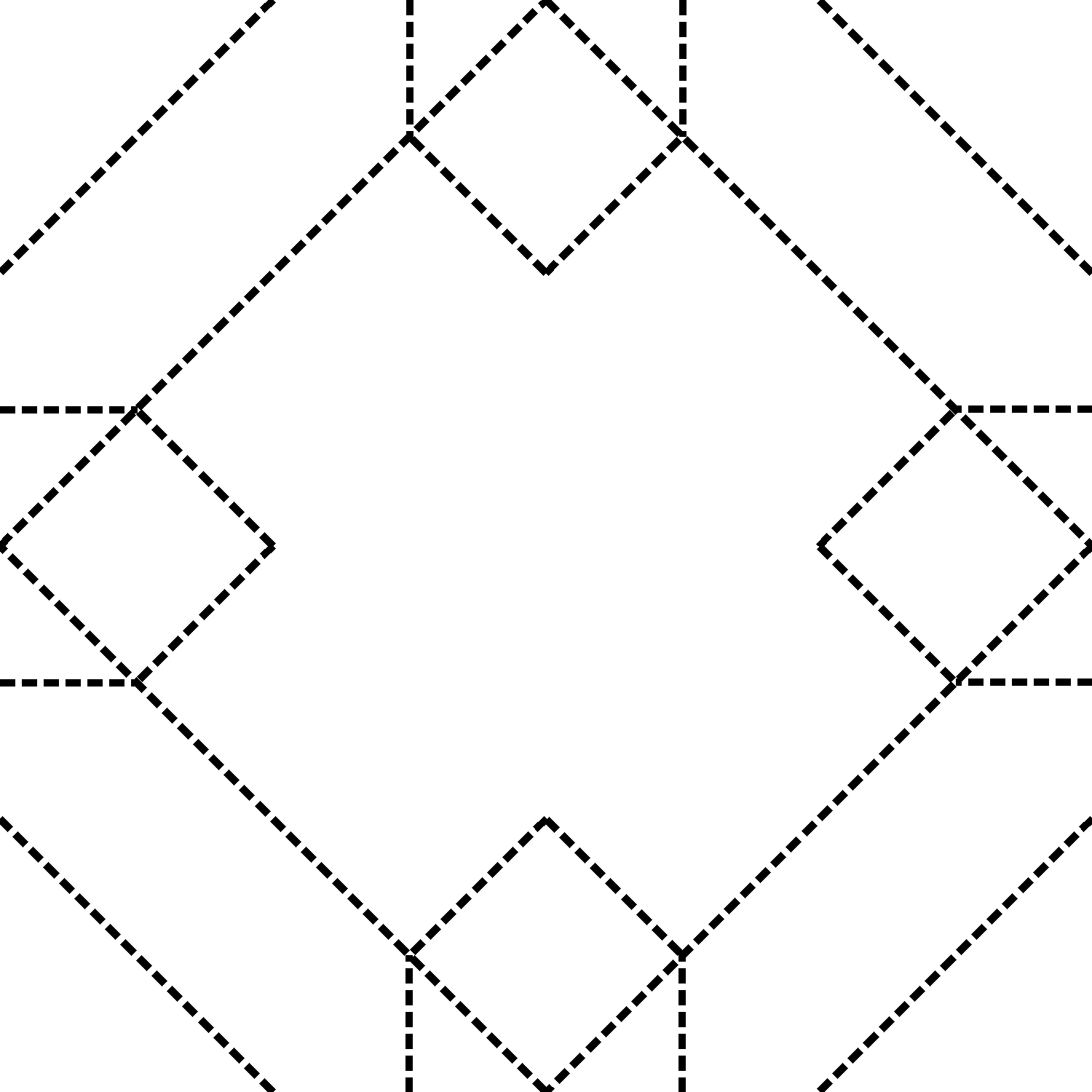
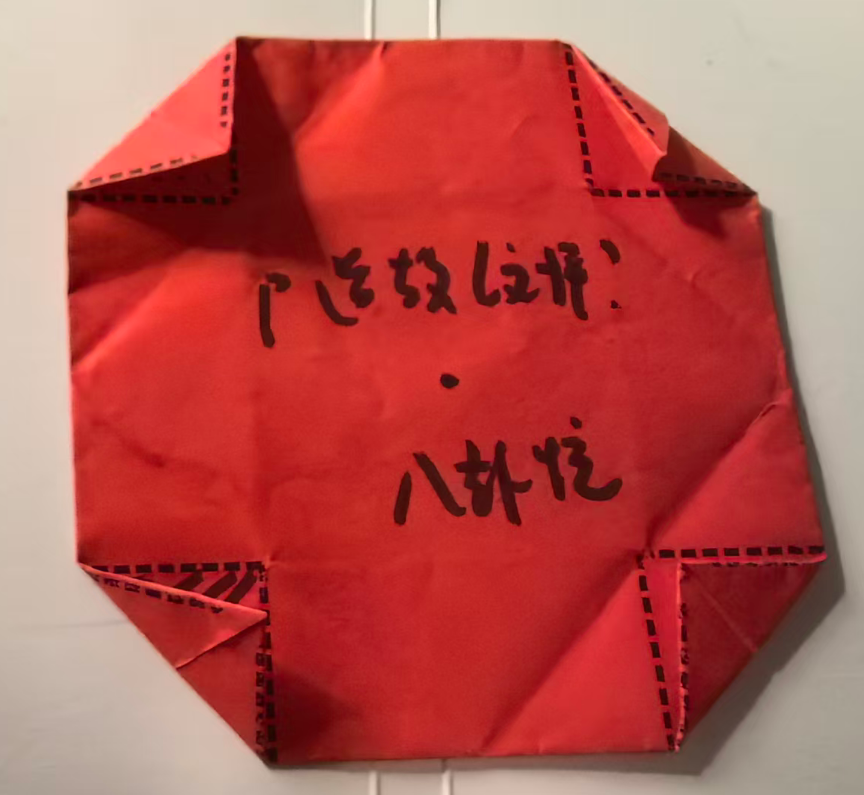
问题:反面小三角黏贴的地方没有标注三角灰色点点。
第2稿,增加各类点点
'''
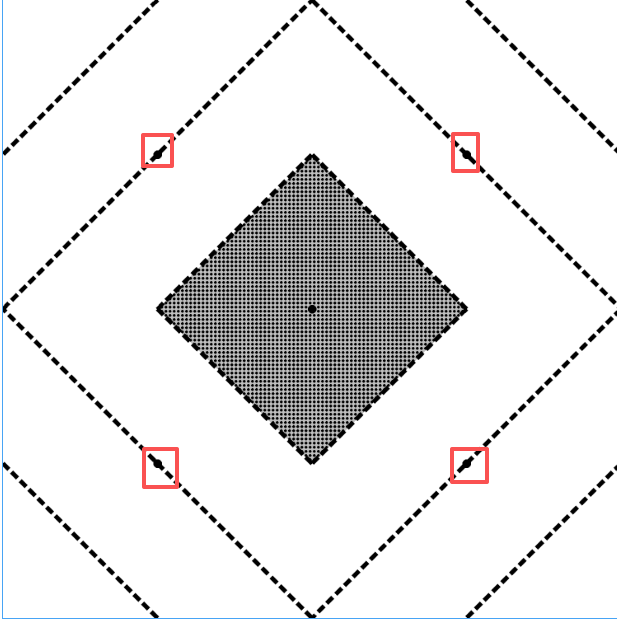
折纸镜子(相框样式)正面2.0
Deepseek,豆包,阿夏
20251220
'''
from PIL import Image, ImageDraw

# 创建白色背景图片
image_size = 1500
image = Image.new('RGB', (image_size, image_size), 'white')
draw = ImageDraw.Draw(image)

# 定义菱形的四个顶点
points = [
    (image_size // 2, 0),        # 上顶点
    (image_size, image_size // 2), # 右顶点
    (image_size // 2, image_size),  # 下顶点
    (0, image_size // 2)         # 左顶点
]

line_width = 10
dash_pattern = [20, 10]  # [实线长度, 间隔长度]
gray_color = (192, 192, 192)  # 灰色

# 绘制菱形的四条虚线边
def draw_dashed_polygon(draw, points, width, pattern):
    """绘制虚线多边形"""
    # 将点列表闭合(添加第一个点到末尾)
    closed_points = points + [points[0]]

    for i in range(len(points)):
        start = closed_points[i]
        end = closed_points[i+1]

        # 计算线段长度
        dx = end[0] - start[0]
        dy = end[1] - start[1]
        length = ((dx**2 + dy**2) ** 0.5)

        if length == 0:
            continue

        # 单位向量
        ux = dx / length
        uy = dy / length

        # 虚线模式:实线 + 间隔
        dash_on, dash_off = pattern
        dash_length = dash_on + dash_off

        # 绘制虚线
        current = 0
        while current < length:
            # 实线段起点
            dash_start_x = start[0] + ux * current
            dash_start_y = start[1] + uy * current

            # 实线段终点
            dash_end = min(current + dash_on, length)
            dash_end_x = start[0] + ux * dash_end
            dash_end_y = start[1] + uy * dash_end

            # 绘制实线段
            draw.line([(dash_start_x, dash_start_y),
                      (dash_end_x, dash_end_y)],
                     fill='black', width=width)

            current += dash_length

# 1. 首先绘制原始菱形
draw_dashed_polygon(draw, points, line_width, dash_pattern)

# 2. 在大菱形的四条边的中点上画10磅的黑点
midpoint_dot_radius = 10  # 增大半径到15像素,使圆点更明显

# 计算大菱形四条边的中点
# 菱形的四个顶点:
top = (image_size // 2, 0)          # 上顶点
right = (image_size, image_size // 2) # 右顶点
bottom = (image_size // 2, image_size) # 下顶点
left = (0, image_size // 2)        # 左顶点

# 计算每条边的中点(连接两个相邻顶点)
# 上边(上顶点到右顶点)的中点
top_to_right_mid = (
    (top[0] + right[0]) // 2,
    (top[1] + right[1]) // 2
)

# 右边(右顶点到下顶点)的中点
right_to_bottom_mid = (
    (right[0] + bottom[0]) // 2,
    (right[1] + bottom[1]) // 2
)

# 下边(下顶点到左顶点)的中点
bottom_to_left_mid = (
    (bottom[0] + left[0]) // 2,
    (bottom[1] + left[1]) // 2
)

# 左边(左顶点到上顶点)的中点
left_to_top_mid = (
    (left[0] + top[0]) // 2,
    (left[1] + top[1]) // 2
)

# 四个边的中点
midpoints = [
    top_to_right_mid,     # 上边中点
    right_to_bottom_mid,  # 右边中点
    bottom_to_left_mid,   # 下边中点
    left_to_top_mid       # 左边中点
]

# 绘制四个边中点的黑点
for x, y in midpoints:
    # 计算圆点的边界框
    left_bound = x - midpoint_dot_radius
    top_bound = y - midpoint_dot_radius
    right_bound = x + midpoint_dot_radius
    bottom_bound = y + midpoint_dot_radius

    # 绘制黑色实心圆点
    draw.ellipse([left_bound, top_bound, right_bound, bottom_bound], fill='black', outline=None)

print("已在大菱形的四条边的中点上添加了黑色圆点:")
print(f"  菱形顶点:")
print(f"    上顶点: {top}")
print(f"    右顶点: {right}")
print(f"    下顶点: {bottom}")
print(f"    左顶点: {left}")
print(f"\n  计算得到的边中点:")
for i, (x, y) in enumerate(midpoints):
    if i == 0:
        position = "上边中点(上顶点到右顶点的中点)"
        vertex1 = top
        vertex2 = right
    elif i == 1:
        position = "右边中点(右顶点到下顶点的中点)"
        vertex1 = right
        vertex2 = bottom
    elif i == 2:
        position = "下边中点(下顶点到左顶点的中点)"
        vertex1 = bottom
        vertex2 = left
    else:
        position = "左边中点(左顶点到上顶点的中点)"
        vertex1 = left
        vertex2 = top

    print(f"    {position}: ({x}, {y}), 直径: {midpoint_dot_radius * 2}像素")
    print(f"      连接: {vertex1} ←→ {vertex2}")

# 3. 计算四条新连接线的端点
# 顶部边线左1/4点:从左上角(0,0)到右上角(image_size,0)的1/4处
top_left_quarter = (image_size * 1 // 4, 0)

# 左侧边线顶1/4点:从左上角(0,0)到左下角(0,image_size)的1/4处
left_top_quarter = (0, image_size * 1 // 4)

# 顶部边线右1/4点:从左上角(0,0)到右上角(image_size,0)的3/4处
top_right_quarter = (image_size * 3 // 4, 0)

# 右侧边线顶1/4点:从右上角(image_size,0)到右下角(image_size,image_size)的1/4处
right_top_quarter = (image_size, image_size * 1 // 4)

# 右侧边线底1/4点:从右上角(image_size,0)到右下角(image_size,image_size)的3/4处
right_bottom_quarter = (image_size, image_size * 3 // 4)

# 底部边线右1/4点:从左下角(0,image_size)到右下角(image_size,image_size)的3/4处
bottom_right_quarter = (image_size * 3 // 4, image_size)

# 底部边线左1/4点:从左下角(0,image_size)到右下角(image_size,image_size)的1/4处
bottom_left_quarter = (image_size * 1 // 4, image_size)

# 左侧边线底1/4点:从左上角(0,0)到左下角(0,image_size)的3/4处
left_bottom_quarter = (0, image_size * 3 // 4)

# 4. 绘制四条新的连接线
new_lines = [
    # 顶部边线左1/4点与左侧边线顶1/4点连接
    (top_left_quarter, left_top_quarter),

    # 顶部边线右1/4点与右侧边线顶1/4点连接
    (top_right_quarter, right_top_quarter),

    # 右侧边线底1/4点与底部边线右1/4点连接
    (right_bottom_quarter, bottom_right_quarter),

    # 底部边线左1/4点与左侧边线底1/4点连接
    (bottom_left_quarter, left_bottom_quarter),
]

# 绘制虚线线段函数
def draw_dashed_line(draw, start, end, width, pattern):
    """绘制虚线线段"""
    # 计算线段长度
    dx = end[0] - start[0]
    dy = end[1] - start[1]
    length = ((dx**2 + dy**2) ** 0.5)

    if length == 0:
        return

    # 单位向量
    ux = dx / length
    uy = dy / length

    # 虚线模式:实线 + 间隔
    dash_on, dash_off = pattern
    dash_length = dash_on + dash_off

    # 绘制虚线
    current = 0
    while current < length:
        # 实线段起点
        dash_start_x = start[0] + ux * current
        dash_start_y = start[1] + uy * current

        # 实线段终点
        dash_end = min(current + dash_on, length)
        dash_end_x = start[0] + ux * dash_end
        dash_end_y = start[1] + uy * dash_end

        # 绘制实线段
        draw.line([(dash_start_x, dash_start_y),
                  (dash_end_x, dash_end_y)],
                 fill='black', width=width)

        current += dash_length

# 绘制四条新的连接线
for start, end in new_lines:
    draw_dashed_line(draw, start, end, line_width, dash_pattern)

# 5. 在中间位置画一个小菱形
# 计算小菱形的尺寸:顶点距离顶部大约是1/4的边长的宽度

# 计算大菱形的中心点(图片中心)
center_x = image_size // 2
center_y = image_size // 2

# 大菱形的顶点到中心的垂直距离(上顶点到中心的距离)
large_vertical_distance = image_size // 2

# 小菱形的顶点到中心的垂直距离:1/4边长宽度
small_vertical_distance = image_size // 4  # 1500/4 = 375

# 小菱形的顶点到中心的水平距离(保持菱形形状)
small_horizontal_distance = small_vertical_distance

# 计算小菱形的四个顶点
small_diamond_points = [
    (center_x, center_y - small_vertical_distance),        # 上顶点
    (center_x + small_horizontal_distance, center_y),      # 右顶点
    (center_x, center_y + small_vertical_distance),        # 下顶点
    (center_x - small_horizontal_distance, center_y)       # 左顶点
]

# 先填充小菱形为灰色
draw.polygon(small_diamond_points, fill=gray_color, outline=None)

# 绘制小菱形边框(同样使用虚线)
draw_dashed_polygon(draw, small_diamond_points, line_width, dash_pattern)

# 6. 在小菱形内部绘制点点点(黑色圆点)
# 设置点点的参数
dot_radius = 3  # 点点的半径
dot_spacing = 10  # 点与点之间的间距

# 计算小菱形的边界
small_diamond_left = center_x - small_horizontal_distance
small_diamond_right = center_x + small_horizontal_distance
small_diamond_top = center_y - small_vertical_distance
small_diamond_bottom = center_y + small_vertical_distance

# 创建判断点是否在菱形内的函数
def is_point_in_diamond(x, y, center_x, center_y, h_dist, v_dist):
    """判断点(x,y)是否在菱形内"""
    # 菱形的数学方程:|x - center_x|/h_dist + |y - center_y|/v_dist <= 1
    return (abs(x - center_x) / h_dist + abs(y - center_y) / v_dist) <= 1

# 在菱形内均匀绘制点点
for x in range(int(small_diamond_left), int(small_diamond_right), dot_spacing):
    for y in range(int(small_diamond_top), int(small_diamond_bottom), dot_spacing):
        # 检查点是否在菱形内
        if is_point_in_diamond(x, y, center_x, center_y, small_horizontal_distance, small_vertical_distance):
            # 计算圆点的边界框
            dot_left = x - dot_radius
            dot_top = y - dot_radius
            dot_right = x + dot_radius
            dot_bottom = y + dot_radius

            # 绘制黑色圆点
            draw.ellipse([dot_left, dot_top, dot_right, dot_bottom], fill='black', outline=None)

# 7. 在画布中心位置画一个20磅的黑色圆点(在点点的上面)
center_dot_radius = 10  # 中心圆点的半径
# 计算圆点的边界框
left_bound = center_x - center_dot_radius
top_bound = center_y - center_dot_radius
right_bound = center_x + center_dot_radius
bottom_bound = center_y + center_dot_radius

# 绘制黑色实心圆点(在最上层)
draw.ellipse([left_bound, top_bound, right_bound, bottom_bound], fill='black', outline=None)

print(f"\n中心圆点信息:")
print(f"  中心坐标: ({center_x}, {center_y})")
print(f"  圆点直径: {center_dot_radius * 2}像素")

print(f"\n小菱形信息:")
print(f"  中心点: ({center_x}, {center_y})")
print(f"  填充颜色: RGB{gray_color}")
print(f"  顶点到中心垂直距离: {small_vertical_distance}像素")
print(f"  顶点到中心水平距离: {small_horizontal_distance}像素")
print(f"  点点参数: 半径{dot_radius}像素, 间距{dot_spacing}像素")
print(f"  上顶点坐标: {small_diamond_points[0]}")
print(f"  右顶点坐标: {small_diamond_points[1]}")
print(f"  下顶点坐标: {small_diamond_points[2]}")
print(f"  左顶点坐标: {small_diamond_points[3]}")

# 保存图片
output_path = r'C:\Users\jg2yXRZ\OneDrive\桌面\20251215 手工纸镜子\正面2.0.png'
image.save(output_path)

print(f"\n已创建图片: {output_path}")
print(f"图片尺寸: {image_size} x {image_size}")
print(f"菱形线宽: {line_width}像素")
print(f"边中点圆点直径: {midpoint_dot_radius * 2}像素")
print(f"中心圆点直径: {center_dot_radius * 2}像素")
print(f"虚线模式: 实线{dash_pattern[0]}像素 + 间隔{dash_pattern[1]}像素")
print(f"小菱形点点: 半径{dot_radius}像素, 间距{dot_spacing}像素")

# 显示图片
image.show()
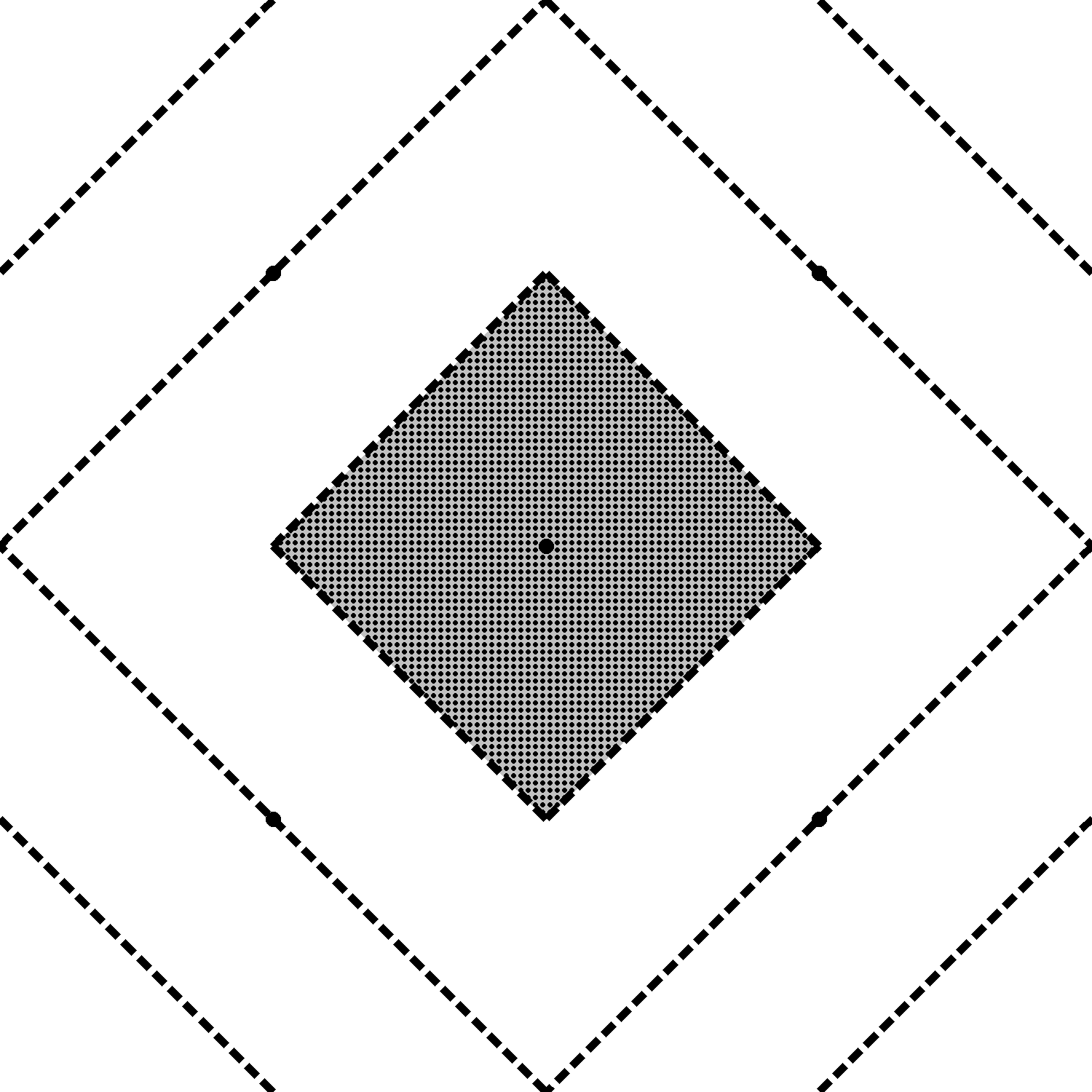
中间有点,便于四个角与中心点对位
大菱形四边中点有点,便于四个角与中点对位,折小三角形
'''
折纸镜子(相框样式)反面2.0
Deepseek,豆包,阿夏
20251220
'''
from PIL import Image, ImageDraw
import math

# ===================== 基础配置 =====================
image_size = 1500  # 画布尺寸
line_width = 10    # 线宽
dash_pattern = [20, 10]  # 虚线样式
main_line_color = (0, 0, 0)  # 黑色
small_diamond_color = 'white'  # 小菱形边框
triangle_fill_color = (150, 150, 150)  # 灰色150
dot_color = (192, 192, 192)  # 灰点子颜色
dot_radius = 5  # 点子半径(5磅,约3.5像素)
dot_spacing = 10  # 点子间距(10像素,5磅间距+5磅空白)
output_path = r'C:\Users\jg2yXRZ\OneDrive\桌面\20251215 手工纸镜子\反面2.0.png'

# ===================== 创建画布 =====================
image = Image.new('RGB', (image_size, image_size), 'white')
draw = ImageDraw.Draw(image)

# 大菱形顶点
big_diamond_points = [
    (image_size // 2, 0),        # 上中点
    (image_size, image_size // 2), # 右中点
    (image_size // 2, image_size),  # 下中点
    (0, image_size // 2)         # 左中点
]

# ===================== 工具函数(不变) =====================
def draw_dashed_polygon(draw, points, width, pattern, color):
    closed_points = points + [points[0]]
    for i in range(len(points)):
        start = closed_points[i]
        end = closed_points[i+1]
        dx = end[0] - start[0]
        dy = end[1] - start[1]
        length = math.hypot(dx, dy)
        if length == 0:
            continue
        ux = dx / length
        uy = dy / length
        dash_on, dash_off = pattern
        dash_length = dash_on + dash_off
        current = 0
        while current < length:
            dash_start = (start[0] + ux * current, start[1] + uy * current)
            dash_end = min(current + dash_on, length)
            dash_end_pos = (start[0] + ux * dash_end, start[1] + uy * dash_end)
            draw.line([dash_start, dash_end_pos], fill=color, width=width)
            current += dash_length

def draw_dashed_line(draw, start, end, width, pattern, color):
    dx = end[0] - start[0]
    dy = end[1] - start[1]
    length = math.hypot(dx, dy)
    if length == 0:
        return
    ux = dx / length
    uy = dy / length
    dash_on, dash_off = pattern
    dash_length = dash_on + dash_off
    current = 0
    while current < length:
        dash_start = (start[0] + ux * current, start[1] + uy * current)
        dash_end = min(current + dash_on, length)
        dash_end_pos = (start[0] + ux * dash_end, start[1] + uy * dash_end)
        draw.line([dash_start, dash_end_pos], fill=color, width=width)
        current += dash_length

def find_line_diamond_intersection(line_start, line_end, diamond_points):
    x1, y1 = line_start
    x2, y2 = line_end
    diamond_edges = [
        (diamond_points[0], diamond_points[1]),
        (diamond_points[1], diamond_points[2]),
        (diamond_points[2], diamond_points[3]),
        (diamond_points[3], diamond_points[0]),
    ]
    intersections = []
    for edge_start, edge_end in diamond_edges:
        x3, y3 = edge_start
        x4, y4 = edge_end
        denom = (y4 - y3) * (x2 - x1) - (x4 - x3) * (y2 - y1)
        if denom == 0:
            continue
        ua = ((x4 - x3) * (y1 - y3) - (y4 - y3) * (x1 - x3)) / denom
        ub = ((x2 - x1) * (y1 - y3) - (y2 - y1) * (x1 - x3)) / denom
        if 0 <= ua <= 1 and 0 <= ub <= 1:
            x = x1 + ua * (x2 - x1)
            y = y1 + ua * (y2 - y1)
            intersections.append((x, y))
    if intersections:
        distances = [math.hypot(ix - x1, iy - y1) for ix, iy in intersections]
        return intersections[distances.index(min(distances))]
    return None

def line_intersection(line1, line2):
    x1, y1 = line1[0]
    x2, y2 = line1[1]
    x3, y3 = line2[0]
    x4, y4 = line2[1]
    denom = (y4 - y3) * (x2 - x1) - (x4 - x3) * (y2 - y1)
    if denom == 0:
        return None
    ua = ((x4 - x3) * (y1 - y3) - (y4 - y3) * (x1 - x3)) / denom
    ub = ((x2 - x1) * (y1 - y3) - (y2 - y1) * (x1 - x3)) / denom
    if 0 <= ua <= 1 and 0 <= ub <= 1:
        x = x1 + ua * (x2 - x1)
        y = y1 + ua * (y2 - y1)
        return (x, y)
    return None

def draw_dots_in_triangle(draw, triangle_points):
    """在三角形内部绘制均匀分布的小圆点"""
    # 找到三角形的边界
    x_coords = [p[0] for p in triangle_points]
    y_coords = [p[1] for p in triangle_points]
    min_x, max_x = min(x_coords), max(x_coords)
    min_y, max_y = min(y_coords), max(y_coords)

    # 生成网格点
    x = min_x + dot_spacing
    while x <= max_x - dot_spacing:
        y = min_y + dot_spacing
        while y <= max_y - dot_spacing:
            # 检查点是否在三角形内部
            if point_in_triangle((x, y), triangle_points):
                # 绘制小圆点
                draw.ellipse(
                    [x - dot_radius, y - dot_radius,
                     x + dot_radius, y + dot_radius],
                    fill=dot_color
                )
            y += dot_spacing
        x += dot_spacing

def point_in_triangle(point, triangle):
    """检查点是否在三角形内部(使用重心坐标法)"""
    x, y = point
    (x1, y1), (x2, y2), (x3, y3) = triangle

    # 计算重心坐标
    denom = ((y2 - y3) * (x1 - x3) + (x3 - x2) * (y1 - y3))
    if denom == 0:
        return False

    a = ((y2 - y3) * (x - x3) + (x3 - x2) * (y - y3)) / denom
    b = ((y3 - y1) * (x - x3) + (x1 - x3) * (y - y3)) / denom
    c = 1 - a - b

    # 如果所有重心坐标都在0和1之间,点在三角形内部
    return 0 <= a <= 1 and 0 <= b <= 1 and 0 <= c <= 1

# ===================== 绘制原有图形(不变) =====================
# 大菱形
draw_dashed_polygon(draw, big_diamond_points, line_width, dash_pattern, main_line_color)

# 1/4点连接线
top_left_quarter = (image_size * 1 // 4, 0)
left_top_quarter = (0, image_size * 1 // 4)
top_right_quarter = (image_size * 3 // 4, 0)
right_top_quarter = (image_size, image_size * 1 // 4)
right_bottom_quarter = (image_size, image_size * 3 // 4)
bottom_right_quarter = (image_size * 3 // 4, image_size)
bottom_left_quarter = (image_size * 1 // 4, image_size)
left_bottom_quarter = (0, image_size * 3 // 4)
quarter_lines = [
    (top_left_quarter, left_top_quarter),
    (top_right_quarter, right_top_quarter),
    (right_bottom_quarter, bottom_right_quarter),
    (bottom_left_quarter, left_bottom_quarter),
]
for start, end in quarter_lines:
    draw_dashed_line(draw, start, end, line_width, dash_pattern, main_line_color)

# 3/8点延伸线
top_left_3_8 = (image_size * 3 // 8, 0)
top_right_3_8 = (image_size * 5 // 8, 0)
right_top_3_8 = (image_size, image_size * 3 // 8)
right_bottom_3_8 = (image_size, image_size * 5 // 8)
bottom_right_3_8 = (image_size * 5 // 8, image_size)
bottom_left_3_8 = (image_size * 3 // 8, image_size)
left_bottom_3_8 = (0, image_size * 5 // 8)
left_top_3_8 = (0, image_size * 3 // 8)
draw_dashed_line(draw, top_left_3_8, find_line_diamond_intersection(top_left_3_8, (top_left_3_8[0], image_size), big_diamond_points), line_width, dash_pattern, main_line_color)
draw_dashed_line(draw, top_right_3_8, find_line_diamond_intersection(top_right_3_8, (top_right_3_8[0], image_size), big_diamond_points), line_width, dash_pattern, main_line_color)
draw_dashed_line(draw, right_top_3_8, find_line_diamond_intersection(right_top_3_8, (0, right_top_3_8[1]), big_diamond_points), line_width, dash_pattern, main_line_color)
draw_dashed_line(draw, right_bottom_3_8, find_line_diamond_intersection(right_bottom_3_8, (0, right_bottom_3_8[1]), big_diamond_points), line_width, dash_pattern, main_line_color)
draw_dashed_line(draw, bottom_right_3_8, find_line_diamond_intersection(bottom_right_3_8, (bottom_right_3_8[0], 0), big_diamond_points), line_width, dash_pattern, main_line_color)
draw_dashed_line(draw, bottom_left_3_8, find_line_diamond_intersection(bottom_left_3_8, (bottom_left_3_8[0], 0), big_diamond_points), line_width, dash_pattern, main_line_color)
draw_dashed_line(draw, left_bottom_3_8, find_line_diamond_intersection(left_bottom_3_8, (image_size, left_bottom_3_8[1]), big_diamond_points), line_width, dash_pattern, main_line_color)
draw_dashed_line(draw, left_top_3_8, find_line_diamond_intersection(left_top_3_8, (image_size, left_top_3_8[1]), big_diamond_points), line_width, dash_pattern, main_line_color)

# 小菱形+延长线
center_x = image_size // 2
center_y = image_size // 2
small_vertical_distance = image_size // 4
small_diamond_points = [
    (center_x, center_y - small_vertical_distance),
    (center_x + small_vertical_distance, center_y),
    (center_x, center_y + small_vertical_distance),
    (center_x - small_vertical_distance, center_y)
]
draw_dashed_polygon(draw, small_diamond_points, line_width, dash_pattern, small_diamond_color)
for i in range(4):
    p_start = small_diamond_points[i]
    p_end = small_diamond_points[(i+1)%4]
    dx = p_end[0] - p_start[0]
    dy = p_end[1] - p_start[1]
    length = math.hypot(dx, dy)
    ux = dx / length
    uy = dy / length
    # 反方向延长
    for j in range(4):
        big_edge = (big_diamond_points[j], big_diamond_points[(j+1)%4])
        ext_line = (p_start, (p_start[0] - ux * image_size, p_start[1] - uy * image_size))
        intersect = line_intersection(ext_line, big_edge)
        if intersect:
            draw_dashed_line(draw, p_start, intersect, line_width, dash_pattern, main_line_color)
            break
    # 正方向延长
    for j in range(4):
        big_edge = (big_diamond_points[j], big_diamond_points[(j+1)%4])
        ext_line = (p_end, (p_end[0] + ux * image_size, p_end[1] + uy * image_size))
        intersect = line_intersection(ext_line, big_edge)
        if intersect:
            draw_dashed_line(draw, p_end, intersect, line_width, dash_pattern, main_line_color)
            break

# ===================== 绘制向外扩展的灰色三角形(核心调整) =====================
# 计算网格基础单位(1/8画布尺寸)
unit = image_size // 8  # 1500//8 = 187.5

# 定义4个向外扩展的三角形顶点坐标
# 1. 上方三角形(向画布顶部外扩)
top_triangle = [
    (center_x - 1*unit, center_y - 3*unit),  # 左顶点(更上+更左)
    (center_x + 1*unit, center_y - 3*unit),  # 右顶点(更上+更右)
    (center_x, center_y - 2*unit)            # 下顶点(直角顶点,向外移)
]

# 2. 左方三角形(向画布左侧外扩)
left_triangle = [
    (center_x - 3*unit, center_y - 1*unit),  # 上顶点(更左+更上)
    (center_x - 3*unit, center_y + 1*unit),  # 下顶点(更左+更下)
    (center_x - 2*unit, center_y)            # 右顶点(直角顶点,向外移)
]

# 3. 右方三角形(向画布右侧外扩)
right_triangle = [
    (center_x + 3*unit, center_y - 1*unit),  # 上顶点(更右+更上)
    (center_x + 3*unit, center_y + 1*unit),  # 下顶点(更右+更下)
    (center_x + 2*unit, center_y)            # 左顶点(直角顶点,向外移)
]

# 4. 下方三角形(向画布底部外扩)
bottom_triangle = [
    (center_x - 1*unit, center_y + 3*unit),  # 左顶点(更下+更左)
    (center_x + 1*unit, center_y + 3*unit),  # 右顶点(更下+更右)
    (center_x, center_y + 2*unit)            # 上顶点(直角顶点,向外移)
]

# 批量绘制4个向外扩展的灰色三角形
triangles = [top_triangle, left_triangle, right_triangle, bottom_triangle]
for triangle in triangles:
    draw.polygon(triangle, fill=triangle_fill_color)
    # 在每个三角形内部绘制小圆点
    draw_dots_in_triangle(draw, triangle)

# ===================== 保存与输出 =====================
image.save(output_path)
image.show()

# 打印坐标验证信息
print(f"\n已创建图片: {output_path}")
print(f"图片尺寸: {image_size} x {image_size}")
print(f"点子半径: {dot_radius}像素")
print(f"点子间距: {dot_spacing}像素")
print(f"三角形填充色: RGB{triangle_fill_color}")
print(f"点子颜色: RGB{dot_color}")
print(f"\n向外扩展的三角形坐标:")
print(f"上方三角: {top_triangle}")
print(f"左方三角: {left_triangle}")
print(f"右方三角: {right_triangle}")
print(f"下方三角: {bottom_triangle}")
有灰色的三角形
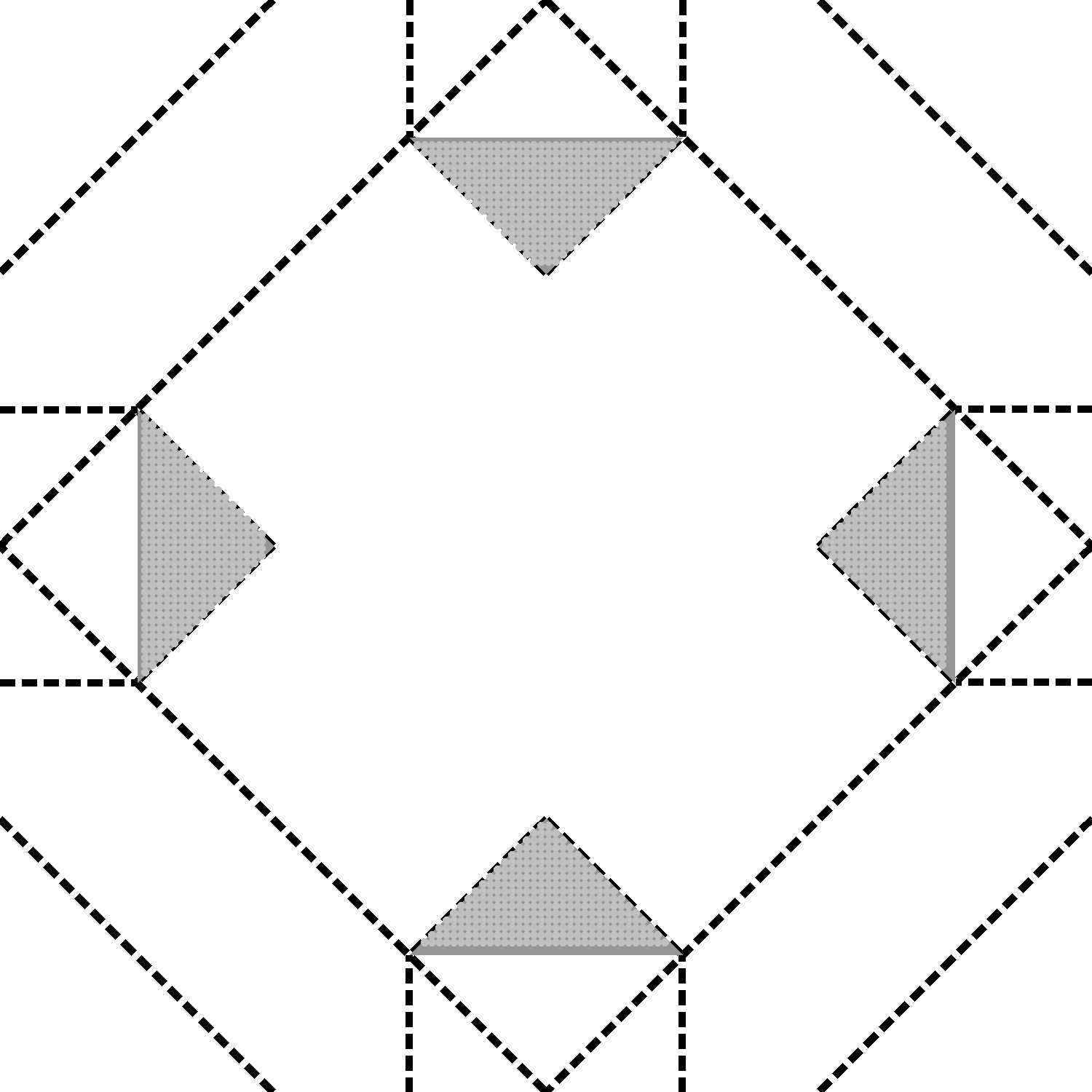
灰度点子的灰色与正面的镜子贴面的灰度点子灰色相同
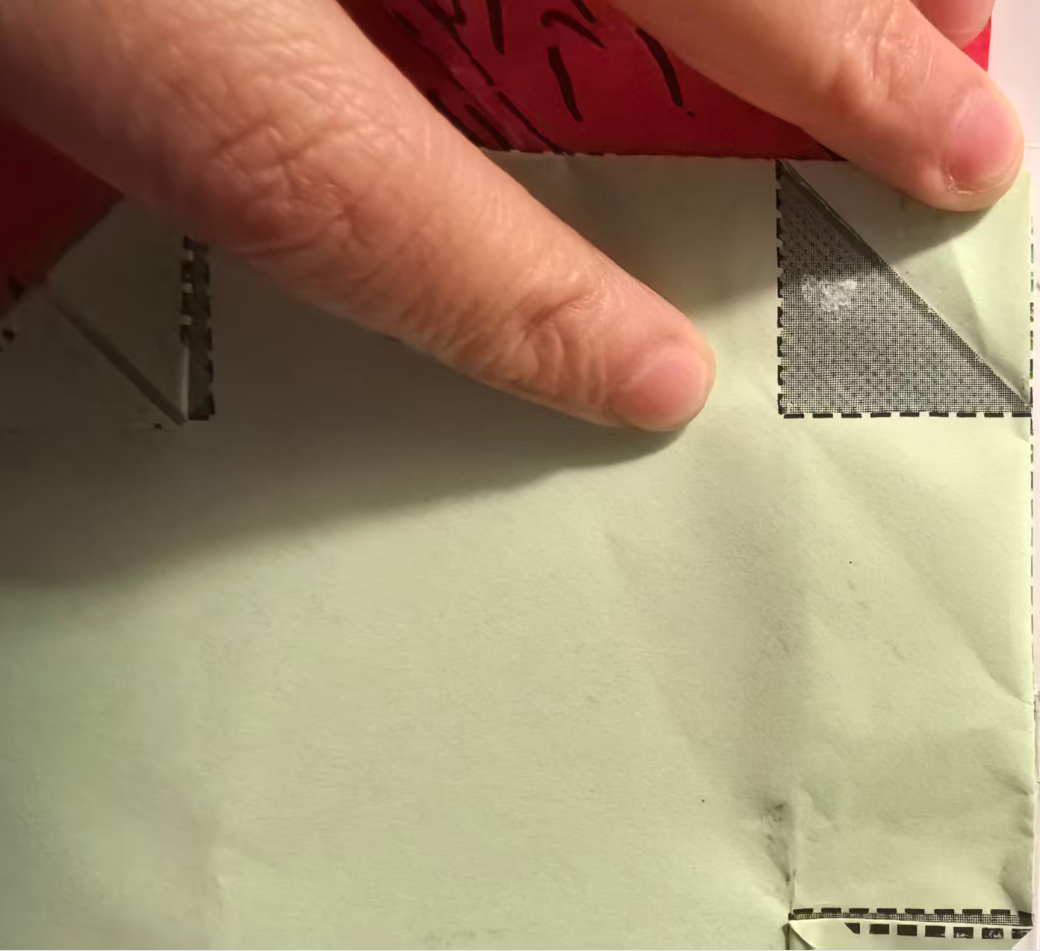
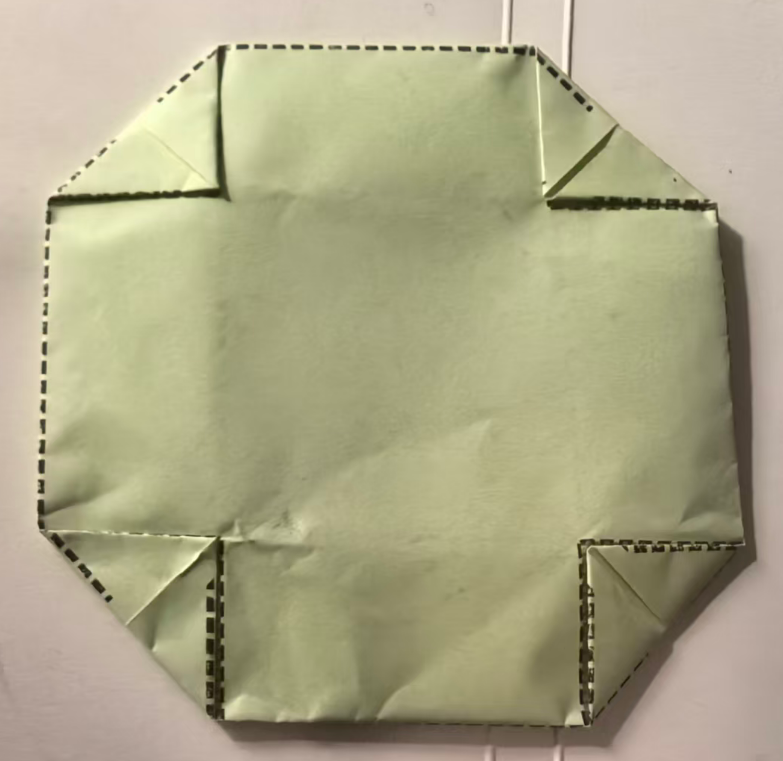
三、图案黏贴
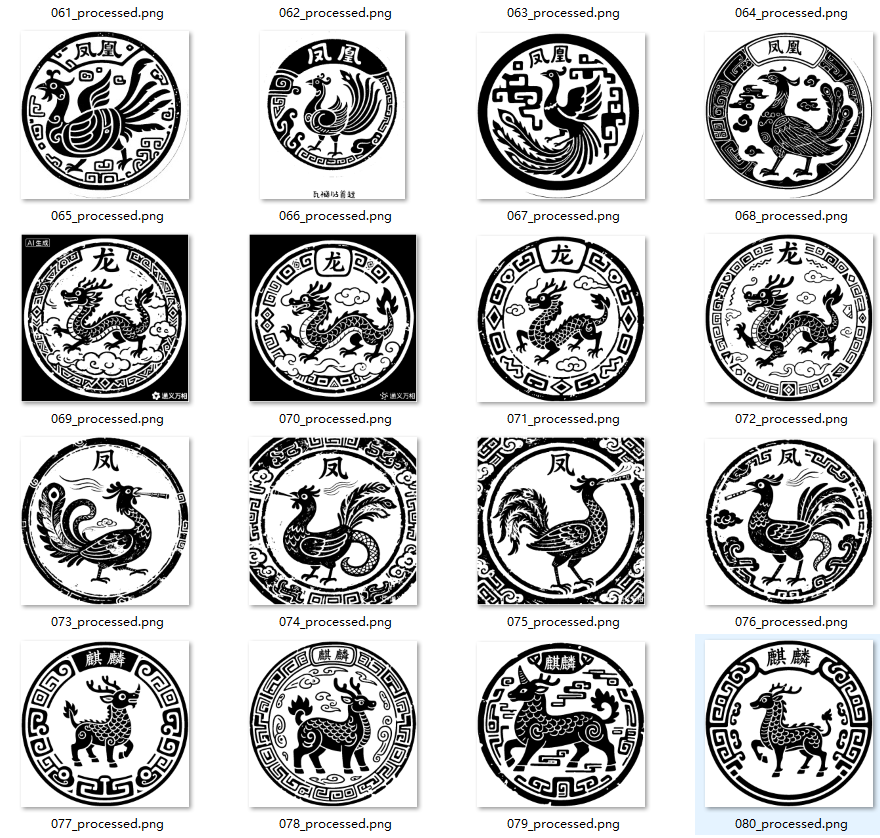
把小三角贴到镜面,背面贴神兽图
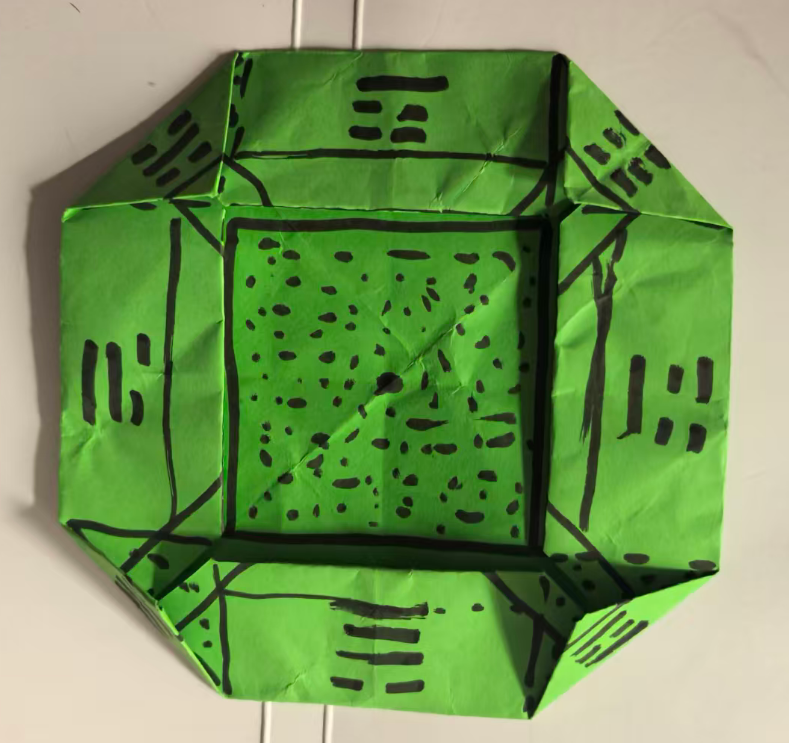
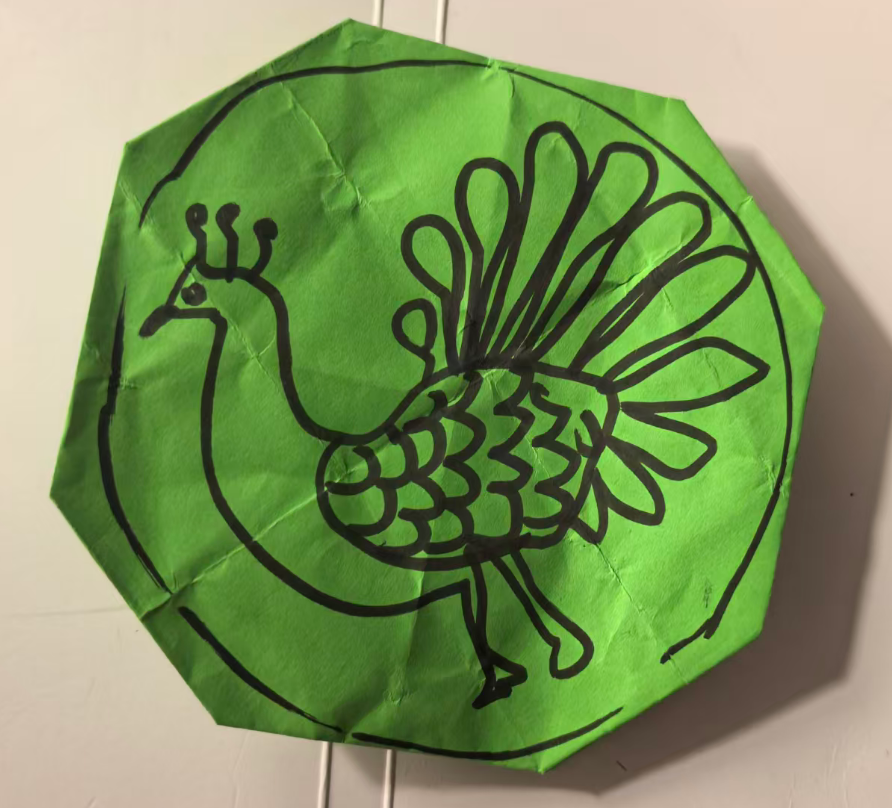
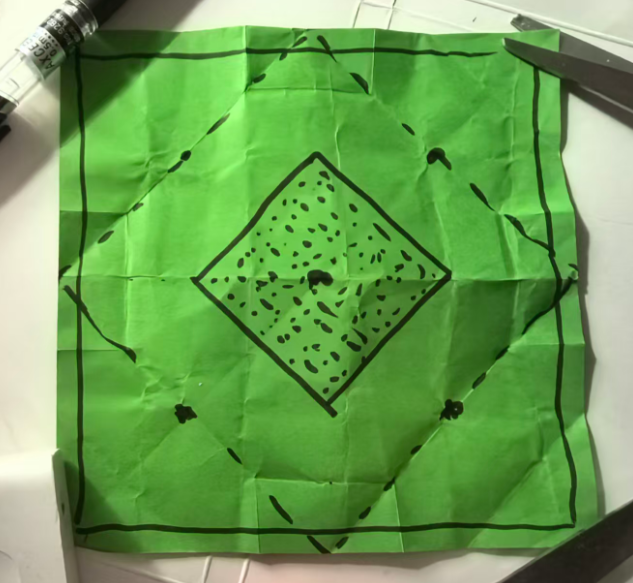
这个图纸好难做啊
正面(考虑有0.7的预留白边,打印机有0,7白边没法打印到)
'''
折纸镜子(相框样式)正面3.0
Deepseek,豆包,阿夏
20251220
'''
from PIL import Image, ImageDraw

# 新的颜色和尺寸参数定义
image_size = 1500  # 画布尺寸
line_width = 10    # 线宽
dash_pattern = [20, 10]  # 虚线样式
main_line_color = (0, 0, 0)  # 黑色
small_diamond_color = 'white'  # 小菱形边框
triangle_fill_color = (150, 150, 150)  # 灰色150
dot_color = (192, 192, 192)  # 灰点子颜色
dot_radius = 5  # 点子半径(5磅,约3.5像素)
dot_spacing = 10  # 点子间距(10像素,5磅间距+5磅空白)
output_path = r'C:\Users\jg2yXRZ\OneDrive\桌面\20251215 手工纸镜子\正面3.0.png'

# 创建白色背景图片
image = Image.new('RGB', (image_size, image_size), 'white')
draw = ImageDraw.Draw(image)

# 定义菱形的四个顶点
points = [
    (image_size // 2, 0),        # 上顶点
    (image_size, image_size // 2), # 右顶点
    (image_size // 2, image_size),  # 下顶点
    (0, image_size // 2)         # 左顶点
]

# 绘制菱形的四条虚线边
def draw_dashed_polygon(draw, points, width, pattern):
    """绘制虚线多边形"""
    # 将点列表闭合(添加第一个点到末尾)
    closed_points = points + [points[0]]

    for i in range(len(points)):
        start = closed_points[i]
        end = closed_points[i+1]

        # 计算线段长度
        dx = end[0] - start[0]
        dy = end[1] - start[1]
        length = ((dx**2 + dy**2) ** 0.5)

        if length == 0:
            continue

        # 单位向量
        ux = dx / length
        uy = dy / length

        # 虚线模式:实线 + 间隔
        dash_on, dash_off = pattern
        dash_length = dash_on + dash_off

        # 绘制虚线
        current = 0
        while current < length:
            # 实线段起点
            dash_start_x = start[0] + ux * current
            dash_start_y = start[1] + uy * current

            # 实线段终点
            dash_end = min(current + dash_on, length)
            dash_end_x = start[0] + ux * dash_end
            dash_end_y = start[1] + uy * dash_end

            # 绘制实线段(使用新定义的主线条颜色)
            draw.line([(dash_start_x, dash_start_y),
                      (dash_end_x, dash_end_y)],
                     fill=main_line_color, width=width)

            current += dash_length

# 1. 首先绘制原始菱形
draw_dashed_polygon(draw, points, line_width, dash_pattern)

# 2. 在大菱形的四条边的中点上画10磅的黑点
midpoint_dot_radius = 10  # 增大半径到15像素,使圆点更明显

# 计算大菱形四条边的中点
# 菱形的四个顶点:
top = (image_size // 2, 0)          # 上顶点
right = (image_size, image_size // 2) # 右顶点
bottom = (image_size // 2, image_size) # 下顶点
left = (0, image_size // 2)        # 左顶点

# 计算每条边的中点(连接两个相邻顶点)
# 上边(上顶点到右顶点)的中点
top_to_right_mid = (
    (top[0] + right[0]) // 2,
    (top[1] + right[1]) // 2
)

# 右边(右顶点到下顶点)的中点
right_to_bottom_mid = (
    (right[0] + bottom[0]) // 2,
    (right[1] + bottom[1]) // 2
)

# 下边(下顶点到左顶点)的中点
bottom_to_left_mid = (
    (bottom[0] + left[0]) // 2,
    (bottom[1] + left[1]) // 2
)

# 左边(左顶点到上顶点)的中点
left_to_top_mid = (
    (left[0] + top[0]) // 2,
    (left[1] + top[1]) // 2
)

# 四个边的中点
midpoints = [
    top_to_right_mid,     # 上边中点
    right_to_bottom_mid,  # 右边中点
    bottom_to_left_mid,   # 下边中点
    left_to_top_mid       # 左边中点
]

# 绘制四个边中点的黑点
for x, y in midpoints:
    # 计算圆点的边界框
    left_bound = x - midpoint_dot_radius
    top_bound = y - midpoint_dot_radius
    right_bound = x + midpoint_dot_radius
    bottom_bound = y + midpoint_dot_radius

    # 绘制黑色实心圆点
    draw.ellipse([left_bound, top_bound, right_bound, bottom_bound], fill=main_line_color, outline=None)

print("已在大菱形的四条边的中点上添加了黑色圆点:")
print(f"  菱形顶点:")
print(f"    上顶点: {top}")
print(f"    右顶点: {right}")
print(f"    下顶点: {bottom}")
print(f"    左顶点: {left}")
print(f"\n  计算得到的边中点:")
for i, (x, y) in enumerate(midpoints):
    if i == 0:
        position = "上边中点(上顶点到右顶点的中点)"
        vertex1 = top
        vertex2 = right
    elif i == 1:
        position = "右边中点(右顶点到下顶点的中点)"
        vertex1 = right
        vertex2 = bottom
    elif i == 2:
        position = "下边中点(下顶点到左顶点的中点)"
        vertex1 = bottom
        vertex2 = left
    else:
        position = "左边中点(左顶点到上顶点的中点)"
        vertex1 = left
        vertex2 = top

    print(f"    {position}: ({x}, {y}), 直径: {midpoint_dot_radius * 2}像素")
    print(f"      连接: {vertex1} ←→ {vertex2}")

# 3. 计算四条新连接线的端点
# 顶部边线左1/4点:从左上角(0,0)到右上角(image_size,0)的1/4处
top_left_quarter = (image_size * 1 // 4, 0)

# 左侧边线顶1/4点:从左上角(0,0)到左下角(0,image_size)的1/4处
left_top_quarter = (0, image_size * 1 // 4)

# 顶部边线右1/4点:从左上角(0,0)到右上角(image_size,0)的3/4处
top_right_quarter = (image_size * 3 // 4, 0)

# 右侧边线顶1/4点:从右上角(image_size,0)到右下角(image_size,image_size)的1/4处
right_top_quarter = (image_size, image_size * 1 // 4)

# 右侧边线底1/4点:从右上角(image_size,0)到右下角(image_size,image_size)的3/4处
right_bottom_quarter = (image_size, image_size * 3 // 4)

# 底部边线右1/4点:从左下角(0,image_size)到右下角(image_size,image_size)的3/4处
bottom_right_quarter = (image_size * 3 // 4, image_size)

# 底部边线左1/4点:从左下角(0,image_size)到右下角(image_size,image_size)的1/4处
bottom_left_quarter = (image_size * 1 // 4, image_size)

# 左侧边线底1/4点:从左上角(0,0)到左下角(0,image_size)的3/4处
left_bottom_quarter = (0, image_size * 3 // 4)

# 4. 绘制四条新的连接线
new_lines = [
    # 顶部边线左1/4点与左侧边线顶1/4点连接
    (top_left_quarter, left_top_quarter),

    # 顶部边线右1/4点与右侧边线顶1/4点连接
    (top_right_quarter, right_top_quarter),

    # 右侧边线底1/4点与底部边线右1/4点连接
    (right_bottom_quarter, bottom_right_quarter),

    # 底部边线左1/4点与左侧边线底1/4点连接
    (bottom_left_quarter, left_bottom_quarter),
]

# 绘制虚线线段函数
def draw_dashed_line(draw, start, end, width, pattern):
    """绘制虚线线段"""
    # 计算线段长度
    dx = end[0] - start[0]
    dy = end[1] - start[1]
    length = ((dx**2 + dy**2) ** 0.5)

    if length == 0:
        return

    # 单位向量
    ux = dx / length
    uy = dy / length

    # 虚线模式:实线 + 间隔
    dash_on, dash_off = pattern
    dash_length = dash_on + dash_off

    # 绘制虚线
    current = 0
    while current < length:
        # 实线段起点
        dash_start_x = start[0] + ux * current
        dash_start_y = start[1] + uy * current

        # 实线段终点
        dash_end = min(current + dash_on, length)
        dash_end_x = start[0] + ux * dash_end
        dash_end_y = start[1] + uy * dash_end

        # 绘制实线段(使用新定义的主线条颜色)
        draw.line([(dash_start_x, dash_start_y),
                  (dash_end_x, dash_end_y)],
                 fill=main_line_color, width=width)

        current += dash_length

# 绘制四条新的连接线
for start, end in new_lines:
    draw_dashed_line(draw, start, end, line_width, dash_pattern)

# 5. 在中间位置画一个小菱形
# 计算小菱形的尺寸:顶点距离顶部大约是1/4的边长的宽度

# 计算大菱形的中心点(图片中心)
center_x = image_size // 2
center_y = image_size // 2

# 大菱形的顶点到中心的垂直距离(上顶点到中心的距离)
large_vertical_distance = image_size // 2

# 小菱形的顶点到中心的垂直距离:1/4边长宽度
small_vertical_distance = image_size // 4  # 1500/4 = 375

# 小菱形的顶点到中心的水平距离(保持菱形形状)
small_horizontal_distance = small_vertical_distance

# 计算小菱形的四个顶点
small_diamond_points = [
    (center_x, center_y - small_vertical_distance),        # 上顶点
    (center_x + small_horizontal_distance, center_y),      # 右顶点
    (center_x, center_y + small_vertical_distance),        # 下顶点
    (center_x - small_horizontal_distance, center_y)       # 左顶点
]

# 先填充小菱形为新定义的灰色(triangle_fill_color = 150,150,150)
draw.polygon(small_diamond_points, fill=triangle_fill_color, outline=None)

# 绘制小菱形边框(使用新定义的小菱形边框颜色)
draw_dashed_polygon(draw, small_diamond_points, line_width, dash_pattern)

# 6. 在小菱形内部绘制点点点(使用新定义的灰点子颜色)
# 使用新定义的点子参数
dot_radius_used = dot_radius  # 5像素
dot_spacing_used = dot_spacing  # 10像素

# 计算小菱形的边界
small_diamond_left = center_x - small_horizontal_distance
small_diamond_right = center_x + small_horizontal_distance
small_diamond_top = center_y - small_vertical_distance
small_diamond_bottom = center_y + small_vertical_distance

# 创建判断点是否在菱形内的函数
def is_point_in_diamond(x, y, center_x, center_y, h_dist, v_dist):
    """判断点(x,y)是否在菱形内"""
    # 菱形的数学方程:|x - center_x|/h_dist + |y - center_y|/v_dist <= 1
    return (abs(x - center_x) / h_dist + abs(y - center_y) / v_dist) <= 1

# 在菱形内均匀绘制点点
for x in range(int(small_diamond_left), int(small_diamond_right), dot_spacing_used):
    for y in range(int(small_diamond_top), int(small_diamond_bottom), dot_spacing_used):
        # 检查点是否在菱形内
        if is_point_in_diamond(x, y, center_x, center_y, small_horizontal_distance, small_vertical_distance):
            # 计算圆点的边界框
            dot_left = x - dot_radius_used
            dot_top = y - dot_radius_used
            dot_right = x + dot_radius_used
            dot_bottom = y + dot_radius_used

            # 绘制灰点子(使用新定义的dot_color = 192,192,192)
            draw.ellipse([dot_left, dot_top, dot_right, dot_bottom], fill=dot_color, outline=None)

# 7. 在画布中心位置画一个20磅的黑色圆点(在点点的上面)
center_dot_radius = 10  # 中心圆点的半径
# 计算圆点的边界框
left_bound = center_x - center_dot_radius
top_bound = center_y - center_dot_radius
right_bound = center_x + center_dot_radius
bottom_bound = center_y + center_dot_radius

# 绘制黑色实心圆点(在最上层)
draw.ellipse([left_bound, top_bound, right_bound, bottom_bound], fill=main_line_color, outline=None)


# 显示图片
image.show()
# ========== 仅添加这部分:四个白色矩形 ==========
rect_width = 70
# 1. 左侧矩形:(0,0) 70宽 1500高
draw.rectangle([0, 0, rect_width, image_size], fill='white', outline=None)
# 2. 顶部矩形:(0,0) 1500宽 70高
draw.rectangle([0, 0, image_size, rect_width], fill='white', outline=None)
# 3. 右侧矩形:(1500-70,0) 70宽 1500高
draw.rectangle([image_size - rect_width, 0, image_size, image_size], fill='white', outline=None)
# 4. 底部矩形:(0,1500-70) 1500宽 70高
draw.rectangle([0, image_size - rect_width, image_size, image_size], fill='white', outline=None)
# ========== 矩形绘制结束 ==========

print(f"\n中心圆点信息:")
print(f"  中心坐标: ({center_x}, {center_y})")
print(f"  圆点直径: {center_dot_radius * 2}像素")

print(f"\n小菱形信息:")
print(f"  中心点: ({center_x}, {center_y})")
print(f"  填充颜色: RGB{triangle_fill_color} (新定义的灰色)")
print(f"  顶点到中心垂直距离: {small_vertical_distance}像素")
print(f"  顶点到中心水平距离: {small_horizontal_distance}像素")
print(f"  点点参数: 半径{dot_radius_used}像素, 间距{dot_spacing_used}像素")
print(f"  点点颜色: RGB{dot_color} (新定义的灰点子颜色)")
print(f"  上顶点坐标: {small_diamond_points[0]}")
print(f"  右顶点坐标: {small_diamond_points[1]}")
print(f"  下顶点坐标: {small_diamond_points[2]}")
print(f"  左顶点坐标: {small_diamond_points[3]}")

# 保存图片(使用新定义的输出路径)
image.save(output_path)

print(f"\n已创建图片: {output_path}")
print(f"图片尺寸: {image_size} x {image_size}")
print(f"菱形线宽: {line_width}像素")
print(f"边中点圆点直径: {midpoint_dot_radius * 2}像素")
print(f"中心圆点直径: {center_dot_radius * 2}像素")
print(f"虚线模式: 实线{dash_pattern[0]}像素 + 间隔{dash_pattern[1]}像素")
print(f"小菱形点点: 半径{dot_radius_used}像素, 间距{dot_spacing_used}像素")
print(f"小菱形填充色: RGB{triangle_fill_color}")
print(f"点点颜色: RGB{dot_color}")
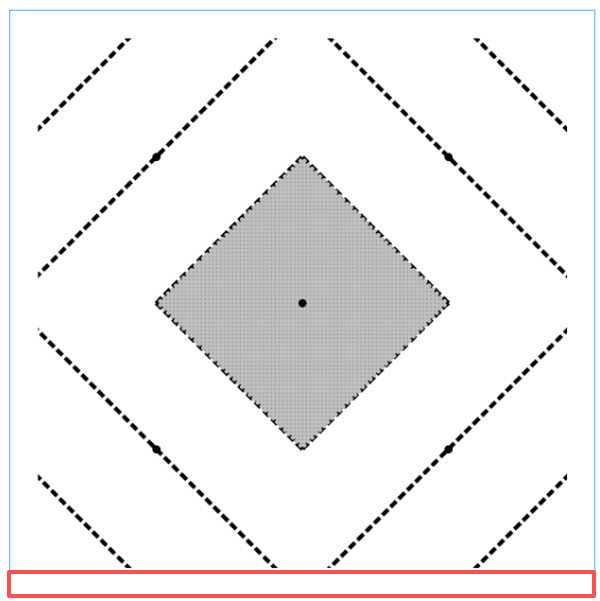
'''
折纸镜子(相框样式)反面3.0(八个小三角,背后是8八边形
Deepseek,豆包,阿夏
20251220
'''
from PIL import Image, ImageDraw
import math

# ===================== 基础配置 =====================
image_size = 1500  # 画布尺寸
line_width = 10    # 线宽
dash_pattern = [20, 10]  # 虚线样式
main_line_color = (0, 0, 0)  # 黑色
small_diamond_color = 'white'  # 小菱形边框
triangle_fill_color = (150, 150, 150)  # 灰色150
dot_color = (192, 192, 192)  # 灰点子颜色
dot_radius = 5  # 点子半径
dot_spacing = 10  # 点子间距
output_path = r'C:\Users\jg2yXRZ\OneDrive\桌面\20251215 手工纸镜子\反面3.0.png'

# ===================== 创建画布 =====================
image = Image.new('RGB', (image_size, image_size), 'white')
draw = ImageDraw.Draw(image)

# 大菱形顶点
center_x, center_y = image_size//2, image_size//2
big_diamond = [
    (center_x, 0),        # 上中点(T)
    (image_size, center_y), # 右中点(R)
    (center_x, image_size),  # 下中点(B)
    (0, center_y)         # 左中点(L)
]

# ===================== 工具函数(不变) =====================
def draw_dashed_polygon(draw, points, width, pattern, color):
    closed_points = points + [points[0]]
    for i in range(len(points)):
        start = closed_points[i]
        end = closed_points[i+1]
        dx = end[0] - start[0]
        dy = end[1] - start[1]
        length = math.hypot(dx, dy)
        if length == 0:
            continue
        ux = dx / length
        uy = dy / length
        dash_on, dash_off = pattern
        dash_length = dash_on + dash_off
        current = 0
        while current < length:
            dash_start = (start[0] + ux * current, start[1] + uy * current)
            dash_end = min(current + dash_on, length)
            dash_end_pos = (start[0] + ux * dash_end, start[1] + uy * dash_end)
            draw.line([dash_start, dash_end_pos], fill=color, width=width)
            current += dash_length

def draw_dashed_line(draw, start, end, width, pattern, color):
    dx = end[0] - start[0]
    dy = end[1] - start[1]
    length = math.hypot(dx, dy)
    if length == 0:
        return
    ux = dx / length
    uy = dy / length
    dash_on, dash_off = pattern
    dash_length = dash_on + dash_off
    current = 0
    while current < length:
        dash_start = (start[0] + ux * current, start[1] + uy * current)
        dash_end = min(current + dash_on, length)
        dash_end_pos = (start[0] + ux * dash_end, start[1] + uy * dash_end)
        draw.line([dash_start, dash_end_pos], fill=color, width=width)
        current += dash_length

def find_line_diamond_intersection(line_start, line_end, diamond_points):
    x1, y1 = line_start
    x2, y2 = line_end
    diamond_edges = [
        (diamond_points[0], diamond_points[1]),
        (diamond_points[1], diamond_points[2]),
        (diamond_points[2], diamond_points[3]),
        (diamond_points[3], diamond_points[0]),
    ]
    intersections = []
    for edge_start, edge_end in diamond_edges:
        x3, y3 = edge_start
        x4, y4 = edge_end
        denom = (y4 - y3) * (x2 - x1) - (x4 - x3) * (y2 - y1)
        if denom == 0:
            continue
        ua = ((x4 - x3) * (y1 - y3) - (y4 - y3) * (x1 - x3)) / denom
        ub = ((x2 - x1) * (y1 - y3) - (y2 - y1) * (x1 - x3)) / denom
        if 0 <= ua <= 1 and 0 <= ub <= 1:
            x = x1 + ua * (x2 - x1)
            y = y1 + ua * (y2 - y1)
            intersections.append((x, y))
    if intersections:
        distances = [math.hypot(ix - x1, iy - y1) for ix, iy in intersections]
        return intersections[distances.index(min(distances))]
    return None

def line_intersection(line1, line2):
    x1, y1 = line1[0]
    x2, y2 = line1[1]
    x3, y3 = line2[0]
    x4, y4 = line2[1]
    denom = (y4 - y3) * (x2 - x1) - (x4 - x3) * (y2 - y1)
    if denom == 0:
        return None
    ua = ((x4 - x3) * (y1 - y3) - (y4 - y3) * (x1 - x3)) / denom
    ub = ((x2 - x1) * (y1 - y3) - (y2 - y1) * (x1 - x3)) / denom
    if 0 <= ua <= 1 and 0 <= ub <= 1:
        x = x1 + ua * (x2 - x1)
        y = y1 + ua * (y2 - y1)
        return (x, y)
    return None

def draw_dots_in_triangle(draw, triangle_points):
    x_coords = [p[0] for p in triangle_points]
    y_coords = [p[1] for p in triangle_points]
    min_x, max_x = min(x_coords), max(x_coords)
    min_y, max_y = min(y_coords), max(y_coords)

    x = min_x + dot_spacing
    while x <= max_x - dot_spacing:
        y = min_y + dot_spacing
        while y <= max_y - dot_spacing:
            if point_in_triangle((x, y), triangle_points):
                draw.ellipse(
                    [x - dot_radius, y - dot_radius,
                     x + dot_radius, y + dot_radius],
                    fill=dot_color
                )
            y += dot_spacing
        x += dot_spacing

def point_in_triangle(point, triangle):
    x, y = point
    (x1, y1), (x2, y2), (x3, y3) = triangle

    denom = ((y2 - y3) * (x1 - x3) + (x3 - x2) * (y1 - y3))
    if denom == 0:
        return False

    a = ((y2 - y3) * (x - x3) + (x3 - x2) * (y - y3)) / denom
    b = ((y3 - y1) * (x - x3) + (x1 - x3) * (y - y3)) / denom
    c = 1 - a - b

    return 0 <= a <= 1 and 0 <= b <= 1 and 0 <= c <= 1

# ===================== 绘制原有图形(不变) =====================
# 大菱形
draw_dashed_polygon(draw, big_diamond, line_width, dash_pattern, main_line_color)

# 1/4点连接线
quarter_lines = [
    ((image_size//4, 0), (0, image_size//4)),
    ((3*image_size//4, 0), (image_size, image_size//4)),
    ((image_size, 3*image_size//4), (3*image_size//4, image_size)),
    ((image_size//4, image_size), (0, 3*image_size//4)),
]
for start, end in quarter_lines:
    draw_dashed_line(draw, start, end, line_width, dash_pattern, main_line_color)

# 3/8点延伸线
draw_dashed_line(draw, (3*image_size//8, 0), find_line_diamond_intersection((3*image_size//8, 0), (3*image_size//8, image_size), big_diamond), line_width, dash_pattern, main_line_color)
draw_dashed_line(draw, (5*image_size//8, 0), find_line_diamond_intersection((5*image_size//8, 0), (5*image_size//8, image_size), big_diamond), line_width, dash_pattern, main_line_color)
draw_dashed_line(draw, (image_size, 3*image_size//8), find_line_diamond_intersection((image_size, 3*image_size//8), (0, 3*image_size//8), big_diamond), line_width, dash_pattern, main_line_color)
draw_dashed_line(draw, (image_size, 5*image_size//8), find_line_diamond_intersection((image_size, 5*image_size//8), (0, 5*image_size//8), big_diamond), line_width, dash_pattern, main_line_color)
draw_dashed_line(draw, (5*image_size//8, image_size), find_line_diamond_intersection((5*image_size//8, image_size), (5*image_size//8, 0), big_diamond), line_width, dash_pattern, main_line_color)
draw_dashed_line(draw, (3*image_size//8, image_size), find_line_diamond_intersection((3*image_size//8, image_size), (3*image_size//8, 0), big_diamond), line_width, dash_pattern, main_line_color)
draw_dashed_line(draw, (0, 5*image_size//8), find_line_diamond_intersection((0, 5*image_size//8), (image_size, 5*image_size//8), big_diamond), line_width, dash_pattern, main_line_color)
draw_dashed_line(draw, (0, 3*image_size//8), find_line_diamond_intersection((0, 3*image_size//8), (image_size, 3*image_size//8), big_diamond), line_width, dash_pattern, main_line_color)

# ===================== 绘制8个边缘红色区域的灰色带点三角形 =====================
unit = image_size // 8  # 基础单位

# 定义8个边缘小三角(每条大菱形边2个)
final_triangles = [
    # 上边2个
    [(center_x - 2*unit, 0), (center_x - 1*unit, 0), (center_x - unit, unit)],  # 上边左红三角
    [(center_x + 1*unit, 0), (center_x + 2*unit, 0), (center_x + unit, unit)],  # 上边右红三角
    # 右边2个
    [(image_size, center_y - 2*unit), (image_size, center_y-  1*unit), (image_size - unit, center_y - unit)],  # 右边上红三角
    [(image_size, center_y + 1*unit), (image_size, center_y + 2*unit), (image_size - unit, center_y + unit)],  # 右边下红三角
    # 下边2个
    [(center_x - 2*unit, image_size), (center_x - 1*unit, image_size), (center_x - unit, image_size - unit)],  # 下边左红三角
    [(center_x + 1*unit, image_size), (center_x + 2*unit, image_size), (center_x + unit, image_size - unit)],  # 下边右红三角
    # 左边2个
    [(0, center_y - 2*unit), (0, center_y - 1*unit), (unit, center_y - unit)],  # 左边上红三角
    [(0, center_y + 1*unit), (0, center_y + 2*unit), (unit, center_y + unit)]   # 左边下红三角
]

# 绘制8个灰色带点三角
for tri in final_triangles:
    draw.polygon(tri, fill=triangle_fill_color)
    draw_dots_in_triangle(draw, tri)

# ===================== 绘制附件图片中红线位置的黑色虚线(精准计算坐标) =====================
# 核心:计算4段虚线的起止坐标(匹配原图红线)
black_dash_color = main_line_color  # 黑色
black_dash_width = line_width       # 与主线条同宽
black_dash_pattern = dash_pattern   # 与主线条同虚线样式

# 计算4段黑色虚线的坐标
dash_lines = [
    # 1. 上边水平虚线:连接上边两个灰色三角的下方顶点
    (final_triangles[0][2], final_triangles[1][2]),
    # 2. 右边垂直虚线:连接右边两个灰色三角的左侧顶点
    (final_triangles[2][2], final_triangles[3][2]),
    # 3. 下边水平虚线:连接下边两个灰色三角的上方顶点
    (final_triangles[4][2], final_triangles[5][2]),
    # 4. 左边垂直虚线:连接左边两个灰色三角的右侧顶点
    (final_triangles[6][2], final_triangles[7][2]),
]

# 绘制4段黑色虚线
for start, end in dash_lines:
    draw_dashed_line(draw, start, end, black_dash_width, black_dash_pattern, black_dash_color)

# ========== 仅添加这部分:四个白色矩形 ==========
rect_width = 70
# 1. 左侧矩形:(0,0) 70宽 1500高
draw.rectangle([0, 0, rect_width, image_size], fill='white', outline=None)
# 2. 顶部矩形:(0,0) 1500宽 70高
draw.rectangle([0, 0, image_size, rect_width], fill='white', outline=None)
# 3. 右侧矩形:(1500-70,0) 70宽 1500高
draw.rectangle([image_size - rect_width, 0, image_size, image_size], fill='white', outline=None)
# 4. 底部矩形:(0,1500-70) 1500宽 70高
draw.rectangle([0, image_size - rect_width, image_size, image_size], fill='white', outline=None)

# ===================== 保存与输出 =====================
image.save(output_path)
image.show()

# 打印验证信息
print(f"\n已创建图片: {output_path}")
print(f"8个边缘红区三角坐标:")
for i, tri in enumerate(final_triangles, 1):
    print(f"三角{i}: {tri}")
print(f"\n4段黑色虚线坐标:")
for i, (start, end) in enumerate(dash_lines, 1):
    print(f"虚线{i}: 起点{start} → 终点{end}")
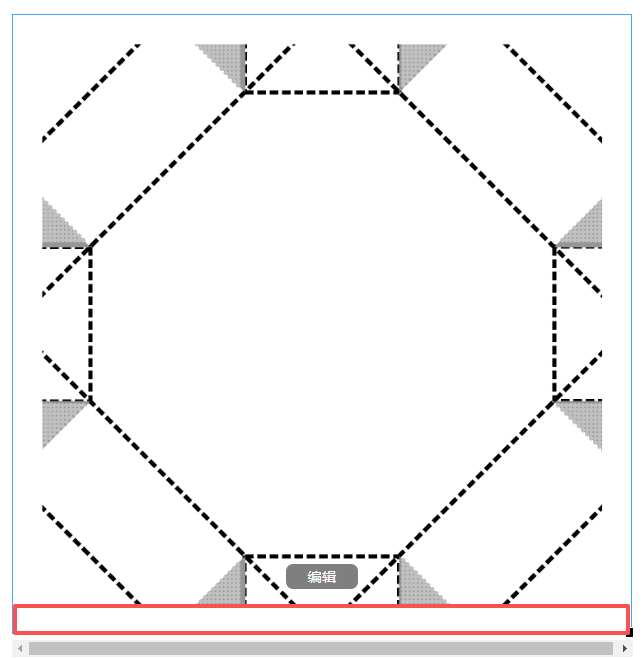
图片置于文字下方
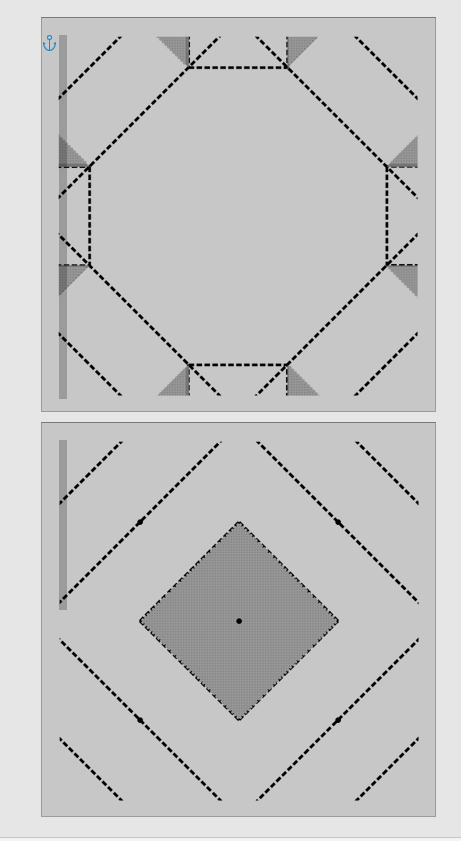
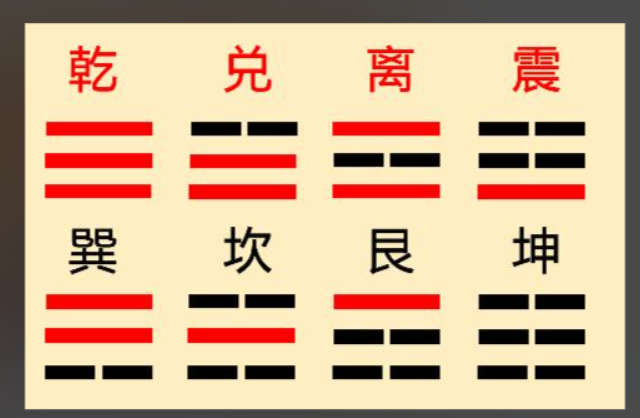
明天继续贴神兽图+贴八卦图案
再见2025,希望2026年,全家依旧能够平平安安,健康康康