使用logging模块追溯PyQt5程序中的错误。总结了一下经验,特此写这篇文章。2025年12月29日。这些测试用的代码在保存于我的电脑的路径:D:\My Program\python基础类\logging_study\梳理定位错误日志功能\梳理第1个聊天记录。
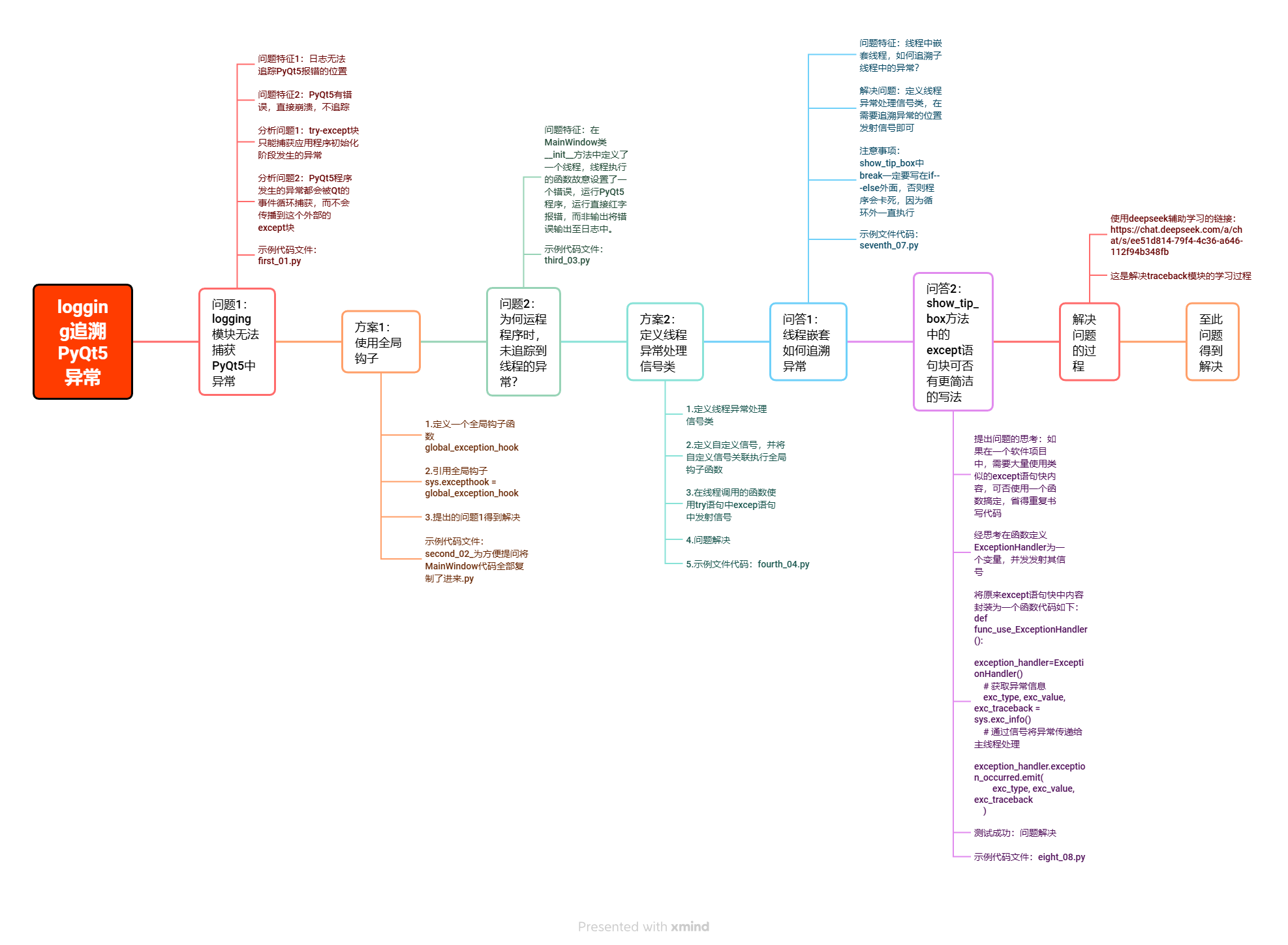
第一节 测试运行这些代码配置文件
一、logging.conf
python
[loggers]
keys=root,applog

[handlers]
keys=consoleHandler,fileHandler

[formatters]
keys=simpleFormatter

[logger_root]
level=DEBUG
handlers=consoleHandler

[logger_applog]
level=DEBUG
handlers=consoleHandler,fileHandler
qualname=applog
propagate=0

[handler_consoleHandler]
class=StreamHandler
level=DEBUG
formatter=simpleFormatter
args=(sys.stdout,)

[handler_fileHandler]
class=handlers.TimedRotatingFileHandler
level=DEBUG
formatter=simpleFormatter
args=('applog.log', 'midnight',1,0) # 文件名称

[formatter_simpleFormatter]
format=%(asctime)s - %(name)s - %(levelname)s - %(message)s
datefmt=%Y-%m-%d %H:%M:%S
二、func_A.py
python
import func_B
def testA():
    func_B.testB()
def testA1():
    func_B.testB1()
def testA2(name,num):
    func_B.testB2(name,num)
三、func_B.py
python
import time
import gevent


def testB():
    print("调用")
    1/0
    time.sleep(1)


def testB1():
    print("调用")
    print(1 / 0)
    time.sleep(1)


def testB2(name, num):
    for i in range(num):
        print(f"~~~携程~~~{name}~~~{i}~~~")
        if i == 8:
            # 直接抛出异常
            print(1 / 0)
        gevent.sleep(1)
第二节 PyQt5特殊的异常捕获机制
这个try-except块只能捕获应用程序初始化阶段发生的异常(例如创建QApplication或MainWindow时出现的错误)。一旦进入Qt的事件循环(app.exec_()),所有在事件处理函数(如按钮点击)中发生的异常都会被Qt的事件循环捕获,而不会传播到这个外部的except块。对应文件名:first_01.py
python
import sys
from PyQt5.QtWidgets import (
    QApplication, QMainWindow, QWidget, QVBoxLayout,
    QPushButton, QDialog, QHBoxLayout, QLabel,
    QMessageBox
)
import logging.config
"""
这份deepseek聊天记录的链接:
https://chat.deepseek.com/a/chat/s/c86d4484-9fd6-4ff0-8acd-7648c1b7fe0b
"""
"""
提示问题:本代码的问题:日志无法追踪PyQt5报错的位置,PyQt5有错误,直接崩溃,不而追踪
问题原因:
1.异常捕获范围不足:

try:
    app = QApplication(sys.argv)
    window = MainWindow()
    window.show()
    sys.exit(app.exec_())
except Exception as e:
    logger.exception(e)
这个try-except块只能捕获应用程序初始化阶段发生的异常(例如创建QApplication或MainWindow时出现的错误)。
一旦进入Qt的事件循环(app.exec_()),所有在事件处理函数(如按钮点击)中发生的异常都会被Qt的事件循环捕获,而
不会传播到这个外部的except块。

2.Qt的事件处理机制:

当您点击按钮五时,会触发on_button5_clicked方法

该方法中的x=1/0会引发ZeroDivisionError

这个异常会被Qt的事件循环捕获,导致:

程序崩溃(显示Python错误信息)

异常不会传播到主线程的try-except块

因此logger.exception(e)永远不会执行
"""

class CustomDialog(QDialog):
    def __init__(self, parent=None):
        super().__init__(parent)
        self.setWindowTitle("功能对话框")
        self.setMinimumSize(300, 150)

        # 创建主布局
        main_layout = QVBoxLayout()

        # 添加标签
        main_layout.addWidget(QLabel("请选择要执行的操作:"))

        # 创建按钮布局
        button_layout = QHBoxLayout()

        # 创建两个功能按钮
        self.btn_action1 = QPushButton("模拟功能一")
        self.btn_action2 = QPushButton("模拟功能二")
        self.btn_action1.clicked.connect(self.perform_action1)
        self.btn_action2.clicked.connect(self.perform_action2)

        # 将按钮添加到按钮布局
        button_layout.addWidget(self.btn_action1)
        button_layout.addWidget(self.btn_action2)

        # 将按钮布局添加到主布局
        main_layout.addLayout(button_layout)

        # 设置对话框布局
        self.setLayout(main_layout)

    def perform_action1(self):
        QMessageBox.information(self, "功能一", "执行了模拟功能一:数据备份完成!")

    def perform_action2(self):
        QMessageBox.warning(self, "功能二", "执行了模拟功能二:系统清理完成!")


class MainWindow(QMainWindow):
    def __init__(self):
        super().__init__()
        self.setWindowTitle("垂直布局按钮示例")
        self.setGeometry(300, 300, 400, 400)

        # 创建中央部件
        central_widget = QWidget()
        self.setCentralWidget(central_widget)

        # 创建垂直布局
        layout = QVBoxLayout()

        # 创建6个按钮并连接到不同的槽函数
        self.button1 = QPushButton("按钮一")
        self.button1.clicked.connect(self.on_button1_clicked)

        self.button2 = QPushButton("按钮二")
        self.button2.clicked.connect(self.on_button2_clicked)

        self.button3 = QPushButton("按钮三")
        self.button3.clicked.connect(self.on_button3_clicked)

        self.button4 = QPushButton("按钮四")
        self.button4.clicked.connect(self.on_button4_clicked)

        self.button5 = QPushButton("按钮五")
        self.button5.clicked.connect(self.on_button5_clicked)

        self.button6 = QPushButton("打开对话框")
        self.button6.clicked.connect(self.on_button6_clicked)

        # 将按钮添加到布局
        layout.addWidget(self.button1)
        layout.addWidget(self.button2)
        layout.addWidget(self.button3)
        layout.addWidget(self.button4)
        layout.addWidget(self.button5)
        layout.addWidget(self.button6)

        # 添加拉伸因子使按钮在顶部显示
        layout.addStretch(1)

        # 设置中央部件的布局
        central_widget.setLayout(layout)

    def on_button1_clicked(self):
        QMessageBox.information(self, "按钮一", "按钮一被点击:执行功能A")

    def on_button2_clicked(self):
        QMessageBox.information(self, "按钮二", "按钮二被点击:执行功能B")

    def on_button3_clicked(self):
        QMessageBox.information(self, "按钮三", "按钮三被点击:执行功能C")

    def on_button4_clicked(self):
        QMessageBox.information(self, "按钮四", "按钮四被点击:执行功能D")

    def on_button5_clicked(self):
        x=1/0
        QMessageBox.information(self, "按钮五", "按钮五被点击:执行功能E")

    def on_button6_clicked(self):
        dialog = CustomDialog(self)
        dialog.exec_()


if __name__ == "__main__":
    logging.config.fileConfig("../logging.conf")
    logger = logging.getLogger("applog")
    try:
        app = QApplication(sys.argv)
        window = MainWindow()
        window.show()
        sys.exit(app.exec_())
    except Exception as e:
        logger.exception(e)
第三节 全局钩子
为了解决上一个代码中,PyQt5中异常机制问题,特用全局钩子解决这个问题。对应文件名:
second_02_为方便提问将MainWindow代码全部复制了进来.py
python
import sys
import traceback
from PyQt5.QtWidgets import (
    QApplication, QMainWindow, QWidget, QVBoxLayout,
    QPushButton, QDialog, QHBoxLayout, QLabel,
    QMessageBox
)

import logging.config
"""
解释全局钩子sys.excepthook = global_exception_hook的链接
https://chat.deepseek.com/a/chat/s/0aedf6ed-e82f-4e9a-9dec-7be1807e782a
"""

def global_exception_hook(exc_type, exc_value, exc_traceback):
    """全局异常处理函数"""


    logger = logging.getLogger("applog")
    error_msg = "".join(traceback.format_exception(exc_type, exc_value, exc_traceback))
    logger.error(f"全局异常捕获:\n{error_msg}")

    # 创建临时QApplication实例(如果不存在)
    app = QApplication.instance() or QApplication(sys.argv)
    # 显示错误提示
    QMessageBox.critical(
        None,
        "系统错误",
        f"发生未预期的错误: {exc_value}\n\n详细信息已记录到日志文件。"
    )

    # 对于致命错误,退出应用
    if not isinstance(exc_value, (KeyboardInterrupt, SystemExit)):
        sys.exit(1)


# 设置全局异常钩子
sys.excepthook = global_exception_hook
class CustomDialog(QDialog):
    def __init__(self, parent=None):
        super().__init__(parent)
        self.setWindowTitle("功能对话框")
        self.setMinimumSize(300, 150)

        # 创建主布局
        main_layout = QVBoxLayout()

        # 添加标签
        main_layout.addWidget(QLabel("请选择要执行的操作:"))

        # 创建按钮布局
        button_layout = QHBoxLayout()

        # 创建两个功能按钮
        self.btn_action1 = QPushButton("模拟功能一")
        self.btn_action2 = QPushButton("模拟功能二")
        self.btn_action1.clicked.connect(self.perform_action1)
        self.btn_action2.clicked.connect(self.perform_action2)

        # 将按钮添加到按钮布局
        button_layout.addWidget(self.btn_action1)
        button_layout.addWidget(self.btn_action2)

        # 将按钮布局添加到主布局
        main_layout.addLayout(button_layout)

        # 设置对话框布局
        self.setLayout(main_layout)

    def perform_action1(self):
        QMessageBox.information(self, "功能一", "执行了模拟功能一:数据备份完成!")

    def perform_action2(self):
        QMessageBox.warning(self, "功能二", "执行了模拟功能二:系统清理完成!")
class MainWindow(QMainWindow):
    def __init__(self):
        super().__init__()
        self.setWindowTitle("垂直布局按钮示例")
        self.setGeometry(300, 300, 400, 400)

        # 创建中央部件
        central_widget = QWidget()
        self.setCentralWidget(central_widget)

        # 创建垂直布局
        layout = QVBoxLayout()

        # 创建6个按钮并连接到不同的槽函数
        self.button1 = QPushButton("按钮一")
        self.button1.clicked.connect(self.on_button1_clicked)

        self.button2 = QPushButton("按钮二")
        self.button2.clicked.connect(self.on_button2_clicked)

        self.button3 = QPushButton("按钮三")
        self.button3.clicked.connect(self.on_button3_clicked)

        self.button4 = QPushButton("按钮四")
        self.button4.clicked.connect(self.on_button4_clicked)

        self.button5 = QPushButton("按钮五")
        self.button5.clicked.connect(self.on_button5_clicked)

        self.button6 = QPushButton("打开对话框")
        self.button6.clicked.connect(self.on_button6_clicked)

        # 将按钮添加到布局
        layout.addWidget(self.button1)
        layout.addWidget(self.button2)
        layout.addWidget(self.button3)
        layout.addWidget(self.button4)
        layout.addWidget(self.button5)
        layout.addWidget(self.button6)

        # 添加拉伸因子使按钮在顶部显示
        layout.addStretch(1)

        # 设置中央部件的布局
        central_widget.setLayout(layout)

    def on_button1_clicked(self):
        QMessageBox.information(self, "按钮一", "按钮一被点击:执行功能A")

    def on_button2_clicked(self):
        QMessageBox.information(self, "按钮二", "按钮二被点击:执行功能B")

    def on_button3_clicked(self):
        QMessageBox.information(self, "按钮三", "按钮三被点击:执行功能C")

    def on_button4_clicked(self):
        QMessageBox.information(self, "按钮四", "按钮四被点击:执行功能D")

    def on_button5_clicked(self):
        x=1/0
        QMessageBox.information(self, "按钮五", "按钮五被点击:执行功能E")

    def on_button6_clicked(self):
        dialog = CustomDialog(self)
        dialog.exec_()

if __name__ == "__main__":

    logging.config.fileConfig("logging.conf")
    logger = logging.getLogger("applog")

    try:
        app = QApplication(sys.argv)
        window = MainWindow()
        window.show()
        sys.exit(app.exec_())
    except Exception as e:
        # 处理初始化阶段的异常
        logger.exception("应用程序初始化错误")
        QMessageBox.critical(None, "启动错误", f"应用程序启动失败: {e}")
        sys.exit(1)
第四节 无法捕获线程中的异常
有了全局钩子,为何运程程序时,未追踪到线程的异常?下面是说明这个问题的示例代码。对应文件名:third_03.py
python
import sys
import threading
import time
import traceback
from PyQt5.QtWidgets import (
    QApplication, QMainWindow, QWidget, QVBoxLayout,
    QPushButton, QDialog, QHBoxLayout, QLabel,
    QMessageBox
)
import logging.config
import func_A
"""
为何运程程序时,未追踪到线程的异常?
"""
def global_exception_hook(exc_type, exc_value, exc_traceback):
    """全局异常处理函数"""
    # 确保日志系统已初始化
    if not logging.getLogger("applog").hasHandlers():
        logging.basicConfig(level=logging.ERROR)

    logger = logging.getLogger("applog")
    error_msg = "".join(traceback.format_exception(exc_type, exc_value, exc_traceback))
    logger.error(f"全局异常捕获:\n{error_msg}")

    # 创建临时QApplication实例(如果不存在)
    app = QApplication.instance()
    if app is None:
        app = QApplication(sys.argv)

    # 显示错误提示
    QMessageBox.critical(
        None,
        "系统错误",
        f"发生未预期的错误: {exc_value}\n\n详细信息已记录到日志文件。"
    )

    # 对于致命错误,退出应用
    if not isinstance(exc_value, (KeyboardInterrupt, SystemExit)):
        sys.exit(1)


# 设置全局异常钩子
sys.excepthook = global_exception_hook


class CustomDialog(QDialog):
    def __init__(self, parent=None):
        super().__init__(parent)
        self.setWindowTitle("功能对话框")
        self.setMinimumSize(300, 150)

        # 创建主布局
        main_layout = QVBoxLayout()

        # 添加标签
        main_layout.addWidget(QLabel("请选择要执行的操作:"))

        # 创建按钮布局
        button_layout = QHBoxLayout()

        # 创建两个功能按钮
        self.btn_action1 = QPushButton("模拟功能一")
        self.btn_action2 = QPushButton("模拟功能二")
        self.btn_action1.clicked.connect(self.perform_action1)
        self.btn_action2.clicked.connect(self.perform_action2)

        # 将按钮添加到按钮布局
        button_layout.addWidget(self.btn_action1)
        button_layout.addWidget(self.btn_action2)

        # 将按钮布局添加到主布局
        main_layout.addLayout(button_layout)

        # 设置对话框布局
        self.setLayout(main_layout)

    def perform_action1(self):
        x=eval("b")
        QMessageBox.information(self, "功能一", "执行了模拟功能一:数据备份完成!")

    def perform_action2(self):
        x = 1 / 0
        QMessageBox.warning(self, "功能二", "执行了模拟功能二:系统清理完成!")


class MainWindow(QMainWindow):
    def __init__(self):
        super().__init__()
        self.setWindowTitle("垂直布局按钮示例")
        self.setGeometry(300, 300, 400, 400)
        t1=threading.Thread(target=self.thread_test)
        t1.daemon=True
        t1.start()
        # 创建中央部件
        central_widget = QWidget()
        self.setCentralWidget(central_widget)

        # 创建垂直布局
        layout = QVBoxLayout()

        # 创建6个按钮并连接到不同的槽函数
        self.button1 = QPushButton("按钮一")
        self.button1.clicked.connect(self.on_button1_clicked)

        self.button2 = QPushButton("按钮二")
        self.button2.clicked.connect(self.on_button2_clicked)

        self.button3 = QPushButton("按钮三")
        self.button3.clicked.connect(self.on_button3_clicked)

        self.button4 = QPushButton("按钮四")
        self.button4.clicked.connect(self.on_button4_clicked)

        self.button5 = QPushButton("按钮五")
        self.button5.clicked.connect(self.on_button5_clicked)

        self.button6 = QPushButton("打开对话框")
        self.button6.clicked.connect(self.on_button6_clicked)

        # 将按钮添加到布局
        layout.addWidget(self.button1)
        layout.addWidget(self.button2)
        layout.addWidget(self.button3)
        layout.addWidget(self.button4)
        layout.addWidget(self.button5)
        layout.addWidget(self.button6)

        # 添加拉伸因子使按钮在顶部显示
        layout.addStretch(1)

        # 设置中央部件的布局
        central_widget.setLayout(layout)
    def thread_test(self):
        while True:
            func_A.testA()
            time.sleep(1)
    def on_button1_clicked(self):
        QMessageBox.information(self, "按钮一", "按钮一被点击:执行功能A")

    def on_button2_clicked(self):
        QMessageBox.information(self, "按钮二", "按钮二被点击:执行功能B")

    def on_button3_clicked(self):
        QMessageBox.information(self, "按钮三", "按钮三被点击:执行功能C")

    def on_button4_clicked(self):
        QMessageBox.information(self, "按钮四", "按钮四被点击:执行功能D")

    def on_button5_clicked(self):
        # 这里故意制造一个除零错误
        x = 1 / 0
        QMessageBox.information(self, "按钮五", "按钮五被点击:执行功能E")

    def on_button6_clicked(self):
        dialog = CustomDialog(self)
        dialog.exec_()


if __name__ == "__main__":
    # 配置日志系统
    try:
        logging.config.fileConfig("logging.conf")
    except Exception as e:
        # 如果配置文件不存在,创建基本配置
        logging.basicConfig(
            level=logging.DEBUG,
            format='%(asctime)s - %(name)s - %(levelname)s - %(message)s',
            filename='app.log',
            filemode='w'
        )

    logger = logging.getLogger("applog")

    try:
        app = QApplication(sys.argv)
        window = MainWindow()
        window.show()
        sys.exit(app.exec_())
    except Exception as e:
        # 捕获应用程序初始化阶段的异常
        logger.exception("应用程序初始化错误")
        QMessageBox.critical(None, "启动错误", f"应用程序启动失败: {e}")
        sys.exit(1)
# 其中,
# func_A代码如下:
# import func_B
# def testA():
#     func_B.testB()
# func_B代码如下:
# def testB():
#     print("调用")
#     print(1/0)
# 为何运程程序时,未抛出异常
第五节 线程内异常处理函数
通过构造一个线程内异常处理类来解决无法追踪线程内异常的问题。对应文件名:
fourth_04.py
python
import sys
import threading
import time
import traceback
from PyQt5.QtWidgets import (
    QApplication, QMainWindow, QWidget, QVBoxLayout,
    QPushButton, QDialog, QHBoxLayout, QLabel,
    QMessageBox
)
from PyQt5.QtCore import pyqtSignal, QObject
import logging.config
import func_A


def global_exception_hook(exc_type, exc_value, exc_traceback):
    """全局异常处理函数"""
    # 确保日志系统已初始化
    if not logging.getLogger("applog").hasHandlers():
        logging.basicConfig(level=logging.ERROR)

    logger = logging.getLogger("applog")
    error_msg = "".join(traceback.format_exception(exc_type, exc_value, exc_traceback))
    logger.error(f"全局异常捕获:\n{error_msg}")

    # 创建临时QApplication实例(如果不存在)
    app = QApplication.instance()
    if app is None:
        app = QApplication(sys.argv)

    # 显示错误提示
    QMessageBox.critical(
        None,
        "系统错误",
        f"发生未预期的错误: {exc_value}\n\n详细信息已记录到日志文件。"
    )

    # 对于致命错误,退出应用
    if not isinstance(exc_value, (KeyboardInterrupt, SystemExit)):
        sys.exit(1)


# 设置全局异常钩子
sys.excepthook = global_exception_hook


class ExceptionHandler(QObject):
    """线程异常处理信号类"""
    exception_occurred = pyqtSignal(object, object, object)

    def __init__(self):
        super().__init__()
        self.exception_occurred.connect(self.handle_exception)

    def handle_exception(self, exc_type, exc_value, exc_traceback):
        """处理线程异常"""
        global_exception_hook(exc_type, exc_value, exc_traceback)


class CustomDialog(QDialog):
    def __init__(self, parent=None):
        super().__init__(parent)
        self.setWindowTitle("功能对话框")
        self.setMinimumSize(300, 150)

        # 创建主布局
        main_layout = QVBoxLayout()

        # 添加标签
        main_layout.addWidget(QLabel("请选择要执行的操作:"))

        # 创建按钮布局
        button_layout = QHBoxLayout()

        # 创建两个功能按钮
        self.btn_action1 = QPushButton("模拟功能一")
        self.btn_action2 = QPushButton("模拟功能二")
        self.btn_action1.clicked.connect(self.perform_action1)
        self.btn_action2.clicked.connect(self.perform_action2)

        # 将按钮添加到按钮布局
        button_layout.addWidget(self.btn_action1)
        button_layout.addWidget(self.btn_action2)

        # 将按钮布局添加到主布局
        main_layout.addLayout(button_layout)

        # 设置对话框布局
        self.setLayout(main_layout)

    def perform_action1(self):
        # 模拟未定义变量错误
        x = eval("b")
        QMessageBox.information(self, "功能一", "执行了模拟功能一:数据备份完成!")

    def perform_action2(self):
        # 模拟除零错误
        x = 1 / 0
        QMessageBox.warning(self, "功能二", "执行了模拟功能二:系统清理完成!")


class MainWindow(QMainWindow):
    def __init__(self):
        super().__init__()
        self.setWindowTitle("垂直布局按钮示例")
        self.setGeometry(300, 300, 400, 400)

        # 创建异常处理器
        self.exception_handler = ExceptionHandler()

        # 启动后台线程
        t1 = threading.Thread(target=self.thread_test)
        t1.daemon = True
        t1.start()

        # 创建中央部件
        central_widget = QWidget()
        self.setCentralWidget(central_widget)

        # 创建垂直布局
        layout = QVBoxLayout()

        # 创建6个按钮并连接到不同的槽函数
        self.button1 = QPushButton("按钮一")
        self.button1.clicked.connect(self.on_button1_clicked)

        self.button2 = QPushButton("按钮二")
        self.button2.clicked.connect(self.on_button2_clicked)

        self.button3 = QPushButton("按钮三")
        self.button3.clicked.connect(self.on_button3_clicked)

        self.button4 = QPushButton("按钮四")
        self.button4.clicked.connect(self.on_button4_clicked)

        self.button5 = QPushButton("按钮五")
        self.button5.clicked.connect(self.on_button5_clicked)

        self.button6 = QPushButton("打开对话框")
        self.button6.clicked.connect(self.on_button6_clicked)

        # 将按钮添加到布局
        layout.addWidget(self.button1)
        layout.addWidget(self.button2)
        layout.addWidget(self.button3)
        layout.addWidget(self.button4)
        layout.addWidget(self.button5)
        layout.addWidget(self.button6)

        # 添加拉伸因子使按钮在顶部显示
        layout.addStretch(1)

        # 设置中央部件的布局
        central_widget.setLayout(layout)

    def thread_test(self):
        """后台线程函数"""
        while True:
            try:
                func_A.testA()
                time.sleep(1)
            except Exception as e:
                # 获取异常信息
                exc_type, exc_value, exc_traceback = sys.exc_info()
                # 通过信号将异常传递给主线程处理
                self.exception_handler.exception_occurred.emit(
                    exc_type, exc_value, exc_traceback
                )
                # 等待一段时间后继续,避免快速循环报错
                time.sleep(5)

    def on_button1_clicked(self):
        QMessageBox.information(self, "按钮一", "按钮一被点击:执行功能A")

    def on_button2_clicked(self):
        QMessageBox.information(self, "按钮二", "按钮二被点击:执行功能B")

    def on_button3_clicked(self):
        QMessageBox.information(self, "按钮三", "按钮三被点击:执行功能C")

    def on_button4_clicked(self):
        QMessageBox.information(self, "按钮四", "按钮四被点击:执行功能D")

    def on_button5_clicked(self):
        # 这里故意制造一个除零错误
        x = 1 / 0
        QMessageBox.information(self, "按钮五", "按钮五被点击:执行功能E")

    def on_button6_clicked(self):
        dialog = CustomDialog(self)
        dialog.exec_()


if __name__ == "__main__":
    # 配置日志系统
    try:
        logging.config.fileConfig("logging.conf")
    except Exception as e:
        # 如果配置文件不存在,创建基本配置
        logging.basicConfig(
            level=logging.DEBUG,
            format='%(asctime)s - %(name)s - %(levelname)s - %(message)s',
            filename='app.log',
            filemode='w'
        )

    logger = logging.getLogger("applog")

    try:
        app = QApplication(sys.argv)
        window = MainWindow()
        window.show()
        sys.exit(app.exec_())
    except Exception as e:
        # 捕获应用程序初始化阶段的异常
        logger.exception("应用程序初始化错误")
        QMessageBox.critical(None, "启动错误", f"应用程序启动失败: {e}")
        sys.exit(1)
第六节、全局异常处理类
同上一个异常处理函数不同,这次构造异常处理类。感觉同第四节没有区别。复习这一节内容可考虑不看。对应文件名:
fifth_05.py
python
import sys
import threading
import time
import traceback
from PyQt5.QtWidgets import (
    QApplication, QMainWindow, QWidget, QVBoxLayout,
    QPushButton, QDialog, QHBoxLayout, QLabel,
    QMessageBox
)
from PyQt5.QtCore import pyqtSignal, QObject
import logging.config
import func_A


def global_exception_hook(exc_type, exc_value, exc_traceback):
    """全局异常处理函数"""
    # 确保日志系统已初始化
    if not logging.getLogger("applog").hasHandlers():
        logging.basicConfig(level=logging.ERROR)

    logger = logging.getLogger("applog")
    error_msg = "".join(traceback.format_exception(exc_type, exc_value, exc_traceback))
    logger.error(f"全局异常捕获:\n{error_msg}")

    # 创建临时QApplication实例(如果不存在)
    app = QApplication.instance()
    if app is None:
        app = QApplication(sys.argv)

    # 显示错误提示
    QMessageBox.critical(
        None,
        "系统错误",
        f"发生未预期的错误: {exc_value}\n\n详细信息已记录到日志文件。"
    )

    # 对于致命错误,退出应用
    if not isinstance(exc_value, (KeyboardInterrupt, SystemExit)):
        sys.exit(1)


# 设置全局异常钩子
sys.excepthook = global_exception_hook


class ExceptionHandler(QObject):
    """线程异常处理信号类"""
    exception_occurred = pyqtSignal(object, object, object)

    def __init__(self):
        super().__init__()
        self.exception_occurred.connect(self.handle_exception)

    def handle_exception(self, exc_type, exc_value, exc_traceback):
        """处理线程异常"""
        global_exception_hook(exc_type, exc_value, exc_traceback)


class CustomDialog(QDialog):
    def __init__(self, parent=None):
        super().__init__(parent)
        self.setWindowTitle("功能对话框")
        self.setMinimumSize(300, 150)

        # 创建主布局
        main_layout = QVBoxLayout()

        # 添加标签
        main_layout.addWidget(QLabel("请选择要执行的操作:"))

        # 创建按钮布局
        button_layout = QHBoxLayout()

        # 创建两个功能按钮
        self.btn_action1 = QPushButton("模拟功能一")
        self.btn_action2 = QPushButton("模拟功能二")
        self.btn_action1.clicked.connect(self.perform_action1)
        self.btn_action2.clicked.connect(self.perform_action2)

        # 将按钮添加到按钮布局
        button_layout.addWidget(self.btn_action1)
        button_layout.addWidget(self.btn_action2)

        # 将按钮布局添加到主布局
        main_layout.addLayout(button_layout)

        # 设置对话框布局
        self.setLayout(main_layout)

    def perform_action1(self):
        # 模拟未定义变量错误
        x = eval("b")
        QMessageBox.information(self, "功能一", "执行了模拟功能一:数据备份完成!")

    def perform_action2(self):
        # 模拟除零错误
        x = 1 / 0
        QMessageBox.warning(self, "功能二", "执行了模拟功能二:系统清理完成!")


class MainWindow(QMainWindow):
    def __init__(self):
        super().__init__()
        self.setWindowTitle("垂直布局按钮示例")
        self.setGeometry(300, 300, 400, 400)

        # 创建异常处理器
        self.exception_handler = ExceptionHandler()

        # 启动后台线程
        t1 = threading.Thread(target=self.thread_test)
        t1.daemon = True
        t1.start()

        # 创建中央部件
        central_widget = QWidget()
        self.setCentralWidget(central_widget)

        # 创建垂直布局
        layout = QVBoxLayout()

        # 创建6个按钮并连接到不同的槽函数
        self.button1 = QPushButton("按钮一")
        self.button1.clicked.connect(self.on_button1_clicked)

        self.button2 = QPushButton("按钮二")
        self.button2.clicked.connect(self.on_button2_clicked)

        self.button3 = QPushButton("按钮三")
        self.button3.clicked.connect(self.on_button3_clicked)

        self.button4 = QPushButton("按钮四")
        self.button4.clicked.connect(self.on_button4_clicked)

        self.button5 = QPushButton("按钮五")
        self.button5.clicked.connect(self.on_button5_clicked)

        self.button6 = QPushButton("打开对话框")
        self.button6.clicked.connect(self.on_button6_clicked)

        # 将按钮添加到布局
        layout.addWidget(self.button1)
        layout.addWidget(self.button2)
        layout.addWidget(self.button3)
        layout.addWidget(self.button4)
        layout.addWidget(self.button5)
        layout.addWidget(self.button6)

        # 添加拉伸因子使按钮在顶部显示
        layout.addStretch(1)

        # 设置中央部件的布局
        central_widget.setLayout(layout)

    def thread_test(self):
        """后台线程函数"""
        while True:
            try:
                func_A.testA()
                time.sleep(1)
            except Exception as e:
                # 获取异常信息
                exc_type, exc_value, exc_traceback = sys.exc_info()
                # 通过信号将异常传递给主线程处理
                self.exception_handler.exception_occurred.emit(
                    exc_type, exc_value, exc_traceback
                )
                # 等待一段时间后继续,避免快速循环报错
                time.sleep(5)

    def on_button1_clicked(self):
        QMessageBox.information(self, "按钮一", "按钮一被点击:执行功能A")

    def on_button2_clicked(self):
        QMessageBox.information(self, "按钮二", "按钮二被点击:执行功能B")

    def on_button3_clicked(self):
        QMessageBox.information(self, "按钮三", "按钮三被点击:执行功能C")

    def on_button4_clicked(self):
        QMessageBox.information(self, "按钮四", "按钮四被点击:执行功能D")

    def on_button5_clicked(self):
        # 这里故意制造一个除零错误
        x = 1 / 0
        QMessageBox.information(self, "按钮五", "按钮五被点击:执行功能E")

    def on_button6_clicked(self):
        dialog = CustomDialog(self)
        dialog.exec_()


if __name__ == "__main__":
    # 配置日志系统
    try:
        logging.config.fileConfig("logging.conf")
    except Exception as e:
        # 如果配置文件不存在,创建基本配置
        logging.basicConfig(
            level=logging.DEBUG,
            format='%(asctime)s - %(name)s - %(levelname)s - %(message)s',
            filename='app.log',
            filemode='w'
        )

    logger = logging.getLogger("applog")

    try:
        app = QApplication(sys.argv)
        window = MainWindow()
        window.show()
        sys.exit(app.exec_())
    except Exception as e:
        # 捕获应用程序初始化阶段的异常
        logger.exception("应用程序初始化错误")
        QMessageBox.critical(None, "启动错误", f"应用程序启动失败: {e}")
        sys.exit(1)
第七节 线程嵌套中的异常
线程嵌套,即在线程中再加子线程。切记:show_tip_box方法中的break一定要写在try语句外面,否则会一直弹出报错窗口直至卡死。说明在需要查找异常的位置使用exception_handler对象发射信号就可以了。对应文件名:
seventh_07.py
python
import sys
import threading
import time
import traceback
from PyQt5.QtWidgets import (
    QApplication, QMainWindow, QWidget, QVBoxLayout,
    QPushButton, QDialog, QHBoxLayout, QLabel,
    QMessageBox
)
from PyQt5.QtCore import pyqtSignal, QObject, QThread
import logging.config
import func_A
def pty():
    1/0

def global_exception_hook(exc_type, exc_value, exc_traceback):
    """全局异常处理函数"""
    # 确保日志系统已初始化
    if not logging.getLogger("applog").hasHandlers():
        logging.basicConfig(level=logging.ERROR)

    logger = logging.getLogger("applog")
    error_msg = "".join(traceback.format_exception(exc_type, exc_value, exc_traceback))
    logger.error(f"全局异常捕获:\n{error_msg}")

    # 创建临时QApplication实例(如果不存在)
    app = QApplication.instance()
    if app is None:
        app = QApplication(sys.argv)

    # 显示错误提示
    QMessageBox.critical(
        None,
        "系统错误",
        f"发生未预期的错误: {exc_value}\n\n详细信息已记录到日志文件。"
    )

    # 对于致命错误,退出应用
    if not isinstance(exc_value, (KeyboardInterrupt, SystemExit)):
        sys.exit(1)


# 设置全局异常钩子
sys.excepthook = global_exception_hook


class ExceptionHandler(QObject):
    """线程异常处理信号类"""
    exception_occurred = pyqtSignal(object, object, object)

    def __init__(self):
        super().__init__()
        self.exception_occurred.connect(self.handle_exception)

    def handle_exception(self, exc_type, exc_value, exc_traceback):
        """处理线程异常"""
        global_exception_hook(exc_type, exc_value, exc_traceback)


class CustomDialog(QDialog):
    def __init__(self, parent=None):
        super().__init__(parent)
        self.setWindowTitle("功能对话框")
        self.setMinimumSize(300, 150)

        # 创建主布局
        main_layout = QVBoxLayout()

        # 添加标签
        main_layout.addWidget(QLabel("请选择要执行的操作:"))

        # 创建按钮布局
        button_layout = QHBoxLayout()

        # 创建两个功能按钮
        self.btn_action1 = QPushButton("模拟功能一")
        self.btn_action2 = QPushButton("模拟功能二")
        self.btn_action1.clicked.connect(self.perform_action1)
        self.btn_action2.clicked.connect(self.perform_action2)

        # 将按钮添加到按钮布局
        button_layout.addWidget(self.btn_action1)
        button_layout.addWidget(self.btn_action2)

        # 将按钮布局添加到主布局
        main_layout.addLayout(button_layout)

        # 设置对话框布局
        self.setLayout(main_layout)

    def perform_action1(self):
        # 模拟未定义变量错误
        x = eval("b")
        QMessageBox.information(self, "功能一", "执行了模拟功能一:数据备份完成!")

    def perform_action2(self):
        # 模拟除零错误
        x = 1 / 0
        QMessageBox.warning(self, "功能二", "执行了模拟功能二:系统清理完成!")

class TestThread(QThread):
    signal=pyqtSignal(int)
    def __init__(self,mainwindow):
        super().__init__()
        self.mainwindow=mainwindow
        self.num=0
    def run(self):
        t1=threading.Thread(target=self.count_num)
        t2=threading.Thread(target=self.show_tip_box)
        t1.start()
        t2.start()
    def count_num(self):
        for i in range(25):
            print("正在计算数字")
            self.num=self.num+1
            time.sleep(1)
    def show_tip_box(self):
        while True:
            print(f"~~循环执行show_tip_box:{self.num}~~")
            if self.num<20:
                pass
            else:
                try:
                    pty()
                    self.signal.emit(self.num)

                except Exception as e:
                    # 获取异常信息
                    exc_type, exc_value, exc_traceback = sys.exc_info()
                    # 通过信号将异常传递给主线程处理
                    self.mainwindow.exception_handler.exception_occurred.emit(
                        exc_type, exc_value, exc_traceback
                    )
                    # 等待一段时间后继续,避免快速循环报错
                break
class MainWindow(QMainWindow):
    def __init__(self):
        super().__init__()
        self.setWindowTitle("垂直布局按钮示例")
        self.setGeometry(300, 300, 400, 400)

        # 创建异常处理器
        self.exception_handler = ExceptionHandler()

        # 创建中央部件
        central_widget = QWidget()
        self.setCentralWidget(central_widget)

        # 创建垂直布局
        layout = QVBoxLayout()

        # 创建6个按钮并连接到不同的槽函数
        self.button1 = QPushButton("线程嵌套")
        self.button1.clicked.connect(self.on_button1_clicked)

        self.button2 = QPushButton("按钮二")
        self.button2.clicked.connect(self.on_button2_clicked)

        self.button3 = QPushButton("按钮三")
        self.button3.clicked.connect(self.on_button3_clicked)

        self.button4 = QPushButton("按钮四")
        self.button4.clicked.connect(self.on_button4_clicked)

        self.button5 = QPushButton("按钮五")
        self.button5.clicked.connect(self.on_button5_clicked)

        self.button6 = QPushButton("打开对话框")
        self.button6.clicked.connect(self.on_button6_clicked)

        # 将按钮添加到布局
        layout.addWidget(self.button1)
        layout.addWidget(self.button2)
        layout.addWidget(self.button3)
        layout.addWidget(self.button4)
        layout.addWidget(self.button5)
        layout.addWidget(self.button6)

        # 添加拉伸因子使按钮在顶部显示
        layout.addStretch(1)

        # 设置中央部件的布局
        central_widget.setLayout(layout)


    def on_button1_clicked(self):
        self.thread=TestThread(mainwindow=self)
        self.thread.signal.connect(self.show_tip_messagbox)
        self.thread.start()
        print("~~线程已经执行~~~")
    def on_button2_clicked(self):
        QMessageBox.information(self, "按钮二", "按钮二被点击:执行功能B")

    def on_button3_clicked(self):
        QMessageBox.information(self, "按钮三", "按钮三被点击:执行功能C")

    def on_button4_clicked(self):
        QMessageBox.information(self, "按钮四", "按钮四被点击:执行功能D")

    def on_button5_clicked(self):
        # 这里故意制造一个除零错误
        x = 1 / 0
        QMessageBox.information(self, "按钮五", "按钮五被点击:执行功能E")

    def on_button6_clicked(self):
        dialog = CustomDialog(self)
        dialog.exec_()
    def show_tip_messagbox(self,num):
        print("~~~弹窗提示~~~")
        QMessageBox.information(self,"提示",f"计算完成,用时{num}秒!")

if __name__ == "__main__":
    # 配置日志系统
    try:
        logging.config.fileConfig("logging.conf")
    except Exception as e:
        # 如果配置文件不存在,创建基本配置
        logging.basicConfig(
            level=logging.DEBUG,
            format='%(asctime)s - %(name)s - %(levelname)s - %(message)s',
            filename='app.log',
            filemode='w'
        )

    logger = logging.getLogger("applog")

    try:
        app = QApplication(sys.argv)
        window = MainWindow()
        window.show()
        sys.exit(app.exec_())
    except Exception as e:
        # 捕获应用程序初始化阶段的异常
        logger.exception("应用程序初始化错误")
        QMessageBox.critical(None, "启动错误", f"应用程序启动失败: {e}")
        sys.exit(1)
第八节 通用写法
下面这代码代码成了线程追溯错误异常的标准写法了。无非定义一个exception_handler对象。
python
            try:
                可能报错的功能,即函数
            except Exception as e:
                # 获取异常信息
                exc_type, exc_value, exc_traceback = sys.exc_info()
                # 通过信号将异常传递给主线程处理
                self.exception_handler.exception_occurred.emit(
                    exc_type, exc_value, exc_traceback
                )
第九节 在函数中定义线程异常处理类
如果大量需要追溯线程中异常,这个方法最好用。在需要位置写一行代码即可。相当于将第八节中try语句中内容构造了一个函数func_use_ExceptionHandler解决。这一段内容及代码是2025年12月29日复习时,提出的更简洁的处理方法。对应文件名:
eight_08.py
python
import sys
import threading
import time
import traceback
from PyQt5.QtWidgets import (
    QApplication, QMainWindow, QWidget, QVBoxLayout,
    QPushButton, QDialog, QHBoxLayout, QLabel,
    QMessageBox
)
from PyQt5.QtCore import pyqtSignal, QObject, QThread
import logging.config
import func_A
def pty():
    1/0

def global_exception_hook(exc_type, exc_value, exc_traceback):
    """全局异常处理函数"""
    # 确保日志系统已初始化
    if not logging.getLogger("applog").hasHandlers():
        logging.basicConfig(level=logging.ERROR)

    logger = logging.getLogger("applog")
    error_msg = "".join(traceback.format_exception(exc_type, exc_value, exc_traceback))
    logger.error(f"全局异常捕获:\n{error_msg}")

    # 创建临时QApplication实例(如果不存在)
    app = QApplication.instance()
    if app is None:
        app = QApplication(sys.argv)

    # 显示错误提示
    QMessageBox.critical(
        None,
        "系统错误",
        f"发生未预期的错误: {exc_value}\n\n详细信息已记录到日志文件。"
    )

    # 对于致命错误,退出应用
    if not isinstance(exc_value, (KeyboardInterrupt, SystemExit)):
        sys.exit(1)


# 设置全局异常钩子
sys.excepthook = global_exception_hook


class ExceptionHandler(QObject):
    """线程异常处理信号类"""
    exception_occurred = pyqtSignal(object, object, object)

    def __init__(self):
        super().__init__()
        self.exception_occurred.connect(self.handle_exception)

    def handle_exception(self, exc_type, exc_value, exc_traceback):
        """处理线程异常"""
        global_exception_hook(exc_type, exc_value, exc_traceback)


class CustomDialog(QDialog):
    def __init__(self, parent=None):
        super().__init__(parent)
        self.setWindowTitle("功能对话框")
        self.setMinimumSize(300, 150)

        # 创建主布局
        main_layout = QVBoxLayout()

        # 添加标签
        main_layout.addWidget(QLabel("请选择要执行的操作:"))

        # 创建按钮布局
        button_layout = QHBoxLayout()

        # 创建两个功能按钮
        self.btn_action1 = QPushButton("模拟功能一")
        self.btn_action2 = QPushButton("模拟功能二")
        self.btn_action1.clicked.connect(self.perform_action1)
        self.btn_action2.clicked.connect(self.perform_action2)

        # 将按钮添加到按钮布局
        button_layout.addWidget(self.btn_action1)
        button_layout.addWidget(self.btn_action2)

        # 将按钮布局添加到主布局
        main_layout.addLayout(button_layout)

        # 设置对话框布局
        self.setLayout(main_layout)

    def perform_action1(self):
        # 模拟未定义变量错误
        x = eval("b")
        QMessageBox.information(self, "功能一", "执行了模拟功能一:数据备份完成!")

    def perform_action2(self):
        # 模拟除零错误
        x = 1 / 0
        QMessageBox.warning(self, "功能二", "执行了模拟功能二:系统清理完成!")

class TestThread(QThread):
    signal=pyqtSignal(int)
    def __init__(self,mainwindow):
        super().__init__()
        self.mainwindow=mainwindow
        self.num=0
    def run(self):
        t1=threading.Thread(target=self.count_num)
        t2=threading.Thread(target=self.show_tip_box)
        t1.start()
        t2.start()
    def count_num(self):
        for i in range(25):
            print("正在计算数字")
            self.num=self.num+1
            time.sleep(1)
    def show_tip_box(self):
        while True:
            print(f"~~循环执行show_tip_box:{self.num}~~")
            if self.num<20:
                pass
            else:
                try:
                    pty()
                    self.signal.emit(self.num)

                except Exception as e:
                    # 获取异常信息
                    exc_type, exc_value, exc_traceback = sys.exc_info()
                    # 通过信号将异常传递给主线程处理
                    self.mainwindow.exception_handler.exception_occurred.emit(
                        exc_type, exc_value, exc_traceback
                    )
                    # 等待一段时间后继续,避免快速循环报错
                break
class MainWindow(QMainWindow):
    def __init__(self):
        super().__init__()
        self.setWindowTitle("垂直布局按钮示例")
        self.setGeometry(300, 300, 400, 400)

        # 创建异常处理器
        self.exception_handler = ExceptionHandler()

        # 创建中央部件
        central_widget = QWidget()
        self.setCentralWidget(central_widget)

        # 创建垂直布局
        layout = QVBoxLayout()

        # 创建6个按钮并连接到不同的槽函数
        self.button1 = QPushButton("线程嵌套")
        self.button1.clicked.connect(self.on_button1_clicked)

        self.button2 = QPushButton("按钮二")
        self.button2.clicked.connect(self.on_button2_clicked)

        self.button3 = QPushButton("按钮三")
        self.button3.clicked.connect(self.on_button3_clicked)

        self.button4 = QPushButton("按钮四")
        self.button4.clicked.connect(self.on_button4_clicked)

        self.button5 = QPushButton("按钮五")
        self.button5.clicked.connect(self.on_button5_clicked)

        self.button6 = QPushButton("打开对话框")
        self.button6.clicked.connect(self.on_button6_clicked)

        # 将按钮添加到布局
        layout.addWidget(self.button1)
        layout.addWidget(self.button2)
        layout.addWidget(self.button3)
        layout.addWidget(self.button4)
        layout.addWidget(self.button5)
        layout.addWidget(self.button6)

        # 添加拉伸因子使按钮在顶部显示
        layout.addStretch(1)

        # 设置中央部件的布局
        central_widget.setLayout(layout)


    def on_button1_clicked(self):
        self.thread=TestThread(mainwindow=self)
        self.thread.signal.connect(self.show_tip_messagbox)
        self.thread.start()
        print("~~线程已经执行~~~")
    def on_button2_clicked(self):
        QMessageBox.information(self, "按钮二", "按钮二被点击:执行功能B")

    def on_button3_clicked(self):
        QMessageBox.information(self, "按钮三", "按钮三被点击:执行功能C")

    def on_button4_clicked(self):
        QMessageBox.information(self, "按钮四", "按钮四被点击:执行功能D")

    def on_button5_clicked(self):
        # 这里故意制造一个除零错误
        x = 1 / 0
        QMessageBox.information(self, "按钮五", "按钮五被点击:执行功能E")

    def on_button6_clicked(self):
        dialog = CustomDialog(self)
        dialog.exec_()
    def show_tip_messagbox(self,num):
        print("~~~弹窗提示~~~")
        QMessageBox.information(self,"提示",f"计算完成,用时{num}秒!")

if __name__ == "__main__":
    # 配置日志系统
    try:
        logging.config.fileConfig("logging.conf")
    except Exception as e:
        # 如果配置文件不存在,创建基本配置
        logging.basicConfig(
            level=logging.DEBUG,
            format='%(asctime)s - %(name)s - %(levelname)s - %(message)s',
            filename='app.log',
            filemode='w'
        )

    logger = logging.getLogger("applog")

    try:
        app = QApplication(sys.argv)
        window = MainWindow()
        window.show()
        sys.exit(app.exec_())
    except Exception as e:
        # 捕获应用程序初始化阶段的异常
        logger.exception("应用程序初始化错误")
        QMessageBox.critical(None, "启动错误", f"应用程序启动失败: {e}")
        sys.exit(1)