Compose - Scaffold使用
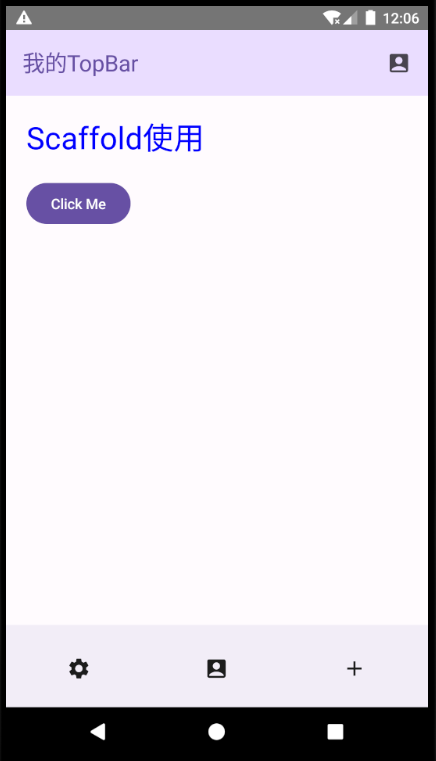
/**
 * Author : wn
 * Email : maoning20080809@163.com
 * Date : 2026/1/1 19:32
 * Description : Scaffold组件提供了一个基本的APP结构,包括AppBar、底部导航栏和主要内容区域。通过声明式的方式,开发者可以轻松创建一致且可扩展的用户界面。
 */
class ScaffoldActivity : ComponentActivity(){

    override fun onCreate(savedInstanceState: Bundle?) {
        super.onCreate(savedInstanceState)

        setContent {
            testScaffold()
        }
    }


    @OptIn(ExperimentalMaterial3Api::class)
    @SuppressLint("UnusedMaterialScaffoldPaddingParameter")
    @Preview
    @Composable
    fun testScaffold(){
        MaterialTheme{
            Scaffold(
                topBar = {
                    SmallTopAppBar(
                        title = {
                            Text(text = "我的TopBar")
                        },
                        actions = {
                            IconButton(onClick = {
                                println("点击1")
                            }) {
                                Icon(Icons.Default.AccountBox, contentDescription = null)
                            }
                        },
                        colors = TopAppBarDefaults.smallTopAppBarColors(
                            containerColor = MaterialTheme.colorScheme.primaryContainer,
                            titleContentColor = MaterialTheme.colorScheme.primary,
                        )
                    )
                },
                content = { innerPadding ->     // 接收 innerPadding 参数
                    Column(
                        modifier = Modifier.padding(innerPadding).fillMaxSize()
                    ) {
                        Text(
                            text = "Scaffold使用",
                            modifier = Modifier.padding(20.dp),
                            fontSize = 30.sp,
                            color = Color.Blue
                        )
                        Button(onClick = {
                            println("点击222")
                        },modifier = Modifier.padding(start = 20.dp)) {
                            Text(text = "Click Me", )
                        }
                    }
                },
                bottomBar = {
                    BottomAppBar() {
                        Row() {
                            IconButton(modifier = Modifier.weight(1f), onClick = {
                                println("点击bottom bar 1")
                            }) {
                                Icon(Icons.Default.Settings, contentDescription = "")
                            }
                            IconButton(modifier = Modifier.weight(1f) , onClick = {
                                println("点击bottom bar 2")
                            }) {
                                Icon(Icons.Default.AccountBox, contentDescription = "")
                            }
                            IconButton(modifier = Modifier.weight(1f), onClick = {
                                println("点击bottom bar 3")
                            }) {
                                Icon(Icons.Default.Add, contentDescription = "")
                            }
                        }
                    }
                }
            )
        }

    }
}