前言
有時候,我們會期望某些事件(例如,Logging, 處理驗證身份...等)能夠在請求進入Controller前或響應返回客戶端前做些處理。類似這漾的需求,透過 Filter 的功能,我們就能夠在前端請求進入 Controller 之前,或是處理完 Response 返回給前端之前,執行其他邏輯處理,達到我們要的目的。本文件就兩個簡單例子說明 Filter 功能。 Spring 其順序如下圖:
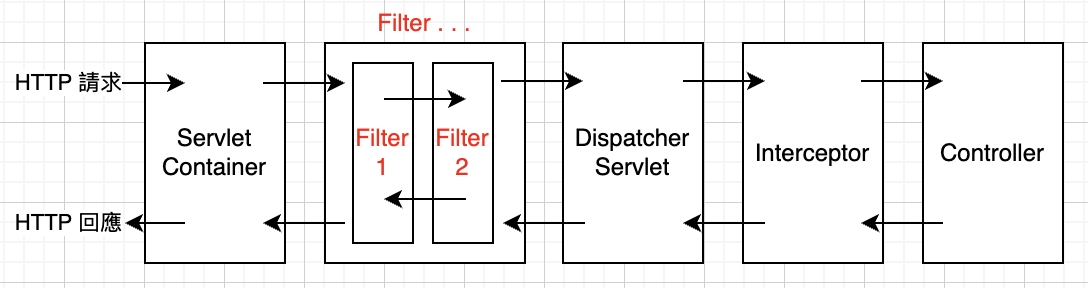
註:
-
Filter 不是 Spring 的機制,而是 Java Servlet 規範的一部分。Spring 只是使用並整合 Filter
-
本文範例一:旨在說明。範例二: 提供完整 Logging Filter 實作說明。
OncePerRequestFilter
Spring 有一個稱為 OncePerRequestFilter 的 Filter,適合用來處理 JWT 驗證需求。
至於為什麼用 OncePerRequestFilter?因為 OncePerRequestFilter 在單一個 Request 只執行一次,而且它保證,同一個 request 只會執行一次,JWT 驗證 只能做一次,正好適合用來處理驗證。
範例一:
僅用於演示。Request -> 檢查驗證攔截請求,從 Header 中提取 Token。建立一個類別叫 JwtAuthenticationFilter,它繼承了 OncePerRequestFilter 抽象類別,並覆寫 doFilterInternal 方法。
攔截請求,從 Header 中提取 Token
java
public class JwtAuthenticationFilter extends OncePerRequestFilter {

    @Autowired
    private JwtService tokenService;

    @Autowired
    private CustomUserDetailsService customUserDetailsService;

    // 從請求頭取得 Token 的方法
    private String getJwtFromRequest(HttpServletRequest request) {
        String bearerToken = request.getHeader("Authorization");
        // 檢查是否包含 Bearer 前綴
        if (StringUtils.hasText(bearerToken) && bearerToken.startsWith("Bearer ")) {
            return bearerToken.substring(7); // 擷取 Token
        }
        return null;
    }

    @Override
    protected void doFilterInternal(HttpServletRequest request,
            HttpServletResponse response,
            FilterChain filterChain) throws ServletException, IOException {

        // 如果是 OPTIONS 請求,直接放行,讓 SecurityConfig 的 CORS 配置處理
        if ("OPTIONS".equalsIgnoreCase(request.getMethod())) {
            response.setStatus(HttpServletResponse.SC_OK);
            return;
        }
        try {
            String jwt = getJwtFromRequest(request);

            if (StringUtils.hasText(jwt) && tokenService.validateToken(jwt)) {

                String username = tokenService.getUsernameFromToken(jwt);

                // 從資料庫載入用戶
                UserDetails userDetails = customUserDetailsService.loadUserByUsername(username);

                // 建立 Authentication 對象
                UsernamePasswordAuthenticationToken authentication = new UsernamePasswordAuthenticationToken(
                        userDetails, null, userDetails.getAuthorities());

                // 設定詳細信息,通常是請求的 IP、Session ID 等
                authentication.setDetails(new WebAuthenticationDetailsSource().buildDetails(request));

                // 將 Authentication 物件設定到 SecurityContext 中
                SecurityContextHolder.getContext().setAuthentication(authentication);
            }
        } catch (Exception ex) {
            logger.error("Could not set user authentication in security context", ex);
        }

        filterChain.doFilter(request, response);
    }
}


@Configuration
@EnableWebSecurity
@EnableMethodSecurity
public class SecurityConfig {

    // JWT Filter
    @Bean
    public JwtAuthenticationFilter jwtAuthenticationFilter() {
        return new JwtAuthenticationFilter();
    }

    // 設定 AuthenticationManager,用於處理登入要求
    @Bean
    public AuthenticationManager authenticationManager(AuthenticationConfiguration authenticationConfiguration)
            throws Exception {
        return authenticationConfiguration.getAuthenticationManager();
    }

    @Bean
    public CorsConfigurationSource corsConfigurationSource() {
        CorsConfiguration configuration = new CorsConfiguration();
        configuration.setAllowedOrigins(Arrays.asList("http://localhost:5173"));
        configuration.setAllowedMethods(Arrays.asList("GET", "POST", "PUT", "DELETE", "OPTIONS"));
        configuration.setAllowedHeaders(Arrays.asList("Authorization", "Content-Type", "X-Requested-With"));
        configuration.setAllowCredentials(true);
        configuration.setMaxAge(3600L);

        UrlBasedCorsConfigurationSource source = new UrlBasedCorsConfigurationSource();
        source.registerCorsConfiguration("/**", configuration);
        return source;
    }

    @Bean
    public SecurityFilterChain securityFilterChain(HttpSecurity http) throws Exception {
        http
                // 啟用 CORS
                .cors(cors -> cors.configurationSource(corsConfigurationSource()))

                .csrf(AbstractHttpConfigurer::disable)
                // 停用 Session 管理,使用 STATELESS
                .sessionManagement(sess -> sess.sessionCreationPolicy(SessionCreationPolicy.STATELESS))

                .authorizeHttpRequests(auth -> auth
                        // 允許所有人存取登入接口
                        .requestMatchers("/auth/**", "/login").permitAll()

                        // 其他受保護的 RESTful 接口
                        .requestMatchers(HttpMethod.GET, "/api/users", "/api/users/{uid}").hasAnyAuthority("read")
                        .requestMatchers(HttpMethod.POST, "/api/user").hasAnyAuthority("create")
                        .requestMatchers(HttpMethod.PUT, "/api/users/{uid}").hasAnyAuthority("update")
                        .requestMatchers(HttpMethod.DELETE, "/api/users/{uid}").hasAnyAuthority("delete", "ROLE_ADMIN")

                        .anyRequest().authenticated())

                // 在 Spring Security 預設的 UsernamePasswordAuthenticationFilter 之前新增 JWT 過濾器
                .addFilterBefore(jwtAuthenticationFilter(), UsernamePasswordAuthenticationFilter.class);

        return http.build();
    }

    @Bean
    public PasswordEncoder passwordEncoder() {
        return new BCryptPasswordEncoder();
    }

}
範例二:
建立一個Spring boot 專案,使用 Filter 來記錄執行耗時。
- 建立一個類別叫 LogApiFilter,它繼承了 OncePerRequestFilter 抽象類別,並覆寫 doFilterInternal 方法。
java
@Component
public class LogApiFilter extends OncePerRequestFilter {

    @Override
    protected void doFilterInternal(
            HttpServletRequest request,
            HttpServletResponse response,
            FilterChain filterChain)
            throws ServletException, IOException {

        long startTime = System.currentTimeMillis();

        filterChain.doFilter(request, response);

        long endTime = System.currentTimeMillis();
        long duration = endTime - startTime;

        // 計算的是 Controller + 後續處理的完整時間
        System.out.printf(
                "[LogApiFilter] %s %s 耗時 %d ms%n",
                request.getMethod(),
                request.getRequestURI(),
                duration);
    }
}- 建立 Service:模擬商業邏輯耗時
java
@Service
public class DemoBusinessService {

    public String processBusinessLogic() {
        try {
            // 模擬商業邏輯耗時
            Thread.sleep(168);
        } catch (InterruptedException e) {
            Thread.currentThread().interrupt();
        }
        return "商業邏輯處理完成";
    }
}- 測試用 Controller
java
@RestController
public class HelloController {

    @Autowired
    private DemoBusinessService demoBusinessService;

    @GetMapping("/hello")
    public String hello() throws InterruptedException {
        String result = demoBusinessService.processBusinessLogic();
        return "hello world - " + result;
    }
}
啟動 Spring Boot
% mvn exec:java -Dexec.mainClass="com.example.demo.DemoApplication"
實際執行結果
手動測試
呼叫 API
% curl http://localhost:8080/hello
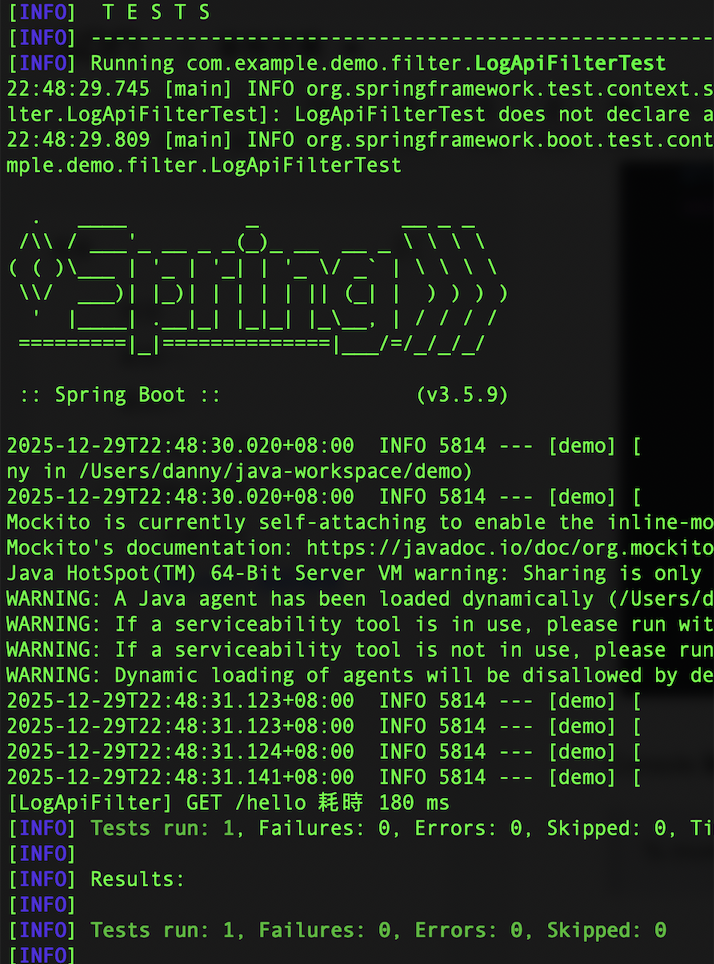
Console 輸出

MockMvc 測試案例
驗證 Filter 真的有跑
java
import com.example.demo.filter.LogApiFilter;
import com.example.demo.service.DemoBusinessService;
import org.junit.jupiter.api.Test;
import org.springframework.beans.factory.annotation.Autowired;
import org.springframework.boot.test.autoconfigure.web.servlet.AutoConfigureMockMvc;
import org.springframework.boot.test.context.SpringBootTest;
import org.springframework.test.web.servlet.MockMvc;

import org.springframework.test.context.bean.override.mockito.MockitoSpyBean;

import static org.mockito.Mockito.times;
import static org.mockito.Mockito.verify;
import static org.springframework.test.web.servlet.request.MockMvcRequestBuilders.get;
import static org.springframework.test.web.servlet.result.MockMvcResultMatchers.status;

@SpringBootTest
@AutoConfigureMockMvc
class LogApiFilterTest {

	@Autowired
	private MockMvc mockMvc;

	@MockitoSpyBean
	private LogApiFilter logApiFilter;

	@MockitoSpyBean
	private DemoBusinessService demoBusinessService;

	@Test
	void filter_and_service_should_be_executed() throws Exception {

		mockMvc.perform(get("/hello"))
				.andExpect(status().isOk());

		verify(logApiFilter, times(1))
				.doFilterInternal(
						org.mockito.ArgumentMatchers.any(),
						org.mockito.ArgumentMatchers.any(),
						org.mockito.ArgumentMatchers.any());

		verify(demoBusinessService, times(1))
				.processBusinessLogic();
	}
}
Console 輸出
% mvn test