android compose BottomNavigation(底部) 使用
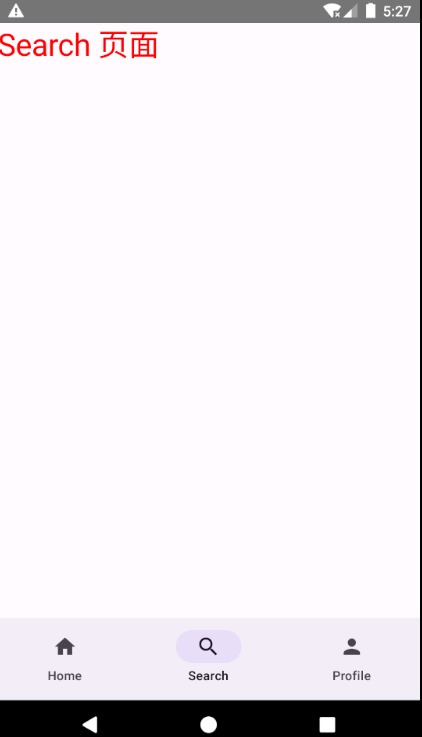
/**
 * Author : wn
 * Email : maoning20080809@163.com
 * Date : 2026/1/3 13:06
 * Description : BottomNavigation 底部导航栏
 */
class BottomNavigationActivity : ComponentActivity(){

    override fun onCreate(savedInstanceState: Bundle?) {
        super.onCreate(savedInstanceState)

        setContent {
            testBottomNavigation()
        }
    }

    @Preview
    @Composable
    private fun testBottomNavigation(){
        //要添加Composable,导入:import androidx.compose.runtime.getValue和import androidx.compose.runtime.setValue
        var selectedItem by remember { mutableStateOf(0) }
        val items = listOf<String>("Home", "Search", "Profile")
        val icons = listOf(Icons.Default.Home, Icons.Default.Search, Icons.Default.Person)

        Scaffold(bottomBar = {
            NavigationBar() {
                items.forEachIndexed {index, item ->
                    NavigationBarItem(
                        icon = {Icon(icons[index], contentDescription = item)},
                        label = {Text(item)},
                        selected = selectedItem == index,
                        onClick = {selectedItem = index }
                    )
                }
            }
        }) {
            when(selectedItem){
                0 -> testHome()
                1 -> testSearch()
                2 -> testProfile()
            }
        }
    }

    @Composable
    private fun testHome(){
        Text(text = "Home 页面")
    }

    @Composable
    private fun testSearch(){
        Text(text = "Search 页面", fontSize = 30.sp, color = Color.Red)
    }

    @Composable
    private fun testProfile(){
        Text(text = "Profile 页面", fontSize = 30.sp, color = Color.Blue)
    }

}