借鉴rapid-ocr的文章地址
https://gitee.com/lc_monster/rapid-ocr-java https://gitee.com/lc_monster/rapid-ocr-java
坐标的位置
这是一个非常关键的问题!在 RapidOcr-Java(以及大多数图像处理和计算机视觉任务)中,x1, y1, x2, y2, x3, y3, x4, y4 这些坐标是相对于原始输入图片左上角的像素坐标。
具体来说:
- 坐标系原点 :原点
(0, 0)位于输入图片的左上角。 - X轴方向 :X轴向右为正方向。
x值越大,表示点在图片中越靠右。 - Y轴方向 :Y轴向下为正方向。
y值越大,表示点在图片中越靠下。
举例说明
假设您有一张 800x600 像素的图片(宽800,高600),并且识别出了一个文字框,其四个角点的坐标为:
(x1, y1) = (100, 50)(x2, y2) = (300, 50)(x3, y3) = (300, 80)(x4, y4) = (100, 80)
那么,这个文字框的位置是:
- 左上角:距离图片左边缘 100 像素,距离图片上边缘 50 像素。
- 右上角:距离图片左边缘 300 像素,距离图片上边缘 50 像素。
- 右下角:距离图片左边缘 300 像素,距离图片上边缘 80 像素。
- 左下角:距离图片左边缘 100 像素,距离图片上边缘 80 像素。
这个文字框是一个宽 200 像素(300-100)、高 30 像素(80-50)的矩形。
重要提示
- 单位是像素 :这些坐标值的单位是像素,不是毫米、厘米或其他物理单位。
- 顺序 :这四个点通常是按顺时针 或逆时针 顺序排列的,形成一个封闭的四边形(或矩形)。在 RapidOcr-Java 的输出中,通常是从左上角开始,按顺时针方向排列:
左上 -> 右上 -> 右下 -> 左下。 - 根据4个点的坐标计算出一个长方形的框把一个识别到的词包含进去
java
//从左边到右顺时针旋转获取4个坐标系的位置
int X1 = block.getBoxPoint().get(0).getX();
int Y1 = block.getBoxPoint().get(0).getY();
int X2 = block.getBoxPoint().get(1).getX();
int Y2 = block.getBoxPoint().get(1).getY();
int X3 = block.getBoxPoint().get(2).getX();
int Y3 = block.getBoxPoint().get(2).getY();
int X4 = block.getBoxPoint().get(3).getX();
int Y4 = block.getBoxPoint().get(3).getY();

LocationDetails locationDetails =new LocationDetails();
locationDetails.setLeft(Math.min(X1,X4));
locationDetails.setRight(Math.max(X2,X3));
locationDetails.setTop(Math.min(Y1,Y2));
locationDetails.setBottom(Math.max(Y3,Y4));
置信度
非常好的问题!置信度(Confidence) 是 OCR(光学字符识别)以及其他机器学习和人工智能模型中一个非常重要的概念。
简单来说,置信度是模型对自己识别结果"正确性"的一个量化评估,通常用一个 0.0 到 1.0 之间的数值来表示。
我们可以这样理解:
-
高置信度 (例如 0.95 或 95%):模型非常"自信"它识别出的文字是正确的。这通常意味着:
- 图片中的文字非常清晰。
- 字体是常见的、易于识别的。
- 光线充足,没有模糊、扭曲或遮挡。
- 背景简单,与文字颜色对比度高。
-
低置信度 (例如 0.3 或 30%):模型对它的识别结果感到"怀疑"或"不确定"。这通常意味着:
- 图片模糊或分辨率很低。
- 文字有扭曲、旋转、透视变形。
- 光线不足、有阴影或反光。
- 背景复杂,与文字颜色相近,难以区分。
- 字体是手写体、艺术字或非常规字体。
- 文字部分被遮挡或损坏。
在实际应用中,置信度有什么用?
-
结果过滤:您可以设定一个置信度阈值(例如 0.7)。只有置信度高于这个阈值的识别结果才被认为是"可靠"的,低于这个阈值的结果可以被忽略或标记为"需要人工复核"。这对于自动化处理大量图片时保证数据质量非常有用。
-
质量评估:通过查看整体的平均置信度,您可以评估当前输入图片的质量或者模型在特定场景下的表现。
-
错误预警:如果某个关键信息(如身份证号、银行卡号)的置信度很低,系统可以发出警告,提示用户检查图片或进行人工确认,避免因识别错误导致严重后果。
-
模型调试:开发者可以通过分析低置信度的识别案例,来了解模型的弱点,进而优化模型或改进预处理流程。
基于springboot编写的OCR的识别代码
bean的TextPointInformation
java
package com.example.demo.bean;

public class TextPointInformation {
    private String text;
    private String score;
    private LocationDetails locationDetails;

    public void setText(String text) {
        this.text = text;
    }
    public void setScore(String score) {
        this.score = score;
    }

    public void setLocationDetails(LocationDetails locationDetails) {
        this.locationDetails = locationDetails;
    }
    public String getText() {
        return text;
    }
    public String getScore() {
        return score;
    }
    public LocationDetails getLocationDetails() {
        return locationDetails;
    }

}
bean的LocationDetails
java
package com.example.demo.bean;

public class LocationDetails {
    private int left;
    private int right;
    private int top;
    private int bottom;
    public void setLeft(int left) {
        this.left = left;
    }

    public void setRight(int right) {
        this.right = right;
    }

    public void setTop(int top) {
        this.top = top;
    }

    public void setBottom(int bottom) {
        this.bottom = bottom;
    }
    public int getLeft() {
        return left;
    }

    public int getRight() {
        return right;
    }

    public int getTop() {
        return top;
    }

    public int getBottom() {
        return bottom;
    }
}
controller接收上传的图片并识别OCR
java
package com.example.demo;

import com.benjaminwan.ocrlibrary.OcrResult;
import com.benjaminwan.ocrlibrary.TextBlock;
import com.example.demo.bean.LocationDetails;
import com.example.demo.bean.TestDemo;
import com.example.demo.bean.TextPointInformation;
import io.github.mymonstercat.Model;
import io.github.mymonstercat.ocr.InferenceEngine;
import org.springframework.beans.factory.annotation.Autowired;
import org.springframework.http.ResponseEntity;
import org.springframework.stereotype.Component;
import org.springframework.web.bind.annotation.PostMapping;
import org.springframework.web.bind.annotation.RequestMapping;
import org.springframework.web.bind.annotation.RequestParam;
import org.springframework.web.bind.annotation.RestController;
import org.springframework.web.multipart.MultipartFile;

import java.io.IOException;
import java.nio.file.Files;
import java.nio.file.Path;
import java.nio.file.Paths;
import java.util.ArrayList;
import java.util.Arrays;
import java.util.List;

@Component
@RestController
@RequestMapping("/test")
public class controllerdemo {
    // 指定上传目录(可修改为你的路径)
    private static final String UPLOAD_DIR = "E:/demo/src/main/resources/static/";
    @PostMapping("/image")
    public List<TextPointInformation> uploadImage(@RequestParam("file") MultipartFile file) {
        List<TextPointInformation> listTextPointInformations = new ArrayList<TextPointInformation>();
        TextPointInformation textPointInformation = new TextPointInformation();
        if (file.isEmpty()) {
            textPointInformation.setText("上传的文件为空");
            listTextPointInformations.add(textPointInformation);
            return listTextPointInformations;
        }
        // 2. 创建上传目录
        Path uploadPath = Paths.get(UPLOAD_DIR);
        if (!Files.exists(uploadPath)) {
            try {
                Files.createDirectories(uploadPath);
            } catch (IOException e) {
                textPointInformation.setText("无法创建上传目录");
                listTextPointInformations.add(textPointInformation);
                return listTextPointInformations;
            }
        }
        //保存图片
        try {
            Files.write(Path.of(UPLOAD_DIR + file.getOriginalFilename()),file.getBytes());
        } catch (IOException e) {
            e.printStackTrace();
        }
        listTextPointInformations = ocrDetail(file);
        return listTextPointInformations;
    }
    public List<TextPointInformation> ocrDetail(MultipartFile file){
        List<TextPointInformation> listTextPointInformations = new ArrayList<TextPointInformation>();
        //获取推理引擎实例,指定使用0NNX版本的PP-0CRV3模型
        InferenceEngine engine = InferenceEngine.getInstance(Model.ONNX_PPOCR_V3);
        OcrResult ocrResult = engine.runOcr(UPLOAD_DIR + file.getOriginalFilename());
        System.out.println(ocrResult.getTextBlocks());
        List<TextBlock> textBlocks = ocrResult.getTextBlocks();
        //遍历处理每个文字块
        for (TextBlock block : textBlocks) {
            TextPointInformation textPointInformation = new TextPointInformation();
            textPointInformation.setText(block.getText());

            //从左边到右顺时针旋转获取4个坐标系的位置
            int X1 = block.getBoxPoint().get(0).getX();
            int Y1 = block.getBoxPoint().get(0).getY();
            int X2 = block.getBoxPoint().get(1).getX();
            int Y2 = block.getBoxPoint().get(1).getY();
            int X3 = block.getBoxPoint().get(2).getX();
            int Y3 = block.getBoxPoint().get(2).getY();
            int X4 = block.getBoxPoint().get(3).getX();
            int Y4 = block.getBoxPoint().get(3).getY();

            LocationDetails locationDetails =new LocationDetails();
            locationDetails.setLeft(Math.min(X1,X4));
            locationDetails.setRight(Math.max(X2,X3));
            locationDetails.setTop(Math.min(Y1,Y2));
            locationDetails.setBottom(Math.max(Y3,Y4));

            textPointInformation.setLocationDetails(locationDetails);
            //置信度
            textPointInformation.setScore(String.valueOf(block.getBoxScore()));
            listTextPointInformations.add(textPointInformation);

            System.out.println("文字内容:"+block.getText());
            System.out.println("位置坐标:"+ Arrays.toString(block.getBoxPoint().toArray()));
            System.out.println("置信度:"+block.getBoxScore());

        }
        return listTextPointInformations;
    }
}
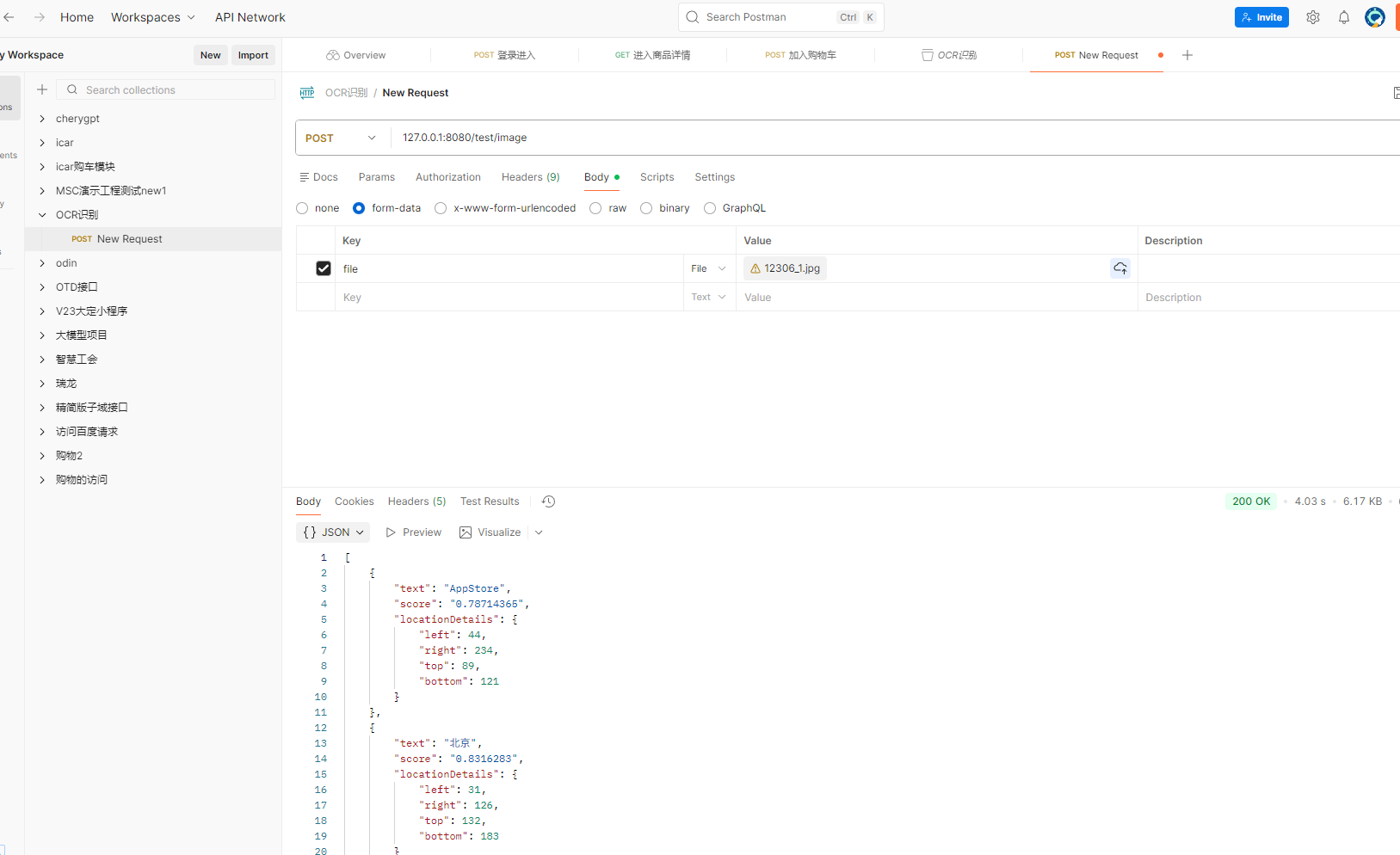
上传图片并获取到ocr识别的结果
postman调用
python调用
python
#coding:utf-8

import requests

file_path = 'D:/PythonProject/ocr/3fbb29d947ade6c1e7027a66ad66e165.jpg'
url = "http://127.0.0.1:8080/test/image"

# headers = {
#     'Content-Type': 'multipart/form-data'
# }

with open(file_path, 'rb') as file:
    files = {'file': file}
    response = requests.post(url, files = files)

# 检查响应状态码
if response.status_code == 200:
    print('图片上传成功')
    print(response.text)  # 打印服务器返回的信息,如果有的话
else:
    print('图片上传失败')
    print(f'状态码: {response.status_code}')
    print(response.text)