需求背景
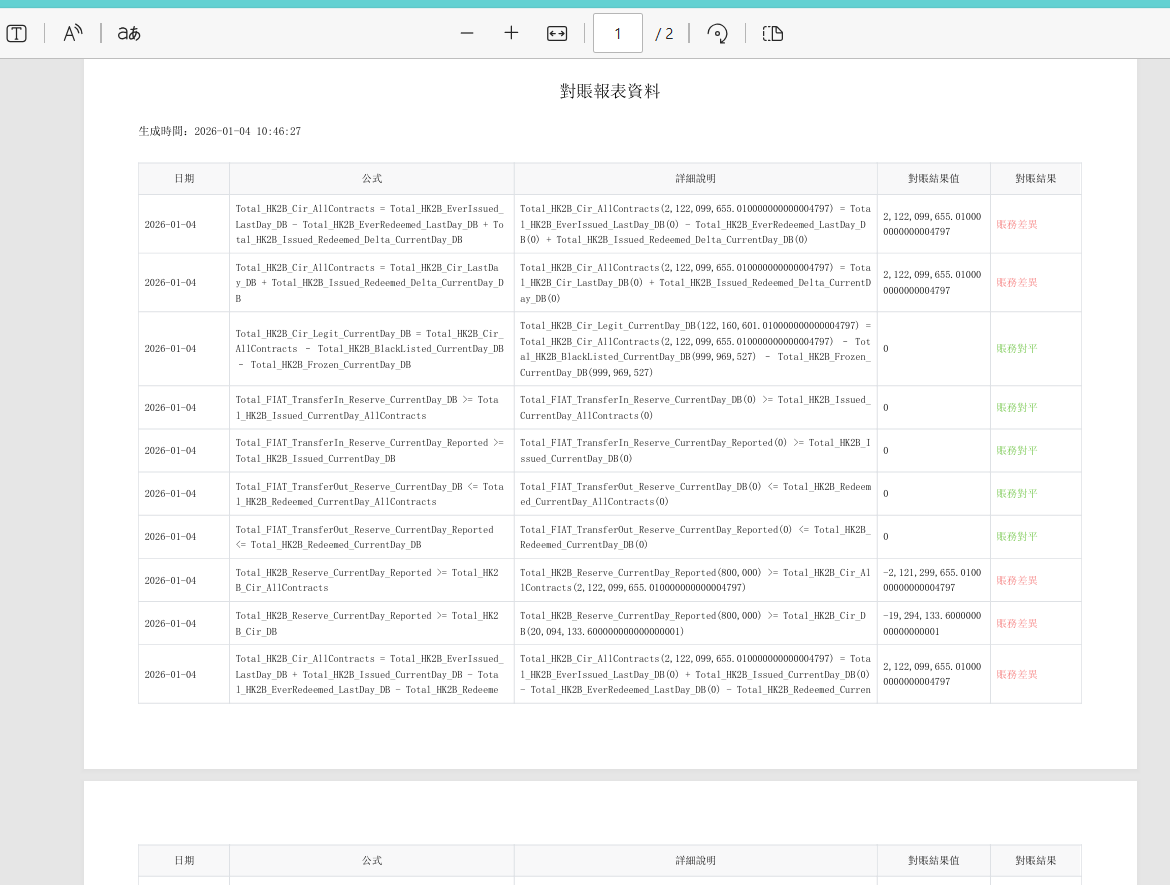
客户要求项目报表支持导出PDF文件,并线下领导签字再上传已签名的PDF扫描件。
解决方案
1.使用flying-saucer-pdf+thymeleaf
这种方式需要编写html,每个报表都需要重新编写html对表头及数据格式等。
2.使用itextpdf开源组件
开发支持注解方式导出PDF(类似ruoyi导出excel的方式),只需要bean对象编写需要导出字段的注解。
这里选择使用itextpdf。
代码组成
1.PDF字段注解PdfField.java
java
package com.asiadb.common.annotation;

import java.lang.annotation.ElementType;
import java.lang.annotation.Retention;
import java.lang.annotation.RetentionPolicy;
import java.lang.annotation.Target;

/**
 * PDF字段注解
 */
@Target(ElementType.FIELD)
@Retention(RetentionPolicy.RUNTIME)
public @interface PdfField {

    /**
     * 字段名称(标题)
     */
    String name() default "";

    /**
     * 字段顺序
     */
    int sort() default 0;

    /**
     * 日期格式
     */
    String dateFormat() default "";

    /**
     * 字典类型
     */
    String dictType() default "";

    /**
     * 是否忽略该字段
     */
    boolean ignore() default false;

    /**
     * 字段宽度(百分比)
     */
    int width() default 10;

    /**
     * 对齐方式:left, center, right
     */
    String align() default "left";

    /**
     * 字体颜色(支持CSS颜色值,如:#FF0000, red, rgb(255,0,0))
     */
    String color() default "";

    /**
     * 条件颜色配置(JSON格式)
     * 示例:[{"value":"1","color":"#FF0000"},{"value":"2","color":"#00FF00"}]
     */
    String conditionalColor() default "";

    /**
     * 背景颜色
     */
    String backgroundColor() default "";
}
2.PDF表格注解PdfSheet.java
java
package com.asiadb.common.annotation;

import java.lang.annotation.ElementType;
import java.lang.annotation.Retention;
import java.lang.annotation.RetentionPolicy;
import java.lang.annotation.Target;

/**
 * PDF表格注解
 */
@Target(ElementType.TYPE)
@Retention(RetentionPolicy.RUNTIME)
public @interface PdfSheet {

    /**
     * 表格标题
     */
    String title() default "";

    /**
     * 表头高度
     */
    int headerHeight() default 20;

    /**
     * 行高
     */
    int rowHeight() default 15;

    /**
     * 是否显示序号列
     */
    boolean showIndex() default true;

    /**
     * 序号列名称
     */
    String indexName() default "序号";
    /**
     * 页面方向:portrait(纵向), landscape(横向)
     */
    String orientation() default "portrait";

    /**
     * 页面尺寸:A4, A3, LETTER等
     */
    String pageSize() default "A4";

    /**
     * 页面边距(毫米)
     */
    float marginLeft() default 20;
    float marginRight() default 20;
    float marginTop() default 20;
    float marginBottom() default 20;
}
3.PDF导出工具类
PdfUtils.java
java
package com.asiadb.common.utils.pdf;
import com.asiadb.common.utils.StringUtils;
import com.itextpdf.html2pdf.HtmlConverter;
import com.itextpdf.io.font.PdfEncodings;
import com.itextpdf.io.font.FontProgram;
import com.itextpdf.io.font.FontProgramFactory;
import com.itextpdf.kernel.font.PdfFont;
import com.itextpdf.kernel.font.PdfFontFactory;
import com.itextpdf.kernel.pdf.PdfDocument;
import com.itextpdf.kernel.pdf.PdfWriter;
import com.itextpdf.layout.Document;
import com.itextpdf.layout.element.Paragraph;
import com.itextpdf.layout.element.Table;
import com.itextpdf.layout.element.Cell;
import com.itextpdf.layout.properties.UnitValue;
import javax.servlet.http.HttpServletResponse;
import java.io.ByteArrayOutputStream;
import java.io.IOException;
import java.io.OutputStream;
import java.net.URLEncoder;
import java.util.List;
import java.util.UUID;
/**
* PDF导出工具类
*/
public class PdfUtils {
// 字体路径配置
private static final String[] FONT_PATHS = {
"fonts/simsun.ttf", // 项目resources下的字体
"fonts/simhei.ttf", // 黑体
"fonts/msyh.ttf", // 微软雅黑
"fonts/msyhbd.ttf", // 微软雅黑粗体
"fonts/simsunb.ttf" // 宋体粗体
};
// 系统字体路径
private static final String[] SYSTEM_FONT_PATHS = {
"C:/Windows/Fonts/simsun.ttc", // Windows宋体
"C:/Windows/Fonts/simhei.ttf", // Windows黑体
"C:/Windows/Fonts/msyh.ttc", // Windows微软雅黑
"C:/Windows/Fonts/msyhbd.ttc", // Windows微软雅黑粗体
"/System/Library/Fonts/PingFang.ttc", // Mac苹方字体
"/System/Library/Fonts/STHeiti Light.ttc", // Mac华文黑体
"/usr/share/fonts/truetype/wqy/wqy-microhei.ttc" // Linux文泉驿微米黑
};
private static PdfFont chineseFont = null;
/**
* 初始化中文字体 - 修复字体加载逻辑
*/
private static synchronized PdfFont getChineseFont() throws IOException {
if (chineseFont == null) {
// 1. 首先尝试从资源文件加载
for (String fontPath : FONT_PATHS) {
try {
System.out.println("尝试加载资源字体: " + fontPath);
try (java.io.InputStream is = PdfUtils.class.getClassLoader().getResourceAsStream(fontPath)) {
if (is != null) {
byte[] fontBytes = is.readAllBytes();
// 使用正确的方法创建字体
chineseFont = PdfFontFactory.createFont(fontBytes, PdfEncodings.IDENTITY_H);
System.out.println("成功加载资源字体: " + fontPath);
return chineseFont;
}
}
} catch (Exception e) {
System.out.println("无法加载资源字体: " + fontPath + ", 错误: " + e.getMessage());
}
}
// 2. 尝试从系统字体加载
for (String fontPath : SYSTEM_FONT_PATHS) {
try {
java.io.File fontFile = new java.io.File(fontPath);
if (fontFile.exists()) {
// 使用正确的方法创建字体
chineseFont = PdfFontFactory.createFont(fontPath, PdfEncodings.IDENTITY_H);
System.out.println("成功加载系统字体: " + fontPath);
return chineseFont;
}
} catch (Exception e) {
// 继续尝试下一个字体
System.out.println("无法加载系统字体: " + fontPath + ", 错误: " + e.getMessage());
}
}
// 3. 尝试使用iText Asian字体(如果依赖已添加)
try {
// 使用iText Asian字体包中的字体
chineseFont = PdfFontFactory.createFont("STSong-Light", "UniGB-UCS2-H");
System.out.println("成功加载iText Asian字体: STSong-Light");
return chineseFont;
} catch (Exception e) {
System.out.println("无法加载iText Asian字体: " + e.getMessage());
}
// 4. 最后尝试使用默认字体(可能不支持中文)
try {
chineseFont = PdfFontFactory.createFont("Helvetica", PdfEncodings.IDENTITY_H);
System.out.println("使用Helvetica字体(可能不支持中文)");
} catch (Exception e) {
System.err.println("警告:无法加载任何中文字体,将使用默认字体");
chineseFont = PdfFontFactory.createFont();
}
}
return chineseFont;
}
/**
* 编码文件名
*/
public static String encodingFilename(String filename) {
filename = UUID.randomUUID().toString() + "_" + filename;
return filename;
}
/**
* 导出PDF到响应流 - 修复的主要方法
*/
public static void exportPdf(HttpServletResponse response, String fileName, String content) throws IOException {
response.setContentType("application/pdf");
response.setCharacterEncoding("utf-8");
fileName = encodingFilename(fileName);
fileName = URLEncoder.encode(fileName, "UTF-8").replaceAll("\\+", "%20");
response.setHeader("Content-disposition", "attachment;filename*=utf-8''" + fileName + ".pdf");
response.setHeader("download-filename", fileName + ".pdf");
ByteArrayOutputStream baos = new ByteArrayOutputStream();
// 设置HTML转换器属性
com.itextpdf.html2pdf.ConverterProperties properties = new com.itextpdf.html2pdf.ConverterProperties();
// 设置字符编码
properties.setCharset("UTF-8");
// 创建字体提供者
com.itextpdf.html2pdf.resolver.font.DefaultFontProvider fontProvider =
new com.itextpdf.html2pdf.resolver.font.DefaultFontProvider();
// 获取中文字体
PdfFont font = getChineseFont();
if (font != null) {
try {
fontProvider.addFont(font.getFontProgram(), PdfEncodings.IDENTITY_H);
System.out.println("已添加字体到字体提供者: " + font.getFontProgram().getFontNames().getFontName());
} catch (Exception e) {
System.err.println("添加字体到字体提供者失败: " + e.getMessage());
}
}
// 尝试添加其他可能的字体
for (String fontPath : SYSTEM_FONT_PATHS) {
try {
java.io.File fontFile = new java.io.File(fontPath);
if (fontFile.exists()) {
fontProvider.addFont(fontFile.getAbsolutePath());
System.out.println("字体提供者添加系统字体: " + fontPath);
}
} catch (Exception e) {
// 忽略错误,继续尝试下一个
}
}
properties.setFontProvider(fontProvider);
// 构建完整的HTML,确保CSS正确
String htmlWithFont = "<!DOCTYPE html>" +
"<html lang='zh-CN'>" +
"<head>" +
" <meta charset='UTF-8'>" +
" <meta http-equiv='Content-Type' content='text/html; charset=UTF-8'>" +
" <style>" +
" @font-face {" +
" font-family: 'ChineseFont';" +
" src: local('SimSun'), local('Microsoft YaHei');" +
" }" +
" body {" +
" font-family: 'ChineseFont', 'SimSun', 'Microsoft YaHei', 'STSong', sans-serif;" +
" font-size: 12pt;" +
" line-height: 1.5;" +
" }" +
" * {" +
" font-family: inherit;" +
" }" +
" table {" +
" border-collapse: collapse;" +
" width: 100%;" +
" }" +
" th, td {" +
" border: 1px solid #ddd;" +
" padding: 8px;" +
" text-align: left;" +
" }" +
" th {" +
" background-color: #f2f2f2;" +
" font-weight: bold;" +
" }" +
" </style>" +
"</head>" +
"<body>" + content + "</body>" +
"</html>";
try {
HtmlConverter.convertToPdf(htmlWithFont, baos, properties);
System.out.println("PDF生成成功");
} catch (Exception e) {
System.err.println("PDF生成失败: " + e.getMessage());
e.printStackTrace();
// 尝试使用简化版本
exportPdfSimple(response, fileName.replace(".pdf", ""), content);
return;
}
response.getOutputStream().write(baos.toByteArray());
response.getOutputStream().flush();
}
/**
* 生成表格PDF - 修复表格中文显示
*/
public static void exportTablePdf(HttpServletResponse response, String fileName,
List<String> headers, List<List<String>> data) throws IOException {
response.setContentType("application/pdf");
response.setCharacterEncoding("utf-8");
fileName = URLEncoder.encode(fileName, "UTF-8").replaceAll("\\+", "%20");
response.setHeader("Content-disposition", "attachment;filename*=utf-8''" + fileName + ".pdf");
ByteArrayOutputStream baos = new ByteArrayOutputStream();
PdfWriter writer = new PdfWriter(baos);
PdfDocument pdf = new PdfDocument(writer);
Document document = new Document(pdf);
// 设置中文字体 - 使用IDENTITY_H编码
PdfFont font = getChineseFont();
document.setFont(font);
// 添加标题
document.add(new Paragraph(fileName)
.setBold()
.setFontSize(16)
.setFont(font));
// 创建表格
Table table = new Table(UnitValue.createPercentArray(headers.size()));
table.setWidth(UnitValue.createPercentValue(100));
// 添加表头
for (String header : headers) {
Cell cell = new Cell()
.add(new Paragraph(header)
.setBold()
.setFont(font));
table.addHeaderCell(cell);
}
// 添加数据
for (List<String> row : data) {
for (String cellData : row) {
Cell cell = new Cell()
.add(new Paragraph(StringUtils.isNotNull(cellData) ? cellData : "")
.setFont(font));
table.addCell(cell);
}
}
document.add(table);
document.close();
response.getOutputStream().write(baos.toByteArray());
response.getOutputStream().flush();
}
/**
* 生成HTML内容PDF
*/
public static byte[] generatePdfFromHtml(String html) throws IOException {
ByteArrayOutputStream baos = new ByteArrayOutputStream();
// 设置转换属性
com.itextpdf.html2pdf.ConverterProperties properties = new com.itextpdf.html2pdf.ConverterProperties();
properties.setCharset("UTF-8");
// 创建字体提供者
com.itextpdf.html2pdf.resolver.font.DefaultFontProvider fontProvider =
new com.itextpdf.html2pdf.resolver.font.DefaultFontProvider();
// 添加中文字体
PdfFont font = getChineseFont();
if (font != null) {
fontProvider.addFont(font.getFontProgram(), PdfEncodings.IDENTITY_H);
}
properties.setFontProvider(fontProvider);
// 包装HTML确保字符集和字体
String htmlWithFont = "<!DOCTYPE html>" +
"<html lang='zh-CN'>" +
"<head>" +
" <meta charset='UTF-8'>" +
" <meta http-equiv='Content-Type' content='text/html; charset=UTF-8'>" +
" <style>" +
" body { font-family: 'SimSun', 'Microsoft YaHei', 'STSong', sans-serif; }" +
" * { font-family: inherit; }" +
" </style>" +
"</head>" +
"<body>" + html + "</body>" +
"</html>";
HtmlConverter.convertToPdf(htmlWithFont, baos, properties);
return baos.toByteArray();
}
/**
* 设置自定义字体
*/
public static void setChineseFont(PdfFont font) {
chineseFont = font;
}
/**
* 从资源文件加载字体 - 修复的方法
*/
public static PdfFont loadFontFromResource(String resourcePath) throws IOException {
try (java.io.InputStream is = PdfUtils.class.getClassLoader().getResourceAsStream(resourcePath)) {
if (is != null) {
byte[] fontBytes = is.readAllBytes();
return PdfFontFactory.createFont(fontBytes, PdfEncodings.IDENTITY_H);
}
}
return null;
}
/**
* 简化版本 - 直接使用系统字体
*/
public static void exportPdfSimple(HttpServletResponse response, String fileName, String content) throws IOException {
response.setContentType("application/pdf");
response.setCharacterEncoding("utf-8");
fileName = URLEncoder.encode(fileName, "UTF-8").replaceAll("\\+", "%20");
response.setHeader("Content-disposition", "attachment;filename*=utf-8''" + fileName + ".pdf");
ByteArrayOutputStream baos = new ByteArrayOutputStream();
// 创建字体提供者
com.itextpdf.html2pdf.resolver.font.DefaultFontProvider fontProvider =
new com.itextpdf.html2pdf.resolver.font.DefaultFontProvider();
// 尝试直接添加字体文件
for (String fontFile : SYSTEM_FONT_PATHS) {
try {
java.io.File file = new java.io.File(fontFile);
if (file.exists()) {
fontProvider.addFont(fontFile);
System.out.println("成功添加字体文件: " + fontFile);
}
} catch (Exception e) {
// 忽略错误
}
}
com.itextpdf.html2pdf.ConverterProperties properties = new com.itextpdf.html2pdf.ConverterProperties();
properties.setFontProvider(fontProvider);
properties.setCharset("UTF-8");
// 确保HTML有正确的字符集声明
String html = "<!DOCTYPE html>" +
"<html lang='zh-CN'>" +
"<head>" +
" <meta charset='UTF-8'>" +
" <meta http-equiv='Content-Type' content='text/html; charset=UTF-8'>" +
" <style>" +
" body { font-family: 'SimSun', 'Microsoft YaHei', sans-serif; }" +
" </style>" +
"</head>" +
"<body>" + content + "</body>" +
"</html>";
HtmlConverter.convertToPdf(html, baos, properties);
response.getOutputStream().write(baos.toByteArray());
response.getOutputStream().flush();
}
/**
* 测试方法:检查字体是否可用
*/
public static boolean testChineseFont() {
try {
PdfFont font = getChineseFont();
if (font != null) {
System.out.println("字体名称: " + font.getFontProgram().getFontNames().getFontName());
System.out.println("支持中文: " + font.isEmbedded());
return true;
}
} catch (Exception e) {
System.err.println("测试字体失败: " + e.getMessage());
}
return false;
}
/**
* 清理字体缓存
*/
public static void clearFontCache() {
chineseFont = null;
System.out.println("已清理字体缓存");
}
/**
* 替代方案:使用更简单的方法创建字体
*/
public static PdfFont createChineseFontSimple() throws IOException {
// 方法1:尝试使用系统字体
try {
return PdfFontFactory.createFont("C:/Windows/Fonts/simsun.ttc", PdfEncodings.IDENTITY_H);
} catch (Exception e1) {
// 方法2:尝试从资源加载
try (java.io.InputStream is = PdfUtils.class.getClassLoader().getResourceAsStream("fonts/simsun.ttf")) {
if (is != null) {
byte[] fontBytes = is.readAllBytes();
return PdfFontFactory.createFont(fontBytes, PdfEncodings.IDENTITY_H);
}
} catch (Exception e2) {
// 方法3:使用默认字体
return PdfFontFactory.createFont();
}
}
return PdfFontFactory.createFont();
}
/**
* 使用iText Asian字体的方法(需要添加itext-asian依赖)
*/
public static PdfFont createAsianFont() throws IOException {
try {
// 如果添加了itext-asian依赖,可以使用这些字体
return PdfFontFactory.createFont("STSong-Light", "UniGB-UCS2-H");
} catch (Exception e) {
System.out.println("无法加载Asian字体,尝试其他方法: " + e.getMessage());
return getChineseFont();
}
}
/**
* 修复字体问题的终极方案
*/
public static void exportPdfFixed(HttpServletResponse response, String fileName, String content) throws IOException {
response.setContentType("application/pdf");
response.setCharacterEncoding("utf-8");
fileName = URLEncoder.encode(fileName, "UTF-8").replaceAll("\\+", "%20");
response.setHeader("Content-disposition", "attachment;filename*=utf-8''" + fileName + ".pdf");
ByteArrayOutputStream baos = new ByteArrayOutputStream();
// 方法1:使用HTML转换器,确保字体正确
com.itextpdf.html2pdf.ConverterProperties properties = new com.itextpdf.html2pdf.ConverterProperties();
properties.setCharset("UTF-8");
// 创建字体提供者
com.itextpdf.html2pdf.resolver.font.DefaultFontProvider fontProvider =
new com.itextpdf.html2pdf.resolver.font.DefaultFontProvider();
// 尝试添加多种字体
boolean fontAdded = false;
// 1. 尝试添加系统字体
String[] fontFiles = {
"C:/Windows/Fonts/simsun.ttc",
"C:/Windows/Fonts/simhei.ttf",
"C:/Windows/Fonts/msyh.ttc",
"C:/Windows/Fonts/msyhbd.ttc",
"/System/Library/Fonts/PingFang.ttc",
"/usr/share/fonts/truetype/wqy/wqy-microhei.ttc"
};
for (String fontFile : fontFiles) {
try {
java.io.File file = new java.io.File(fontFile);
if (file.exists()) {
fontProvider.addFont(fontFile);
System.out.println("成功添加字体: " + fontFile);
fontAdded = true;
break;
}
} catch (Exception e) {
// 忽略错误,继续尝试下一个
}
}
// 2. 如果系统字体失败,尝试从资源加载
if (!fontAdded) {
try {
java.io.InputStream is = PdfUtils.class.getClassLoader().getResourceAsStream("fonts/simsun.ttf");
if (is != null) {
byte[] fontBytes = is.readAllBytes();
fontProvider.addFont(fontBytes, PdfEncodings.IDENTITY_H);
System.out.println("成功从资源加载字体");
fontAdded = true;
}
} catch (Exception e) {
System.out.println("从资源加载字体失败: " + e.getMessage());
}
}
properties.setFontProvider(fontProvider);
// 构建完整的HTML,包含CSS字体设置
String html = "<!DOCTYPE html>" +
"<html>" +
"<head>" +
" <meta charset=\"UTF-8\">" +
" <style>" +
" @font-face {" +
" font-family: 'MyChineseFont';" +
" src: local('SimSun'), local('Microsoft YaHei');" +
" }" +
" body {" +
" font-family: 'MyChineseFont', 'SimSun', 'Microsoft YaHei', sans-serif;" +
" font-size: 14px;" +
" line-height: 1.6;" +
" }" +
" h1, h2, h3, h4, h5, h6 {" +
" font-family: inherit;" +
" }" +
" table {" +
" border-collapse: collapse;" +
" width: 100%;" +
" }" +
" th, td {" +
" border: 1px solid #ddd;" +
" padding: 8px;" +
" }" +
" th {" +
" background-color: #f2f2f2;" +
" }" +
" </style>" +
"</head>" +
"<body>" + content + "</body>" +
"</html>";
try {
HtmlConverter.convertToPdf(html, baos, properties);
System.out.println("PDF生成成功");
} catch (Exception e) {
System.err.println("HTML转换失败: " + e.getMessage());
// 回退方案:使用直接PDF创建
baos = createPdfDirectly(content);
}
response.getOutputStream().write(baos.toByteArray());
response.getOutputStream().flush();
}
/**
* 直接创建PDF的回退方案
*/
private static ByteArrayOutputStream createPdfDirectly(String content) throws IOException {
ByteArrayOutputStream baos = new ByteArrayOutputStream();
PdfWriter writer = new PdfWriter(baos);
PdfDocument pdf = new PdfDocument(writer);
Document document = new Document(pdf);
// 尝试获取中文字体
PdfFont font = null;
try {
font = getChineseFont();
} catch (Exception e) {
// 如果获取失败,使用默认字体
font = PdfFontFactory.createFont();
}
document.setFont(font);
// 将内容按段落分割
String[] paragraphs = content.split("\n");
for (String paragraph : paragraphs) {
if (paragraph.trim().length() > 0) {
document.add(new Paragraph(paragraph).setFont(font));
}
}
document.close();
return baos;
}
/**
* 推荐的解决方案:使用iText Asian字体包
* 需要添加依赖: com.itextpdf:itext-asian:7.2.5
*/
public static void exportPdfWithAsianFont(HttpServletResponse response, String fileName, String content) throws IOException {
response.setContentType("application/pdf");
response.setCharacterEncoding("utf-8");
fileName = URLEncoder.encode(fileName, "UTF-8").replaceAll("\\+", "%20");
response.setHeader("Content-disposition", "attachment;filename*=utf-8''" + fileName + ".pdf");
ByteArrayOutputStream baos = new ByteArrayOutputStream();
com.itextpdf.html2pdf.ConverterProperties properties = new com.itextpdf.html2pdf.ConverterProperties();
properties.setCharset("UTF-8");
// 创建字体提供者
com.itextpdf.html2pdf.resolver.font.DefaultFontProvider fontProvider =
new com.itextpdf.html2pdf.resolver.font.DefaultFontProvider();
try {
// 方法1:尝试使用iText Asian字体
fontProvider.addFont("STSong-Light");
System.out.println("使用STSong-Light字体");
} catch (Exception e1) {
try {
// 方法2:尝试使用系统字体
String fontPath = "C:/Windows/Fonts/simsun.ttc";
java.io.File fontFile = new java.io.File(fontPath);
if (fontFile.exists()) {
fontProvider.addFont(fontPath);
System.out.println("使用系统字体: " + fontPath);
}
} catch (Exception e2) {
// 方法3:从资源加载
try (java.io.InputStream is = PdfUtils.class.getClassLoader().getResourceAsStream("fonts/simsun.ttf")) {
if (is != null) {
byte[] fontBytes = is.readAllBytes();
fontProvider.addFont(fontBytes, PdfEncodings.IDENTITY_H);
System.out.println("从资源加载字体");
}
} catch (Exception e3) {
System.err.println("所有字体加载方法都失败了");
}
}
}
properties.setFontProvider(fontProvider);
// 构建HTML
String html = "<!DOCTYPE html>" +
"<html>" +
"<head>" +
" <meta charset=\"UTF-8\">" +
" <style>" +
" body {" +
" font-family: 'STSong-Light', 'SimSun', 'Microsoft YaHei', sans-serif;" +
" font-size: 12pt;" +
" }" +
" </style>" +
"</head>" +
"<body>" + content + "</body>" +
"</html>";
HtmlConverter.convertToPdf(html, baos, properties);
response.getOutputStream().write(baos.toByteArray());
response.getOutputStream().flush();
}
/**
* 最简单的解决方案:确保有字体文件在resources/fonts目录下
*/
public static void exportPdfSimpleFixed(HttpServletResponse response, String fileName, String content) throws IOException {
response.setContentType("application/pdf");
response.setCharacterEncoding("utf-8");
fileName = URLEncoder.encode(fileName, "UTF-8").replaceAll("\\+", "%20");
response.setHeader("Content-disposition", "attachment;filename*=utf-8''" + fileName + ".pdf");
ByteArrayOutputStream baos = new ByteArrayOutputStream();
com.itextpdf.html2pdf.ConverterProperties properties = new com.itextpdf.html2pdf.ConverterProperties();
properties.setCharset("UTF-8");
// 创建字体提供者
com.itextpdf.html2pdf.resolver.font.DefaultFontProvider fontProvider =
new com.itextpdf.html2pdf.resolver.font.DefaultFontProvider();
// 确保有字体文件在resources/fonts目录下
// 1. 下载一个中文字体文件(如simsun.ttf)
// 2. 放在项目的src/main/resources/fonts/目录下
try (java.io.InputStream is = PdfUtils.class.getClassLoader().getResourceAsStream("fonts/simsun.ttf")) {
if (is != null) {
byte[] fontBytes = is.readAllBytes();
fontProvider.addFont(fontBytes, PdfEncodings.IDENTITY_H);
System.out.println("成功加载simsun.ttf字体");
} else {
System.err.println("找不到字体文件: fonts/simsun.ttf");
// 尝试其他字体
try (java.io.InputStream is2 = PdfUtils.class.getClassLoader().getResourceAsStream("fonts/msyh.ttf")) {
if (is2 != null) {
byte[] fontBytes = is2.readAllBytes();
fontProvider.addFont(fontBytes, PdfEncodings.IDENTITY_H);
System.out.println("成功加载msyh.ttf字体");
}
}
}
}
properties.setFontProvider(fontProvider);
String html = "<!DOCTYPE html>" +
"<html>" +
"<head>" +
" <meta charset=\"UTF-8\">" +
" <style>" +
" body { font-family: 'SimSun', sans-serif; }" +
" </style>" +
"</head>" +
"<body>" + content + "</body>" +
"</html>";
HtmlConverter.convertToPdf(html, baos, properties);
response.getOutputStream().write(baos.toByteArray());
response.getOutputStream().flush();
}
}PdfExportUtil.java
java
package com.asiadb.common.utils.pdf;
import cn.hutool.json.JSONArray;
import cn.hutool.json.JSONObject;
import cn.hutool.json.JSONUtil;
import com.asiadb.common.annotation.PdfField;
import com.asiadb.common.annotation.PdfSheet;
import com.asiadb.common.utils.DateUtils;
import com.asiadb.common.utils.DictUtils;
import com.asiadb.common.utils.MessageUtils;
import com.asiadb.common.utils.StringUtils;
import com.asiadb.common.utils.reflect.ReflectUtils;
import org.slf4j.Logger;
import org.slf4j.LoggerFactory;
import java.lang.reflect.Field;
import java.math.BigDecimal;
import java.util.*;
import java.util.concurrent.ConcurrentHashMap;
/**
* PDF导出工具类(支持注解)
*/
public class PdfExportUtil {
private static final Logger log = LoggerFactory.getLogger(PdfExportUtil.class);
// 缓存类字段信息
private static final Map<Class<?>, List<FieldInfo>> FIELD_CACHE = new ConcurrentHashMap<>();
// 缓存条件颜色配置
private static final Map<String, List<ColorCondition>> COLOR_CONDITION_CACHE = new ConcurrentHashMap<>();
private static final String DATEFORMAT = "00000000000000000";
/**
* 颜色条件配置
*/
private static class ColorCondition {
private String value;
private String color;
private String backgroundColor;
public ColorCondition(String value, String color, String backgroundColor) {
this.value = value;
this.color = color;
this.backgroundColor = backgroundColor;
}
public String getValue() {
return value;
}
public String getColor() {
return color;
}
public String getBackgroundColor() {
return backgroundColor;
}
}
/**
* 字段信息(增加颜色相关属性)
*/
public static class FieldInfo {
private Field field;
private PdfField annotation;
private int sort;
private String name;
private List<ColorCondition> colorConditions; // 条件颜色配置
public FieldInfo(Field field, PdfField annotation) {
this.field = field;
this.annotation = annotation;
this.sort = annotation.sort();
try {
if(StringUtils.isNotEmpty(annotation.name())){
this.name = MessageUtils.message(annotation.name());
}else{
this.name = field.getName();
}
}catch (Exception e){
log.error("国际化异常:",e);
}
// 解析条件颜色配置
this.colorConditions = parseColorConditions(annotation);
}
public Field getField() {
return field;
}
public PdfField getAnnotation() {
return annotation;
}
public int getSort() {
return sort;
}
public String getName() {
return name;
}
public List<ColorCondition> getColorConditions() {
return colorConditions;
}
/**
* 解析条件颜色配置
*/
private List<ColorCondition> parseColorConditions(PdfField annotation) {
String conditionalColor = annotation.conditionalColor();
if (StringUtils.isEmpty(conditionalColor)) {
return Collections.emptyList();
}
try {
String cacheKey = field.getDeclaringClass().getName() + "." + field.getName();
return COLOR_CONDITION_CACHE.computeIfAbsent(cacheKey, key -> {
List<ColorCondition> conditions = new ArrayList<>();
JSONArray array = JSONUtil.parseArray(conditionalColor);
for (int i = 0; i < array.size(); i++) {
JSONObject obj = array.getJSONObject(i);
String value = obj.getStr("value");
String color = obj.getStr("color");
String backgroundColor = obj.getStr("backgroundColor");
conditions.add(new ColorCondition(value, color, backgroundColor));
}
return conditions;
});
} catch (Exception e) {
log.error("解析条件颜色配置失败: {}", conditionalColor, e);
return Collections.emptyList();
}
}
/**
* 根据字段值获取颜色样式
*/
public String getColorStyle(Object fieldValue) {
if (fieldValue == null) {
return "";
}
StringBuilder style = new StringBuilder();
// 1. 首先应用条件颜色
String strValue = fieldValue.toString();
for (ColorCondition condition : colorConditions) {
if (strValue.equals(condition.getValue())) {
if (StringUtils.isNotEmpty(condition.getColor())) {
style.append("color:").append(condition.getColor()).append(";");
}
if (StringUtils.isNotEmpty(condition.getBackgroundColor())) {
style.append("background-color:").append(condition.getBackgroundColor()).append(";");
}
return style.toString();
}
}
// 2. 应用固定颜色(如果没有条件颜色匹配)
if (StringUtils.isNotEmpty(annotation.color())) {
style.append("color:").append(annotation.color()).append(";");
}
if (StringUtils.isNotEmpty(annotation.backgroundColor())) {
style.append("background-color:").append(annotation.backgroundColor()).append(";");
}
return style.toString();
}
}
/**
* 获取类的字段信息(实时获取,不使用缓存)
*/
public static List<FieldInfo> getFieldInfos(Class<?> clazz) {
List<FieldInfo> fieldInfos = new ArrayList<>();
Field[] fields = clazz.getDeclaredFields();
for (Field field : fields) {
PdfField annotation = field.getAnnotation(PdfField.class);
if (annotation != null && !annotation.ignore()) {
fieldInfos.add(new FieldInfo(field, annotation));
}
}
// 按sort排序
fieldInfos.sort(Comparator.comparingInt(FieldInfo::getSort));
return fieldInfos;
}
/**
* 获取表头信息
*/
public static List<String> getHeaders(Class<?> clazz) {
PdfSheet sheetAnnotation = clazz.getAnnotation(PdfSheet.class);
List<String> headers = new ArrayList<>();
if (sheetAnnotation != null && sheetAnnotation.showIndex()) {
headers.add(sheetAnnotation.indexName());
}
List<FieldInfo> fieldInfos = getFieldInfos(clazz);
for (FieldInfo fieldInfo : fieldInfos) {
headers.add(fieldInfo.getName());
}
return headers;
}
/**
* 获取数据行
*/
public static List<List<CellData>> getDataRows(List<?> dataList) {
if (dataList == null || dataList.isEmpty()) {
return new ArrayList<>();
}
Class<?> clazz = dataList.get(0).getClass();
PdfSheet sheetAnnotation = clazz.getAnnotation(PdfSheet.class);
List<FieldInfo> fieldInfos = getFieldInfos(clazz);
List<List<CellData>> rows = new ArrayList<>();
for (int i = 0; i < dataList.size(); i++) {
Object obj = dataList.get(i);
List<CellData> row = new ArrayList<>();
// 添加序号
if (sheetAnnotation != null && sheetAnnotation.showIndex()) {
CellData indexCell = new CellData(String.valueOf(i + 1), "",fieldInfos.get(0).annotation.align());
row.add(indexCell);
}
// 添加字段数据
for (FieldInfo fieldInfo : fieldInfos) {
try {
Object value = ReflectUtils.invokeGetter(obj, fieldInfo.getField().getName());
String strValue = formatValue(value, fieldInfo.getAnnotation());
String style = fieldInfo.getColorStyle(value);
row.add(new CellData(strValue, style,fieldInfo.annotation.align()));
} catch (Exception e) {
log.error("获取字段值失败: {}", fieldInfo.getField().getName(), e);
row.add(new CellData("", "","left"));
}
}
rows.add(row);
}
return rows;
}
/**
* 格式化字段值
*/
private static String formatValue(Object value, PdfField annotation) {
if (value == null) {
return "";
}
// 日期格式化
if (StringUtils.isNotEmpty(annotation.dateFormat())) {
String format = DateUtils.YYYYMMDDHHMMSS_SSS;
if (value instanceof Long) {
value = String.valueOf(value);
}
if (value instanceof String) {
String dateStr =String.valueOf(value);
dateStr=dateStr+DATEFORMAT.substring(0, DATEFORMAT.length() - dateStr.length());
Date dateTime = DateUtils.dateTime(format, dateStr);
return DateUtils.parseDateToStr(annotation.dateFormat(), dateTime);
} else if (value instanceof Date) {
DateUtils.parseDateToStr(annotation.dateFormat(), (Date) value);
}
}
// 字典转换(这里需要根据实际情况实现字典转换)
if (StringUtils.isNotEmpty(annotation.dictType())) {
// 这里可以调用字典服务进行转换
try {
return DictUtils.getDictLabel(annotation.dictType(), value.toString());
}catch (Exception e) {
return value.toString();
}
}
// 其他类型处理
if (value instanceof Date) {
return DateUtils.parseDateToStr(DateUtils.YYYY_MM_DD_HH_MM_SS, (Date) value);
} else if (value instanceof BigDecimal) {
return ((BigDecimal) value).toPlainString();
} else if (value instanceof Boolean) {
return (Boolean) value ? "是" : "否";
}
return value.toString();
}
public static class CellData {
private String value;
private String style;
private String align;
public CellData(String value, String style,String align) {
this.value = value;
this.style = style;
this.align = align;
}
public String getValue() {
return value;
}
public String getStyle() {
return style;
}
public String getAlign() {
return align;
}
}
/**
* 生成HTML表格
*/
public static String generateTableHtml(List<?> dataList) {
String nodatamsg;
try{
nodatamsg = MessageUtils.message("common.noData");
}catch (Exception e){
nodatamsg = "暂无数据";
}
if (dataList == null || dataList.isEmpty()) {
return "<html><body><p>"+nodatamsg+"</p></body></html>";
}
Class<?> clazz = dataList.get(0).getClass();
PdfSheet sheetAnnotation = clazz.getAnnotation(PdfSheet.class);
String title;
try {
if(sheetAnnotation != null){
title = MessageUtils.message(sheetAnnotation.title());
}else{
title = "数据报表";
}
}catch (Exception e){
log.error("国际化异常:",e);
title = "数据报表";
}
List<String> headers = getHeaders(clazz);
List<List<CellData>> data = getDataRows(dataList);
return buildHtmlTable(title, headers, data);
}
/**
* 构建HTML表格
*/
private static String buildHtmlTable(String title, List<String> headers, List<List<CellData>> data) {
StringBuilder html = new StringBuilder();
// 计算列宽
int colCount = headers.size();
int colWidth = 100 / colCount;
html.append("<!DOCTYPE html>")
.append("<html>")
.append("<head>")
.append("<meta charset=\"UTF-8\">")
.append("<style>")
.append("body { font-family: 'SimSun', Arial, sans-serif; margin: 20px; }")
.append(".title { text-align: center; font-size: 18px; font-weight: bold; margin-bottom: 20px; }")
.append(".table { width: 100%; border-collapse: collapse; margin-top: 10px; font-size: 12px; }")
.append(".table th { background-color: #f8f9fa; border: 1px solid #dee2e6; padding: 8px; text-align: center; font-weight: bold; }")
.append(".table td { border: 1px solid #dee2e6; padding: 6px; }")
.append(".text-left { text-align: left; }")
.append(".text-center { text-align: center; }")
.append(".text-right { text-align: right; }")
.append(".header-info { margin-bottom: 15px; font-size: 13px; }")
.append(".footer { margin-top: 30px; text-align: right; font-size: 12px; color: #666; }")
.append("</style>")
.append("</head>")
.append("<body>");
// 标题
html.append("<div class=\"title\">").append(title).append("</div>");
// 生成时间
html.append("<div class=\"header-info\">")
.append(MessageUtils.message("common.exportTime")+":").append(DateUtils.getTime())
.append("</div>");
// 表格
html.append("<table class=\"table\">")
.append("<thead><tr>");
// 表头
for (String header : headers) {
html.append("<th>").append(header).append("</th>");
}
html.append("</tr></thead>")
.append("<tbody>");
// 数据行
if (data.isEmpty()) {
html.append("<tr><td colspan=\"").append(headers.size())
.append("\" class=\"text-center\">"+MessageUtils.message("common.noData")+"</td></tr>");
} else {
for (int i = 0; i < data.size(); i++) {
List<CellData> row = data.get(i);
html.append("<tr>");
for (CellData cell : row) {
String style = cell.getStyle();
String alignClass = StringUtils.isNotEmpty(cell.getAlign())?("text-"+cell.getAlign()):"text-left"; // 根据需要从注解获取对齐方式
html.append("<td class=\"").append(alignClass).append("\"");
if (StringUtils.isNotEmpty(style)) {
html.append(" style=\"").append(style).append("\"");
}
html.append(">")
.append(cell.getValue() != null ? cell.getValue() : "")
.append("</td>");
}
html.append("</tr>");
// 每50行添加分页(横向时行数可以更多)
if ((i + 1) % 100 == 0 && i < data.size() - 1) {
html.append("</tbody></table></div>")
.append("<div class=\"page-break\"></div>")
.append("<div class=\"table-container\">")
.append("<table class=\"table\">")
.append("<thead><tr>");
for (String header : headers) {
html.append("<th>").append(header).append("</th>");
}
html.append("</tr></thead><tbody>");
}
}
}
html.append("</tbody>")
.append("</table>")
.append("</div>");
// 页脚
html.append("<div class=\"footer\">")
.append(MessageUtils.message("common.totalCount", data.size()))
.append("</div>")
.append("</body>")
.append("</html>");
return html.toString();
}
/**
* 获取表格标题
*/
public static String getSheetTitle(Class<?> clazz) {
PdfSheet sheetAnnotation = clazz.getAnnotation(PdfSheet.class);
return sheetAnnotation != null ? sheetAnnotation.title() : "数据报表";
}
/**
* 生成横向表格HTML
*/
public static String generateLandscapeTableHtml(List<?> dataList) {
String nodatamsg;
try{
nodatamsg = MessageUtils.message("common.noData");
}catch (Exception e){
nodatamsg = "暂无数据";
}
if (dataList == null || dataList.isEmpty()) {
return "<html><body><p>"+nodatamsg+"</p></body></html>";
}
Class<?> clazz = dataList.get(0).getClass();
PdfSheet sheetAnnotation = clazz.getAnnotation(PdfSheet.class);
String title;
try {
if(sheetAnnotation != null){
title = MessageUtils.message(sheetAnnotation.title());
}else{
title = "数据报表";
}
}catch (Exception e){
log.error("国际化异常:",e);
title = "数据报表";
}
List<String> headers = getHeaders(clazz);
List<List<CellData>> data = getDataRows(dataList);
return buildLandscapeHtmlTable(title, headers, data, sheetAnnotation);
}
/**
* 构建横向HTML表格
*/
private static String buildLandscapeHtmlTable(String title, List<String> headers,
List<List<CellData>> data, PdfSheet sheetAnnotation) {
StringBuilder html = new StringBuilder();
// 计算列宽(横向时列可以更宽)
int colCount = headers.size();
int baseColWidth = 100 / Math.min(colCount, 10); // 横向时限制最大列数
html.append("<!DOCTYPE html>")
.append("<html>")
.append("<head>")
.append("<meta charset=\"UTF-8\">")
.append("<style>")
.append("@page { size: landscape; margin: 1cm; }")
.append("body { font-family: 'SimSun', Arial, sans-serif; margin: 0; padding: 20px; }")
.append(".title { text-align: center; font-size: 18px; font-weight: bold; margin-bottom: 20px; }")
.append(".table-container { width: 100%; overflow-x: auto; }")
.append(".table { width: 100%; border-collapse: collapse; margin-top: 10px; font-size: 11px; }")
.append(".table th { background-color: #f8f9fa; border: 1px solid #dee2e6; padding: 8px; text-align: center; font-weight: bold; min-width: 80px; }")
.append(".table td { border: 1px solid #dee2e6; padding: 6px; word-wrap: break-word; word-break: break-all; }")
.append(".text-left { text-align: left; }")
.append(".text-center { text-align: center; }")
.append(".text-right { text-align: right; }")
.append(".header-info { margin-bottom: 15px; font-size: 12px; display: flex; justify-content: space-between; }")
.append(".footer { margin-top: 30px; text-align: right; font-size: 11px; color: #666; }")
.append(".page-break { page-break-after: always; }")
.append("</style>")
.append("</head>")
.append("<body>");
// 标题
html.append("<div class=\"title\">").append(title).append("</div>");
// 生成时间
html.append("<div class=\"header-info\">")
.append("<div>"+MessageUtils.message("common.exportTime")+":").append(DateUtils.getTime()).append("</div>")
.append("</div>");
// 表格容器
html.append("<div class=\"table-container\">")
.append("<table class=\"table\">")
.append("<thead><tr>");
// 表头
for (String header : headers) {
html.append("<th>").append(header).append("</th>");
}
html.append("</tr></thead>")
.append("<tbody>");
// 数据行
if (data.isEmpty()) {
html.append("<tr><td colspan=\"").append(headers.size())
.append("\" class=\"text-center\">"+MessageUtils.message("common.noData")+"</td></tr>");
} else {
for (int i = 0; i < data.size(); i++) {
List<CellData> row = data.get(i);
html.append("<tr>");
for (CellData cell : row) {
String style = cell.getStyle();
String alignClass = "text-left";
html.append("<td class=\"").append(alignClass).append("\"");
if (StringUtils.isNotEmpty(style)) {
html.append(" style=\"").append(style).append("\"");
}
html.append(">")
.append(cell.getValue() != null ? cell.getValue() : "")
.append("</td>");
}
html.append("</tr>");
// 每50行添加分页(横向时行数可以更多)
if ((i + 1) % 100 == 0 && i < data.size() - 1) {
html.append("</tbody></table></div>")
.append("<div class=\"page-break\"></div>")
.append("<div class=\"table-container\">")
.append("<table class=\"table\">")
.append("<thead><tr>");
for (String header : headers) {
html.append("<th>").append(header).append("</th>");
}
html.append("</tr></thead><tbody>");
}
}
}
html.append("</tbody>")
.append("</table>")
.append("</div>");
// 页脚
html.append("<div class=\"footer\">")
.append(MessageUtils.message("common.totalCount", data.size()))
.append("</div>")
.append("</body>")
.append("</html>");
return html.toString();
}
/**
* 根据注解判断是否需要横向导出
*/
public static boolean isLandscapeExport(Class<?> clazz) {
PdfSheet sheetAnnotation = clazz.getAnnotation(PdfSheet.class);
return sheetAnnotation != null && "landscape".equalsIgnoreCase(sheetAnnotation.orientation());
}
}4.PDF导出服务接口
IPdfExportService.java
java
package com.asiadb.common.core.service;

import javax.servlet.http.HttpServletResponse;
import java.io.IOException;
import java.util.List;
import java.util.Map;

/**
 * PDF导出服务接口
 */
public interface IPdfExportService<T> {

    /**
     * 导出数据为PDF
     */
    void exportPdf(HttpServletResponse response, String fileName, List<?> dataList) throws IOException;

    void exportLandscapePdf(HttpServletResponse response, String fileName, List<?> dataList) throws IOException;

    /**
     * 导出数据为PDF(带自定义参数)
     */
    void exportPdf(HttpServletResponse response, String fileName, List<?> dataList, Map<String, Object> params) throws IOException;

    /**
     * 生成PDF字节数组
     */
    byte[] generatePdfBytes(List<?> dataList) throws IOException;

    /**
     * 生成PDF字节数组(带自定义参数)
     */
    byte[] generatePdfBytes(List<?> dataList, Map<String, Object> params) throws IOException;

    String generateHtmlContent(List<T> dataList, Map<String, Object> params);

    String customizeHtml(String originalHtml, Map<String, Object> params);

    String generateStyledHtml(List<T> dataList, String customCss);
}
AbstractPdfExportService.java
java
package com.asiadb.common.core.service;

import com.asiadb.common.core.service.IPdfExportService;
import com.asiadb.common.utils.pdf.PdfExportUtil;
import com.asiadb.common.utils.pdf.PdfUtils;
import org.apache.commons.lang3.StringUtils;
import org.springframework.stereotype.Service;
import javax.servlet.http.HttpServletResponse;
import java.io.IOException;
import java.util.List;
import java.util.Map;

/**
 * 抽象PDF导出服务(支持注解)
 */
@Service
public abstract class AbstractPdfExportService<T> implements IPdfExportService<T> {

    @Override
    public void exportPdf(HttpServletResponse response, String fileName, List<?> dataList) throws IOException {
        exportPdf(response, fileName, dataList, null);
    }

    @Override
    public void exportLandscapePdf(HttpServletResponse response, String fileName, List<?> dataList) throws IOException {
        String htmlContent = generateLandscapeHtmlContent((List<T>) dataList, null);
        PdfUtils.exportPdf(response, fileName, htmlContent);
    }

    @Override
    public void exportPdf(HttpServletResponse response, String fileName, List<?> dataList, Map<String, Object> params) throws IOException {
        String htmlContent = generateHtmlContent((List<T>) dataList, params);
        PdfUtils.exportPdf(response, fileName, htmlContent);
    }

    @Override
    public byte[] generatePdfBytes(List<?> dataList) throws IOException {
        return generatePdfBytes(dataList, null);
    }

    @Override
    public byte[] generatePdfBytes(List<?> dataList, Map<String, Object> params) throws IOException {
        String htmlContent = generateHtmlContent((List<T>) dataList, params);
        return PdfUtils.generatePdfFromHtml(htmlContent);
    }

    /**
     * 生成HTML内容(默认实现使用注解)
     */
    @Override
    public String generateHtmlContent(List<T> dataList, Map<String, Object> params) {
        // 使用注解方式生成HTML
        String html = PdfExportUtil.generateTableHtml(dataList);

        // 如果子类需要自定义,可以重写此方法
        if (params != null) {
            // 可以在这里处理额外的参数
            html = customizeHtml(html, params);
        }

        return html;
    }

    /**
     * 生成HTML内容(默认实现使用注解)
     */
    public String generateLandscapeHtmlContent(List<T> dataList, Map<String, Object> params) {
        // 使用注解方式生成HTML
        String html = PdfExportUtil.generateLandscapeTableHtml(dataList);

        // 如果子类需要自定义,可以重写此方法
        if (params != null) {
            // 可以在这里处理额外的参数
            html = customizeHtml(html, params);
        }

        return html;
    }

    /**
     * 自定义HTML(子类可重写)
     */
    @Override
    public String customizeHtml(String originalHtml, Map<String, Object> params) {
        return originalHtml;
    }

    /**
     * 生成带自定义样式的HTML
     */
    @Override
    public String generateStyledHtml(List<T> dataList, String customCss) {
        String html = PdfExportUtil.generateTableHtml(dataList);

        if (StringUtils.isNotEmpty(customCss)) {
            // 替换或添加自定义样式
            html = html.replace("</style>", customCss + "</style>");
        }

        return html;
    }
}
使用
1.报表需求实现service
ReportReconciliationPdfService.java
java
package com.asiadb.report.service;

import com.asiadb.common.core.service.AbstractPdfExportService;
import com.asiadb.report.domain.ReportReconciliation;
import org.springframework.stereotype.Service;

/**
 * @ClassName ReportReconciliationPdfService
 * @Description TODO
 * @Author
 * @Date 2025/12/30 14:46
 * @Version 1.0
 **/
@Service
public class ReportReconciliationPdfService  extends AbstractPdfExportService<ReportReconciliation> {

}
2.bean注解
ReportReconciliation.java
java
package com.asiadb.report.domain;

import com.asiadb.common.annotation.Excel;
import com.asiadb.common.annotation.PdfField;
import com.asiadb.common.annotation.PdfSheet;
import com.baomidou.mybatisplus.annotation.IdType;
import com.baomidou.mybatisplus.annotation.TableField;
import com.baomidou.mybatisplus.annotation.TableId;
import com.baomidou.mybatisplus.annotation.TableName;
import com.fasterxml.jackson.annotation.JsonFormat;
import lombok.Data;
import lombok.EqualsAndHashCode;
import lombok.experimental.Accessors;

import java.io.Serializable;

/**
 * <p>
 * 对账报表
 * </p>
 *
 * @author author
 * @since 2025-12-26
 */
@Data
@EqualsAndHashCode(callSuper = false)
@Accessors(chain = true)
@TableName("t_report_reconciliation")
@PdfSheet(
        title = "export.ReportReconciliation.sheetname",
        orientation = "landscape",  // 关键:设置为横向
        pageSize = "A4",           // A4横向
        showIndex = false,
        marginLeft = 15,
        marginRight = 15,
        marginTop = 20,
        marginBottom = 20
)
public class ReportReconciliation implements Serializable {

    private static final long serialVersionUID = 1L;

    /**
     * ID
     */
    @TableId(value = "id", type = IdType.AUTO)
    private Integer id;

    /**
     * 日期
     */
    @TableField("batch_date")
    @Excel(name = "export.ReportReconciliation.batchDate",dateFormat = "yyyy-MM-dd")
    @PdfField(name = "export.ReportReconciliation.batchDate", sort = 1,dateFormat = "yyyy-MM-dd")
    @JsonFormat(pattern = "yyyy-MM-dd")
    private String batchDate;

    /**
     * 公式
     */
    @TableField("equation")
    @Excel(name = "export.ReportReconciliation.equation")
    @PdfField(name = "export.ReportReconciliation.equation", sort = 2)
    private String equation;

    /**
     * 数值
     */
    @TableField("data")
    @Excel(name = "export.ReportReconciliation.data")
    @PdfField(name = "export.ReportReconciliation.data", sort = 3)
    private String data;

    /**
     * 结果
     */
    @TableField("result")
    @Excel(name = "export.ReportReconciliation.result")
    @PdfField(name = "export.ReportReconciliation.result", sort = 4)
    private String result;


    private String type;

    @Excel(name = "export.ReportReconciliation.resultType")
    @PdfField(name = "export.ReportReconciliation.resultType", dictType = "recon_resulttype",conditionalColor="[{\"value\":\"0\",\"color\":\"#67C23A\"},{\"value\":\"1\",\"color\":\"#F56C6C\"}]", sort = 5)
    @TableField(exist = false)
    private String resultType;


}
3.Controller类
ReportReconciliationController.java
java
@ApiOperation("导出对账仪表盘pdf")
    @PreAuthorize("@ss.hasPermi('reportCenter:reportReconciliation:export')")
    @Log(title = "导出发对账仪表盘pdf", businessType = BusinessType.EXPORT)
    @GetMapping("/exportpdf")
    public void exportpdf(String batchDate, HttpServletResponse response)
    {
        List<ReportReconciliation> list = reportReconciliationService.list(getQueryWrapper(new ReportReconciliation().setBatchDate(batchDate)));
        processReconciliationResults(list);
        String fileName = MessageUtils.message("export.ReportReconciliation.sheetname");

        try {
            reportReconciliationPdfService.exportLandscapePdf(response, fileName, list);
        } catch (IOException e) {
            e.printStackTrace();
        }
    }
4.前端
download.js
javascript
exportPdf(url) {
    return new Promise((resolve, reject) => {
      var _url = baseURL + url;
      axios({
        method: 'get',
        url: _url,
        responseType: 'blob',
        headers: {
          'Authorization': 'Bearer ' + getToken(),
          "signtimestamp": new Date().getTime(),
          "browserid": localStorage.getItem('browserId'),
          "Accept-Language": store.getters.language,
        },
      }).then(res => {
        try {
          const blob = new Blob([res.data], { type: 'application/pdf' });
          const filename = decodeURIComponent(res.headers['download-filename'] || 'download.pdf');
          saveAs(blob, filename);
          resolve({
            success: true,
            filename: filename,
            blob: blob
          });
        } catch (error) {
          reject(new Error('保存文件失败'));
        }
      }).catch(error => {
        console.error('下载PDF失败:', error);
        // 处理不同的错误类型
        let errorMessage = '下载失败';
        reject(new Error(errorMessage));
      });
    });
  },
vue中按钮使用
javascript
// 导出PDF
    async handleExportPdf() {
      try {
        // 显示确认对话框
        await this.$modal.confirm(this.$t(this.config.confirmExportContent));
        this.exportpdfLoading = true;
        await this.$download.exportPdf(
          "/reportCenter/reportReconciliation/exportpdf?batchDate=" +
          this.config.queryParams.batchDate
        );
        // 下载成功
      } catch (error) {
        // 用户取消确认对话框
        if (error === 'cancel' || error?.message?.includes('cancel')) {
          return;
        }
        // 下载失败
        console.error('导出PDF失败:', error);
      } finally {
        // 无论成功失败,都关闭loading
        this.exportpdfLoading = false;
      }
    },
导出结果展示