一、项目简介
停车场车位识别是计算机视觉在智能交通领域的典型应用,核心目标是基于监控视频或图像,自动检测车位位置、判断车位占用状态(空 / 占用),并实时统计空闲车位数量。该项目可解决传统停车场找车位效率低、交通拥堵等问题,为智能停车引导系统提供核心技术支撑。
项目整体流程无需依赖预设车位坐标,完全基于原始图像 / 视频实现 "车位区域自动划分 + 占用状态智能判断",融合了 OpenCV 图像处理、霍夫直线检测、深度学习分类等关键技术,兼具实用性和学习价值。
二、核心原理
项目核心逻辑可拆解为 "车位区域定位" 和 "占用状态识别" 两大模块,流程环环相扣,从图像预处理到模型预测形成完整闭环:
(一)模块 1:车位区域自动定位
核心目标
从复杂的停车场图像中,筛选出有效的停车区域,精准划分每个车位的坐标范围(无需人工标注)。
实现步骤
-
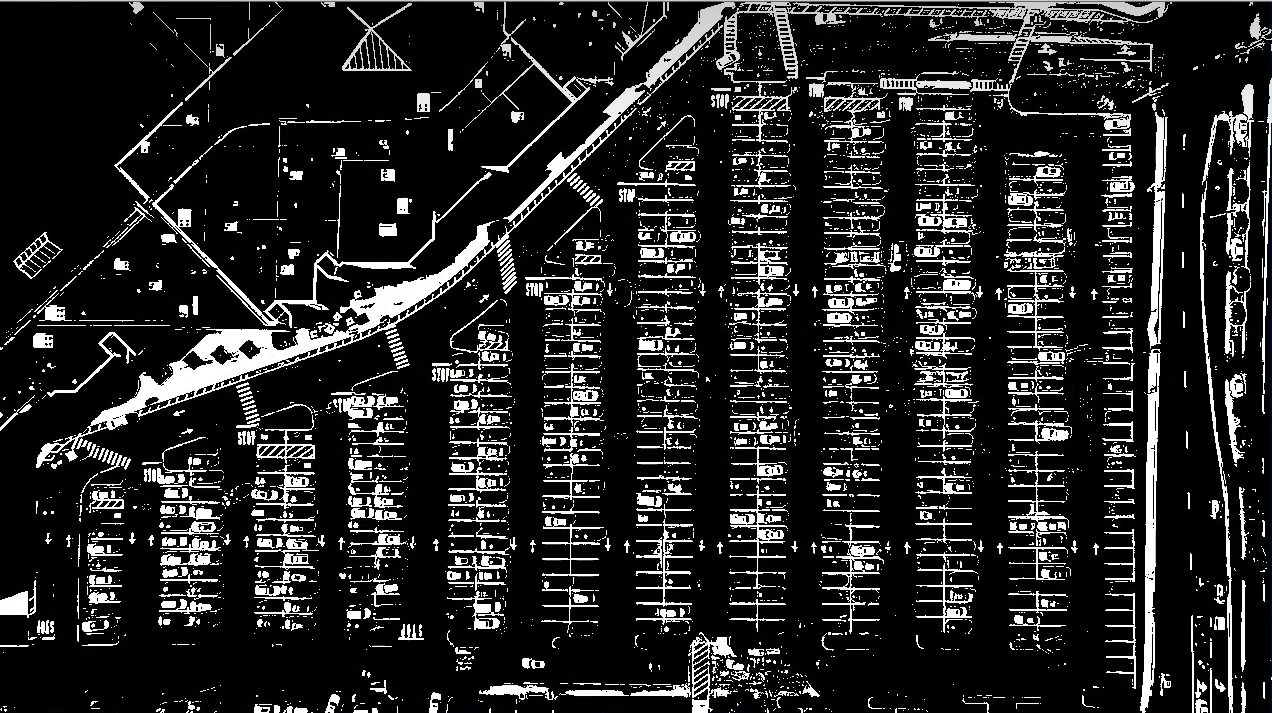
图像预处理与背景过滤
-
颜色阈值过滤:使用
cv2.inRange()函数设定颜色阈值,保留图像中车位线等关键区域,过滤无关背景(如建筑物、车道)。 -
灰度化与边缘检测:将彩色图转为灰度图,通过 Canny 边缘检测算法提取图像边缘,突出车位线的轮廓特征。
-
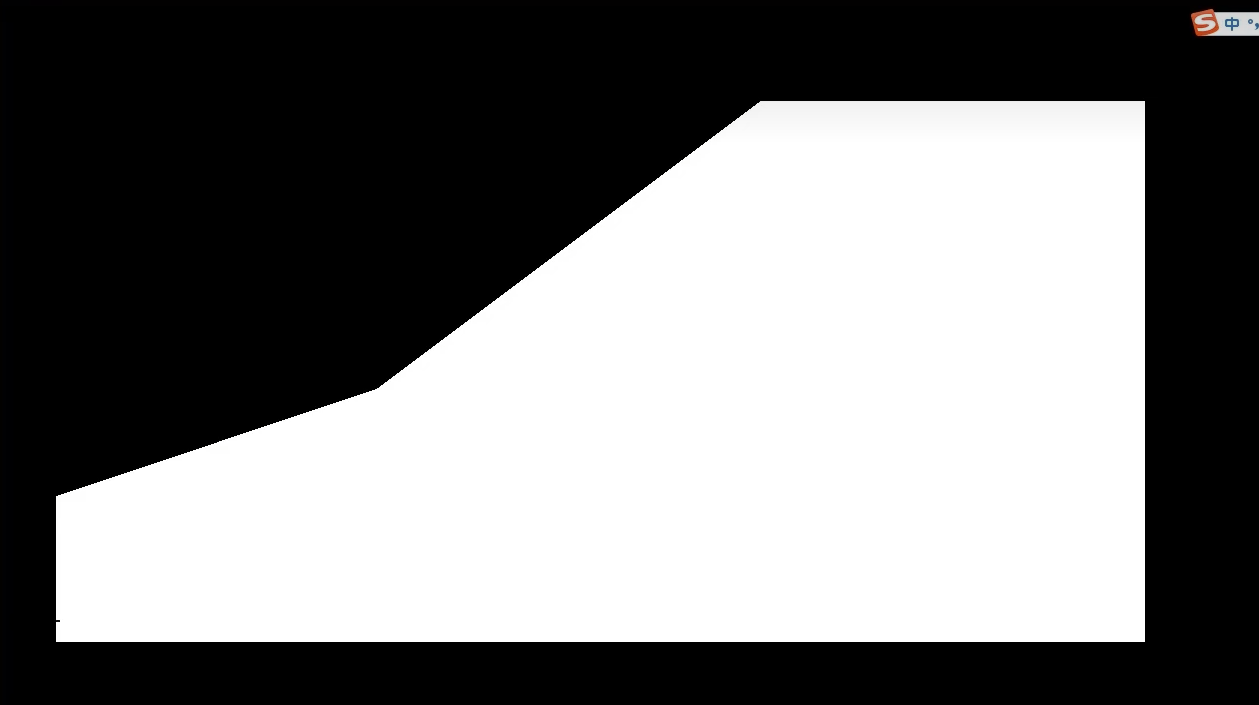
区域筛选:手动指定停车场核心区域的顶点坐标,通过
cv2.fillPoly()生成掩码(mask),仅保留核心区域的边缘信息,进一步剔除干扰。
-
-
霍夫直线检测与筛选
-
霍夫变换(Hough Line Transform):对边缘检测后的图像执行概率霍夫直线检测(
cv2.HoughLinesP()),检测所有直线(即车位线)。 -
直线过滤:根据车位线的特征筛选有效直线 ------ 过滤倾斜角度过大的斜线、长度过短 / 过长的非车位线,保留水平方向的有效车位分隔线。
-
-
按列 聚类 与区域划分
-
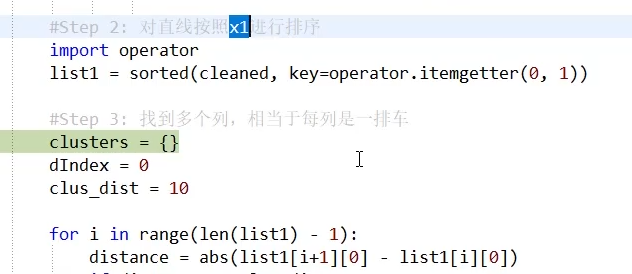
直线聚类排序:将筛选后的直线按 X 坐标聚类(同一列的车位线 X 坐标差异小),区分出停车场的不同列。
-
矩形框绘制:对每一列,计算直线的最大 / 最小 Y 坐标,绘制出该列的矩形范围,确定每列的纵向边界。
-
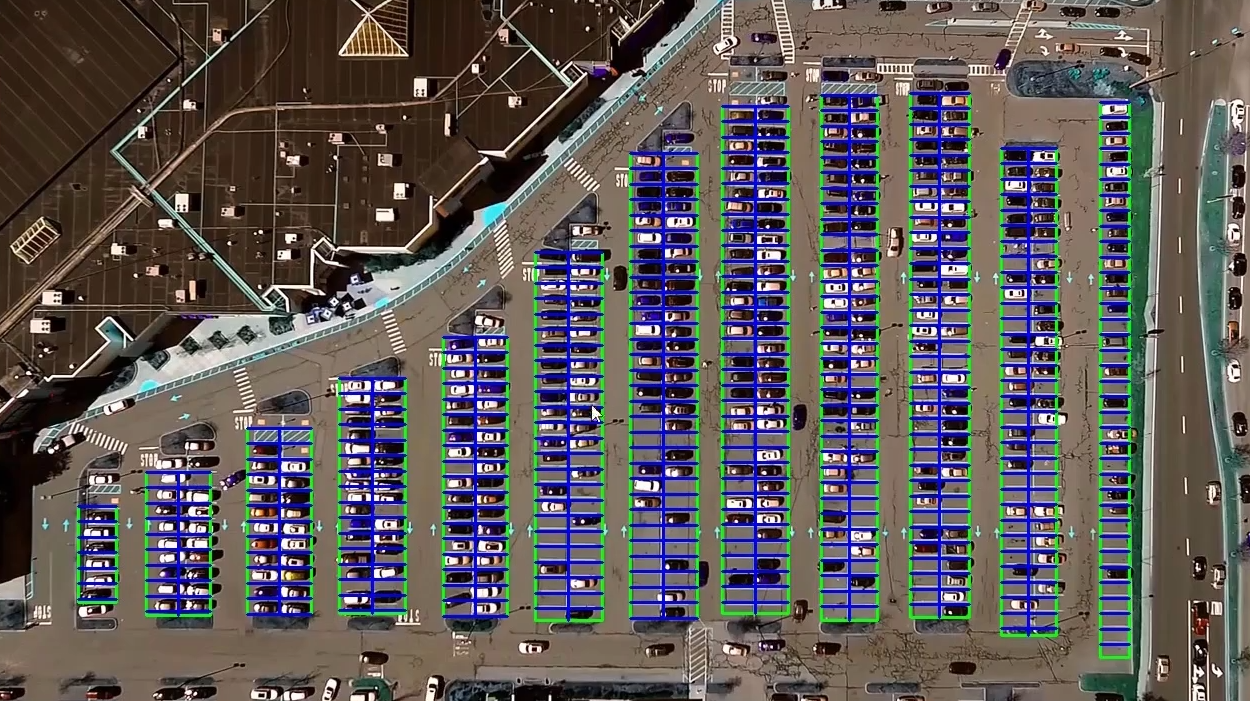
车位切分:根据车位间距(gap 值,经验值 15.5 像素),在每列矩形内横向切分,得到单个车位的坐标(X1,Y1,X2,Y2),并为每个车位分配唯一编号。
-
(二)模块 2:车位占用状态识别
核心目标
基于划分好的车位坐标,通过深度学习模型判断每个车位是 "空闲" 还是 "被占用"。
实现步骤
-
车位图像数据采集
-
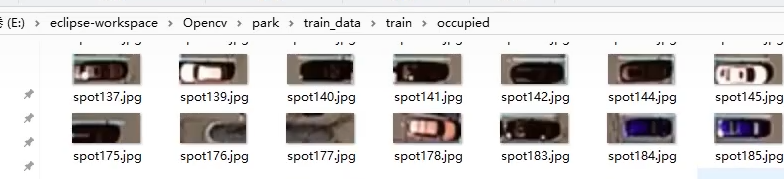
按车位坐标裁剪图像:从原始图像中,根据每个车位的坐标裁剪出对应的局部图像。
-
数据分类与预处理:将裁剪后的图像分为 "空闲车位" 和 "占用车位" 两类,缩放为 48×48 像素(适配模型输入),并划分训练集和测试集。
-
-
分类模型 构建与训练
-
模型选择:基于 Keras 框架,采用迁移学习(使用预训练的 VGG16 模型),减少训练数据量需求,提升训练效率。
-
模型微调:冻结 VGG16 的前 10 层,添加自定义全连接层,输出二分类结果(0 = 空闲,1 = 占用)。
-
数据增强:使用图像翻转、缩放、亮度调整等数据增强技术,提升模型泛化能力。
-
训练参数:输入图像尺寸 48×48,优化器选择 Adam,损失函数为交叉熵,训练轮次(epoch)设为 15,最终验证准确率可达 90% 以上。
-
-
实时预测与结果可视化
-
图像预处理:测试时,对裁剪后的车位图像执行与训练时一致的预处理(缩放、归一化),并扩展为 4D 张量(适配 TensorFlow 后端)。
-
模型预测:通过训练好的模型输出预测概率,选择概率较大的类别作为车位状态。
-
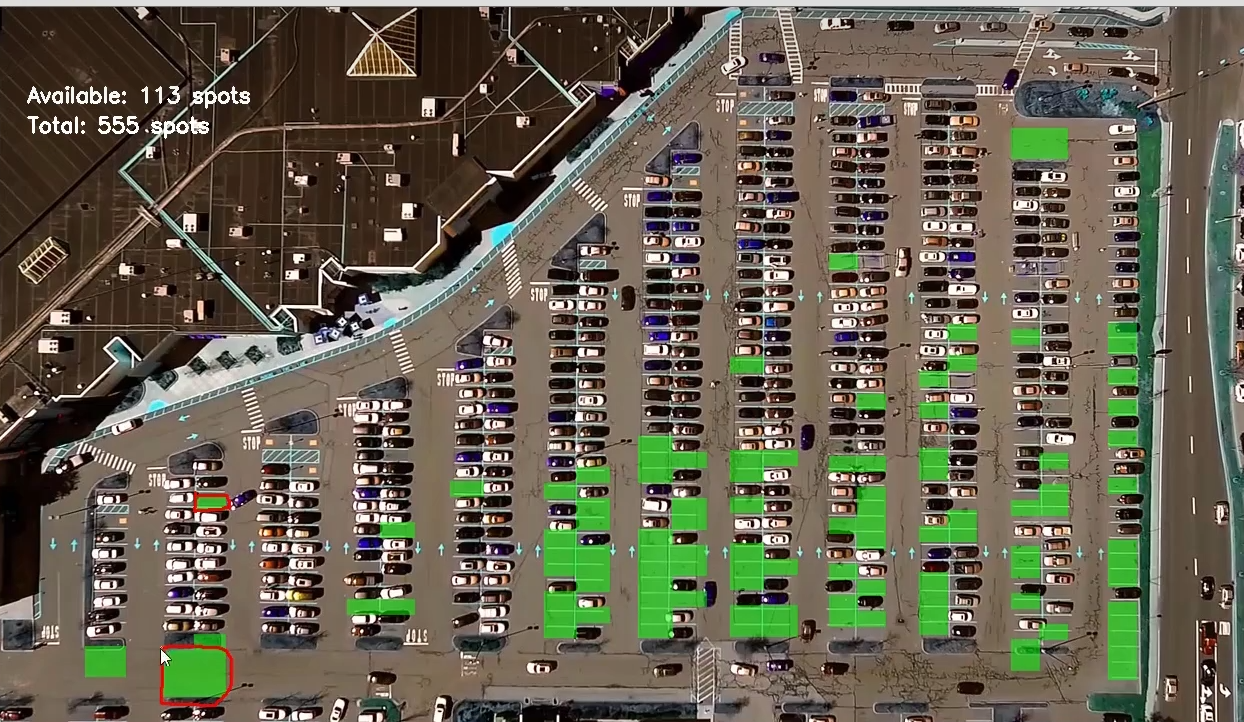
结果标注:在原始图像中,用不同颜色框标注车位状态(如绿色 = 空闲,红色 = 占用),并实时统计空闲 / 占用车位数量。
-
三、代码实战
原始数据
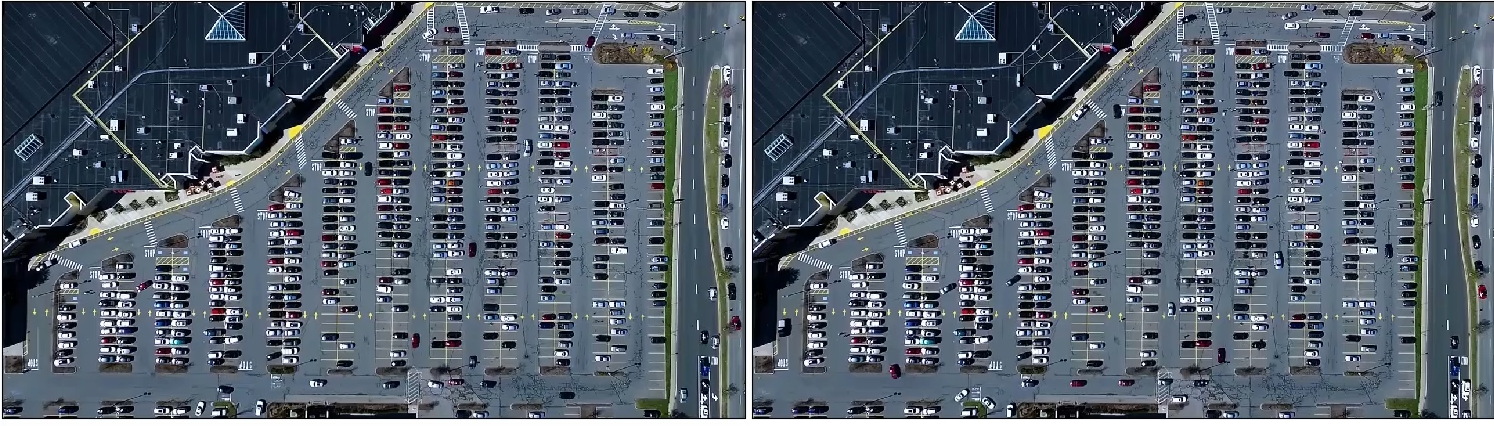 阈值改变
阈值改变
roi判定
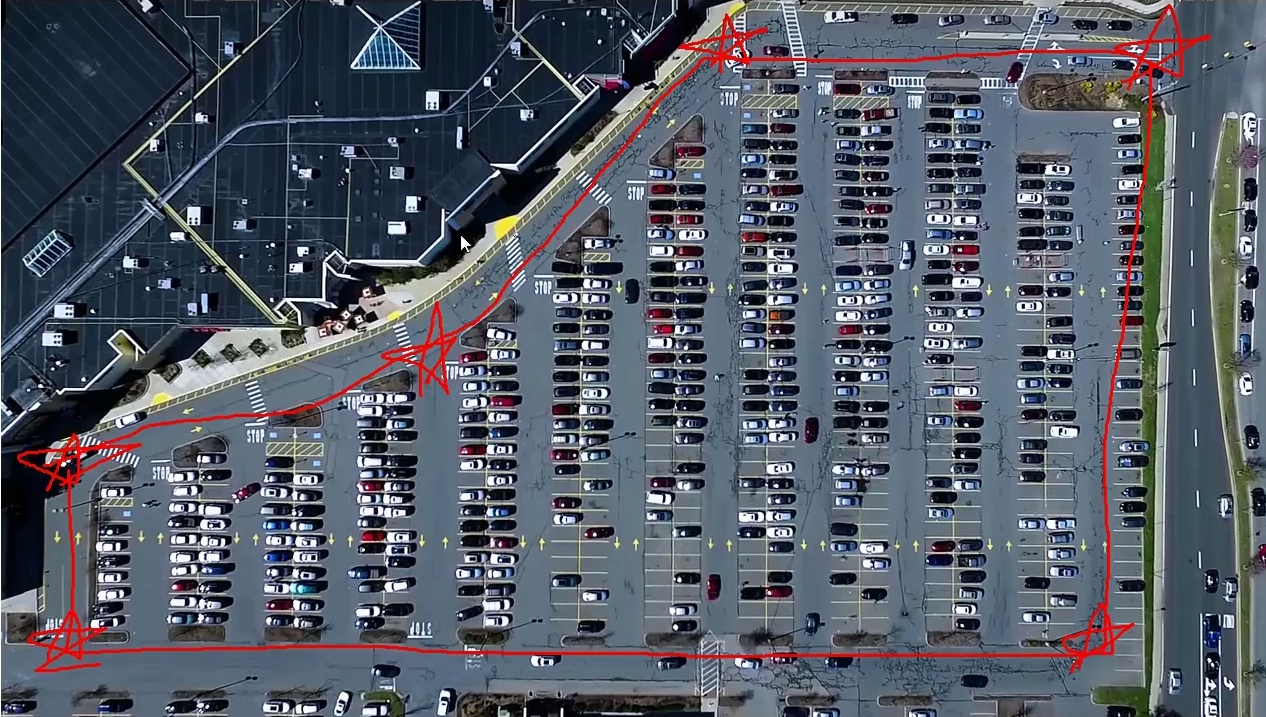
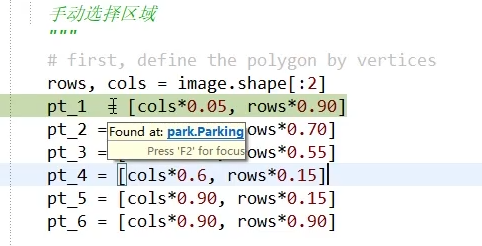
手动指定

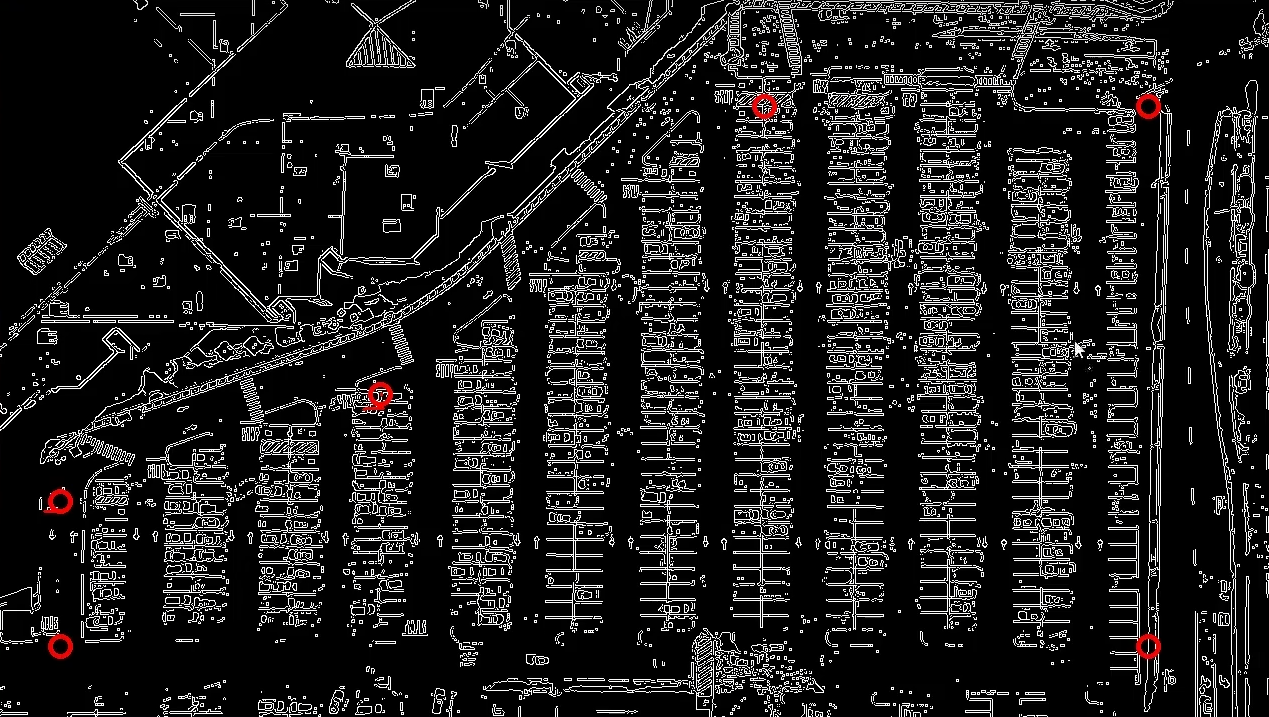
过滤并剔除后的图片
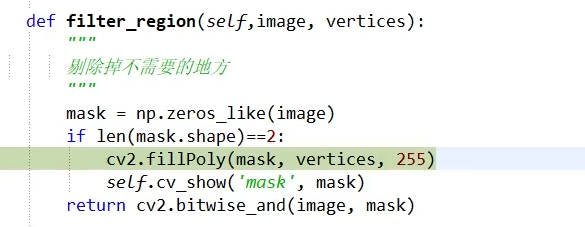
指定mask
结果
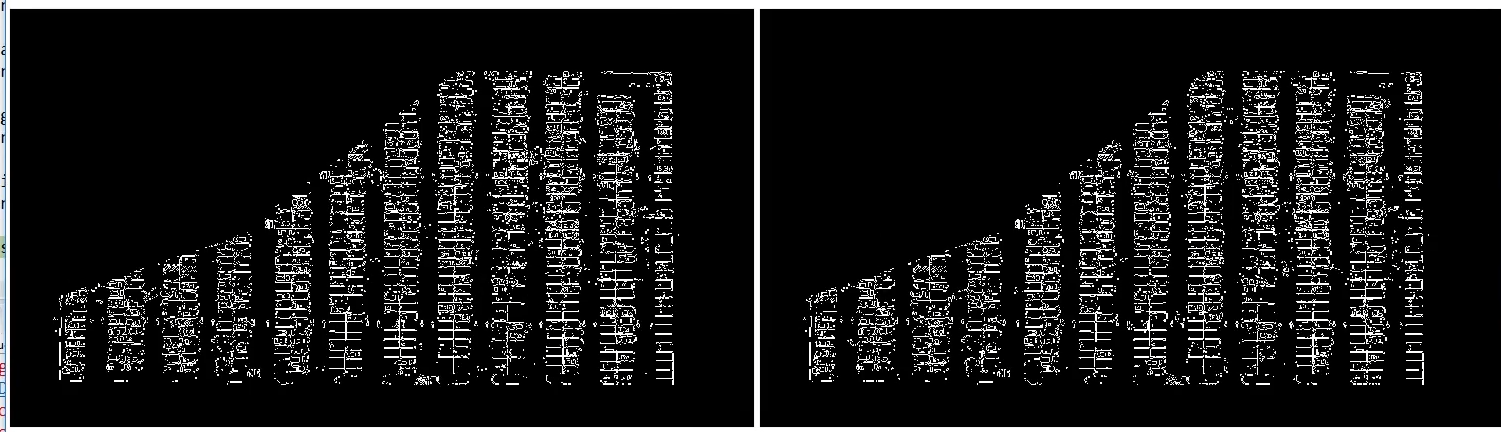
需要把图中的直线利用起来(找直线------霍夫变换,直线检测)
image最好是经过边缘检测之后的结果。


y2 - y1 表示检测直线的倾斜程度
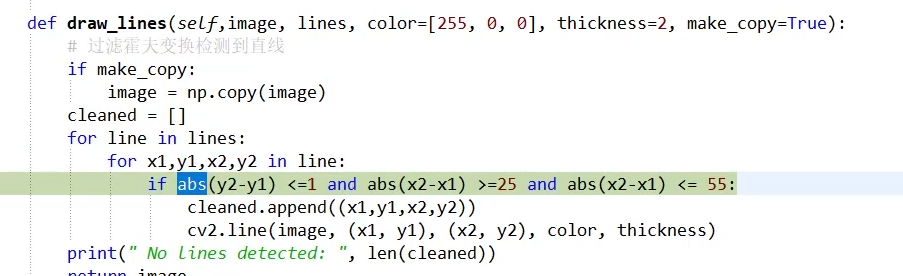
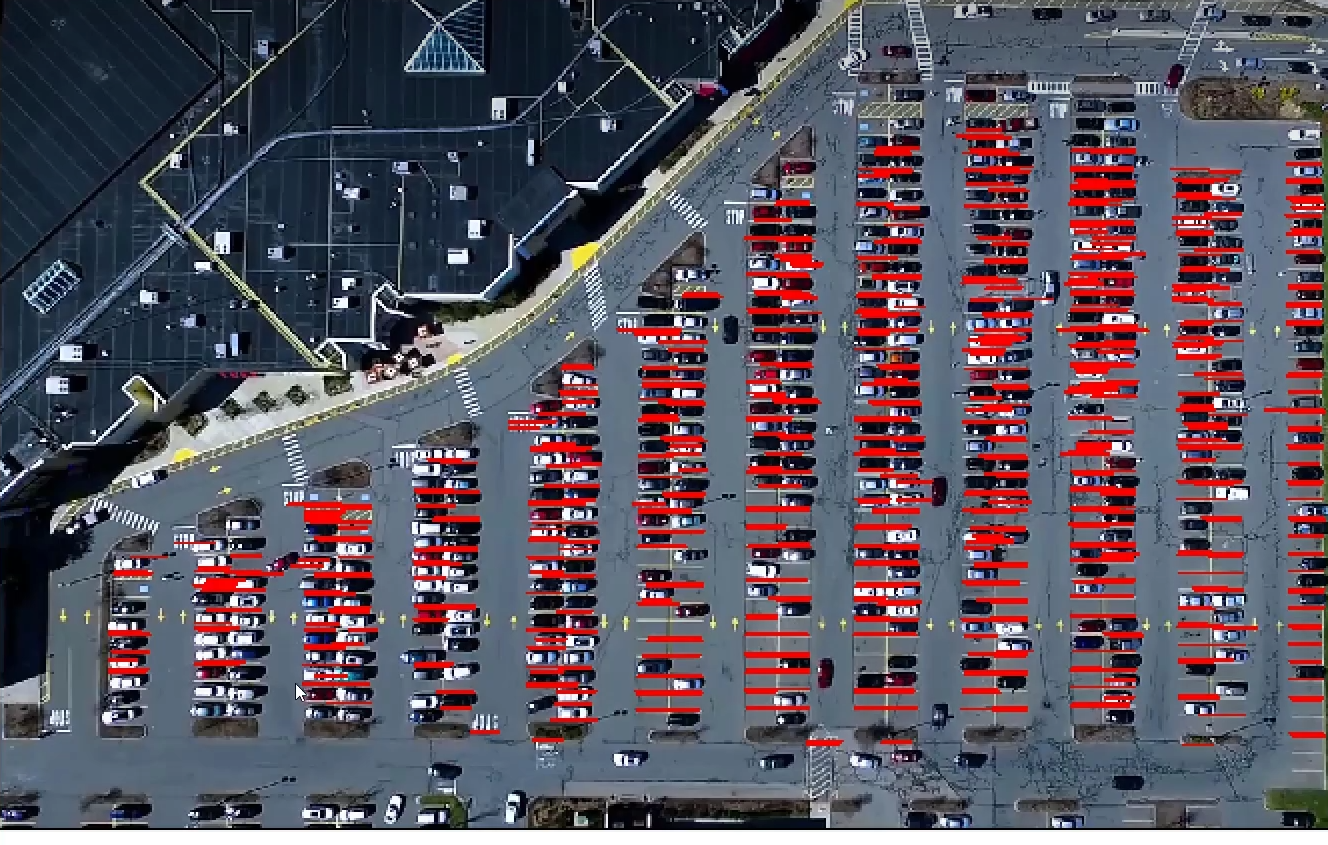
由于车的干扰,我们需要进一步做的好一些(后续再说)
接下来对每一列排序,使用簇,判断距离
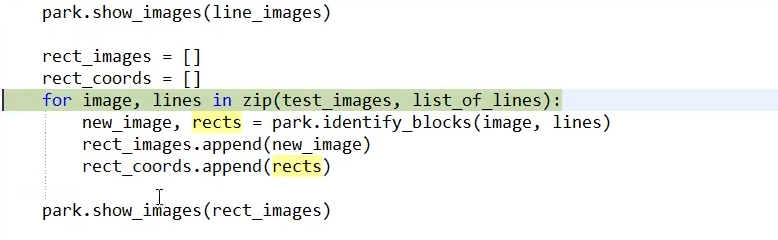
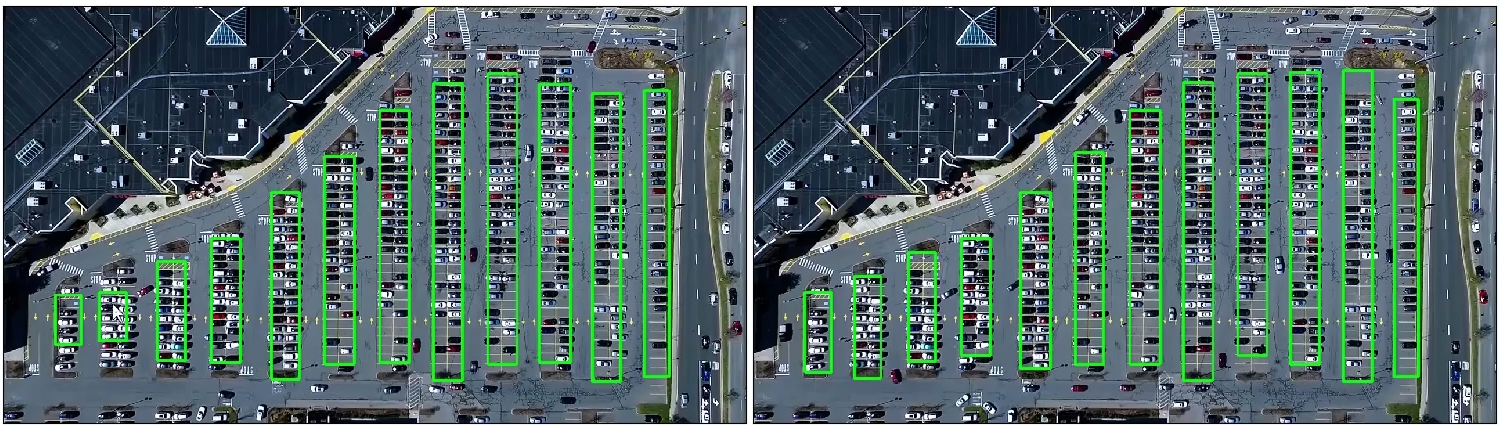
画出停车位
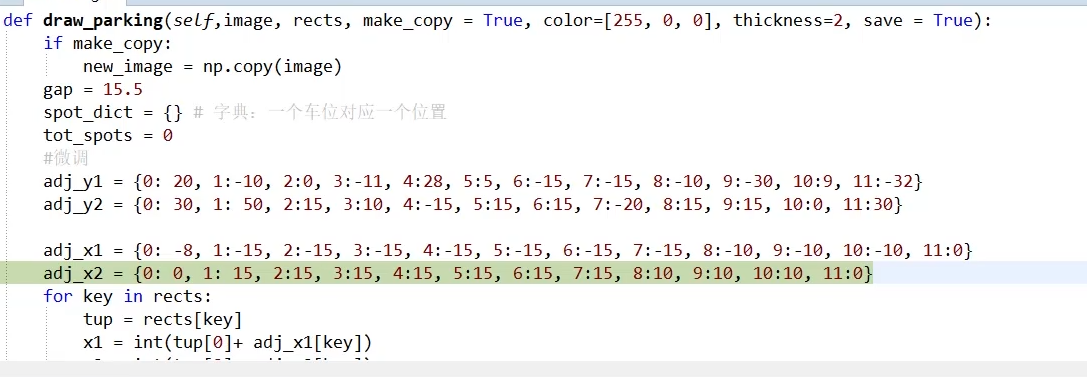
训练过程,有空和占据两种状态,具体看train.py文件
用模型推理预测
parking.py
python
import matplotlib.pyplot as plt
import cv2
import os, glob
import numpy as np

class Parking:

    def show_images(self, images, cmap=None):
        cols = 2
        rows = (len(images)+1)//cols

        plt.figure(figsize=(15, 12))
        for i, image in enumerate(images):
            plt.subplot(rows, cols, i+1)
            cmap = 'gray' if len(image.shape)==2 else cmap
            plt.imshow(image, cmap=cmap)
            plt.xticks([])
            plt.yticks([])
        plt.tight_layout(pad=0, h_pad=0, w_pad=0)
        plt.show()

    def cv_show(self,name,img):
        cv2.imshow(name, img)
        cv2.waitKey(0)
        cv2.destroyAllWindows()
    def select_rgb_white_yellow(self,image):
        #过滤掉背景
        lower = np.uint8([120, 120, 120])
        upper = np.uint8([255, 255, 255])
        # lower_red和高于upper_red的部分分别变成0,lower_red~upper_red之间的值变成255,相当于过滤背景
        white_mask = cv2.inRange(image, lower, upper)  # 只保留 0 和 255 也就是全黑和全白了
        self.cv_show('white_mask',white_mask)

        masked = cv2.bitwise_and(image, image, mask = white_mask)
        self.cv_show('masked',masked)
        return masked
    def convert_gray_scale(self,image):
        return cv2.cvtColor(image, cv2.COLOR_RGB2GRAY)
    def detect_edges(self,image, low_threshold=50, high_threshold=200):
        return cv2.Canny(image, low_threshold, high_threshold)

    def filter_region(self,image, vertices):
        """
                剔除掉不需要的地方
        """
        mask = np.zeros_like(image)
        if len(mask.shape)==2:
            cv2.fillPoly(mask, vertices, 255)
            self.cv_show('mask', mask)
        return cv2.bitwise_and(image, mask)

    def select_region(self,image):
        """
                手动选择区域
        """
        # first, define the polygon by vertices
        rows, cols = image.shape[:2]
        pt_1  = [cols*0.05, rows*0.90]
        pt_2 = [cols*0.05, rows*0.70]
        pt_3 = [cols*0.30, rows*0.55]
        pt_4 = [cols*0.6, rows*0.15]
        pt_5 = [cols*0.90, rows*0.15]
        pt_6 = [cols*0.90, rows*0.90]

        vertices = np.array([[pt_1, pt_2, pt_3, pt_4, pt_5, pt_6]], dtype=np.int32)
        point_img = image.copy()
        point_img = cv2.cvtColor(point_img, cv2.COLOR_GRAY2RGB)
        for point in vertices[0]:
            cv2.circle(point_img, (point[0],point[1]), 10, (0,0,255), 4)
        self.cv_show('point_img',point_img)


        return self.filter_region(image, vertices)

    def hough_lines(self,image):
        #输入的图像需要是边缘检测后的结果
        #minLineLengh(线的最短长度,比这个短的都被忽略)和MaxLineCap(两条直线之间的最大间隔,小于此值,认为是一条直线)
        #rho距离精度,theta角度精度,threshod超过设定阈值才被检测出线段
        return cv2.HoughLinesP(image, rho=0.1, theta=np.pi/10, threshold=15, minLineLength=9, maxLineGap=4)

    def draw_lines(self,image, lines, color=[255, 0, 0], thickness=2, make_copy=True):
        # 过滤霍夫变换检测到直线
        if make_copy:
            image = np.copy(image)
        cleaned = []
        for line in lines:
            for x1,y1,x2,y2 in line:
                if abs(y2-y1) <=1 and abs(x2-x1) >=25 and abs(x2-x1) <= 55:
                    cleaned.append((x1,y1,x2,y2))
                    cv2.line(image, (x1, y1), (x2, y2), color, thickness)
        print(" No lines detected: ", len(cleaned))
        return image
    def identify_blocks(self,image, lines, make_copy=True):
        if make_copy:
            new_image = np.copy(image)
        #Step 1: 过滤部分直线
        cleaned = []
        for line in lines:
            for x1,y1,x2,y2 in line:
                if abs(y2-y1) <=1 and abs(x2-x1) >=25 and abs(x2-x1) <= 55:
                    cleaned.append((x1,y1,x2,y2))

        #Step 2: 对直线按照x1进行排序
        import operator
        list1 = sorted(cleaned, key=operator.itemgetter(0, 1))

        #Step 3: 找到多个列,相当于每列是一排车
        clusters = {}
        dIndex = 0
        clus_dist = 10

        for i in range(len(list1) - 1):
            distance = abs(list1[i+1][0] - list1[i][0])
            if distance <= clus_dist:
                if not dIndex in clusters.keys(): clusters[dIndex] = []
                clusters[dIndex].append(list1[i])
                clusters[dIndex].append(list1[i + 1])

            else:
                dIndex += 1

        #Step 4: 得到坐标
        rects = {}
        i = 0
        for key in clusters:
            all_list = clusters[key]
            cleaned = list(set(all_list))
            if len(cleaned) > 5:
                cleaned = sorted(cleaned, key=lambda tup: tup[1])
                avg_y1 = cleaned[0][1]
                avg_y2 = cleaned[-1][1]
                avg_x1 = 0
                avg_x2 = 0
                for tup in cleaned:
                    avg_x1 += tup[0]
                    avg_x2 += tup[2]
                avg_x1 = avg_x1/len(cleaned)
                avg_x2 = avg_x2/len(cleaned)
                rects[i] = (avg_x1, avg_y1, avg_x2, avg_y2)
                i += 1

        print("Num Parking Lanes: ", len(rects))
        #Step 5: 把列矩形画出来
        buff = 7
        for key in rects:
            tup_topLeft = (int(rects[key][0] - buff), int(rects[key][1]))
            tup_botRight = (int(rects[key][2] + buff), int(rects[key][3]))
            cv2.rectangle(new_image, tup_topLeft,tup_botRight,(0,255,0),3)
        return new_image, rects

    def draw_parking(self,image, rects, make_copy = True, color=[255, 0, 0], thickness=2, save = True):
        if make_copy:
            new_image = np.copy(image)
        gap = 15.5
        spot_dict = {} # 字典:一个车位对应一个位置
        tot_spots = 0
        #微调
        adj_y1 = {0: 20, 1:-10, 2:0, 3:-11, 4:28, 5:5, 6:-15, 7:-15, 8:-10, 9:-30, 10:9, 11:-32}
        adj_y2 = {0: 30, 1: 50, 2:15, 3:10, 4:-15, 5:15, 6:15, 7:-20, 8:15, 9:15, 10:0, 11:30}

        adj_x1 = {0: -8, 1:-15, 2:-15, 3:-15, 4:-15, 5:-15, 6:-15, 7:-15, 8:-10, 9:-10, 10:-10, 11:0}
        adj_x2 = {0: 0, 1: 15, 2:15, 3:15, 4:15, 5:15, 6:15, 7:15, 8:10, 9:10, 10:10, 11:0}
        for key in rects:
            tup = rects[key]
            x1 = int(tup[0]+ adj_x1[key])
            x2 = int(tup[2]+ adj_x2[key])
            y1 = int(tup[1] + adj_y1[key])
            y2 = int(tup[3] + adj_y2[key])
            cv2.rectangle(new_image, (x1, y1),(x2,y2),(0,255,0),2)
            num_splits = int(abs(y2-y1)//gap)
            for i in range(0, num_splits+1):
                y = int(y1 + i*gap)
                cv2.line(new_image, (x1, y), (x2, y), color, thickness)
            if key > 0 and key < len(rects) -1 :
                #竖直线
                x = int((x1 + x2)/2)
                cv2.line(new_image, (x, y1), (x, y2), color, thickness)
            # 计算数量
            if key == 0 or key == (len(rects) -1):
                tot_spots += num_splits +1
            else:
                tot_spots += 2*(num_splits +1)

            # 字典对应好
            if key == 0 or key == (len(rects) -1):
                for i in range(0, num_splits+1):
                    cur_len = len(spot_dict)
                    y = int(y1 + i*gap)
                    spot_dict[(x1, y, x2, y+gap)] = cur_len +1
            else:
                for i in range(0, num_splits+1):
                    cur_len = len(spot_dict)
                    y = int(y1 + i*gap)
                    x = int((x1 + x2)/2)
                    spot_dict[(x1, y, x, y+gap)] = cur_len +1
                    spot_dict[(x, y, x2, y+gap)] = cur_len +2

        print("total parking spaces: ", tot_spots, cur_len)
        if save:
            filename = 'with_parking.jpg'
            cv2.imwrite(filename, new_image)
        return new_image, spot_dict

    def assign_spots_map(self,image, spot_dict, make_copy = True, color=[255, 0, 0], thickness=2):
        if make_copy:
            new_image = np.copy(image)
        for spot in spot_dict.keys():
            (x1, y1, x2, y2) = spot
            cv2.rectangle(new_image, (int(x1),int(y1)), (int(x2),int(y2)), color, thickness)
        return new_image

    def save_images_for_cnn(self,image, spot_dict, folder_name ='cnn_data'):
        for spot in spot_dict.keys():
            (x1, y1, x2, y2) = spot
            (x1, y1, x2, y2) = (int(x1), int(y1), int(x2), int(y2))
            #裁剪
            spot_img = image[y1:y2, x1:x2]
            spot_img = cv2.resize(spot_img, (0,0), fx=2.0, fy=2.0)
            spot_id = spot_dict[spot]

            filename = 'spot' + str(spot_id) +'.jpg'
            print(spot_img.shape, filename, (x1,x2,y1,y2))

            cv2.imwrite(os.path.join(folder_name, filename), spot_img)
    def make_prediction(self,image,model,class_dictionary):
        #预处理
        img = image/255.

        #转换成4D tensor
        image = np.expand_dims(img, axis=0)

        # 用训练好的模型进行训练
        class_predicted = model.predict(image)
        inID = np.argmax(class_predicted[0])
        label = class_dictionary[inID]
        return label
    def predict_on_image(self,image, spot_dict , model,class_dictionary,make_copy=True, color = [0, 255, 0], alpha=0.5):
        if make_copy:
            new_image = np.copy(image)
            overlay = np.copy(image)
        self.cv_show('new_image',new_image)
        cnt_empty = 0
        all_spots = 0
        for spot in spot_dict.keys():
            all_spots += 1
            (x1, y1, x2, y2) = spot
            (x1, y1, x2, y2) = (int(x1), int(y1), int(x2), int(y2))
            spot_img = image[y1:y2, x1:x2]
            spot_img = cv2.resize(spot_img, (48, 48))

            label = self.make_prediction(spot_img,model,class_dictionary)
            if label == 'empty':
                cv2.rectangle(overlay, (int(x1),int(y1)), (int(x2),int(y2)), color, -1)
                cnt_empty += 1

        cv2.addWeighted(overlay, alpha, new_image, 1 - alpha, 0, new_image)

        cv2.putText(new_image, "Available: %d spots" %cnt_empty, (30, 95),
        cv2.FONT_HERSHEY_SIMPLEX,
        0.7, (255, 255, 255), 2)

        cv2.putText(new_image, "Total: %d spots" %all_spots, (30, 125),
        cv2.FONT_HERSHEY_SIMPLEX,
        0.7, (255, 255, 255), 2)
        save = False

        if save:
            filename = 'with_marking.jpg'
            cv2.imwrite(filename, new_image)
        self.cv_show('new_image',new_image)

        return new_image

    def predict_on_video(self,video_name,final_spot_dict, model,class_dictionary,ret=True):
        cap = cv2.VideoCapture(video_name)
        count = 0
        while ret:
            ret, image = cap.read()
            count += 1
            if count == 5:
                count = 0

                new_image = np.copy(image)
                overlay = np.copy(image)
                cnt_empty = 0
                all_spots = 0
                color = [0, 255, 0]
                alpha=0.5
                for spot in final_spot_dict.keys():
                    all_spots += 1
                    (x1, y1, x2, y2) = spot
                    (x1, y1, x2, y2) = (int(x1), int(y1), int(x2), int(y2))
                    spot_img = image[y1:y2, x1:x2]
                    spot_img = cv2.resize(spot_img, (48,48))

                    label = self.make_prediction(spot_img,model,class_dictionary)
                    if label == 'empty':
                        cv2.rectangle(overlay, (int(x1),int(y1)), (int(x2),int(y2)), color, -1)
                        cnt_empty += 1

                cv2.addWeighted(overlay, alpha, new_image, 1 - alpha, 0, new_image)

                cv2.putText(new_image, "Available: %d spots" %cnt_empty, (30, 95),
                cv2.FONT_HERSHEY_SIMPLEX,
                0.7, (255, 255, 255), 2)

                cv2.putText(new_image, "Total: %d spots" %all_spots, (30, 125),
                cv2.FONT_HERSHEY_SIMPLEX,
                0.7, (255, 255, 255), 2)
                cv2.imshow('frame', new_image)
                if cv2.waitKey(10) & 0xFF == ord('q'):
                    break

        cv2.destroyAllWindows()
        cap.release()
推理代码
python
from __future__ import division
import matplotlib.pyplot as plt
import cv2
import os, glob
import numpy as np
from PIL import Image
from keras.applications.imagenet_utils import preprocess_input
from keras.models import load_model
from keras.preprocessing import image
from Parking import Parking
import pickle
cwd = os.getcwd()

def img_process(test_images,park):
    white_yellow_images = list(map(park.select_rgb_white_yellow, test_images))
    park.show_images(white_yellow_images)

    gray_images = list(map(park.convert_gray_scale, white_yellow_images))
    park.show_images(gray_images)

    edge_images = list(map(lambda image: park.detect_edges(image), gray_images))
    park.show_images(edge_images)

    roi_images = list(map(park.select_region, edge_images))
    park.show_images(roi_images)

    list_of_lines = list(map(park.hough_lines, roi_images))

    line_images = []
    for image, lines in zip(test_images, list_of_lines):
        line_images.append(park.draw_lines(image, lines))
    park.show_images(line_images)

    rect_images = []
    rect_coords = []
    for image, lines in zip(test_images, list_of_lines):
        new_image, rects = park.identify_blocks(image, lines)
        rect_images.append(new_image)
        rect_coords.append(rects)

    park.show_images(rect_images)

    delineated = []
    spot_pos = []
    for image, rects in zip(test_images, rect_coords):
        new_image, spot_dict = park.draw_parking(image, rects)
        delineated.append(new_image)
        spot_pos.append(spot_dict)

    park.show_images(delineated)
    final_spot_dict = spot_pos[1]
    print(len(final_spot_dict))

    with open('spot_dict.pickle', 'wb') as handle:
        pickle.dump(final_spot_dict, handle, protocol=pickle.HIGHEST_PROTOCOL)

    park.save_images_for_cnn(test_images[0],final_spot_dict)

    return final_spot_dict
def keras_model(weights_path):
    model = load_model(weights_path)
    return model
def img_test(test_images,final_spot_dict,model,class_dictionary):
    for i in range (len(test_images)):
        predicted_images = park.predict_on_image(test_images[i],final_spot_dict,model,class_dictionary)
def video_test(video_name,final_spot_dict,model,class_dictionary):
    name = video_name
    cap = cv2.VideoCapture(name)
    park.predict_on_video(name,final_spot_dict,model,class_dictionary,ret=True)


if __name__ == '__main__':
    test_images = [plt.imread(path) for path in glob.glob('test_images/*.jpg')]
    weights_path = 'car1.h5'
    video_name = 'parking_video.mp4'
    class_dictionary = {}
    class_dictionary[0] = 'empty'
    class_dictionary[1] = 'occupied'
    park = Parking()
    park.show_images(test_images)
    final_spot_dict = img_process(test_images,park)
    model = keras_model(weights_path)
    img_test(test_images,final_spot_dict,model,class_dictionary)
    video_test(video_name,final_spot_dict,model,class_dictionary)
训练文件
python
import numpy
import os
from keras import applications
from keras.preprocessing.image import ImageDataGenerator
from keras import optimizers
from keras.models import Sequential, Model
from keras.layers import Dropout, Flatten, Dense, GlobalAveragePooling2D
from keras import backend as k
from keras.callbacks import ModelCheckpoint, LearningRateScheduler, TensorBoard, EarlyStopping
from keras.models import Sequential
from keras.layers.normalization import BatchNormalization
from keras.layers.convolutional import Conv2D
from keras.layers.convolutional import MaxPooling2D
from keras.initializers import TruncatedNormal
from keras.layers.core import Activation
from keras.layers.core import Flatten
from keras.layers.core import Dropout
from keras.layers.core import Dense

files_train = 0
files_validation = 0

cwd = os.getcwd()
folder = 'train_data/train'
for sub_folder in os.listdir(folder):
    path, dirs, files = next(os.walk(os.path.join(folder,sub_folder)))
    files_train += len(files)

folder = 'train_data/test'
for sub_folder in os.listdir(folder):
    path, dirs, files = next(os.walk(os.path.join(folder,sub_folder)))
    files_validation += len(files)

print(files_train,files_validation)

img_width, img_height = 48, 48
train_data_dir = "train_data/train"
validation_data_dir = "train_data/test"
nb_train_samples = files_train
nb_validation_samples = files_validation
batch_size = 32
epochs = 15
num_classes = 2

model = applications.VGG16(weights='imagenet', include_top=False, input_shape = (img_width, img_height, 3))

for layer in model.layers[:10]:
    layer.trainable = False

x = model.output
x = Flatten()(x)
predictions = Dense(num_classes, activation="softmax")(x)

model_final = Model(input = model.input, output = predictions)

model_final.compile(loss = "categorical_crossentropy",
                    optimizer = optimizers.SGD(lr=0.0001, momentum=0.9),
                    metrics=["accuracy"])

train_datagen = ImageDataGenerator(
rescale = 1./255,
horizontal_flip = True,
fill_mode = "nearest",
zoom_range = 0.1,
width_shift_range = 0.1,
height_shift_range=0.1,
rotation_range=5)

test_datagen = ImageDataGenerator(
rescale = 1./255,
horizontal_flip = True,
fill_mode = "nearest",
zoom_range = 0.1,
width_shift_range = 0.1,
height_shift_range=0.1,
rotation_range=5)

train_generator = train_datagen.flow_from_directory(
train_data_dir,
target_size = (img_height, img_width),
batch_size = batch_size,
class_mode = "categorical")

validation_generator = test_datagen.flow_from_directory(
validation_data_dir,
target_size = (img_height, img_width),
class_mode = "categorical")

checkpoint = ModelCheckpoint("car1.h5", monitor='val_acc', verbose=1, save_best_only=True, save_weights_only=False, mode='auto', period=1)
early = EarlyStopping(monitor='val_acc', min_delta=0, patience=10, verbose=1, mode='auto')

history_object = model_final.fit_generator(
train_generator,
samples_per_epoch = nb_train_samples,
epochs = epochs,
validation_data = validation_generator,
nb_val_samples = nb_validation_samples,
callbacks = [checkpoint, early])