项目链接 https://github.com/magicyuan876/mineru-tianshu/
MinerU Tianshu(天枢)是一个企业级 AI 数据预处理平台,将非结构化数据转换为 AI 可用的结构化格式:
📄 文档: PDF、Word、Excel、PPT → Markdown/JSON(MinerU、PaddleOCR-VL 109+ 语言、水印去除🧪)
🎬 视频: MP4、AVI、MKV → 语音转写 + 关键帧 OCR🧪(FFmpeg + SenseVoice)
🎙️ 音频: MP3、WAV、M4A → 文字转写 + 说话人识别(SenseVoice 多语言)
🖼️ 图片: JPG、PNG → 文字提取 + 结构化(多 OCR 引擎 + 水印去除🧪)
🧬 生物格式: FASTA、GenBank → Markdown/JSON(插件化引擎,易扩展)
方式二:本地开发部署
前置要求:Node.js 18+、Python 3.12、CUDA(可选)
- 创建虚拟环境
uv python list 列出本地有哪些python源
uv init :创建新项目 会创建
├── .python-version
├── pyproject.toml  项目配置文件
└── README.md 项目说明uv venv --python 3.12 指定python版本创建虚拟环境- 安装库
# 步骤 1:PaddlePaddle GPU(CUDA 12.6)
uv pip install paddlepaddle-gpu==3.2.0 -i https://www.paddlepaddle.org.cn/packages/stable/cu118/

# 步骤 2:支持 CUDA 的 PyTorch
uv pip install torch==2.6.0+cu118 torchvision==0.21.0+cu118 torchaudio==2.6.0+cu118 --index-url https://download.pytorch.org/whl/cu118

# 步骤 3:核心依赖
uv pip install "mineru[core]" -i https://pypi.tuna.tsinghua.edu.cn/simple --no-deps
uv pip install "paddleocr[doc-parser]" -i https://pypi.tuna.tsinghua.edu.cn/simple --no-deps

# 步骤 4:Web 框架和工具
uv pip install fastapi uvicorn litserve aiohttp -i https://pypi.tuna.tsinghua.edu.cn/simple
uv pip install PyMuPDF Pillow img2pdf einops easydict addict loguru modelscope -i https://pypi.tuna.tsinghua.edu.cn/simple

uv pip install lxml bs4 contourpy cryptography mineru-vl-utils
uv pip install yarl websockets ultralytics ultralytics-thop tzdata tokenizers thop stringzilla starlette
uv pip install simsimd seaborn pyzmq pytz python-multipart pyparsing
uv pip install pyjwt 'pydantic[email]' biopython doclayout_yolo transformers ftfy dill shapely pyclipper omegaconf minio
启动rustfs服务(可选, 不影响使用)
docker run -d --name tianshu-rustfs -p 19000:9000 -p 19001:9001 -e RUSTFS_ROOT_USER=minioadmin -e RUSTFS_ROOT_PASSWORD=minioadmin rustfs/rustfs:latest
- 修改.env环境
原项目默认使用8000,可以将项目中的所有8000端口替换成18000,防止与其他项目冲突
3.1 mineru_tianshu/.env
将mineru_tianshu下的.env.example修改成.env
在.env中添加,模型从modelscope下载
MINERU_MODEL_SOURCE=modelscope
MinerU Tianshu - Environment Configuration
天枢环境配置示例
复制此文件为 .env 并修改配置
============================================================================
API Server Configuration
============================================================================
API_PORT=18000
WORKERS_PER_DEVICE=2
GPU_DEVICES=0
============================================================================
Authentication & Authorization
============================================================================
JWT Secret Key (生产环境必须修改!)
JWT_SECRET_KEY=your-super-secret-key-change-in-production-min-32-chars
JWT Token 过期时间 (分钟)
JWT_EXPIRE_MINUTES=1440 # 24 hours
============================================================================
SSO Integration (Optional)
============================================================================
启用 SSO 登录
SSO_ENABLED=false
SSO 类型: oidc / saml
SSO_TYPE=oidc
-------------------- OIDC Configuration --------------------
OpenID Connect (例如: Keycloak, Auth0, Okta)
SSO_CLIENT_ID=your-oidc-client-id
SSO_CLIENT_SECRET=your-oidc-client-secret
SSO_ISSUER_URL=https://auth.example.com/realms/your-realm
SSO_REDIRECT_URI=http://localhost:18000/api/v1/auth/sso/callback
-------------------- SAML Configuration --------------------
SAML 2.0 (例如: Azure AD, OneLogin)
SSO_ENTITY_ID=https://idp.example.com
SSO_SSO_URL=https://idp.example.com/sso
SSO_X509_CERT=MIIC...your-certificate...
SSO_SP_ENTITY_ID=http://localhost:18000/metadata
SSO_SP_ACS_URL=http://localhost:18000/api/v1/auth/sso/callback
============================================================================
MinIO Object Storage (Optional)
============================================================================
MINIO_ENDPOINT=minio.example.com
MINIO_ACCESS_KEY=your-access-key
MINIO_SECRET_KEY=your-secret-key
MINIO_BUCKET=mineru-tianshu
============================================================================
MCP Protocol (Optional)
============================================================================
MCP_HOST=0.0.0.0
MCP_PORT=18001
============================================================================
Database
============================================================================
SQLite database file path (relative to backend/)
DB_PATH=mineru_tianshu.db
============================================================================
Task Scheduler (Optional)
============================================================================
SCHEDULER_ENABLED=true
CLEANUP_INTERVAL_HOURS=24
CLEANUP_RETENTION_DAYS=7
3.2 mineru_tianshu\backend\.env
将.env.example修改成.env
MinerU Tianshu - Environment Configuration
天枢环境配置示例
复制此文件为 .env 并修改配置
============================================================================
API Server Configuration
============================================================================
API_PORT=18000
WORKERS_PER_DEVICE=2
GPU_DEVICES=0
============================================================================
Authentication & Authorization
============================================================================
JWT Secret Key (生产环境必须修改!)
JWT_SECRET_KEY=your-super-secret-key-change-in-production-min-32-chars
JWT Token 过期时间 (分钟)
JWT_EXPIRE_MINUTES=1440 # 24 hours
============================================================================
SSO Integration (Optional)
============================================================================
启用 SSO 登录
SSO_ENABLED=false
SSO 类型: oidc / saml
SSO_TYPE=oidc
-------------------- OIDC Configuration --------------------
OpenID Connect (例如: Keycloak, Auth0, Okta)
SSO_CLIENT_ID=your-oidc-client-id
SSO_CLIENT_SECRET=your-oidc-client-secret
SSO_ISSUER_URL=https://auth.example.com/realms/your-realm
SSO_REDIRECT_URI=http://localhost:18000/api/v1/auth/sso/callback
-------------------- SAML Configuration --------------------
SAML 2.0 (例如: Azure AD, OneLogin)
SSO_ENTITY_ID=https://idp.example.com
SSO_SSO_URL=https://idp.example.com/sso
SSO_X509_CERT=MIIC...your-certificate...
SSO_SP_ENTITY_ID=http://localhost:18000/metadata
SSO_SP_ACS_URL=http://localhost:18000/api/v1/auth/sso/callback
============================================================================
MinIO Object Storage (Optional)
============================================================================
MINIO_ENDPOINT=minio.example.com
MINIO_ACCESS_KEY=your-access-key
MINIO_SECRET_KEY=your-secret-key
MINIO_BUCKET=mineru-tianshu
============================================================================
MCP Protocol (Optional)
============================================================================
MCP_HOST=0.0.0.0
MCP_PORT=18001
============================================================================
Database
============================================================================
SQLite database file path (relative to backend/)
DB_PATH=mineru_tianshu.db
============================================================================
Task Scheduler (Optional)
============================================================================
SCHEDULER_ENABLED=true
CLEANUP_INTERVAL_HOURS=24
CLEANUP_RETENTION_DAYS=7
- 解决出现的报错
4.1 解决无法调用GPU版torch
uv 默认去「PyPI 官方源」找, 必须把 CUDA 索引 写进 pyproject.toml
在pyproject.toml下方加
\[tool.uv.index\]
url = "https://download.pytorch.org/whl/cu118"
4.2 修改mineru_tianshu/.env中DATABASE_PATH
DATABASE_PATH=./tianshu.db
4.3 报错信息如何
_pickle.UnpicklingError: Weights only load failed. This file can still be loaded, to do so you have two options, do those steps only if you trust the source of the checkpoint.
(1) In PyTorch 2.6, we changed the default value of the `weights_only` argument in `torch.load` from `False` to `True`. Re-running `torch.load` with `weights_only` set to `False` will likely succeed, but it can result in arbitrary code execution. Do it only if you got the file from a trusted source.
(2) Alternatively, to load with `weights_only=True` please check the recommended steps in the following error message.
WeightsUnpickler error: Unsupported global: GLOBAL doclayout_yolo.nn.tasks.YOLOv10DetectionModel was not an allowed global by default. Please use `torch.serialization.add_safe_globals(YOLOv10DetectionModel)` or the `torch.serialization.safe_globals(YOLOv10DetectionModel)` context manager to allowlist this global if you trust this class/function.
Check the documentation of torch.load to learn more about types accepted by default with weights_only https://pytorch.org/docs/stable/generated/torch.load.html
解决方案:
不允许的全局对象"从 YOLOv10DetectionModel 变成了 dill._dill._load_type
1、weights_only=True改成weights_only=False 改的是.venv中的
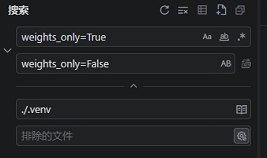
2、在 mineru-tianshu 项目中找到加载模型的地方(通常在 .venv\Lib\site-packages\doclayout_yolo/nn/tasks.py 附近),在 torch.load 之前添加白名单:
import torch
#from doclayout_yolo.nn.tasks import YOLOv10DetectionModel # 关键:导入这个类
添加到安全全局白名单(只需执行一次,通常放在模型初始化前)
torch.serialization.add_safe_globals(YOLOv10DetectionModel)
.venv\Lib\site-packages\doclayout_yolo\nn\tasks.py
添加
import torch
import dill._dill # 关键导入
将 dill 的内部加载函数加入 PyTorch 安全白名单
torch.serialization.add_safe_globals([
dill._dill._load_type,
dill._dill._create_type, # 有时也会用到
dill._dill._create_function, # 常见
dill._dill.Pickler, # 偶尔需要
dill._dill.Unpickler,
])
- 启动后端服务
在start_all.py文件中添加

env_path = os.path.join(Path(file).resolve().parent.parent, '.env')
load_dotenv(env_path, override=True)
uv run backend/start_all.py
- 前端搭建
进入 frontend
cd frontend
安装依赖
删除现有依赖
del node_modules
del package-lock.json
重新安装
npm install
启动开发服务器
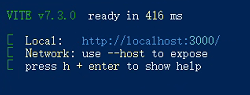
npm run dev
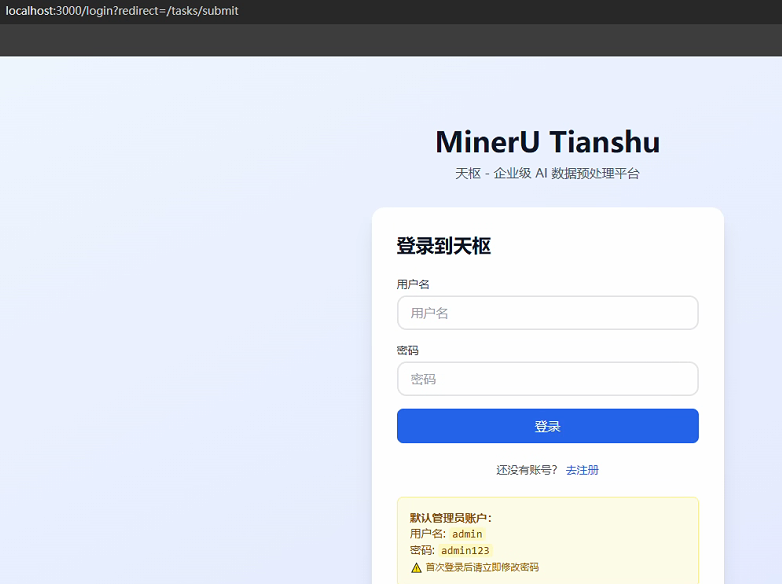
- 浏览器访问 第4步显示的链接
- 下载模型
from modelscope import snapshot_download
if name == 'main':
snapshot_download(
repo_id="opendatalab/PDF-Extract-Kit-1.0",
local_dir=r"C:\Users\Administrator\.cache\huggingface\hub\models--opendatalab--PDF-Extract-Kit-1.0",
local_dir_use_symlinks=False, # 确保文件真实复制
max_workers=8 # 加速下载
)
-
通过接口进行请求
import requests
import time
import json
import os
import requests
from pathlib import Path
from typing import Optional文档
http://127.0.0.1:18001/docs
API 基地址(根据你的部署修改)
BASE_URL = "http://localhost:18000"
可选:如果需要认证,先登录获取 token
response = requests.post(f"{BASE_URL}/api/v1/auth/login", json={"username": "admin", "password": "admin123"})
token = response.json()["access_token"]
headers = {"Authorization": f"Bearer {token}"}
print('headers:', headers)def submit_task(
file_path: str | Path,
*,
backend: str = "auto", # auto | pipeline | paddleocr-vl | sensevoice | video | fasta 等
lang: str = "auto", # auto | ch | en | korean | japan 等
method: str = "auto", # auto | txt | ocr
formula_enable: bool = True,
table_enable: bool = True,
priority: int = 0,
# 视频专用
keep_audio: bool = False,
enable_keyframe_ocr: bool = False,
ocr_backend: str = "paddleocr-vl", # 关键帧 OCR 引擎
keep_keyframes: bool = False,
# 音频专用
enable_speaker_diarization: bool = False,
# 水印去除专用
remove_watermark: bool = False,
watermark_conf_threshold: float = 0.35,
watermark_dilation: int = 10,
) -> Optional[str]:
"""
:param file_path: 文件路径
:param backend: 处理后端: auto (自动选择) | pipeline/paddleocr-vl (文档) | sensevoice (音频) | video (视频) | fasta/genbank (专业格式)
:param lang: 语言: auto/ch/en/korean/japan等
:param method: 解析方法: auto/txt/ocr
:param formula_enable: 是否启用公式识别
:param table_enable: 是否启用表格识别
:param priority: 优先级,数字越大越优先
:param keep_audio: 视频处理时是否保留提取的音频文件
:param enable_keyframe_ocr: 是否启用视频关键帧OCR识别(实验性功能)
:param ocr_backend: 关键帧OCR引擎: paddleocr-vl
:param keep_keyframes: 是否保留提取的关键帧图像
:param enable_speaker_diarization: 是否启用说话人分离(音频多说话人识别,需要额外下载 Paraformer 模型)
:param remove_watermark: 是否启用水印去除(支持 PDF/图片)
:param watermark_conf_threshold: 水印检测置信度阈值(0.0-1.0,推荐 0.35)
:param watermark_dilation: 水印掩码膨胀大小(像素,推荐 10)
"""
file_path = Path(file_path)
if not file_path.exists():
print(f"文件不存在: {file_path}")
return None# multipart/form-data 字段构造(布尔值必须转成小写字符串) files = { "file": (file_path.name, open(file_path, "rb")), # 自动推导 Content-Type "backend": (None, backend), "lang": (None, lang), "method": (None, method), "formula_enable": (None, str(formula_enable).lower()), "table_enable": (None, str(table_enable).lower()), "priority": (None, str(priority)), "keep_audio": (None, str(keep_audio).lower()), "enable_keyframe_ocr": (None, str(enable_keyframe_ocr).lower()), "ocr_backend": (None, ocr_backend), "keep_keyframes": (None, str(keep_keyframes).lower()), "enable_speaker_diarization": (None, str(enable_speaker_diarization).lower()), "remove_watermark": (None, str(remove_watermark).lower()), "watermark_conf_threshold": (None, str(watermark_conf_threshold)), "watermark_dilation": (None, str(watermark_dilation)), } url = f"{BASE_URL}/api/v1/tasks/submit" try: response = requests.post(url, headers=headers, files=files) response.raise_for_status() result = response.json() if result.get("success"): task_id = result["task_id"] print(f"✅ 任务提交成功!task_id: {task_id}") print(f" 文件: {result['file_name']}") print(f" 状态: {result['status']}") return task_id else: print("❌ 提交返回 success=False:", result) return None except requests.exceptions.HTTPError as e: print(f"❌ HTTP 错误 {response.status_code}: {response.text}") return None except Exception as e: print(f"❌ 请求异常: {e}") return None finally: # 关闭文件句柄,防止资源泄漏 if "file" in files: files["file"][1].close()def get_task_result(task_id, format: str = "both"):
"""
:param task_id: 任务ID
:param format: 结果格式: both (默认) | markdown | json | images_urls
"""
"""轮询任务直到完成"""
url = f"{BASE_URL}/api/v1/tasks/{task_id}"
params = {
"format": format
}
while True:
response = requests.get(url, headers=headers, params=params)
if response.status_code != 200:
print("查询失败:", response.text)
return None
result = response.json()
status = result["status"]
print(f"当前状态: {status}")if status == "completed": print('result:', result) print("解析完成!") # result 中包含 markdown, json, images_urls 等 with open("result.md", "w", encoding="utf-8") as f: f.write(json.dumps(result, ensure_ascii=False, indent=2)) print("Markdown 已保存到 result.md") print("图片链接示例:", result.get("images", [])[:3]) return result elif status == "failed": print("任务失败:", result.get("error")) return None time.sleep(5) # 每5秒查询一次def handle_pdf():
# 示例1: 处理 PDF 文档(MinerU 引擎)
file_pdf = r''
task_id = submit_task(
file_pdf,
backend="auto",
lang="ch",
formula_enable=True,
table_enable=True,
watermark_removal=True
)
if task_id:
get_task_result(task_id)def handle_image():
# 示例2: 处理图片(JPG/PNG)
image_path = r'C:\Users\Administrator\Desktop\基金\3c441c0f517b7bf94707cecd2e1bd0b2.jpg'
task_id = submit_task(
image_path,
backend="auto",
lang="ch",
method="ocr",
ocr_backend="paddleocr-vl", # 表格效果最好
table_enable=True,
formula_enable=False,
remove_watermark=False, # 如有水印可开启
priority=1
)
if task_id:
get_task_result(task_id)
# down_markdown(task_id)def handle_video():
# 示例3: 处理视频(MP4,语音转写 + 关键帧 OCR)
mp4_path = r''
task_id = submit_task(
mp4_path,
backend="video",
enable_keyframe_ocr=True,
keep_keyframes=True,
ocr_backend="paddleocr-vl",
enable_speaker_diarization=True,
keep_audio=True
)
if task_id:
get_task_result(task_id)def handle_audio():
# 示例4: 处理音频(MP3,带说话人识别)
mp3_path = r''
task_id = submit_task(
mp3_path,
backend="sensevoice",
enable_speaker_diarization=True
)
if task_id:
get_task_result(task_id)def handle_bio():
# 示例5: 处理生物格式(FASTA)
fasta_path = r"sequence.fasta"
task_id = submit_task(fasta_path, backend="fasta")
if task_id:
get_task_result(task_id)handle_image()