Spring AOP详解:从原理到实战
前言
AOP(Aspect-Oriented Programming,面向切面编程)是Spring框架的另一大核心特性。它通过将横切关注点(Cross-Cutting Concerns)从业务逻辑中分离出来,实现了代码的解耦和复用。本文将深入讲解Spring AOP的核心概念、实现原理和实战应用。
一、什么是AOP
1.1 AOP的概念
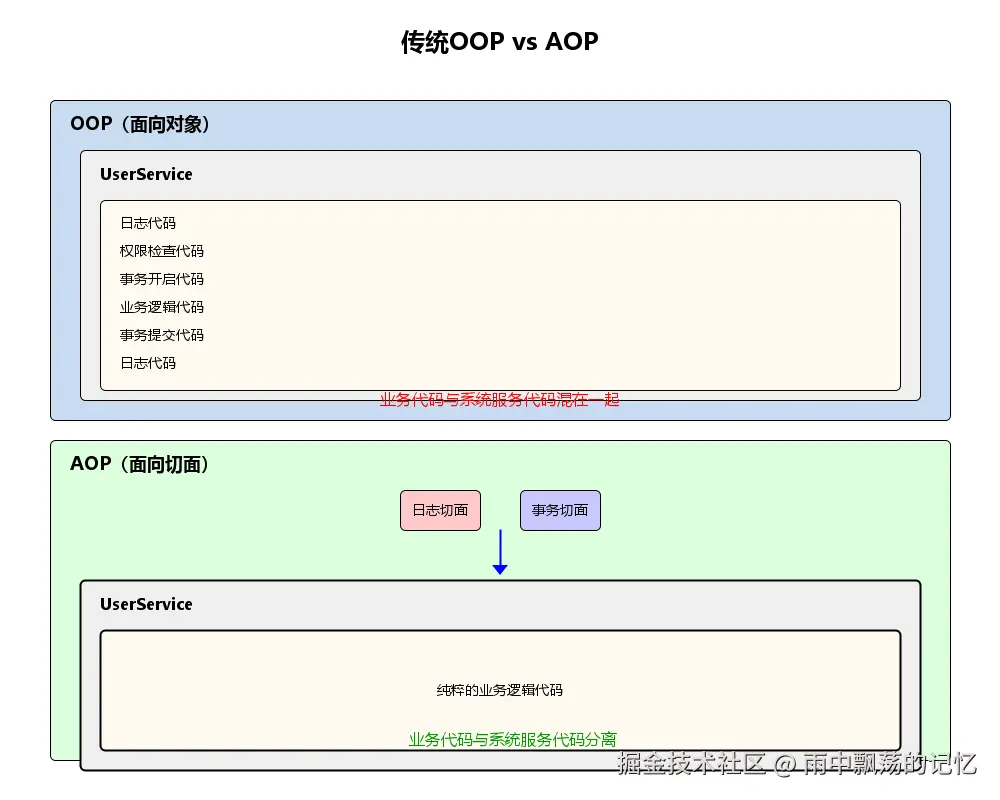
AOP是一种编程范式,它将程序中的横切关注点(如日志、事务、安全等)从业务逻辑中分离出来,形成独立的切面。
1.2 核心概念

1.3 为什么需要AOP
java
/**
 * 没有AOP的代码 - 存在的问题
 */
public class UserServiceWithoutAOP {

    public void createUser(User user) {
        // 1. 日志记录
        System.out.println("开始创建用户: " + user.getUsername());
        long startTime = System.currentTimeMillis();

        // 2. 权限检查
        if (!SecurityContext.hasPermission("user:create")) {
            throw new SecurityException("没有权限");
        }

        // 3. 参数校验
        if (user.getUsername() == null || user.getUsername().isEmpty()) {
            throw new IllegalArgumentException("用户名不能为空");
        }

        // 4. 事务开启
        Transaction tx = TransactionManager.begin();
        try {
            // 5. 核心业务逻辑
            saveUser(user);

            // 6. 事务提交
            tx.commit();
        } catch (Exception e) {
            // 7. 事务回滚
            tx.rollback();
            throw e;
        }

        // 8. 日志记录
        long endTime = System.currentTimeMillis();
        System.out.println("创建用户完成,耗时: " + (endTime - startTime) + "ms");
    }

    private void saveUser(User user) {
        // 实际的业务逻辑
        System.out.println("保存用户到数据库");
    }
}

// 问题:
// 1. 代码重复:日志、权限、事务等代码在每个方法中重复
// 2. 代码混乱:业务逻辑与系统服务代码混在一起
// 3. 难以维护:修改日志逻辑需要改动所有方法
// 4. 违反单一职责:一个方法承担了太多责任
java
/**
 * 使用AOP的代码 - 简洁清晰
 */
@Service
public class UserServiceWithAOP {

    @Transactional
    @RequiresPermission("user:create")
    @Validated
    public void createUser(User user) {
        // 纯粹的业务逻辑
        saveUser(user);
    }

    private void saveUser(User user) {
        System.out.println("保存用户到数据库");
    }
}

// 优势:
// 1. 代码简洁:只包含核心业务逻辑
// 2. 易于维护:系统服务代码集中管理
// 3. 可复用:切面可以应用于多个方法
// 4. 符合单一职责:业务方法只关注业务逻辑
二、Spring AOP基础
2.1 通知类型
java
/**
 * 五种通知类型演示
 */
@Aspect
@Component
public class AdviceTypeDemo {

    /**
     * 前置通知:在目标方法执行之前执行
     */
    @Before("execution(* com.example.service.*.*(..))")
    public void beforeAdvice(JoinPoint joinPoint) {
        String methodName = joinPoint.getSignature().getName();
        System.out.println("前置通知:准备执行方法 " + methodName);
    }

    /**
     * 后置通知:在目标方法执行之后执行(无论是否抛出异常)
     */
    @After("execution(* com.example.service.*.*(..))")
    public void afterAdvice(JoinPoint joinPoint) {
        String methodName = joinPoint.getSignature().getName();
        System.out.println("后置通知:方法 " + methodName + " 执行完成");
    }

    /**
     * 返回通知:在目标方法正常返回之后执行
     */
    @AfterReturning(
        pointcut = "execution(* com.example.service.*.*(..))",
        returning = "result"
    )
    public void afterReturningAdvice(JoinPoint joinPoint, Object result) {
        String methodName = joinPoint.getSignature().getName();
        System.out.println("返回通知:方法 " + methodName + " 返回值 " + result);
    }

    /**
     * 异常通知:在目标方法抛出异常后执行
     */
    @AfterThrowing(
        pointcut = "execution(* com.example.service.*.*(..))",
        throwing = "ex"
    )
    public void afterThrowingAdvice(JoinPoint joinPoint, Exception ex) {
        String methodName = joinPoint.getSignature().getName();
        System.out.println("异常通知:方法 " + methodName + " 抛出异常 " + ex.getMessage());
    }

    /**
     * 环绕通知:包围目标方法执行,最强大的通知类型
     */
    @Around("execution(* com.example.service.*.*(..))")
    public Object aroundAdvice(ProceedingJoinPoint joinPoint) throws Throwable {
        String methodName = joinPoint.getSignature().getName();

        System.out.println("环绕通知:方法 " + methodName + " 开始执行");
        long startTime = System.currentTimeMillis();

        try {
            // 执行目标方法
            Object result = joinPoint.proceed();

            long endTime = System.currentTimeMillis();
            System.out.println("环绕通知:方法 " + methodName + " 执行成功,耗时 " +
                             (endTime - startTime) + "ms");

            return result;
        } catch (Throwable e) {
            System.out.println("环绕通知:方法 " + methodName + " 执行失败");
            throw e;
        }
    }
}
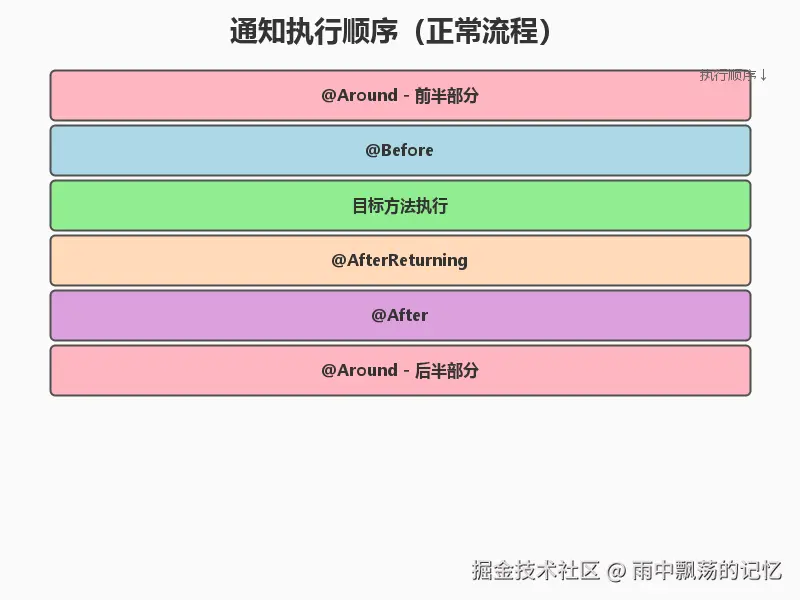
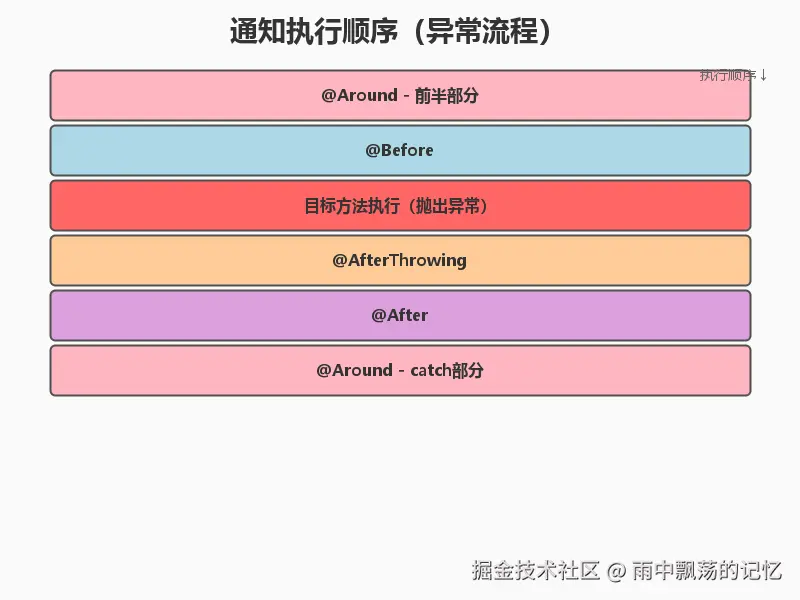
通知执行顺序:
2.2 切点表达式
java
/**
 * 切点表达式示例
 */
@Aspect
@Component
public class PointcutExpressionDemo {

    /**
     * execution表达式:最常用
     * 语法:execution(修饰符? 返回类型 包名.类名.方法名(参数) 异常?)
     */

    // 匹配UserService的所有public方法
    @Pointcut("execution(public * com.example.service.UserService.*(..))")
    public void userServiceMethods() {}

    // 匹配所有Service的所有方法
    @Pointcut("execution(* com.example.service.*.*(..))")
    public void allServiceMethods() {}

    // 匹配所有返回User的方法
    @Pointcut("execution(com.example.entity.User *.*(..))")
    public void returnUser() {}

    // 匹配第一个参数是Long类型的方法
    @Pointcut("execution(* *(Long, ..))")
    public void firstParamIsLong() {}

    /**
     * within表达式:匹配特定类型
     */

    // 匹配service包下的所有类
    @Pointcut("within(com.example.service.*)")
    public void withinService() {}

    // 匹配service包及子包下的所有类
    @Pointcut("within(com.example.service..*)")
    public void withinServicePackage() {}

    /**
     * @annotation表达式:匹配带有特定注解的方法
     */

    // 匹配带有@Transactional注解的方法
    @Pointcut("@annotation(org.springframework.transaction.annotation.Transactional)")
    public void transactionalMethods() {}

    // 匹配带有@RequiresPermission注解的方法
    @Pointcut("@annotation(com.example.annotation.RequiresPermission)")
    public void requiresPermissionMethods() {}

    /**
     * @within表达式:匹配带有特定注解的类的所有方法
     */

    // 匹配带有@Service注解的类的所有方法
    @Pointcut("@within(org.springframework.stereotype.Service)")
    public void serviceBeans() {}

    /**
     * args表达式:匹配参数类型
     */

    // 匹配参数是User类型的方法
    @Pointcut("args(com.example.entity.User)")
    public void argsUser() {}

    /**
     * 组合切点表达式
     */

    // 与运算:同时满足两个条件
    @Pointcut("userServiceMethods() && args(Long)")
    public void userServiceWithLongParam() {}

    // 或运算:满足任一条件
    @Pointcut("withinService() || withinServicePackage()")
    public void serviceOrPackage() {}

    // 非运算:不满足条件
    @Pointcut("allServiceMethods() && !userServiceMethods()")
    public void excludeUserService() {}
}
2.3 完整的切面示例
java
/**
 * 日志切面
 */
@Aspect
@Component
@Slf4j
public class LoggingAspect {

    /**
     * 定义切点:service层所有方法
     */
    @Pointcut("execution(* com.example.service..*.*(..))")
    public void serviceLayer() {}

    /**
     * 环绕通知:记录方法执行时间和参数
     */
    @Around("serviceLayer()")
    public Object logAround(ProceedingJoinPoint joinPoint) throws Throwable {
        // 获取方法信息
        String className = joinPoint.getTarget().getClass().getSimpleName();
        String methodName = joinPoint.getSignature().getName();
        Object[] args = joinPoint.getArgs();

        // 记录开始
        log.info("开始执行: {}.{}(), 参数: {}", className, methodName, Arrays.toString(args));
        long startTime = System.currentTimeMillis();

        try {
            // 执行目标方法
            Object result = joinPoint.proceed();

            // 记录成功
            long endTime = System.currentTimeMillis();
            log.info("执行成功: {}.{}(), 耗时: {}ms, 返回值: {}",
                    className, methodName, (endTime - startTime), result);

            return result;

        } catch (Throwable e) {
            // 记录异常
            long endTime = System.currentTimeMillis();
            log.error("执行失败: {}.{}(), 耗时: {}ms, 异常: {}",
                     className, methodName, (endTime - startTime), e.getMessage());
            throw e;
        }
    }
}
三、AOP实现原理
3.1 JDK动态代理
java
/**
 * JDK动态代理示例
 * 要求:目标对象必须实现接口
 */
public interface UserService {
    User findById(Long id);
    void save(User user);
}

public class UserServiceImpl implements UserService {

    @Override
    public User findById(Long id) {
        System.out.println("查询用户: " + id);
        return new User(id, "User" + id);
    }

    @Override
    public void save(User user) {
        System.out.println("保存用户: " + user.getUsername());
    }
}

/**
 * 自定义InvocationHandler
 */
public class LogInvocationHandler implements InvocationHandler {

    private Object target;

    public LogInvocationHandler(Object target) {
        this.target = target;
    }

    @Override
    public Object invoke(Object proxy, Method method, Object[] args) throws Throwable {
        // 前置增强
        System.out.println("JDK代理 - 方法开始: " + method.getName());
        long startTime = System.currentTimeMillis();

        // 调用目标方法
        Object result = method.invoke(target, args);

        // 后置增强
        long endTime = System.currentTimeMillis();
        System.out.println("JDK代理 - 方法结束: " + method.getName() +
                         ", 耗时: " + (endTime - startTime) + "ms");

        return result;
    }

    /**
     * 创建代理对象
     */
    public static <T> T createProxy(T target) {
        return (T) Proxy.newProxyInstance(
            target.getClass().getClassLoader(),
            target.getClass().getInterfaces(),
            new LogInvocationHandler(target)
        );
    }
}

/**
 * 使用JDK代理
 */
public class JdkProxyDemo {
    public static void main(String[] args) {
        // 创建目标对象
        UserService target = new UserServiceImpl();

        // 创建代理对象
        UserService proxy = LogInvocationHandler.createProxy(target);

        // 调用代理对象的方法
        proxy.findById(1L);
        proxy.save(new User(null, "张三"));
    }
}
3.2 CGLIB代理
java
/**
 * CGLIB代理示例
 * 优势:不需要实现接口,通过继承实现
 */
public class OrderService {

    public Order findById(Long id) {
        System.out.println("查询订单: " + id);
        return new Order(id, "ORDER" + id);
    }

    public void save(Order order) {
        System.out.println("保存订单: " + order.getOrderNo());
    }
}

/**
 * 自定义MethodInterceptor
 */
public class LogMethodInterceptor implements MethodInterceptor {

    @Override
    public Object intercept(Object obj, Method method, Object[] args,
                          MethodProxy proxy) throws Throwable {
        // 前置增强
        System.out.println("CGLIB代理 - 方法开始: " + method.getName());
        long startTime = System.currentTimeMillis();

        // 调用父类方法(目标方法)
        Object result = proxy.invokeSuper(obj, args);

        // 后置增强
        long endTime = System.currentTimeMillis();
        System.out.println("CGLIB代理 - 方法结束: " + method.getName() +
                         ", 耗时: " + (endTime - startTime) + "ms");

        return result;
    }

    /**
     * 创建代理对象
     */
    public static <T> T createProxy(Class<T> clazz) {
        Enhancer enhancer = new Enhancer();
        enhancer.setSuperclass(clazz);
        enhancer.setCallback(new LogMethodInterceptor());
        return (T) enhancer.create();
    }
}

/**
 * 使用CGLIB代理
 */
public class CglibProxyDemo {
    public static void main(String[] args) {
        // 创建代理对象(无需目标对象)
        OrderService proxy = LogMethodInterceptor.createProxy(OrderService.class);

        // 调用代理对象的方法
        proxy.findById(1L);
        proxy.save(new Order(null, "ORD20240101"));
    }
}
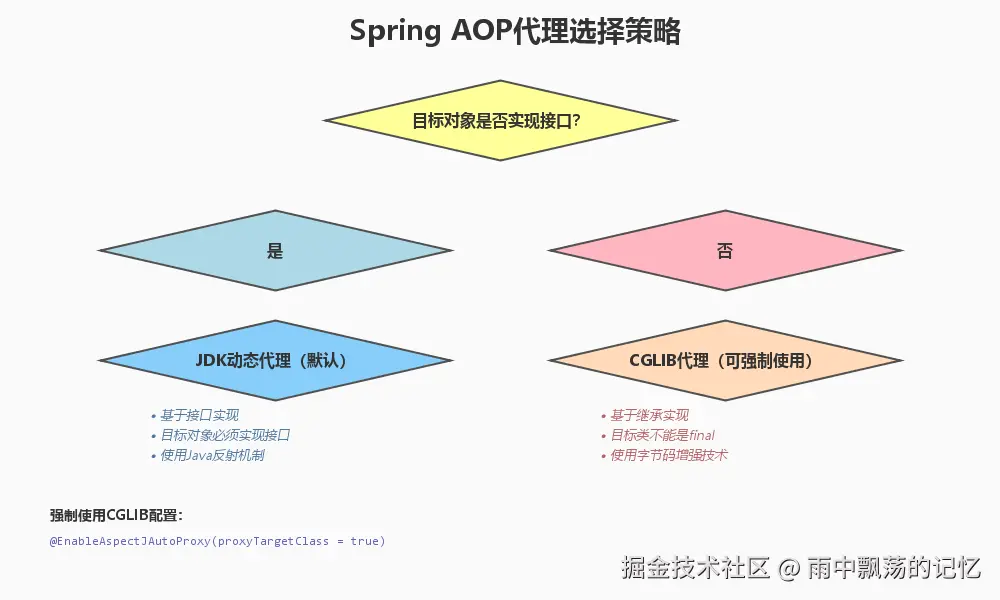
3.3 Spring AOP代理选择
java
/**
 * Spring AOP配置
 */
@Configuration
@EnableAspectJAutoProxy(proxyTargetClass = true)  // 强制使用CGLIB
public class AopConfig {
}
四、实战案例
4.1 案例1:性能监控切面
java
/**
 * 性能监控注解
 */
@Target(ElementType.METHOD)
@Retention(RetentionPolicy.RUNTIME)
public @interface PerformanceMonitor {
    String value() default "";
    long threshold() default 1000;  // 默认阈值1秒
}

/**
 * 性能监控切面
 */
@Aspect
@Component
@Slf4j
public class PerformanceMonitorAspect {

    @Around("@annotation(monitor)")
    public Object monitor(ProceedingJoinPoint joinPoint, PerformanceMonitor monitor)
            throws Throwable {

        String methodName = joinPoint.getSignature().toShortString();
        String operationName = monitor.value().isEmpty() ? methodName : monitor.value();
        long threshold = monitor.threshold();

        // 开始计时
        long startTime = System.currentTimeMillis();

        try {
            Object result = joinPoint.proceed();

            // 计算耗时
            long endTime = System.currentTimeMillis();
            long duration = endTime - startTime;

            // 记录性能数据
            if (duration > threshold) {
                log.warn("性能警告: {} 执行耗时 {}ms,超过阈值 {}ms",
                        operationName, duration, threshold);
            } else {
                log.info("性能监控: {} 执行耗时 {}ms", operationName, duration);
            }

            // 可以将性能数据发送到监控系统
            sendToMonitoringSystem(operationName, duration);

            return result;

        } catch (Throwable e) {
            long endTime = System.currentTimeMillis();
            long duration = endTime - startTime;
            log.error("性能监控: {} 执行失败,耗时 {}ms", operationName, duration);
            throw e;
        }
    }

    private void sendToMonitoringSystem(String operation, long duration) {
        // 发送到Prometheus、Grafana等监控系统
        // MetricsRegistry.timer(operation).record(duration, TimeUnit.MILLISECONDS);
    }
}

/**
 * 使用性能监控
 */
@Service
public class ProductService {

    @PerformanceMonitor(value = "查询商品列表", threshold = 500)
    public List<Product> findProducts(String category) {
        // 模拟数据库查询
        try {
            Thread.sleep(300);
        } catch (InterruptedException e) {
            e.printStackTrace();
        }
        return Arrays.asList(
            new Product(1L, "商品1"),
            new Product(2L, "商品2")
        );
    }

    @PerformanceMonitor(value = "生成报表", threshold = 2000)
    public void generateReport() {
        // 模拟耗时操作
        try {
            Thread.sleep(1500);
        } catch (InterruptedException e) {
            e.printStackTrace();
        }
    }
}
4.2 案例2:操作日志切面
java
/**
 * 操作日志注解
 */
@Target(ElementType.METHOD)
@Retention(RetentionPolicy.RUNTIME)
public @interface OperationLog {
    String module();        // 模块名
    String operation();     // 操作类型
    String description();   // 操作描述
}

/**
 * 操作日志实体
 */
@Data
public class SysOperationLog {
    private Long id;
    private String module;
    private String operation;
    private String description;
    private String method;
    private String params;
    private String result;
    private String username;
    private String ip;
    private Long duration;
    private LocalDateTime createTime;
    private String errorMsg;
}

/**
 * 操作日志切面
 */
@Aspect
@Component
@Slf4j
public class OperationLogAspect {

    @Autowired
    private OperationLogService operationLogService;

    @Around("@annotation(operationLog)")
    public Object logOperation(ProceedingJoinPoint joinPoint, OperationLog operationLog)
            throws Throwable {

        // 创建日志对象
        SysOperationLog sysLog = new SysOperationLog();
        sysLog.setModule(operationLog.module());
        sysLog.setOperation(operationLog.operation());
        sysLog.setDescription(operationLog.description());
        sysLog.setCreateTime(LocalDateTime.now());

        // 获取方法信息
        String className = joinPoint.getTarget().getClass().getName();
        String methodName = joinPoint.getSignature().getName();
        sysLog.setMethod(className + "." + methodName);

        // 获取方法参数
        Object[] args = joinPoint.getArgs();
        sysLog.setParams(JSON.toJSONString(args));

        // 获取用户信息
        sysLog.setUsername(getCurrentUsername());
        sysLog.setIp(getClientIp());

        // 开始计时
        long startTime = System.currentTimeMillis();

        try {
            // 执行目标方法
            Object result = joinPoint.proceed();

            // 记录返回值
            sysLog.setResult(JSON.toJSONString(result));

            // 计算耗时
            long endTime = System.currentTimeMillis();
            sysLog.setDuration(endTime - startTime);

            // 异步保存日志
            operationLogService.saveAsync(sysLog);

            return result;

        } catch (Throwable e) {
            // 记录异常
            sysLog.setErrorMsg(e.getMessage());
            long endTime = System.currentTimeMillis();
            sysLog.setDuration(endTime - startTime);

            // 异步保存日志
            operationLogService.saveAsync(sysLog);

            throw e;
        }
    }

    private String getCurrentUsername() {
        // 从SecurityContext获取当前用户
        return "admin";  // 简化示例
    }

    private String getClientIp() {
        // 从HttpServletRequest获取客户端IP
        return "127.0.0.1";  // 简化示例
    }
}

/**
 * 使用操作日志
 */
@RestController
@RequestMapping("/api/users")
public class UserController {

    @Autowired
    private UserService userService;

    @PostMapping
    @OperationLog(
        module = "用户管理",
        operation = "创建",
        description = "创建新用户"
    )
    public Result<User> createUser(@RequestBody User user) {
        userService.createUser(user);
        return Result.success(user);
    }

    @DeleteMapping("/{id}")
    @OperationLog(
        module = "用户管理",
        operation = "删除",
        description = "删除用户"
    )
    public Result<Void> deleteUser(@PathVariable Long id) {
        userService.deleteUser(id);
        return Result.success();
    }
}
4.3 案例3:权限校验切面
java
/**
 * 权限校验注解
 */
@Target(ElementType.METHOD)
@Retention(RetentionPolicy.RUNTIME)
public @interface RequiresPermission {
    String[] value();           // 需要的权限
    Logical logical() default Logical.AND;  // 多个权限的逻辑关系
}

public enum Logical {
    AND, OR
}

/**
 * 权限校验切面
 */
@Aspect
@Component
@Slf4j
public class PermissionAspect {

    @Autowired
    private PermissionService permissionService;

    @Before("@annotation(requiresPermission)")
    public void checkPermission(JoinPoint joinPoint, RequiresPermission requiresPermission) {
        String[] permissions = requiresPermission.value();
        Logical logical = requiresPermission.logical();

        // 获取当前用户
        String username = getCurrentUsername();

        // 检查权限
        boolean hasPermission = false;

        if (logical == Logical.AND) {
            // AND:需要拥有所有权限
            hasPermission = permissionService.hasAllPermissions(username, permissions);
        } else {
            // OR:拥有任一权限即可
            hasPermission = permissionService.hasAnyPermission(username, permissions);
        }

        if (!hasPermission) {
            String method = joinPoint.getSignature().toShortString();
            log.warn("权限不足: 用户[{}]访问方法[{}]需要权限{}", username, method, permissions);
            throw new PermissionDeniedException("权限不足");
        }

        log.info("权限校验通过: 用户[{}]访问方法[{}]", username, joinPoint.getSignature().toShortString());
    }

    private String getCurrentUsername() {
        // 从SecurityContext获取当前用户
        return "admin";  // 简化示例
    }
}

/**
 * 权限服务
 */
@Service
public class PermissionService {

    // 用户权限缓存(实际应从数据库或Redis获取)
    private Map<String, Set<String>> userPermissions = new HashMap<>();

    public PermissionService() {
        // 初始化测试数据
        userPermissions.put("admin", new HashSet<>(Arrays.asList(
            "user:create", "user:update", "user:delete", "user:view"
        )));
        userPermissions.put("user", new HashSet<>(Arrays.asList(
            "user:view"
        )));
    }

    public boolean hasAllPermissions(String username, String[] permissions) {
        Set<String> userPerms = userPermissions.getOrDefault(username, new HashSet<>());
        return userPerms.containsAll(Arrays.asList(permissions));
    }

    public boolean hasAnyPermission(String username, String[] permissions) {
        Set<String> userPerms = userPermissions.getOrDefault(username, new HashSet<>());
        for (String permission : permissions) {
            if (userPerms.contains(permission)) {
                return true;
            }
        }
        return false;
    }
}

/**
 * 使用权限校验
 */
@RestController
@RequestMapping("/api/users")
public class UserController {

    @PostMapping
    @RequiresPermission("user:create")
    public Result<User> createUser(@RequestBody User user) {
        // 只有拥有user:create权限的用户才能访问
        return Result.success(user);
    }

    @DeleteMapping("/{id}")
    @RequiresPermission({"user:delete", "admin:all"}, logical = Logical.OR)
    public Result<Void> deleteUser(@PathVariable Long id) {
        // 拥有user:delete或admin:all权限之一即可访问
        return Result.success();
    }
}
4.4 案例4:缓存切面
java
/**
 * 缓存注解
 */
@Target(ElementType.METHOD)
@Retention(RetentionPolicy.RUNTIME)
public @interface Cacheable {
    String key();               // 缓存key
    int expire() default 3600;  // 过期时间(秒)
}

@Target(ElementType.METHOD)
@Retention(RetentionPolicy.RUNTIME)
public @interface CacheEvict {
    String key();  // 要删除的缓存key
}

/**
 * 缓存切面
 */
@Aspect
@Component
@Slf4j
public class CacheAspect {

    @Autowired
    private RedisTemplate<String, Object> redisTemplate;

    /**
     * 缓存查询
     */
    @Around("@annotation(cacheable)")
    public Object cache(ProceedingJoinPoint joinPoint, Cacheable cacheable) throws Throwable {
        // 构建缓存key
        String cacheKey = buildCacheKey(cacheable.key(), joinPoint);

        // 尝试从缓存获取
        Object cachedValue = redisTemplate.opsForValue().get(cacheKey);
        if (cachedValue != null) {
            log.info("缓存命中: {}", cacheKey);
            return cachedValue;
        }

        // 缓存未命中,执行方法
        log.info("缓存未命中: {}", cacheKey);
        Object result = joinPoint.proceed();

        // 存入缓存
        if (result != null) {
            redisTemplate.opsForValue().set(cacheKey, result,
                cacheable.expire(), TimeUnit.SECONDS);
            log.info("缓存写入: {}, 过期时间: {}秒", cacheKey, cacheable.expire());
        }

        return result;
    }

    /**
     * 缓存清除
     */
    @AfterReturning("@annotation(cacheEvict)")
    public void evictCache(JoinPoint joinPoint, CacheEvict cacheEvict) {
        String cacheKey = buildCacheKey(cacheEvict.key(), joinPoint);
        redisTemplate.delete(cacheKey);
        log.info("缓存清除: {}", cacheKey);
    }

    /**
     * 构建缓存key
     */
    private String buildCacheKey(String keyPattern, JoinPoint joinPoint) {
        Object[] args = joinPoint.getArgs();

        // 支持SpEL表达式(简化版)
        String key = keyPattern;
        for (int i = 0; i < args.length; i++) {
            key = key.replace("#p" + i, String.valueOf(args[i]));
        }

        return key;
    }
}

/**
 * 使用缓存
 */
@Service
public class ProductService {

    @Cacheable(key = "product:#p0", expire = 1800)
    public Product findById(Long id) {
        log.info("从数据库查询商品: {}", id);
        // 模拟数据库查询
        return new Product(id, "商品" + id);
    }

    @CacheEvict(key = "product:#p0.id")
    public void updateProduct(Product product) {
        log.info("更新商品: {}", product.getId());
        // 更新数据库
    }
}
4.5 案例5:防重复提交切面
java
/**
 * 防重复提交注解
 */
@Target(ElementType.METHOD)
@Retention(RetentionPolicy.RUNTIME)
public @interface PreventDuplicateSubmit {
    int timeout() default 5;  // 锁定时间(秒)
}

/**
 * 防重复提交切面
 */
@Aspect
@Component
@Slf4j
public class PreventDuplicateSubmitAspect {

    @Autowired
    private RedisTemplate<String, String> redisTemplate;

    @Around("@annotation(preventDuplicate)")
    public Object preventDuplicate(ProceedingJoinPoint joinPoint,
                                   PreventDuplicateSubmit preventDuplicate) throws Throwable {

        // 构建唯一key(用户 + 方法 + 参数)
        String key = buildSubmitKey(joinPoint);
        int timeout = preventDuplicate.timeout();

        // 尝试获取锁
        Boolean success = redisTemplate.opsForValue()
            .setIfAbsent(key, "1", timeout, TimeUnit.SECONDS);

        if (success == null || !success) {
            log.warn("重复提交: {}", key);
            throw new DuplicateSubmitException("请勿重复提交");
        }

        try {
            // 执行方法
            return joinPoint.proceed();
        } catch (Throwable e) {
            // 发生异常时释放锁
            redisTemplate.delete(key);
            throw e;
        }
    }

    private String buildSubmitKey(JoinPoint joinPoint) {
        String username = getCurrentUsername();
        String className = joinPoint.getTarget().getClass().getSimpleName();
        String methodName = joinPoint.getSignature().getName();
        Object[] args = joinPoint.getArgs();

        return String.format("submit:%s:%s:%s:%s",
            username, className, methodName, Arrays.hashCode(args));
    }

    private String getCurrentUsername() {
        return "user123";  // 简化示例
    }
}

/**
 * 使用防重复提交
 */
@RestController
@RequestMapping("/api/orders")
public class OrderController {

    @PostMapping
    @PreventDuplicateSubmit(timeout = 10)
    public Result<Order> createOrder(@RequestBody Order order) {
        // 创建订单(防止用户重复点击)
        return Result.success(order);
    }
}
五、事务管理与AOP
5.1 声明式事务原理
java
/**
 * Spring事务是基于AOP实现的
 * @Transactional注解的处理流程
 */
@Aspect
@Component
public class TransactionAspectSimulation {

    @Around("@annotation(transactional)")
    public Object handleTransaction(ProceedingJoinPoint joinPoint,
                                    Transactional transactional) throws Throwable {

        // 1. 获取事务管理器
        TransactionManager txManager = getTransactionManager();

        // 2. 开启事务
        TransactionStatus status = txManager.begin();

        try {
            // 3. 执行业务方法
            Object result = joinPoint.proceed();

            // 4. 提交事务
            txManager.commit(status);

            return result;

        } catch (Throwable e) {
            // 5. 回滚事务
            txManager.rollback(status);
            throw e;
        }
    }

    private TransactionManager getTransactionManager() {
        return new TransactionManager();
    }
}

/**
 * 事务传播行为示例
 */
@Service
public class OrderService {

    @Autowired
    private OrderDao orderDao;

    @Autowired
    private OrderItemService orderItemService;

    /**
     * REQUIRED:如果当前有事务,加入该事务;否则创建新事务
     */
    @Transactional(propagation = Propagation.REQUIRED)
    public void createOrder(Order order) {
        orderDao.save(order);

        // 加入当前事务
        orderItemService.saveItems(order.getItems());
    }

    /**
     * REQUIRES_NEW:总是创建新事务,挂起当前事务
     */
    @Transactional(propagation = Propagation.REQUIRES_NEW)
    public void createOrderWithNewTransaction(Order order) {
        orderDao.save(order);

        // 在新事务中执行
        orderItemService.saveItemsInNewTransaction(order.getItems());
    }

    /**
     * NESTED:嵌套事务
     */
    @Transactional(propagation = Propagation.NESTED)
    public void createOrderWithNested(Order order) {
        orderDao.save(order);

        try {
            // 嵌套事务,可以独立回滚
            orderItemService.saveItemsNested(order.getItems());
        } catch (Exception e) {
            // 子事务回滚不影响主事务
            log.error("保存订单项失败", e);
        }
    }
}
5.2 事务失效场景
java
/**
 * 事务失效的常见场景
 */
@Service
public class TransactionFailureDemo {

    @Autowired
    private UserDao userDao;

    /**
     * 场景1:方法不是public(事务失效)
     */
    @Transactional
    private void privateMethod() {  //事务不生效
        userDao.save(new User());
    }

    /**
     * 场景2:同类内部调用(事务失效)
     */
    public void outerMethod() {
        //直接调用,绕过代理,事务不生效
        this.innerMethod();
    }

    @Transactional
    public void innerMethod() {
        userDao.save(new User());
    }

    /**
     * 场景3:异常被捕获(事务失效)
     */
    @Transactional
    public void catchException() {
        try {
            userDao.save(new User());
            throw new RuntimeException();
        } catch (Exception e) {
            //异常被捕获,事务不会回滚
        }
    }

    /**
     * 场景4:抛出检查异常(默认不回滚)
     */
    @Transactional  //默认只回滚RuntimeException
    public void checkedExceptionMethod() throws Exception {
        userDao.save(new User());
        throw new Exception();  // 不会回滚
    }

    /**
     * 正确做法:指定回滚异常
     */
    @Transactional(rollbackFor = Exception.class)
    public void correctMethod() throws Exception {
        userDao.save(new User());
        throw new Exception();  // ✓ 会回滚
    }
}

/**
 * 解决同类调用问题
 */
@Service
public class TransactionSolution {

    @Autowired
    private UserDao userDao;

    @Autowired
    private ApplicationContext context;

    /**
     * 方案1:注入自己
     */
    @Autowired
    private TransactionSolution self;

    public void outerMethod1() {
        self.innerMethod();  // ✓ 通过代理调用
    }

    /**
     * 方案2:从容器获取
     */
    public void outerMethod2() {
        TransactionSolution proxy = context.getBean(TransactionSolution.class);
        proxy.innerMethod();  // ✓ 通过代理调用
    }

    /**
     * 方案3:使用AopContext
     */
    public void outerMethod3() {
        ((TransactionSolution) AopContext.currentProxy()).innerMethod();  // ✓
    }

    @Transactional
    public void innerMethod() {
        userDao.save(new User());
    }
}
六、最佳实践
6.1 切面设计原则
java
/**
 * 1. 切面职责单一
 */

//不好:一个切面做太多事
@Aspect
public class BadAspect {
    @Around("execution(* com.example..*(..))")
    public Object doEverything(ProceedingJoinPoint joinPoint) throws Throwable {
        // 日志
        // 权限检查
        // 缓存
        // 事务
        // ...
        return joinPoint.proceed();
    }
}

// ✓ 好:每个切面专注一个职责
@Aspect
public class LoggingAspect { /* 只负责日志 */ }

@Aspect
public class SecurityAspect { /* 只负责权限 */ }

@Aspect
public class CachingAspect { /* 只负责缓存 */ }

/**
 * 2. 精确的切点表达式
 */

// 不好:范围太大
@Pointcut("execution(* *.*(..))")  // 匹配所有方法

// ✓ 好:精确匹配
@Pointcut("execution(* com.example.service.*.*(..))")  // 只匹配service层
6.2 性能优化
java
/**
 * 1. 使用@Pointcut复用切点表达式
 */
@Aspect
@Component
public class OptimizedAspect {

    // 定义可复用的切点
    @Pointcut("execution(* com.example.service..*.*(..))")
    public void serviceLayer() {}

    @Pointcut("@annotation(com.example.annotation.Log)")
    public void logAnnotation() {}

    // 复用切点
    @Before("serviceLayer() && logAnnotation()")
    public void beforeLog() {
        // ...
    }

    @After("serviceLayer() && logAnnotation()")
    public void afterLog() {
        // ...
    }
}

/**
 * 2. 避免在切面中进行耗时操作
 */
@Aspect
@Component
public class AsyncLoggingAspect {

    @Autowired
    private ThreadPoolTaskExecutor executor;

    @Around("@annotation(com.example.annotation.Log)")
    public Object log(ProceedingJoinPoint joinPoint) throws Throwable {
        Object result = joinPoint.proceed();

        // ✓ 异步保存日志,不阻塞业务
        executor.execute(() -> saveLog(joinPoint, result));

        return result;
    }

    private void saveLog(JoinPoint joinPoint, Object result) {
        // 耗时的日志保存操作
    }
}
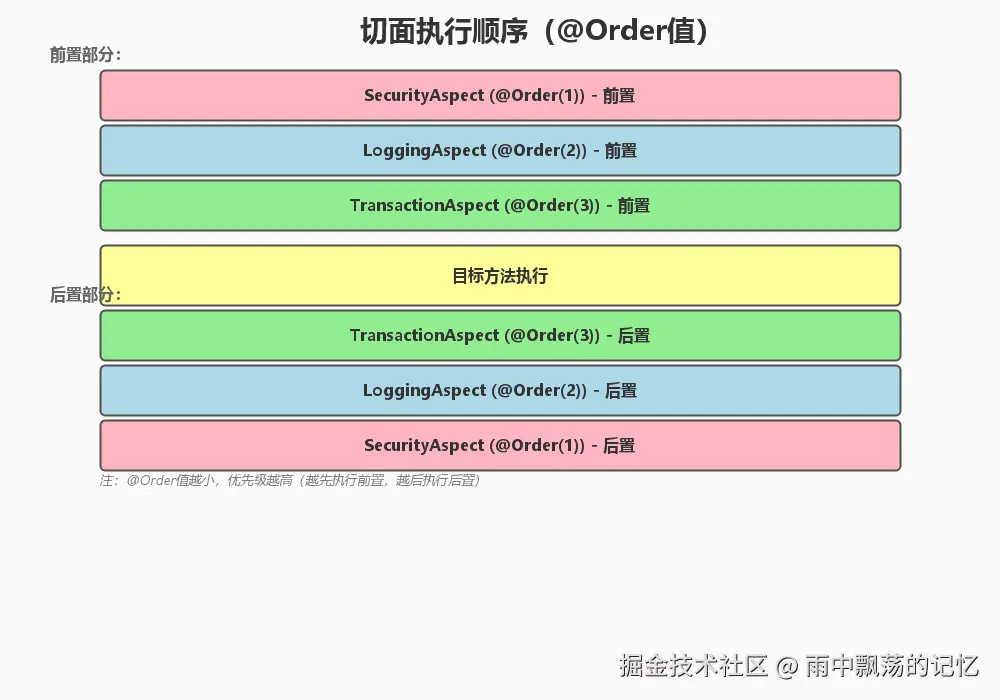
6.3 切面执行顺序
java
/**
 * 使用@Order控制切面执行顺序
 */
@Aspect
@Component
@Order(1)  // 数字越小,优先级越高
public class SecurityAspect {
    // 最先执行
}

@Aspect
@Component
@Order(2)
public class LoggingAspect {
    // 第二执行
}

@Aspect
@Component
@Order(3)
public class TransactionAspect {
    // 最后执行
}
七、总结
Spring AOP是Spring框架的重要组成部分,它将横切关注点从业务逻辑中分离出来,使代码更加简洁、易于维护。在实际开发中,合理运用AOP可以大大提高开发效率和代码质量。