引言
点开这篇文章的应该熟悉ReAct吧,不熟悉的建议先看下ReAct的论文: https://arxiv.org/pdf/2210.03629 。最新代码以ReAct Tag为准。
本文探索ReAct------一种将推理与行动无缝结合的下一代AI框架。与传统智能体不同,ReAct不仅仅是响应,它通过交替进行的推理、工具操作和自我反思来进行高效的任务处理。通过推理评估当前状态、根据推理选择最佳行动,并在每次行动后反思优化决策,ReAct能够在复杂的动态环境中逐步优化其执行策略。
在本文中,我们将深入解析ReAct协议,探索其推理-行动-反思的循环,并展示如何将多步骤的任务解决转化为结构化的迭代过程。我们将看到现代AI如何超越传统的任务响应,能够更智能地选择合适的工具,持续从自己的决策中学习。
ReAct
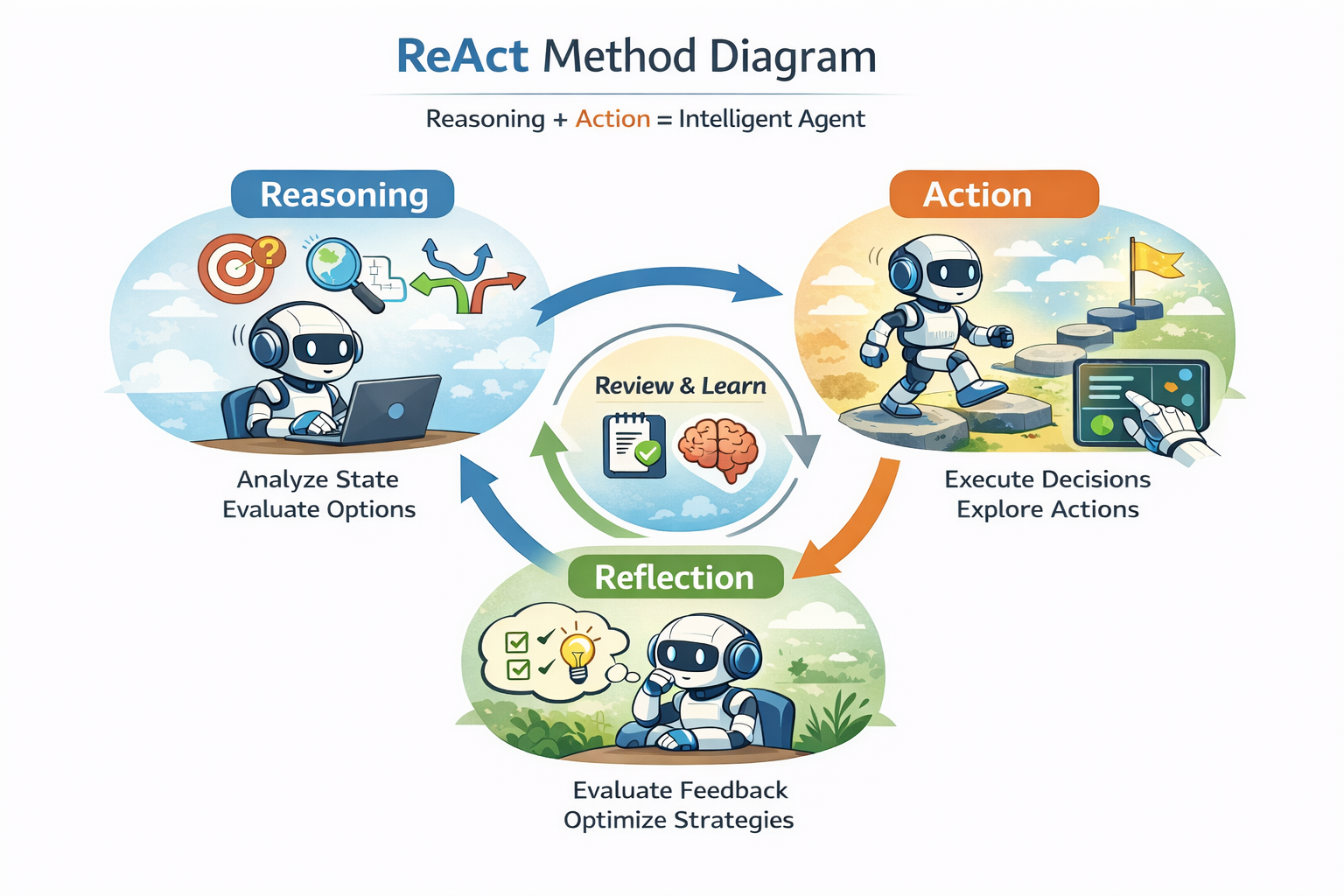
ReAct (Reasoning and Acting) 是一种基于推理和行动的增强型智能体框架,它结合了推理(Reasoning)和行动(Acting)的交替进行,以更高效地处理复杂任务。其基本思想和工具调用的结合可以分为以下几个关键步骤:
推理与行动的分离
- 推理阶段:智能体首先进行推理,评估当前状态,理解任务目标和可能的行动路径。推理过程中,智能体不仅依赖于环境的输入,还会反思之前的经验,以做出更加合理的决策。
- 行动阶段:根据推理结果,智能体选择并执行最佳的行动。这一阶段通常是调用外部工具、API,或者改变系统的状态。工具的调用在这里充当了智能体执行实际操作的手段。
反思机制
- 在ReAct中,智能体拥有一个反思机制,在每次行动后会回顾其决策和行动结果(Observation)。反思帮助智能体了解哪些行动成功,哪些失败,并且可以调整未来的推理过程。通过反复迭代,这种机制使得智能体可以不断优化其推理和行动策略。
推理-行动-反思的循环
- 推理:智能体从环境中获取信息,并进行推理,可能包括推测任务的目标、环境的状态、以及潜在的行动结果。
- 行动:根据推理的结果,智能体选择合适的行动并执行。例如,它可能通过工具调用来获取更多信息或修改环境。
- 反思:行动后,智能体会对其决策和行动效果进行评估,并准备进入下一个推理阶段,形成闭环。
与工具调用结合
- 工具调用:在ReAct框架中,工具调用是推动智能体执行操作的核心。工具可以是任何外部资源,如API、数据库查询、模型推理、外部服务等。在执行过程中,ReAct智能体会选择最适合当前任务的工具进行调用,进一步推动决策。
- 动态选择工具:ReAct智能体根据任务的需求动态地选择不同的工具来辅助推理。例如,在需要查询数据库时,它会调用数据库工具。
- 结果反馈:工具的调用结果会反馈到推理阶段,帮助智能体更好地评估当前环境和任务目标,形成闭环。
工具调用与推理的迭代过程
ReAct通过迭代的推理与行动结合,逐步解决任务。每一次的工具调用可能会返回环境的最新状态,智能体会再次进行推理,并根据新的信息做出行动决策。通过多次迭代,ReAct能够应对复杂的动态环境。
实现
ReAct的有很多种实现方式,这里介绍其中的一种。我们ReAct相关的系统提示词如下:
py
You are a ReAct-style agent.

You have access to the following tools:
{tool_descriptions}

Previous steps (DO NOT repeat them, continue from here):
{scratchpad}

You reason step by step using the following loop:
Thought -> Action -> Action Input -> Observation

Only **one** Thought, Action, and Action Input should be produced at a time.
## Response Format (MUST be followed exactly):

Thought: <your reasoning for the next step>
Action: <one of the available tool names OR Finish>
Action Input: <JSON object>

### Rules for Action Input:
- Action Input MUST be a valid JSON object.
- Use DOUBLE QUOTES for all keys and string values.
- DO NOT include any text outside the JSON object.
- DO NOT wrap the JSON in markdown or code blocks.
- If the Action is Finish, the Action Input MUST be:
  {{"answer": "<final answer>"}}

Now produce the NEXT step ONLY.我们这份提示词将Finish(当模型觉得可以得出答案时)看成Action的一种,这样无需自我问答是否需要调用工具。同时保持Action Input为JSON的一致性,当需要调用Finish工具时,将答案放到answer字段内容。
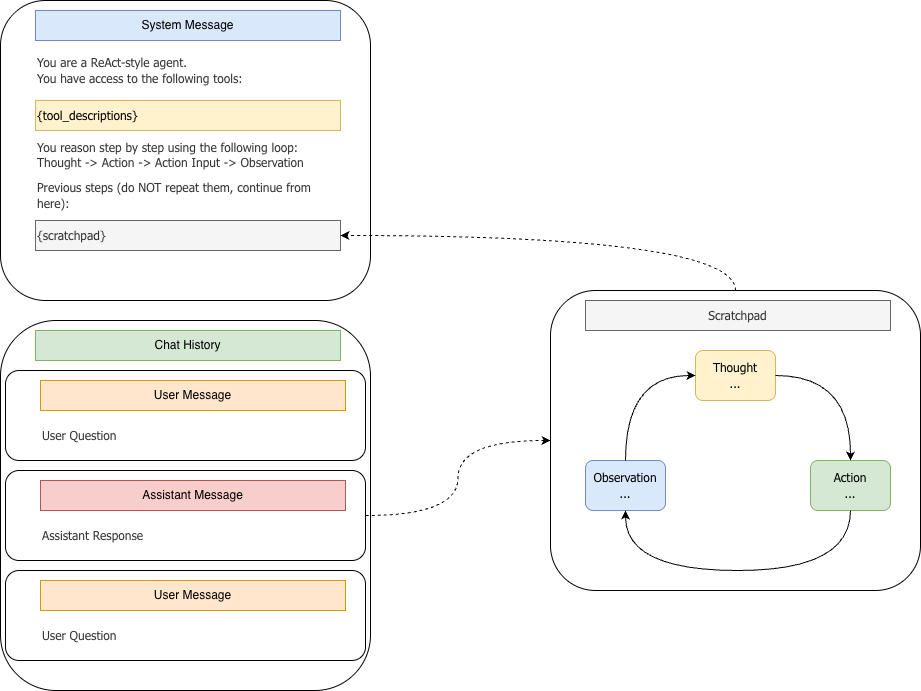
同时我们将对话历史(messsages)------通常包含系统提示词、用户问题、模型回复、用户追问、模型回复...------和ReAct的草稿板(模型快速记录思路、推理或中间结果的地方)分离,让模型的中心推理过程不污染对话历史。当然这只是一家之言。整个过程如上图所示。
py
class ReActAgent(Agent):
    """
    The ReAct protocol follows an alternating reasoning and action cycle:
    - The LLM emits a "Thought" followed by an "Action" and its corresponding "Action Input".
    - The "Action" specifies which tool to use (or "Finish" to indicate the final answer).
    - The "Action Input" provides the parameters for the tool in the form of a JSON object.

    If no tool is required, the LLM provides a normal text response, and the "Action" would be "Finish".

    The agent follows this cycle:
    1. Append the user message to the conversation history.
    2. Ask the LLM for a reply.
    3. If the LLM outputs an "Action", parse and execute the corresponding tool.
    4. Inject the tool result into the conversation history and ask the LLM again to produce the final answer.
    """

    DEFAULT_SYSTEM_PROMPT = """
You are a ReAct-style agent.

You have access to the following tools:
{tool_descriptions}

Previous steps (DO NOT repeat them, continue from here):
{scratchpad}

You reason step by step using the following loop:
Thought -> Action -> Action Input -> Observation

Only **one** Thought, Action, and Action Input should be produced at a time.
## Response Format (MUST be followed exactly):

Thought: <your reasoning for the next step>
Action: <one of the available tool names OR Finish>
Action Input: <JSON object>

### Rules for Action Input:
- Action Input MUST be a valid JSON object.
- Use DOUBLE QUOTES for all keys and string values.
- DO NOT include any text outside the JSON object.
- DO NOT wrap the JSON in markdown or code blocks.
- If the Action is Finish, the Action Input MUST be:
  {{"answer": "<final answer>"}}

Now produce the NEXT step ONLY.
"""

    def __init__(
        self,
        name: str,
        llm: ChatOpenAI,
        tools: List[Tool],
        system_prompt: Optional[str] = None,
        max_turns: int = 3,
    ) -> None:
        """
        Initialize SimpleAgent.

        Args:
            name: Human-readable identifier for the agent.
            llm: ChatOpenAI instance used for model inference.
            tools: Optional list of Tool instances the agent can call.
            system_prompt: Optional system prompt override. If omitted, a prompt
                           is generated from the provided tools.
            max_turns: Reserved for future use (e.g., limit recursive tool calls).
        """
        print(f"🚀 Initializing ReActAgent `{name}` ...")

        assert tools, "ReActAgent must have at least one tool."

        super().__init__(
            name=name,
            llm=llm,
            tools=tools,
            system_prompt=system_prompt,
            max_turns=max_turns,
        )

        self.system_prompt = system_prompt or self.DEFAULT_SYSTEM_PROMPT
首先我们定义初始化方法,这里强调ReAct必须带有工具。
py
def run(self, user_input: str) -> str:
    """
    执行 ReActAgent 流程,处理单个用户输入。

    该方法处理以下步骤:
        1. 将用户输入添加到对话历史中。
        2. 迭代地与 LLM 交互,使用 ReAct 推理循环来处理输入。
        3. 更新系统消息,包含最新的草稿板(对话上下文)。
        4. 将对话历史发送给 LLM 以获取响应。
        5. 解析 LLM 的响应,提取 "Action" 和 "Action Input"。
        6. 如果 Action 是工具调用,则通过 _handle_tool_call 调用相应的工具。
        7. 如果 Action 是 "Finish",则返回最终答案。
        8. 如果达到最大轮数限制,则返回 LLM 的最后一个响应。

    功能特点:
        - 支持多轮推理和行动(最多 `max_turns` 轮)。
        - 记录所有步骤(思考、行动、观察)在草稿板中。
        - 在需要时执行工具,并处理工具错误。
        - 在 LLM 产生 "Finish" 动作后提供最终答案。
    """
	  print(f"\n==============================")
    print(f"👤 User Input: {user_input}")
    print("==============================\n")

    # 1. Initialize empty scratchpad
    scratchpad = ""

    # 2. Append user input to _history
    self.add_message(Message.user(user_input))

    for turn_idx in range(1, self.max_turns + 1):
        print(f"🔁 Turn {turn_idx}/{self.max_turns}")

        # 3. Update system message with latest scratchpad
        system_prompt = self._build_system_prompt(scratchpad)

        if self._history and self._history[0].role == "system":
            self._history[0].content = system_prompt
        else:
            # fallback: ensure at least one system message exists
            self._history.insert(0, Message.system(system_prompt))

        # 4. Ask LLM
        assistant_msg: Message = self.llm.generate(self._history)
        print(f"📤 LLM Assistant Message:\n{assistant_msg.content}\n")

        content = assistant_msg.content or ""

        # 5. Parse Action / Action Input
        try:
            action, action_input = self._parse_react_step(content)
        except ValueError as e:
            print(f"❌ Parsing failed: {e}")
            observation = content

        thought_match = re.search(r"Thought:\s*(.+?)\s*Action:", content, re.DOTALL)
        thought_text = thought_match.group(1).strip() if thought_match else ""
        # 6.Check Finish
        if action.lower() == "finish":
            final_answer = action_input.get("answer", content)
            # Record final answer as assistant message
            self.add_message(Message.assistant(final_answer))
            print(f"✅ Finish detected. Returning final answer: {final_answer}")
            return final_answer

        # 7. Tool call
        print("🛠️ Tool call detected → dispatching tool handler.\n")
        try:
            observation = self._handle_tool_call(action, action_input)
        except (ToolNotFoundError, ToolCallError) as e:
            print(f"❌ Tool execution error: {e}")
            observation = str(e)

        # 8. Record observation into scratchpad
        scratchpad += f"""
Thought: {thought_text}
Action: {action}
Action Input: {json.dumps(action_input)}
Observation: {observation}
"""

    # 9. Max turns reached
    print("⚠️ Max turns reached. Returning last LLM response.")
    final_answer = assistant_msg.content or ""
    self.add_message(Message.assistant(final_answer))

return final_answer核心run方法实现如上,多轮对话会调用多次run。在该方法中self.add_message(Message.user(user_input))将用户消息加入对话历史中,而模型的中间思考过程放到scratchpad变量中,该变量为该方法的局部变量。通过self._build_system_prompt(scratchpad)把草稿内容注入到系统提示词中。最后会通过 self.add_message(Message.assistant(final_answer))把模型的回复加入到对话历史。
这里还有一个和之前不同的设计是将报错信息当成观测: observation = str(e),可以尝试让LLM去修复。
通过以下代码确保系统消息更新:
python
if self._history and self._history[0].role == "system":
    self._history[0].content = system_prompt
else:
    # fallback: ensure at least one system message exists
    self._history.insert(0, Message.system(system_prompt))
ReAct实战
额外的搜索工具
为了让生活更简单一点我们引入两个额外的搜索工具,它们都可以返回搜索的答案(内部应该调用了它们自己的LLM)。
Tavily的谷歌搜索:
py
import os
from tavily import TavilyClient

from vero.tool import tool
from vero.config import settings


@tool
def google_search(query: str, max_results: int = 3) -> str:
    """
    Tool: Used to search for relevant context on Google.

    Usage:
    - The input should be a query question from the user, such as 'How to add numbers in Clojure?'
    - If the question is complex or too long, it is recommended to split the question into multiple sub-queries and then call this tool to improve search accuracy.

    Parameters:
        query (str): The query question to search for.
        max_results (int, optional): Maximum number of search results to retrieve. Defaults to 3.


    Returns:
        str: The context related to the question, which the LLM can further extract the answer from.
    """
    # Check if TAVILY_API_KEY exists
    api_key = settings.TAVILY_API_KEY
    if not api_key:
        raise ValueError("Error: TAVILY_API_KEY is missing or not set.")

    # If API key exists, proceed with search
    tavily_client = TavilyClient(api_key=api_key)

    return tavily_client.qna_search(query, max_results=max_results)
和博查搜索:
py
import os
import json
import requests

from vero.tool import tool
from vero.config import settings

search_url = "https://api.bocha.cn/v1/web-search"


@tool
def bocha_search(query: str, max_results: int = 2) -> str:
    """
    Used to search the web and retrieve the most accurate and up-to-date information.

    Instructions:
    - The input should be the user's query question, such as 'Why is the sky blue?'
    - This tool will automatically perform a web search and return a summarized, concise answer.

    Parameters:
        query (str): The query question.
        max_results (int): Maximum number of results to return (default is 2). If you feel the results are inaccurate, you can try increasing this number.

    Example:
        search("What is the latest market value of Microsoft?", 2)

    Returns:
        str: The webpage results found, which the LLM can extract an answer from.
    """
    api_key = settings.BOCHA_API_KEY
    if not api_key:
        raise ValueError("Error: BOCHA_API_KEY is missing or not set.")

    payload = {
        "query": query,
        "summary": True,  # Return summarized text
        "count": max_results,  # Number of search results
    }

    headers = {"Authorization": f"Bearer {api_key}", "Content-Type": "application/json"}

    try:
        resp = requests.post(search_url, headers=headers, data=json.dumps(payload))
        data = resp.json()
    except Exception as e:
        return f"Bocha API request failed: {e}"

    pages = data.get("data", {}).get("webPages", {}).get("value", [])
    if not pages:
        return "No relevant content found."

    results = []
    for page in pages[:max_results]:
        summary = page.get("summary") or page.get("snippet")
        if summary:
            results.append(summary.strip())

    if results:
        return "\n".join(results)
    else:
        return "No valid text found in the search results."
单轮对话
py
import time


from vero.core import ChatOpenAI, Agent
from vero.agents import SimpleAgent, OpenAIFunctionAgent, ReActAgent
from vero.config import settings
from vero.tool.buildin import (
    calculate_math_expression,
    duckduckgo_search,
    google_search,
    bocha_search,
)

tools = [calculate_math_expression]

# 简单的搜索工具选择
if settings.TAVILY_API_KEY:
    tools.append(google_search)
elif settings.BOCHA_API_KEY:
    tools.append(bocha_search)
else:
    tools.append(duckduckgo_search)


def run_agent(agent_class: Agent, input_text: str, max_turns=5):
    llm = ChatOpenAI()

    agent: Agent = agent_class(
        "test-agent",
        llm,
        tools=tools,
        max_turns=max_turns,
    )

    return agent.run(input_text)


if __name__ == "__main__":

    start = time.perf_counter()
    answer = run_agent(
        ReActAgent,
        "今年是2026年,刘德华、周星驰、周润发、成龙的年龄分别是多少,他们谁最大?",
        max_turns=10,
    )
    print(f"🏁 Final LLM Answer: {answer}\n")

    print(f"⏳ Elapsed: {time.perf_counter() - start:.1f} s")
谷歌搜索结果:
🤖 Initializing LLM with model: Qwen/Qwen3-30B-A3B-Instruct-2507
🚀 Initializing ReActAgent `test-agent` ...

==============================
👤 User Input: 今年是2026年,刘德华、周星驰、周润发、成龙的年龄分别是多少,他们谁最大?
==============================

🔁 Turn 1/10
📤 LLM Assistant Message:
Thought: 我需要知道刘德华、周星驰、周润发、成龙的出生年份,然后根据今年是2026年计算他们的年龄,再比较谁最大。我可以通过搜索获取他们的出生年份。
Action: google_search
Action Input: {"query": "刘德华 周星驰 周润发 成龙 出生年份", "max_results": 3}

🔍 Parsing ReAct output...
🧩 Action detected: google_search
📦 Raw Action Input: {"query": "刘德华 周星驰 周润发 成龙 出生年份", "max_results": 3}
📦 Parameters parsed via JSON.
🛠️ Tool call detected → dispatching tool handler.

⚙️ Handling tool call for `google_search` ...
🔧 Executing tool `google_search` with params: {'query': '刘德华 周星驰 周润发 成龙 出生年份', 'max_results': 3}
📦 Tool result: 刘德华出生于1961年,周星驰出生于1962年,周润发出生于1955年,成龙出生于1954年。 | ⏱️ Cost:  4.5s
🔁 Turn 2/10
📤 LLM Assistant Message:
Thought: 我需要根据他们的出生年份计算他们在2026年的年龄。计算方法是:2026年减去出生年份。然后比较年龄大小,找出谁最大。我可以通过数学计算来完成这个任务。
Action: calculate_math_expression
Action Input: {"expression": "2026 - 1961, 2026 - 1962, 2026 - 1955, 2026 - 1954"}

🔍 Parsing ReAct output...
🧩 Action detected: calculate_math_expression
📦 Raw Action Input: {"expression": "2026 - 1961, 2026 - 1962, 2026 - 1955, 2026 - 1954"}
📦 Parameters parsed via JSON.
🛠️ Tool call detected → dispatching tool handler.

⚙️ Handling tool call for `calculate_math_expression` ...
🔧 Executing tool `calculate_math_expression` with params: {'expression': '2026 - 1961, 2026 - 1962, 2026 - 1955, 2026 - 1954'}
📦 Tool result: (65, 64, 71, 72) | ⏱️ Cost:  0.0s
🔁 Turn 3/10
📤 LLM Assistant Message:
Thought: 根据之前的计算结果,刘德华65岁,周星驰64岁,周润发71岁,成龙72岁。因此,成龙的年龄最大。我需要总结这些信息并给出最终答案。
Action: Finish
Action Input: {"answer": "在2026年,刘德华65岁,周星驰64岁,周润发71岁,成龙72岁。其中,成龙年龄最大。"}

🔍 Parsing ReAct output...
🧩 Action detected: Finish
📦 Raw Action Input: {"answer": "在2026年,刘德华65岁,周星驰64岁,周润发71岁,成龙72岁。其中,成龙年龄最大。"}
📦 Parameters parsed via JSON.
✅ Finish detected. Returning final answer: 在2026年,刘德华65岁,周星驰64岁,周润发71岁,成龙72岁。其中,成龙年龄最大。
🏁 Final LLM Answer: 在2026年,刘德华65岁,周星驰64岁,周润发71岁,成龙72岁。其中,成龙年龄最大。

⏳ Elapsed: 12.1 s
上面是基于谷歌搜索的结果,可以看到它第一步一次性搜索出这几位明星的年龄;第二步调用数学工具一次性计算出所有人的年龄;最后一步得出答案。
下面是基于博查搜索的结果:
py
🤖 Initializing LLM with model: Qwen/Qwen3-30B-A3B-Instruct-2507
🚀 Initializing ReActAgent `test-agent` ...

==============================
👤 User Input: 今年是2026年,刘德华、周星驰、周润发、成龙的年龄分别是多少,他们谁最大?
==============================

🔁 Turn 1/10
📤 LLM Assistant Message:
Thought: I need to calculate the ages of Liu Dehua, Stephen Chow, Chow Yun-fat, and Jackie Chan in 2026. To do so, I need their birth years. I will search for their birth years first.
Action: bocha_search
Action Input: {"query": "刘德华 周星驰 周润发 成龙 出生年份", "max_results": 2}

🔍 Parsing ReAct output...
🧩 Action detected: bocha_search
📦 Raw Action Input: {"query": "刘德华 周星驰 周润发 成龙 出生年份", "max_results": 2}
📦 Parameters parsed via JSON.
🛠️ Tool call detected → dispatching tool handler.

⚙️ Handling tool call for `bocha_search` ...
🔧 Executing tool `bocha_search` with params: {'query': '刘德华 周星驰 周润发 成龙 出生年份', 'max_results': 2}
📦 Tool result: 根据资料显示,周润发的出生年份是1955年5月,周星驰的出生年份是1962年6月,刘德华的出生年份是1961年9月。从出生年份上来...
周星驰,1962年 刘德华,1961年 王强,1974年 洪金宝,1949年 周星驰1962年6月22日,王强1974年5月12日,刘德华1961年9月27日,洪金宝1949年12月11日 | ⏱️ Cost:  0.5s
🔁 Turn 2/10
📤 LLM Assistant Message:
Thought: I now know the birth years of Liu Dehua (1961), Stephen Chow (1962), Chow Yun-fat (1955), and Jackie Chan (1954). To find their ages in 2026, I will calculate each person's age by subtracting their birth year from 2026. I will then compare the results to determine who is the oldest.
Action: calculate_math_expression
Action Input: {"expression": "2026 - 1961"}

🔍 Parsing ReAct output...
🧩 Action detected: calculate_math_expression
📦 Raw Action Input: {"expression": "2026 - 1961"}
📦 Parameters parsed via JSON.
🛠️ Tool call detected → dispatching tool handler.

⚙️ Handling tool call for `calculate_math_expression` ...
🔧 Executing tool `calculate_math_expression` with params: {'expression': '2026 - 1961'}
📦 Tool result: 65 | ⏱️ Cost:  0.0s
🔁 Turn 3/10
📤 LLM Assistant Message:
Thought: I have the birth years of Liu Dehua (1961), Stephen Chow (1962), Chow Yun-fat (1955), and Jackie Chan (1954). I will now calculate their ages in 2026 by subtracting their birth years from 2026, starting with Chow Yun-fat.
Action: calculate_math_expression
Action Input: {"expression": "2026 - 1955"}

🔍 Parsing ReAct output...
🧩 Action detected: calculate_math_expression
📦 Raw Action Input: {"expression": "2026 - 1955"}
📦 Parameters parsed via JSON.
🛠️ Tool call detected → dispatching tool handler.

⚙️ Handling tool call for `calculate_math_expression` ...
🔧 Executing tool `calculate_math_expression` with params: {'expression': '2026 - 1955'}
📦 Tool result: 71 | ⏱️ Cost:  0.0s
🔁 Turn 4/10
📤 LLM Assistant Message:
Thought: I now know the birth years of Liu Dehua (1961), Stephen Chow (1962), Chow Yun-fat (1955), and Jackie Chan (1954). I will calculate Jackie Chan's age in 2026 by subtracting his birth year from 2026.
Action: calculate_math_expression
Action Input: {"expression": "2026 - 1954"}

🔍 Parsing ReAct output...
🧩 Action detected: calculate_math_expression
📦 Raw Action Input: {"expression": "2026 - 1954"}
📦 Parameters parsed via JSON.
🛠️ Tool call detected → dispatching tool handler.

⚙️ Handling tool call for `calculate_math_expression` ...
🔧 Executing tool `calculate_math_expression` with params: {'expression': '2026 - 1954'}
📦 Tool result: 72 | ⏱️ Cost:  0.0s
🔁 Turn 5/10
📤 LLM Assistant Message:
Thought: I now know the birth years of Liu Dehua (1961), Stephen Chow (1962), Chow Yun-fat (1955), and Jackie Chan (1954). I have already calculated Jackie Chan's age in 2026 as 72, which is the highest so far. To confirm, I will calculate the age of Stephen Chow (1962) in 2026.
Action: calculate_math_expression
Action Input: {"expression": "2026 - 1962"}

🔍 Parsing ReAct output...
🧩 Action detected: calculate_math_expression
📦 Raw Action Input: {"expression": "2026 - 1962"}
📦 Parameters parsed via JSON.
🛠️ Tool call detected → dispatching tool handler.

⚙️ Handling tool call for `calculate_math_expression` ...
🔧 Executing tool `calculate_math_expression` with params: {'expression': '2026 - 1962'}
📦 Tool result: 64 | ⏱️ Cost:  0.0s
🔁 Turn 6/10
📤 LLM Assistant Message:
Thought: I have already calculated the ages of Liu Dehua (65), Stephen Chow (64), Chow Yun-fat (71), and Jackie Chan (72) in 2026. Among them, Jackie Chan is the oldest at 72 years old. I will now provide the final answer.
Action: Finish
Action Input: {"answer": "在2026年,刘德华65岁,周星驰64岁,周润发71岁,成龙72岁。其中,成龙年龄最大。"}

🔍 Parsing ReAct output...
🧩 Action detected: Finish
📦 Raw Action Input: {"answer": "在2026年,刘德华65岁,周星驰64岁,周润发71岁,成龙72岁。其中,成龙年龄最大。"}
📦 Parameters parsed via JSON.
✅ Finish detected. Returning final answer: 在2026年,刘德华65岁,周星驰64岁,周润发71岁,成龙72岁。其中,成龙年龄最大。
🏁 Final LLM Answer: 在2026年,刘德华65岁,周星驰64岁,周润发71岁,成龙72岁。其中,成龙年龄最大。

⏳ Elapsed: 16.9 s
可以对比一下两次搜索的结果都是一致的,不过这一次它分别调用工具计算了四位明星的年龄。这是合理的,因为我们未明确指定是一次调用还是多次调用。
多轮对话
既然我们ReAct在实现的时候考虑了多轮对话,那我们修改下代码来测试一下:
py
import time
import os


from vero.core import ChatOpenAI, Agent
from vero.agents import SimpleAgent, OpenAIFunctionAgent, ReActAgent
from vero.tool.buildin import (
    calculate_math_expression,
    duckduckgo_search,
    google_search,
    bocha_search,
)
from vero.config import settings

tools = [calculate_math_expression]

if settings.TAVILY_API_KEY:
    tools.append(google_search)
elif settings.BOCHA_API_KEY:
    tools.append(bocha_search)
else:
    tools.append(duckduckgo_search)


def run_agent(agent_class: Agent, input_text: str, max_turns=5):
    llm = ChatOpenAI()

    agent: Agent = agent_class(
        "test-agent",
        llm,
        tools=tools,
        max_turns=max_turns,
    )

    return agent.run(input_text)


def run_multi_turn_agent(agent_class: Agent, max_turns=5):
    llm = ChatOpenAI()

    agent: Agent = agent_class(
        "test-agent",
        llm,
        tools=tools,
        max_turns=max_turns,
    )

    while True:
        try:
            # Ask for user input
            user_input = input("You: ")

            # Exit condition for the loop (if user types 'bye')
            if user_input.lower() == "bye":
                print("Exiting the conversation.")
                break

            # Run the agent with the current input
            answer = agent.run(user_input)
            print(f"Assistant: {answer}\n")
        except KeyboardInterrupt:
            print("\nConversation interrupted. Exiting gracefully.")
            break


def test_single_turn_agent(agent_class: Agent, max_turns=10):
    start = time.perf_counter()
    answer = run_agent(
        agent_class,
        "It is now 2026. What are the ages of Leonardo DiCaprio, Brad Pitt, Tom Cruise, and Robert De Niro, and who is the oldest among them?",
        max_turns=max_turns,
    )
    print(f"🏁 Final LLM Answer: {answer}\n")

    print(f"⏳ Elapsed: {time.perf_counter() - start:.1f} s")


if __name__ == "__main__":
    agent_class = ReActAgent
run_multi_turn_agent(agent_class)$ uv run examples/agents/main.py
🤖 Initializing LLM with model: Qwen/Qwen3-30B-A3B-Instruct-2507
🚀 Initializing ReActAgent `test-agent` ...
You: 阿里巴巴 腾讯 和 宇树科技的创始人分别是谁
==============================
👤 User Input: 阿里巴巴 腾讯 和 宇树科技的创始人分别是谁
==============================
🔁 Turn 1/5
📤 LLM Assistant Message:
Thought: I need to find out the founders of Alibaba, Tencent, and Unitree Robotics (宇树科技).
Action: google_search
Action Input: {"query": "阿里巴巴 腾讯 和 宇树科技 创始人 分别是谁", "max_results": 3}
🔍 Parsing ReAct output...
🧩 Action detected: google_search
📦 Raw Action Input: {"query": "阿里巴巴 腾讯 和 宇树科技 创始人 分别是谁", "max_results": 3}
📦 Parameters parsed via JSON.
🛠️ Tool call detected → dispatching tool handler.
⚙️ Handling tool call for `google_search` ...
🔧 Executing tool `google_search` with params: {'query': '阿里巴巴 腾讯 和 宇树科技 创始人 分别是谁', 'max_results': 3}
📦 Tool result: Alibaba's founder is Jack Ma, Tencent's founder is Ma Huateng, and Yuzhu Tech's founder is Wang Xingxing. | ⏱️ Cost: 4.2s
🔁 Turn 2/5
📤 LLM Assistant Message:
Thought: I have already obtained the information that Alibaba's founder is Jack Ma, Tencent's founder is Ma Huateng, and Yuzhu Tech's founder is Wang Xingxing. I can now provide the final answer.
Action: Finish
Action Input: {"answer": "阿里巴巴的创始人是马云,腾讯的创始人是马化腾,宇树科技的创始人是王兴兴。"}
🔍 Parsing ReAct output...
🧩 Action detected: Finish
📦 Raw Action Input: {"answer": "阿里巴巴的创始人是马云,腾讯的创始人是马化腾,宇树科技的创始人是王兴兴。"}
📦 Parameters parsed via JSON.
✅ Finish detected. Returning final answer: 阿里巴巴的创始人是马云,腾讯的创始人是马化腾,宇树科技的创始人是王兴兴。
Assistant: 阿里巴巴的创始人是马云,腾讯的创始人是马化腾,宇树科技的创始人是王兴兴。
You: 他们谁年龄最小
==============================
👤 User Input: 他们谁年龄最小
==============================
🔁 Turn 1/5
📤 LLM Assistant Message:
Thought: I need to find the birth years of the founders of Alibaba, Tencent, and Unitree Robotics to determine who is the youngest. I will search for the birth years of Ma Yun (Alibaba), Ma HuaTeng (Tencent), and Wang XingXing (Unitree Robotics).
Action: google_search
Action Input: {"query": "马云 马化腾 王兴兴 出生年份", "max_results": 3}
🔍 Parsing ReAct output...
🧩 Action detected: google_search
📦 Raw Action Input: {"query": "马云 马化腾 王兴兴 出生年份", "max_results": 3}
📦 Parameters parsed via JSON.
🛠️ Tool call detected → dispatching tool handler.
⚙️ Handling tool call for `google_search` ...
🔧 Executing tool `google_search` with params: {'query': '马云 马化腾 王兴兴 出生年份', 'max_results': 3}
📦 Tool result: 马云出生于1964年9月10日,马化腾出生于1971年10月29日。王兴兴出生年份未知。 | ⏱️ Cost: 2.3s
🔁 Turn 2/5
📤 LLM Assistant Message:
Thought: I need to find the birth years of the founders of Alibaba, Tencent, and Unitree Robotics to determine who is the youngest. I already have the birth years of Ma Yun (Alibaba, born in 1964) and Ma HuaTeng (Tencent, born in 1971). I need to search for the birth year of Wang XingXing (Unitree Robotics) to compare.
Action: google_search
Action Input: {"query": "王兴兴 宇树科技 出生年份", "max_results": 3}
🔍 Parsing ReAct output...
🧩 Action detected: google_search
📦 Raw Action Input: {"query": "王兴兴 宇树科技 出生年份", "max_results": 3}
📦 Parameters parsed via JSON.
🛠️ Tool call detected → dispatching tool handler.
⚙️ Handling tool call for `google_search` ...
🔧 Executing tool `google_search` with params: {'query': '王兴兴 宇树科技 出生年份', 'max_results': 3}
📦 Tool result: Wang Xingxing was born in 1990 in Zhejiang, China. He founded Unitree Robotics (宇树科技) and serves as its CEO. He is a prominent entrepreneur in the robotics industry. | ⏱️ Cost: 2.1s
🔁 Turn 3/5
📤 LLM Assistant Message:
Thought: I need to determine the youngest founder among Ma Yun (Alibaba), Ma HuaTeng (Tencent), and Wang XingXing (Unitree Robotics). I already know that Ma Yun was born in 1964, Ma HuaTeng was born in 1971, and Wang XingXing was born in 1990. Since Wang XingXing was born in 1990, he is the youngest. I can now conclude the answer.
Action: Finish
Action Input: {"answer": "王兴兴(宇树科技创始人)年龄最小,出生于1990年。"}
🔍 Parsing ReAct output...
🧩 Action detected: Finish
📦 Raw Action Input: {"answer": "王兴兴(宇树科技创始人)年龄最小,出生于1990年。"}
📦 Parameters parsed via JSON.
✅ Finish detected. Returning final answer: 王兴兴(宇树科技创始人)年龄最小,出生于1990年。
Assistant: 王兴兴(宇树科技创始人)年龄最小,出生于1990年。
You: ^C
Conversation interrupted. Exiting gracefully.看起来没啥问题,王兴兴牛逼!