一、关闭geoserver服务web、rest、gwc/rest管理页面
1、tomcat
tomcat发布的geoserver服务中,进入tomcat/webapps/geoserver/WEB-INF,打开web.xml文件,
在文件最后添加如下配置
java
<security-constraint>
     <web-resource-collection>
         <web-resource-name>Block web and rest</web-resource-name>
         <url-pattern>/web/*</url-pattern>
         <url-pattern>/rest/*</url-pattern>
         <url-pattern>/gwc/*</url-pattern>
         <url-pattern>/web.html</url-pattern>
         <url-pattern>/web.htm</url-pattern>
         <url-pattern>/web.webj</url-pattern>
         <url-pattern>/web.web</url-pattern>
         <url-pattern>/web.jsp</url-pattern>
         <url-pattern>/web.jspx</url-pattern>
         <url-pattern>/rest.html</url-pattern>
         <url-pattern>/rest.htm</url-pattern>
         <url-pattern>/rest.webj</url-pattern>
         <url-pattern>/rest.web</url-pattern>
         <url-pattern>/rest.jsp</url-pattern>
         <url-pattern>/rest.jspx</url-pattern>
     </web-resource-collection>
     <auth-constraint>
         <!-- 空auth-constraint表示不允许任何角色访问 -->
     </auth-constraint>
 </security-constraint>
配置完成后重启tomcat
2、东方通
通过东方通发布的geoserver服务,与tomcat类似,配置完成后重启东方通
3、nginx
通过nginx代理geoserver服务,在nginx的配置文件nginx.conf中添加相关配置
java
http中添加白名单配置
geo  $admin_whitelist {
    default 0;
    127.0.0.1 1;
    192.168.1.0/24 1;
    58.247.17.139 1;
}
java
# GeoServer 配置
location /geoserver/ {
	 #       proxy_pass http://127.0.0.1:2443;
	 #       proxy_set_header Host $host;
	 #       proxy_set_header X-Real-IP $remote_addr;


		 location ~* ^/geoserver/(web|rest) {

		        # 重要:确保 proxy_pass 正确工作
		        proxy_pass http://127.0.0.1:2443;


		        proxy_set_header Host $host;
		        proxy_set_header X-Real-IP $remote_addr;
		        proxy_set_header X-Forwarded-For $proxy_add_x_forwarded_for;
		        proxy_set_header X-Forwarded-Proto $scheme;

		           if ($admin_whitelist != 1) {
		                access_log logs/geoserver_admin_denied.log;
		                return 403;
		            }
		            allow all;
		            access_log logs/geoserver_admin_access.log;

		}

		location ~* ^/geoserver/([^/]+)/(wms|wfs|wcs|wmts|ows) {
		        # 重要:确保 proxy_pass 正确工作
		        proxy_pass http://127.0.0.1:2443;

		        proxy_set_header Host $host;
		        proxy_set_header X-Real-IP $remote_addr;
		        proxy_set_header X-Forwarded-For $proxy_add_x_forwarded_for;
		        proxy_set_header X-Forwarded-Proto $scheme;

	            allow all;
	            proxy_read_timeout 120s;

		}

   deny all;
   return 404;
}
4、geoserver添加authkey认证访问
第一步:在官网下载对应版本的authkey插件
第二步:将下载的插件jar包,放到geoserver的lib目录中geoserver\WEB-INF\lib
第三步:启动geoserver,进入后台管理页面,一定需要修改密码
第四步:配置权限认证。添加UUID b52d2068-0a9b-45d7-kedu-144d12222025
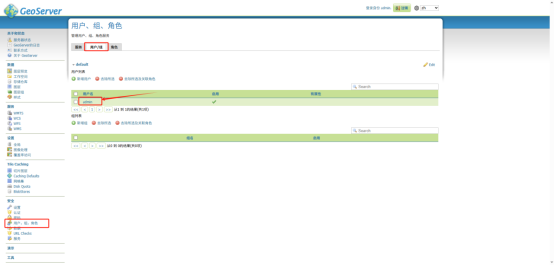
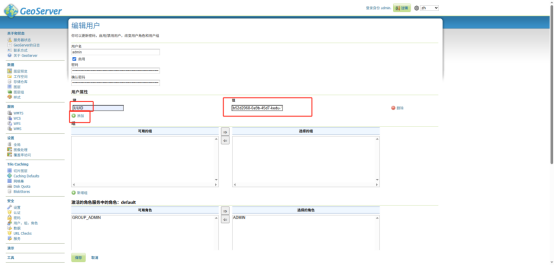
第五步:设置过滤器
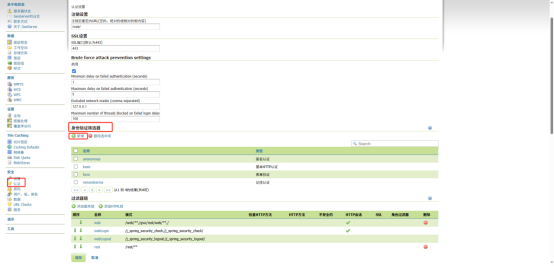
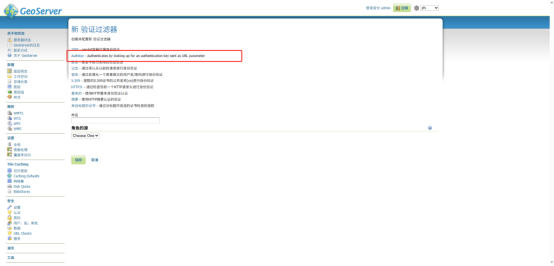
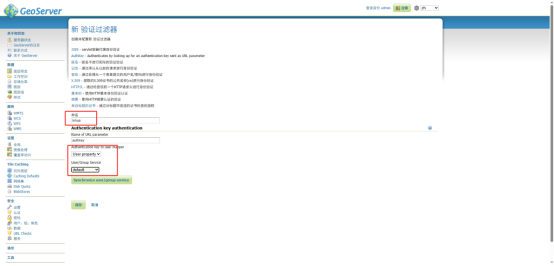
第六步:添加过滤器
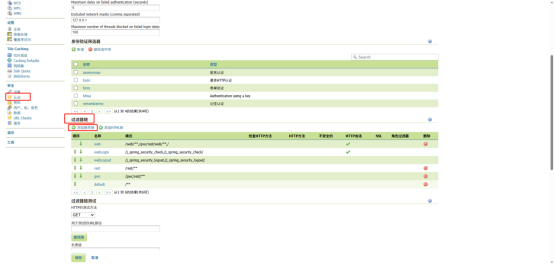
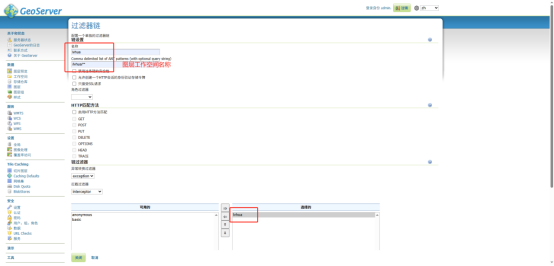
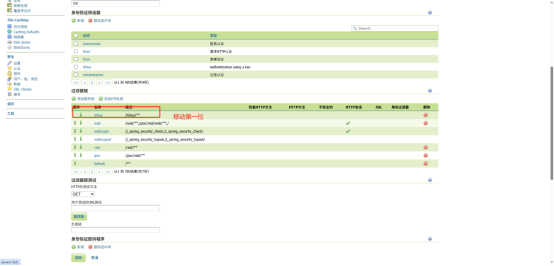
第七步:保存配置
第八步:访问测试,访问所有的工作空间都需要加&authkey=b52d2068-0a9b-45d7-kedu-144d12222025