对于一些不支持SDK的编程语言,我们可以直接使用HTTP接入,使用HTTP 请求来调用 AI 大模型的 API。一般情况支持SDK的话,优先使用SDK。
HTTP 调用的详细说明可参考官方文档:通过 API 调用通义千问
官方文档中直接为我们提供了OpenAI SDK的方式来使用http请求
// 该代码 OpenAI SDK 版本为 2.6.0
import com.openai.client.OpenAIClient;
import com.openai.client.okhttp.OpenAIOkHttpClient;
import com.openai.models.chat.completions.ChatCompletion;
import com.openai.models.chat.completions.ChatCompletionCreateParams;

public class Main {
    public static void main(String[] args) {
        OpenAIClient client = OpenAIOkHttpClient.builder()
                .apiKey(System.getenv("DASHSCOPE_API_KEY"))
                .baseUrl("https://dashscope.aliyuncs.com/compatible-mode/v1")
                .build();

        ChatCompletionCreateParams params = ChatCompletionCreateParams.builder()
                .addUserMessage("你是谁")
                .model("qwen-plus")
                .build();

        try {
            ChatCompletion chatCompletion = client.chat().completions().create(params);
            System.out.println(chatCompletion);
        } catch (Exception e) {
            System.err.println("Error occurred: " + e.getMessage());
            e.printStackTrace();
        }
    }
}
也可将curl的代码,让AI帮咱生成Java的请求代码:
curl代码
curl -X POST https://dashscope.aliyuncs.com/compatible-mode/v1/chat/completions \
-H "Authorization: Bearer $DASHSCOPE_API_KEY" \
-H "Content-Type: application/json" \
-d '{
    "model": "qwen-plus",
    "messages": [
        {
            "role": "system",
            "content": "You are a helpful assistant."
        },
        {
            "role": "user",
            "content": "你是谁?"
        }
    ]
}'
AI生成代码
public class HttpAiInvoke {
    // 替换为你的DashScope API Key
    private static final String DASHSCOPE_API_KEY = "sk-XXXXXXXXXXXXX";//这里配置自己的apikey
    private static final String API_URL = "https://dashscope.aliyuncs.com/api/v1/services/aigc/text-generation/generation";

    public static void main(String[] args) {
        // 1. 构建JSON请求体(使用Hutool的JSONObject)
        JSONObject requestBody = buildRequestBody();

        try {
            // 2. 构建并发送POST请求(适配低版本Hutool)
            HttpResponse response = HttpRequest.post(API_URL)
                    // 设置请求头
                    .header("Authorization", "Bearer " + DASHSCOPE_API_KEY)
                    .header("Content-Type", "application/json")
                    // 修复1:JSONObject转为String传入body
                    .body(requestBody.toString())
                    // 修复2:统一使用timeout设置总超时(适配低版本Hutool)
                    // timeout参数:毫秒,这里设置30秒超时(同时控制连接和读取)
                    .timeout(30000)
                    // 若你的版本支持setConnectionTimeout,也可这样写:
                    // .setConnectionTimeout(5000) // 连接超时5秒
                    // .setReadTimeout(30000)      // 读取超时30秒
                    // 发送请求
                    .execute();

            // 3. 处理响应
            System.out.println("响应状态码: " + response.getStatus());
            // 格式化输出响应内容(更易读)
            String responseBody = response.body();
            JSONObject responseJson = new JSONObject(responseBody);
            System.out.println("响应内容(格式化): " + responseJson.toStringPretty());

        } catch (Exception e) {
            System.err.println("调用通义千问API失败:" + e.getMessage());
            e.printStackTrace();
        }
    }

    /**
     * 构建请求体(使用Hutool JSONObject)
     */
    private static JSONObject buildRequestBody() {
        // 外层对象
        JSONObject requestBody = new JSONObject();
        // 设置模型
        requestBody.put("model", "qwen-plus");

        // 构建input对象
        JSONObject input = new JSONObject();
        // 构建messages数组
        JSONObject systemMsg = new JSONObject();
        systemMsg.put("role", "system");
        systemMsg.put("content", "You are a helpful assistant.");

        JSONObject userMsg = new JSONObject();
        userMsg.put("role", "user");
        userMsg.put("content", "你好我在学习springai使用http调用大模型");

        input.put("messages", new JSONObject[]{systemMsg, userMsg});
        requestBody.put("input", input);

        // 构建parameters对象
        JSONObject parameters = new JSONObject();
        parameters.put("result_format", "message");
        requestBody.put("parameters", parameters);

        return requestBody;
    }
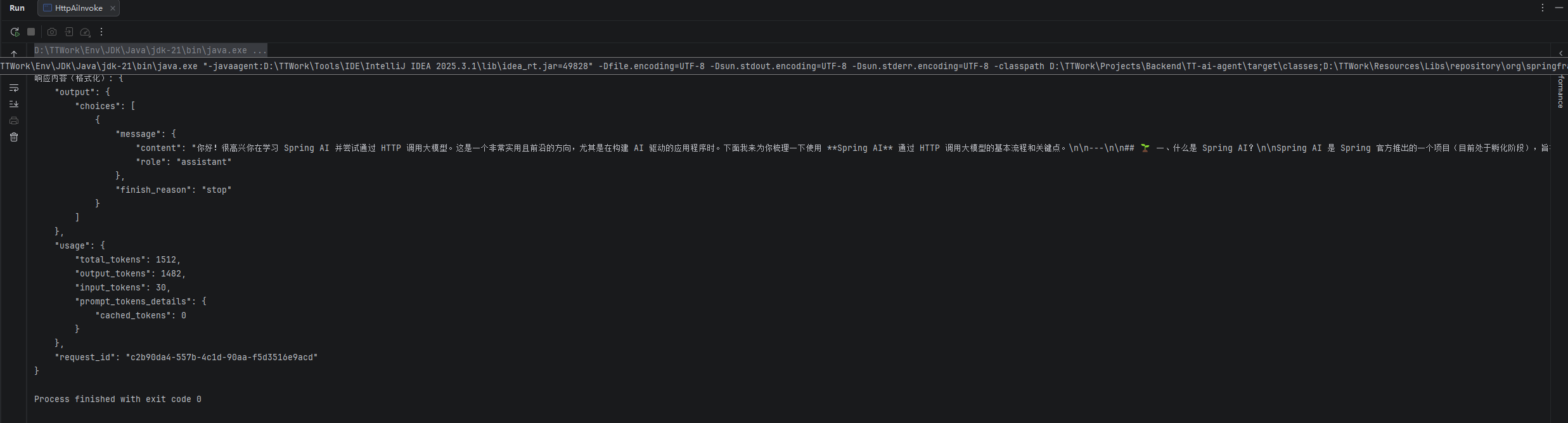
生成结果: