Vue + Element UI 实现复选框删除线效果:优雅的选项排除提示
前言
在开发报告生成、配置选择等功能时,我们经常需要让用户选择包含哪些内容。一个好的UI设计应该让用户清晰地看到哪些选项被选中,哪些被排除。本文将介绍如何使用Vue + Element UI实现一个优雅的复选框删除线效果。
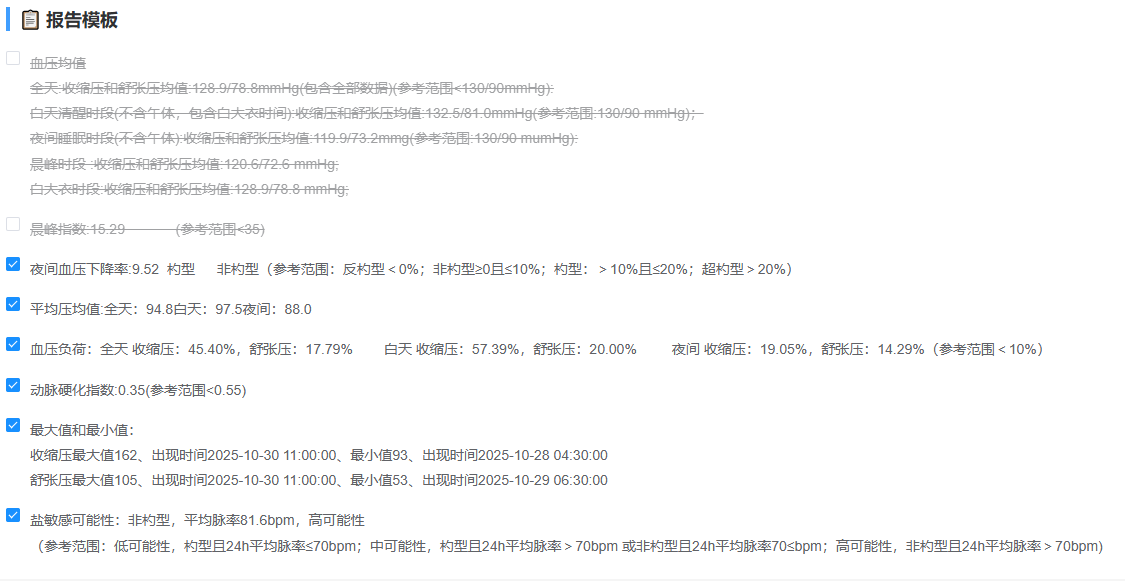 效果图
效果图
效果展示
选中状态 :文字正常显示,表示该项会包含在报告中
未选中状态:文字显示删除线并半透明,表示该项被排除
这种设计在医疗报告、数据分析报告等场景中非常实用,能让用户一目了然地看到最终会包含哪些内容。
一、基础实现
1. HTML结构
vue
<template>
    <div class="template-selection">
        <el-checkbox-group v-model="selectedTemplateIds">
            <el-checkbox
                v-for="item in reportData.template"
                :key="item.id"
                :label="item.id"
            >
                <div class="template-item-content">
                    {{ item.templateContent }}
                </div>
            </el-checkbox>
        </el-checkbox-group>
    </div>
</template>
2. 数据结构
javascript
export default {
    data() {
        return {
            // 选中的模板ID数组
            selectedTemplateIds: [1, 2, 3],

            // 报告数据
            reportData: {
                template: [
                    {
                        id: 1,
                        templateContent: '血压均值:\n全天:收缩压均值为...'
                    },
                    {
                        id: 2,
                        templateContent: '夜间血压下降率 9.52 约型...'
                    },
                    {
                        id: 3,
                        templateContent: '平均压均值 全天:94.8...'
                    }
                    // ... 更多模板
                ]
            }
        }
    }
}
3. 核心样式实现
scss
.template-selection {
    .el-checkbox-group {
        display: flex;
        flex-direction: column;
        gap: 15px;  // 每个选项之间的间距
    }

    .el-checkbox {
        display: flex;
        align-items: flex-start;
        margin-right: 0;

        .template-item-content {
            white-space: pre-wrap;  // 保留换行符
            line-height: 1.8;
            color: #606266;
            font-size: 14px;
            transition: all 0.3s ease;  // 平滑过渡效果
        }

        // 关键代码:未选中时显示删除线
        &:not(.is-checked) .template-item-content {
            text-decoration: line-through;  // 删除线
            opacity: 0.6;  // 半透明
        }
    }
}
二、实现原理详解
1. Element UI的类名机制
Element UI的复选框组件有一个内置的类名机制:
- 选中时 :
.el-checkbox元素会自动添加.is-checked类 - 未选中时 :
.el-checkbox元素没有.is-checked类
2. CSS选择器解析
scss
&:not(.is-checked) .template-item-content {
    text-decoration: line-through;
    opacity: 0.6;
}
选择器拆解:
&- 代表父选择器.el-checkbox:not(.is-checked)- CSS伪类,表示"没有.is-checked类".template-item-content- 内容区域
翻译成人话:
"当复选框没有被选中时(没有.is-checked类),给内容区域添加删除线和半透明效果"
3. 样式属性说明
| 属性 | 值 | 作用 |
|---|---|---|
| text-decoration | line-through | 添加删除线(横线穿过文字) |
| opacity | 0.6 | 透明度60%,显得灰暗 |
| transition | all 0.3s ease | 状态切换时的平滑过渡动画 |
三、完整示例代码
vue
<template>
    <div class="report-template-section">
        <div class="section-title">
            📋 报告模板
        </div>

        <div class="template-selection">
            <el-checkbox-group v-model="selectedTemplateIds">
                <el-checkbox
                    v-for="item in templates"
                    :key="item.id"
                    :label="item.id"
                >
                    <div class="template-item-content">
                        {{ item.content }}
                    </div>
                </el-checkbox>
            </el-checkbox-group>
        </div>

        <div class="action-buttons">
            <el-button @click="selectAll">全选</el-button>
            <el-button @click="clearAll">清空</el-button>
            <el-button type="primary" @click="generateReport">生成报告</el-button>
        </div>
    </div>
</template>

<script>
export default {
    data() {
        return {
            selectedTemplateIds: [1, 2, 3],
            templates: [
                {
                    id: 1,
                    content: '血压均值:\n全天:收缩压均值为均值128.9/78.8mmHg(包含全部数据)...'
                },
                {
                    id: 2,
                    content: '夜间血压下降率 9.52 约型    非约型 (参考范围: 反勺型< 0%; 非约型≥0且≤10%; 约型: > 10%且≤20%; 超约型 > 20%)'
                },
                {
                    id: 3,
                    content: '平均压均值 全天:94.8|白天:97.5|夜间:88.0'
                },
                {
                    id: 4,
                    content: '血压负荷:全天 收缩压:45.40%, 舒张压:17.79%    白天 收缩压:57.39%, 舒张压:20.00%'
                },
                {
                    id: 5,
                    content: '动脉硬化指数 0.35(参考范围<0.55)'
                },
                {
                    id: 6,
                    content: '最大值和最小值:\n收缩压最大值162, 出现时间2025-10-30 11:00:00, 最小值93...'
                },
                {
                    id: 7,
                    content: '盐敏感可能性:非约型, 平均脉率81.5bpm, 高可能性'
                }
            ]
        }
    },
    methods: {
        selectAll() {
            this.selectedTemplateIds = this.templates.map(t => t.id)
        },
        clearAll() {
            this.selectedTemplateIds = []
        },
        generateReport() {
            console.log('选中的模板ID:', this.selectedTemplateIds)
            this.$message.success('报告生成中...')
        }
    }
}
</script>

<style lang="scss" scoped>
.report-template-section {
    width: 100%;
    padding: 20px;
    background: #fff;
    border-radius: 8px;
    margin-bottom: 20px;

    .section-title {
        font-size: 18px;
        font-weight: bold;
        margin-bottom: 20px;
        color: #303133;
        border-left: 4px solid #409eff;
        padding-left: 10px;
    }

    .template-selection {
        margin-bottom: 20px;

        .el-checkbox-group {
            display: flex;
            flex-direction: column;
            gap: 15px;
        }

        .el-checkbox {
            display: flex;
            align-items: flex-start;
            margin-right: 0;

            .template-item-content {
                white-space: pre-wrap;
                line-height: 1.8;
                color: #606266;
                font-size: 14px;
                transition: all 0.3s ease;
            }

            // 核心样式:未选中时显示删除线
            &:not(.is-checked) .template-item-content {
                text-decoration: line-through;
                opacity: 0.6;
            }
        }
    }

    .action-buttons {
        display: flex;
        gap: 10px;
        justify-content: flex-end;
    }
}
</style>
四、进阶优化
1. 添加悬停效果
scss
.el-checkbox {
    .template-item-content {
        transition: all 0.3s ease;
    }

    // 未选中时的悬停效果
    &:not(.is-checked):hover .template-item-content {
        opacity: 0.8;  // 悬停时稍微提高透明度
        color: #409eff;  // 改变颜色提示可点击
    }
}
2. 添加选中动画
scss
.el-checkbox {
    .template-item-content {
        transition: all 0.3s cubic-bezier(0.4, 0, 0.2, 1);
        transform-origin: left center;
    }

    // 选中时的缩放动画
    &.is-checked .template-item-content {
        animation: checkIn 0.3s ease;
    }
}

@keyframes checkIn {
    0% {
        transform: scale(0.95);
    }
    50% {
        transform: scale(1.02);
    }
    100% {
        transform: scale(1);
    }
}
3. 响应式适配
scss
// 移动端适配
@media screen and (max-width: 768px) {
    .template-selection {
        .el-checkbox {
            .template-item-content {
                font-size: 12px;
                line-height: 1.6;
            }
        }
    }
}
五、实际应用场景
1. 医疗报告生成
javascript
// 医疗报告模板选择
templates: [
    { id: 1, content: '血压均值分析' },
    { id: 2, content: '血压变异性分析' },
    { id: 3, content: '血压负荷分析' },
    { id: 4, content: '动脉硬化风险评估' },
    { id: 5, content: '用药建议' }
]
2. 数据导出配置
javascript
// 导出字段选择
exportFields: [
    { id: 1, content: '基本信息' },
    { id: 2, content: '测量数据' },
    { id: 3, content: '统计分析' },
    { id: 4, content: '图表' }
]
3. 权限配置
javascript
// 权限选择
permissions: [
    { id: 1, content: '查看报告' },
    { id: 2, content: '编辑报告' },
    { id: 3, content: '删除报告' },
    { id: 4, content: '导出报告' }
]
六、常见问题
1. 问题:删除线不显示
原因 :Element UI版本不同,类名可能不是.is-checked
解决:检查实际的类名
javascript
// 在浏览器开发者工具中查看选中时的类名
// 可能是 .is-checked 或 .el-checkbox--checked
2. 问题:换行不生效
原因 :没有设置white-space: pre-wrap
解决:
scss
.template-item-content {
    white-space: pre-wrap;  // 保留换行符和空格
}
3. 问题:过渡动画不流畅
解决:使用更好的缓动函数
scss
transition: all 0.3s cubic-bezier(0.4, 0, 0.2, 1);七、总结
通过:not()伪类选择器和Element UI的内置类名机制,我们可以轻松实现复选框的删除线效果:
核心要点:
- 使用
:not(.is-checked)选择未选中的复选框 - 应用
text-decoration: line-through添加删除线 - 使用
opacity降低透明度增强视觉效果 - 添加
transition实现平滑过渡
这种设计模式不仅美观,而且能显著提升用户体验,让用户清楚地知道哪些选项被包含或排除。