先来看看文档对defineModel的描述和使用例
html
<script setup>
const model = defineModel()

function update() {
  model.value++
}
</script>

<template>
  <div>Parent bound v-model is: {{ model }}</div>
  <button @click="update">Increment</button>
</template>
html
<Child v-model="countModel" /> 不过这里的简单例子中 v-model的类型是数字类型 对它的变更自然也只有直接赋值这一种方式
那么 如果v-model是对象呢?
html
<script setup lang="ts">
const countObj = defineModel<{ count: number }>()
</script>
<template>
  <div class="m-4">
    {{ countObj.count }}
    <el-button
      @click="
        () => {
          countObj.count++
        }
      "
    >
      +1
    </el-button>
  </div>
</template>
html
<script setup lang="ts">
import { ref } from 'vue'
import Child from './Child.vue'

const countObj = ref({
  count: 1,
})
</script>
<template>
  <Child v-model="countObj" />
</template>
可以正常使用  v-model的value也是很正常的ref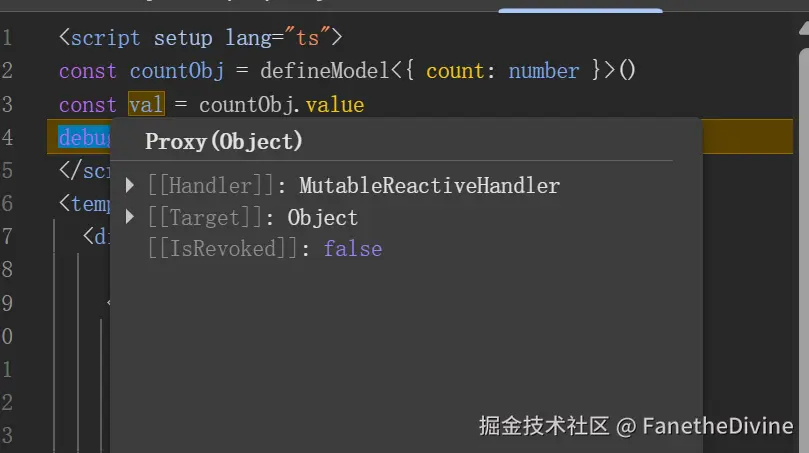
然而如果改一下写法
html
  <Child
    :model-value="countObj"
    @update:model-value="
      (val) => {
        debugger
        countObj = val
      }
    "
/>就会发现@update:model-value根本没调用 这一点和文档是不一致的
如果countObj自身还是shallowRef(虽然一般也不会用) 那defineModel就会完全出错
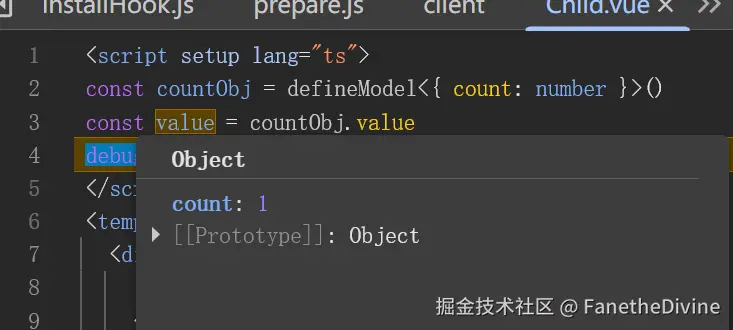
这里的v-model甚至是一个完全没有响应性的变量 对它的变更不会触发渲染 也不会调用update事件
而如果使用之前的写法model-value + @update 就可以正常使用
html
<script setup lang="ts">
const props = defineProps<{ modelValue: { count: number } }>()
const emit = defineEmits<{
  'update:modelValue': [val: { count: number }]
}>()
</script>
<template>
  <div class="m-4">
    {{ modelValue.count }}
    <el-button
      @click="
        () => {
          emit('update:modelValue', { count: modelValue.count + 1 })
        }
      "
    >
      +1
    </el-button>
  </div>
</template>
总结:1.defineModel的行为与文档不一致 2.shallowRef+defineModel会导致完全失效