文章目录
管道
- 用于进程间通信(IPC)的单向数据通道
- 数据在内核缓冲区中传递,不写入文件系统
- 遵循先进先出(FIFO)原则
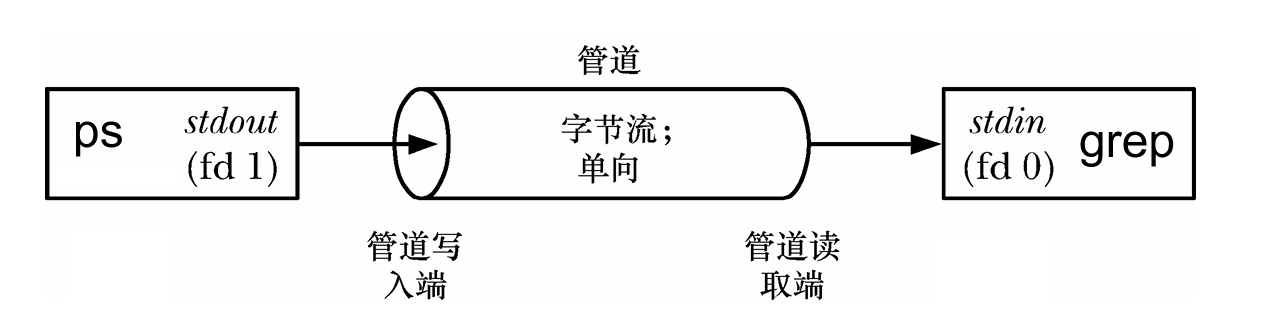
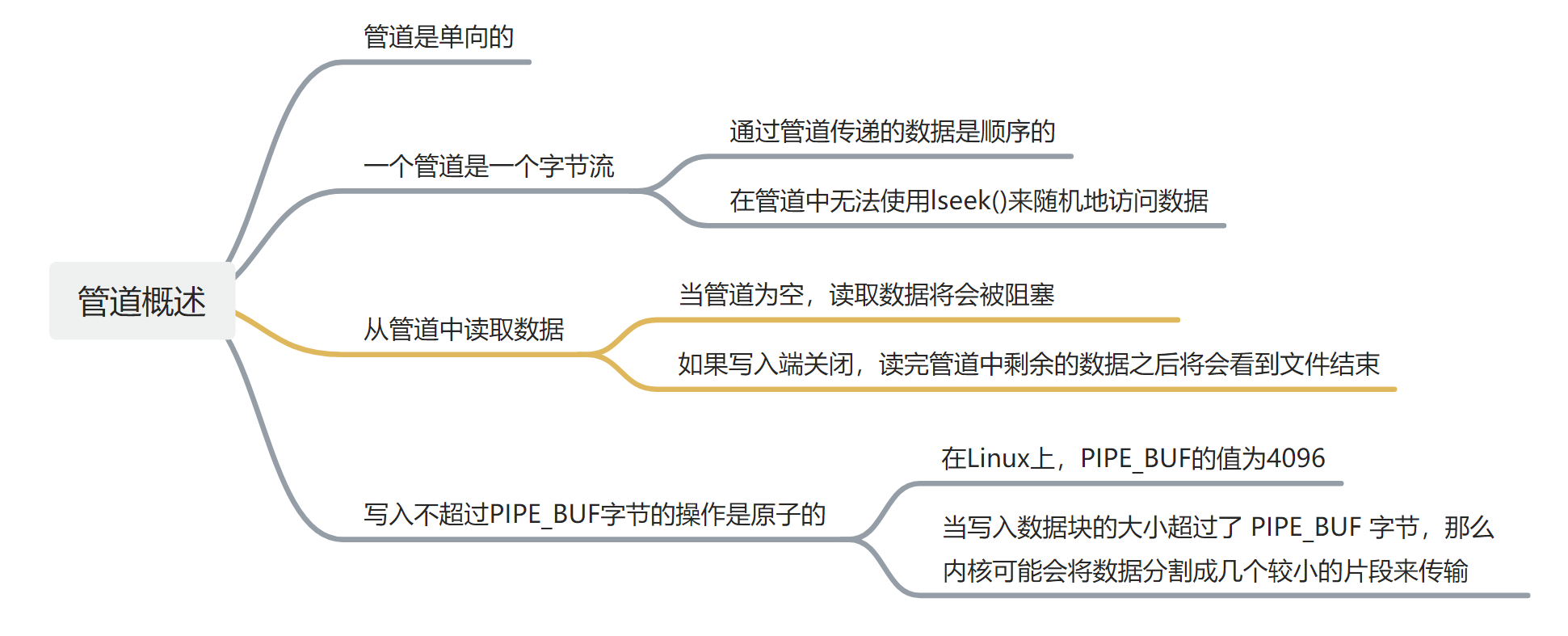
- 命令行中的管道
|符号创建管道,将 ps 命令的输出作为 grep 命令的输入
bash
ps -elf | grep ./test无名管道(匿名管道)
创建无名管道
- 写入管道写入端的数据由内核缓冲,直到从管道的读取端读取
c
#include <unistd.h>
int pipe(int pipefd[2]);- 数组 pipefd 用于返回两个引用管道末端的文件描述符
- pipefd0:读取端文件描述符
- pipefd1:写入端文件描述符
- 返回 0 成功,-1 失败
无名管道使用模式
- 单进程管道(无意义)
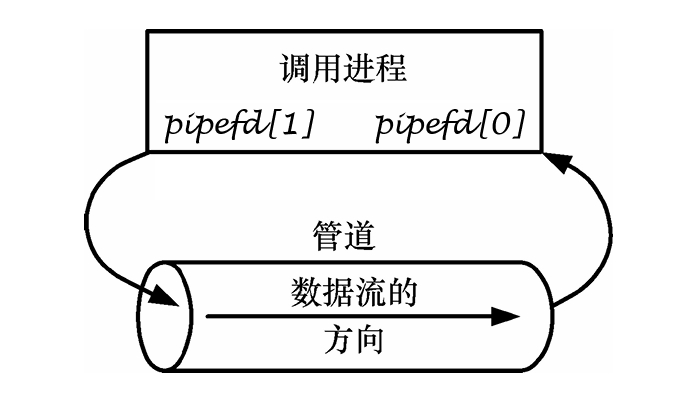
- 父子进程管道(常用)
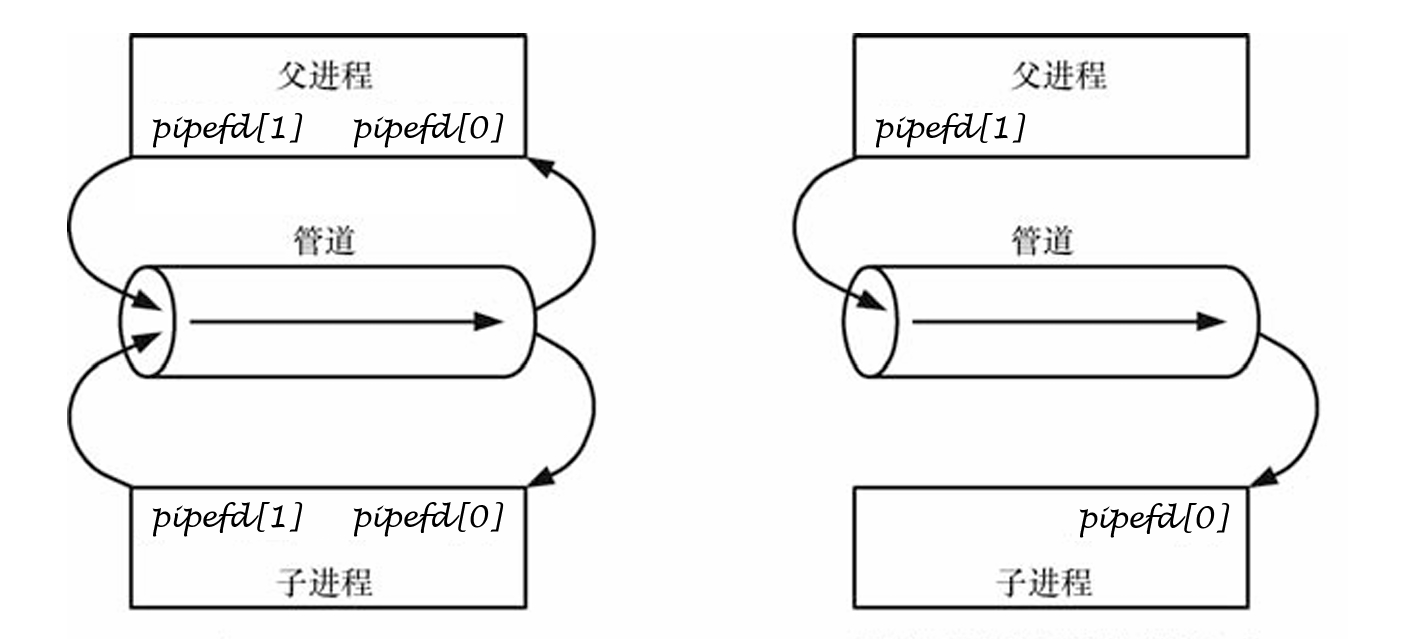
进程间管道通信demo
c
#include <unistd.h>
#include <stdio.h>
#include <string.h>

int main() {
    int pipefd[2];
    pid_t pid;
    char buf[128];

    if (pipe(pipefd) == -1) {
        perror("pipe");
        return 1;
    }

    pid = fork();
    if (pid == 0) {
        // 子进程:读取数据
        close(pipefd[1]);  // 关闭写端
        read(pipefd[0], buf, sizeof(buf));
        printf("Child received: %s\n", buf);
        close(pipefd[0]);
    } else {
        // 父进程:写入数据
        close(pipefd[0]);  // 关闭读端
        write(pipefd[1], "Hello from parent", 18);
        close(pipefd[1]);
        wait(NULL);
    }
    return 0;
}
管道特性
读写顺序
- 进程执行顺序由系统调度决定,读写无严格顺序
- 同一时刻只有一个写端和一个读端(单工通信)
读端阻塞
c
// 问题示例
int pfd[2];
pipe(pfd);

fork();
// 子进程关闭所有管道端
close(pfd[0]);
close(pfd[1]);

// 父进程读取(会阻塞)
read(pfd[0], buf, sizeof(buf)); // 阻塞!- 阻塞原因:读端需要所有写端都关闭才能读到 EOF
管道破裂
- 向没有读端的管道写入数据会导致管道破裂
- 内核向进程发送 SIGPIPE 信号
- 默认处理:终止进程
- 预防:检查 write() 返回值或捕获 SIGPIPE 信号
无名管道实现命令管道(模拟 ps | grep)
思路
- 创建无名管道
- 创建第一个子进程,执行 ps 命令
- 将 ps 的标准输出重定向到管道写端
- 创建第二个子进程,执行 grep 命令
- 将 grep 的标准输入重定向到管道读端
关键函数
c
int dup2(int oldfd, int newfd);- 将 newfd 指向 oldfd 相同的文件
- 常用于标准输入/输出重定向
实现代码
c
#include <stdio.h>
#include <unistd.h>
#include <stdlib.h>

int main() {
    int pfd[2];

    // 1. 创建管道
    if (pipe(pfd) == -1) {
        perror("pipe");
        exit(EXIT_FAILURE);
    }

    // 2. 创建 ps 进程
    if (fork() == 0) {
        close(pfd[0]);  // 关闭读端
        dup2(pfd[1], STDOUT_FILENO);  // 标准输出重定向到管道写端
        close(pfd[1]);
        execlp("ps", "ps", "-elf", NULL);
        perror("execlp ps");
        exit(EXIT_FAILURE);
    }

    // 3. 创建 grep 进程
    if (fork() == 0) {
        close(pfd[1]);  // 关闭写端
        dup2(pfd[0], STDIN_FILENO);   // 标准输入重定向到管道读端
        close(pfd[0]);
        execlp("grep", "grep", "systemd", NULL);
        perror("execlp grep");
        exit(EXIT_FAILURE);
    }

    // 4. 父进程关闭管道并等待子进程
    close(pfd[0]);
    close(pfd[1]);
    wait(NULL);
    wait(NULL);

    return 0;
}
当把stdio流重写向到管道以后,将会导致缓冲区的类型也会发生改变,由原本的行缓冲变成块缓冲
命名管道
- 命名管道(FIFO),先进先出特殊文件
- FIFO 特殊文件(命名管道)类似于管道,不同之处在于它是作为文件系统的一部分访问的
- 可以由多个进程打开以进行读取或写入
- 当进程通过 FIFO 交换数据时,内核在内部传递所有数据,而不会将其写入文件系统
- 因此, FIFO 特殊文件在文件系统上没有内容
命名管道的创建
命令行创建
bash
mkfifo -m 0666 myfifo
ls -l
# 输出:prw-rw-rw- 1 user user 0 ... myfifo- -m是自定义权限,可以看到权限位是0666(rw-rw-rw-)
mkfifo 默认不受 umask 影响
函数创建
c
#include <sys/types.h>
#include <sys/stat.h>
int mkfifo(const char *pathname, mode_t mode);pathname: 路径mode: 权限
命名管道通信
- 发送端
c
#include <fcntl.h>
#include <unistd.h>
#include <string.h>

int main() {
    int fd;
    char *fifo = "/tmp/my_fifo";
    char msg[] = "Hello from sender";

    // 打开管道(只写)
    fd = open(fifo, O_WRONLY);
    write(fd, msg, strlen(msg) + 1);
    close(fd);

    return 0;
}- 接收端
c
#include <fcntl.h>
#include <unistd.h>
#include <stdio.h>

int main() {
    int fd;
    char *fifo = "/tmp/my_fifo";
    char buffer[1024];

    // 打开管道(只读)
    fd = open(fifo, O_RDONLY);
    read(fd, buffer, sizeof(buffer));
    printf("Received: %s\n", buffer);
    close(fd);

    return 0;
}
无名管道VS匿名管道
| 特性 | 无名管道 | 命名管道 |
|---|---|---|
| 可见性 | 仅相关进程 | 所有进程 |
| 创建方式 | pipe() |
mkfifo() |
| 持久性 | 进程结束消失 | 文件系统存在 |
| 使用场景 | 父子/兄弟进程 | 任意进程间 |
- 读阻塞:确保写端正确关闭
- 管道破裂:检查读端是否存在
- 数据完整性:小数据可能合并,大数据分块传输
- 缓冲区大小:Linux 默认 64KB,可通过 fcntl() 查询