引言
在跨平台开发中,步骤条(Stepper)组件是指导用户完成多步骤流程的关键UI元素。本文将深入探讨如何在OpenHarmony平台上使用Flutter构建一个高度自适应、性能优化的步骤条组件,并解决鸿蒙平台特有的适配问题。
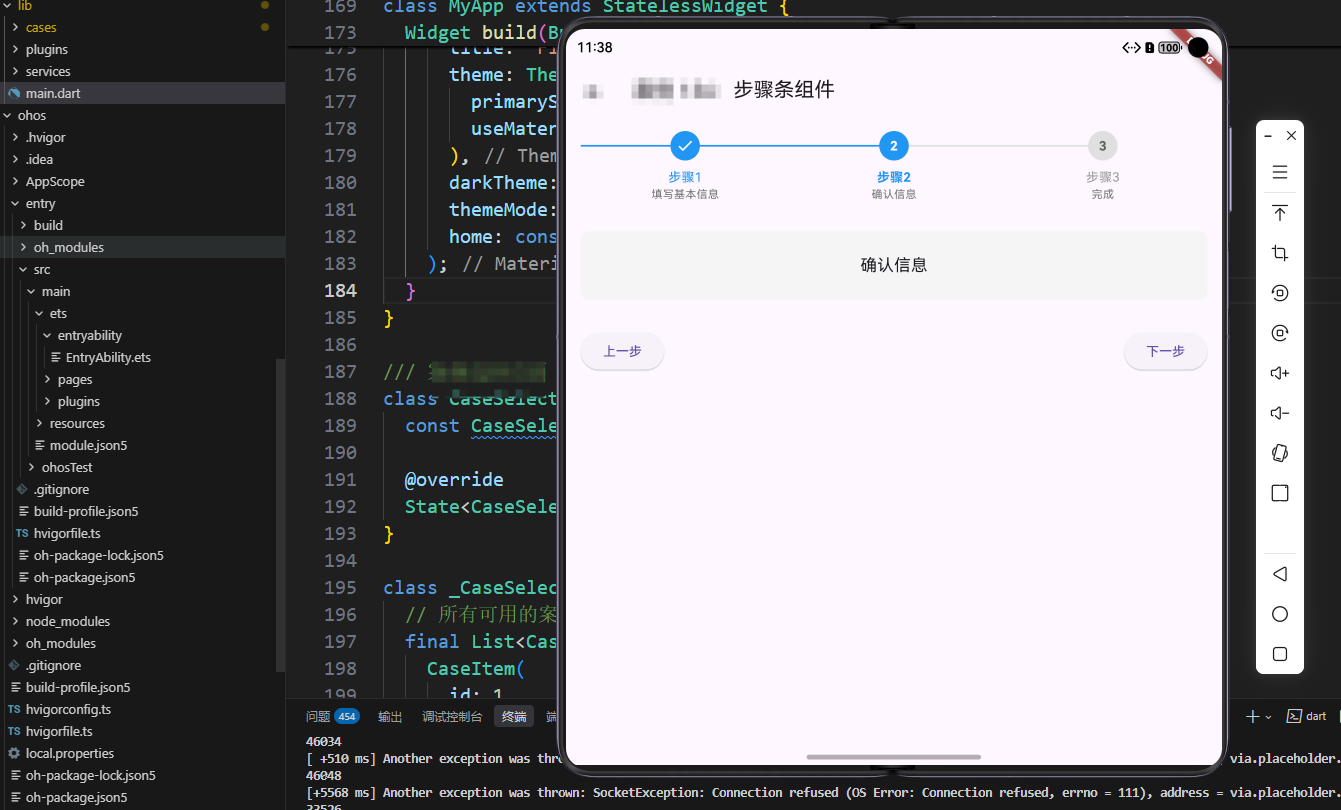
一、鸿蒙平台UI适配考量
与传统移动平台相比,OpenHarmony具有一套独特的UI规范和交互准则。Flutter应用在鸿蒙设备上运行时,需要特别注意以下几点:
- 响应式布局:鸿蒙设备形态多样(手机、平板、智慧屏等),组件需要动态适应不同屏幕尺寸
- 交互反馈:遵循鸿蒙的人机交互指南,提供符合平台预期的触控反馈
- 系统集成:适当使用鸿蒙原生能力增强组件功能
Flutter应用层
步骤条组件
UI渲染层
状态管理层
业务逻辑层
鸿蒙UI引擎
鸿蒙状态管理
鸿蒙原生能力
OpenHarmony系统
图1:Flutter步骤条组件在鸿蒙平台的架构层次
二、核心实现方案
1. 数据模型设计
我们采用状态驱动的设计模式,将步骤状态与UI表现分离:
dart
enum StepStatus { notStarted, active, completed }

class StepModel {
  final String title;
  final String subtitle;
  final Widget content;
  StepStatus status;

  StepModel({
    required this.title,
    required this.subtitle,
    required this.content,
    this.status = StepStatus.notStarted,
  });
}

// 鸿蒙平台适配点: 使用@HType注解标记需要序列化的类
@HType()
class StepperState {
  int currentStep = 0;
  List<StepModel> steps = [];

  void addStep(StepModel step) {
    steps.add(step);
    if (steps.length == 1) step.status = StepStatus.active;
  }

  void nextStep() {
    if (currentStep < steps.length - 1) {
      steps[currentStep].status = StepStatus.completed;
      currentStep++;
      steps[currentStep].status = StepStatus.active;
    }
  }

  void prevStep() {
    if (currentStep > 0) {
      steps[currentStep].status = StepStatus.notStarted;
      currentStep--;
      steps[currentStep].status = StepStatus.active;
    }
  }
}
代码解析 :我们定义了两种关键数据结构:StepModel表示单个步骤的数据和状态,StepperState管理整体步骤流程。使用@HType注解是鸿蒙平台特有的序列化需求,确保状态可在应用生命周期中正确保存和恢复。
2. 鸿蒙适配的UI实现
dart
Widget _buildHarmonyAdaptiveStepper(BuildContext context, StepperState state) {
  // 鸿蒙平台适配点: 根据设备类型选择不同布局
  final deviceType = MediaQuery.of(context).size.width > 600
      ? DeviceType.tablet
      : DeviceType.phone;

  return Column(
    children: [
      _buildIndicatorRow(state, deviceType),
      const SizedBox(height: 24),
      Expanded(child: state.steps[state.currentStep].content),
      const SizedBox(height: 24),
      _buildNavigationButtons(state),
    ],
  );
}

Widget _buildIndicatorRow(StepperState state, DeviceType deviceType) {
  // 鸿蒙设备适配: 平板使用水平布局,手机使用垂直布局
  if (deviceType == DeviceType.tablet) {
    return _buildHorizontalIndicators(state);
  } else {
    return _buildVerticalIndicators(state);
  }
}代码解析:此代码实现了关键的鸿蒙平台适配------根据设备类型动态调整布局。在平板等大屏设备上使用水平布局,在手机上使用垂直布局,符合鸿蒙的响应式设计原则。

图2:步骤条组件在鸿蒙平台的数据流
三、鸿蒙平台专属功能集成
为充分利用鸿蒙特性,我们集成了分布式能力,允许步骤状态在多个设备间同步:
dart
class HarmonyStepSynchronizer {
  final StepperState state;
  final String taskId;

  HarmonyStepSynchronizer({required this.state, required this.taskId});

  void init() {
    // 鸿蒙特有API: 初始化分布式数据管理
    try {
      // 创建分布式数据对象
      final distributedDB = DistributedDataManager.create(taskId);

      // 注册状态变更监听
      distributedDB.registerListener((data) {
        if (data.containsKey('currentStep')) {
          state.currentStep = data['currentStep'];
          for (int i = 0; i < state.steps.length; i++) {
            state.steps[i].status =
                i < state.currentStep ? StepStatus.completed :
                i == state.currentStep ? StepStatus.active :
                StepStatus.notStarted;
          }
        }
      });

      // 将当前状态同步到分布式数据库
      syncCurrentState();
    } catch (e) {
      debugPrint('分布式同步初始化失败: $e');
    }
  }

  void syncCurrentState() {
    final data = {
      'currentStep': state.currentStep,
      'timestamp': DateTime.now().millisecondsSinceEpoch,
    };
    DistributedDataManager.update(taskId, data);
  }
}
在实际应用中,我们这样使用:
dart
@override
void initState() {
  super.initState();
  _stepperState = StepperState();
  // 添加步骤...

  // 鸿蒙平台判断
  if (Platform.isHarmony) {
    _synchronizer = HarmonyStepSynchronizer(
      state: _stepperState,
      taskId: 'user_registration_flow'
    )..init();
  }
}

@override
void dispose() {
  _synchronizer?.dispose();
  super.dispose();
}
代码解析 :这段代码展示了如何利用鸿蒙特有的分布式能力,使步骤状态能在多设备间同步。这是传统移动平台不具备的能力,通过DistributedDataManager API实现。注意异常处理,确保在非鸿蒙设备上优雅降级。
四、性能优化实践
在鸿蒙设备上,我们特别注重以下性能优化点:
- 状态更新优化 :使用
const构造函数和局部状态更新,减少不必要的UI重建 - 动画性能:在低端鸿蒙设备上自动降级复杂动画
- 内存管理:实现步骤内容的懒加载,避免一次性加载所有步骤内容
dart
Widget _buildStepContent(StepModel step) {
  // 鸿蒙性能优化: 仅当步骤活跃时完全加载内容
  return ValueListenableBuilder<int>(
    valueListenable: _currentStepNotifier,
    builder: (context, currentStep, child) {
      if (step.status == StepStatus.active) {
        return step.content;
      } else {
        // 非活跃步骤仅保留占位,减少内存占用
        return const SizedBox();
      }
    },
  );
}
代码解析 :通过ValueListenableBuilder仅在需要时渲染步骤内容,大幅降低内存占用,这对资源有限的鸿蒙IoT设备尤为重要。
五、总结与最佳实践
在OpenHarmony平台上实现Flutter步骤条组件,需要注意以下几点:
- 平台适配:根据鸿蒙设备类型(手机/平板/智慧屏)动态调整UI布局
- 交互规范:遵循鸿蒙人机交互指南,提供符合平台预期的交互反馈
- 能力集成:充分利用鸿蒙分布式能力,实现跨设备状态同步
- 性能优化:针对鸿蒙设备特性进行专项性能优化,尤其是低内存设备
- 降级策略:设计合理的功能降级策略,确保在不同鸿蒙版本上都能提供基础功能
通过本文介绍的方法,开发者可以构建出既符合Flutter跨平台特性,又能充分利用鸿蒙平台优势的高质量步骤条组件。在实践中,建议结合具体应用场景,灵活调整组件设计,为鸿蒙用户提供流畅、一致的多步骤操作体验。
随着鸿蒙生态的不断发展,Flutter应用在鸿蒙平台上的适配将更加深入。开发者应持续关注鸿蒙新特性,不断优化跨平台应用的用户体验。
欢迎大家加入开源鸿蒙跨平台开发者社区,一起探索更多鸿蒙跨平台开发技术!