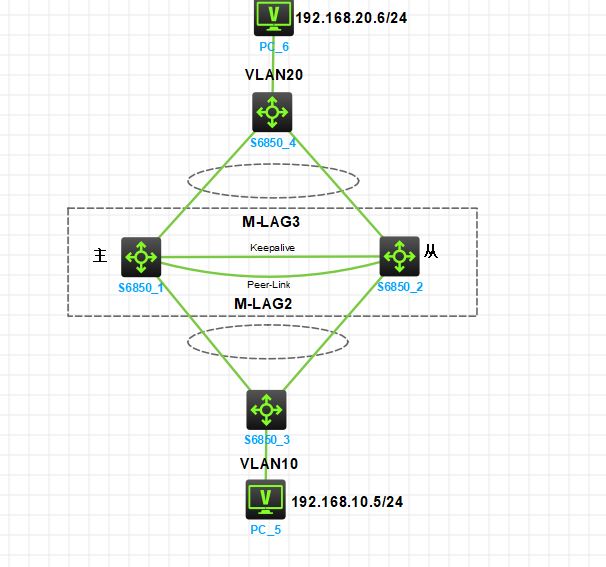
m-lag的两种接口
Keeplivead接口: 接口类型为路由模式,需要配置上IP地址
peer-link接口:接口为汇聚端口或通道端口
模拟器要关闭配置一致性检查: m-lag consistency-check disable
实验需求:实现两台PC可以相互ping通。SW1和SW2的双活架构,完成设备间的Peer-Link互联、Keepalive心跳检测,跨设备业务链路聚合,实现PC5使用VRRP双活网关,PC6使用M-LAG双活网关。
配置部署:
1、配置SW1和SW2的m-lag系统
SW1#
m-lag system-number 1      设置m-lag系统编号,同一分布式聚合组中的M-LAG设备应配置不同的系统编号
m-lag system-priority 100    设置m-lag优先级,同一分布式聚合组中,所有M-LAG设备的系统优先级必须相同
m-lag system-mac 0001-0001-0001   设置m-lag源mac,同一分布式聚合组中,所有M-LAG设备的系统MAC地址必须相同
SW2#
m-lag system-number 2
m-lag system-priority 100
m-lag system-mac 0001-0001-0001
2、配置 Keepalive 接口
SW1#
interface GigabitEthernet1/0/1
 port link-mode route   设置接口类型为路由模式
 ip address 172.16.1.1 255.255.255.252

m-lag mad exclude interface GigabitEthernet1/0/1   配置为 M-LAG 保留接口,M-LAG 系统分裂后,这些端口不 Down。
m-lag keepalive ip destination 172.16.1.2 source 172.16.1.1   配置Keepalive报文的目的IPv4地址和源IPv4地址
SW2#
interface GigabitEthernet1/0/1
 port link-mode route
 ip address 172.16.1.2 255.255.255.252

m-lag mad exclude interface GigabitEthernet1/0/1
m-lag keepalive ip destination 172.16.1.1 source 172.16.1.2
3、配置 peer-link 接口
SW1#
interface Bridge-Aggregation1
 link-aggregation mode dynamic   #添加汇聚接口,配置为动态模式

interface FortyGigE1/0/53
 port link-aggregation group 1     #将接口添加到聚合端口中

interface Bridge-Aggregation1
 port m-lag peer-link 1                #设备聚合端口为peer-link接口
 undo mac-address static source-check enable #关闭报文入接口与静态MAC地址表项匹配检查功能,避免跨peer-link链路三层转发的流量不通
dis m-lag system   #查看m-lag系统信息
SW2#
interface Bridge-Aggregation1
 link-aggregation mode dynamic

interface FortyGigE1/0/53
 port link-aggregation group 1

interface Bridge-Aggregation1
 port m-lag peer-link 1
undo mac-address static source-check enable
4、配置 M-LAG 接口下连到SW3
SW1#
vlan 10
interface Bridge-Aggregation2
 link-aggregation mode dynamic

 interface GigabitEthernet1/0/2
 port link-aggregation group 2

interface Bridge-Aggregation2
 port link-type trunk
 port trunk permit vlan 1 10
port m-lag group 2   #配置聚合口2加入M-LAG组2
SW2#配置相同
SW3#
vlan 10
interface Bridge-Aggregation2
link-aggregation mode dynamic
int range int g1/0/1 to g1/0/2
port link-aggregation group 2
nterface Bridge-Aggregation2
port link-type trunk
 port trunk permit vlan 10
5、配置 M-LAG 接口下连到SW4
SW1#
vlan 20
interface Bridge-Aggregation3
 link-aggregation mode dynamic

 interface GigabitEthernet1/0/3
 port link-aggregation group 3

interface Bridge-Aggregation3
 port link-type trunk
 port trunk permit vlan 1 20
port m-lag group 3   #配置聚合口2加入M-LAG组3
SW2#配置相同
SW4#
vlan 20
interface Bridge-Aggregation3
link-aggregation mode dynamic
int range int g1/0/1 to g1/0/2
port link-aggregation group 3
nterface Bridge-Aggregation3
port link-type trunk
 port trunk permit vlan 20
dis link-aggregation verbose 查看端口聚合状态
5、配置VRRP双活网关
SW1#
interface Vlan-interface10
 ip address 192.168.10.251 255.255.255.0
 vrrp vrid 10 virtual-ip 192.168.10.254
SW2#
interface Vlan-interface10
 ip address 192.168.10.252 255.255.255.0
 vrrp vrid 10 virtual-ip 192.168.10.254
SW3#
int g1/0/3
 port access vlan 10
5、配置VLAN双活网关,推荐使用
SW1#SW2#配置一样
interface Vlan-interface20
 ip address 192.168.20.254 255.255.255.0
 mac-address 0002-0002-0002
SW4#
int g1/0/3
 port access vlan 20